Result Management System: GPA, Merit Position and Online Results

In this article 14 sections
- 1.What a Result Management System Actually Does
- 2.Why Results on Excel and Paper Keep Going Wrong
- 3.How GPA Is Calculated on the Bangladesh Scale
- 4.Mark Entry: Written, MCQ and Practical Parts
- 5.Merit Position, Tabulation Sheets and Mark Sheets
- 6.Publishing Results Online and by SMS
- 7.Certificates and Result Verification
- 8.Features to Check in a Result Management System
- 9.Mistakes Schools Make When Moving Results Online
- 10.A Results Week Timeline That Works
- 11.Costs, Hosting and Ownership
- 12.How Our School Management Software Handles Results, End to End
- 13.How Nexteio Can Help With Your School's Results
- 14.Frequently asked questions
A result management system takes exam marks from teachers, works out grades, GPA and merit position, and publishes results for guardians without anyone retyping a single number. In many schools in Bangladesh, that job still runs on paper mark lists, a few Excel files and one tired office assistant. It works, slowly, until a formula breaks or a roll number shifts by one row.
Results are the most sensitive thing a school publishes. A wrong grade can mean a wrong merit position, an upset guardian at the office gate and a head teacher signing a corrected mark sheet a week later. Results week is also when the office has the least time, because the next term, admission and fee collection all start together.
This guide is written for the people who carry that weight: head teachers, principals, exam committee members and office staff. It explains how GPA is calculated on the Bangladesh scale, how mark entry should be organized, how merit position and tabulation sheets work, and what it takes to publish results online and by SMS.
Each section first explains the topic in general, so you can judge any software. Then it shows how our own School Management Software handles the same point, with a live demo you can try before you talk to anyone.
What a Result Management System Actually Does
At its core, a result management system is a chain of steps that used to happen on separate sheets of paper. Each step takes the output of the step before it, so a mistake early in the chain travels all the way to the printed mark sheet. Good software does not remove the steps. It removes the copying between them.
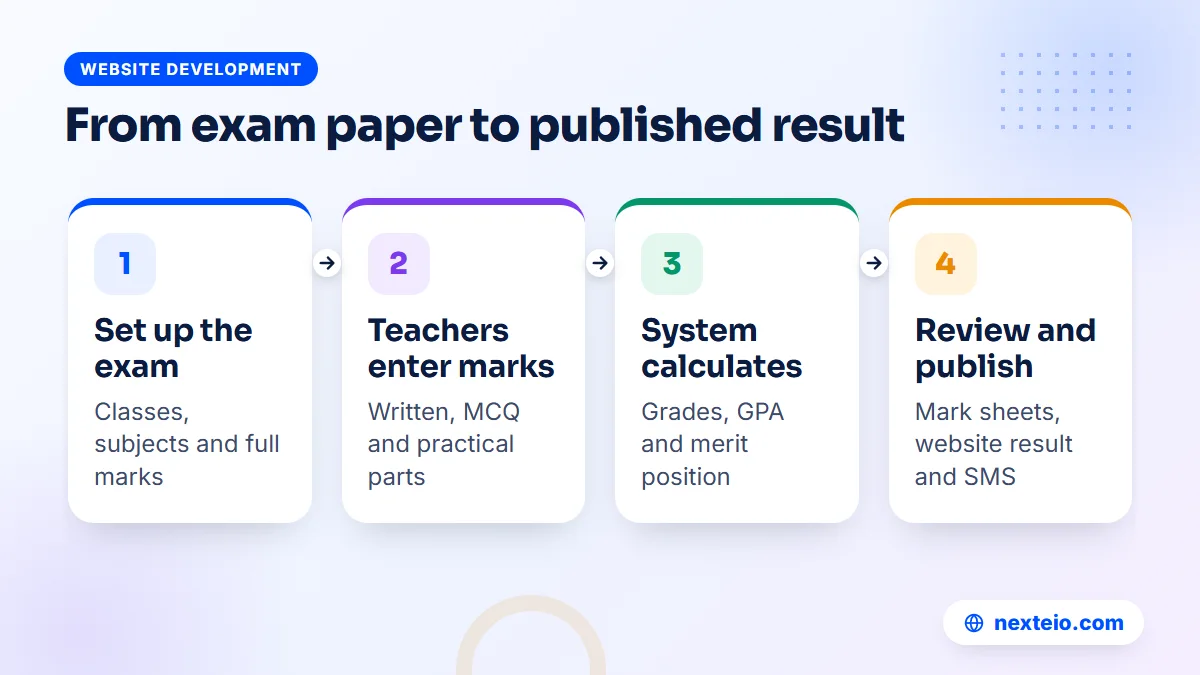
The chain usually looks like this:
- Set up the exam: the exam name, the classes and sections that sit it, the subjects and the full marks for each part.
- Enter marks: subject teachers enter written, MCQ and practical marks for their own students.
- Calculate: the system adds the parts, applies pass marks, turns marks into grade points and works out GPA.
- Rank: students are placed in merit order within the class or section.
- Review: the exam committee checks the tabulation sheet and corrects any entry errors.
- Publish: mark sheets are printed, results go on the website and guardians get an SMS.
The value is not only speed. When every number comes from one place, the mark sheet, the tabulation sheet, the website result and the SMS always agree with each other. With paper and Excel, those four things are prepared separately, so they can quietly disagree.
Why Results on Excel and Paper Keep Going Wrong
Picture a typical half-yearly exam for Class Eight with three sections. Twelve subject teachers write marks on paper lists. The office types those lists into one large spreadsheet, column by column. Someone copies a GPA formula down three hundred rows. A second person sorts the sheet to find merit positions, and a third prints mark sheets from a Word template using mail merge.
Every one of those hand-offs is a place where things slip. These are some of the most common errors:
- A row is sorted without its neighbours, so one student's marks end up next to another student's name.
- A formula is overwritten with a typed number and nobody notices.
- The fourth subject bonus is added for students who failed a compulsory subject.
- A late correction is made in the spreadsheet but not in the already printed mark sheets.
- Two teachers enter marks for the same subject in different copies of the file.
None of these mistakes come from careless people. They come from a process that depends on copying. A result management system fixes the process, which is why the change usually feels bigger in the office than in the classroom.
How GPA Is Calculated on the Bangladesh Scale
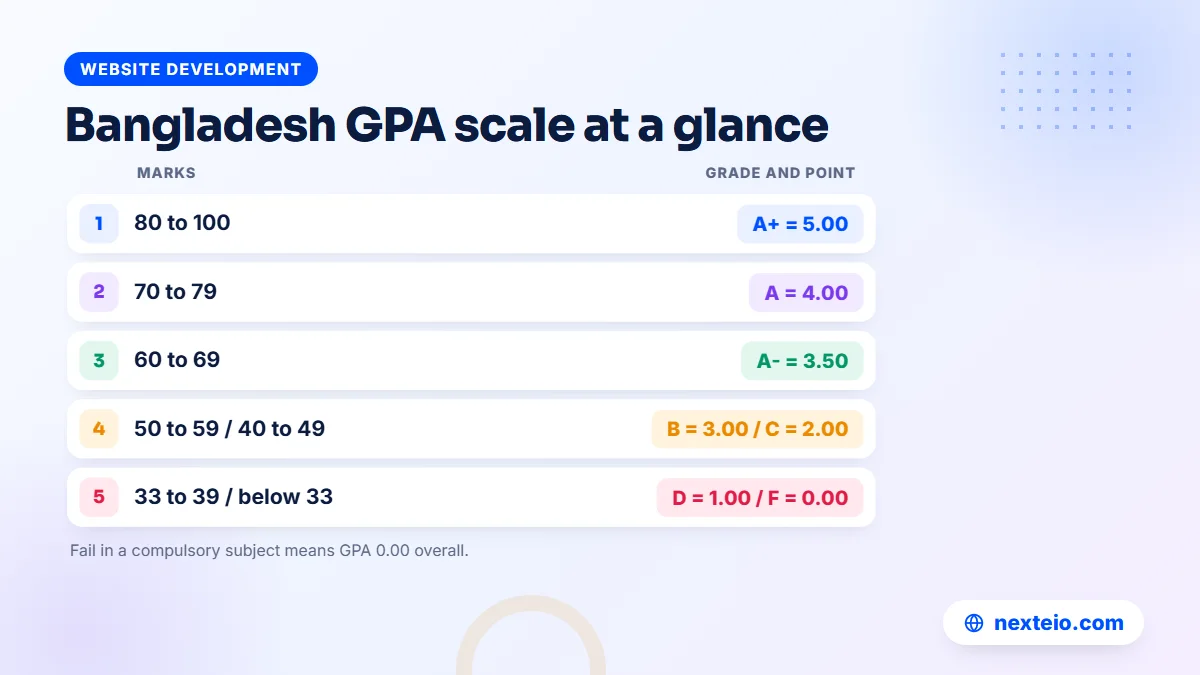
Before you trust any software with results, someone on your exam committee should be able to check its calculations by hand. Most schools in Bangladesh follow the same grading scale that the education boards use for SSC, so that is the scale to test against.
| Letter grade | Marks (out of 100) | Grade point |
|---|---|---|
| A+ | 80 to 100 | 5.00 |
| A | 70 to 79 | 4.00 |
| A- | 60 to 69 | 3.50 |
| B | 50 to 59 | 3.00 |
| C | 40 to 49 | 2.00 |
| D | 33 to 39 | 1.00 |
| F | 0 to 32 | 0.00 |
Three rules sit on top of this table, and they are where spreadsheets most often go wrong.
Rule 1: a failed compulsory subject means GPA 0.00
If a student gets grade F in any compulsory subject, the overall result is a fail and the GPA is 0.00, no matter how well the student did elsewhere. A simple average formula ignores this and shows a respectable GPA for a student who has actually failed.
Rule 2: the fourth subject adds only the points above 2.00
The optional or fourth subject does not count like the others. Only the grade points above 2.00 are added to the total. A grade of A (4.00) in the fourth subject adds 2.00 points, while a grade of C (2.00) or lower adds nothing. The total is then divided by the number of compulsory subjects, and GPA cannot go above 5.00.
Rule 3: a worked example
Take a simplified case with six compulsory subjects. A student earns grade points of 5.00, 4.00, 5.00, 3.50, 4.00 and 5.00, which add up to 26.50. Divided by six, that is a GPA of about 4.42. Now add a fourth subject grade of A (4.00). The bonus is 4.00 minus 2.00, so 2.00 points. The new total is 28.50, and 28.50 divided by six gives a GPA of 4.75.
Run two or three cases like this through any software you are considering. If the numbers do not match your hand calculation, ask why before you go any further. You can check the current official rules for your level through the Directorate of Secondary and Higher Education and the Ministry of Education.
Our School Management Software uses this Bangladesh GPA scale out of the box: A+ starts at 80 percent, a compulsory fail sets GPA to 0.00 and the fourth subject bonus is applied as described. You can test it in the demo with your own sample numbers.
Mark Entry: Written, MCQ and Practical Parts
Most results problems start at mark entry, not at calculation. A subject like science may have a written part, a multiple-choice (MCQ) part and a practical part, each with its own full marks. If teachers enter a single combined number, nobody can later check whether a student actually passed each part or how the total was reached.
A sound mark entry process has a few simple rules:
- Each teacher enters marks only for the subjects and sections they teach.
- Written, MCQ and practical marks are entered separately and added by the system.
- The entry screen shows the full marks, so a typo like 85 out of 50 is obvious.
- There is a clear deadline, after which the exam committee reviews the entries.
- Absent students are marked as absent, not given a zero that looks like a real score.
Speed matters too. A teacher with four sections of forty students is entering more than a hundred and fifty rows per exam. If the screen needs three clicks per student, the job gets pushed to the last evening and mistakes follow. A fast entry grid, where the teacher moves down the column with the keyboard, saves real hours.
In our School Management Software, teachers log in with their own account and enter written, MCQ and practical marks on a fast entry screen. Teachers see only the parts of the dashboard their role allows, and hidden pages cannot be opened by typing the address. Roles and permissions can be adjusted, so a school can decide who may enter marks and who may only view them.
Who should be allowed to change marks
Decide this before the first exam, not during the first complaint. A common setup lets subject teachers enter marks, the exam committee review and correct, and the head teacher approve publication. After results are out, any change should be rare and recorded. Our software keeps an activity log of actions in the dashboard, so a later question about who changed what has an answer.
Merit Position, Tabulation Sheets and Mark Sheets
Merit position
Merit position looks simple and causes more arguments than anything else on results day. The usual order is GPA first, then total marks. But schools differ on the details. Some rank only students who passed every subject. Some rank within each section, others across the whole class. Some break ties with marks in English or mathematics.
Write your rule down and get the head teacher or exam committee to approve it. Then check that the software follows it on a sample class. A result management system that produces a merit list nobody can explain will cost you more trust than it saves time. Our system calculates merit position from the results automatically, and the demo lets you see the order it produces with sample data.
The tabulation sheet
The tabulation sheet is the exam committee's master view: one row per student, one column per subject, with totals, grade points, GPA and position. It is the document the committee signs off before anything goes public. A good system produces it directly from the entered marks, ready to print, so the committee is checking the same numbers that will appear on the mark sheets.
Mark sheets
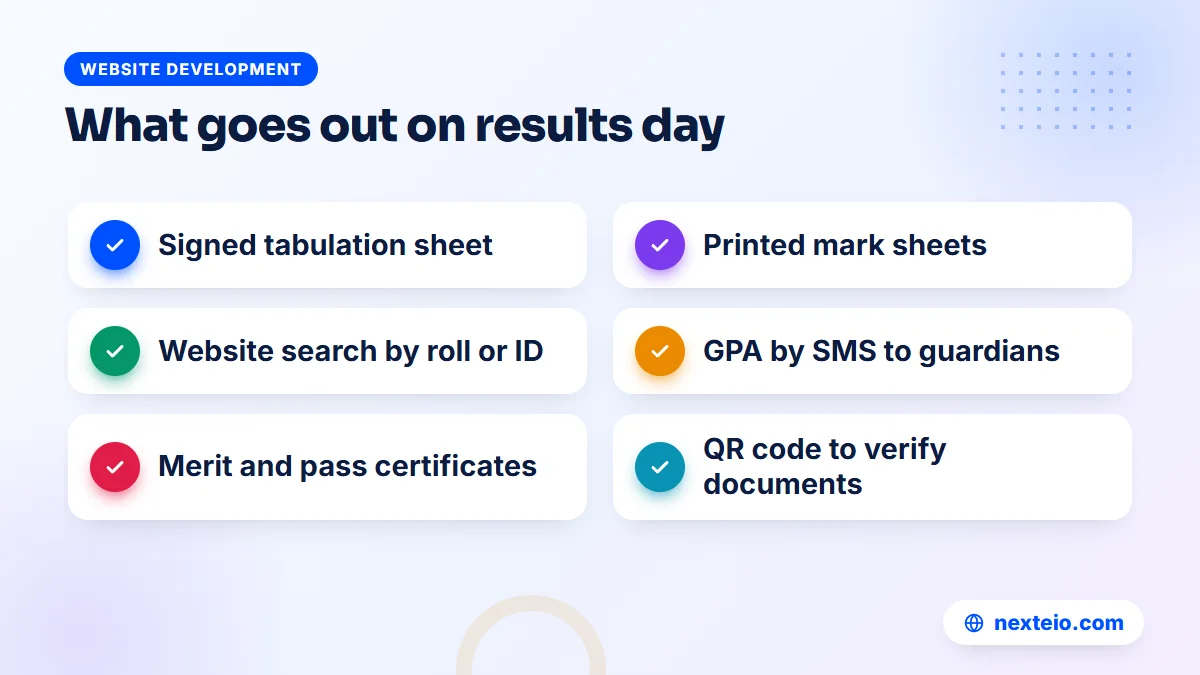
The mark sheet is what the guardian keeps. It should show the school name and logo, the student's name, class, roll and ID, every subject with marks and grades, the GPA, the position and space for signatures. Our School Management Software prints tabulation sheets and individual mark sheets from the same results, and parents and students can view mark sheets from their own login. Names on mark sheets come straight from the student record, so our guide to a student information system on getting names and dates right at admission is worth reading first.
One thing to know plainly: admit cards are not part of the current version of our school software. Schools that need them usually keep printing admit cards the way they do today, while results run through the system.
Publishing Results Online and by SMS
Publishing is the moment guardians actually see your system. A clean result search page on the school website takes pressure off the office phone and the notice board. The usual pattern is a page where a guardian chooses the exam and class, types a roll number or student ID, and sees the result instantly.
SMS reaches the families who will never open the website. A short message with the student's name, the exam and the GPA, sent on the same day, is often the only notice some guardians read. Make sure the text is short enough for one SMS, because longer messages cost more and some phones split them badly.
Our software does both. Results can be searched on the school website by roll or student ID, and GPA can be sent to guardians by SMS. The system has ready settings for BulkSMSBD, Alpha SMS, Greenweb and ElitBuzz, and a custom option for another provider's API. The SMS text is editable, and there is a test button to check the message before you send it to every family.
Results day traffic
Results are announced at a set time, and many guardians open the page in the same few minutes, mostly on phones and mobile data. Cheap shared hosting can slow down under that load. A few habits help:
- Announce a clear publishing time and stick to it.
- Keep the result search page light, with no heavy slider or video.
- Send the SMS shortly after the website result goes live, so not every family rushes the site at once.
- Talk to your hosting company before the first big results day if your plan is very small.
Our software runs on normal cPanel hosting, but a school with a large student body should choose a hosting plan with some headroom. Our guide to responsive website design also explains why the result page has to work well on a small phone screen first.
The school website itself also carries public results history. Our software includes a page for board results by year, so visitors can see your SSC record alongside notices, the head teacher's message and admission information. If you are planning the website side, our article on educational website design covers the pages guardians look for.
Certificates and Result Verification
After results, schools print certificates: merit certificates for top positions and pass certificates for students who need proof of a result. When these are made by hand in a design program, each one takes time and each one can carry a typing mistake. Fake or altered certificates are also a real concern when a student applies elsewhere.
Making certificates from the results themselves solves both problems. The name, class, exam and GPA come from the system, so they match the mark sheet. A QR code printed on the certificate lets anyone scan it and check the record online.
Our school software creates merit and pass certificates from results, with 16 designs to choose from, QR verification and PDF download. Student ID cards from the same system also carry a QR code for verification, which gives the school one consistent way to prove that a document is genuine.
Features to Check in a Result Management System
If you are comparing software vendors or briefing a developer, use a short checklist. A result management system is only worth buying if it handles your real exam rules, not a simplified demo version of them. Ask to see each of these working:
- The Bangladesh GPA scale, including compulsory fail and the fourth subject bonus.
- Separate entry for written, MCQ and practical marks.
- Teacher logins that limit each teacher to their own subjects and sections.
- A merit position that follows your written tie rule.
- A printable tabulation sheet for the exam committee.
- Mark sheets with your school's name, logo and signature spaces.
- Result search on your website by roll or student ID.
- GPA by SMS with editable text.
- Bangla and English, because many guardians prefer Bangla and some documents need English.
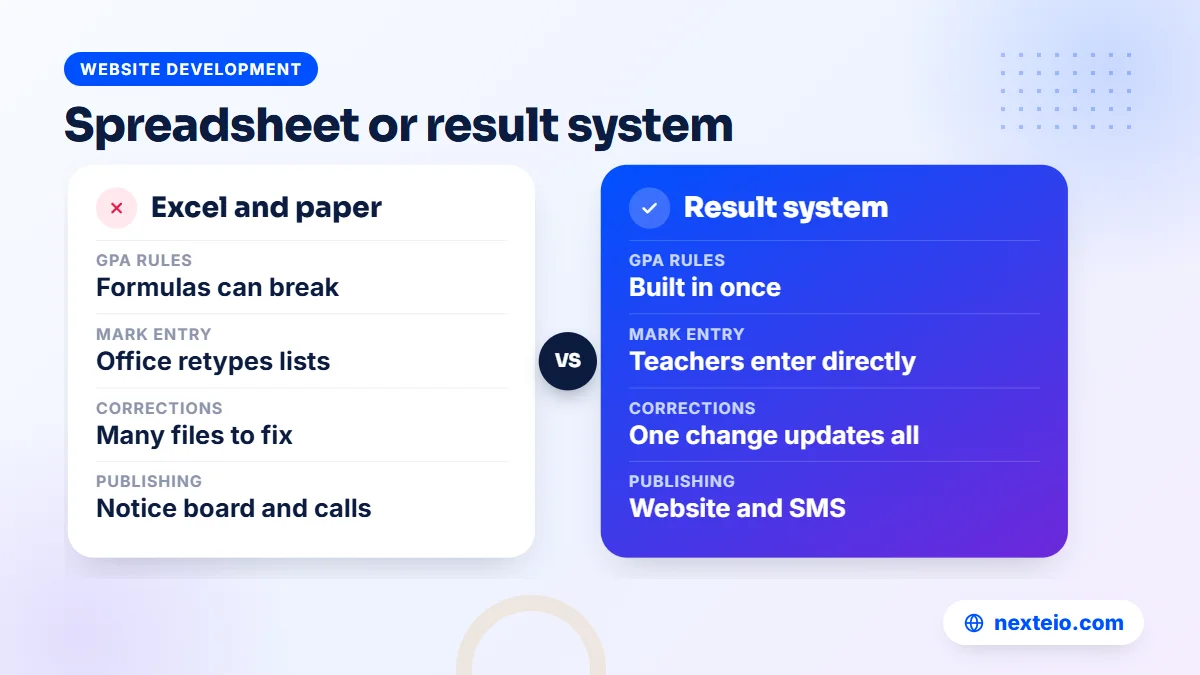
Then ask about the things around results that decide whether you can live with the software for years: backups, who owns the data, where it is hosted, and what happens if you change providers. The table below shows how a spreadsheet process compares with a proper system on the points that usually matter to a head teacher.
| Point | Excel and paper | Result management system |
|---|---|---|
| GPA rules | Formulas that can be overwritten | Built in and checked once |
| Mark entry | Paper lists retyped by office staff | Teachers enter directly |
| Merit position | Manual sorting | Calculated from results |
| Corrections | Several files to update | One change updates everything |
| Publishing | Notice board and phone calls | Website search and SMS |
| Record of changes | Usually none | Activity log in the dashboard |
For a wider view of what a full school system covers beyond results, read our guide to school management software features. Colleges with departments and semesters have different needs, which our article on campus management system software explains.
Related guides for schools planning their systems:
- Learning management systems for schools, if you also want online lessons and assignments
- How web application development works, for the steps behind a custom system
- What the Laravel framework is and why it suits school software
Mistakes Schools Make When Moving Results Online
The software is rarely the hardest part. The change in routine is. These are the mistakes that most often turn a good system into a bad first results day.
Starting with the final exam. The first exam in a new system will surface questions about subjects, full marks and tie rules. Better to meet those questions at a class test or a half-yearly exam than at the annual exam that decides promotion.
Skipping the subject setup review. If the full marks or pass marks for one subject are set up wrongly, every result in that class is wrong. Have a senior teacher check the subject list and marks for each class before any entry starts.
No parallel run. For the first exam, keep your old spreadsheet for one or two sections and compare it with the system. If both agree, confidence grows quickly. If they do not, you find out before guardians do.
Wrong guardian phone numbers. SMS is only as good as the numbers in student records. Clean the phone numbers before results day, or the most important message of the term goes nowhere. Our guide to school attendance software sets out a simple routine for checking guardian numbers that works just as well here.
Publishing before the committee signs off. Online results are seen within minutes. Agree that nothing goes live until the tabulation sheet is checked and approved, and decide who presses the publish button.
Ignoring the teachers. If teachers find mark entry slow or confusing, they will hand paper lists to the office again and you are back where you started. Let a few teachers try the entry screen in the demo before you decide.
A Results Week Timeline That Works
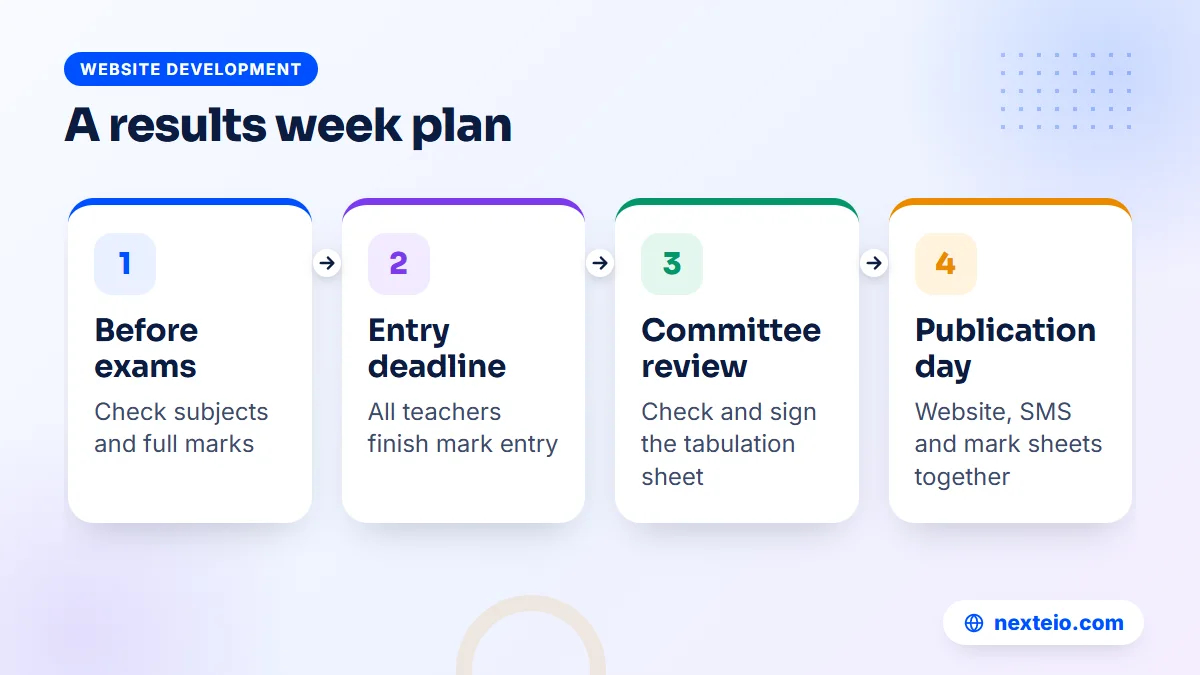
A clear calendar for the exam period keeps everyone honest. Here is a sample plan for a school running a result management system for a half-yearly exam. Adjust the days to your own routine and holidays.
| When | Task | Who |
|---|---|---|
| Before exams start | Create the exam, check subjects and full marks for each class | Exam committee and office |
| Within a week of the last paper | Teachers enter written, MCQ and practical marks | Subject teachers |
| Entry deadline plus one day | Review missing entries and obvious errors | Exam committee |
| Next two days | Print and check the tabulation sheet, fix errors | Committee and head teacher |
| Publication day | Publish online, send GPA by SMS, print mark sheets | Office, with head teacher approval |
| Following week | Print merit and pass certificates | Office |
The point of the calendar is that everyone knows their part and their deadline. The software then makes each part quick. When the office no longer types marks, the time between the last paper and the published result can shrink a lot, but only if teachers enter marks on time.
Costs, Hosting and Ownership
School software in Bangladesh is sold in two broad ways. Some providers rent access to a shared online system for a monthly or yearly fee, and your data sits on their server with many other schools. Others install a copy of the system on your own domain and hosting, so the school controls the server and the data.
For a custom-built system, including result management, a school management system or a portal, the honest answer on price is that it is quoted after a requirements review. When a range is needed, custom software in this category usually falls somewhere between BDT 150,000 and 1,200,000 or more, depending on modules and the number of users. Ready-made systems can cost less because the main work is already done, and a Laravel web application can still be extended later for rules that are unique to your school.
Running costs are smaller but real. A .com domain usually costs about BDT 1,500 to 2,500 a year, and shared hosting about BDT 2,000 to 8,000 a year, though a large school may need a stronger plan. SMS is paid separately to your SMS company, so budget for the number of guardians you message after each exam.
Ownership matters as much as price. Our School Management Software is installed on the school's own domain and hosting, with the school's name, logo and colors. Nexteio has no access to the school's data. The license is tied to the school's domain. Backups run every night, covering the database and files, and a copy goes to the server and to the school's own Google Drive, with manual backup and download as well.
If your website and results will live on the same domain, our guide on when to use a sub domain helps you decide whether the system should sit on something like a portal address or the main site. Ongoing care of the server and software is covered in our article on website maintenance services.
How Our School Management Software Handles Results, End to End
Results are one part of a larger system, which our guide to an education management system describes module by module. The product also covers the public website, online admission, student records, ID cards, attendance with same-day SMS to guardians of absent students, fees with bKash and SSLCommerz, class routine and staff payroll. It is built with Laravel and works in Bangla and English with a one-click switch.
For results, the flow follows this guide closely. The school sets up exams and subjects. Teachers enter written, MCQ and practical marks. The system applies the Bangladesh GPA scale, works out merit position and produces the tabulation sheet and mark sheets. Guardians search results on the website by roll or ID and receive GPA by SMS. Certificates come out of the same data with QR verification.
The software is sold in three module packages. Exams, results and certificates are part of the Standard and Premium packages. Some things are not part of the current version, including admit cards, class promotion, a separate reports module and bulk SMS to custom groups. We would rather you know that now than discover it after setup.
The quickest way to judge it is to use it. The live School Management Software demo has one-click logins for Super Admin, Head Teacher, Teacher, Accountant, Parent and Student, with about 113 sample students. You can enter marks, publish results and view mark sheets yourself. The demo data resets every three hours. You can also see the project on our School Management Software portfolio page.
Some schools need something the product does not do, such as a special grading rule for a coaching wing or links to another system. That is where our Laravel development service comes in, because the product and any custom work share the same technology. For marketing your admission season once the system is live, our Facebook ads service helps reach guardians in your area.
How Nexteio Can Help With Your School's Results
We set up our School Management Software on your school's own domain and hosting, with your name, logo and colors. The SMS and payment gateway settings use your school's own accounts with those companies. We can import your existing student list from a spreadsheet, since the system supports CSV import, so you do not start with an empty database. Your data stays on your server, and nightly backups go to your own Google Drive.
Before you contact us, try the demo with your exam committee. Enter a few marks, publish a test result and check the GPA against your own calculation. Then note what fits and what does not, and send it to us through the project request form. If you need changes or extra modules, we build them as custom Laravel work around the product, quoted after a requirements review.
If your school also needs a new public website or a redesign, our custom website design and WordPress website services cover that, and our SEO service helps guardians find you on Google. You can read more about Nexteio, look through our wider portfolio, review the school software project again, send us your school's requirements or reach us through the contact page.
Keep reading: when an organization needs its own software, how to hire a Laravel developer, or browse all our website development guides. For a deeper look at the platform, see the Laravel website service page.
Frequently asked questions
What is a result management system in a school?
It is software that collects exam marks from teachers, calculates grades, GPA and merit position, and produces tabulation sheets, mark sheets and online results. The main benefit is that every document comes from one set of marks, so the website, the SMS and the printed mark sheet always agree.
How is the fourth subject counted in GPA?
Only the grade points above 2.00 in the fourth subject are added to the total of the compulsory subjects. The total is then divided by the number of compulsory subjects, and GPA cannot go above 5.00. A grade of C or lower in the fourth subject adds nothing.
Can guardians see results on the school website?
Yes, if the system includes a public result search. With our School Management Software, guardians choose the exam and search by roll number or student ID on the school website. GPA can also be sent to guardians by SMS on the same day.
Is it safe to publish school results online?
It is safe when the system shows a result only for the roll or ID searched, runs over HTTPS and keeps regular backups. Agree that results go live only after the exam committee approves the tabulation sheet. Also limit who can change marks, and keep a record of any changes.
How long does it take to move results from Excel to software?
Setting up the software itself is the quicker part. Most of the time goes into entering classes, subjects and full marks correctly and importing the student list. Plan to run your first class test or half-yearly exam in the new system, with your old spreadsheet kept for comparison.
Does the result management system work with Bangla?
Our School Management Software works in Bangla and English with a one-click switch, and school content shows in Bangla when no English text has been added. Ask any other vendor to show mark sheets and the result page in both languages before you decide.
Can we try the software before buying it?
Yes. The live demo lets you log in as a teacher, head teacher, parent or student with one click. You can enter marks, publish results and view mark sheets with sample data, which resets every three hours.