Blogspot Create Guide: How to Start a Site on Google Blogger
In this article 15 sections
- 1.Before the Blogspot Create Process: What to Prepare
- 2.Blogspot Create Steps: Setting Up a Blog on Google Blogger
- 3.Choosing a Blog Name and Address That Will Last
- 4.Picking a Theme That Works on Phones
- 5.The Settings to Fix in the First Hour
- 6.Writing Your First Posts and Pages
- 7.Connecting Your Own Domain to a Blogspot Site
- 8.Getting Your Blogspot Website Found on Google
- 9.Earning From a Free Blogspot Blog
- 10.What Google Blogger Cannot Do
- 11.Who Should Use Blogger in Bangladesh, and Who Should Not
- 12.Common Blogspot Create Mistakes and How to Avoid Them
- 13.Keeping a Blogger Site Safe and Backed Up
- 14.How Nexteio Can Help With Your Blogger Website
- 15.Frequently asked questions
Blogspot create is what many people type into Google when they want a free blog without paying for hosting. The tool behind it is Google Blogger, a free publishing service that gives you an address ending in .blogspot.com and looks after the server, the security certificate and the storage for you. You can have a working blog in under half an hour, but a blog that people trust and Google shows takes more thought than the sign-up screen suggests.
Most blogspot create guides stop once the blog exists. That is the easy part. The decisions that matter come next: the name and address you will live with for years, and the settings that control how your posts appear in search. After that come your own domain and, for many people, earning from the blog.
This guide is written for readers in Bangladesh: a coaching centre teacher who wants to post class notes, a writer publishing in Bangla, a small news page, or an office that needs a simple notice blog. It covers the setup itself, the first-hour settings, custom domains, getting indexed, AdSense, and the limits that tell you when Blogger is the wrong tool for the job.
Before the Blogspot Create Process: What to Prepare
You need very little to start: a Google account, a phone or computer with a browser, and a clear idea of what the blog is for. The last item is the one people skip, and it shapes everything else, from the name to the theme to the pages you add.
Spend ten minutes on these points before you open Blogger:
- Purpose: is this a personal writing blog, a news page, a notice board for an institution, or a place to publish tutorials? Each one needs different pages and settings.
- Audience and language: will you write in Bangla, English or both? Blogger handles Bangla Unicode text well, but it is clearer for readers, and for Google, when each post sticks to one language.
- Owner account: which Google account will own the blog? For an organization, use an official account, not a staff member's personal Gmail.
- Name ideas: three or four short names, in case your first choice of address is already taken.
- First five topics: a blog with a single post looks abandoned, so plan a few posts before launch.
Write the answers down and keep them next to you during setup.
The owner account matters more than it seems. If a teacher creates the school's blog on a personal account and later leaves, the school can lose control of it. Other people can be added as admins inside Blogger, but the safest start is an account the organization controls, protected with two-step verification.
Blogspot Create Steps: Setting Up a Blog on Google Blogger
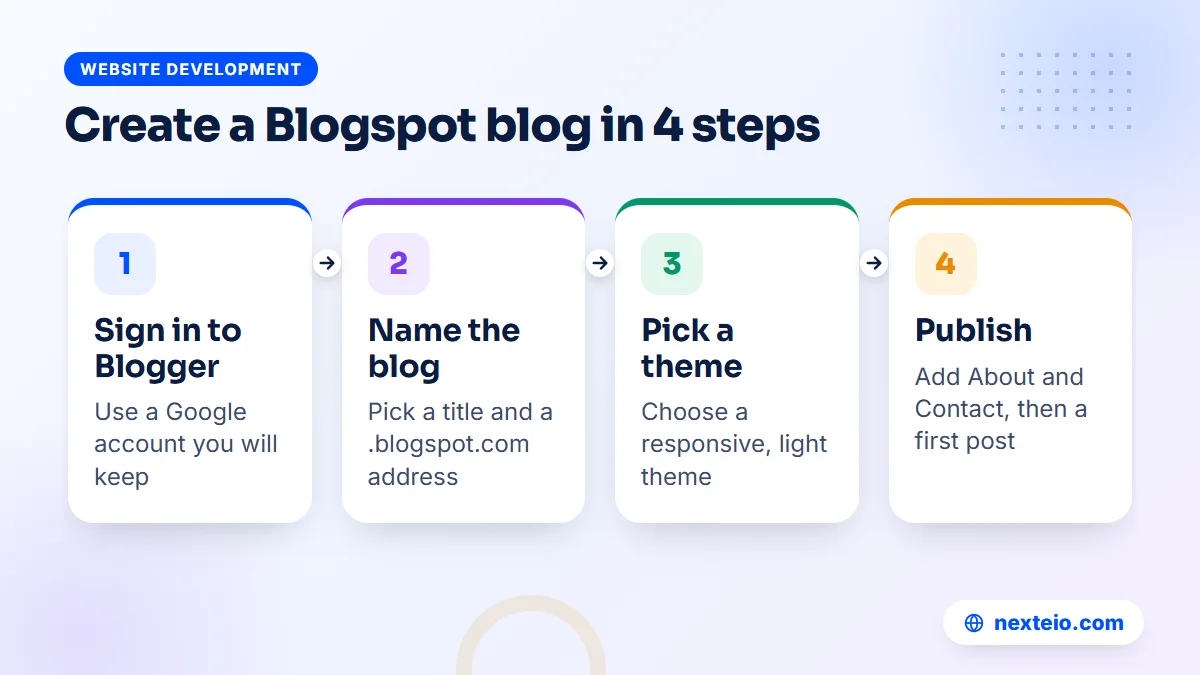
Here is the full blogspot create setup in nine steps, split into two parts. The screens change from time to time, but the order has stayed much the same for years. If a button has moved, Google keeps current instructions in the Blogger Help Center.
Part one creates the blog itself:
- Open Blogger. Go to blogger.com and choose the option to create your blog.
- Sign in. Use the Google account that will own the blog for the long term.
- Enter a title. This is the name readers see at the top of the blog. You can change it later.
- Choose an address. Type the part that comes before .blogspot.com. Blogger tells you straight away if it is taken.
- Confirm your display name. This appears as the author on your posts. Use a real name or the organization's name.
Part two, steps six to nine, makes it ready for readers:
- Pick a theme. Open the Theme section and choose one of the current responsive themes, which adjust to phone screens.
- Fix the basic settings. Set the description, language, time zone, search description and HTTPS options, covered in detail below.
- Create your core pages. Add an About page and a Contact page before your first post goes live.
- Publish your first post. Write it, add a label, fill in the search description, preview it on a phone and publish.
Part one of the Blogspot create process takes a few minutes. Part two is where a free Blogspot site starts to look like a serious publication rather than a test page, so give it proper time.
What you get on day one
Once the blog exists, Google hosts it for you. You do not pay for a server, you do not install software, and the blog loads over HTTPS on its blogspot.com address. There is no plugin to update and no database to look after. For many writers this is the main appeal of Google Blogger: the technical upkeep is Google's job, not yours.
What you do not get is control. You cannot install extra software, change how the platform works underneath, or move the blog to another host while keeping the same blogspot.com address. Those limits matter later, and a section further down covers them honestly.
Choosing a Blog Name and Address That Will Last
The title can change any time. The address is the one Blogspot create decision that is hard to undo. You can edit the blogspot.com address in Settings, but old links shared on Facebook, in messaging groups and in search results still point to the old one, and they will usually break. Treat the address as close to permanent.
A good address is short, easy to spell when said aloud, and free of numbers or hyphens that people forget. Compare these examples:
| Address idea | Problem | Better choice |
|---|---|---|
| bestphysicsnotes2026forhsc | Too long, and dated by the year | physicsnotesbd |
| my-new-blog-123 | Hyphens and numbers are easy to forget | a short name tied to your topic |
| abcschoolofficialnoticeboard | Clear, but far too long to type | abcschoolnotice |
| techtipsbangla | None: clear, short and easy to say | Keep it as it is. |
If you plan to connect your own domain later, the blogspot.com address matters less, because readers will see your domain instead. Even then, pick an address that matches the name, so everything stays consistent while you set up the domain.
Check the name on Facebook and other platforms too. A coaching centre that uses one name on its blog, another on its Facebook page and a third on its signboard makes itself harder to find. One name everywhere helps people, and search engines, connect the pieces.
Picking a Theme That Works on Phones
Most of your readers will open the blog on a phone, often on mobile data. Blogger's current built-in themes, such as Contempo, Soho, Emporio, Notable and Essential, are responsive, which means the layout adjusts to the screen size. Start with one of these rather than an old classic theme or a heavy outside template.
Free templates from random websites are a common trap. Some load slowly, some carry hidden links back to the template maker, and a few include scripts you would never knowingly add. If you do use an outside template, get it from a source you trust, and have someone who reads code check it before you apply it.
Customizing without breaking things
Use the theme's Customize option for colors, fonts, background and layout width. Use the Layout section to add or remove gadgets, the small blocks in the sidebar and footer: a search box, a list of pages, labels, popular posts, a profile and a contact form. Keep the sidebar short. Every gadget adds weight to the page, and on a phone the sidebar usually ends up below the posts anyway.
The Edit HTML option gives full access to the theme code. It is powerful and easy to break. Before any change, use the backup option in the Theme section to download a copy of the current theme, so you can restore it if a small edit hides your posts or breaks the mobile layout. Theme code is one of the jobs our Blogger setup service handles for people who would rather not touch it.
A short checklist for a clean theme:
- Text is easy to read on a small screen without zooming.
- The menu shows your main pages, including About and Contact.
- The header image is light, not a large photo that slows the first view.
- Ads, if any, do not push the first paragraph below the screen.
- Links look like links, in a color that stands out from normal text.
- Bangla text uses a font that shows every letter and conjunct correctly.
The Settings to Fix in the First Hour
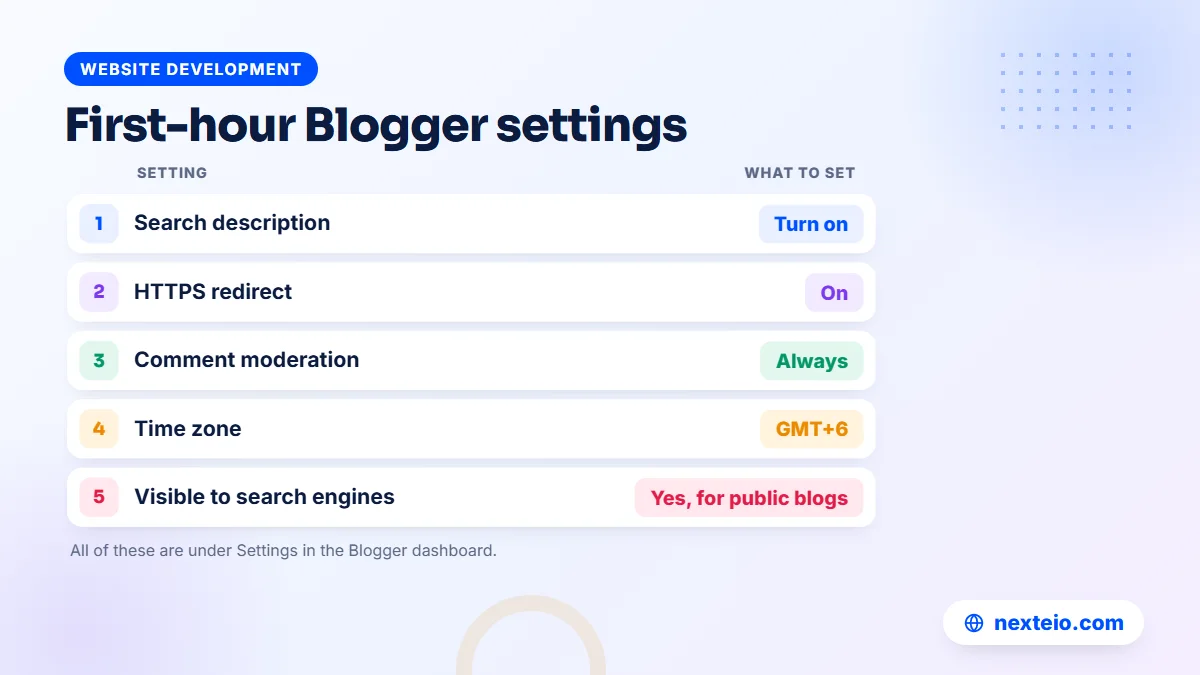
A new blog works with the default settings, but several of them are worth changing before you publish anything. These are the settings that most often get skipped after the Blogspot create step, and all of them live under Settings in the left menu. The table lists the ones that matter most for a blog in Bangladesh.
| Setting | Section | What to set |
|---|---|---|
| Blog description | Basic | A plain sentence or two on the topic |
| Blog language | Basic | The main language of your posts |
| Visible to search engines | Privacy | On, unless the blog is only for internal use |
| HTTPS redirect | HTTPS | On, so every visitor gets the secure version |
| Who can comment and moderation | Comments | Limit who can comment and approve comments first |
| Time zone | Formatting | GMT+6, so post times match Bangladesh time |
| Enable search description | Meta tags | On, then write a short description for the blog |
The search description setting is easy to miss.
Once it is on, every post gets its own search description box in the post editor. Write one or two sentences that say what the post covers. Google does not always use it, but it often shapes the snippet shown under your title in search results.
Comment moderation protects you from spam links, which arrive on almost every public blog. With moderation on, comments wait for your approval before they appear. For a school or office blog, you may prefer to turn comments off and point readers to a phone number or a contact form instead.
Leave the custom robots.txt and custom robots header tags settings alone unless you know exactly what they do. A single wrong line there can hide the whole blog from Google, and Blogger's defaults are sensible for most blogs.
Permissions and team access
Under Permissions you can invite other people as authors or admins. Authors can write and publish their own posts. Admins can also change settings and themes, edit anyone's posts and manage the team. Give admin rights to two trusted people at most, make everyone else an author, and remove access the same week someone leaves.
Writing Your First Posts and Pages
Blogger has two content types. Posts are dated entries that appear on the home page in order, newest first. Pages hold fixed content such as About, Contact, Services or Privacy Policy, which sits outside the date order. A notice blog for a coaching centre might use posts for each class update and pages for the fee list and the address.
Pages every Blogspot website should have
- About: who runs the blog, why, and what readers will find there.
- Contact: an email address, a phone number for an organization, or Blogger's contact form gadget.
- Privacy policy: needed if you show ads, use analytics or collect any details through forms.
- Disclaimer or terms: useful for health, finance or legal topics, where readers may act on what you write.
These pages are not filler. They tell readers and Google that a real person or organization stands behind the blog, and they make a later AdSense application much stronger.
How to write a post that gets read
Open the post editor, write a title that says what the reader will learn, and start with the answer instead of a long warm-up. Use subheadings for anything longer than a few paragraphs, and keep paragraphs short so they read well on a phone. Add one or two labels, which work like categories and create their own archive pages.
On the right side of the editor you will find the post settings: labels, published date, permalink, location, search description and comment options. Set a custom permalink with a few clear words, because the automatic link can cut a long title oddly, and Bangla titles may produce a generic or unreadable link. A link ending in admission-notice-class-nine.html is easier to share and to remember.
For writing that both people and search engines understand, our guide to writing SEO-friendly website content explains how to build a post around one clear question.
Images on a slow connection
Images are the heaviest part of most blog posts. Resize photos before uploading, since a picture straight from a phone camera is often several megabytes, far more than a blog needs. A width of around 1,200 pixels is plenty for a full-width image. Always fill in the alt text, the short description that screen readers use and that helps Google understand the image.
Connecting Your Own Domain to a Blogspot Site
A free Blogspot address is fine for a hobby blog. For a business, school or news page, your own domain, such as yourname.com or yourname.com.bd, looks more trustworthy and stays yours if you ever move away from Blogger. The domain costs money each year, but Blogger itself still costs nothing.
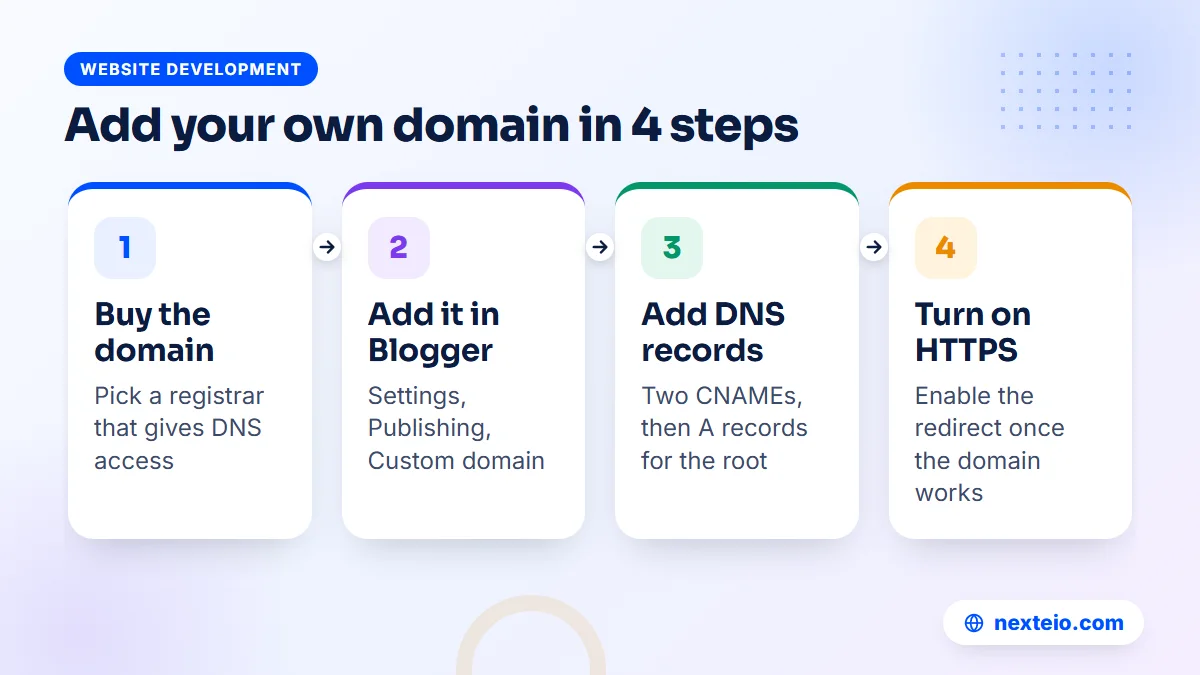
You can connect a domain at any time after the Blogspot create stage, and the process has four parts. Google's instructions are on the Blogger custom domain help page, and the exact records Blogger shows you are specific to your blog.
- Buy the domain from a registrar that lets you edit DNS records. Many local resellers accept bKash or Nagad, but confirm that you will get DNS access, not just a parked name.
- Add the domain in Blogger. Under Settings, in the Publishing section, choose Custom domain and enter the www version, for example www.yourname.com.
- Add the DNS records. Blogger shows two CNAME records: one for www that points to ghs.google.com, and a second, unique one that proves you own the domain. Add both at your registrar.
- Redirect the bare domain and turn on HTTPS. Add the A records Google lists so that the address without www also works, turn on the redirect option in Blogger, and switch on the HTTPS redirect once the domain loads.
DNS changes can take from a few minutes to a day or two to spread.
If Blogger shows an error right after you add the records, wait a few hours and try again before changing anything.
For .bd and .com.bd domains, registration goes through BTCL or its resellers. Ask before you buy whether you can manage DNS records yourself or whether each change needs a request. The same CNAME and A records apply either way. Keep the domain in your own or your organization's name, with an email you control, so a reseller or former staff member never holds the keys. If DNS feels unfamiliar, this is a step our Blogger website team can handle for you.
Getting Your Blogspot Website Found on Google
Publishing a post does not mean Google will show it. A new blog has no history, no links and no reputation, so the first weeks are about helping Google find and understand your pages. Blogger handles part of this automatically: it creates a sitemap at /sitemap.xml and lets search engines crawl the blog by default.
The most useful free tool is Google Search Console. Add your blog as a property using the exact address readers see, with https and www if you use a custom domain. Then submit the sitemap, and use the URL Inspection tool to request indexing for your most important posts. Search Console also shows which searches bring up your blog and which pages have problems.
Habits that help a new blog rank
- Write about questions your readers actually ask, in the words they use.
- Put the main topic of each post in its title, first paragraph and one subheading.
- Link new posts to older related posts, and update older posts to link to new ones.
- Update posts when facts change, such as exam dates, fees or rules.
- Publish on a steady schedule rather than ten posts in one week and then nothing.
Our step-by-step guide to on-page SEO for beginners goes deeper on titles, headings and descriptions. Google's own SEO Starter Guide is also worth reading once, because it explains in plain words what Google looks for. If the blog supports a business and you want steady growth from search, our SEO service takes that work on.
Be patient. A new blog usually takes months, not days, to earn steady search traffic, and the timeline depends on the topic and how many other sites cover it. Blogs that answer narrow local questions well, such as admission rules for a specific board or how a local process works, often get found sooner than blogs chasing broad topics.
Related guides for new blog owners:
- 10 simple SEO tips for small business websites
- Technical SEO basics every website owner should know
- Common SEO mistakes that hurt business websites
Earning From a Free Blogspot Blog
Many people start a free Blogspot blog hoping to earn from it. That is possible, but it is slower and harder than most videos suggest. The main route is Google AdSense, which Blogger supports through the Earnings section of the dashboard. Google decides who is approved, and it reviews the blog against the AdSense Program policies as well as the Blogger Content Policy.
Blogs that get rejected usually share a few problems: too little original content, posts copied or lightly rewritten from other sites, missing About and Contact pages, menus that are hard to use, or topics Google restricts. Fixing these takes real work, and there is no shortcut. Anyone who promises guaranteed approval is not being honest, because the decision rests with Google.
Other income routes include clearly labelled sponsored posts, affiliate links to products you have actually used, selling your own courses or services, and using the blog to bring clients to an offline business. For a coaching centre or a consultant, the last one is often worth far more than ad income.
If you want help preparing a blog for review, our Google AdSense service looks for the issues that commonly cause rejection, and our guide to AdSense help in Bangladesh explains what that kind of support covers. AdSense pays publishers in Bangladesh by bank wire transfer, so ask your bank early what it needs to receive the payment.
What Google Blogger Cannot Do
Blogger is good at one job: publishing articles. Problems start when people ask it to be something else. Before you commit, check whether your plans fit inside these limits.
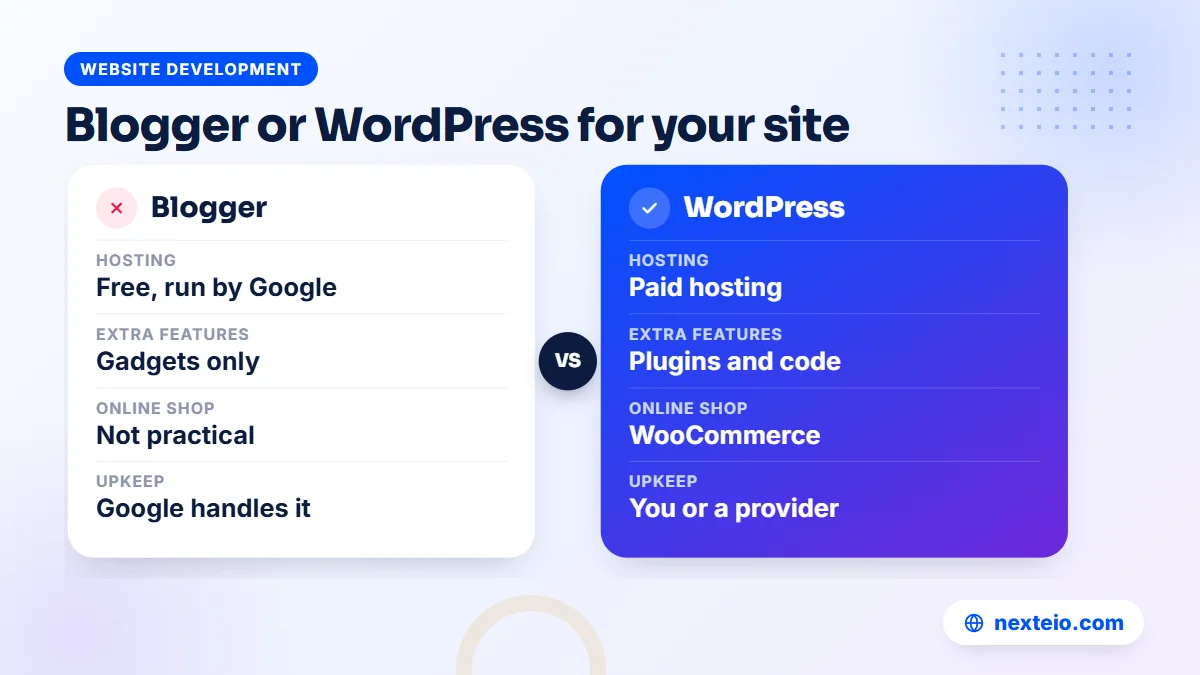
| Need | Blogger | WordPress or custom site |
|---|---|---|
| Hosting cost | Free, run by Google | Paid hosting each year |
| Plugins and extra features | None; only gadgets and theme code | Plugins or custom code for almost anything |
| Online shop with cart and bKash checkout | Not practical | Yes, with WooCommerce or a custom build |
| Admission forms, logins, dashboards | Not supported | Yes |
| Technical upkeep | Handled by Google | Updates, backups and security by you or a provider |
| Control over the platform | Google sets the rules and can change them | You choose the host and own the setup |
The last row deserves a moment.
Google owns the platform. It can change features, retire themes, or remove a blog that breaks its content policy, and it has closed other free products in the past. That does not mean Blogger will disappear, but it does mean your blog depends on decisions you do not make. Regular backups and your own domain reduce that risk.
If your plans include selling products, taking bookings or building a brand site with custom pages, a WordPress website or a custom-designed site is the better base. Our comparison of WordPress and custom websites explains the trade-offs. An online store needs proper e-commerce website development, with cart, payment and courier features built in from the start.
Who Should Use Blogger in Bangladesh, and Who Should Not
It is worth deciding whether Blogger fits before you finish the Blogspot create steps, not after a year of posts. Blogger works best when the content is mostly text and photos, the budget is close to zero, and nobody on the team wants to manage hosting. Some realistic examples:
- A teacher posting class notes, suggestions and model tests for students.
- A writer publishing Bangla stories, poems or essays.
- A small local news page that posts a few updates a day.
- A school club, alumni group or community organization sharing events and photos.
- A lawyer, accountant or doctor explaining common questions in plain language.
It fits poorly when the site is the main face of a company, a hospital or an export business. A garment exporter's buyers expect a polished company site with product lines, certifications and a clear enquiry route. A clinic needs doctor schedules and appointment requests. An online shop needs a cart and payment options. These can be squeezed into Blogger for a while, but the result rarely looks professional, and moving later costs more than building properly the first time.
A middle path works for some organizations: a proper company website as the main site, plus a blog on a subdomain such as blog.yourname.com that runs on Blogger. This keeps the blog's cost low while the main site carries the brand. It does split your content across two platforms, though, so most businesses are better served by a blog section inside their main website. If you are unsure which route suits you, tell us what the site needs to do and we will suggest one.
Common Blogspot Create Mistakes and How to Avoid Them
The same problems turn up again and again on new Blogger blogs. Most are easy to avoid if you know about them in advance.
Using a personal account for an organization's blog. When the person leaves, the blog can leave with them. Create it on an official Google account and add a second admin.
Choosing a long or dated address. An address with a year in it looks stale the following year. Short and timeless lasts longer.
Copying content from other sites. Copied posts can lead to copyright complaints, AdSense rejection and poor search visibility. Write in your own words, and link to the source when you use someone else's facts.
Installing a heavy free template. Sliders, animations and dozens of widgets slow the blog on mobile data. Start with a built-in theme and add only what readers need.
Skipping the search description and permalinks. These take seconds per post and help both search results and sharing.
Publishing once and stopping. A blog with three posts from two years ago tells visitors nobody is home. Plan a schedule you can keep, even if it is one post a week.
Ignoring comment spam. Spam comments full of links hurt trust. Keep moderation on and clear the queue every week.
Most of these mistakes come from rushing the Blogspot create stage and treating the blog as finished once the address works. A few extra hours at the start save weeks of clean-up later.
Keeping a Blogger Site Safe and Backed Up
Google protects the servers, but the account is your responsibility. If someone gets into the Google account that owns the blog, they can delete posts, change the theme or remove you as an admin. Turn on two-step verification for every account with admin rights, and use a strong, unique password for each one.
Back up the content regularly. Under Settings, in the Manage blog section, the Back up content option downloads an XML file with your posts, pages and comments. Save it outside Google as well, for example on an office computer and an external drive. Also download a copy of the theme whenever you change it. A monthly routine is enough for most blogs, and weekly makes sense for a busy news page.
Keep these records in one place:
- The Google account that owns the blog, and who holds its recovery phone and email.
- The list of admins and authors, with the dates they were added.
- The domain registrar login and the domain's renewal date.
- The date of the latest content and theme backup.
Domain renewal is the risk most people forget. If your custom domain expires, the blog stops loading on that address and every shared link breaks. Set a reminder a month before renewal, and make sure the payment approval does not get stuck in an office queue.
How Nexteio Can Help With Your Blogger Website
Many people can finish the Blogspot create steps alone. Where we help is the part after sign-up, when the blog needs to look professional, load quickly on phones and be set up properly for Google. Through our Blogger website service, we set up a new blog or rework an existing one with a clean mobile theme, connect your own domain with HTTPS, and get the core pages, labels, permalinks and search settings right.
We also take on the jobs people find fiddly: theme code edits, menu and gadget layout, Search Console setup and sitemap submission, and fixing the common problems we see before an AdSense application. If you already have a blog that looks dated or loads slowly, we can review it and tell you plainly what is worth fixing.
If your plans have outgrown Blogger, we will say so, and we can move your posts to a WordPress or custom site. You can see everything we offer on our services page, look at the kind of work we do in our portfolio, or send us a short brief about your blog. For a quick question, use our contact page. If you are comparing options, the details of our Blogger setup work show what is included.
Keep reading: how to build a professional business website, what to check before hiring a WordPress developer, or browse all our website development guides.
Frequently asked questions
What does blogspot create mean?
It is the phrase many people search when they want to make a blog on Google's Blogger platform, which gives a free address ending in .blogspot.com. In practice it means signing in at blogger.com with a Google account, choosing a title and address, picking a theme and publishing your first post.
Is a Blogspot blog really free?
Yes. Hosting, storage and HTTPS on the blogspot.com address cost nothing. You only pay if you choose to buy a custom domain, a paid template or outside help with design and setup.
Can I write my blog in Bangla?
Yes. Blogger accepts Bangla Unicode text in posts, pages and titles. Choose a theme font that shows Bangla letters correctly, set short English permalinks by hand so links stay readable, and keep each post in one language where you can.
Can more than one person manage the same blog?
Yes. In the Permissions section you can invite others as authors, who write and publish posts, or as admins, who can also change settings and manage the team. Keep admin rights to a small number of trusted people and remove access promptly when someone leaves.
Can I move my Blogger blog to WordPress later?
Yes. Download the XML backup from Blogger and bring it into WordPress with an importer, then check images, links and formatting. Moving is much easier if the blog already uses your own domain, because readers and Google keep finding the same address.
How soon can a new Blogspot blog apply for AdSense?
Google does not publish a fixed number of posts or days. It looks at whether the blog has enough original, useful content, follows its policies and is easy to use. Most new blogs do better waiting until they have a solid set of posts plus About, Contact and privacy pages.
Will my blog appear on Google automatically?
Google often finds new Blogger blogs on its own, but that can take time. Adding the blog to Search Console and submitting the sitemap helps Google discover your pages sooner. Appearing in results for useful searches still depends on the quality of your posts.
Does the Blogspot create process work with a .com.bd domain?
Yes, as long as you can add DNS records for the domain. Some .bd resellers let you edit DNS yourself, while others handle changes on request, so ask before you buy. The same CNAME and A records that Blogger shows for any domain apply here too.