Education Management System: How a School Runs on One Platform
In this article 15 sections
- 1.What an Education Management System Means for a School
- 2.Three Layers: Website, School System and National EMIS
- 3.One Student Record, Many Uses: How the Modules Connect
- 4.A School Year Inside an Education Management System
- 5.Who Uses an Education Management System and What Each Person Sees
- 6.Decisions Better Data Makes Possible
- 7.Hosted Platform or Your Own Copy: Who Owns the System
- 8.Bangla, Phones and Power Cuts: Bangladesh Realities
- 9.Moving Your Data From Spreadsheets and Old Software
- 10.Making Staff Use the System Every Day
- 11.What the Current Version Does Not Include
- 12.What an Education Management System Costs in Bangladesh
- 13.How to Test Education Management Software Before You Buy
- 14.How Nexteio Can Help
- 15.Frequently asked questions
An education management system is the software that holds a school's daily work in one place: admission, students, attendance, routines, fees, exams, results, staff and salaries, together with the public website guardians visit. Instead of separate registers, receipt books and Excel files that never agree, every office desk works from the same records. The head teacher sees the whole school, and each teacher, accountant or guardian sees only their own part.
Many schools in Bangladesh already use some software. The accounts desk may have one program, results may be prepared in a spreadsheet built by a former teacher, and the website may be a separate site that nobody updates. Each piece works on its own, and none of them talk to each other.
This guide looks at the whole system rather than one module. It explains how the parts connect, what a school year looks like when everything runs in one place, who should see what, how ownership and hosting work, how to move your old data across and what it costs. It is written for head teachers, principals, managing committee members and the office and accounts staff who will live with the choice.
Along the way we show how our own School Management Software handles each point, including the things it does not do yet, so you can compare it fairly with anything else you are considering.
What an Education Management System Means for a School
The phrase is used loosely, so it helps to be precise. For a single school, an education management system is a private web application with a login for each person, a shared database underneath and screens for each job. It usually sits next to a public school website and shares some information with it, such as notices and results.
The same idea exists at national level under a different name. Governments and bodies such as the UNESCO Institute for Statistics use the term educational management information system, or EMIS, for systems that gather data from many institutions to plan and fund education. In Bangladesh, BANBEIS collects education statistics from institutions across the country, and the Ministry of Education sets policy for schools and colleges.
A school-level system does not replace those national systems. It helps the school run its own day better, and as a side effect it makes official data requests much easier to answer, because student and staff numbers are already clean and in one place.
Three Layers: Website, School System and National EMIS
When schools compare products, they often mix up three different tools. Keeping them apart avoids paying for the wrong thing.
| Layer | Who uses it | What it holds | Example jobs |
|---|---|---|---|
| Public school website | Guardians, applicants, anyone | Public information | Notices, admission details, results search, photo albums, contact |
| School education management system | Staff, teachers, guardians, students with logins | Private school records | Attendance, fee collection, marks entry, payroll, ID cards |
| National EMIS | Government education bodies | Data from many institutions | Statistics, planning, policy |
A learning management system is a fourth tool, used for lessons, assignments and online classes. It solves a teaching problem rather than an office problem. If online teaching is your main need, our guide to learning management systems for schools covers that side.
The best setups link the first two layers. A result published in the school system appears in the website's result search. An admission form on the website becomes an application in the office. That link is one reason we built our School Management Software as a school system and a public website together, sharing one database.
If your school only needs the first layer for now, a WordPress school website or a custom-designed website covers it well. The second layer is a different kind of project: a Laravel web application with logins, permissions and a database built for daily office work.
One Student Record, Many Uses: How the Modules Connect
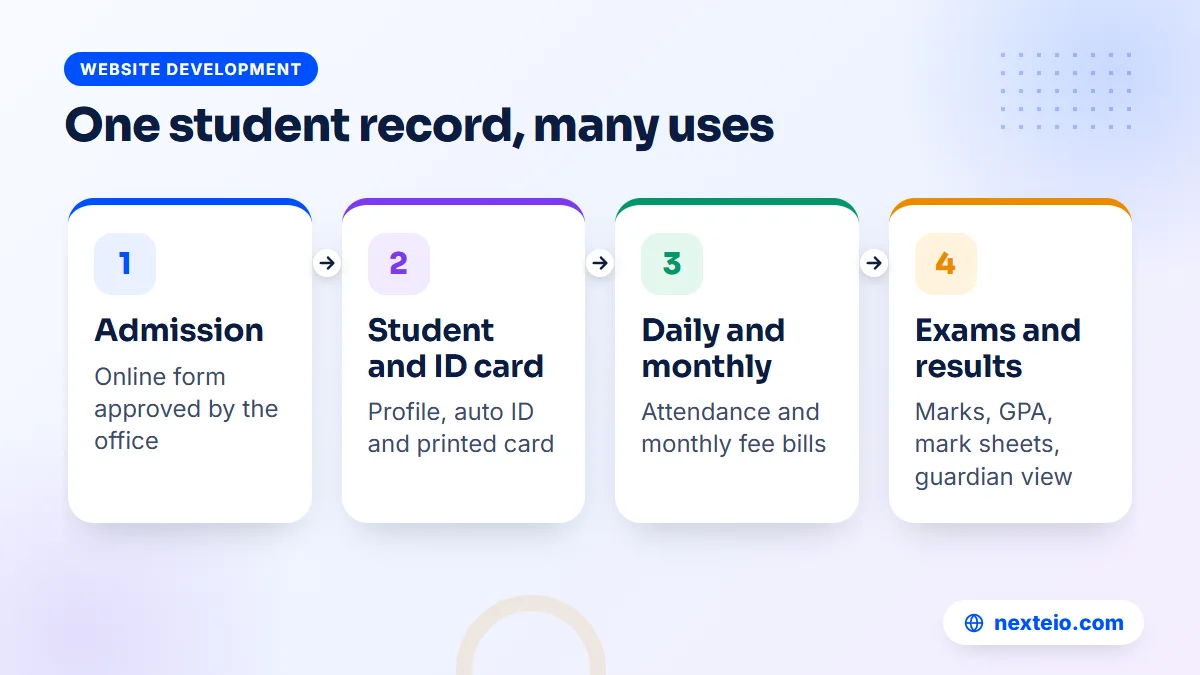
The real value of an education management system is not any single screen. It is the fact that a student's details are typed once and then used everywhere. Follow one student through the year and the chain becomes clear.
- Admission: the guardian applies online with a photo and papers, and the office approves the application.
- Student record: admitting the applicant creates the student profile with an automatic ID.
- ID card: the card is printed from that profile, with no retyping of names.
- Attendance: the student appears in the class list the next morning.
- Fees: monthly bills are created for the student's class automatically.
- Exams and results: marks are entered against the same record, and the result and mark sheet follow.
- Guardian access: the parent logs in and sees attendance, dues and results for the same child.
In a disconnected setup, each of those steps means typing the student's name again in a different file. Every retyping is a chance for a spelling to change, a roll number to slip or a fee to be missed. Connected modules remove that risk at the source.
This is how our own system works. In it, "Admit" on an approved application creates the student, the ID card and, if you choose, parent and student logins in one step. From there the same record carries the student through attendance, fees, exams and results. Our guide to an online admission system walks through that first step, from form design to the "Admit" action, in detail.
A School Year Inside an Education Management System
Features make more sense when you see them on a calendar. Here is how a typical school year in Bangladesh runs when the office works from one system. Exact months vary between schools, so treat this as a pattern rather than a fixed timetable.
| When | What the office needs | What the system does |
|---|---|---|
| Before the session starts | Admission for new students | Online form, application number by SMS, status check by mobile, approval and admission |
| Start of the session | Classes, subjects, routine, ID cards | Class routine with teacher clash check, ID cards with QR verification |
| Every school day | Attendance and absent students | Teacher-marked attendance, same-day SMS to guardians of absent students |
| The 1st of every month | Monthly fees | Bills created automatically by class, with discounts applied |
The second half of the cycle repeats every month and peaks around exams:
| When | What the office needs | What the system does |
|---|---|---|
| Through the month | Collections and dues | Printed receipts, partial payments, online payment, due list and reminders |
| Month end | Teacher and staff salaries | Salary sheet, pay with SMS, printable pay slips |
| Exam seasons | Marks, results and merit | Fast mark entry, GPA, merit position, tabulation sheet, mark sheets |
| After results | Publishing and certificates | Result search on the website, GPA by SMS, merit and pass certificates |
Two things stand out in that table. First, the busiest office jobs, such as bills and salary sheets, are the ones a system automates best. Second, guardians are informed at every stage without anyone in the office picking up a phone.
Admission season is also when the public website gets its heaviest traffic. If you want more families to find your admission page, our SEO service can help it appear in search, and our Facebook ads team can put the admission notice in front of guardians in your area.
Where online payments fit
Fee collection is where guardians feel the change most. Instead of standing in a queue at the accounts desk, a parent can pay from a phone and receive an SMS with a link to the receipt. For the school, every payment lands in the same collection report as cash taken at the counter, so month-end totals no longer need reconciling by hand.
Our software offers three routes. The bKash Payment Gateway works with a bKash merchant account. SSLCommerz accepts cards, bKash, Nagad, Rocket and bank payments through one checkout. The third route suits schools without a gateway: the guardian sends money to the school's bKash or Nagad number, enters the transaction ID, and the office approves the payment after checking it.
Our School Management Software covers every row above. It also uses the Bangladesh GPA scale, including A+ at 80 percent, a 0.00 result for failing a compulsory subject and the fourth subject bonus, so results match what teachers already calculate by hand.
Who Uses an Education Management System and What Each Person Sees
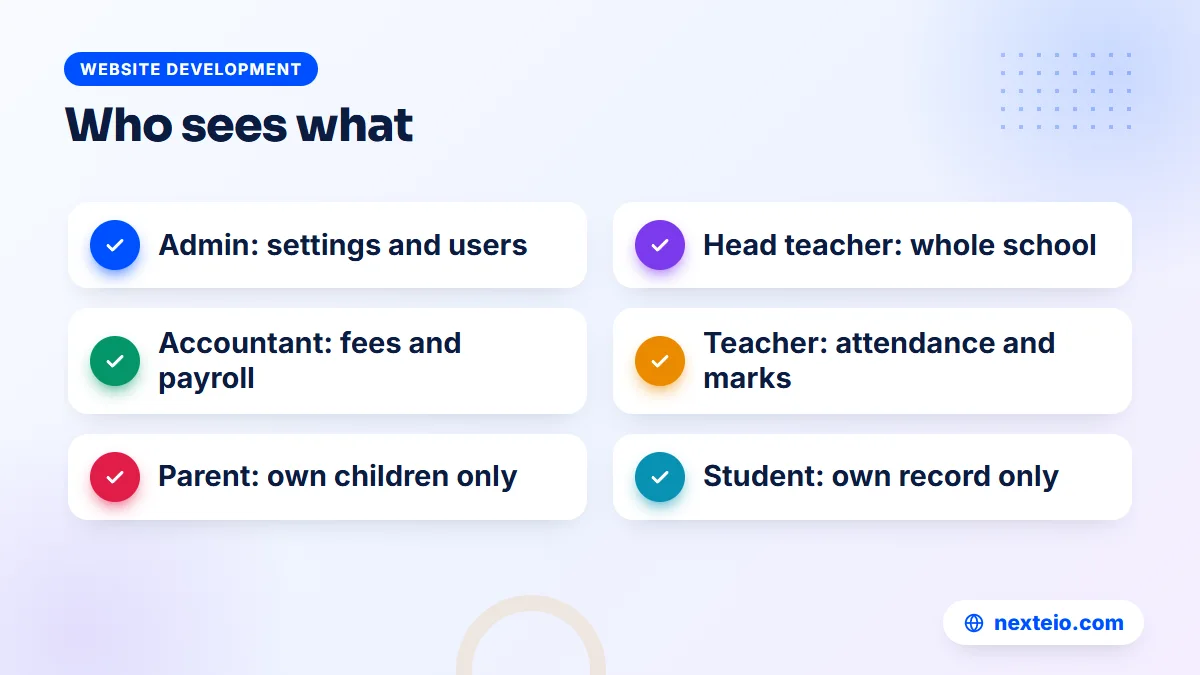
A system used by eight kinds of people needs clear limits. The accountant should not change marks. A teacher should not see salary sheets. A guardian should see only their own children. Good role design is what makes it safe to give everyone a login.
- Super Admin and Admin: settings, users, school information and everything else.
- Principal or head teacher: the whole school's academic and office picture.
- Accountant: fee structure, collections, receipts, dues and payroll.
- Receptionist: admission applications and front-desk work.
- Teacher: attendance, marks entry and today's classes.
- Parent: attendance, fees, results and payments for their children.
- Student: their own attendance, results and routine.
Those eight are the built-in roles in our software. Permissions for each role can be edited, and new roles can be added if your office works differently. Everyone uses the same dashboard, but each person sees only the pages their role allows. Hidden pages cannot be opened by typing the address into the browser, which is a check worth doing on any system you test.
The parent panel covers several children under one login, which matters in schools where siblings study in different classes. Staff log in with their mobile number, so nobody has to remember a separate username.
Decisions Better Data Makes Possible
A system that only replaces paper saves time. A system that someone actually reads changes decisions. These are the questions a head teacher or managing committee can answer quickly once records live in one place:
- How much was collected this month, by which payment method and by which staff member?
- Which students owe fees, and for how many months?
- Which classes have the most absence, and which students are absent again and again?
- How did each class and subject perform in the last exam, and who holds the merit positions?
- What is the total salary bill this month, including allowances, deductions and bonuses?
In our School Management Software, these answers come from built-in lists: the collection report by date, method and collector, the due list, daily and monthly attendance views, the tabulation sheet and the salary sheet. The current version has no separate reports module for building custom reports, so if your committee wants a special format, plan it as additional work.
Data only helps when it is used on a schedule. A simple habit works well: the accountant brings the due list to a short meeting each month, and the head teacher reviews attendance views every week. If a committee member asks a question that the lists cannot answer, write it down. Those questions show which custom report is worth paying for. Our guide to a student information system suggests a one-page monthly summary that keeps committee meetings short.
Related guides for institutions planning their systems:
- School management software: the features a school in Bangladesh needs
- Campus management system software: key modules for colleges
- Educational website design for schools, colleges and madrasas
Hosted Platform or Your Own Copy: Who Owns the System
Education management software is sold in two broad ways, and the difference matters more than any single feature.
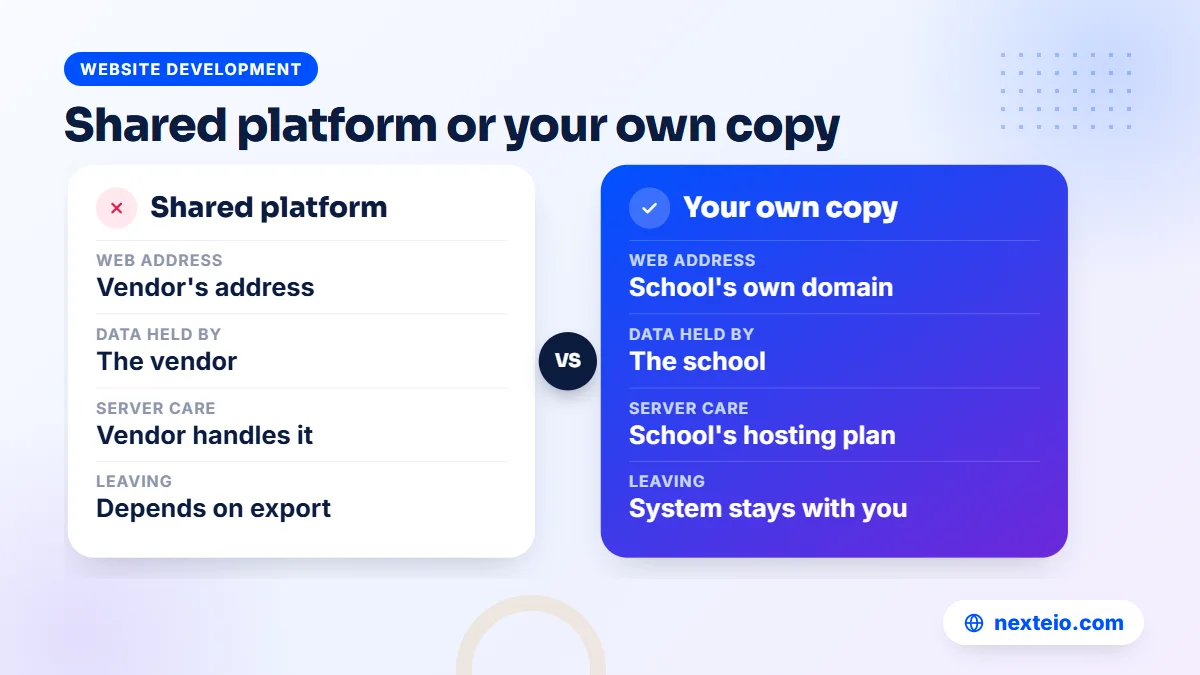
Shared hosted platforms put many schools on one system run by the vendor. You log in to the vendor's address, often pay per student or per month, and the vendor handles the server. Setup is quick. The risks are that your data sits with the vendor, your web address carries the vendor's name and leaving can be difficult if export options are limited.
Your own copy means the software is installed on your school's own domain and hosting. You control the server and the data, and the system carries your school's name. You need a decent hosting plan and someone to keep the server and backups in order, but you are not tied to a vendor's platform for daily access.
Our School Management Software follows the second model. Each school gets its own copy on its own domain and hosting, with its own name, logo and colors, and Nexteio has no access to the school's data. The license key comes from themeve.com and is tied to that domain. Our guide to domains and hosting explains the two accounts in plain words, and it is worth registering both in the school's name.
Many schools in Bangladesh use an .edu.bd address for official work. Our article on internet domains explains how .com, .edu.bd and other endings differ, so you can pick an address before setup rather than changing it later.
Bangla, Phones and Power Cuts: Bangladesh Realities
A system designed elsewhere can look good in a demo and still fail in a school here. Check it against local conditions before you sign.
Bangla that reads properly
Guardians, office staff and many teachers prefer Bangla. The system should show Bangla clearly on phones, not as broken characters, and switching languages should be easy. Our software uses the Hind Siliguri font for Bangla, switches between Bangla and English with one click and shows school content in Bangla when no English text has been added.
Phones first
Most guardians will only ever open the system on a phone, often on mobile data. Teachers will mark attendance on their phones between classes, a routine our guide to school attendance software covers along with absence SMS. Every screen they use must work on a small display without zooming. Our system is responsive on phones and desktops. It has no separate mobile app, and teachers, guardians and students use it in the phone browser.
Servers, power and backups
Some institutions still run software on a computer in the office. That system goes down with every power cut and every failed hard disk. A web-based system on proper hosting stays online when the school's power is off, and staff can still work from home on a phone. Backups need the same thinking. Our software takes a nightly backup of the database and files, stores it on the server and sends a copy to the school's own Google Drive, and the office can also run a manual backup and download it.
Moving Your Data From Spreadsheets and Old Software
Data migration is the stage that decides whether the first month feels smooth or chaotic. The aim is simple: bring across what you need for this session, clean, and leave the rest in an archive.
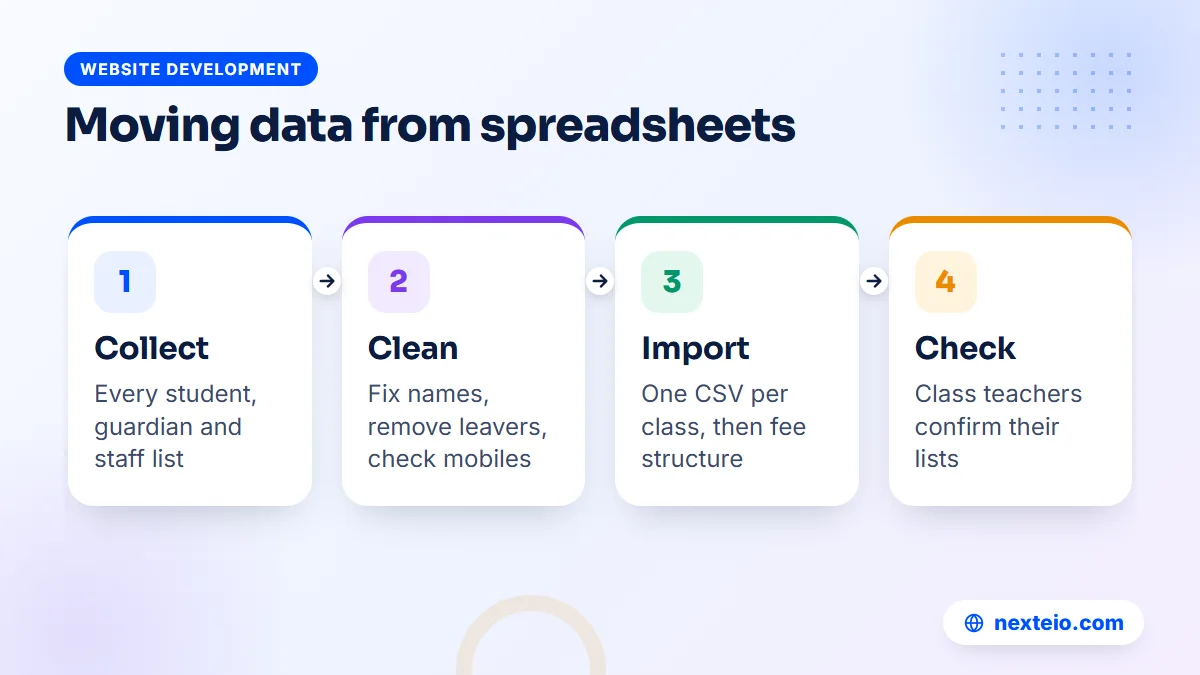
- Collect the sources. Gather every student list, guardian contact sheet, fee register and staff list, including the ones on teachers' own computers.
- Agree one master list. Pick a single sheet per class with name, father's and mother's names, roll, section and guardian mobile number.
- Clean it. Fix spellings, remove students who have left and check every mobile number, because SMS depends on them.
- Import and check. Import the clean sheet, then ask each class teacher to check their class list on screen.
With students in place, set up the money side and the staff:
- Set up fees. Enter fee heads, the class-wise fee structure and any scholarship or sibling discounts before the first bills go out.
- Add staff. Create staff profiles, salary details and logins.
Our system imports and exports students through CSV files, which any Excel sheet can produce. Old results and past fee records are usually best kept as archived files rather than forced into the new system, unless you have a clear reason to bring them across.
Timing matters too. Starting with a new session is far easier than switching in the middle of a term with half-collected fees and exams underway. If you are reading this mid-year, use the remaining months to clean data and test the demo.
Making Staff Use the System Every Day
Software that nobody opens is the most expensive kind. In many schools, the system is installed, a few people try it, and within two months the accounts desk is back to the receipt book because "it was faster". The cause is rarely the software. It is that nobody was put in charge of making it the normal way of working.
Name a system owner
Pick one person in the office, often a senior clerk or an assistant teacher who is comfortable with computers, and make the system part of their job description. They handle user accounts, answer colleagues' questions, check that attendance and marks are entered on time and talk to the vendor when something breaks. Without this person, small problems pile up until staff give up.
Set a cut-over date for each paper register
Running paper and software side by side for a few weeks is sensible. Running them side by side forever doubles the work and guarantees that one of them will be wrong. Agree a date after which the old fee register, attendance book or result sheet is no longer used, and have the head teacher announce it in a staff meeting.
Respect the approval chain
Schools have approval habits for good reasons. Fee waivers need the head teacher's agreement, results need checking before release, and salary changes need the committee. Map those habits into the system's roles rather than ignoring them. When the accountant can collect fees but only the principal can approve a discount, staff trust the system because it works the way the school already works.
Keep passwords personal
Shared logins defeat the activity log. If three office staff use one admin account, nobody can tell who changed a fee or deleted a record. Give each person their own login with the smallest role that lets them do their job, and remove accounts the same week a staff member leaves.
What the Current Version Does Not Include
Every vendor's brochure lists modules. Fewer vendors tell you which ones are thin, half-built or still on the plan. Before you choose any education management software, ask the vendor to show you each module working in a demo, not just named in a list.
We prefer to be plain about our own product. The current version of our School Management Software does not include:
- Homework and assignments (there is a "coming soon" page for this).
- An accounts module for income and expenses, or library, transport, inventory and hostel modules.
- A separate reports module beyond the built-in lists.
- Bulk or custom SMS to groups, or a screen for SMS balance.
- Teacher and staff attendance, class promotion, transfer certificates, testimonials and admit cards.
- A mobile app, push notifications or two-factor login.
Some of these matter more than others. A school with its own buses may need transport tracking, and a school with a hostel needs boarder records. If one of these is essential for you, it can be planned as custom development through our Laravel web application service, quoted separately after we understand the requirement.
What an Education Management System Costs in Bangladesh
The cost has several parts, and comparing quotes only works when you see all of them side by side.
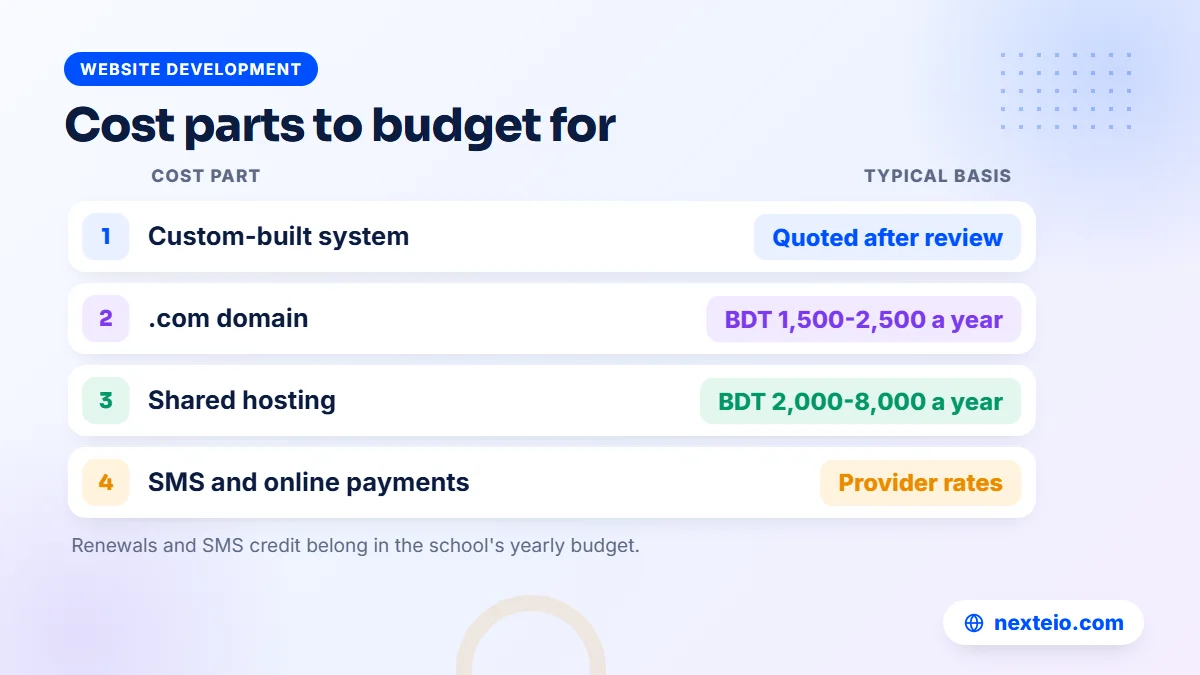
| Cost part | Typical basis | Notes |
|---|---|---|
| Software | Ready product or custom build | Custom systems are quoted after a requirements review |
| .com domain | About BDT 1,500-2,500 a year | Register it in the school's name |
| Shared hosting | About BDT 2,000-8,000 a year | Needs Composer and a cron job for this kind of system |
| SMS credit | Per message from the SMS provider | Bangla SMS holds fewer characters per part |
| Online payments | Fees set by the gateway | Check bKash or SSLCommerz merchant terms |
For a custom system built from scratch, market prices in Bangladesh are quoted after a requirements review, and depending on modules and users they commonly fall between about BDT 150,000 and 1,200,000 or more. That route makes sense for large groups of institutions with unusual processes. Our article on custom software development explains when an organization truly needs its own system.
A ready product set up for your school avoids most of that build cost. We do not publish a price for our School Management Software. It comes in three module packages: Basic (website, admission, students, academic, attendance, notices, SMS, teacher and parent logins), Standard (adding routine, exams, results, certificates, fees, online payment, student login and teachers) and Premium (everything). Ask for a quote through our project form once you know which package fits.
Plan for running costs as well. Hosting and domain renew every year, SMS credit runs out and the server needs someone watching it, so put those lines in the school's yearly budget from the start.
How to Test Education Management Software Before You Buy
A demo with a salesperson clicking for you shows very little. Ask for a demo you can use yourself, and test it as each person in your school would. Our live demo lets you log in with one click as Super Admin, Accountant, Head Teacher, Teacher, Parent or Student, with about 113 sample students and 20 teachers already loaded.
Work through this list in any system you consider:
- As the office: admit a student from an online application and print the ID card.
- As a teacher: take attendance for a class and enter marks for one subject.
- As the accountant: collect a fee, print the receipt and open the due list.
- As the head teacher: publish a result and look at the merit positions.
- As a guardian: log in on your phone, check attendance and pay a fee.
- As a stranger: try to open an admin page while logged in as a student.
In our demo, the users, license, SMS and payment gateway settings are locked, payments are demo payments and the data resets every three hours. Everything else is open to try. Screenshots and the module list are also on our School Management Software portfolio page.
Bring the colleagues who will use the system to the test. An accountant spots problems in the fee screens that a head teacher would miss, and a young teacher will tell you quickly whether attendance is easy on a phone.
How Nexteio Can Help
We built our School Management Software for schools in Bangladesh from Play to Class Ten, including EIIN and MPO schools, using Laravel on the server. We set it up as your own education management system: on your domain and hosting, with your school's name, logo and colors, together with the public school website that shows your notices, results, board results by year and institution information.
The work starts with your package choice and your data. We install the system, set up your school's details, connect your chosen SMS provider and payment gateway, and import your student list from CSV. Your office then adds staff, fee structures and guardian details and starts working. The "Developed & supported by Nexteio" credit shows by default, and a paid white-label option hides it.
If you need a module the current version does not include, our custom Laravel development can build it as separate, quoted work. Try the demo first, see the product details in our portfolio, then send us your school's requirements. You can also see all our services, browse the wider portfolio or write to us through the contact page.
Keep reading: how web applications are planned and built, what ongoing website maintenance covers, or browse more website development guides.
Frequently asked questions
What is the difference between an education management system and EMIS?
EMIS, or educational management information system, usually means a national system that collects data from many institutions for planning and statistics. A school's own education management system runs daily work such as admission, attendance, fees and results. A good school system makes it easier to answer national data requests, but it does not replace them.
Can a small school with a few hundred students use an education management system?
Yes. Small schools often feel the benefit fastest, because one or two office staff handle everything and automatic bills, receipts and SMS save them hours. Starting with a smaller package and adding modules later keeps the first step affordable.
Does our School Management Software work for colleges or universities?
It is built for schools from Play to Class Ten, including EIIN and MPO schools, and its GPA rules follow the school system in Bangladesh. Colleges and universities usually need different modules, such as subject choice and semester records, which would be custom work quoted after a requirements review.
Who owns the data if we use your software?
The school does. Each school gets its own copy on its own domain and hosting, and Nexteio has no access to the school's data. Nightly backups go to the server and to the school's own Google Drive, and the office can download a manual backup at any time.
Can guardians pay fees online through the system?
Yes, in the packages that include fees and online payment. Our software supports the bKash Payment Gateway with a merchant account, SSLCommerz for cards, bKash, Nagad, Rocket and bank payments, and a send-money option where the guardian enters the transaction ID and the office approves it.
How long does it take to start using an education management system?
Installation is the quick part. The time goes into collecting and cleaning student, guardian, fee and staff data, which can take a few weeks depending on how organized your records are. Starting at the beginning of a new session makes the switch much easier than changing mid-term.
Is there a mobile app for guardians?
Not in the current version. The system is fully responsive, so guardians, teachers and students use it in their phone browser without installing anything. Absence, payment, due and result messages arrive as normal SMS, which reach any mobile phone.