Educational Website Design for Schools, Colleges and Madrasas
In this article 16 sections
- 1.What an Educational Website Has to Do for Each Audience
- 2.12 Pages and Features Every Educational Website Needs
- 3.The Notice Board: The Busiest Part of the Site
- 4.Admissions: What to Publish and When
- 5.Results, Routines and the Academic Calendar
- 6.Official Information: EIIN, Affiliation, Governing Body and Teachers
- 7.Schools, Colleges, Universities, Madrasas and Coaching Centres
- 8.Online Admission Forms and Fee Payments
- 9.When an Educational Website Should Become a Student Portal
- 10.Bangla First, English Where It Helps
- 11.Phones, Slow Data and Result-Day Traffic
- 12.Photos, Children's Privacy and Safety Online
- 13.Getting Found: SEO for Education Sites
- 14.Budget, Timeline and Who Updates the Site
- 15.How Nexteio Can Help With Your Educational Website
- 16.Frequently asked questions
An educational website is the official front door of a school, college, madrasa or university, and in Bangladesh it is often busier than the front gate. Guardians check it for admission dates, students look for exam routines and results, job applicants download teacher recruitment circulars, and education officials confirm basic facts about the institution. When the site is slow, outdated or hard to read on a phone, all of those people end up calling the office instead.
Many institutions already have an educational website, but it was set up years ago by a former teacher or a local vendor, and nobody quite knows how to update it. The notice board still shows last year's admission circular. The teacher list includes people who retired long ago. The result page is a scanned image that nobody can open on mobile data.
A well-planned site fixes this without being complicated. It needs the right pages, a notice board the office staff can update in minutes, and a structure that works on cheap phones and slow connections.
This guide explains what an educational website should include and how to handle notices, admissions, results and fees. It also covers how needs differ between schools, colleges, universities, madrasas and coaching centres, when a simple site should become a student portal, and what budget and timeline to plan for.
What an Educational Website Has to Do for Each Audience
An institution's website serves more groups than most business sites, and each group arrives with a different, urgent question. Planning starts with listing them and deciding what each one should find within a click or two.
| Visitor | What they want | What the site should offer |
|---|---|---|
| Guardians of current students | Notices, routines, results, fee dates, holidays | A notice board on the homepage and clear academic pages |
| Prospective students and guardians | Admission rules, seats, fees, facilities, reputation | An admission page, facilities, results history and contact |
| Current students | Class and exam routines, syllabus, results | An academic section that is easy to reach on a phone |
| Teachers and job applicants | Recruitment circulars, deadlines, application process | A careers or recruitment notices section |
| Education officials and inspectors | EIIN, affiliation, governing body, staff details | An about section with official information |
| Alumni and donors | News, events, ways to support | A news page and an alumni or support page |
For most schools and colleges, current guardians and students visit most often, while prospective families and officials visit at specific times of the year. The homepage should serve the frequent visitors first, with a notice board near the top, and still give admission seekers an obvious path.
Keep in mind who updates the site. In most institutions, it will be an office assistant, an ICT teacher or a clerk, not a web developer. Every page you plan needs someone who will keep it current, or it will become another outdated page that hurts trust.
12 Pages and Features Every Educational Website Needs
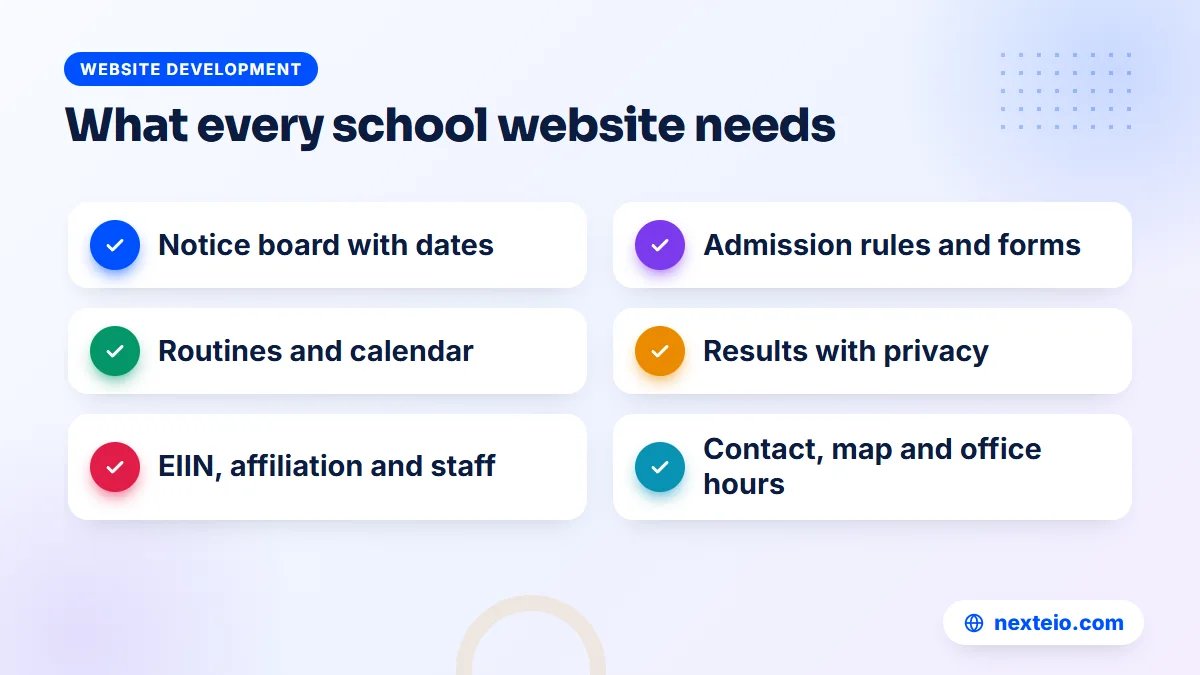
The exact list depends on the size and type of the institution, but most education sites in Bangladesh need the same core set. The first six cover the information people look for every week:
- Notice board: dated notices with the newest first, visible on the homepage.
- Admission page: eligibility, seats, important dates, fees, required documents and forms.
- Academic pages: classes or departments, subjects, groups and syllabus where relevant.
- Routines and calendar: class routines, exam routines, holiday list and the academic calendar.
- Results: internal exam results published safely, plus links for public exam results.
- Contact page: address, map, office hours, phone numbers and email.
The other six build trust and cover the rest of the institution's life:
- About and history: establishment year, EIIN, affiliation, recognition and achievements.
- Governing body or managing committee: names and roles, kept current.
- Teachers and staff: names, designations, subjects and qualifications.
- Facilities: labs, library, hostel, transport and sports, with real photos.
- Gallery and news: events, achievements and activities, with consent for student photos.
- Recruitment and downloads: job circulars, forms and policy documents in one place.
The principal's or head teacher's message is a common page as well. It belongs on the site, but not at the top of the homepage, where it pushes the notice board out of view. Put a short version lower on the homepage and the full message on the about page.
The Notice Board: The Busiest Part of the Site
On almost every school and college website, the notice board gets more visits than any other page. Exam schedules, holiday announcements, fee deadlines, admission circulars and result notices all go through it. If the notice board works well, guardians stop phoning the office for basic information. If it does not, you have an outdated website that mostly serves as decoration.
A good notice board follows a few simple rules:
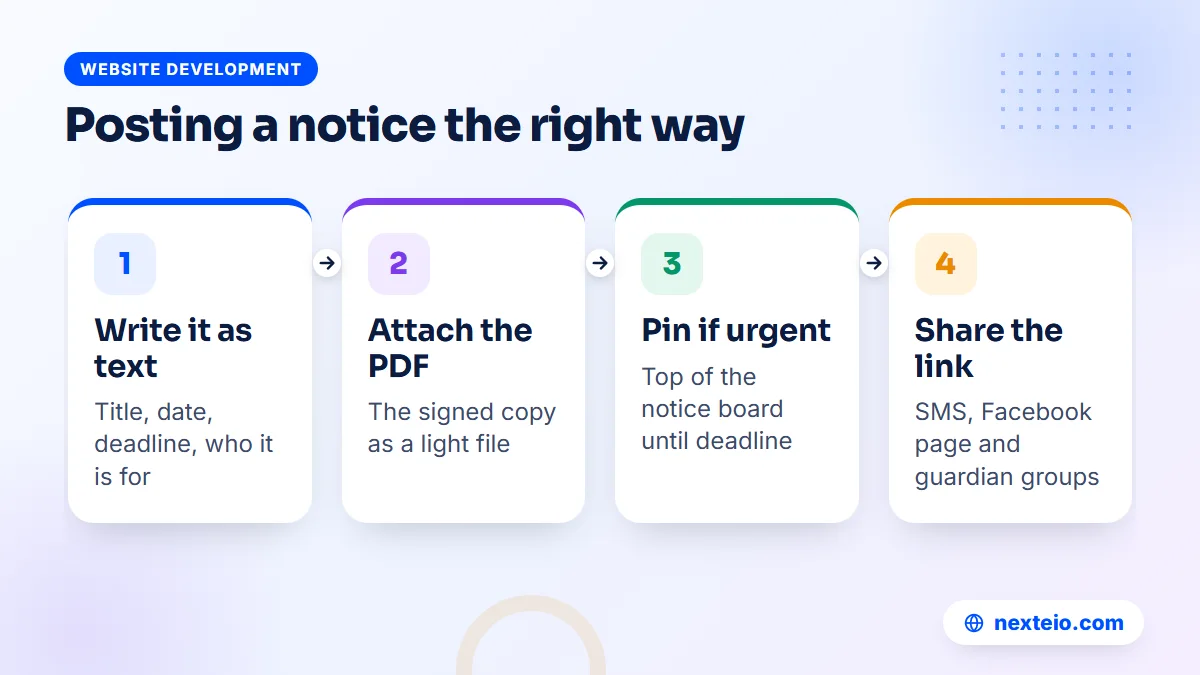
- Each notice has a clear title, a publish date and, where relevant, a deadline.
- The newest notices appear first, and urgent ones can be pinned to the top.
- The main points are written as text on the page, with the signed PDF attached below.
- Notices can be filtered by type, such as admission, exam, result, holiday or recruitment.
- Old notices move to an archive instead of being deleted.
The text version is the part most institutions skip, and it matters a great deal. A scanned image of a notice is hard to read on a phone, cannot be found through search, and is useless to anyone using a screen reader. A three-line summary on the page with the PDF attached solves all three problems.
Posting a notice on an educational website should take a few minutes. The office staff member should be able to log in, fill a short form, attach the PDF and publish, without asking anyone for help. When we build an institution website, we design the notice form around the people who will actually use it, which is usually a clerk or an ICT teacher with limited time.
Admissions: What to Publish and When
Admission season brings the highest traffic of the year, and it is when an educational website earns its keep. Prospective guardians compare institutions, read rules carefully and look for any sign of disorganization. A clear admission page answers their questions before they reach the office.
Publish these details for each admission round:
- Classes or programs open for admission and the number of seats where known.
- Eligibility rules, age limits and required results.
- Key dates: form availability, submission deadline, admission test, result and enrollment.
- Fees, with a clear breakdown of admission, session and monthly charges.
- Documents to bring, such as birth certificates, transcripts and photos.
- How to apply, whether online, in person or through a central system.
That last point is important in Bangladesh. For some levels and types of institutions, admission runs through a central government system rather than through the institution's own form. In that case, the website should not try to replace the official system. Its job is to explain the process, link to the right official page and publish the institution's own notices, such as enrollment dates and lists of selected students.
Policy and circulars from the Ministry of Education and the Directorate of Secondary and Higher Education often affect admission timing and rules. Linking to the official source in your notices helps guardians trust the information and saves your office from repeating it.
Results, Routines and the Academic Calendar
After notices, routines and results are the pages students and guardians check most. They should be easy to find from the homepage and readable on a phone without zooming.
Routines and calendars
Publish class routines and exam routines as text tables on the page wherever possible, with a downloadable PDF as an extra. A routine that exists only as a photo of a printed sheet is difficult to read on a small screen. Keep a yearly academic calendar with term dates, exams, holidays and events, and update it when dates change.
Internal exam results
For internal exams, the safest approach is a result search where a student enters a class, roll number and perhaps a date of birth or student ID to see their own result. Publishing a full list with every student's name and marks on a public page exposes children's data to anyone, including people who have no reason to see it.
For public examinations such as SSC, HSC and their madrasa and technical equivalents, results are published by the education boards through official systems. Your website should link to those official sources and, if you wish, celebrate overall pass rates and achievements once they are confirmed. Avoid copying individual board results onto your own site.
Consistency matters more than design here. Guardians quickly learn where to look if routines and results always appear in the same place, with the same format, every term.
Official Information: EIIN, Affiliation, Governing Body and Teachers
Education officials, inspectors and other institutions use an educational website to confirm basic facts. Guardians do the same in a quieter way. A clear about section shows that the institution is established, recognized and properly run.
Include these details, checked carefully against your official records:
- The full official name in Bangla and English, with the establishment year.
- The EIIN and any other official identification numbers.
- Affiliation and recognition, such as the education board, university or other authority.
- MPO status or government recognition, where it applies.
- The governing body or managing committee, with current members and roles.
- The teacher and staff list, with designations, subjects and qualifications.
The teacher list is a common source of embarrassment on an educational website. It is often accurate on launch day and wrong a year later. Give the office staff the ability to add, edit and remove teacher profiles themselves, and make reviewing it part of the start of every academic year.
A good teacher list also helps with admissions. Guardians want to know who will be teaching their children, and a page with real names, photos and qualifications is far more convincing than a line saying "experienced and dedicated teachers".
Schools, Colleges, Universities, Madrasas and Coaching Centres
All institutions share the basics, but each type of institution has its own priorities. A one-size template usually serves none of them well.
Schools
School sites are used mainly by guardians. The notice board, routines, holiday list, fee information and internal results matter most. Photos of events and achievements are popular, but every student photo needs care and consent. A simple, well-structured site usually covers a school's needs.
Colleges
College sites serve students more directly. Department pages, group-wise subjects, form fill-up notices for public exams, and higher secondary and degree-level information all need clear places. Colleges affiliated with the National University also need to point students to the right official notices for their courses.
Universities
University sites are large and complex: faculties, departments, programs, admission, research, publications, faculty profiles and often several separate portals. Private universities work within requirements set by the University Grants Commission, and their websites are an important part of how they present programs and approvals. These projects need careful information architecture and usually several editors with different permissions.
Madrasas
Madrasa sites need the same core pages as schools, with the madrasa's own structure: levels such as Ebtedayee, Dakhil, Alim, Fazil and Kamil where they apply, affiliation details, and in some cases hostel and boarding information. Many madrasas also accept support from their community, so a clear page about how to contribute, with transparent account details, is often useful.
Coaching centres
Coaching centres are businesses as much as institutions. Their site should focus on courses, batch schedules, fees, results of past students shared with consent, and an easy way to enroll or call. They also benefit most from paid promotion, which we cover later in this guide.
Online Admission Forms and Fee Payments
Many institutions now want guardians to apply and pay online instead of queuing at the office. That is a sensible goal, but it needs more planning than adding a form to a page.
An online admission form should collect only what you need, check obvious errors, let applicants upload photos and documents in reasonable sizes, and give each applicant a reference number. The office then needs a simple dashboard to see, filter and export applications. A form that only sends emails to a single inbox becomes unmanageable during admission season.
Fee payment adds another layer. Common options in Bangladesh include:
- Mobile financial services: bKash or Nagad, through an institutional merchant account.
- Payment gateway: a gateway that accepts cards, mobile wallets and internet banking in one checkout.
- Bank collection: guardians pay at a partner bank branch, and the website shows the instructions.
Whatever you choose, the key question is reconciliation. The accounts office must be able to match each payment to the right student and print or send a receipt. If the system cannot do that reliably, the office ends up checking payments by hand, which defeats the purpose. Use only accounts registered in the institution's name, never a staff member's personal number.
When an Educational Website Should Become a Student Portal
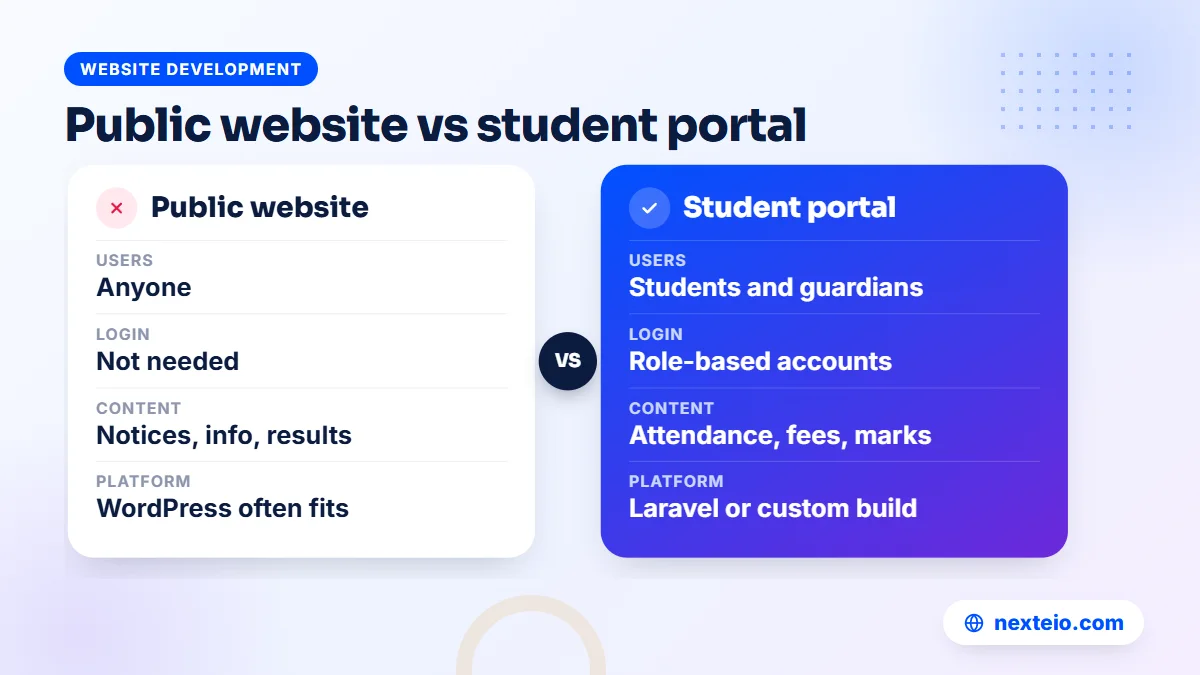
A public website shares information with everyone. A portal gives logged-in users their own information: a student's attendance, marks, fees due and assignments, or a teacher's class list and mark entry. Once an institution starts asking for these features, it has moved beyond a simple educational website.
Signs that you need a portal include:
- Teachers enter marks in spreadsheets that someone then retypes into result sheets.
- Guardians call the office to ask about attendance or fees due.
- Admission applications arrive by email and are tracked by hand.
- Several branches or shifts need shared records.
A portal like this is a proper web application with user roles, data protection and backups, and it is usually built with a framework such as Laravel. Some vendors offer a ready-made education web portal for a yearly fee. That can work for a small institution, but check who owns the data and whether you can export it if you leave. Our Laravel web application service covers this kind of system, and our guide on hiring the right Laravel developer explains what to check before you commit.
For the public site itself, a well-built WordPress website is often enough, and the portal can sit alongside it on a subdomain. Our comparison of WordPress and custom websites explains how to choose.
Bangla First, English Where It Helps
Most guardians in Bangladesh read Bangla most comfortably, so most education sites should treat Bangla as the main language. Notices, admission rules, routines and fee details should always be available in Bangla. English versions help for colleges and universities with international links, English-medium schools, and any institution that wants to present itself to a wider audience.
Use real Unicode Bangla text, not text inside images or older non-Unicode fonts. Unicode text displays correctly on modern phones, can be copied and searched, and lets Google read your content. Choose a clear Bangla web font and test it on several Android phones, since some fonts render poorly at small sizes.
If your educational website offers both languages, decide which pages need both and which can stay in one. A full English copy of every notice doubles the office's workload. A practical middle ground is Bangla for everyday notices and English for the about, academic and admission overview pages, with a clear language switch at the top.
Related guides for the technical side of an institution's site:
- How faster pages help you rank and keep visitors
- Technical SEO basics every website owner should know
- Simple SEO tips for small websites in Bangladesh
Phones, Slow Data and Result-Day Traffic
Most guardians and students visit on a phone, often on mobile data, and many use low-cost Android handsets. Design every page of an educational website for that experience first. Large readable text, short sections, tap-friendly buttons and light pages matter more than animations or large sliders.
Traffic is also uneven. A school site may see a handful of visitors on a normal day and a sudden rush when an admission result or exam routine is published. If the hosting is weak, the site slows down or fails exactly when everyone needs it. Ask your developer how the site will handle these peaks, whether through caching, a better hosting plan or a content delivery network.
Keep files light as well. A 15 MB scanned PDF can take minutes to open on a weak connection. Export notices directly from the word processor as PDF, compress images before uploading, and avoid uploading original camera photos to the gallery.
Hosting the site on a proper data-centre server, rather than a computer in the institution's office, keeps it online during load-shedding and internet outages on campus. Keep the domain and hosting in the institution's name, with an official email address, so access does not leave with a staff member.
Photos, Children's Privacy and Safety Online
Institutions hold a lot of personal information about children, and the website can expose it far more widely than a notice pinned to a wall. A careful site protects students while still sharing the life of the institution.
Practical rules for any educational website:
- Get guardian consent before publishing identifiable photos of students, and keep a record of it.
- Avoid pairing a student's full name, class and photo on public pages.
- Never publish students' or guardians' phone numbers, home addresses or national ID details.
- Use a result search instead of public mark lists, as described earlier.
- Protect admission form uploads so only authorized staff can open them.
- Remove staff accounts as soon as someone leaves the institution.
These rules also protect the institution. A complaint from a guardian about a published photo or leaked result can damage trust far more than any design problem. Agree the rules with the head of the institution before launch, and make sure every staff member who posts content knows them.
Getting Found: SEO for Education Sites
When guardians search for an institution, they usually type its name, sometimes with the area, or a phrase such as "admission notice" with the institution's name. The first goal of search work for education sites is to make sure your official website appears first for your own name, ahead of unofficial pages, old directories or social media groups.
The basics cover most of this. Use the full official name in the homepage title and main heading, keep the name consistent across the site, and add your address and contact details in text. A claimed Google Business Profile helps your institution appear on maps and in local results, and Google's guide to getting started with Business Profile explains the process. Structured data using the School type or a related education type can describe the institution to search engines.
Beyond your name, useful pages can bring in new families. A clear admission page, a page for each program or department, and regular news about achievements give search engines real content to show. Our guide to on-page SEO for beginners walks through the steps, and our SEO service helps institutions that want ongoing work.
Private schools, coaching centres and universities competing for enrollment often add paid promotion during admission season. Short campaigns through Facebook ads aimed at guardians in your catchment area can work well when the ad leads to a clear admission page rather than the homepage.
Budget, Timeline and Who Updates the Site
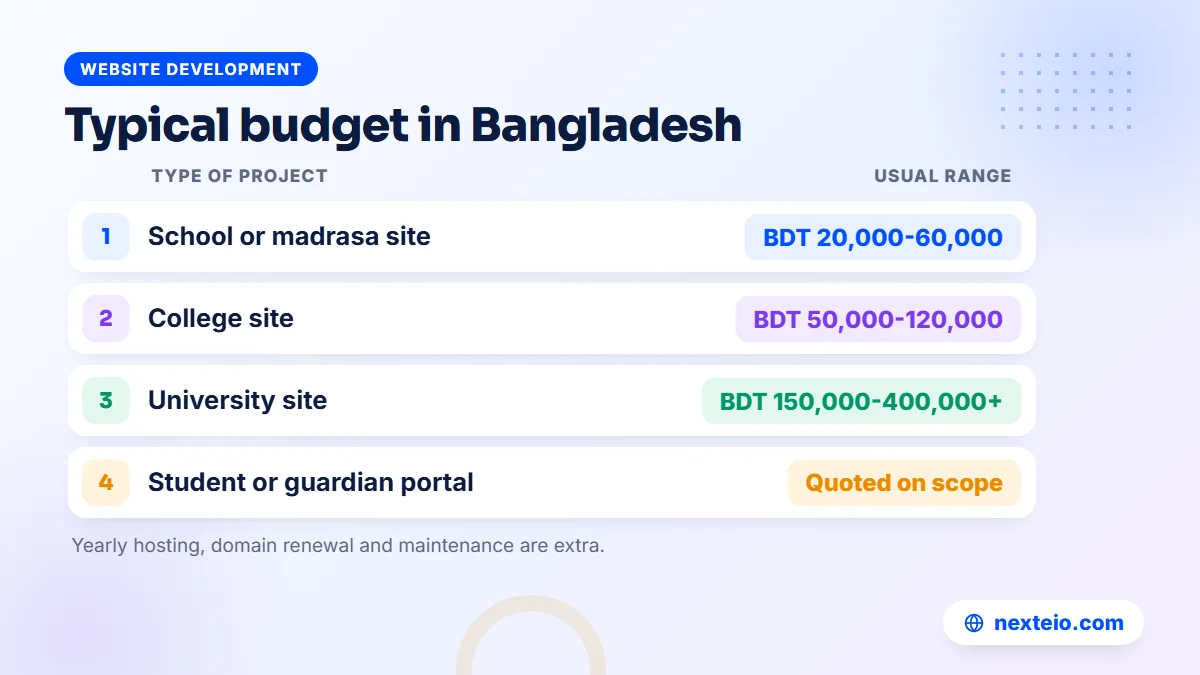
Costs depend on the size of the institution, the number of pages and languages, and whether you need online forms, payments or a portal. In our experience, educational website projects in Bangladesh usually fall into these broad ranges:
| Type of project | Usual range | Typically includes |
|---|---|---|
| School or madrasa website | BDT 20,000 to 60,000 | Core pages, notice board, gallery, teacher list, contact |
| College website | BDT 50,000 to 120,000 | Departments, notices, routines, result search, two languages |
| University website | BDT 150,000 to 400,000 or more | Faculties, programs, research, many editors, integrations |
| Student or guardian portal | Quoted on scope | Logins, attendance, marks, fees, reports |
These are market ranges, not fixed prices. Hosting, domain renewal and maintenance are usually separate. Ask every provider to quote against the same written list of pages and features, which also makes approval by the governing body easier.
For timelines, a school site with ready content can often launch in three to five weeks, while larger college and university sites take longer. In practice, the slowest part is usually collecting content: teacher details, history, photos and approved text. Start gathering it before the design begins.
Finally, plan who updates each part of the educational website. Name one responsible person for the notice board, one for academic pages and one senior person who approves content. Train them before launch, and give each a separate account with only the permissions they need. If you would like a figure for your own institution, send us a short brief.
How Nexteio Can Help With Your Educational Website
We design and build websites for schools, colleges, madrasas, universities and coaching centres across Bangladesh through our custom website design service. Each project starts with the people who will use the site most, usually guardians and students, and the staff who will update it.
We plan the pages and menu with your focal person, then build a notice board your office can update in minutes, admission and academic pages, a safe result search, teacher and governing body pages, and a gallery that respects student privacy. Sites are designed for phones and slow connections, in Bangla first with English where you need it. We train your staff before launch and set up separate accounts for each role.
When an institution needs online admission, fee collection or a student portal, we plan it as a custom education system alongside the public site. The domain, hosting and admin access stay in your institution's name. You can see the kind of sites we build in our portfolio, read about Nexteio, share your requirements or reach us through the contact page. If you are still comparing options, start with our website design service overview.
Keep reading: our buyer's checklist for choosing a web design company, common SEO mistakes that hurt websites, or all our website development guides.
Frequently asked questions
What should a school website include?
At minimum, a dated notice board, admission information, class and exam routines, a holiday list, internal results shared safely, a teacher list and full contact details. Official details such as the EIIN, affiliation and governing body build trust with guardians and officials. A gallery and news page are useful once the basics are in place.
Can our office staff update the educational website without a developer?
Yes, if the site is built for them. A good admin panel lets a clerk or ICT teacher post a notice, upload a PDF and update the teacher list in a few minutes. Ask for training before launch and separate accounts with limited permissions for each person.
Is it safe to publish exam results on our website?
It is safe if each student can only see their own result, for example by entering a roll number and student ID. Avoid publishing full mark lists with names on a public page, because anyone can copy and share them. For public board exams, link to the official result systems instead of copying results.
Should a madrasa website be in Bangla, English or Arabic?
Bangla should usually be the main language, since most guardians read it most comfortably. English helps for the about and contact pages, especially if the madrasa has links with institutions abroad. Arabic text can be added where it is meaningful, such as names of courses or short quotations, as long as it is entered as real text, not images.
Do we need a student portal or just a website?
A website is enough if you mainly share notices, routines and general information. You need a portal when students and guardians must log in to see their own attendance, marks or fees, or when teachers should enter marks online. Many institutions start with a good public educational website and add a portal later.
Can guardians pay fees through the website?
Yes. Institutions commonly use bKash or Nagad merchant accounts, a payment gateway that supports cards and mobile wallets, or bank collection with instructions on the website. The important part is that the accounts office can match every payment to a student and issue a receipt.
How long does it take to build a college website?
A college site with clear content can often launch within one to two months, depending on the number of departments, languages and features such as result search or online forms. Collecting teacher details, photos and approved text usually takes longer than the build itself, so start that work early.
Who should own the domain and hosting for an institution's website?
The institution itself, registered with an official email address and recorded by the head of the institution and at least one other senior person. Your web provider can have separate access to do the work, but the main accounts should not belong to a teacher or vendor personally.