School Fee Management System: Monthly Bills, bKash and Due Reminders
In this article 16 sections
- 1.What a Fee Management System Does That a Receipt Book Cannot
- 2.Step 1: Design Your Fee Structure Before Setup
- 3.Step 2: Set Rules for Discounts, Scholarships and Siblings
- 4.Step 3: Let the Fee Management System Create Monthly Bills
- 5.Step 4: Collect at the Counter With Proper Receipts
- 6.Step 5: Add Online Payments That Families Already Use
- 7.Step 6: Chase Dues Politely With Reminder SMS
- 8.Step 7: Close the Day and Keep Cash Under Control
- 9.Step 8: Publish a Clear Fee Calendar for Guardians
- 10.The Guardian Side: Paying and Checking Fees From a Phone
- 11.Setting Up a Fee Management System: The Full Checklist
- 12.Common Mistakes With School Fee Collection Software
- 13.What a Fee Management System Costs
- 14.Try the Fee Management System in Our Live Demo
- 15.How Nexteio Can Help
- 16.Frequently asked questions
A fee management system turns a school's receipt books and due registers into one record of what every student owes and has paid. Bills are created on time, every taka collected has a receipt, and the office can tell a guardian their exact due in seconds instead of searching through carbon copies. For schools in Bangladesh, it also means taking payments by bKash, Nagad, card or bank without losing track of who paid what.
Fees are the most sensitive part of school administration. A mistake in attendance annoys a guardian. A mistake in fees, such as a payment that was made but not recorded, damages trust and sometimes leads to an awkward meeting with the managing committee.
This how-to guide walks through the whole cycle in the order you would set it up: designing the fee structure, handling discounts, creating monthly bills, collecting at the counter and online, chasing dues politely and closing the books each day. It is written for head teachers, accountants, office staff and committee members who sign off on money matters.
At each step we show how our own School Management Software handles the job, and where it stops, so you can judge it against your school's real needs.
What a Fee Management System Does That a Receipt Book Cannot
A receipt book records a payment. It does not know what was supposed to be paid. That gap is where most fee problems start. The accountant has to remember which students are behind, the head teacher has no quick view of the month's collection, and a guardian who lost their slip has no way to prove a payment.
A fee management system starts from the other end. It knows what each student owes, because the fee structure and the monthly bills are already in it. Every payment is matched against a bill, so dues are always current. In practice that gives the office five things a paper system struggles with:
- An up-to-date due for any student, at any moment.
- A numbered, printed receipt for every payment, with a copy kept in the system.
- Collection totals by day, by payment method and by the staff member who collected.
- A due list that shows who owes what, ready for reminders.
- Online and counter payments in the same record, so nothing is counted twice or missed.
The system does not decide fee policy for you. How much to charge, when fees are due and who gets a waiver are still decisions for the school. What changes is that once those decisions are made, the system applies them the same way every month.
Step 1: Design Your Fee Structure Before Setup
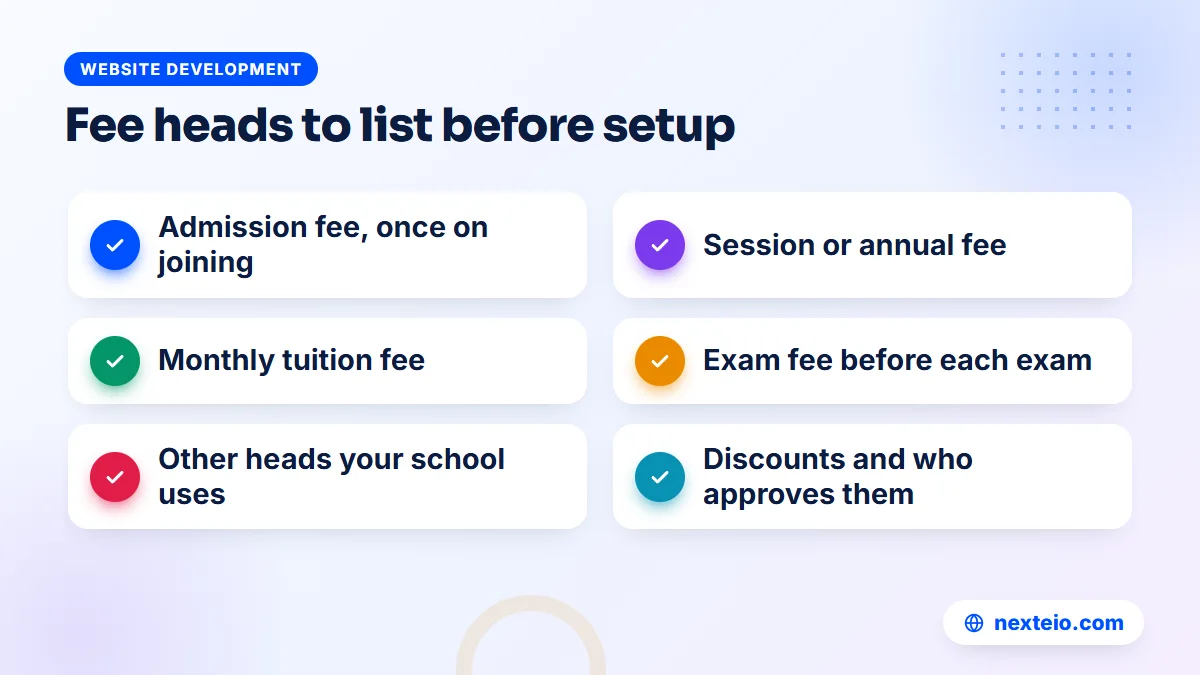
The most common setup mistake is entering fees straight into the software without first agreeing them on paper. Sit down with the head teacher and accountant and list every kind of fee the school charges. These are usually called fee heads. Typical heads in a school in Bangladesh include:
- Admission fee: charged once when a student joins.
- Session or annual fee: charged once a year, often at the start of the session.
- Monthly tuition fee: the regular fee charged every month.
- Exam fee: charged before each term or annual exam.
- Other heads: such as computer lab, sports, ID card or development fees, if your school charges them.
Next, decide which heads apply to which class and at what amount. Class Nine may pay a different tuition fee from Class Two, and a practical exam fee may apply only to science groups. This class-wise table is your fee structure, and it should be approved by whoever approves fees in your school before anyone types it in.
Our School Management Software follows this exact shape. You create fee heads, then set a class-wise fee structure that says which heads each class pays. That structure is what the system uses to create bills, so getting it right at the start saves corrections all year.
Step 2: Set Rules for Discounts, Scholarships and Siblings
Almost every school gives some families a reduced fee. Merit scholarships, poor-student support, staff children and sibling discounts are common. On paper these are often handled informally, with the accountant remembering who pays less. That works until the accountant is on leave or a committee member asks why collections are lower than expected.
Write down each discount type, who qualifies and who approves it. A short policy might look like this:
| Discount type | Who qualifies | Who approves | Review |
|---|---|---|---|
| Merit scholarship | Top results in the previous annual exam | Head teacher | Every year after results |
| Need-based support | Families who apply with a reason | Head teacher and committee | Every year |
| Sibling discount | Second and later children in the school | Accountant, as per policy | When a sibling leaves |
| Staff child | Children of current teachers and staff | Head teacher | When the staff member leaves |
The amounts and rules are yours to set. The point is that each discount is recorded against the student, not kept in someone's memory.
In our software, scholarship and sibling discounts are set against the student and applied when bills are created. The due list and collection reports then reflect the reduced amount automatically, so the numbers the committee sees match what families were actually asked to pay.
Step 3: Let the Fee Management System Create Monthly Bills
Once the fee structure and discounts are in place, monthly billing becomes the easiest job in the office. Instead of an accountant writing bills or updating a due register by hand, the fee management system creates each student's bill on a fixed day.
Our School Management Software creates monthly bills automatically on the 1st of every month, for every class, using the class-wise fee structure and each student's discounts. Nobody has to remember to start it. When a guardian logs in or visits the counter on the 2nd, the new month's bill is already there.
Automatic bills also fix a quieter problem: consistency. When bills are written by hand, two students in the same class can end up with different amounts because of a copying mistake. When the system creates them from one fee structure, every student in the class gets the same bill, minus only the discounts that were approved and recorded.
One-time fees, such as an exam fee or the annual session fee, still need a decision about timing. Agree in advance which month each one is billed, and tell guardians at the start of the year. Surprise charges are a common source of complaints. The admission form fee is a separate case, and our guide to an online admission system compares ways to collect it before a child is enrolled.
Step 4: Collect at the Counter With Proper Receipts
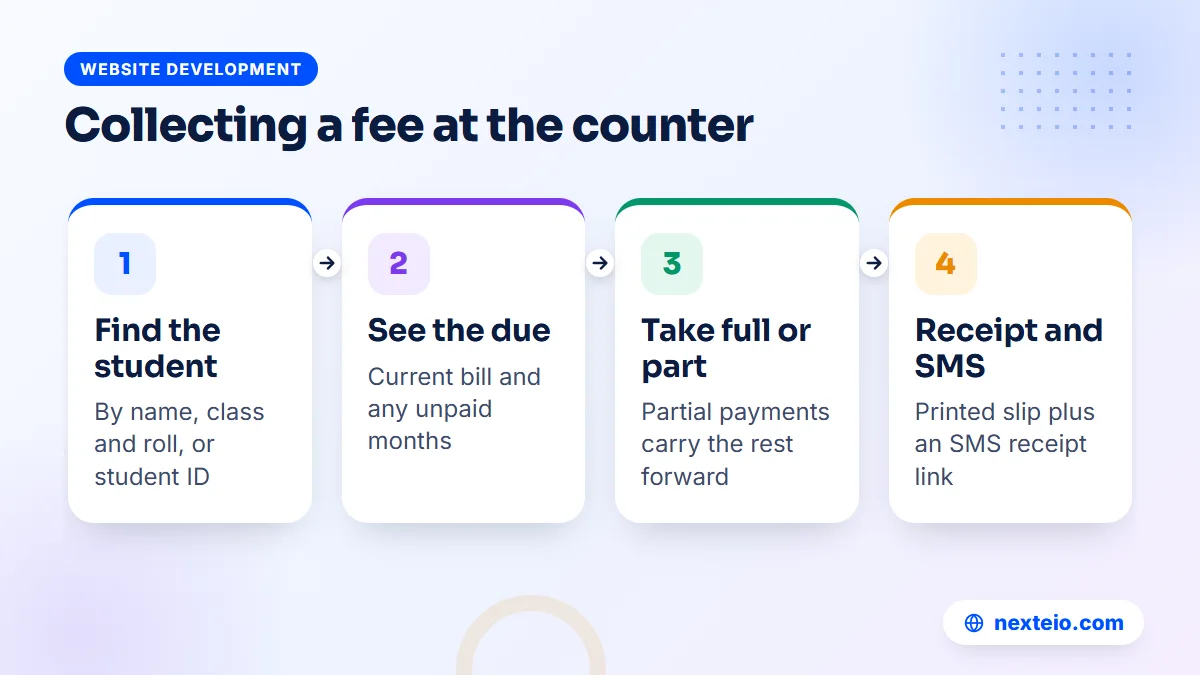
Even with online payments available, many guardians in Bangladesh will keep paying cash at the school. The counter process needs to be quick, because queues form on the first days of each month and before exams.
A good counter routine looks like this:
- The guardian gives the student's name, class and roll, or the student ID.
- The collector opens the student's record and sees the current due.
- The guardian pays the full due or part of it.
- The system records the payment and prints a receipt.
- The collector hands over the receipt and keeps the cash in a separate box for that day.
Partial payments deserve a clear policy. Some families pay in two installments during a hard month. A system that accepts partial payments and carries the rest forward as due handles this cleanly. One that only accepts full payments forces the office back to paper notes.
Our system supports collection with printed receipts and partial payments. Every collection is recorded with the date, the payment method and the person who collected it, and the collection report can be filtered on each of those. When the guardian's mobile number is on file, a payment SMS goes out with a link to the receipt, so a lost paper slip is no longer a problem.
Step 5: Add Online Payments That Families Already Use
Mobile financial services are part of daily life in Bangladesh. Guardians already pay bills and send money with them, and services such as bKash and Nagad operate under rules set by Bangladesh Bank. Adding online payment to your fee management system lets guardians pay without traveling to school or waiting in a queue.
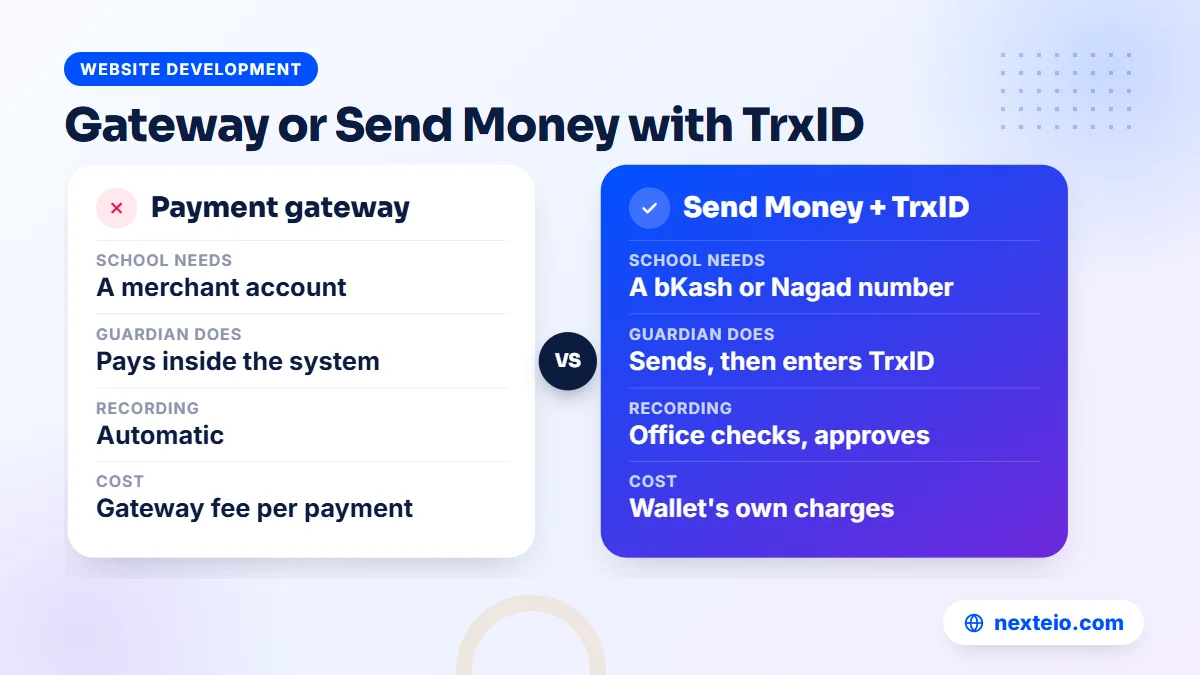
There are three common ways a school can accept online payments, each with different paperwork and costs:
| Route | How the guardian pays | What the school needs | Office work |
|---|---|---|---|
| bKash Payment Gateway | Pays inside the school system using bKash | A bKash merchant account | Payment is recorded automatically |
| SSLCommerz | Chooses card, bKash, Nagad, Rocket or bank at checkout | An SSLCommerz merchant account | Payment is recorded automatically |
| Send Money with TrxID | Sends money to the school's number, then enters the transaction ID | A bKash or Nagad number in the school's name | Office checks the TrxID and approves |
Gateways charge a fee per transaction, and the rates and documents they ask for are set by the provider, so ask each one directly. SSLCommerz publishes its merchant information on its own site, and its developer documentation shows how a website connects to it. Our guide to payment gateways in Bangladesh explains the merchant account process in more detail.
Our School Management Software supports all three routes: the bKash Payment Gateway with a merchant account, SSLCommerz for cards, bKash, Nagad, Rocket and bank payments, and Send Money, where the guardian pays the school's bKash or Nagad number, enters the TrxID and the office approves it. Many schools start with Send Money because it needs no merchant agreement, then add a gateway once online payments become common.
Connecting a gateway is the same kind of work we do for online shops through our e-commerce website development and for custom portals through our Laravel web application service. The checks are the same too: test payments, failed payments and refunds before real guardians use it.
If you are still choosing between providers, our comparison of the best payment processors for small organizations looks at fees and setup effort. Foreign gateways are a different story, and our article on Stripe in Bangladesh explains why most local institutions use local gateways instead.
Step 6: Chase Dues Politely With Reminder SMS
Every school has dues. The question is how to recover them without embarrassing families or wearing out the accountant. A fee management system helps in two ways: it always knows who owes what, and it can remind guardians by SMS without a staff member making dozens of calls.
A few rules keep reminders effective:
- Timing: send the first reminder a few days after the due date, not on the 1st when the bill has just been created.
- Tone: state the student, the month and the amount, and invite the guardian to contact the office if there is a problem.
- Frequency: one reminder a week is plenty. Daily messages feel like pressure and get ignored.
Two more rules protect the relationship with families:
- Privacy: never name students with dues on a notice board or in a class group.
- Personal touch: after two or three reminders, a quiet phone call from the office works better than another SMS.
Our software keeps a due list for the whole school and sends due-reminder SMS to guardians. The text is editable, so you can write it in Bangla or English in a tone that fits your school, and a test SMS button lets you check it before it reaches families. The current version does not offer bulk or custom SMS to groups, so reminders go through the due-reminder feature rather than a free-text broadcast.
Ready settings exist for BulkSMSBD, Alpha SMS (sms.net.bd), Greenweb and ElitBuzz, with a custom option for other providers. Remember that a Bangla SMS holds fewer characters per part than English, so a long Bangla reminder may cost two or three messages.
Related guides for schools planning their systems:
- School management software: the features a school in Bangladesh needs
- Educational website design for schools, colleges and madrasas
- Campus management system software for colleges
Step 7: Close the Day and Keep Cash Under Control
Fee collection involves cash, and cash needs controls. This is not about suspecting staff. Clear controls protect honest collectors from false accusations as much as they protect the school.
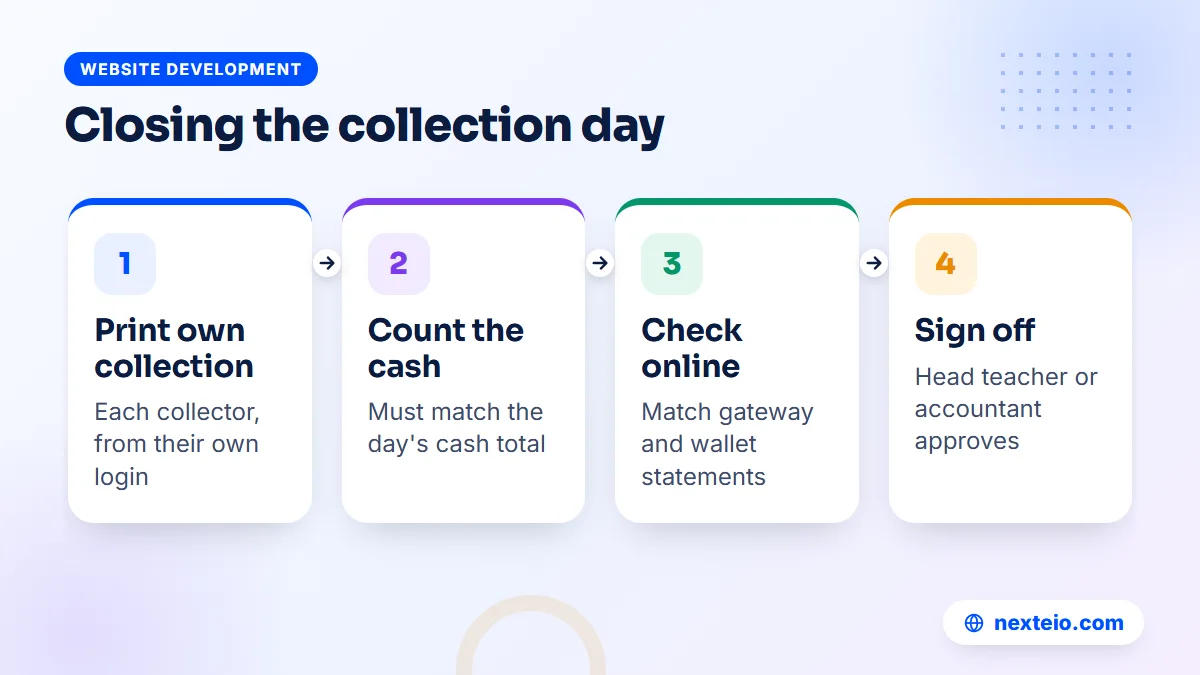
Build a short closing routine at the end of each collection day:
- Each collector prints or views their own collection for the day.
- Cash in the box is counted and must match that day's cash total.
- Online and Send Money payments are checked against the gateway or mobile wallet statement.
- The accountant or head teacher signs off and the cash goes to the bank or the safe.
Then add a few standing rules: every collector uses their own login, no cash is accepted without a system receipt, receipts are never deleted to "fix" a mistake, and any correction is approved by a senior person. These rules only work when the software records who did what, which is why our system reports collections by collector and keeps an activity log of actions.
Corrections and refunds
Mistakes will happen. A collector picks the wrong student with a similar name, or a guardian pays twice, once online and once at the counter. The fix should never be to delete the record quietly. Note what went wrong, have a senior person approve the correction and, where money goes back to a family, give them a written acknowledgement of the refund.
Double payments are most common in the first months after online payment starts, when guardians are unsure whether their bKash payment went through. A clear SMS receipt for every online payment reduces this, and so does a line in the fee notice telling guardians to check their SMS before paying again.
One honest limit matters here. Our software handles student fees: bills, collection, receipts and dues. It does not include a general accounts module for income and expenses, so the school's other spending, bank reconciliation and annual accounts still need the accountant's existing method or separate accounting software. If you want income and expense accounts inside the same system, that is custom work our Laravel developers can scope after a requirements review.
Step 8: Publish a Clear Fee Calendar for Guardians
Many fee complaints are really communication problems. A family budgets for the monthly tuition, then an exam fee and a session fee arrive in the same month without warning. Software cannot fix that, but a simple fee calendar published at the start of the session can.
A useful fee notice answers five questions in plain Bangla and English:
- Which fees apply to each class, and how much is each one?
- In which month is each one-time fee billed?
- By what date should the monthly fee be paid?
- Which payment routes are available, at the counter and online?
- Whom should guardians contact about a discount or a disputed amount?
Post the notice on the school website and repeat the key dates in the admission papers. Our software includes a public school website with notices, downloads and a prospectus PDF, so the fee calendar can sit next to the admission information where new guardians will see it. When the fee structure changes, update the notice the same week, before the first new bill is created.
The Guardian Side: Paying and Checking Fees From a Phone
A fee management system is only half used if guardians cannot see their own account. When a guardian can log in, see the current bill, check past payments and pay from a phone, most "how much do I owe?" calls to the office stop. Our guide to a student information system shows how the same guardian login also answers questions about attendance and results.
In our School Management Software, the parent panel covers several children under one login, which suits families with siblings in different classes. From there, guardians can see fees and pay online through whichever routes the school has switched on. Receipts arrive by SMS link, and the system works in the phone browser in Bangla or English, with no app to install.
Guardians also judge the school by its public website, which our system includes with notices, admission information and result search. If you want that website found by families searching for schools, our SEO service can help it rank. Schools that only want a public site, without the management side, can start with a WordPress website or a custom-designed school website.
Setting Up a Fee Management System: The Full Checklist
Here is the whole setup in one place, in the order that avoids rework. Use it for any system, not just ours. The first half is about policy and data:
- List every fee head and get the amounts approved.
- Build the class-wise fee structure on paper first.
- Write the discount policy and list which students receive which discount.
- Check guardian mobile numbers, because receipts and reminders depend on them.
- Import students and confirm each class list with the class teacher.
The second half is about money routes and going live:
- Decide which payment routes to offer and apply for merchant accounts early.
- Write the payment and due-reminder SMS texts, then test them on staff phones.
- Set the opening dues for students who already owe from previous months.
- Give each collector their own login and agree the daily closing routine.
- Announce the change to guardians with a notice explaining how to pay.
Opening dues deserve care. If a student owed three months under the old register, that amount must be carried in correctly, or the first due list will be wrong and the first reminders will upset families. Have the accountant check opening balances class by class before any reminder goes out.
Common Mistakes With School Fee Collection Software
These problems come up again and again when schools move fees into software:
- Discounts given verbally. If waivers are not recorded in the system, the due list overstates what families owe.
- Shared collector logins. When two people use one account, the collection report cannot show who took the cash.
- Deleting instead of correcting. A deleted receipt leaves a gap that looks like theft even when it was an honest error.
- Approving Send Money without checking. Every TrxID must be matched to the wallet statement before approval.
- Reminders before checking opening dues. A wrong reminder in the first month damages trust in the whole system.
- No notice to guardians. Families need to know how to pay online and what the SMS will look like.
Each of these is a process problem, not a software problem. A fee management system makes the right process easy, but the head teacher still has to insist on it.
What a Fee Management System Costs
The cost of moving fees online has several parts. The software is only one of them.
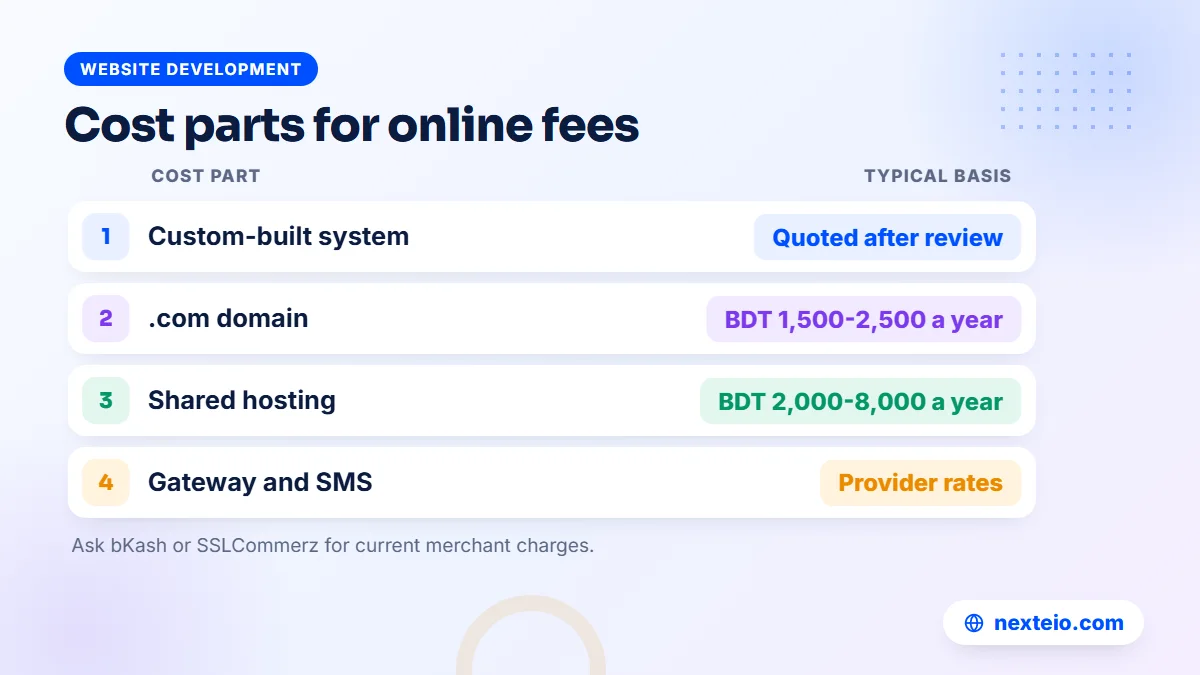
- Software: a ready product set up for your school, or a custom build. Custom systems are quoted after a requirements review, and depending on modules and users they commonly range from about BDT 150,000 to 1,200,000 or more in Bangladesh.
Running costs come on top of the build or setup:
- Domain and hosting: about BDT 1,500-2,500 a year for a .com domain and about BDT 2,000-8,000 a year for shared hosting.
- Gateway charges: a per-transaction fee set by bKash or SSLCommerz under your merchant agreement.
- SMS credit: payment and reminder messages are charged per SMS by your provider.
A fee module is rarely bought on its own. It works best inside a full education management system, where bills come from the same student records used for admission, attendance and results. That is how our School Management Software is built, and it is also why custom fee projects are usually Laravel web applications rather than simple websites. Our explainer on the Laravel framework covers why it suits this kind of system.
We do not publish a price for our School Management Software. Fees and online payment are part of the Standard and Premium packages, while the Basic package covers the website, admission, students, attendance, notices, SMS and teacher and parent logins. The right package and price depend on your school, so send us your requirements for a quote.
Try the Fee Management System in Our Live Demo
You can test the whole fee cycle yourself before talking to anyone. Our live demo has about 113 sample students and 20 teachers, with one-click logins for Super Admin, Accountant, Head Teacher, Teacher, Parent and Student.
A useful ten-minute test:
- Log in as the accountant, find a student, collect part of a fee and print the receipt.
- Open the due list and see how that student's balance changed.
- Check the collection report by date and by collector.
- Log in as a parent and pay a fee with the demo payment.
- Return to the accountant view and confirm the online payment appears.
Users, license, SMS and gateway settings are locked in the demo, payments are demo payments only and the data resets every three hours. For screenshots and the full module list, see our School Management Software page in the portfolio.
How Nexteio Can Help
We built our School Management Software for schools in Bangladesh, from Play to Class Ten, and its fee module covers the full cycle described in this guide: fee heads, class-wise structures, discounts, automatic monthly bills, counter collection with receipts, partial payments, online payments and due reminders by SMS.
We set the system up on your school's own domain and hosting, with your name, logo and colors, import your student list from CSV and connect the payment routes and SMS provider you choose. Your accountant then enters the fee heads, the class-wise structure and discounts, and the first automatic bills go out on the 1st. Nexteio has no access to your school's data once it is running on your server, and nightly backups go to your own Google Drive.
If you need fee features beyond the current version, our Laravel development service can quote them as separate work. Try the demo, see the product details in our portfolio, then tell us about your school. You can also learn more about Nexteio, browse our wider portfolio or reach us through the contact page.
Keep reading: learning management systems for schools, how web applications are built, or browse more website development guides.
Frequently asked questions
Can guardians pay school fees by bKash through the system?
Yes. With a bKash merchant account, the school can use the bKash Payment Gateway so the payment is recorded automatically. Schools without a merchant account can use the Send Money route, where the guardian pays the school's bKash or Nagad number, enters the TrxID and the office approves it after checking.
What happens when a guardian pays only part of the monthly fee?
Our School Management Software accepts partial payments. The amount paid gets a receipt, and the remaining balance stays on the student's due, so it appears in the due list and in later reminders until it is cleared.
Do we need a merchant account to accept online fee payments?
For a payment gateway such as bKash Payment Gateway or SSLCommerz, yes, and the provider sets the documents and charges. If you want to start without one, the Send Money with TrxID route works with an ordinary bKash or Nagad number in the school's name, at the cost of a manual approval step.
Can the system handle sibling discounts and scholarships?
Yes. Scholarship and sibling discounts are set against each student and applied when monthly bills are created. Write a short policy for who qualifies and who approves each discount, so the records match the school's decisions.
Does the fee module manage the school's full accounts?
No. It handles student fees: bills, collections, receipts, partial payments and dues. A general accounts module for income and expenses is not part of the current version, so other spending and annual accounts still need your existing method or separate software.
How do we move existing dues from the old register into the new system?
Import students first, then carry each student's existing due across exactly as it stands in the old register, and have the accountant check the totals class by class. Ask your vendor to show how previous dues are entered in their system. Do not send any reminder SMS until those balances are confirmed, because a wrong first reminder upsets families quickly.
Is it safe to let several staff members collect fees?
It is safe when each collector has their own login and every payment gets a system receipt. Our software reports collections by date, method and collector and keeps an activity log, so the daily closing routine can match each person's cash against their own records.