School Management Software: Features a School in Bangladesh Needs
In this article 15 sections
- 1.What School Management Software Does and What It Does Not
- 2.Signs Your School Has Outgrown Registers and Spreadsheets
- 3.Admission and Student Records
- 4.Attendance and Guardian Alerts
- 5.Fees, Waivers and Mobile Payments
- 6.Exams, Marks Entry and Result Cards
- 7.Routines, Teachers, Staff and Payroll
- 8.Portals, Apps and Reports
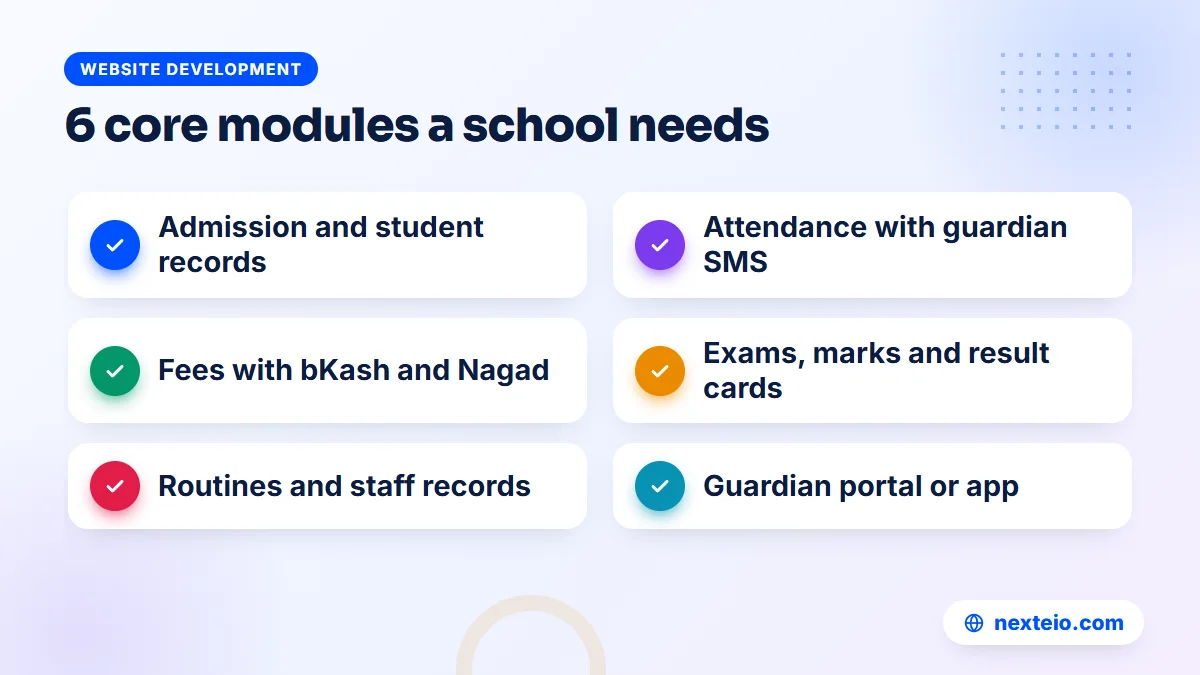
- 9.School Management Software Feature Checklist
- 10.Ready-Made or Custom School Management Software
- 11.Security, Backups and Student Privacy
- 12.What School Management Software Costs and How Long It Takes
- 13.Rolling Out School Management Software Without Chaos
- 14.How Nexteio Can Help With School Management Software
- 15.Frequently asked questions
School management software brings a school's daily records into one system: admissions, student details, attendance, fees, exams, results, routines and staff. Instead of the office keeping one register, the accounts desk another and each class teacher a notebook, everyone works from the same student record. Guardians can see what concerns their child, and the principal can see the whole school at a glance.
For many schools in Bangladesh, the push to change comes from a bad week. Results take days to tabulate by hand. A guardian disputes a fee receipt that nobody can find. The one person who understood the Excel files leaves before the annual exam. A good system removes those single points of failure, but a poor choice can add new ones.
This guide explains what each module should do in a Bangladeshi school, which features matter and which are nice extras, how ready-made and custom systems compare, and what to expect for cost, security and rollout. It is written for principals, governing body members, office heads and the teachers who will use the system every day.
What School Management Software Does and What It Does Not
At its heart, a school management system is a shared database with screens for each kind of user. The office enters a student once at admission. From then on, that same record carries the class and roll, attendance, fee payments, exam marks, results and transfer papers. Nobody types the student's name and father's name again in a different register.
It helps to separate three tools that are often confused, because vendors sometimes sell one as if it were another:
- School website: the public face of the school, with notices, admission information, results announcements and contact details for anyone to read.
- School management software: the private system that runs records, fees, attendance and exams, used by staff and guardians with their own logins.
- Learning management system (LMS): a tool for teaching itself, with lessons, assignments, quizzes and class materials.
Many schools need the first two. Some also want the third, but it solves a different problem. The website and the management system should connect, so a result published in the system can appear on the website and a website admission form can create a record in the system. A school that only needs a notice board and admission pages for now can start with a simple WordPress website and add the management system later.
The software also does not replace good office habits. If marks are entered late or fee waivers are given without approval, the system will record those problems faithfully. What it changes is visibility: everyone can see what was done, by whom and when.
Signs Your School Has Outgrown Registers and Spreadsheets
Paper registers and Excel files work for a small school with one person in charge. They start to fail as the school grows, adds shifts or sections, or loses the staff member who built the files. These are the common warning signs:
- Result tabulation takes several days and needs teachers to stay late copying marks.
- Guardians ask about fee dues and the office cannot answer without searching receipt books.
- The same student appears with different spellings in different registers.
- Attendance is taken on paper but never analyzed until a problem becomes serious.
- Admission season means long queues for forms that are then typed in again.
- Only one person understands the spreadsheets, and the school depends on their presence.
Two or three of these together usually mean the school is spending more staff time on records than a system would cost. The question then is not whether to change, but which system to choose and how to move without disrupting a term.
Admission and Student Records
Admission is where the student record is born, so mistakes here follow the child for years. A good system makes the first entry careful and every later step automatic.
Online applications and admission tests
Guardians should be able to apply from a phone: fill in the child's details and birth registration number, upload a photo, and pay the form fee through bKash, Nagad or a card. The office then sees every application in one list, can generate admit cards for the admission test, enter test marks and publish the selected list. For schools that hold a lottery for some classes, the system should record how places were assigned, so the process can be shown to anyone who asks.
The student profile
Once admitted, each student gets a profile with class, section, shift, roll, photo, date of birth, guardian names and phone numbers, address and any medical notes. Keep the fields the school truly uses. A profile with forty fields that nobody fills in is worse than one with fifteen that are always correct.
The profile should also hold the documents the school issues: ID cards, admit cards, testimonials and transfer certificates. Generating these from the record, with the school's format and the principal's signature image, saves the office hours each week and removes typing errors on official papers.
Promotion and class changes
At the end of the year, students move up a class, some repeat, some leave and new rolls are assigned. A good system handles this in bulk, using the final results, while keeping the history of every previous class. Schools that do this by hand often lose the record of where a student was two years ago.
Attendance and Guardian Alerts
Attendance is the module teachers touch most, so it must be quick. If marking a class of fifty takes five minutes on a slow screen, teachers will go back to paper within a month.
There are three common ways to take student attendance:
- Teacher on a phone: the class list opens with everyone marked present, and the teacher taps only the absent students.
- ID cards with a reader: students tap a card at the gate, and the system records arrival time.
- Fingerprint or face devices: more common for staff attendance than for young students, and dependent on reliable power and network.
For most schools, teacher-marked attendance on a phone is the practical start. Devices can be added later.
The real value comes from what happens next. A guardian who gets an SMS when a child is absent can respond the same morning, rather than hearing about it at the parent meeting. Absence patterns, such as a student missing every Sunday, become visible to the class teacher. Keep in mind that SMS has a cost per message, sent through a local SMS provider, and messages under the school's own name usually cost more than plain ones. Agree which alerts are worth sending, so the SMS bill stays predictable.
Teacher and staff attendance often runs through the same system. Linking it to leave records and payroll removes a monthly argument between the office and the accounts desk.
Fees, Waivers and Mobile Payments
For most private schools, the fees module is the one that pays for the whole system. When fees are tracked properly, dues are collected on time, receipts cannot be lost, and the governing body can see the school's income without waiting for the accountant.
A good fees module should handle all the ways Bangladeshi schools charge:
| Fee type | How it usually works | What the system should do |
|---|---|---|
| Monthly tuition | Fixed amount per class, due each month | Create dues automatically and show each student's balance |
| Admission and session fees | Paid once a year or at admission | Apply to the right students and print a receipt |
| Exam fees | Charged before each term exam | Block admit cards until paid, if the school wants that rule |
| Transport, hostel, coaching | Optional services for some students | Add only to students who use them |
| Waivers and scholarships | Siblings, staff children, merit or need | Record who approved each waiver and why |
Each fee head should also post to the accounts reports, so totals match without manual work.
Mobile payments change the fee desk more than any other feature. When guardians can pay tuition through bKash, Nagad or a card from home, queues shrink and the payment is matched to the student automatically. This usually works through a payment gateway connected to the system, or through the provider's merchant service. Ask any vendor exactly how payments are matched to students, how refunds are handled, and how a payment made outside the system, such as cash at the office, is recorded.
The waiver rule in the table matters more than it looks. Unrecorded discounts are one of the most common reasons a school's fee income falls short of what it should be. A system that requires an approver's name for every waiver protects both the school and the staff.
Exams, Marks Entry and Result Cards
Results are the most visible output of any school management software, and the moment when weaknesses show. Guardians remember a wrong GPA far longer than a smooth admission.
Setting up exams
Each exam needs subjects, full marks and the split between parts such as written, MCQ and practical. Many schools use the familiar letter grades and GPA scale from the public exams, while others add class tests, attendance marks or continuous assessment. Assessment rules in Bangladesh have changed more than once in recent years, so the grading scheme must be something the school can configure, not something fixed in the code.
Entering and checking marks
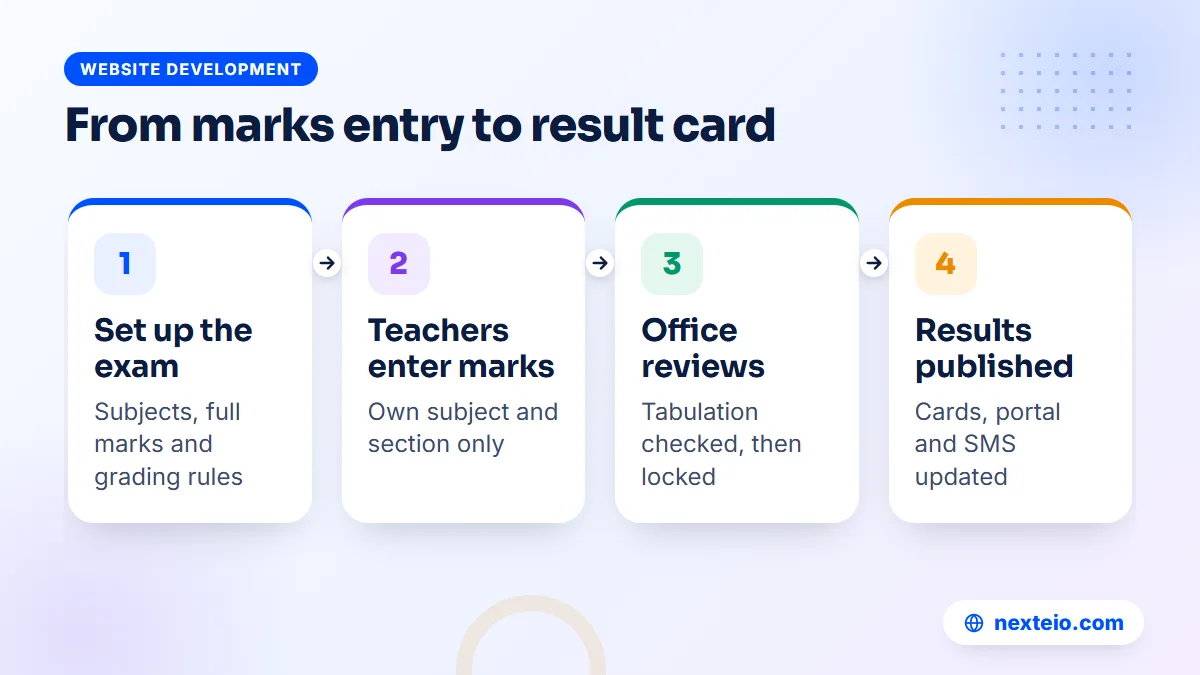
Each teacher should enter marks only for their own subjects and sections, ideally from a phone or office computer. The system then builds the tabulation sheet, calculates totals, grades, GPA and merit positions, and flags anything odd, such as marks above full marks or a missing subject. The office reviews, corrects through the teacher, and locks the results before publishing.
Publishing results
Once locked, results can be printed as report cards, shown to guardians in their portal, sent by SMS and announced on the school website. Result day brings a burst of visitors, so the system should be hosted where it can handle that traffic. A site that goes down the morning results are published does more damage to the school's reputation than having no online results at all.
Routines, Teachers, Staff and Payroll
Class routines are a puzzle that many schools solve on paper every year. A routine module lets the office set periods, rooms and teachers, then warns when a teacher is booked in two classes at once. When a teacher is absent, the office can see who is free and assign a substitute in minutes.
Staff records hold each teacher's subjects, classes, qualifications, joining date and documents. Linked with attendance and leave, the same records can drive payroll: basic salary, allowances, deductions and advances, with payslips generated each month. Larger schools and school groups with several branches benefit most, since staff often move between branches.
Keep payroll access limited. Teachers should see their own payslips, the accounts desk should see everyone's, and nobody else needs to.
Related guides for schools planning their online presence:
- How to build a professional website that gets results
- WordPress or a custom website: which is right for you
- Why faster pages help with search and visitors
Portals, Apps and Reports
Guardian and student access
Guardians care about four things: attendance, fees due, results and notices. A guardian portal or app should show exactly these, clearly, in Bangla where needed, and work on a basic Android phone over mobile data. Anything more is a bonus.
A full app in the Play Store is not always necessary. A well-built mobile web portal, or a progressive web app that can be added to the home screen, works on any phone without an install. It is also cheaper to maintain, since there is only one version to update.
Teacher screens
Teachers need attendance, marks entry, their routine and class notices, all reachable within two taps. Training is easier when the teacher screens are simple. Hide admin features from teacher accounts entirely, rather than showing buttons they cannot use.
Reports for the principal and governing body
The principal and the governing body need a different view: totals and trends rather than single records. Useful reports include:
- Enrollment by class, section and shift, compared with last year.
- Fee collection against dues, with a list of long-standing defaulters.
- Attendance rates by class, and students with frequent absences.
- Result summaries by subject and section, showing where students struggle.
- Staff attendance and leave, and the monthly salary total.
These reports turn board meetings from guesswork into decisions. They also make it easier to answer data requests from education authorities such as the Directorate of Secondary and Higher Education, since figures can be produced from the system rather than counted by hand.
School Management Software Feature Checklist
Not every school needs every module on day one. The table below separates what most schools need from the start and what can wait for a second phase. Use it to compare vendors and to keep your first budget realistic.
| Area | Must-have at launch | Can wait for phase two |
|---|---|---|
| Students | Profiles, promotion, ID cards, transfer certificates | Alumni records, health records |
| Attendance | Teacher marking on phone, absence SMS | Card readers, face devices |
| Fees | Dues, receipts, waivers with approval, reports | Online payment gateway |
| Exams | Marks entry, tabulation, GPA, report cards | Question bank, online tests |
| Staff | Profiles, attendance, leave | Payroll, appraisals |
| Communication | Notices and SMS to guardians | Mobile app, two-way messaging |
Online payments sit in phase two only because they need a merchant account and some setup time.
Some schools will want them on day one, and that is fine if the paperwork is ready. The point is to launch a working core quickly and add features once staff are comfortable, rather than waiting a year for a perfect system.
Ready-Made or Custom School Management Software
Schools in Bangladesh can choose between ready-made products, usually sold as a yearly or per-student subscription, and a custom system built for the school. Both can work. The right choice depends on how standard your processes are and how much control you want.
Ready-made systems
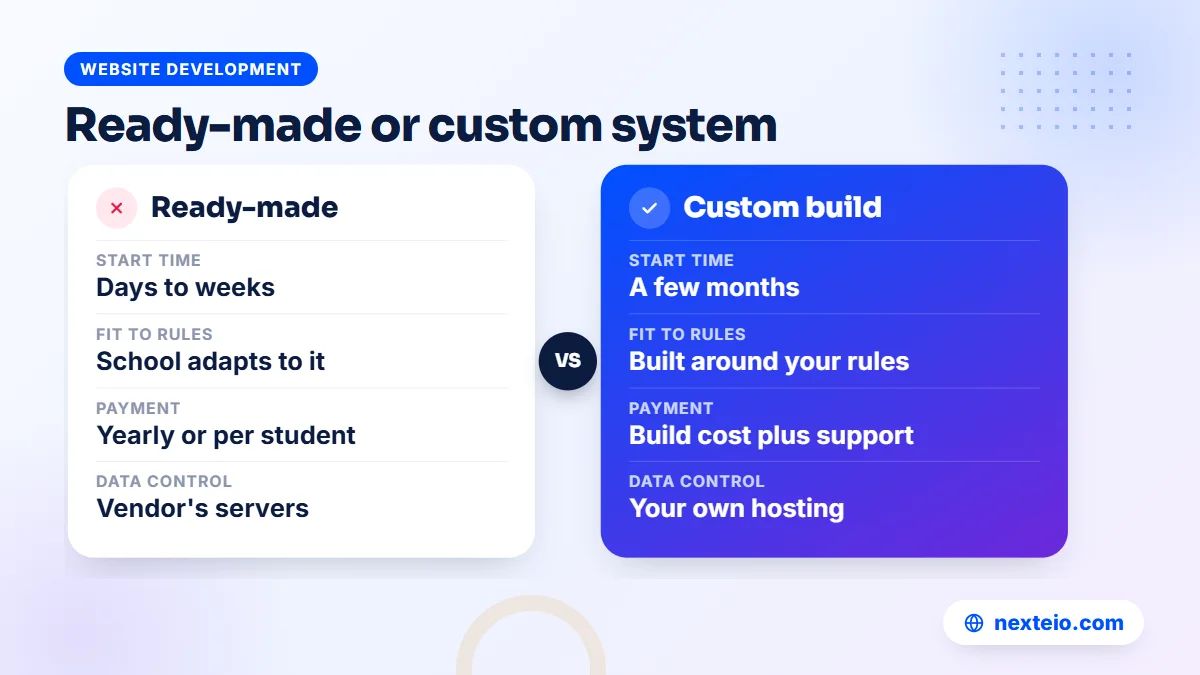
A ready-made product can start within days or weeks, because the software already exists. The vendor handles updates and hosting. The trade-off is fit: the school adapts its forms, fee rules and result format to the software. Data usually sits on the vendor's servers, so ask how you can export everything if you leave, and in what format.
Custom systems
A custom school management system is built around the school's own rules: its fee heads, grading scheme, report card layout, branch structure and approval chain. It takes longer to launch and costs more at the start, but the school owns the code and the data, and the system grows with the institution. This route suits school groups with several branches, English-medium schools with their own assessment methods, madrasas with combined curricula, and any school that has tried a ready-made product and outgrown it.
Before choosing, check how well a product handles the kind of school you run. The differences are bigger than most vendor demos show:
- Madrasas: Arabic and religious subjects sit alongside general subjects, and Alia and Qawmi madrasas follow different boards and structures. Subject lists, mark splits and certificates must reflect that.
- English-medium schools: many follow Cambridge or Pearson Edexcel curricula with their own terms, grades and report formats, which rarely match a product designed around the national curriculum.
- School and college together: the same institution may run classes from the early grades to higher secondary, with different groups, subjects and fee structures at each level.
- Kindergartens: small classes, more guardian contact and descriptive progress reports rather than marks and GPA.
If a ready-made product forces your school into the wrong shape, staff will keep side spreadsheets, and the system will never become the single record it was meant to be.
Custom systems are often built on a framework such as Laravel, which handles user roles, data and reports well. Our Laravel web application service covers this kind of work, and our guide on hiring a Laravel developer in Bangladesh explains what skills to look for if you build with an in-house or freelance team.
Security, Backups and Student Privacy
A school system holds children's names, photos, birth dates, addresses, guardians' phone numbers, fee records and results. That data must be treated as confidential, whatever any vendor says about convenience.
Start with access. Every user should have their own login, and each role should see only what it needs. A class teacher sees their own classes. The accounts desk sees fees. Guardians see only their own children. Laravel's documentation on authorization shows how a well-built system enforces these rules in code rather than only hiding menu items.
Then cover the common technical risks:
- Strong passwords and two-step login for admin and accounts users.
- Protection against the common web attacks listed in the OWASP Top Ten.
- An activity log showing who changed marks, fees or waivers, and when.
- Daily backups stored away from the main server, with a tested restore.
- Prompt removal of accounts for staff who leave.
Hosting matters too. A system running on a computer in the school office goes down with load-shedding or a broken internet line, and can be lost entirely if that computer fails. A proper data-center or cloud server avoids both problems and lets guardians reach the portal at any hour.
Finally, be careful with photos and public pages. Student photos, names and results should appear only behind a login, unless guardians have agreed otherwise. Merit lists published on the website can use roll numbers rather than full details.
What School Management Software Costs and How Long It Takes
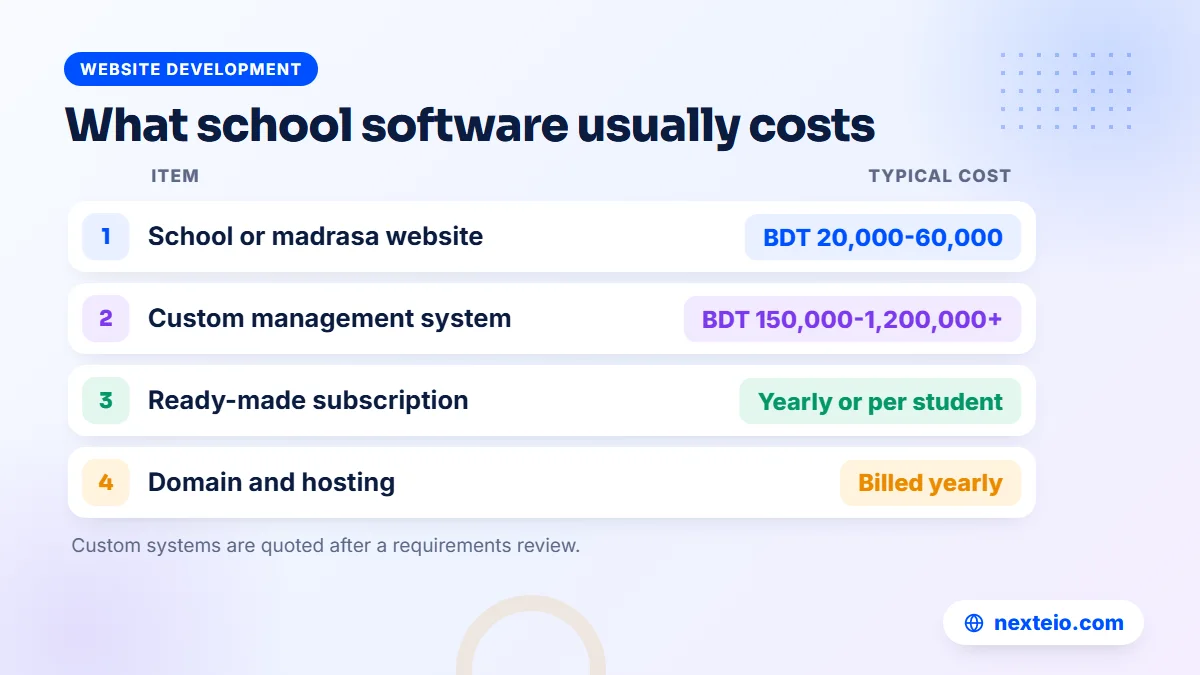
Ready-made products are usually priced as a yearly fee or a fee per student, sometimes with a setup charge and SMS billed separately. Prices vary a lot between vendors, so compare what is included: modules, number of users, SMS, hosting, training and support.
Custom systems are quoted after a requirements review, because the cost depends on the modules, the number of users and branches, and the integrations needed. As a typical market range in Bangladesh, a custom school management system can fall anywhere from about BDT 150,000 to 1,200,000 or more, depending on modules and users. A simple school or madrasa website on its own usually costs about BDT 20,000 to 60,000, and hosting and domain fees are paid yearly on top.
The lower end of that system range covers a single school with the core modules described above. The upper end covers school groups with several branches, payroll, online payments, a guardian app and links to other systems. A custom Laravel system built in phases lets a school spread the cost over two or three budget years instead of paying for everything at once.
Time follows the same logic. A ready-made system can go live within a few weeks if data is ready. A custom system is usually built in phases over several months, with the core modules first. In either case, the biggest delays come from data: student lists with missing guardian numbers, fee records spread across several registers, and old results that need to be entered.
When comparing quotes, ask what happens after launch. Who fixes problems during result week? How are changes to grading rules or fee heads charged? Is hosting included, and where is the data stored? The cheapest quote often leaves these questions open. If you want a clear estimate for your own school, send us your requirements and we will review them with you.
Rolling Out School Management Software Without Chaos
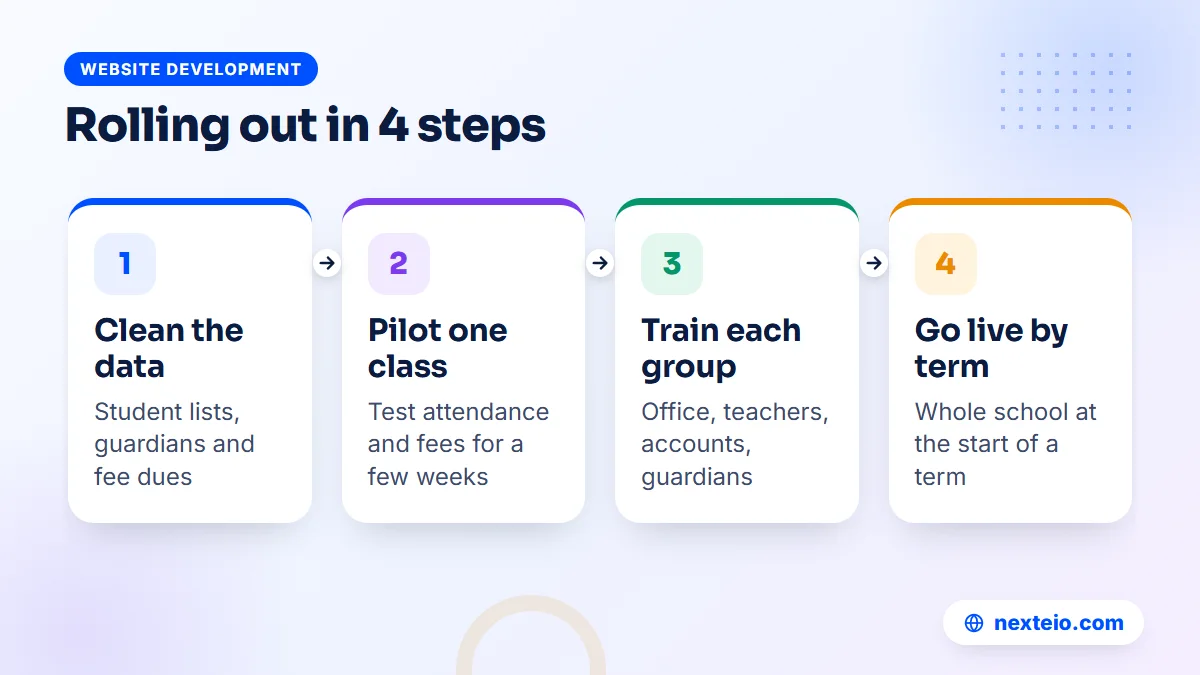
Most failed rollouts fail on people and timing, not technology. A system launched in the middle of exam season, with no training and messy data, will be blamed for problems it did not cause. A careful rollout follows a clear order:
- Clean the data first: correct student lists, guardian phone numbers, class and roll, and outstanding fee dues.
- Run a pilot with one or two classes for a few weeks, covering attendance and fees.
- Train each group separately: office staff, teachers, accounts and finally guardians.
- Go live for the whole school at the start of a term, never in the middle of an exam period.
- Keep the old registers for one term as a backup, then retire them.
Name one person at the school as the system owner. They collect problems from teachers, decide what is a real bug and what is a training gap, and talk to the vendor. Without that role, every complaint reaches the principal.
Guardians need a short, simple guide in Bangla: how to log in, where to see results and how to pay fees. A notice at the parent meeting and a one-page leaflet do more than a long manual.
Questions to ask any vendor before you sign
- Can we see the system running in a school similar to ours?
- Can the grading rules, fee heads and report card layout be changed by us?
- Where is our data stored, and can we export all of it at any time?
- How are backups done, and when was a restore last tested?
- What support is available during admission and result weeks?
- Who owns the code and the data if we stop the contract?
Clear answers to these questions tell you more about a vendor than any feature list. Vague answers are a warning in themselves.
The school website is the other half of the picture. Admission notices, results announcements and contact details still need a fast public site that guardians can find on Google. Our custom website design work covers school and madrasa sites, and our technical SEO basics guide explains how to make sure those pages are found. If you want the admission and result pages to appear higher in Google, our SEO service can plan them with you.
Many schools also run admission campaigns online. Our Facebook ads service and our guide to Meta ads targeting in Bangladesh explain how to reach guardians nearby, while Google Ads can put the school in front of parents who are already searching for admission information.
How Nexteio Can Help With School Management Software
We build custom school management systems on Laravel through our Laravel website service. Because every school runs differently, a system like this is quoted after a requirements review. In that review, we go through the modules you need with you, along with your fee heads, grading rules, report card format and who approves what. The plan and quote that follow can be split into phases, so the core modules go live first.
We then build the system around your school's rules rather than asking you to change them, with separate screens for the office, teachers, accounts and guardians, and mobile-friendly pages that work over mobile data. Where you need online fee collection, a payment gateway can be connected as part of the build. We also recommend keeping the domain, hosting and data in your institution's name, and we plan the setup that way.
If you also need a new public website, we can plan it alongside the system so results and admission notices flow from one to the other. Read more about Nexteio, see examples in our portfolio, tell us about your school through our project form, or contact us to talk it through. You can also learn more about our custom web application work before you get in touch.
Keep reading: a buyer's checklist for choosing a web company, simple SEO tips for small websites, or browse all our website development guides.
Frequently asked questions
What is the difference between a school website and school management software?
A school website is public and shares notices, admission information and contact details with anyone. School management software is a private system with logins, used to run student records, attendance, fees and exams. The two work best when connected, so results and admission data move between them without retyping.
Can guardians pay school fees through bKash or Nagad?
Yes, if the system is connected to a payment gateway or a merchant service that supports these wallets. The payment is then matched to the student automatically and a receipt is issued. The school needs a merchant account, and the system should still record cash payments made at the office.
Does school management software work without internet?
Most modern systems are web-based and need an internet connection, though a phone on mobile data is usually enough. Hosting the system on a proper server rather than an office computer means it keeps running during load-shedding at the school. Some apps can save attendance briefly and send it when the connection returns.
Can the system follow our own grading and report card format?
A good system lets the school set subjects, full marks, mark splits and grading rules, and print report cards in its own layout. Ready-made products allow this only within their options, while a custom system is built around your format. Ask to see a sample report card in your format before you sign.
How long does it take to move a school onto a new system?
A ready-made system can be running in a few weeks if student data is clean. A custom system is usually built in phases over several months. In both cases, preparing accurate student lists and fee records takes the most time, so start that work early.
Is a mobile app necessary for guardians?
Not always. A mobile-friendly web portal, or a progressive web app that can be added to the home screen, gives guardians attendance, fees, results and notices without an install. A store app can come later if guardians ask for one, but it adds cost and upkeep.
Who owns the student data in a school management system?
The school should, and the contract should say so in plain words. Make sure you can export all records at any time in a format you can open, and that the vendor must hand over or delete the data if the contract ends. With a custom system on your own hosting, the data stays under your control.