
Website Maintenance Services: What Is Included and What It Costs
In this article 15 sections
- 1.What Website Maintenance Services Include
- 2.How Often Each Maintenance Task Should Happen
- 3.Security and Backups: The Jobs That Save You in a Bad Week
- 4.Updates, Uptime and Speed
- 5.Content Updates, Forms, Email and Renewals
- 6.SEO Health Checks and Monthly Reporting
- 7.A Sample Monthly Website Maintenance Checklist
- 8.What Website Maintenance Services Cost in Bangladesh
- 9.Response Times and SLAs in Plain Words
- 10.In-House or Outsourced Web Maintenance
- 11.How to Choose Website Maintenance Services
- 12.What Happens When Maintenance Is Skipped
- 13.Ownership and Handover: Who Should Hold Domain, Hosting and Admin Access
- 14.How Nexteio Can Help With Website Maintenance
- 15.Frequently asked questions
Website maintenance services keep a live website safe, current and working long after the launch is over. For many companies, schools, hospitals and NGOs in Bangladesh, the website was built once, paid for, and then left with whoever had the password. That works for a few months. Then a plugin goes out of date, the SSL certificate expires over a weekend, or last year's admission notice is still on the homepage when parents come looking.
A website is not a printed brochure. It runs on software that changes every month, sits on a server that someone has to watch, and carries information that goes stale. A garment exporter's buyers open the site before a meeting. A college's guardians check it for results. A clinic's patients look for the right phone number.
When the site fails, those people rarely complain to you. They simply trust you a little less, or they call someone else.
This guide explains what a proper maintenance plan includes, how often each task should happen, what plans usually cost in Bangladesh and how to judge a provider before you sign. It also covers response times, a sample monthly checklist, and the ownership questions that cause the most trouble when an organization changes its web team.
What Website Maintenance Services Include
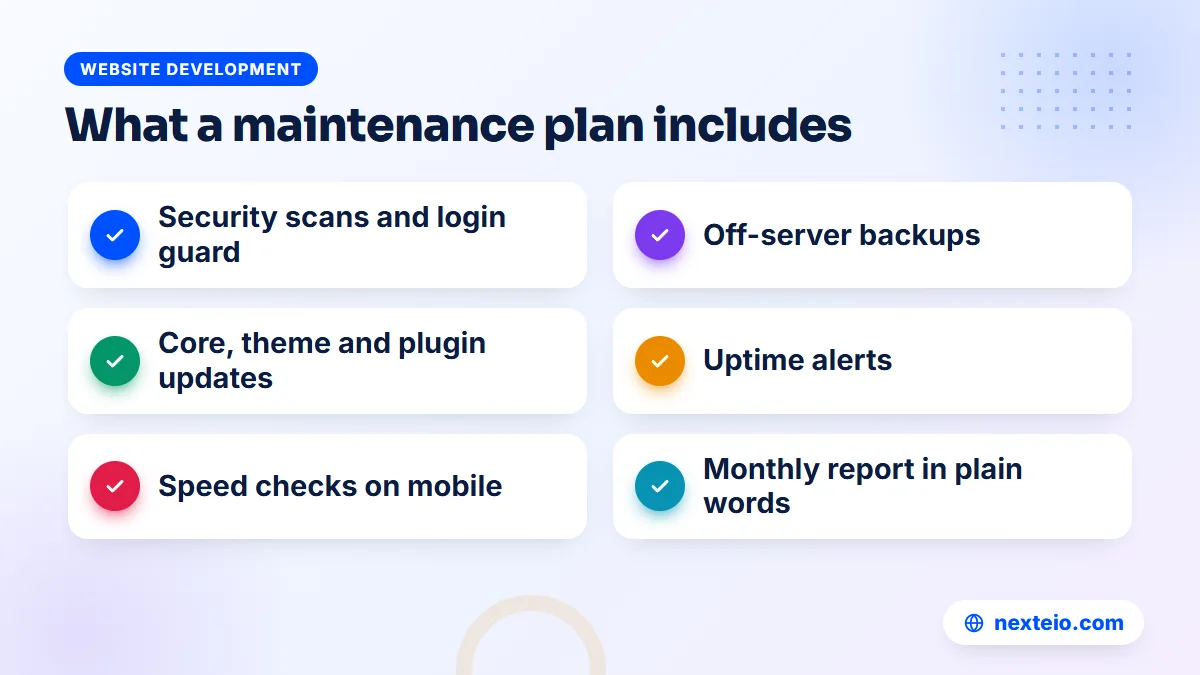
A good plan is a set of routine jobs, done on a schedule, with someone accountable for each one. A complete plan covers ten areas, which fall into three groups. The first group keeps the site protected:
- Security: malware scans, login protection, firewall rules, and removing unused plugins and accounts.
- Backups: automatic copies of the files and the database, stored away from the main server, with a tested way to restore them.
- Updates: the core platform (WordPress, Laravel or another framework), themes, plugins and the PHP version on the server.
The second group keeps the site working the way visitors expect:
- Uptime monitoring: an outside service that checks the site every few minutes and alerts the team when it stops responding.
- Speed: checking load time on phones and mobile data, compressing images and keeping caching in order.
- Forms and email: testing contact, admission and appointment forms, and making sure messages reach an inbox instead of spam.
The third group keeps the site accurate, visible and accountable:
- Content updates: notices, news, staff changes, product details and job posts.
- SSL and domain renewals: tracking expiry dates so the padlock never breaks and the domain never lapses.
- SEO health: watching for broken links, indexing errors and pages that drop out of Google.
- Reporting: a short monthly summary of what was done, what was found and what needs your decision.
Not every organization needs every item at the same depth. A five-page company profile does not need hourly backups, while an online store or a university admission portal probably does. What matters is that each area has an owner and a schedule, so nothing depends on someone remembering.
Good website maintenance services also put this list in writing. A one-line promise of "full support" tells you nothing about what will actually happen next Tuesday when a plugin update arrives.
How Often Each Maintenance Task Should Happen
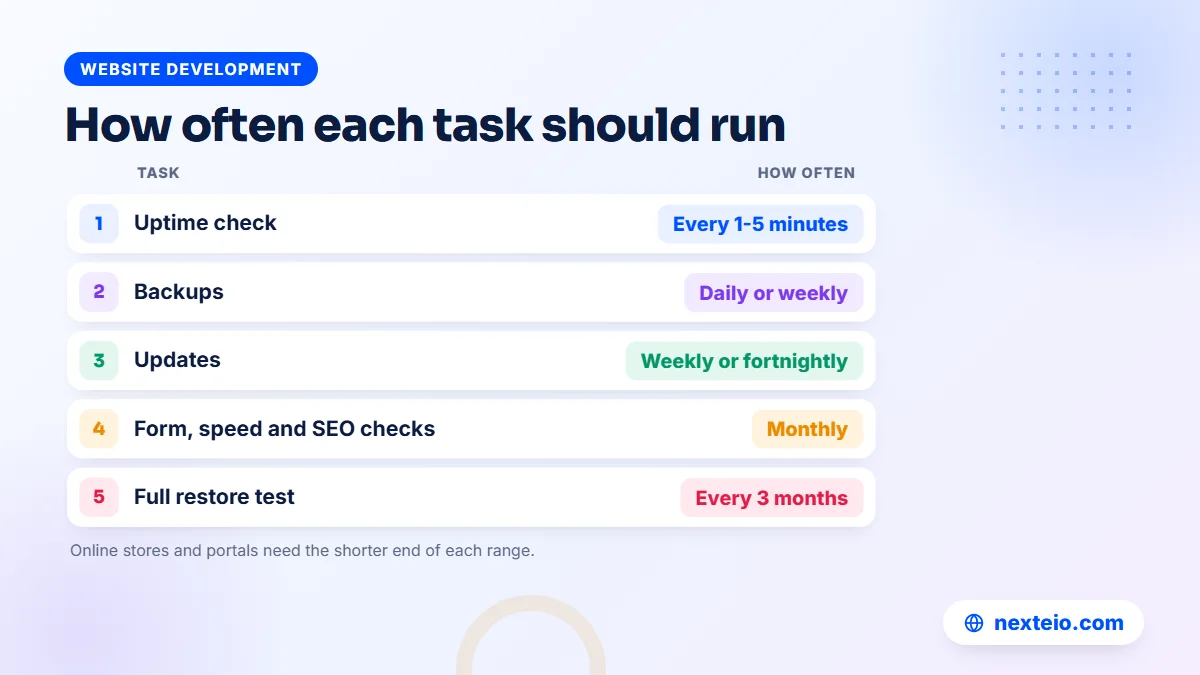
Frequency is where cheap plans and good plans differ most. A provider who says "we update everything" without saying when is not giving you a plan. The two tables below show a sensible rhythm for a typical organization website, starting with the jobs that run all the time.
| Frequent task | How often | Why |
|---|---|---|
| Uptime check | Every 1 to 5 minutes | You hear about downtime first |
| Backups | Daily, or weekly for quiet sites | You can only restore what was saved |
| Security scan | Daily, with a weekly review | Infections get harder to clean over time |
| Plugin and theme updates | Weekly or every two weeks | Most attacks use flaws that already have a fix |
| Core security release | Within a few days | A published fix also tells attackers where to look |
The second set of jobs runs on a monthly or quarterly cycle:
| Periodic task | How often | Why |
|---|---|---|
| Content updates | As requested, within an agreed time | Old notices cost trust |
| Form and email test | Monthly and after updates | Forms can fail without any visible error |
| Speed and SEO check | Monthly | Slow pages and errors build up quietly |
| SSL and domain expiry | Monthly, with 30-day reminders | An expiry takes the site offline |
| Restore test | Every three months | An untested backup may not work |
Busy sites, online shops and portals with user logins should sit at the shorter end of each range.
Updates and backups are linked. A careful provider takes a fresh backup right before updating, tests larger updates on a staging copy first, and checks the live site afterwards. Skipping that order is how a routine update turns into a broken homepage on a Sunday morning, just as the working week starts.
Security and Backups: The Jobs That Save You in a Bad Week
Security work you should expect
Most hacked business websites were never targeted by anyone in particular. Automated bots scan huge numbers of sites for an old plugin, a weak admin password or a forgotten test page, and they break in wherever they find one. The usual damage is spam pages added to your site, redirects to gambling or fake shops, or your server being used to send junk email.
Security is the first thing website maintenance services should be judged on, and the real work is mostly routine. It should include:
- Keeping software updated, since outdated plugins are the most common way in.
- Limiting login attempts and turning on two-step login for admins.
- Removing old users, such as a former intern who still has admin rights.
- Deleting plugins and themes that are installed but unused.
- Scanning for malware and changed files, and cleaning up fast.
The OWASP Top Ten is a good public reference for common web weaknesses. A provider who maintains custom systems should know it well.
Backups that actually work
A backup plan has three parts: what is copied, where it is stored and how it is restored. Copy both the files and the database, because one without the other is useless for most sites. Store at least one copy away from your hosting account, since a hacked or suspended server can take its own backups down with it.
The step that most often gets skipped is the restore test. Every few months, the provider should restore a recent backup to a test location and confirm the site works. Backups are the part of maintenance website owners most often assume someone else is handling, and many only find out otherwise on the worst possible day.
Ask how long backups are kept, too. If malware sat quietly on your site for three weeks and backups are only kept for seven days, every copy you have is already infected. Thirty days of history is a reasonable minimum for most organizations.
Updates, Uptime and Speed
Software updates
WordPress, its plugins and its themes release updates often, and many of them fix security problems. The official WordPress guide on updating WordPress shows that the process is simple on a small site. On a site with twenty plugins, a page builder and custom code, though, one update can clash with another. That is why updates belong in a planned routine, with a backup first and a check after.
Laravel and other custom-built applications need the same discipline in a different form. Framework versions reach the end of support, hosting companies retire old PHP versions, and packages need upgrades. If a developer built your system years ago and nobody has touched it since, catching up may now be a small project rather than a quick update.
Sometimes the honest answer is that a site is too old to maintain sensibly. If the theme is abandoned and half the plugins no longer receive updates, a rebuild through a custom website design project can cost less over two or three years than patching the old one month after month. Our comparison of WordPress and custom websites explains how each option behaves over time.
Uptime monitoring
Uptime monitoring is an automatic check that visits your site every few minutes from outside your server. If the site does not respond, the maintenance team gets an alert by email, SMS or a messaging app. Without it, downtime is usually reported by a customer, a guardian or your managing director, often hours later.
In Bangladesh, also ask where the site is hosted. A website on a proper data-centre server is not affected by load-shedding at your office. A system running on a computer inside the office, which some institutions still use for internal portals, goes down with the power and the internet line.
Speed on real phones
Most of your visitors open the site on a phone, often on mobile data. A page that loads well on office Wi-Fi can feel slow on a weak 4G signal. Maintenance should include a monthly look at page speed and Google's Core Web Vitals for the main pages, plus fixing the usual causes: oversized images, too many plugins, broken caching and heavy sliders.
Speed is not only about comfort. Slow pages lose visitors before they read anything, and they can hold back your search rankings. Our guide on website speed and SEO explains how faster pages help with both rankings and enquiries.
Content Updates, Forms, Email and Renewals
Web page maintenance and content updates
Content updates, sometimes called web page maintenance, are the jobs you will notice most. A school needs exam routines, results and admission notices posted on time. A factory needs new certifications and buyer-facing photos added. A hospital needs doctor schedules and phone numbers kept correct.
A plan should say how many content changes are included each month, how you send them (email, a messaging app or a ticket form) and how quickly they go live. Many organizations also want Bangla and English versions kept in step. That roughly doubles the work, so it should be priced and scheduled as such.
Forms and email delivery
Contact, admission, quotation and appointment forms break more often than people think. A plugin update changes a setting, the hosting company blocks outgoing mail, or messages start landing in spam. The form still shows a thank-you message to the visitor, so nobody notices until enquiries dry up.
A monthly test submission solves most of this. So do correct email authentication records on your domain, known as SPF, DKIM and DMARC, which tell receiving mail servers that your messages are genuine.
If your official email runs on the same domain, the maintenance team should also know who manages it. Email problems are often blamed on the website and the other way around. A clear record of who controls what saves days of back and forth.
SSL certificates and domain renewals
The SSL certificate is what puts the padlock in the browser and lets the site load over HTTPS. When it expires, browsers show a full-page warning and most visitors leave. Free certificates from Let's Encrypt are short-lived by design and are meant to renew automatically, so the real job is making sure that automatic renewal keeps working.
Domain renewal is simpler and more dangerous. If a domain lapses, the website and every email address on it stop working, and in the worst case someone else can register the name. A .com domain renews through a registrar, while .bd and .com.bd domains are handled by BTCL. Either way, the plan should track the expiry date and remind you well ahead, especially when payment needs approval from accounts.
SEO Health Checks and Monthly Reporting
Maintenance is not the same as an SEO campaign, but a maintained site should not slowly lose ground in Google because of neglect. The basic checks are technical: pages returning errors, broken internal links, an accidental "noindex" tag left after an update, missing page titles, a sitemap that stopped updating, and pages that dropped out of the index.
Google Search Console is free and shows most of these problems directly. Your provider should have access to it, check it monthly and tell you about anything unusual. Our article on technical SEO basics explains what each of these checks means. If you want rankings to grow rather than just hold steady, that is separate work, and our SEO service handles it.
Reporting is what makes all of this visible. A useful monthly report fits on one or two pages and answers four questions:
- What was updated, and did anything break?
- Was the site down at any point, and for how long?
- Were there any security warnings, and what was done about them?
- What needs a decision or approval from you this month?
A report full of screenshots and green ticks that you cannot understand is not useful. A report that says "the admission form stopped sending emails on the 12th, it was fixed the same day, and here is why" is what an office manager can forward to the principal or the board.
Related guides that pair well with a maintenance plan:
- How to build a professional business website that gets results
- Common SEO mistakes that hurt business websites
- Why a website gets traffic but no customers
A Sample Monthly Website Maintenance Checklist
Here is a practical checklist that a provider, or a capable in-house person, can follow each month. Adapt it to your site, then ask your provider which items they cover. Start with the technical checks:
- Confirm the automatic backups ran and one copy sits off the server.
- Take a fresh backup, then update the platform, plugins and themes.
- Check the homepage, main pages and contact page on a phone and a desktop.
- Submit every important form and confirm the email arrives.
- Review the uptime log and note the cause of any downtime.
- Run a malware scan and remove admin users who no longer need access.
- Flag any SSL certificate or domain due to expire within 60 days.
Then move to visibility, content and reporting:
- Test page speed for the three most visited pages on mobile.
- Look for new errors or security warnings in Google Search Console.
- Fix broken links and remove expired notices, offers or job posts.
- Apply the content changes requested during the month.
- Send a short written report to the responsible person on your side.
Every three months, add a full restore test, a review of installed plugins and a check that the server's PHP version is still supported. Once a year, review who holds which accounts and whether the plan still fits the site.
What Website Maintenance Services Cost in Bangladesh
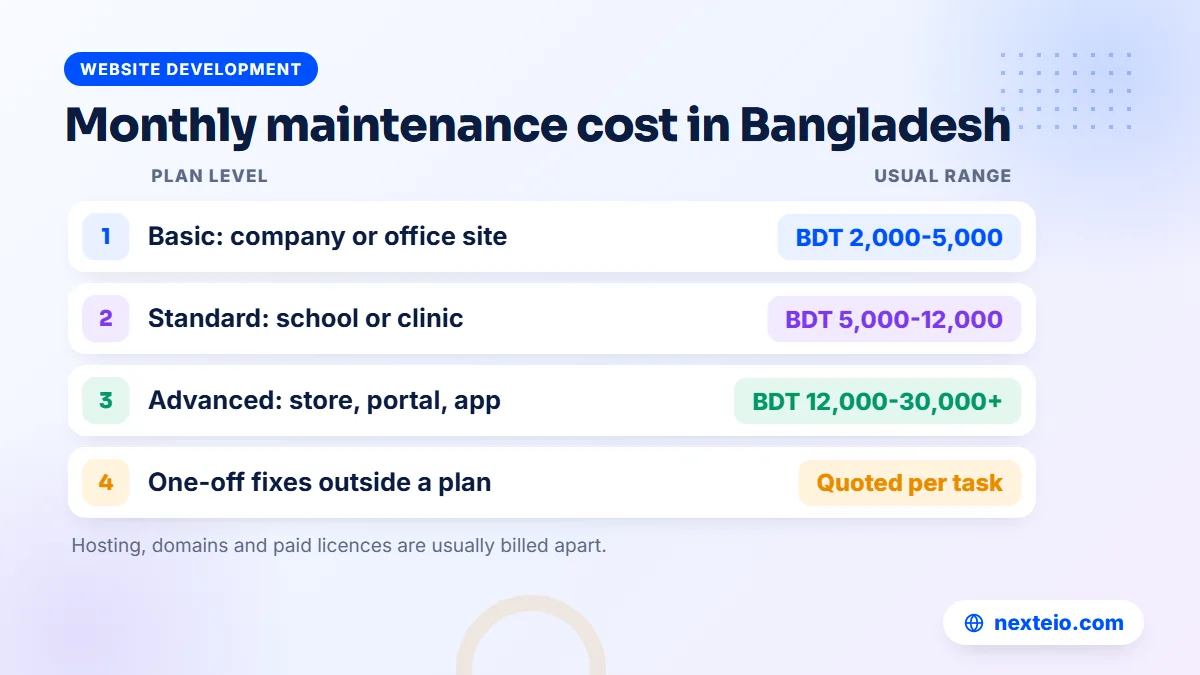
Prices vary a lot, and the cheapest offer is rarely the cheapest result. In our experience, monthly plans for website maintenance services in Bangladesh usually fall into three broad levels. These are market ranges, not fixed prices. The right level depends on your site's size, its platform, how often it changes and how fast you need a response.
| Plan level | Typical monthly range | Usually suits | What it often includes |
|---|---|---|---|
| Basic | BDT 2,000 to 5,000 | Small company profiles, NGO and office sites with few changes | Backups, updates, uptime monitoring, SSL checks and a few content edits |
| Standard | BDT 5,000 to 12,000 | Corporate groups, schools, colleges and clinics with regular notices | Basic tasks plus more content hours, form tests, and speed and SEO checks |
| Advanced | BDT 12,000 to 30,000 or more | Online stores, university portals, hospital booking systems and custom applications | Faster response, a staging copy, deeper security work and developer hours for fixes |
A few factors move the price up or down:
- Platform: a standard WordPress site is quicker to maintain than custom code.
- Integrations: bKash or Nagad payments, SMS and ERP links need testing after updates.
- Content volume: more monthly changes mean more hours, especially in two languages.
- Response time: round-the-clock cover costs more than business-hours support.
- Starting condition: an outdated or infected site needs a one-time cleanup first.
Hosting, domain renewal and paid plugin licences are usually billed separately, so check what sits inside the plan fee.
Also ask how extra work beyond the plan is charged. One-off fixes outside a plan are usually quoted per task. That is fine for a quiet site, but over a year it often costs more than a modest monthly website maintenance service for any site that changes regularly.
Online shops deserve a special note. A store built through e-commerce website development has checkout, stock, payment and courier pieces that can each break after an update, so it nearly always belongs in the advanced level.
Be cautious with very low offers. A plan that costs less than one hour of a developer's time each month can only be automated tools and a promise. That might be enough for a five-page site. It is not enough for a site that takes admissions, payments or patient bookings. If you want a realistic figure for your own site, send us the details through our project form.
Response Times and SLAs in Plain Words
An SLA, or service level agreement, is the part of a contract for website maintenance services that says how quickly the provider will respond to and fix problems. Without one, "we will look into it" can mean an hour or a week. The two numbers that matter are the response time, when someone starts working on the issue, and the fix target, when it should be solved or worked around.
A reasonable SLA sorts problems by how serious they are. Here is a typical structure for an organization website:
| Priority | Example | Typical response | Typical fix target |
|---|---|---|---|
| Critical | Site down or hacked, checkout or admission form broken | Within 1 to 2 hours | Same day, or a workaround that day |
| High | Important page showing errors, emails not arriving | Within 4 to 8 working hours | Within 1 working day |
| Normal | Content change, small layout fix | Within 1 working day | 2 to 3 working days |
| Low | New section, design improvement | Planned in the monthly cycle | An agreed date |
Treat these as a starting point for discussion, not a fixed standard.
Read the hours carefully. In Bangladesh, many offices work Sunday to Thursday, and some providers treat Friday and Saturday as closed days. Ask what happens during Eid holidays, when many teams are away for a week or more. An online store running an Eid sale needs cover at exactly the time a small agency might be closed.
Also ask how you report a problem. A phone number and a named person are better than a generic form. For critical issues, you want a direct line, not a ticket that waits until the next working morning.
In-House or Outsourced Web Maintenance
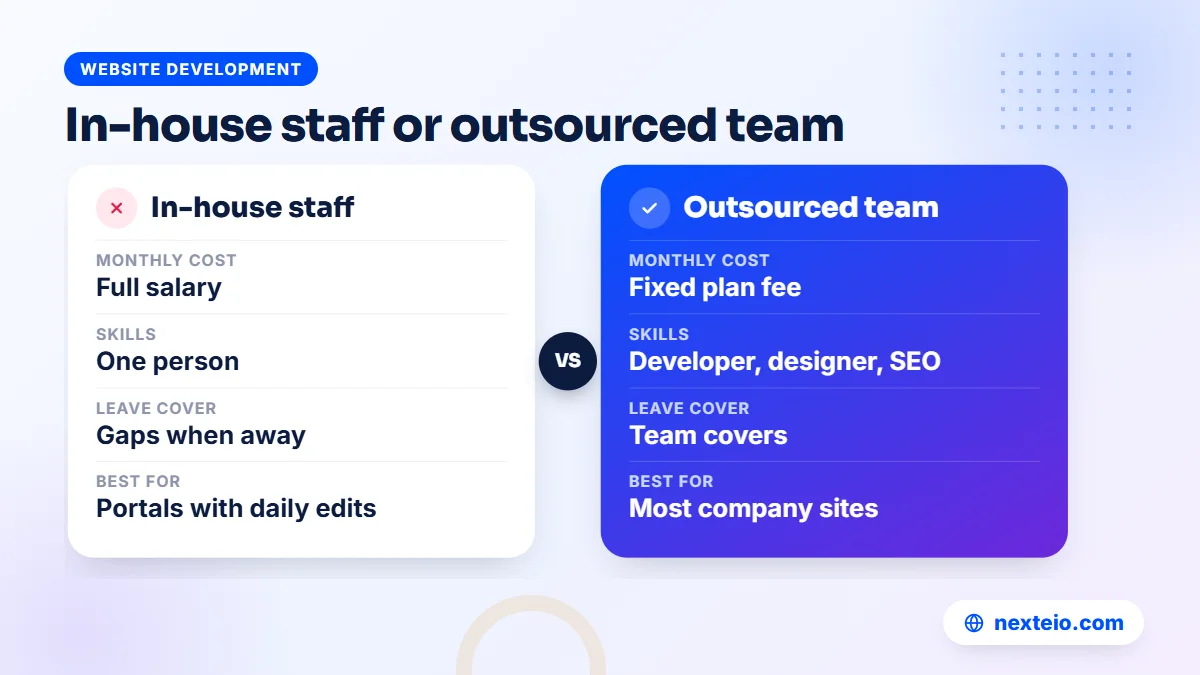
Some organizations keep an IT officer who also looks after the website. Others hand web maintenance services to an outside team. Both can work. The right choice depends on how often the site changes and what skills the job really needs.
An in-house person knows the people and the approval chain. They can post a notice within minutes once the principal or the managing director approves it. The weakness is depth and cover. One person rarely knows server security, WordPress development, SEO and design all at once, and when they take leave or resign, the knowledge often leaves with them.
An outsourced team brings several skills and a second person for every job. The weakness is distance: they need clear instructions and a named contact on your side. For most companies, schools and NGOs, the practical answer is a mix. Your staff handle simple content edits through the admin panel, and an outside provider handles security, updates, backups, monitoring and anything technical.
Universities and large corporate groups with a portal used every day may justify a full-time in-house developer. Even then, many keep an outside team for security reviews and as cover during leave.
How to Choose Website Maintenance Services
Before you sign with any provider of website maintenance services, ask these questions and listen for specific answers. Vague answers to clear questions are a warning in themselves.
- Which tasks are included, and how often is each one done?
- Where are backups stored, how long are they kept, and when was a restore last tested?
- What are your response times, including weekends and holidays?
- How many content changes or support hours are included each month?
- Who will work on our site, and who is our contact person?
- Can we see a sample monthly report?
- Do you test updates on a copy of the site first?
- Will we sign a written agreement that lists the work?
- What happens to our accounts, files and backups if we part ways?
It also helps to look at sites the provider has built or looked after, and to ask a current client how quickly problems were handled. Our buyer's checklist for choosing a web design company covers more of these checks, and most of them apply equally to site maintenance services.
Red flags to watch for
- The provider insists on registering your domain or hosting in their own name.
- There is no written task list, only "full maintenance" or "complete support".
- Backups are stored only on the same server as the website.
- Every answer about response time is "as soon as possible".
- They are reluctant to give you admin access to your own site.
- The contract locks you in for years, with penalties for leaving.
- They cannot explain in plain words what they did last month.
One red flag is a reason to ask more questions. Two or three are a reason to walk away.
What Happens When Maintenance Is Skipped
The cost of skipping maintenance rarely arrives as one large bill. It arrives as a slow slide, then a bad day. These are common patterns when a site has gone a year or more without care.
The quiet hack. An old plugin lets in malware that adds hundreds of spam pages. Google starts showing strange results under your name, or browsers warn visitors that the site is unsafe. Cleaning it up takes days, and getting search visibility back can take weeks.
The expired domain. The renewal email went to a former employee's inbox. The website and every company email address stop working on the same morning, right before a buyer audit or admission week.
The broken form. A server change stopped the contact form from sending email. Visitors still see a thank-you message, so nobody notices. Months of enquiries are simply lost.
The update that came too late. After years without updates, the hosting company retires the old PHP version. The site breaks, and the fix is no longer a quick update but a rebuild of outdated parts.
The stale notice board. Last year's fees, a former principal's message or a discontinued product line stays on the homepage. Nothing is technically broken, but visitors start to doubt everything else on the page.
Regular website maintenance services cost far less than fixing any one of these. They also protect something harder to price: the confidence of buyers, guardians, patients and donors who judge you by what they see online.
Ownership and Handover: Who Should Hold Domain, Hosting and Admin Access
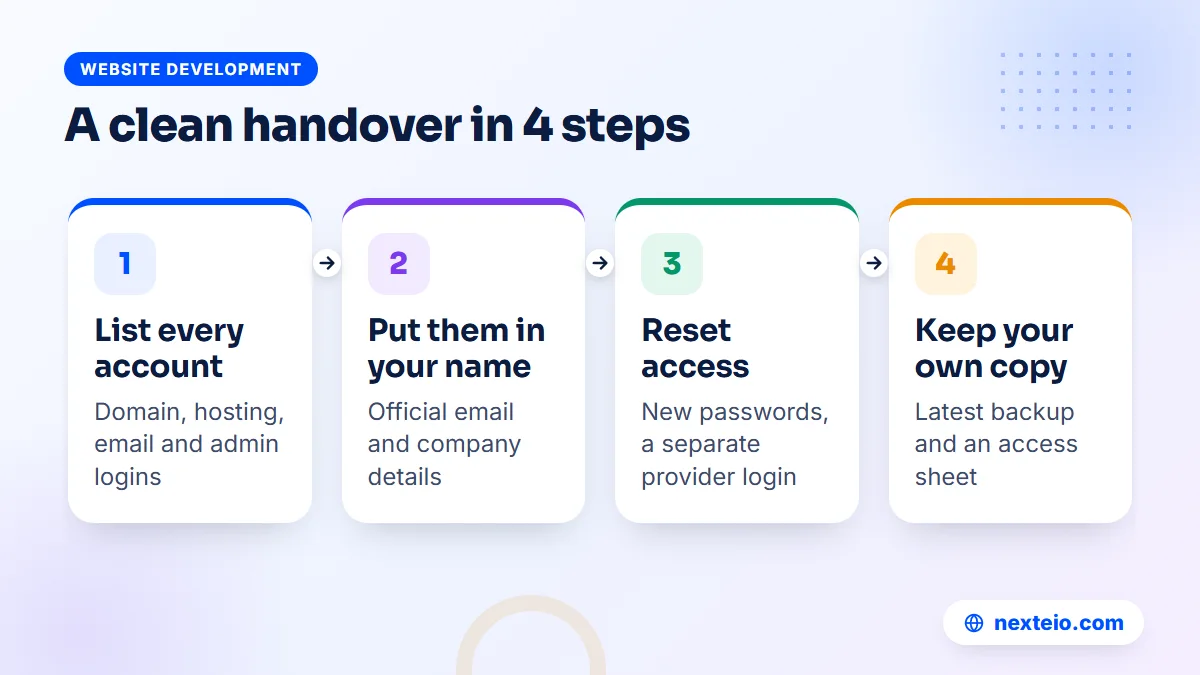
This is the section most organizations wish they had read earlier. Whoever provides your website maintenance services needs access to do the work, but your organization should own the accounts and never depend on one outside person for the keys. Start with the three main accounts:
- Domain: registered in the organization's name, with an official email as the contact rather than a personal Gmail.
- Hosting: the account in your organization's name, with the main login kept on your side and a separate login for the provider.
- Website admin: at least one administrator account that belongs to your organization, not to the provider.
Then make sure you hold the supporting records:
- DNS and email: a note of where DNS is managed and who controls the email service.
- Google tools: Search Console and Analytics owned by an organization account, with the provider added as a user.
- Code and files: for custom sites, the source code and a recent backup you can reach on your own.
Keep all of this in one access sheet, stored safely and known to at least two senior people.
In many organizations, the website was set up by someone who has since left, and nobody can log in to the domain account any more. Recovering it is possible, but slow, and it usually needs paperwork.
If you are planning a new site, settle these points before the build starts. Any custom website build should end with the accounts in your name and a copy of the access details in your hands.
When you change providers, run a proper handover. The outgoing provider should transfer the accounts, share the latest backups and code, and confirm in writing that they have removed their own access. The new provider should change every password, review users, take a fresh backup and check the whole site before taking responsibility for it.
Access should always come with a written agreement. At Nexteio, maintenance starts exactly this way: the client gives us access to the server and the website, and both sides sign a contract that sets out the work. Whoever you choose, insist on the same clarity. A provider who resists giving you control of your own domain is protecting their position, not your website.
How Nexteio Can Help With Website Maintenance
We offer website maintenance services for organizations across Bangladesh, alongside the sites we plan and build through our custom website design service. Getting started is simple. You give us access to your server (the hosting account) and to the website itself, and we both sign an agreement that sets out the work.
That agreement is where the points in this guide come together: which tasks are included, such as backups, updates, security checks, form tests and content changes, and which plan level suits your site. Plans usually fall around BDT 2,000 to 5,000 a month at the basic level, 5,000 to 12,000 at the standard level and 12,000 to 30,000 or more at the advanced level, depending on the site and the work agreed.
We work on WordPress websites and on Laravel web applications, so both a simple company profile and a portal with user logins can be covered. If your current site is too old to keep patching, a rebuilt, easier-to-maintain website may cost less over time. You can read more about Nexteio, see the kind of sites we build in our portfolio, share a few details on our project form or reach us through the contact page.
Keep reading: what to check before hiring a WordPress developer, how to hire the right Laravel developer, or browse all our website development guides.
Frequently asked questions
How much do website maintenance services cost per month in Bangladesh?
Most plans fall somewhere between about BDT 2,000 and BDT 30,000 a month, depending on the size of the site, the platform, how many content changes you need and how fast problems must be fixed. Simple company profiles sit at the low end, while online stores, portals and custom applications sit at the high end. Hosting and domain fees are usually separate.
Can a new provider maintain a website that someone else built?
Yes, as long as you can give them admin access, hosting access and, for custom-built sites, the source code. A careful provider starts with an audit, fixes urgent problems such as outdated software or missing backups, and only then moves to a regular monthly routine.
Does a website need maintenance if the content rarely changes?
Yes. Your text may stay the same, but the software underneath it does not. Plugins, themes, the platform and the server's PHP version all change, and old versions become a security risk. A quiet site can use a lighter plan with fewer content hours, but it still needs backups, updates, monitoring and renewal tracking.
What is the difference between website maintenance and web hosting?
Hosting is the server space where your site lives, and the hosting company keeps that server running. Maintenance is the work done on the website itself: updates, backups you control, security checks, content changes and fixes. Some hosting plans include basic backups, but they rarely cover plugin updates, form testing or content work.
How long should website backups be kept?
Thirty days of daily backups is a sensible minimum for most organization sites, with at least one copy stored away from the hosting server. Busy sites such as online shops benefit from more frequent backups and a longer history. Also ask your provider when they last tested a restore.
Is a yearly maintenance contract better than paying monthly?
Monthly billing gives you flexibility while you judge the provider's work. A yearly contract can make sense once you trust them, especially if it brings a lower rate or makes budget approval easier inside your organization. Avoid long contracts with exit penalties, and make sure the contract explains how your accounts and files are returned if you leave.
What does a maintenance provider need from us to get started?
Usually access to the hosting server and the website admin, plus domain registrar details and Google Search Console access if you have it. Both sides should also sign an agreement that lists the work, and you should name one contact person who can approve content changes. For custom-built sites, the provider will need the source code and any notes from the original developer.
Can our own staff still update content if we have a maintenance plan?
Yes, and for most organizations that is the best setup. Staff post notices, news and simple page edits through the admin panel, while the provider handles updates, security, backups and anything technical. Ask for staff accounts with editor rights rather than full administrator access, which keeps the site safer.