Campus Management System Software: Key Modules for Colleges
In this article 16 sections
- 1.What Campus Management System Software Covers
- 2.Signs Your Institution Needs a Campus System
- 3.Admissions and Online Applications
- 4.Student Records, Course Registration and Timetables
- 5.Fees, Scholarships and Accounts
- 6.Exams, Results and Transcripts
- 7.HR, Payroll, Library, Hostel and Transport
- 8.Portals for Students, Teachers, Guardians and Management
- 9.Ready-Made, ERP or Custom: Choosing Campus Management System Software
- 10.Data Migration, Integration and Result-Day Hosting
- 11.Security, Roles and Audit Trails
- 12.What Campus Management System Software Costs and How Long It Takes
- 13.Rolling Out Module by Module
- 14.Questions to Ask Before You Sign
- 15.How Nexteio Can Help With Your Campus System
- 16.Frequently asked questions
Campus management system software brings a college or university's admissions, student records, fees, exams, results and staff work into one connected system. Instead of the admission office, accounts section and exam controller each keeping their own spreadsheets, everyone works from the same student record. When a fee is paid, the exam office sees it. When a result is approved, the student sees it on a phone the same hour.
Many institutions in Bangladesh run on a patchwork today. Admission forms arrive on paper or through a simple online form, fees are matched against bank slips by hand, and results are tabulated in Excel files that pass between three desks. It works until the student count grows, a key staff member leaves, or a single wrong cell sends an incorrect result to hundreds of students.
This guide walks through the modules that matter most, what each should do in a Bangladeshi college or university, how to choose between a ready-made product and a custom build, what to budget, and how to roll the system out without disrupting an admission season or an exam.
What Campus Management System Software Covers
The phrase covers a lot, and vendors use it loosely. At the core, campus management system software is a central database of students, staff, courses and money, with separate modules for each office that uses that data. The modules talk to each other, so information is entered once and used everywhere.
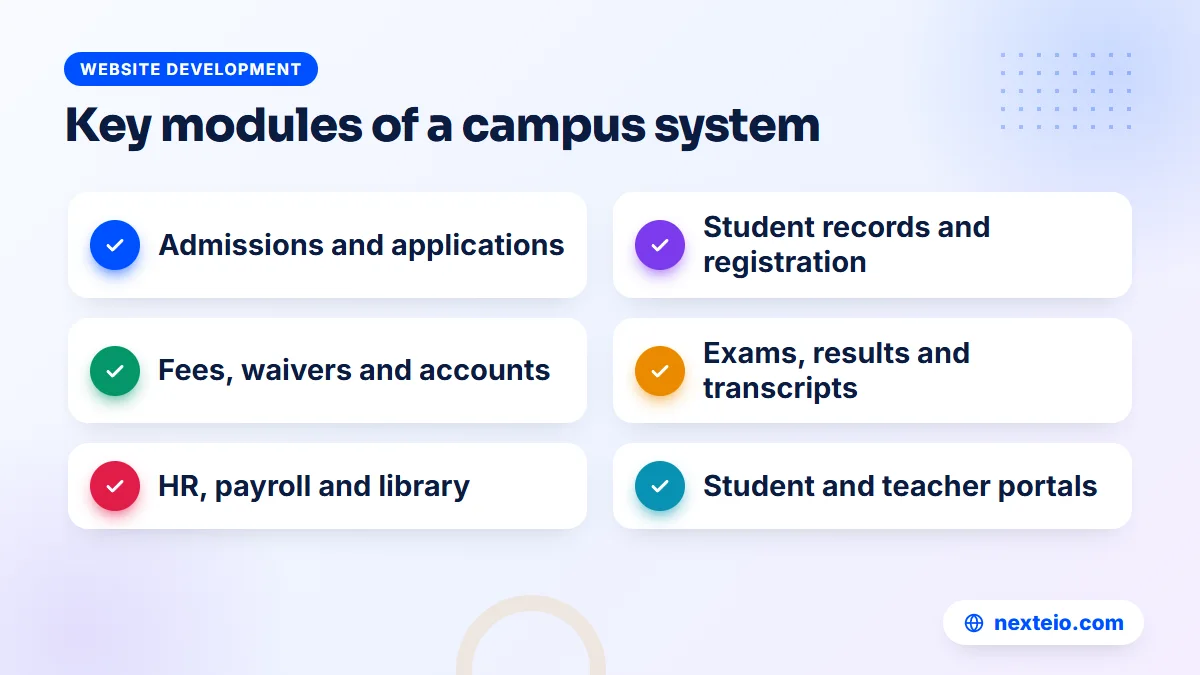
A typical system is built around these modules:
- Admissions: online applications, admission tests, merit lists and enrollment.
- Student records: profiles, documents, programs, sessions and status changes.
- Academics: courses, sections, timetables, attendance and course registration.
- Fees and accounts: fee structures, waivers, payments, dues and receipts.
- Exams and results: mark entry, tabulation, grade calculation, result publishing and transcripts.
- Staff: HR records, leave, payroll and teaching loads.
- Support services: library, hostel and transport.
- Portals: logins for students, teachers, guardians and management.
Not every institution needs every module on day one. A private college may start with admissions, fees and results, because those three cause the most pain. A university may begin with course registration because its credit system is the hardest part to manage by hand.
Campus software is also different from a learning management system. An LMS handles lessons, assignments and quizzes inside a course. A campus system handles everything around the course: who is enrolled, what they paid, what they scored and whether they can graduate. The two often connect, but they solve different problems.
Signs Your Institution Needs a Campus System
Few colleges decide to buy campus software in a calm moment. Usually something goes wrong first. If several of these sound familiar, the manual approach has reached its limit:
- Admission season means staff working late to type paper forms into spreadsheets.
- Accounts cannot quickly say which students owe fees before exams start.
- Results need several days of tabulation and checking, and errors still slip through.
- A student asking for a transcript has to wait while someone searches old files.
- Different offices hold different phone numbers or addresses for the same student.
- Only one staff member understands how the result spreadsheet works.
- Management cannot see enrollment, income or dues by department without asking for a report.
Each of these is a cost, even when nobody puts a number on it.
Think about an affiliated college with 2,500 students across honours and degree programs. Every year, the accounts office spends weeks matching bank deposit slips to student rolls. The exam office then asks accounts which students have cleared their dues, and the answer arrives on paper. A connected system turns that two-week exchange into a filter on one screen.
Admissions and Online Applications
Admissions is usually the first module because it is where the student record begins. If the data is clean here, every later office benefits. If it is messy, every office inherits the mess.
A good admissions module lets applicants apply on a phone, upload a photo and documents, and pay the application fee online through bKash, Nagad or a card. It checks eligibility rules automatically, such as minimum GPA in SSC and HSC for a particular program, so staff do not screen hundreds of forms by hand.
After the deadline, the system should handle the next steps:
- Generate admit cards with roll numbers and test venues for admission tests.
- Record test marks and combine them with academic results using your own weightings.
- Publish merit and waiting lists by program, with clear cut-off rules.
- Let selected students confirm admission and pay the admission fee online.
- Turn each confirmed applicant into a student record without typing anything again.
The public side matters as much as the back office. Applicants find you through your website and search results, so the admission pages should load fast, explain programs and fees clearly, and work on a small screen. A well-planned college website can link straight into the application form. During admission season, many institutions also run Facebook ad campaigns or Google search ads that send people to these pages, and our guide to high-converting landing pages explains what makes those pages turn visits into applications.
Student Records, Course Registration and Timetables
One record per student
The student record is the center of the whole system. It holds personal details, guardian contacts, program and session, documents, status (active, on leave, dropped out, graduated) and a history of every change. Each office sees the parts it needs, and changes are logged with the name of the person who made them.
Keep the record honest about real life. Students change phone numbers, move between sections, take a semester off or transfer in from another institution. The system should handle each of these as a normal event, not a special case that needs the developer.
Course registration for credit-based programs
Universities and colleges running semester or credit systems need a proper registration module. Students choose courses within limits the department sets: prerequisites, credit caps, section capacity and timing clashes. Advisors approve or adjust the choices, and registration closes automatically on the set date.
Done by hand, this is where most mistakes happen. A student registers for a course without the prerequisite, a section is overbooked, or a dropped course still appears on the result sheet. Software catches these before they reach the exam office.
Timetables and attendance
Once courses and sections are set, the class routine can be built inside the system, with rooms and teachers checked for clashes. Teachers then take attendance from a phone in class, and the system can flag students who fall below the attendance a program requires before exams. Guardians of younger college students often want an SMS when attendance drops, which is easy to add once the data exists.
Fees, Scholarships and Accounts
Fee management is where campus management system software usually pays for itself fastest. Money is involved, mistakes are visible, and the manual process involves the most repetitive work.
A fee module should handle the real fee structure, not a simplified one. That includes different fees by program and session, monthly or semester payments, one-time charges such as admission and form fill-up fees, late fines, and waivers or scholarships for merit, siblings, staff children or financial need.
| Payment method | How the system should handle it | Watch out for |
|---|---|---|
| bKash or Nagad through a gateway | Payment confirmed automatically against the student ID | Gateway fees and failed payments that need follow-up |
| Card or internet banking | Confirmed through the payment gateway, receipt sent by SMS or email | Settlement time before money reaches the institution's account |
| Bank deposit slip | Staff enter or upload the slip; the system matches it to the student | Manual matching errors and duplicate slips |
| Cash at the accounts desk | Receipt printed from the system, never by hand | Cash collected without a system receipt |
Once payments are recorded, the useful reports appear almost for free: dues by department, income by month, scholarships granted, and a list of students who must clear dues before receiving admit cards. The accounts office can also export the data for the institution's main accounting software instead of retyping it.
Be careful with one design choice. Some institutions want the system to block a student's admit card or result automatically when fees are due. That is possible, but it needs a clear override process for approved exceptions, or the exam office will end up fighting the software on exam morning.
Exams, Results and Transcripts
Results are the most sensitive output of any institution, and the module that produces them needs the most care. A wrong grade on a transcript can follow a student for years.
A strong exam module covers the full chain. Teachers enter marks for their own courses only, within a deadline. The exam office reviews, moderates and locks the marks. The system calculates grades and GPA or CGPA using the institution's exact grading rules, including retakes and improvement exams. An authorized person approves the result, and only then is it published.
Every step should leave a trail. If a mark changes after it was entered, the system should record the old value, the new value, who changed it and when. That record protects honest staff as much as it discourages dishonest changes.
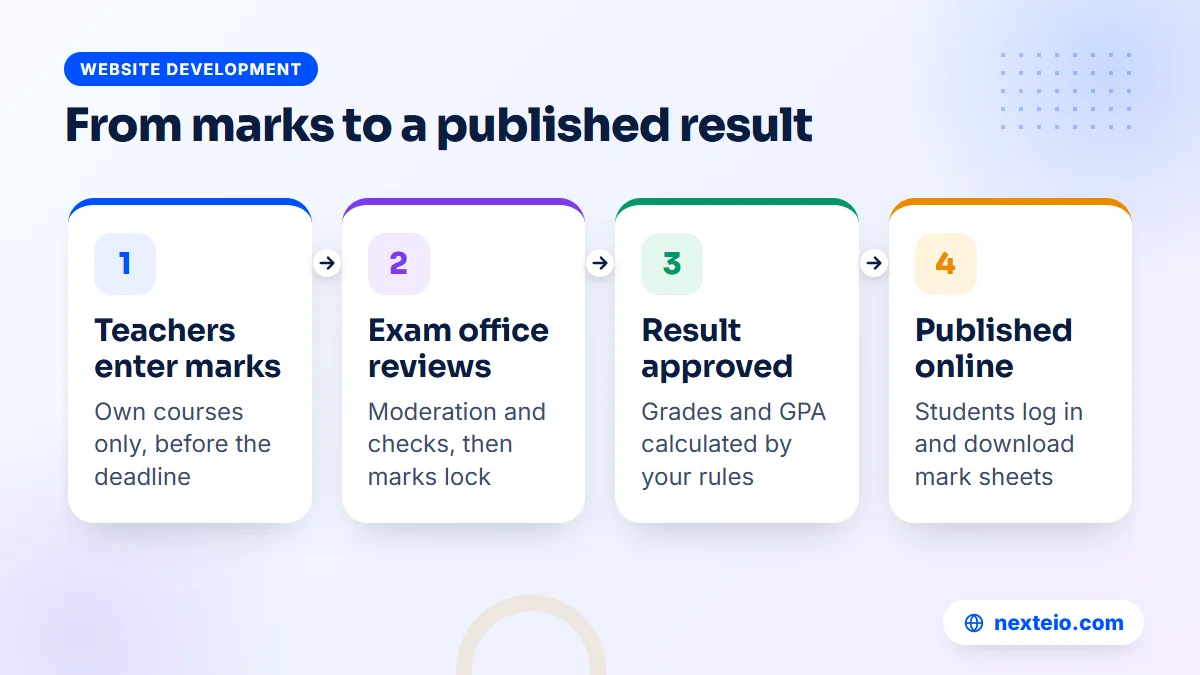
After publication, students should be able to view results by logging in, download a mark sheet, and request a transcript online. Many institutions now add a QR code to transcripts and certificates that links to a verification page on the official website. Employers and foreign universities can then confirm a document without phoning the registrar's office.
Affiliated colleges have an extra layer. Their students may sit public exams run by an affiliating university or education board, which keeps its own registration and result systems. In that case, the campus system handles internal exams and the college's own records, and it should export data in the formats the affiliating body asks for, rather than trying to replace that body's system.
HR, Payroll, Library, Hostel and Transport
These supporting modules rarely drive the decision to buy, but they complete the picture. Once students and money are in one place, it makes sense to bring staff and services in too. Here is how they usually rank for a typical private college or university:
| Module | Main users | What it handles | Usual priority |
|---|---|---|---|
| HR and payroll | Admin office, accounts | Staff records, leave, salary sheets, deductions | High for larger institutions |
| Teaching load | Department heads | Courses per teacher, part-time faculty hours | Medium |
| Library | Librarian, students | Catalog, issue and return, fines, search | Medium |
| Hostel | Hall supervisor, accounts | Seat allocation, hostel fees, visitor records | Only if the campus has hostels |
| Transport | Admin office, drivers | Routes, bus passes, transport fees | Only if buses are provided |
The link between HR and academics is often overlooked. When teacher records and course allocations live in the same system, management can see teaching loads at a glance, plan part-time faculty needs before a semester begins, and pay part-time teachers based on classes actually taken.
Library and hostel modules usually come later. Add them once the core modules are stable and staff trust the system. Trying to launch everything in one semester is a common reason campus projects stall.
Portals for Students, Teachers, Guardians and Management
Portals are where most people meet the system. Office staff use the back office every day, but students, teachers and guardians judge the whole project by what they see on their phones.
- Student portal: profile, class routine, attendance, registered courses, fee status and payment, results, notices and transcript requests.
- Teacher portal: class lists, attendance, mark entry, course materials and personal leave or salary details.
- Guardian portal: attendance, dues and results for one or more children, with SMS alerts for important events.
- Management dashboard: enrollment by program, income against target, dues, attendance trends and pending approvals.
Design every portal for a phone first. Most students and many teachers will never open it on a computer. Keep screens simple, offer Bangla where guardians need it, and make sure the busiest pages stay fast. Our article on page speed explains why a slow page loses people before they read anything, and on result day that patience runs even shorter.
The management dashboard deserves real thought. A principal or vice chancellor does not want forty charts. Five numbers checked every Sunday morning, with a way to drill down when one looks wrong, will be used. A wall of graphs will not.
Related guides for institutions planning their systems and websites:
- How to build a professional website that gets results
- A buyer's checklist for choosing a web design company
- On-page SEO for beginners, step by step
Ready-Made, ERP or Custom: Choosing Campus Management System Software
There are three main ways to get campus management system software, and each has a different cost pattern and level of control.
Ready-made education software
Several local and international companies sell school and college software as a yearly license or subscription. Setup is faster, and the vendor already handles common processes. The risk is fit: if your fee rules, grading system or approval chain do not match the product, staff end up working around it. Ask to see the product run your actual scenarios, not a demo with sample data.
General ERP systems
Large ERP platforms have education add-ons. They can be strong on accounts and HR, but they are often heavy to set up, need specialist consultants and feel complicated to teachers and students. They make most sense for big institutions that already run an ERP for other parts of a larger group.
A custom-built system
A custom system is built around your programs, rules and reports. It costs more at the start and needs a careful scoping phase, but nothing in it exists unless you need it, and it changes when your rules change. Our Laravel web application service builds this kind of system, because the framework handles user roles, queues, scheduled jobs and large databases well. The comparison in our guide to WordPress versus custom websites follows the same logic: ready-made is faster, custom fits better.
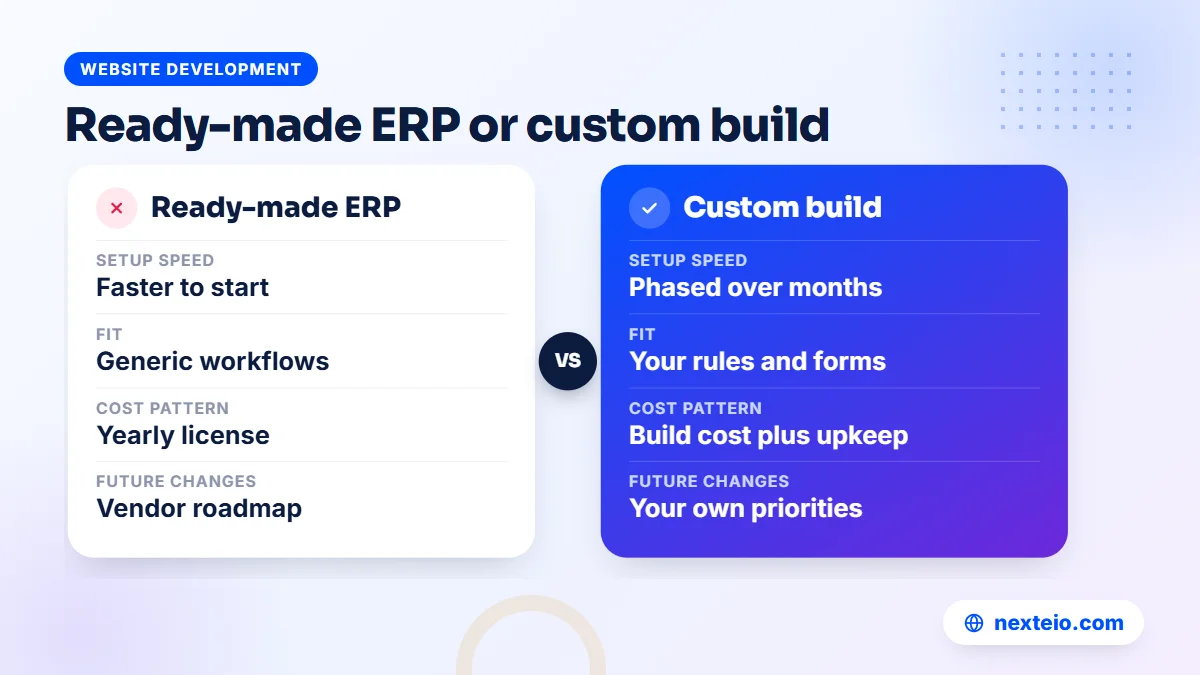
Whichever route you choose, insist on three things in writing. The institution owns its data and can export it in a standard format at any time. The domain and hosting accounts sit in the institution's name. And there is a clear plan for support, updates and fixes after launch.
Data Migration, Integration and Result-Day Hosting
Moving old records in
Data migration is the most underestimated part of any campus project. Years of student records sit in spreadsheets with different column names, Bangla and English mixed in the same field, missing phone numbers and duplicate students. Before importing, someone has to clean and map that data, and the institution has to decide how far back to go.
A sensible approach is to bring in all current students fully, then add past graduates in batches with the fields needed for transcript requests. Test every import on a copy first, and have staff from each office check a sample of records before the system goes live.
Connecting to other systems
Campus software rarely lives alone. Common connections include payment gateways, SMS providers, the public website, an LMS, accounting software and biometric attendance machines. Each connection should be listed during scoping, because each one adds testing work. A good developer will use documented APIs where they exist and avoid fragile workarounds. Connecting these pieces is a large part of any custom web application project, so it should be priced and scheduled openly.
Hosting that survives result day
Traffic on a campus system is uneven. It is quiet most days, then thousands of students log in within minutes when results are published or registration opens. The server must handle those peaks. That means a proper cloud or data-center server, caching for result pages, background queues for bulk SMS, and a plan to add capacity before known busy dates.
Never host the main system on a computer inside the campus. Load-shedding, a failed office UPS or a cut internet line would take the whole institution offline. Keep regular backups in a separate location, and test a restore at least once a term.
Security, Roles and Audit Trails
A campus system holds results, money and personal data for thousands of people. It is also an attractive target for someone who wants to change a grade. Security has to be part of the design, not a feature added at the end.
The essentials include:
- Role-based access, so each user sees and changes only what their job needs.
- Two-step login for staff who can change marks, fees or student status.
- Audit logs for every sensitive change, kept where ordinary users cannot edit them.
- HTTPS on every page, strong password rules and limits on login attempts.
- Regular updates to the framework, packages and server software.
- Off-site backups with a tested restore process.
The OWASP Application Security Verification Standard is a public checklist of security requirements for web applications. You do not need to read it yourself, but a serious developer should be able to show which of its levels the system targets.
People cause as many problems as code. When a staff member leaves, their account must be closed the same day. Shared logins at the exam office should not exist. Review user roles at the start of every semester, because permissions tend to pile up over time.
What Campus Management System Software Costs and How Long It Takes
There is no standard price, because two colleges with the same student count can need very different systems. As a rough guide from the Bangladeshi market, a custom system covering admissions, records, fees and results for a single college often starts around BDT 5 lakh and can reach 15 lakh or more. A university with many departments, a credit system and several portals can cost well beyond that. Treat these as broad market ranges, not quotes.
Ready-made products usually charge a yearly license, often based on student numbers, plus setup and training fees. Compare the total over five years, including the cost of the workarounds staff will need where the product does not fit.
Several factors move the price of campus management system software:
- The number of modules and how many offices use them.
- How complex your grading, fee and approval rules are.
- The number of integrations, such as payments, SMS and biometric devices.
- How much old data needs cleaning and importing.
- Expected peak traffic on result and registration days.
Time follows scope too. A phased build typically runs over several months, with the first module live long before the last. Discovery and planning alone often take two to four weeks for a mid-sized college.
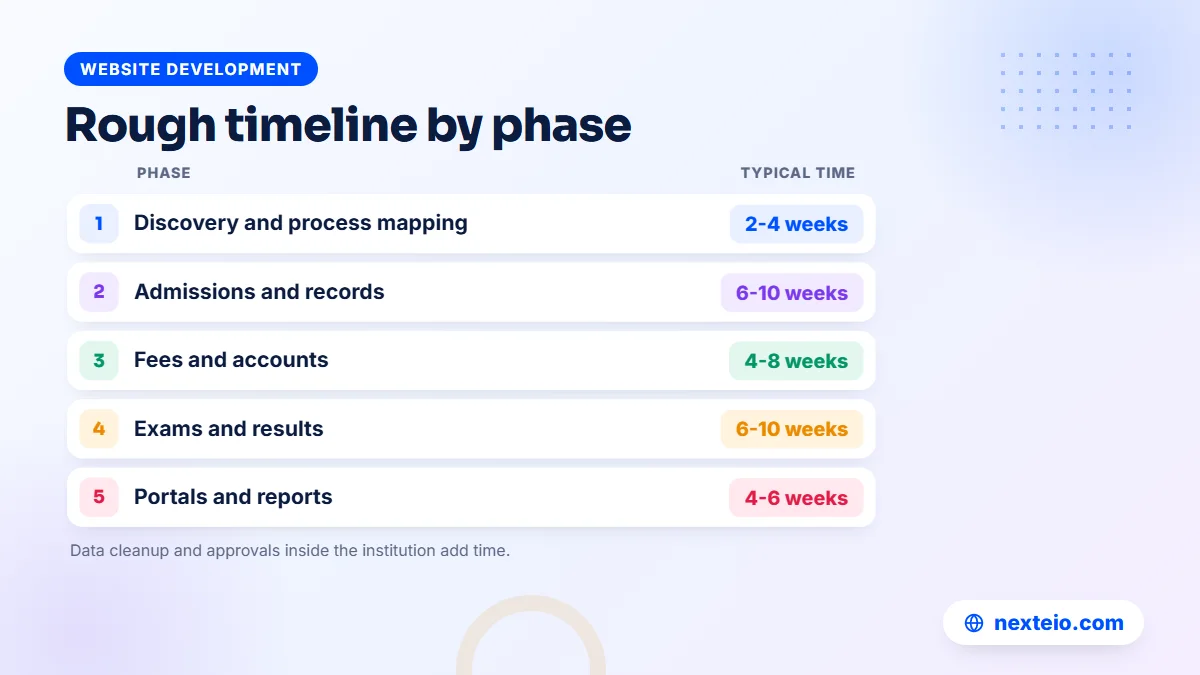
Running costs come after launch: hosting, SMS credits, payment gateway fees, backups and ongoing support. Budget for them from the start, so the system is not left without updates in its second year. If you want a realistic estimate for your institution, share your programs and student numbers through our project form.
Rolling Out Module by Module
The safest rollout follows the academic calendar, not the developer's convenience. Launching a new fee system in the week fees are due, or a new result module during final exams, invites trouble. A phased plan usually looks like this:
- Map processes with each office and agree the scope in writing, signed by management.
- Launch admissions before the next intake, so new students start in the system.
- Move student records and fees next, with old data imported and checked.
- Run the exam module for one internal exam in parallel with the old method, then compare results.
- Add portals, attendance and supporting modules once the core is stable.
Running old and new side by side for one cycle costs some extra effort. It also gives staff confidence that the numbers match.
Training should be short and role-based. The accounts team needs to know the fee screens deeply and nothing else. Teachers need attendance and mark entry. Give each group a one-page guide, a named person to call, and a clear date when the old spreadsheets stop being used.
Name one coordinator inside the institution, often a registrar's office staff member or an IT officer, who collects issues and sets priorities. Without that person, every department sends requests directly to the developer, and nothing gets finished. A custom Laravel system is easiest to improve when requests arrive through one channel in a clear order.
Questions to Ask Before You Sign
If you are buying a product or commissioning a build, these questions separate serious providers from the rest:
- Can you show the system handling our real fee structure and grading rules?
- Who owns the data, and how do we export all of it if we leave?
- Will the domain, hosting and source code be in our name?
- How does the system handle thousands of logins on result day?
- What audit logs exist for marks and payments?
- Which payment gateways and SMS providers do you already connect to?
- How is old data migrated, and who checks it?
- What does support cost after launch, and how fast are urgent problems handled?
Ask to speak with an institution already using the system, and ask them what went wrong during rollout. Every project has problems. What matters is how the provider handled them.
For custom builds, the developer's skill matters more than the sales pitch. Our guide on choosing a Laravel developer in Bangladesh covers the technical questions worth asking. For general guidance on higher education rules, the University Grants Commission of Bangladesh and the Directorate of Secondary and Higher Education publish official notices that may affect what your system needs to record. The Laravel documentation is also public, which helps if another developer ever needs to take over.
How Nexteio Can Help With Your Campus System
We build campus management systems as custom web applications through our Laravel development service, for colleges, universities, madrasas and training institutes in Bangladesh. The work starts with mapping how each office runs today: admissions, records, fees, exams and results. From that map we agree which modules to build first and in what order.
We design for the realities in this guide: phone-first portals, bKash, Nagad and bank payments, your exact grading and fee rules, audit logs for marks, and hosting planned for result-day traffic. We recommend keeping the domain, hosting and data in your institution's name. If your public website needs work too, we can rebuild it through our website design service and connect it to admissions, and our SEO service can help program pages show up when students search.
See the kind of projects we handle in our portfolio, browse all our services, or send us your requirements on the project form. For a quick question first, use our contact page.
Keep reading: technical SEO basics for website owners, a practical guide to Google Ads in Bangladesh, or browse all our website development guides.
Frequently asked questions
What is the difference between campus management software and a school management system?
They cover the same kind of work, but campus systems are built for colleges and universities. That usually means semester or credit-based course registration, GPA and CGPA rules, several departments, and more complex fee and exam structures. A school management system is simpler and focuses on classes, sections and term results.
Which module should a college build first?
Most colleges start with admissions, because every later record begins there. Fees and results usually come next, since they cause the most manual work and the most visible mistakes. Supporting modules such as library and hostel can wait until the core is stable.
Can a campus system collect fees through bKash and Nagad?
Yes. Through a payment gateway, the system can accept mobile wallet, card and internet banking payments and match each one to the right student automatically. The institution needs its own merchant account, and bank deposits or cash can still be recorded by staff.
How do we stop people from changing marks without permission?
Give mark entry rights only to the teacher of each course, lock marks after the exam office approves them, and require two-step login for anyone who can edit results. Most importantly, keep an audit log of every change with the old value, the new value, the user and the time.
Will the system slow down when results are published?
It can if hosting was not planned for peaks. Result pages should be cached, bulk SMS sent through background queues, and the server sized for the busiest hour rather than an average day. Ask the developer how they tested the system under heavy load before you approve launch.
Can we move our old student records into the new system?
Yes, but it takes planning. Old spreadsheets need cleaning, matching and checking before import. Many institutions bring in all current students first, then add past graduates in batches so transcript requests can still be handled.
Do affiliated colleges still need their own campus software?
Often yes. The affiliating university or board runs its own registration and result systems for public exams, but the college still manages admissions, fees, attendance, internal exams and staff. Good campus software handles that internal work and exports data in the formats the affiliating body requests.