Custom Software Development: When a Company Needs Its Own System
In this article 14 sections
- 1.What Custom Software Development Means for a Company
- 2.Eight Signs Your Company Needs Its Own System
- 3.Buy, Customize or Build: Comparing the Three Options
- 4.Where Custom Software Development Pays Off: Examples by Sector
- 5.Calculating Whether a Custom System Is Worth It
- 6.Total Cost of Ownership: What You Pay Before and After Launch
- 7.Start Small: Planning the First Version
- 8.What a Requirements Review Covers
- 9.Features Most Business Systems Need
- 10.Data, Integrations and Local Requirements
- 11.Getting Staff to Actually Use the New System
- 12.Risks of Custom Software Development and How to Reduce Them
- 13.How Nexteio Can Help With Custom Software Development
- 14.Frequently asked questions
Custom software development means building a system around the way your organization works, instead of changing the way you work to fit a product someone else designed. For a growing company, that usually starts with a simple question: why does this job still depend on five spreadsheets, a messaging group and one person who remembers everything?
Most organizations in Bangladesh do not begin with custom software, and they should not. Ready-made tools, a good website and a few shared sheets carry a business a long way. The trouble starts later, when orders, students, patients or branches multiply and the workarounds start costing more time than the work itself.
The hard part is knowing when that point has arrived, and what to do about it. Build too early and you pay for a system your process is not ready for. Wait too long and you lose hours every day to copying, checking and chasing.
This guide helps you make that call. It covers the signs that a company needs its own system, how buying, customizing and building compare, where a custom system pays off by sector, how to estimate whether it is worth the money, what it costs to run after launch, and how to get staff to actually use it.
What Custom Software Development Means for a Company
Custom software is software made for one organization's processes, data and users. The company that pays for it decides what it does, how it looks and when it changes. Done properly, the organization also owns the code and the data, so it is not tied to a single vendor's pricing or product decisions.
For most businesses today, custom application development means a web-based system. Staff and customers use it through a browser on a phone or computer, and it runs on a server rather than on each office PC. That makes it easy to use across branches, factories and field offices without installing anything locally.
It helps to separate three things that often get mixed together:
- Ready-made software: a product you subscribe to or license, such as an accounting package or a general HR tool. Everyone gets the same features.
- Customized ready-made software: the same product with settings, add-ons or paid changes from the vendor. You get more fit, but within the product's limits.
- Custom-built software: a system designed and coded for your process, usually on a standard framework so it can be maintained by other developers later.
Many firms sell general software development services that cover all three. When you speak to them, ask which one they are actually proposing. The cost, ownership and long-term flexibility are very different.
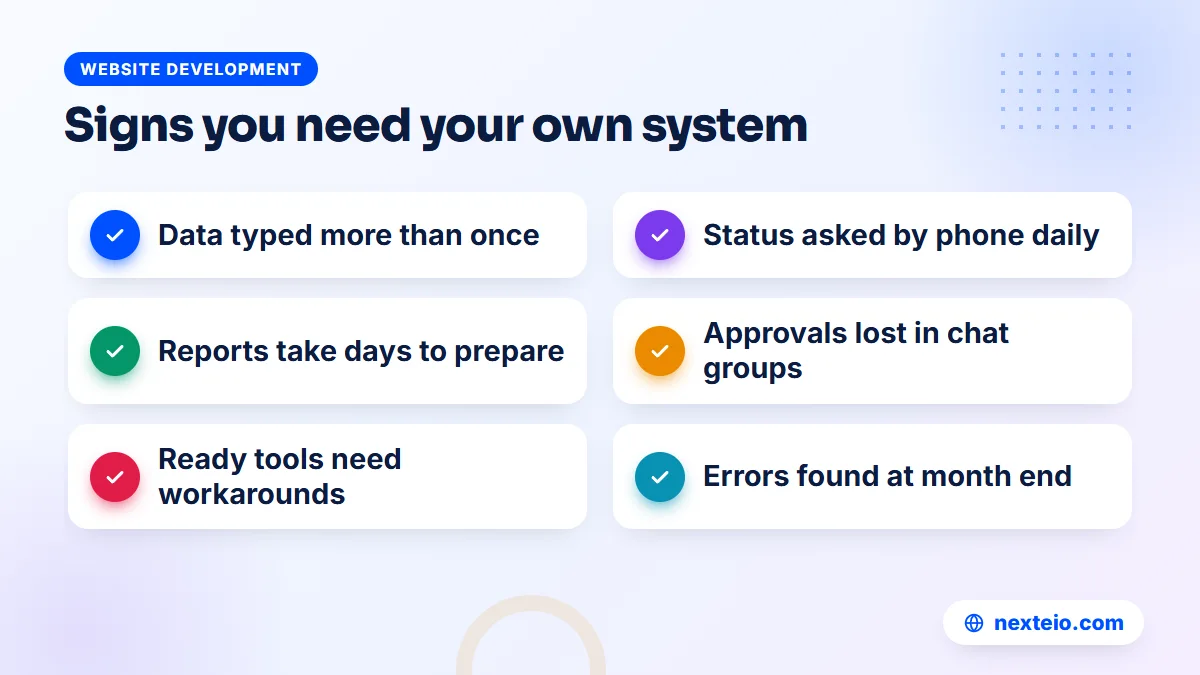
Eight Signs Your Company Needs Its Own System
No single sign proves you need a custom system. When several of these appear together, and they keep getting worse as you grow, it is time to look seriously at the option.
The first four signs show up in daily work:
- The same data is typed more than once. An order is written in a register, entered in a spreadsheet, then copied into an invoice.
- People ask for status by phone. Managers and customers call to ask where an order, an application or a payment stands.
- Reports take days. Month-end figures are assembled by hand from different files, and they rarely match on the first try.
- Approvals get lost. Requisitions and leave requests sit in chat groups or paper files with no record of who approved what.
The other four show up as risk and lost growth:
- One person holds the process. If a key officer is on leave, nobody else can find the latest file or knows the formula.
- Ready-made tools need constant workarounds. Staff export, edit and re-import data because the product does not fit your steps.
- Errors are found too late. Stock mismatches, double payments or missed renewals are discovered at month end or during an audit.
- Customers expect self-service. Dealers, guardians or patients want to check balances, results or bookings online without calling.
Notice that none of these signs is about technology. They are about time, accuracy and control. A good system fixes them by putting each piece of data in one place, letting the right people see it, and recording every change.
Buy, Customize or Build: Comparing the Three Options
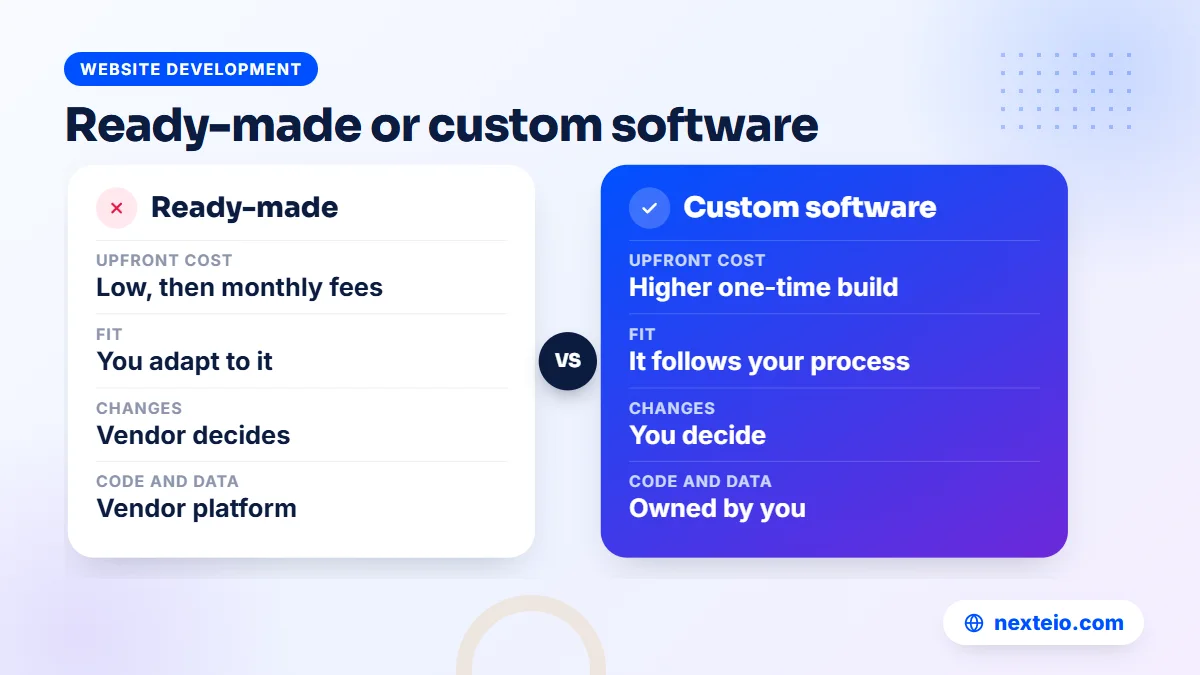
Before choosing custom software development, test the other two options honestly. A ready-made product that fits most of your needs is often the best value, especially for standard functions such as basic accounting or payroll.
| Factor | Buy ready-made | Customize a product | Build custom |
|---|---|---|---|
| Upfront cost | Low | Medium | Higher |
| Ongoing cost | Subscription or license per user | Subscription plus change fees | Hosting and maintenance |
| Fit to your process | You adapt to the product | Partial fit | Built around your process |
| Who decides changes | The vendor | Mostly the vendor | Your organization |
| Data and code ownership | Vendor platform | Vendor platform | Owned by you if the contract says so |
| Time to start | Days | A few weeks | Often a few months |
A useful test is to list your ten most important steps and check how many a ready-made product handles without workarounds. If it covers nine, buy it. If it covers five or six, and the missing steps are the ones that make your business different, building starts to make sense.
There is also a hybrid route. Many organizations keep a ready-made accounting package and build a custom system for operations, with a simple export between the two. That keeps the accounts office on familiar software while giving production, sales or admissions the tool they actually need. A custom Laravel application with a simple accounting export is a common way to set this up.
The same thinking applies to websites. Our comparison of WordPress and custom websites shows how the line between a configurable product and custom code works on the web side.
Where Custom Software Development Pays Off: Examples by Sector
The value of custom software development comes from the steps that are unique to your organization. These examples show what that looks like in sectors common across Bangladesh.
Garments and factories
A garment exporter juggles buyer orders, sample approvals, fabric bookings, production lines, inspection dates and shipment deadlines. Ready-made tools rarely follow that exact sequence. A custom order tracker shows each order's stage, the responsible merchandiser and any delay, so management sees problems while there is still time to act, rather than at the shipment date.
Distribution and trading companies
A distributor working with dozens of dealers needs credit limits, outstanding balances, scheme discounts and delivery routes in one place. A dealer portal lets each dealer place orders and check dues from a phone, and sales officers can record field visits. The head office stops spending its mornings answering balance queries by phone.
Hospitals, clinics and diagnostic centers
Clinics need appointment slots by doctor, patient records, test orders, billing and report delivery. Many have unusual rules, such as doctor chambers on specific days, referral commissions or package prices. A custom system can follow those rules exactly and send SMS reminders, which can reduce missed appointments without extra front-desk calls.
Schools, madrasas and coaching centers
Institutions handle admissions, fee schedules, waivers, attendance, exams and results, often in both Bangla and English. Fee rules alone can be complex: sibling discounts, scholarship cases, monthly and yearly fees, late fines. Custom software can calculate these automatically and let guardians see dues and pay online.
NGOs and development projects
NGOs track beneficiaries, field activities, distributions and donor reports, often across many districts. Each donor may want reports in a different format. A custom system collects field data once and produces each donor's format from the same records, which can save days of work before each reporting deadline.
In each case, the system works because it follows a process the organization already understands. Custom software development rarely succeeds when it is used to invent a new process from scratch at the same time.
Calculating Whether a Custom System Is Worth It
A custom system is an investment, so treat it like one. You do not need a complex financial model. A simple estimate of time saved, errors avoided and revenue protected is usually enough to make the decision clear, either way.
A worked example in hours
Take a hypothetical distributor where three office staff each spend about two hours a day answering dealer balance calls, matching payments and preparing order summaries. Over 24 working days, that is roughly 144 staff hours a month on tasks a dealer portal could largely remove.
Now add the less visible costs. How many orders are delayed because a credit check waited for someone to open a file? How often does a payment get recorded twice or not at all? Each of these has a real cost in money or goodwill, even if nobody tracks it today.
Questions to ask before deciding
- How many staff hours each month go to copying, checking and chasing?
- What did errors cost in the last year: write-offs, penalties, lost customers?
- Which growth plans, such as a new branch or more dealers, will the current method fail to handle?
- What would customers or guardians value most if they could do it online?
- What happens to the process if the one person who understands it leaves?
Compare the answers with the cost of the system over three years, not just the build price. If the numbers are close, start with a smaller first phase. If the time saved is clearly larger, the case is strong.
Related guides for this decision:
- How to hire the right Laravel developer in Bangladesh
- A buyer's checklist for choosing a web design company
- Why a website gets traffic but no customers
Total Cost of Ownership: What You Pay Before and After Launch
The build is only the first payment. A realistic budget for custom software development services covers the full life of the system, including hosting, outside services, maintenance and later changes.
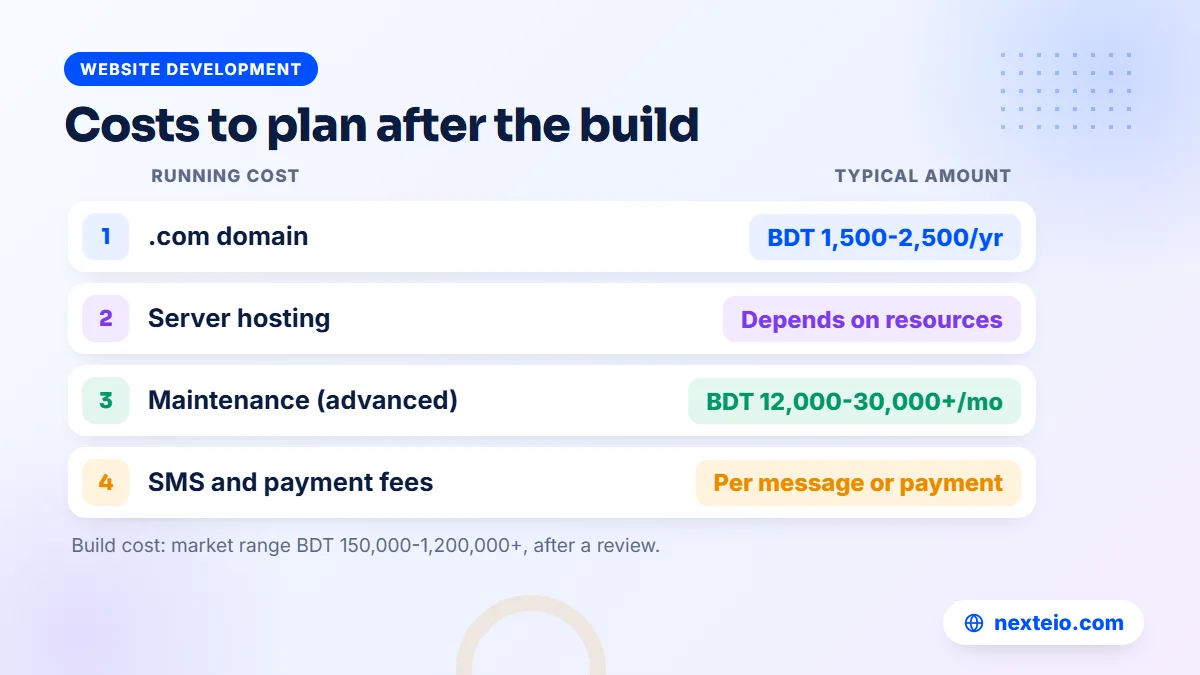
For the build itself, custom systems, portals and management software are normally quoted after a requirements review. As a broad guide, typical market ranges in Bangladesh run from about BDT 150,000 to BDT 1,200,000 or more, depending on modules and users. The table below shows the other costs to plan for.
| Cost item | Typical amount or basis | Notes |
|---|---|---|
| Build (first phase) | Quoted after a requirements review | Market range about BDT 150,000 to 1,200,000+ |
| .com domain | About BDT 1,500 to 2,500 a year | Register it in your organization's name |
| Server hosting | Depends on users, data and resources | Applications usually need more than shared hosting |
| SMS and payment gateways | Per message or per transaction | Set by the SMS provider and payment company |
| Maintenance | Often BDT 12,000 to 30,000+ a month | Updates, backups, monitoring and small fixes |
| New features | Quoted per change or phase | Plan a yearly budget for improvements |
Shared hosting at around BDT 2,000 to 8,000 a year suits ordinary websites, but most business applications need a virtual private server or cloud hosting, especially once several branches use the system at the same time. Ask for a hosting estimate based on your expected users rather than a generic package.
Maintenance is the line people most often leave out. In our maintenance plans, applications usually sit at the advanced level, because the work involves developer time for updates, security and small changes. Leaving it out does not remove the cost. It only moves it to the day something breaks.
Start Small: Planning the First Version
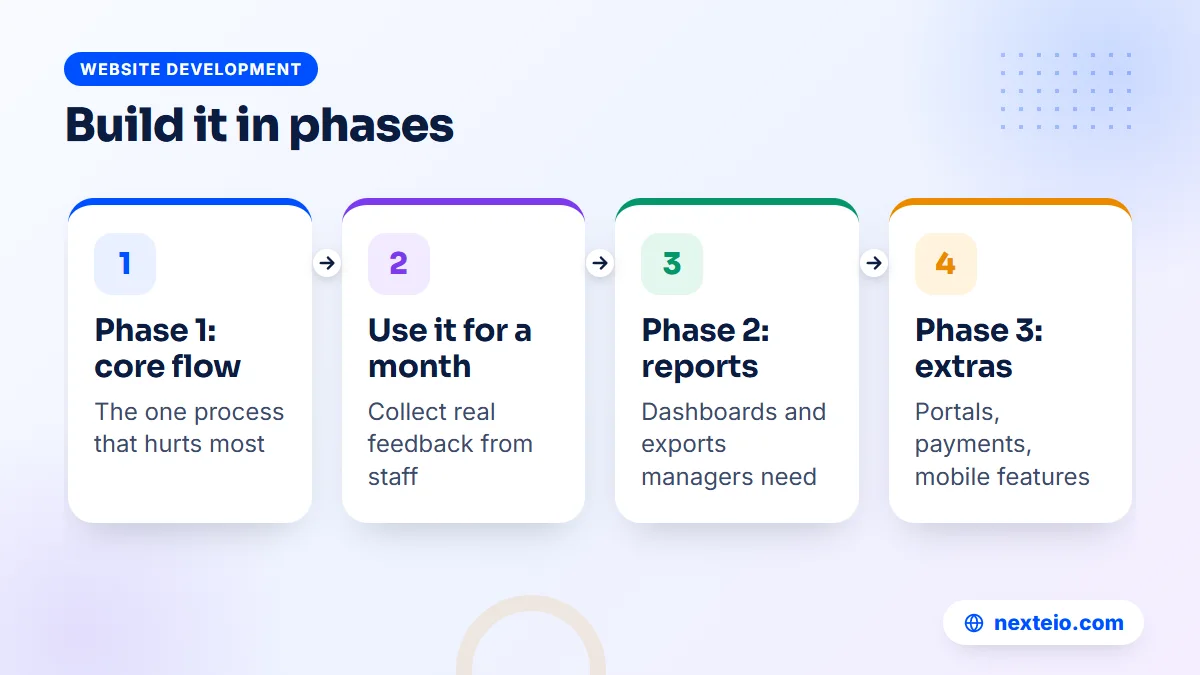
The safest way to approach custom software is in phases. Pick the one process that causes the most pain, build that well, and put it in front of real users. Everything else waits until you have learned from the first version.
A good first phase has three qualities. It solves a problem people feel every day, so they want to use it. It is small enough to launch within a few months. And it creates the core data, such as customers, products, students or orders, that later phases will build on.
For example, a school might start with admissions and fee collection, then add attendance and results in the next phase, and a guardian app later. A factory might start with order tracking, then add inspection records, then a buyer portal. Ideally, each phase proves its value before the next one is approved.
Phasing also helps with internal approvals. A first phase with a clear scope and a moderate cost is easier to get through a board or managing committee than a large system with an uncertain budget. When the first phase works, the second approval tends to be easier. If you are unsure which process to start with, describe the one that hurts most in our project form.
What a Requirements Review Covers
Because every process is different, custom software development is priced after a requirements review rather than from a feature list. Knowing what that review involves helps you prepare and makes the resulting quote far more accurate.
A proper review usually looks at five areas:
- People: every type of user, from data entry staff to directors, customers or guardians, and roughly how many of each.
- Process: each step of the work as it happens today, including the unusual cases such as refunds, partial deliveries, transfers or cancellations.
- Data: what records exist, where they live now, how clean they are and how much history needs to move.
- Outputs: the reports, invoices, certificates, receipts and exports that people rely on, with real samples.
- Connections: payments, SMS, email, the public website, accounting software and any device such as a barcode scanner.
You can prepare by collecting sample forms, spreadsheets and reports before the first meeting, and by making sure the people who do the daily work are available to explain it. Managers describe how a process should work. Staff describe how it actually works, and the system has to handle both.
The output of a good review is a short written scope: users and roles, the features for the first phase, the reports, the integrations and what is left for later. That document protects both sides. It makes the quote comparable between providers, and it gives everyone a clear reference when someone later asks whether a feature was included.
Expect the review to raise questions you have not considered, such as who approves a discount, what happens when a dealer exceeds a credit limit, or how a student transfer affects fees. Those questions are a good sign. Every rule settled on paper is one less surprise during the build.
Features Most Business Systems Need
Every system is different, but some features appear in almost every successful project. If a proposal leaves them out, ask why.
- Roles and permissions: each user sees only what their job requires, and sensitive actions need the right role.
- Activity log: a record of who created, changed or deleted each important record, and when.
- Search and filters: staff find any record in seconds by name, phone number, ID or date.
- Reports with export: standard reports on screen, plus export to Excel or PDF for meetings and auditors.
Beyond the basics, a few practical features decide whether people enjoy using the system:
- Notifications: SMS or email alerts for approvals, due dates, bookings and payments.
- Mobile-friendly screens: the daily tasks work on a phone, because that is what many users carry.
- Bangla support: names, addresses and notices in Bangla display, print and search correctly.
- Backups and restore: automatic, off-server copies with a tested way to bring them back.
Login security deserves its own mention. Strong password rules, limits on repeated attempts and two-step login for administrators are standard practice. The OWASP authentication cheat sheet is a public reference your developer should know.
For field staff in areas with weak signal, some systems also work as progressive web apps, which can be installed from the browser and can keep certain screens available offline. The MDN guide to progressive web apps explains what is possible. This adds work, so include it only when field use is central.
Data, Integrations and Local Requirements
Moving your existing data
Your old spreadsheets and registers hold years of history. Moving them into a new system is often harder than expected, because the same customer appears under three spellings, phone numbers are stored in different formats and some columns were used differently by different staff. Plan time for cleaning, and decide early how much history is worth importing.
A practical approach is to import active records in full, such as current students, open orders or dealers with balances, and keep older history in an archived file. That keeps the new system clean from day one.
Connecting to services people already use
Local integrations often decide whether custom software fits better than an imported product. Common ones include:
- bKash, Nagad and card payments through a payment gateway.
- Bulk SMS for confirmations, reminders and notices.
- Export to your accounting software in the format the accounts office uses.
- Your public website, so online forms feed straight into the system.
- Courier booking and tracking for businesses that ship goods.
Connecting these is routine work in a Laravel-based business system, as long as each provider offers a documented connection.
If you sell online, the shop and the operations system should share product and order data. Many businesses start with a dedicated e-commerce website and connect it to custom stock or dealer modules later. Our guide to planning and budgeting an e-commerce website covers the store side.
Hosting for local conditions
Do not run a business system on a computer in the office. Load-shedding, a single internet connection and no proper backups make it fragile. A data center server with daily off-site backups and uptime monitoring is the safer base, and it lets branches and field staff connect from anywhere.
Data privacy also belongs in the plan from the start, especially for patient, student or beneficiary records. The NIST Privacy Framework offers a structured way to think about what data you collect, who can access it and how long you keep it.
Getting Staff to Actually Use the New System
The most common way a custom software development project fails is not a technical failure. It is a system that works, but people keep using the old spreadsheet anyway. Adoption needs as much planning as development.
Involve users early. The staff who do the daily work should see screen designs and try test versions before launch. They will spot missing steps that management never sees, and they will feel the system is theirs rather than something imposed on them.
Choose a champion in each department, someone respected who learns the system first and helps colleagues. Train each group on its own tasks, not the whole system. A teacher needs attendance and marks entry, not the fee module. Short, task-based sessions with a printed or video guide work better than one long training day.
Set a clear switch-over date. Running old and new methods side by side for a short time is sensible for critical processes, but it should end on a fixed date. After that, the new system is the only source of truth, and reports come only from it. Managers have to lead here: if they keep asking for the old spreadsheet, staff will keep making it.
Finally, collect feedback in the first months and act on it quickly. Small fixes, such as a missing filter or one extra field, show staff that their input matters and turn early doubters into regular users.
Risks of Custom Software Development and How to Reduce Them
Custom software development carries risks that ready-made products do not. Most can be managed with a few decisions made at the start.
| Risk | What it looks like | How to reduce it |
|---|---|---|
| Dependence on one developer | Only one person understands the code | Use a mainstream framework, insist on documentation and code access |
| Scope creep | New requests keep delaying launch | Fix a first-phase scope and log new ideas for later |
| Lock-in | Vendor holds the server, domain or code | Keep all accounts and the repository in your name |
| Security gaps | Weak logins, missing role checks | Ask for security testing and two-step login for admins |
| Abandoned system | No updates after launch, software ages | Agree on maintenance before the build ends |
Technology choice is part of the answer. Building on a widely used framework such as Laravel means the code follows known conventions, so another developer can pick it up if needed. That is a strong protection against the most painful scenario, where a system works but nobody can change it. It is also why our Laravel development service uses it for business systems.
Visibility matters too. Even a small custom application should have a public face that works: online forms, a clear login page and, where relevant, pages that customers can find on Google. Our guide on technical SEO basics covers the essentials, and an ads campaign can bring the first users to a new customer portal or booking page.
How Nexteio Can Help With Custom Software Development
We handle custom software development through our Laravel web application service. When a normal website cannot handle your process, we build the application around it: portals, dashboards, booking systems, stock and order records, fee and admission tools, and the daily workflows your team runs.
We begin by looking at how the work is done today, including your spreadsheets, forms and reports, and which step causes the most trouble. From that requirements review we suggest a sensible first phase and give you a quote for it, so the budget is based on your real process. Later phases are planned once the first one is in use.
After launch, we can keep the system updated, backed up and monitored through a maintenance agreement. It starts once you give us access to the server and the application and both sides sign a contract that sets out the work. If you also need a public website, we can build it with our custom website design or WordPress website service. Read more about Nexteio, see our portfolio, tell us about your process through the project form or reach us on the contact page.
Keep reading: how to build a professional business website, how faster pages help you rank and sell, or more website development guides.
Frequently asked questions
When is custom software better than a ready-made product?
When the steps that make your organization different are exactly the ones a product cannot handle without workarounds. If a ready-made tool covers almost all of your process, buying it is usually better value. If it misses the core steps, staff end up working around it every day, and a custom system starts to pay off.
How much does custom software cost in Bangladesh?
Custom systems are normally quoted after a requirements review, because the price depends on modules, user roles, reports and integrations. Typical market ranges run from about BDT 150,000 to BDT 1,200,000 or more. Hosting, SMS, payment fees and maintenance are ongoing costs on top of the build.
How long does it take to build a custom business system?
A focused first phase often takes from about one to four months, depending on its size and how quickly your team gives feedback. Larger systems are usually released in phases over a longer period. Starting with the most painful process gets a working tool into staff hands sooner.
Can we keep our current accounting software and still build a custom system?
Yes. Many organizations keep a familiar accounting package and build a custom system for operations such as orders, production, admissions or dealers. The custom system exports data in the format the accounts office needs, so both sides keep working with the tools that suit them.
Do we own the custom software after it is built?
You should, but only the contract makes it so. Make sure it states that the source code and data belong to your organization once paid for, and keep the domain, server and code repository accounts in your organization's name.
What if our process changes after the system is built?
That is one of the main advantages of a custom system: it can change with you. Small changes are usually handled under a maintenance agreement, while larger ones are planned and priced as a new phase. Building on a mainstream framework keeps those changes affordable.
Will our staff need technical skills to use custom software?
No. A well-designed system shows each person only the screens they need for their job, in plain language and, where useful, in Bangla. Short training sessions for each user group, plus a simple written or video guide, are usually enough for daily use.