Domain and Hosting Explained: A Plain Guide for Business Owners
In this article 15 sections
- 1.Domain and Hosting in Plain Words
- 2.How the Domain Finds the Hosting
- 3.Buying Domain and Hosting Together or Separately
- 4.Free Domain Offers and What They Really Mean
- 5.What Domain and Hosting Cost Each Year
- 6.Email on Your Own Domain
- 7.Setting Up Domain and Hosting for a New Website
- 8.Choosing a Domain Name People Can Remember
- 9.Matching Hosting to What Your Website Does
- 10.Domain and Hosting Choices for Common Organizations
- 11.Common Domain and Hosting Problems and Their Fixes
- 12.Moving to New Hosting Without Losing Your Domain or Email
- 13.Who Should Hold the Domain and Hosting Logins
- 14.How Nexteio Can Help With Domain and Hosting
- 15.Frequently asked questions
Every website runs on two paid services that many business owners mix up: a domain and hosting. The domain is the address people type, such as yourcompany.com. Hosting is the computer, kept running in a data centre, where the website's files actually live. A third piece, called DNS, connects the two so that the address leads to the right computer.
The confusion is understandable. Many providers sell both on one invoice, use the words loosely, and set them up behind the scenes. Then one day the website stops loading, the email bounces, or a new developer asks for "the DNS login", and nobody in the office knows where to look.
This guide explains what each part does, how they connect, and what to decide before you pay for either. It covers free domain offers, email on your own domain, a step-by-step setup for a new site, the problems that most often break a website, and how to move to a new host without losing anything.
No technical background is needed. If you can follow a delivery address to a house, you can follow how a website is found.
Domain and Hosting in Plain Words
Think of an office building. The domain is the postal address written on your letterhead. Hosting is the actual office space you rent, where the furniture and files are kept. DNS is the directory at the gate that tells visitors which floor to go to. You can change offices and keep the same address on your letterhead, as long as you update the directory.
The two also differ in how they are bought, billed and lost:
| Question | Domain | Hosting |
|---|---|---|
| What is it? | Your website's name and address | Server space where the site's files and database live |
| Who sells it? | Registrars and their resellers; BTCL for .bd names | Hosting companies, local or international |
| How is it billed? | Usually yearly | Monthly or yearly, often with a multi-year offer |
| What if it lapses? | Site and email stop working, and the name can be lost | Site goes offline, and files may be deleted after a grace period |
Both bills matter, but a lost domain is far harder to recover than a lost hosting plan.
Owning a domain does not give you a website, and buying hosting does not give you an address. You need both, plus the website itself, which is the design and code built on the hosting. When people ask for "domain hosting" as one product, they usually mean a package that bundles the first two. The website, whether a theme-based site or a custom-designed business website, is a separate piece of work.
Mozilla's beginner guide to what a domain name is explains the parts of a name, such as the top-level domain at the end, if you want a little more depth.
How the Domain Finds the Hosting
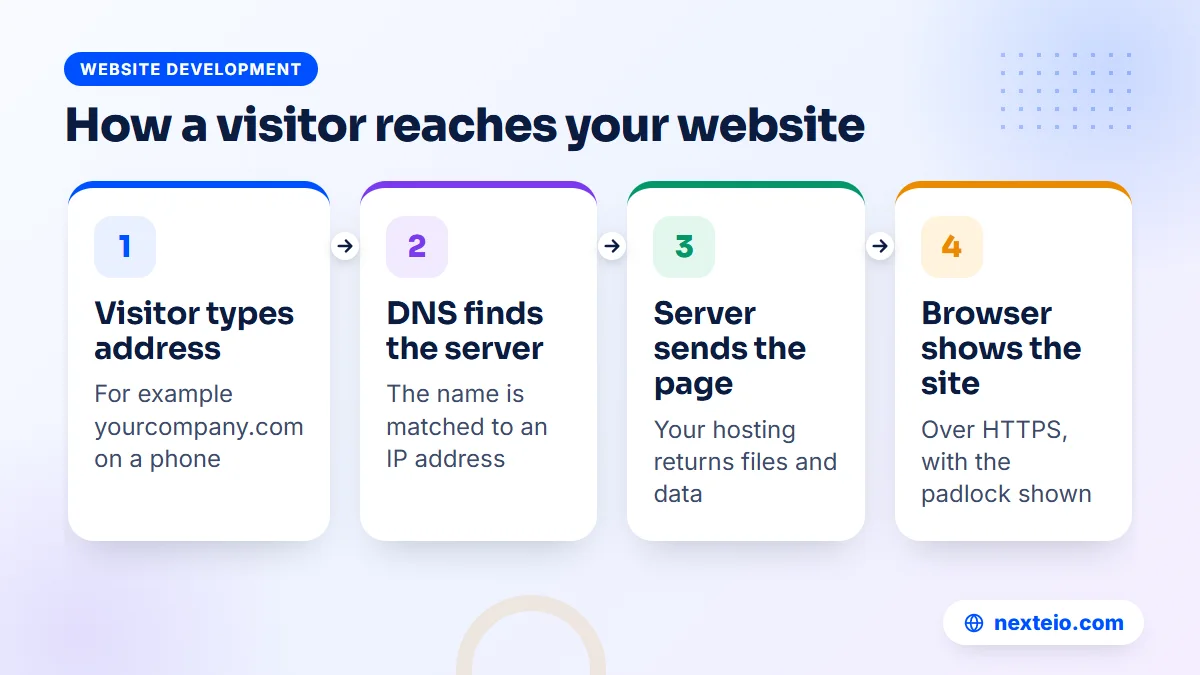
When someone types your address, their device does not know where your website lives. It asks the domain name system, or DNS, which works like a large shared directory. DNS returns the address of your hosting server, called an IP address, and the browser then asks that server for the page.
Your domain points to the hosting in one of two ways. The first is by changing the domain's nameservers to the ones your hosting company gives you, which hands the whole DNS directory to the host. The second is by keeping DNS where it is and adding individual records that point to the server. Both work. The first is simpler; the second gives more control when email, the website and other services live with different companies.
| DNS record | What it does | Typical use |
|---|---|---|
| A | Points a name to a server's IPv4 address | The main website |
| CNAME | Points one name to another name | www, or a service such as Blogger |
| MX | Says which server receives email | Business email |
| TXT | Holds text for checks and email rules | Domain verification, SPF, DMARC |
You rarely need to touch these by hand, but knowing the four names helps when a provider asks for them.
When you change nameservers or records, the update spreads across the internet over a period called propagation. It is often quick, but it can take several hours and occasionally up to a day or two, depending on a setting called TTL. During that window some visitors may see the old site and some the new one. That is normal, and it is the reason website moves should never happen the night before an admission deadline or a trade fair.
Buying Domain and Hosting Together or Separately
You can buy the domain and the hosting from the same company or from two different ones. Many local providers in Bangladesh sell a domain name and web hosting together in one yearly package, often with a discount. International registrars and hosts usually sell them separately, although many also offer a domain name web hosting bundle at checkout. Neither route is wrong, but each has trade-offs.
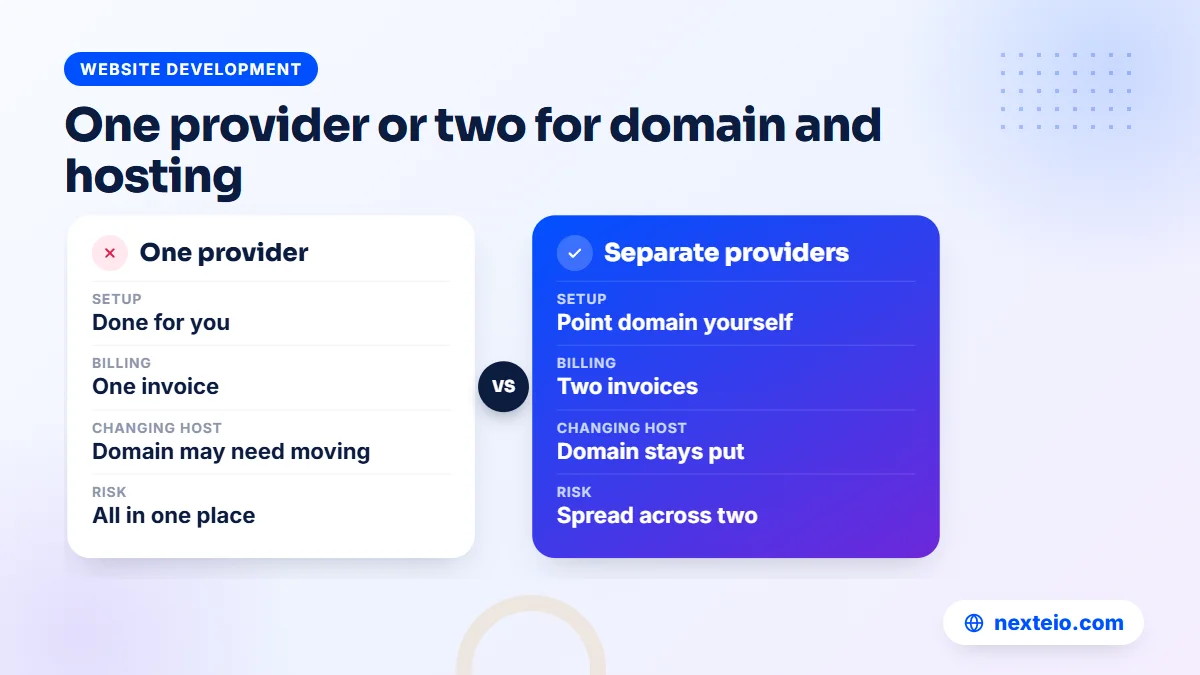
One company for both is convenient. The nameservers are set for you, one invoice covers both, and one support desk answers questions. The risk is concentration: if that company has an outage, a billing dispute or simply goes out of business, your address and your website are stuck in the same place.
Separate companies take a little more setup, because you point the domain to the host yourself. In return, you can change hosting later without touching the domain, and a problem at the host never puts your address at risk. Larger organizations and anyone who expects to move hosts over time usually prefer this.
A practical middle path works for most small organizations. Buy the domain from a well-known registrar in the organization's own name, buy hosting wherever it suits your site and budget, and keep both logins on your side. If you choose a bundled web hosting and domain package, ask how you would move the domain out later, and get the answer in writing.
Free Domain Offers and What They Really Mean
Search for a web domain free of charge and you will find three different kinds of offer. They are not the same thing, and only one of them gives you a real address of your own.
- A free first year with hosting. Many hosts include a domain at no extra charge when you buy a yearly plan. The domain is real and can be yours, but it renews at the normal price from the second year, and some providers register it in their own account.
- A free subdomain on a platform. Blogger, website builders and some hosts give you an address such as yourname.blogspot.com. It costs nothing, but the platform owns the main name, and your address carries their brand.
- Free extensions from unknown registries. Some little-known services give away whole domain names. Email from these addresses is often treated with suspicion, and the service can change its terms at any time.
All three can look alike on a sales page, so read the small print before you click.
For a business, school or NGO, the first option is fine as long as the domain is registered in your organization's name. The second suits a personal blog or a test. The third is best avoided for anything official.
A free Blogger address can still grow into something professional. Blogger is hosted by Google at no cost, and you can connect your own domain to it later. Our Blogger website service sets up exactly that for small publishers and writers who want a proper address without paying for hosting.
What Domain and Hosting Cost Each Year
Both services are recurring costs, so think of them as yearly bills rather than one-time purchases. Typical market ranges in Bangladesh look like this:
- .com domain: about BDT 1,500 to 2,500 a year, depending on the registrar.
- .com.bd and other .bd names: priced by BTCL, with its own registration terms and paperwork.
- Shared hosting: about BDT 2,000 to 8,000 a year for a plan that suits a business website.
- VPS or larger servers: billed monthly, for online stores, portals and custom applications with heavier needs.
For most company and school websites, domain and hosting together come to a few thousand taka a year.
When you compare website hosting and domain offers, watch the renewal price on both. Domains and hosting are often sold cheaply for the first term and renewed at a higher regular rate. Some sellers also add small extras at checkout, such as privacy protection, paid SSL or site builders, which you may not need. Free SSL from Let's Encrypt is now included on most hosting plans and renews on its own.
The website build is a separate, one-time cost. Typical market ranges in Bangladesh are about BDT 25,000 to 60,000 for a theme-based company website and 60,000 to 150,000 for a custom design. School or madrasa sites usually fall around BDT 20,000 to 60,000. These figures depend on the pages, features and content involved, so treat them as a starting point for planning.
Email on Your Own Domain
The domain does more than carry your website. It also carries your email addresses, such as info@yourcompany.com or principal@yourschool.edu.bd. That is the third piece people forget, and it is often the piece that causes the most trouble.
Email is controlled by the domain's MX records, which say which server should receive mail. You have two common choices. Mailboxes on your hosting plan cost little and are set up in the control panel. A separate email service, such as Google Workspace or Microsoft 365, costs a monthly fee per user but usually delivers more reliably and handles staff changes more easily. Google's guide to setting up MX records for Google Workspace shows what the switch involves.
Whichever you choose, add the email authentication records known as SPF, DKIM and DMARC. They tell receiving servers that mail from your domain is genuine, which keeps quotations, admission replies and invoices out of spam folders. Many hosts add SPF automatically, but DKIM and DMARC often need a few minutes of manual setup.
Keep email in mind whenever you change anything. Moving the nameservers to a new host without copying the MX records is the most common way an office loses its email for a day.
Setting Up Domain and Hosting for a New Website
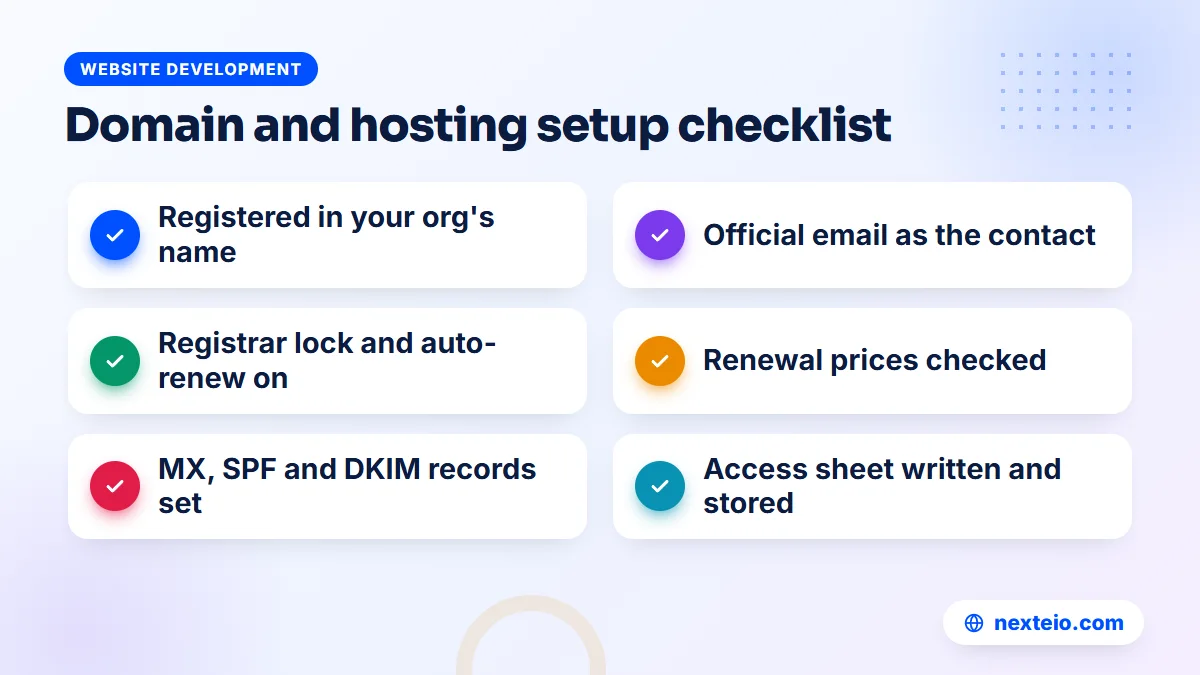
If you are starting from nothing, the order of steps matters. Doing them in this sequence avoids most of the problems described later in this guide:
- Choose the name. Check that it is available as .com and, if you want a local address, as .com.bd or another .bd name.
- Register the domain in the organization's name. Use an official email address that more than one person can read, not a developer's or a staff member's personal inbox.
- Turn on the registrar lock and auto-renew, and note the expiry date in a shared calendar.
- Buy hosting that fits the site. A shared plan for most company, school and NGO sites, and a VPS for stores and portals with heavy use.
With the accounts in place, connect them and finish the setup:
- Point the domain to the hosting by changing nameservers or adding A and CNAME records.
- Set up email with MX, SPF, DKIM and DMARC records before you print business cards.
- Install SSL so the site loads over HTTPS, and check that both the www and non-www versions work.
- Write everything down in an access sheet: registrar, host, DNS location, email service, renewal dates and who holds each login.
The last step looks like paperwork, but it is the one that saves the most time when staff or providers change.
If your web developer handles the setup for you, ask them to follow the same list and hand you the access sheet at the end. A careful team building your company website should be glad to do this, because it makes their own work clearer too.
Related guides that help at this stage:
- How to build a professional business website that gets results
- WordPress vs custom website: which is right for your business
- Simple SEO tips for small business websites in Bangladesh
Choosing a Domain Name People Can Remember
A good domain name is easy to say on the phone, easy to spell after hearing it once, and short enough to fit on a signboard or a visiting card. That rules out more names than you might expect.
- Keep it short, ideally the organization's known name or a clear short form.
- Avoid hyphens and numbers, which people forget or type wrongly.
- Be careful with English spellings of Bangla names. If people might write "Rahman" or "Rahaman", consider registering both and redirecting one.
- Check that the same name is free on Facebook and other platforms you use, so customers find one consistent identity.
- Do not build the name around a product or a year that may change.
A clear name also pays off in search, where people often search for a business by name.
Then choose the extension. A .com suits companies and exporters with buyers abroad. A .com.bd, .org.bd or .edu.bd signals a registered Bangladeshi organization but needs documents. Many organizations register both a .com and a .bd name and point one to the other. Once the site is live, the steps in our guide to on-page SEO for beginners help each page show up for the right searches.
Matching Hosting to What Your Website Does
Hosting should follow the job the website does. A five-page company profile, a school site with notices, a busy online store and an admission portal put very different loads on a server. Buying the same plan for all of them either wastes money or causes failures.
For a typical company, factory, clinic or NGO site built on WordPress, a well-run shared plan with clear resource limits is usually enough. A school or college should pick a stronger shared plan, because traffic jumps on result day. An online store built through e-commerce website development needs more processing power for checkout, stock updates and payment callbacks, and may move to a VPS as orders grow.
Location matters too. A server in or near Bangladesh can respond faster to local visitors on mobile data, while exporters with buyers in Europe or North America may prefer a server closer to them. Whatever you choose, test the site's speed on a phone before you sign up for a long term. Our article on website speed and SEO explains why a slow server holds back everything else.
Finally, check the software. If the site runs on WordPress or Laravel, the host must support the current PHP version and offer a database, backups and a simple way to restore them.
Domain and Hosting Choices for Common Organizations
The right setup depends less on technology than on who uses the site and who pays the bills. A few common cases show how the same building blocks are arranged differently.
A garment exporter or trading company
Buyers abroad check the website and send email before every meeting, so email delivery matters as much as the site. A .com domain, a reliable shared plan, and email on a separate service with SPF, DKIM and DMARC set up is a sound base. Registering a matching .com.bd and pointing it to the main site protects the name locally.
A school, college or madrasa
Guardians visit on result day and during admissions, often from mobile data. A .edu.bd name, or a .com if paperwork is not yet ready, plus a stronger shared plan suits most institutions. The renewal should sit in the accounts calendar, because a lapse during admission week is the worst possible timing.
An NGO or development organization
Donors and partners use the site to check reports and contact details. A .org or .org.bd name signals the right kind of body. Because staff and projects change often, keep the domain in the organization's name and use role email addresses so access does not leave with a project officer.
A clinic or diagnostic centre
Patients want a phone number, doctor schedules and directions, and many arrive from Google Maps. Shared hosting is enough, but the appointment form must deliver email reliably. A monthly test message to the form is a simple habit that catches problems before patients do.
Common Domain and Hosting Problems and Their Fixes
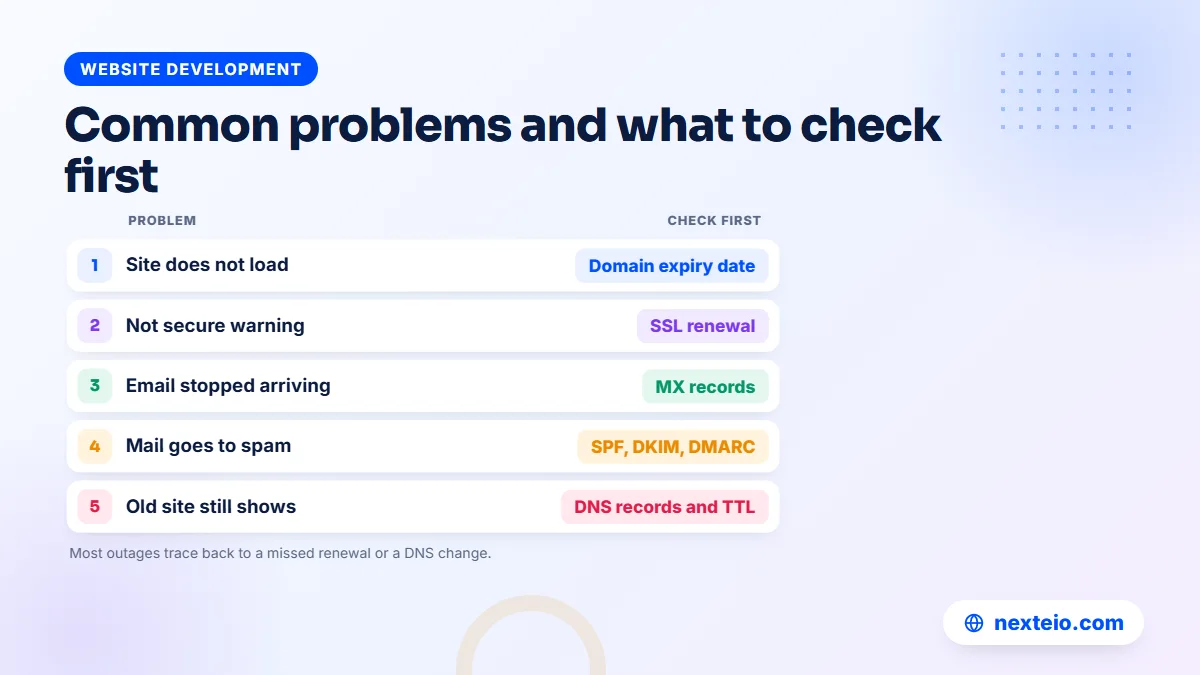
Most website emergencies in small organizations trace back to the domain and hosting setup, not to the website design. Here are the problems that come up most often, and the first thing to check for each.
The site does not load at all
First check whether the domain has expired, because an expired domain stops the site and email together. If the domain is fine, check whether the hosting account was suspended for an unpaid invoice or for crossing a resource limit. If both are fine, look at whether someone recently changed the nameservers or the A record.
The browser shows "Not secure"
The SSL certificate has expired, failed to renew, or was issued only for the non-www version of the name. Reissuing it from the hosting control panel usually fixes the problem in minutes. If the site loads some images over plain HTTP, those also need to be changed to HTTPS.
Email stopped arriving
Look at the MX records first, especially after any change of host or nameservers. Then check whether the mailbox is full or the hosting account was suspended. If mail goes out but lands in spam, the SPF, DKIM or DMARC records are usually missing or wrong.
An old version of the site appears
After a move, some visitors may still reach the old server until propagation finishes. If it lasts more than two days, a record somewhere still points to the old IP address. Caching plugins and browser caches can also show stale pages, so clear them before you assume the move failed.
When none of these checks finds the cause, a technical review helps. Our guide to technical SEO basics covers server errors and redirects that also affect how Google sees the site.
Moving to New Hosting Without Losing Your Domain or Email
Changing hosts is routine when it is planned. The domain stays where it is; only the place it points to changes. The risk lies in the email and in the short period when both servers are live. A safe move follows this order:
- Take a full backup of the website files and database from the old host, and keep a copy offline.
- Write down every DNS record currently in use, especially MX and TXT records.
- A day before the move, lower the TTL on the main records so the change spreads faster.
- Set up the site on the new host and test it through a temporary address.
- Recreate the email setup on the new side, or confirm it stays with a separate service.
- Switch the nameservers or A record, then test the site and email from several networks.
- Keep the old hosting active for at least a week before you cancel it.
Plan the switch for a quiet day, never just before results, admissions or a sale.
Moving the domain itself to a new registrar is a separate process and is rarely needed at the same time. A generic domain is moved with an authorization code from the current registrar, and it usually cannot be moved within 60 days of registration or a previous transfer. The ICANN beginner's guides explain how registries and registrars fit together. Changes to .bd names go through BTCL and its own process.
Who Should Hold the Domain and Hosting Logins
The safest rule is simple: the organization owns the accounts, and outside providers get their own limited access. Many organizations discover, years later, that the domain sits in a former developer's account or that the hosting renewal emails go to someone who left long ago.
- Register the domain and hosting in the organization's legal name.
- Use a role email such as it@ or admin@ on your domain, readable by two senior people.
- Give developers and maintenance providers separate logins that you can remove.
- Store the access sheet in a safe place and update it after every change.
These habits cost nothing and prevent the most painful website problems an office can face.
If you are hiring someone to build or look after the site, ask about this before you sign. A good provider will register everything in your name without being asked. Our buyer's checklist for choosing a web design company includes this and other questions worth raising early.
How Nexteio Can Help With Domain and Hosting
When we build a website through our custom website design service, the domain and hosting are planned along with the site, not left for launch day. We help you choose a name and extension, recommend hosting that fits what the site does and how busy it gets, connect the domain, set up SSL and make sure business email keeps working.
Our advice is always to register the domain and hosting in your organization's name, with an official email you control. At the end of a project, you should have every login and a clear note of where each service lives, so you never depend on one person for the keys.
If you already have a website and something feels unclear, such as who holds the domain, where DNS is managed or why email keeps failing, send us the site address through our project brief form. You can also see our recent work, browse all our services, or reach us through the contact page. If a fresh start makes more sense, we can plan a new website build with the domain and hosting set up correctly from day one, or start a project brief together.
Keep reading: what to check before hiring a WordPress developer, how internal linking helps your pages rank, or browse all our website development guides.
Frequently asked questions
Can I buy a domain without buying hosting?
Yes. Many organizations register their name early to protect it and add hosting only when the website is ready. A domain without hosting can still be used for email through a separate email service, or pointed to a free platform such as Blogger.
Can I change hosting and keep the same domain?
Yes. The domain stays with its registrar, and you only update the nameservers or records so it points to the new server. Copy your email records before the switch and keep the old hosting active for about a week, so nothing is lost while the change spreads.
Is a free domain with hosting really free?
Usually only for the first year. After that the domain renews at the registrar's normal price, and the hosting renews at its regular rate. Check whose account the free domain is registered in, because some providers keep it in their own name.
What is the difference between a domain, hosting and a website?
The domain is the address, hosting is the server space where the site lives, and the website is the design, content and code placed on that hosting. You pay for the domain and hosting every year, while the website is usually built once and then maintained.
How long does it take for a new domain to start working?
A newly registered domain usually starts resolving within minutes to a few hours once it points to the hosting. When you change nameservers on an existing domain, the update can take several hours and sometimes a day or two to reach every network.
Should an organization in Bangladesh choose .com or .com.bd?
A .com is quick to register online and familiar to buyers abroad, which suits exporters and companies with foreign partners. A .com.bd or another .bd name signals a Bangladeshi organization but needs documents through BTCL. Many organizations hold both and redirect one to the other.
Does it matter where DNS is managed?
It matters for control more than for speed. DNS can sit with the registrar, the hosting company or a separate DNS service, and whoever holds that login can redirect your website and email. Write down where DNS lives, keep that login inside the organization, and copy every record before changing it.
Who should be the owner of our domain and hosting accounts?
Your organization should be, using its legal name and an official email address that more than one senior person can read. Developers and maintenance providers should get separate logins that you can remove later, so you never depend on one outside person to reach your own website.