Madrasa Management Software: Hifz, Results, Fees and a Guardian App
In this article 15 sections
- 1.What Madrasa Management Software Should Cover
- 2.Why General School Software Rarely Fits a Madrasa
- 3.The Hifz Department: Daily Records Without Extra Paperwork
- 4.Results for Qawmi, Hifz, Nurani and Alia Classes
- 5.Fees, Concessions and Lillah Boarding
- 6.Separate Funds: Zakat, Lillah, Sadaqah and Donations
- 7.Residential Life: Rooms, Gate Pass, Meals and Canteen
- 8.Attendance With QR Gate Scanning and SMS
- 9.The Guardian App and the Teacher App
- 10.Security, Roles and Who Sees What
- 11.Choosing Madrasa Management Software: Questions to Ask
- 12.Costs, Hosting and Data Ownership
- 13.Mistakes That Make Madrasas Give Up on Software
- 14.How Nexteio Can Help Your Madrasa
- 15.Frequently asked questions
Madrasa management software brings a madrasa's office work into one system: admission, student and guardian records, Hifz lessons, attendance, fees, separate funds, results and notices. Most madrasas in Bangladesh still run these on registers, exercise books and one or two Excel files kept by the office. The registers work, but they live in different hands, and the muhtamim usually learns about a problem only after it has grown.
A madrasa is not a school with a different name. The Hifz department keeps daily lesson records that a school never needs. Many students live on campus, so the office tracks rooms, meals and who has gone home for the weekend. Money arrives as tuition, as Lillah support and as Zakat, and the committee expects each to stay in its own account.
This guide is for the people who decide: the muhtamim, the madrasa committee, the nazim, and the office and accounts staff. It explains what a good system should cover department by department, the questions to ask before buying, honest notes on cost and ownership, and the mistakes that make madrasas give up on software after one term.
Along the way, we show how our own Madrasa Management Software handles each point, with a live demo you can open on your phone and try today.
What Madrasa Management Software Should Cover
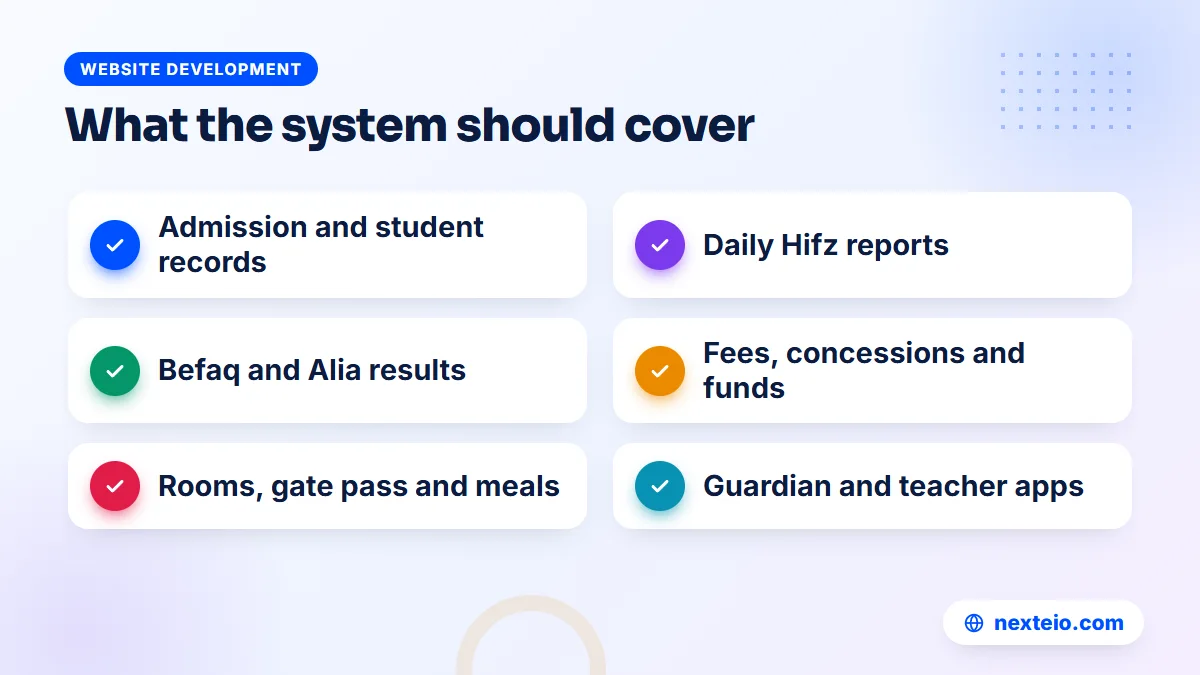
Start with your departments, not with a feature list. A typical madrasa may run a Nurani or Maktab section for young children, a Hifz department, Qawmi Kitab classes following Befaq, and in some cases Alia classes under the Bangladesh Madrasah Education Board. Each department has its own classes, teachers, exams and fee rules. Software that only understands "Class One to Class Ten" will force you to bend your structure to fit it.
A complete madrasah management system usually covers two groups of work. The first group covers students and teaching:
- Admission and students: application forms, student profiles, guardians, ID cards, promotion to the next class, testimonials and transfer certificates.
- Teaching records: class routines, daily Hifz reports and teachers' daily work reports.
- Attendance: for students and staff, with a message to guardians when a student is absent.
- Exams: mark entry, tabulation, report cards, admit cards and Befaq registration.
The second group covers money, life on campus and contact with families:
- Money: monthly fees, concessions, receipts, income and expense, separate funds and donor records.
- Residential life: hostel rooms, gate passes, meal menus and the canteen.
- Communication: notices, SMS, and a way for guardians to see their child's progress.
Few madrasas need every part on day one. What matters is that the system can grow with you, and that sections you do not use can be switched off so they do not clutter the screen for your staff. Our Madrasa Management Software is built on Laravel, the same framework behind our Laravel web application service, which is why extra features can be added later without starting over. You can see the system running for a real madrasa in our Darul Uloom Model Madrasa project.
Why General School Software Rarely Fits a Madrasa
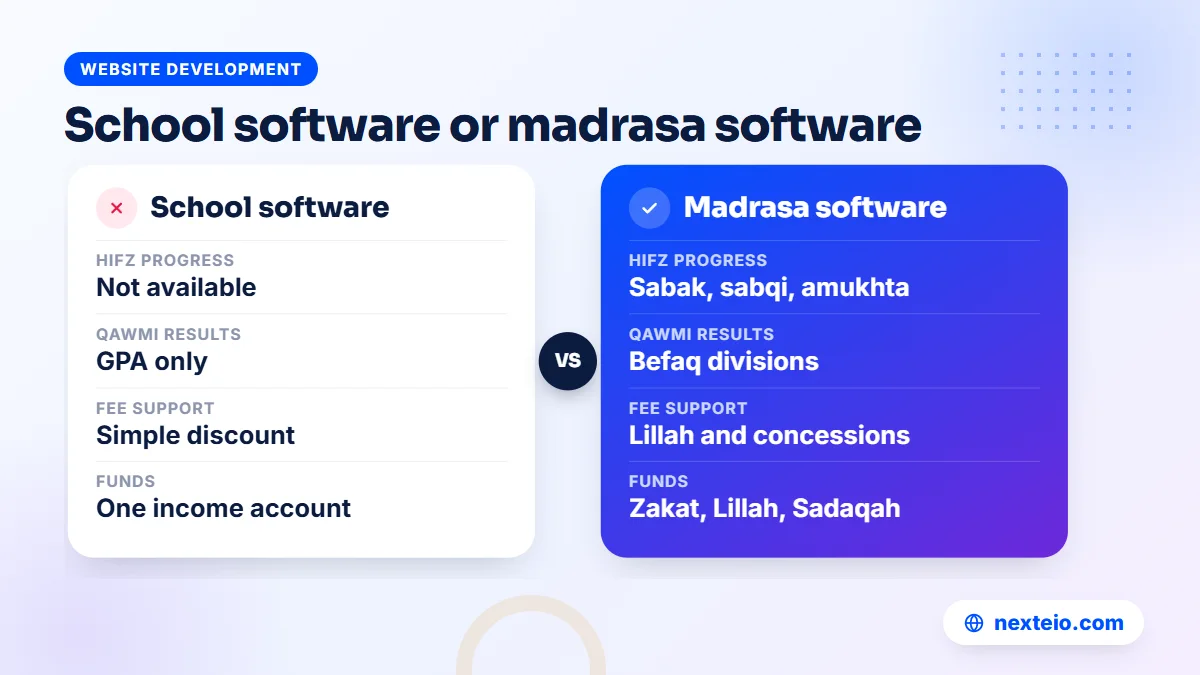
Many madrasas first try a school management package because it is easy to find. The problems show up within weeks. The results screen only knows GPA, so Qawmi and Hifz results in Befaq divisions have to be kept on paper. The fee module has no idea what Lillah boarding means. There is nowhere to record Zakat separately from tuition, so the accountant keeps a second register anyway.
The gaps tend to fall in the same places:
| Need | Typical school software | Madrasa-specific software |
|---|---|---|
| Hifz progress | Not available | Daily sabak, sabqi and amukhta records |
| Qawmi and Hifz results | GPA only | Befaq divisions, plus GPA for Alia |
| Fee support | Simple discount | Half, full, Lillah boarding or a set amount |
| Funds | One income account | Zakat, Lillah, Sadaqah, construction and general funds kept apart |
| Residential students | Usually missing | Rooms, gate pass and meal menu |
| Calendar | Gregorian only | Hijri date and prayer times on the website |
None of this makes school software bad. It was simply built for a different institution. If you want to understand what school systems are designed to do, our guide to school management software features lays it out, and the contrast makes the madrasa gaps easy to see.
The Hifz Department: Daily Records Without Extra Paperwork
In a Hifz class, progress is measured every day. The ustad hears the new lesson (sabak), the recent revision (sabqi) and the older revision (amukhta). In many madrasas, these are written in a personal exercise book for each student, which the ustad carries and the guardian rarely sees. When an ustad changes or a book is lost, the record goes with it.
Software for this job should let the teacher record, in a minute or two per student, the para, the surah and ayat range, how the student recited and how many mistakes were made. Over weeks, those daily entries show which students are moving steadily and which ones are stuck on the same pages.
Our Madrasa Management Software has a daily Hifz report built for exactly this: sabak, sabqi, amukhta, para, surah and ayat range, and mistakes. Teachers record it in the system each day, and guardians see daily lessons in the parent app. The madrasa website can also show a Hifz honor board for students who complete the Quran, if the committee wants that.
The software keeps the record. How the ustad teaches, and what counts as a good day, stays entirely with the madrasa's teachers.
Results for Qawmi, Hifz, Nurani and Alia Classes
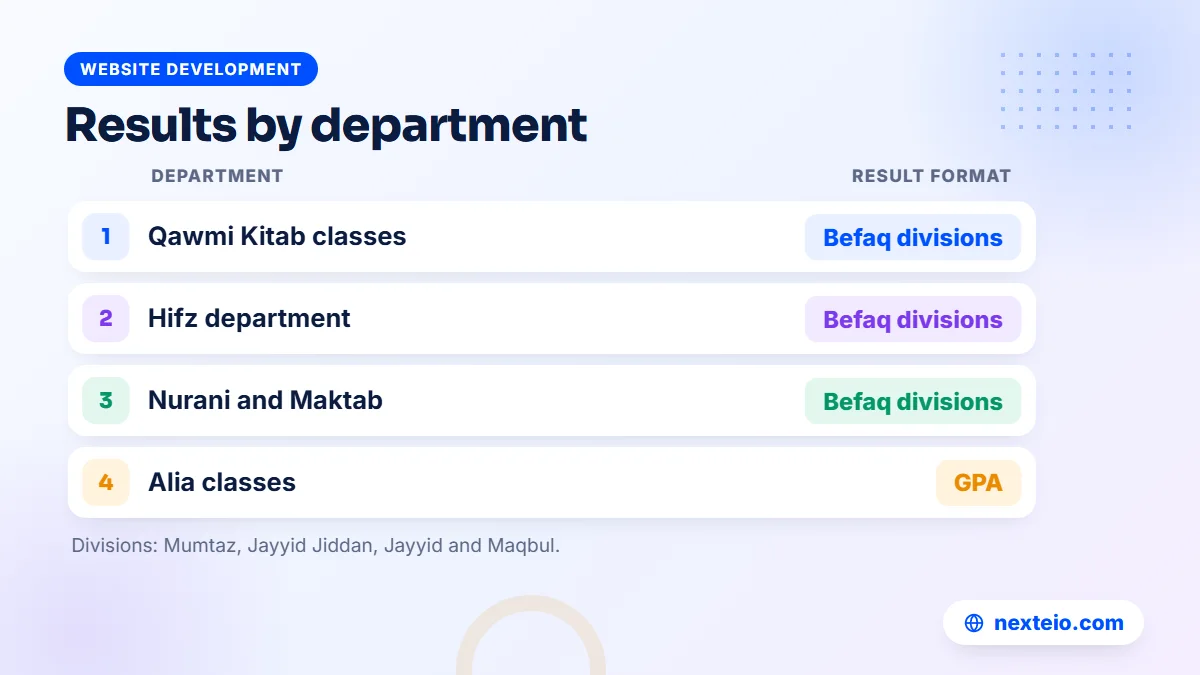
Results are where a madrasa with several departments feels the most pain. Qawmi classes that follow Befaq use divisions such as Mumtaz, Jayyid Jiddan, Jayyid and Maqbul. Alia classes follow the GPA system used by the Bangladesh Madrasah Education Board. A madrasa running both needs both in the same system, side by side, without two separate result registers. Our guide to a result management system shows how to check GPA calculations by hand before you trust any software with them.
Check that any madrasa management software you consider can handle:
- Mark entry by subject teachers for their own classes.
- Befaq divisions for Qawmi, Hifz and Nurani, and GPA for Alia.
- Tabulation sheets for the exam committee to check.
- Report cards for guardians and final results for the year.
- Admit cards and a published exam schedule.
- Result search on the madrasa website, so guardians do not have to visit the office.
Our system covers all six. Results can be searched on the website by registration number, and certificates can be checked by serial number or QR code. It also keeps Befaq registration records and a Befaq report from Ibtidaiyyah to Takmil and Hifz, which helps the office prepare board work without retyping student details.
The Befaq and the education board set the rules for their own exams. The software follows those rules for internal records; it does not replace the board's own registration or result systems. For Alia madrasas, the Directorate of Madrasah Education remains the official source for policies and notices.
Fees, Concessions and Lillah Boarding
Madrasa fees are rarely one number. A residential Hifz student may pay admission, monthly tuition, residential and meal charges and exam fees. A Kitab student from a poor family may pay half tuition, while an orphan may have full boarding covered under Lillah. The office needs to know, every month, who owes what, without recalculating each case by hand. Our guide to a fee management system walks through fee heads, concessions and daily cash checks step by step.
| Fee or support type | What the office needs to track |
|---|---|
| Admission fee | Paid once at entry, with a receipt |
| Monthly tuition | A bill on the 1st, paid or due |
| Residential and meal charges | Only for students living on campus |
| Exam fees | Per exam, often collected with admit cards |
| Concessions | Half, full, Lillah boarding or a fixed amount |
Our Madrasa Management Software creates monthly bills on the 1st and handles admission, residential and meal, exam and other fees. Concessions can be set as half, full, Lillah boarding or a set amount, so the monthly bill already reflects the support a student receives. Receipts are sent with an SMS, and dues reminders go out automatically by SMS and email.
For payments, guardians can pay through bKash Tokenized Checkout, and the office records cash, Nagad and bank payments by hand. Card payments and a Nagad gateway are not part of the current version. Our guide on accepting online payments in Bangladesh explains how merchant accounts and gateways work if this is new for your accounts office.
Separate Funds: Zakat, Lillah, Sadaqah and Donations
For most madrasa committees, this is the most important section. Donors give money for specific purposes, and the madrasa is answerable for how each taka is used. When all income goes into one cash register, it becomes hard to show a donor that their Zakat went where it should. It also becomes hard for the committee to see whether the construction fund is on track.
Good accounts software keeps each fund in its own place and records every movement with a voucher. Look for:
- Separate funds for Zakat, Lillah, Sadaqah, construction and general use.
- A donor list, so the madrasa knows who gave, when and to which fund.
- Income and expense entries with vouchers.
- A cash book and a monthly report the committee can read.
- An audit log showing who entered or changed each record.
Our software does all of these, and the website includes a donation page with funds and project progress bars, for example for a new building. Online donations work through bKash once the madrasa's own bKash merchant account is connected. On the public demo, the online donation button shows "coming soon" because bKash is not connected there.
One point needs to be clear. Software keeps funds apart and records how they are spent. Which expenses each fund may cover is a religious and committee decision, and that judgment belongs to the madrasa's own scholars and committee, not to any software company. If your madrasa is planning a public donation page, our article on non-profit website design covers how to present appeals and projects honestly.
Residential Life: Rooms, Gate Pass, Meals and Canteen
Residential madrasas carry a responsibility that day schools do not: they are looking after children day and night. Guardians want to know their child is safe. The office needs to know who is on campus, who has gone out, and who has not come back on time.
A gate pass record answers those questions. When a student leaves campus, the office records who went out and for how long. If the student is late back, the system raises an alert. Our software includes this gate pass, and teachers and staff can handle it from the staff app as well as the dashboard.
The other residential pieces fit around it:
- Hostel rooms: which student is in which room.
- Meal menu: a weekly menu shown on the website, which guardians often ask about.
- Canteen: sales including credit, purchases, supplier dues, stock and a report.
- Library: books, issue and return, with a receipt.
Two things are not built: transport management and general inventory beyond canteen stock. A madrasa that runs its own vehicles will need to keep those records separately for now.
Attendance With QR Gate Scanning and SMS
Attendance in a madrasa often happens more than once a day, especially for residential students with early Hifz sessions. Taking it by calling names is slow, and paper registers are hard to summarize at the end of the month. Our guide to school attendance software covers absence SMS wording and a calm rollout, and most of it applies to a madrasa as well.
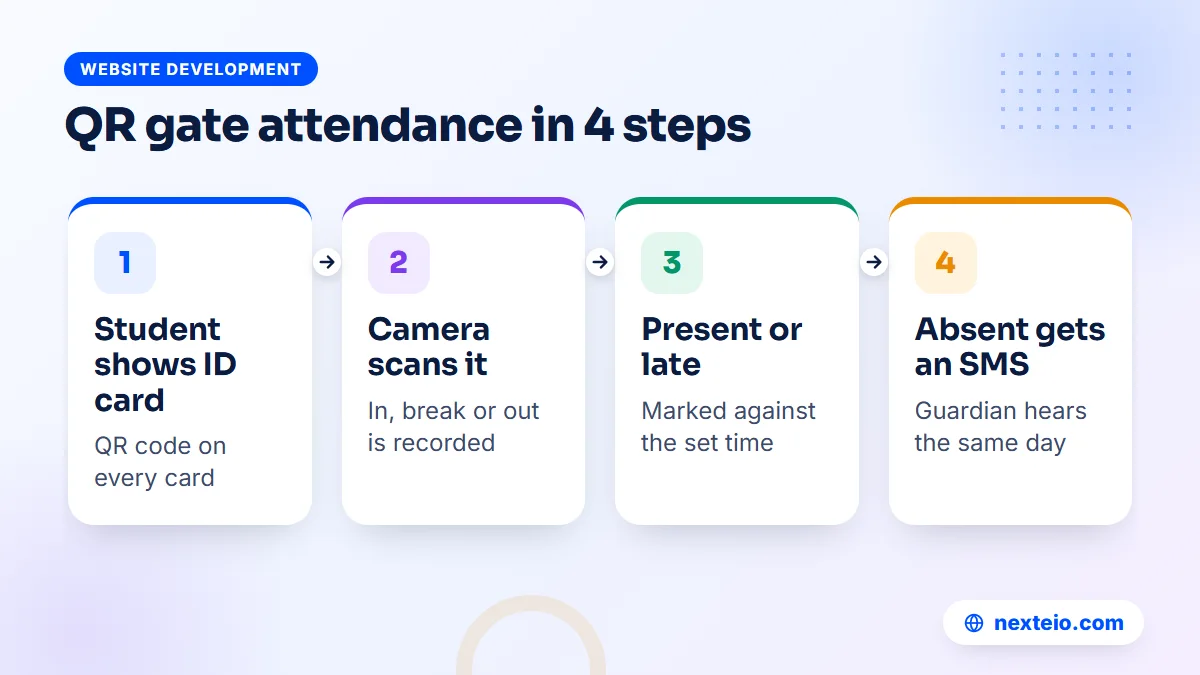
Our software offers two ways. Teachers can mark attendance for students and staff in the usual way. There is also a QR gate scanner: a phone or laptop camera reads the QR code on each student's ID card for in, break and out, and marks the student present or late. When a student is absent, the guardian gets an SMS. For a guardian whose son lives far from home, that same-day message means a great deal.
Staff attendance sits in the same system, which leads to the next part of the office's work: the people who teach.
Teachers and staff: routine, work reports and salaries
In many madrasas, the muhtamim learns how the teaching day went by walking the corridors. That works in a small Maktab. It does not work when there are Hifz halaqahs before Fajr, Kitab classes through the day and evening study for residential students, spread over several buildings.
Three records make the teaching day visible without extra meetings:
- Class routine: who teaches which class at which time, built once and shared with teachers.
- Daily work reports: a short note from each teacher on what was covered.
- Staff attendance: who came, who was late and who was on leave.
Salaries close the loop. Our Madrasa Management Software keeps staff records, logs salary payments and prints salary slips, so a teacher who asks about last month's payment gets a clear answer from the accounts office. It does not replace the committee's own decisions on pay; it simply keeps the record straight.
For a madrasa with many part-time teachers, having these records in one place takes much of the guesswork out of the end-of-month accounts.
The Guardian App and the Teacher App
Guardians of madrasa students often live in another district, work abroad or simply cannot visit often. A phone app that shows their child's day is one of the most valued parts of a modern system. It also cuts down on phone calls to the office.
Our software includes a parent app. Guardians log in with their mobile number and a password or an SMS code. They can see attendance, daily lessons, results, fees, notices, the routine, messages, and canteen and library records. They can pay fees with bKash and switch between children if more than one studies at the madrasa. A parent-teacher chat handles quick questions without a phone call.
Teachers and staff have their own app for attendance, gate pass, messages and today's overview, and each person sees only what their role allows. Both apps are available as Android APK files, installed outside the Play Store, so Android asks the user to allow installation from an unknown source. For guardians, instant notifications and a daily 8 PM summary work when the parent app is added to the home screen from Chrome over HTTPS; they do not reach the current APK.
Notices, SMS and guardian requests
Before any exam, Eid holiday or change in the routine, the office has to reach every family. Many madrasas still do this by asking students to tell their guardians, which means half the families hear late or not at all.
The communication tools in our software cover the common cases. Notices appear on the website with a scrolling ticker and in the parent app. Bulk SMS reaches many guardians in one go, voice SMS helps guardians who do not read text messages comfortably, and saved SMS templates keep the wording consistent. An SMS log and an SMS balance screen show what was sent and what credit remains.
Messages also flow the other way. Through the parent app, guardians can ask to talk to a teacher, request a meeting or apply for leave for their child. The office sees these requests in one place instead of in scattered phone calls and paper slips.
BulkSMSBD is built in, and any other SMS company can be connected through a URL template during setup. Choosing the SMS company from the dashboard is not available, so decide on your provider before installation.
Security, Roles and Who Sees What
A madrasa holds sensitive information: children's details, guardians' phone numbers, family circumstances behind Lillah support and the names of donors. Not every staff member needs to see all of it, and none of it should be easy to reach from outside.
Roles are the first line of protection. Our software has roles for Super Admin, Muhtamim or Principal, Accountant, Teacher and Guardian, and the permissions for each role are set with simple ticks. Any section of the dashboard can be switched off for the whole madrasa if you do not use it.
For logins, the system supports two-factor sign-in with Google Authenticator, QR login on a phone and a login history. An audit log records changes. Backups run every night, with download and restore, and an optional copy to Google Drive. If your madrasa does not yet have a routine for software updates and server care, our guide to website maintenance services explains what that routine should include.
Choosing Madrasa Management Software: Questions to Ask
Demos always look smooth. The real test is whether the system fits your departments, your fee rules and your staff's daily routine. Before choosing any madrasa management software, sit with your office staff and one senior teacher from each department, and ask the vendor to show these working. Start with teaching and results:
- Can it hold all our departments, such as Nurani, Hifz, Kitab and Alia, in one system?
- Does it keep daily Hifz records with sabak, sabqi and amukhta?
- Does it produce Befaq divisions for Qawmi classes and GPA for Alia?
Then move to money, language and control of your data:
- Can we set half, full and Lillah concessions without manual calculation each month?
- Are Zakat, Lillah and Sadaqah kept in separate funds with vouchers?
- Does it work in Bangla for staff who are not comfortable in English?
- Will it run on our own domain and hosting, with our data in our control?
- How are backups made, and can we restore one ourselves?
- What is not built yet, in writing?
The last question matters most. A vendor who will not list missing features in writing will surprise you later. For our own product, the list is short: no SSLCommerz or card payments, no Nagad gateway, no Play Store listing, no transport module and no general inventory beyond the canteen. When a madrasa needs one of these, we can scope it as custom Laravel development rather than promise it as part of the product.
Related guides for madrasa committees:
- Educational website design for schools, colleges and madrasas
- Learning management systems for schools, if you plan online lessons
- How web application development works, if you need custom features
Costs, Hosting and Data Ownership
Software for madrasas is offered in two broad ways. Some providers rent a shared online system, where your records sit on their server alongside other institutions. Others install a separate copy on your own domain and hosting, so the madrasa holds the server and the data.
On price, be careful with numbers quoted without a conversation. A custom-built system for a madrasa, with its departments, funds and residential needs, is quoted after a requirements review. When a range is needed, custom software of this kind usually falls between BDT 150,000 and 1,200,000 or more, depending on the modules and the number of users. A ready product costs less to set up because most of the work is already done, and a Laravel-based system can still be extended for rules that only your madrasa follows.
Running costs are modest but real. A .com domain usually costs about BDT 1,500 to 2,500 a year, and shared hosting about BDT 2,000 to 8,000 a year; a large residential madrasa may need a stronger plan. SMS is paid to your SMS company, and bKash charges its own transaction fees. Our guide to domains like .com, .org and .edu.bd helps if you are choosing the madrasa's web address for the first time.
Our Madrasa Management Software is set up on the madrasa's own domain and hosting with its name and logo. Setup uses a web installer, and the server needs a cron job and HTTPS. The license is tied to the domain. A "Developed and supported by Nexteio" credit is shown, and a paid white-label option can hide it. We do not publish a price for the software, so ask us for a quote based on your departments and needs.
Mistakes That Make Madrasas Give Up on Software
Buying for the office alone. If teachers never touch the system, Hifz reports and attendance stay on paper, and guardians see nothing in the app. Involve one ustad from each department in the decision.
Entering everything at once. Typing in every past fee record and every old result before going live exhausts the office. Start with current students, current guardians and this month's bills.
Wrong guardian numbers. SMS, OTP login and the parent app all depend on correct mobile numbers. Collect and check them at admission or at the start of term.
No one owns the system. Name one person in the office who is responsible for the software, with one backup person. Without that, small problems wait until they become big ones.
Ignoring the guardians. Many guardians need help installing the parent app the first time. A short session on admission day, or a help desk during the first fee week, saves hundreds of phone calls later.
How Nexteio Can Help Your Madrasa
We set up our Madrasa Management Software on your madrasa's own domain and hosting, with your name and logo. During setup we connect your SMS company and bKash, so receipts, absence messages and online fee payment work from the first day. We can import your existing student and guardian lists so the office does not start from an empty screen. Your records stay on your own server, with nightly backups.
Before you contact us, open the live Madrasa Management Software demo with your muhtamim and office staff. Log in as Muhtamim, Accountant, Teacher or Guardian with one click, try a Hifz report, collect a fee and open the parent app. The demo resets every 30 minutes, so feel free to experiment. You can also see the project on our Darul Uloom Model Madrasa portfolio page.
Then send your departments, student numbers and any special needs through our project request form. If you need something the product does not do, we build it as custom Laravel work on the same platform, quoted after a requirements review.
Our custom website design team can also plan the public side of your madrasa online, our SEO service helps families find you on Google, our Facebook ads service can promote admission season, and our video editing service can prepare lecture videos for the website. You can read more about Nexteio, see our wider portfolio, send your madrasa's requirements or reach us through the contact page.
Keep reading: how to hire a Laravel developer, or browse all our website development guides.
Frequently asked questions
What is madrasa management software?
It is a system that runs a madrasa's office work in one place: admission, student and guardian records, Hifz lessons, attendance, fees, funds, results and notices. Unlike school software, it understands Befaq results, Lillah concessions, separate Zakat funds and residential needs such as gate passes.
Can one system handle Hifz, Qawmi and Alia departments together?
Yes, if it was designed for madrasas. Our Madrasa Management Software keeps Hifz, Qawmi Kitab, Alia and Nurani departments in one place, with Befaq divisions for Qawmi, Hifz and Nurani results and GPA for Alia classes.
Does the software keep Zakat and Lillah money separate?
Our software has separate funds for Zakat, Lillah, Sadaqah, construction and general use, with a donor list, vouchers, a cash book and a monthly report. Which expenses each fund may cover is decided by the madrasa's own scholars and committee.
Can guardians pay madrasa fees with bKash?
Yes. Guardians can pay through bKash from the parent app once the madrasa's bKash merchant account is connected. Cash, Nagad and bank payments are recorded by the office by hand, because card payments and a Nagad gateway are not part of the current version.
Is there a mobile app for guardians and teachers?
There are Android APK files for the parent app and the teacher and admin app, installed outside the Play Store. Both open the same web app. Phone notifications work when the parent app is added to the home screen from Chrome, not inside the current APK.
Do we need fast internet to run the system?
The system runs on a hosting server, not on a computer in the office, so a power cut at the madrasa does not take it offline. Staff and guardians only need ordinary mobile data to use it, since the pages are built to load quickly on phones.
How can we try the software before deciding?
Open the live demo and log in with one click as Muhtamim, Accountant, Teacher or Guardian. You can try Hifz reports, attendance, fee collection, results and the parent app. The demo data resets every 30 minutes.