Payment Gateway Guide: Accepting Online Payments in Bangladesh
In this article 15 sections
- 1.What a Payment Gateway Actually Does
- 2.Gateways, Processors, Platforms and Portals: The Terms Explained
- 3.Payment Methods Customers in Bangladesh Expect
- 4.Payment Gateway Options in Bangladesh
- 5.How to Compare Online Payment Providers
- 6.Payment Gateway Costs, Fees and Settlement
- 7.Documents and Website Pages You Need Before You Apply
- 8.How to Add a Payment Gateway to Your Website
- 9.Security: Protecting Your Store and Your Customers
- 10.Cash on Delivery, Advance Payments and Hybrid Checkout
- 11.Fee Collection for Schools, Clinics and Organizations
- 12.International Payments and Selling Abroad
- 13.Common Payment Gateway Mistakes to Avoid
- 14.How Nexteio Can Help With Your Payment Gateway
- 15.Frequently asked questions
A payment gateway is the service that lets a customer pay on your website with a card, bKash, Nagad or internet banking, and sends you the money after a short settlement period. For an online shop in Bangladesh, a coaching center selling courses or a school collecting admission fees, it is the difference between "please send money to this number and share a screenshot" and a checkout that confirms itself.
Many businesses start without one. Orders come through Facebook messages, payment arrives by personal bKash transfer, and someone in the office matches transaction IDs by hand. That works for ten orders a day. At fifty, mistakes start: a payment nobody can trace, a parcel sent twice, a customer who says he paid and has no proof.
Adding a payment gateway is not hard, but there are real choices to make. Which provider, which payment methods, what it costs, what papers you need and how it connects to your website all affect how smoothly money reaches your bank account.
This guide covers each of those choices in plain terms, with the steps, costs and checks that matter for a business or institution in Bangladesh.
What a Payment Gateway Actually Does
At its simplest, a gateway sits between your website and the banks or mobile wallets your customers use. Your site never sees the customer's card number or bKash PIN. It hands the customer over to the gateway, waits for the result, and then marks the order as paid or failed.
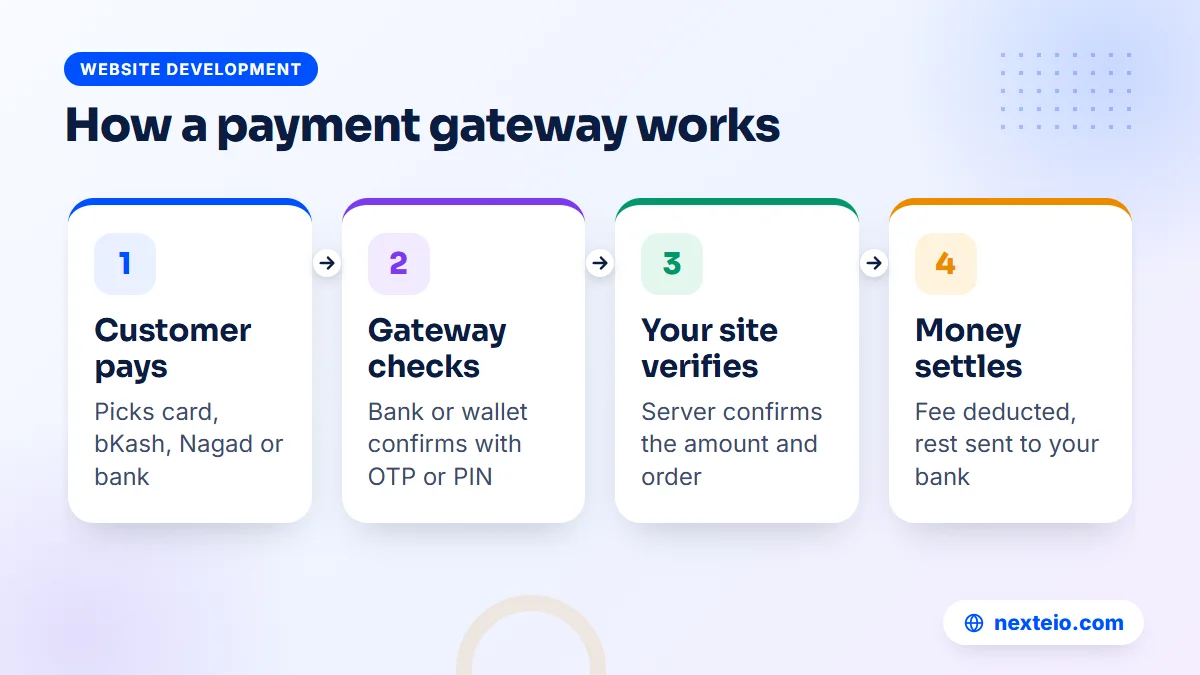
Here is what happens in a typical card or wallet payment, step by step:
- The customer fills the cart and clicks "Pay now" on your checkout page.
- Your website sends the order amount and an order ID to the gateway from your server.
- The customer sees the gateway's payment page or pop-up and picks a method, such as a Visa card or bKash.
- The customer's bank or wallet checks the payment, usually with an OTP or PIN.
- The gateway tells your website the result, both in the browser and through a separate server-to-server message.
- Your website checks the result with the gateway, confirms the amount, and marks the order paid.
- After the settlement period, the gateway sends the collected money, minus its fee, to your bank account.
Most of this happens within a few seconds.
Step six is where many weak integrations fail. If your site trusts only what the browser says, a clever user can fake a "success" page. A proper online payment gateway setup always confirms the payment from your server before releasing the order. Any online store for a Bangladeshi business should have this server check built into the checkout from the first version.
Gateways, Processors, Platforms and Portals: The Terms Explained
Sales staff and websites use many overlapping names, and it helps to know which is which before you compare offers. Some people simply say "pay gateway" for all of them, but they are not quite the same thing.
- Payment gateway: the technical connection between your checkout and the payment networks. It handles the payment page, security and the result message.
- Payment processors: the companies and banks that actually move the money between the customer's bank or wallet and the merchant side. In Bangladesh, the processing is often hidden behind the gateway you sign with, and some online payment processors act as the gateway too.
Three more terms appear in sales offers and on provider websites.
- Aggregator: one company that gives you many methods (cards, several wallets, internet banking) through a single contract and integration. Most small and mid-sized merchants use one.
- Payment platforms: a broad term for any service that offers payments plus extras like invoices, payment links, dashboards or subscriptions.
- Payment portals: usually a page or system where people pay a known bill, such as tuition fees or utility charges, rather than buying from a shop.
For practical purposes, what you sign with is a payment provider: the company that gives you a merchant account, a dashboard and the code or plugin for your website. Whether they call themselves a gateway, an aggregator or one of the digital payment platforms, check what methods they support and who holds the license.
Payments in Bangladesh are regulated by Bangladesh Bank, which licenses payment system operators and payment service providers. A reputable provider will tell you plainly which license or bank partnership it works under.
Payment Methods Customers in Bangladesh Expect
The methods you offer matter more than the brand of gateway. A beautiful checkout that only takes cards will lose many buyers who would happily pay by mobile wallet. Think about who your customers are and how they pay for other things.
| Method | Who tends to use it | What to keep in mind |
|---|---|---|
| Mobile financial services (bKash, Nagad, Rocket, Upay) | Most everyday shoppers, students, guardians | Usually the most important method for local customers |
| Local debit and credit cards (Visa, Mastercard, others) | Office workers, corporate buyers, higher-value orders | Card holders may need online payments switched on by their bank |
| Internet banking | Customers of banks with online banking services | Useful for larger fees and business payments |
| International cards | Buyers or students paying from abroad | Must be enabled in your merchant agreement |
| Cash on delivery | First-time buyers and customers who want to see the product | Not a gateway method, but still a large share of orders for many shops |
For most local businesses, mobile wallets come first, cards second and internet banking third. A training center or a clinic serving professionals may see more card use. A school or madrasa will see many guardians paying by mobile wallet, often from a relative's number.
Whatever mix you choose, show the accepted methods clearly near the cart and on the checkout page. Customers in Bangladesh often check this before adding anything to the basket.
Payment Gateway Options in Bangladesh
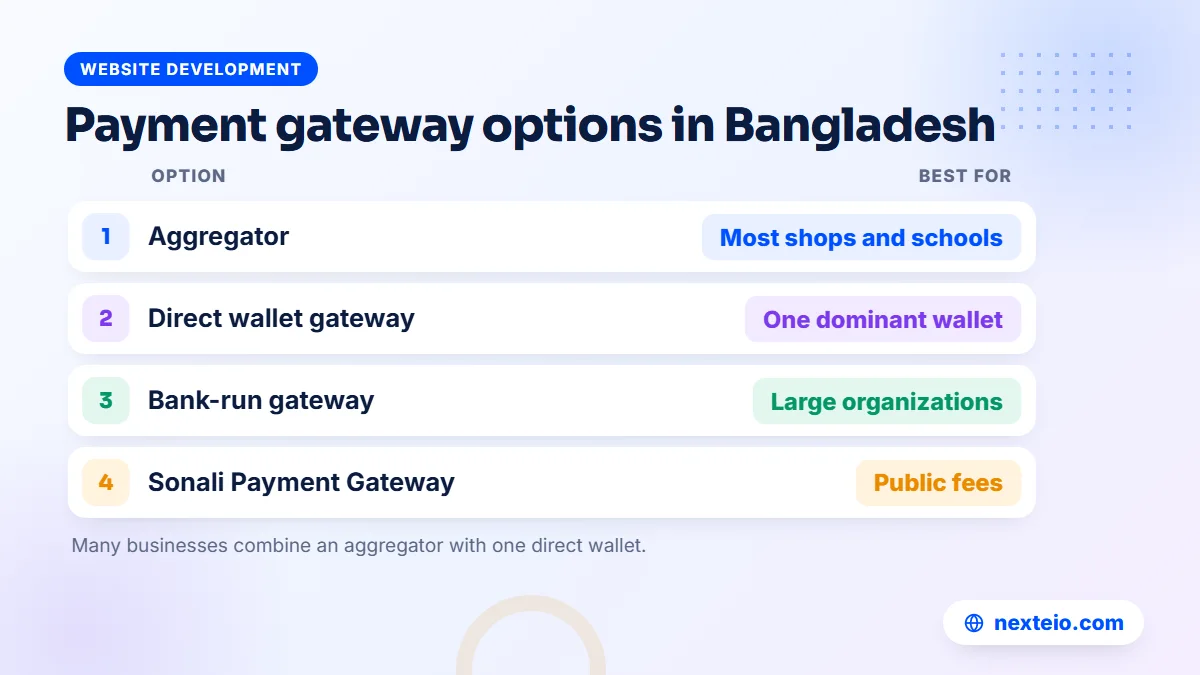
The options fall into a few broad groups. Each has a place, and many businesses end up using two of them together.
Aggregators
These services connect you to cards, several mobile wallets and internet banking through one integration. SSLCOMMERZ, often searched as "ssl commerz", is one of the best-known names, and others such as aamarPay and ShurjoPay serve the same market. For an online shop, this is usually the simplest starting point, because one contract and one plugin cover most of what customers want.
Direct mobile wallet gateways
bKash and Nagad each offer merchant payment services that you can connect to directly. Going direct can make sense when nearly all your customers pay with one wallet, or when you want that wallet's own checkout flow. The trade-off is more integrations to build and maintain if you also want cards. Nagad describes its merchant services on its official site, and bKash does the same on its own site.
Bank-run gateways
Some banks offer card acquiring and e-commerce gateways to their business customers. These can suit larger organizations that already bank there and want card payments at negotiated rates. They often need more paperwork and a stronger developer on your side.
Government and institutional collection
The Sonali Payment Gateway, run by state-owned Sonali Bank, is widely used for government fees and by many public institutions. If you are building a portal for a public body, the payment route may already be decided by policy, and your website needs to fit around it.
| Option | Best for | Main trade-off |
|---|---|---|
| Aggregator | Most shops, training centers, private schools and clinics | Fees can be slightly higher than direct deals at high volume |
| Direct wallet gateway | Businesses where one wallet dominates | Separate integration for each wallet and for cards |
| Bank gateway | Large organizations with an existing bank relationship | More paperwork and technical work |
| Government gateway | Public bodies and fee-based public services | Rules are set by the institution, not by you |
The figure below sums up the same choice.
How to Compare Online Payment Providers
Price is only one part of the decision. A slightly cheaper provider with slow settlement or poor support can cost you more in lost orders and staff time. When you compare online payment providers, ask each one the same questions and write the answers side by side. A shop built for selling online in Bangladesh should be able to switch or add a provider later without a full rebuild, so keep that flexibility in mind too.
- Methods: which cards, wallets and banks are included, and are international cards possible?
- Fees: what is the rate for each method, and is there a setup, yearly or withdrawal fee?
- Settlement: how many working days until money reaches your bank account?
- Integration: is there a ready plugin for WordPress and WooCommerce, and clear API documentation for custom sites?
- Testing: is there a sandbox where your developer can test without real money?
- Refunds: can you refund from the dashboard, and how long does it take to reach the customer?
- Support: who answers when a payment fails on a Friday evening during a sale?
- Dashboard: can your accounts team download reports that match your bank statements?
Get the important answers in writing.
It also helps to try paying on a few websites that already use each provider. You will see the real customer experience: how many screens, how fast the OTP arrives and what happens on a weak mobile connection.
Finally, compare how each payment provider online handles disputes and chargebacks. Card payments can be reversed when a customer complains to their bank, and you want to know who contacts you, what evidence they need and how much time you have to reply.
Payment Gateway Costs, Fees and Settlement
Most gateways charge a percentage of each successful payment, often called the merchant discount rate. Rates in Bangladesh vary by provider, payment method and your monthly volume. In the market, they commonly sit somewhere between about 1.5 and 3.5 percent, but always check the provider's current rate card, because offers change and large merchants can negotiate.
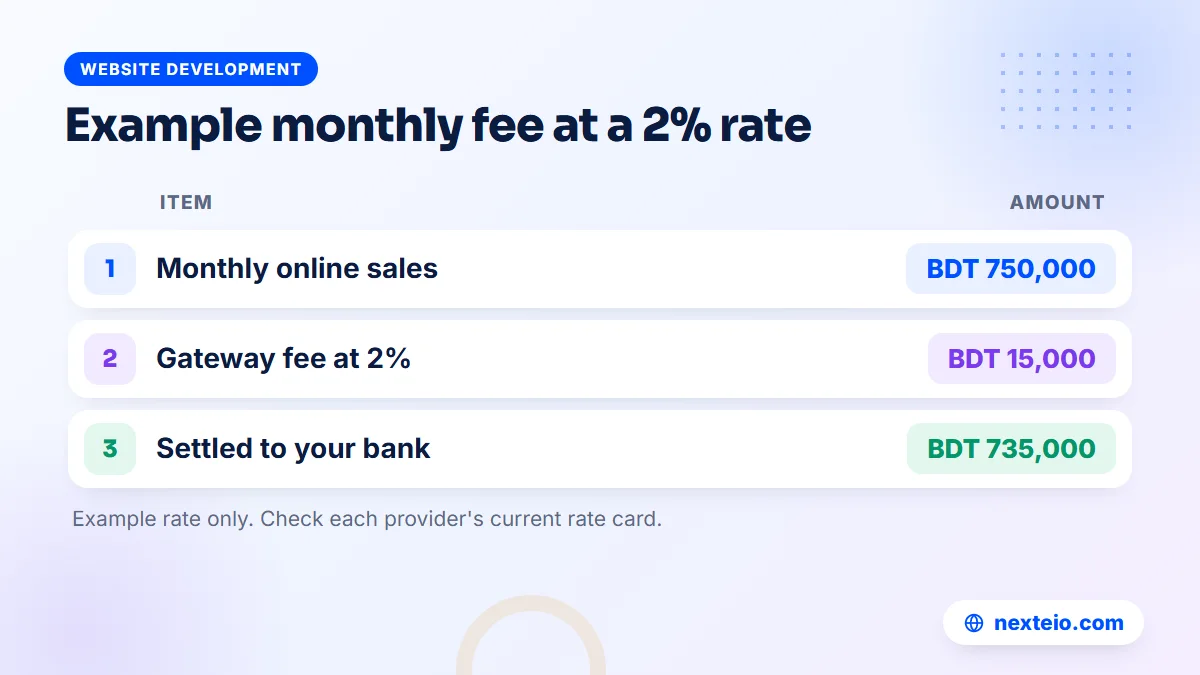
Here is a simple worked example using a made-up rate, to show how the numbers add up:
| Item | Example figure |
|---|---|
| Average order value | BDT 2,500 |
| Orders paid online per month | 300 |
| Monthly online sales | BDT 750,000 |
| Fee at an example rate of 2% | BDT 15,000 |
| Amount settled to your bank | BDT 735,000 |
Compare that fee with what cash on delivery really costs you. COD often brings courier cash-handling charges, returned parcels that you pay to ship both ways, and staff time spent calling customers to confirm. If even one COD order in ten comes back, a modest gateway fee can work out cheaper.
Other costs to ask about include a one-time setup fee, a yearly maintenance fee, charges for withdrawals or settlement to certain banks, and refund fees. Some providers waive setup fees, while others charge them for faster onboarding or extra features.
Settlement time matters for cash flow. If the provider settles within a few working days, a shop running a large Eid sale will wait a while before that money is usable. Plan stock purchases and supplier payments around the real settlement schedule, not the order date.
Documents and Website Pages You Need Before You Apply
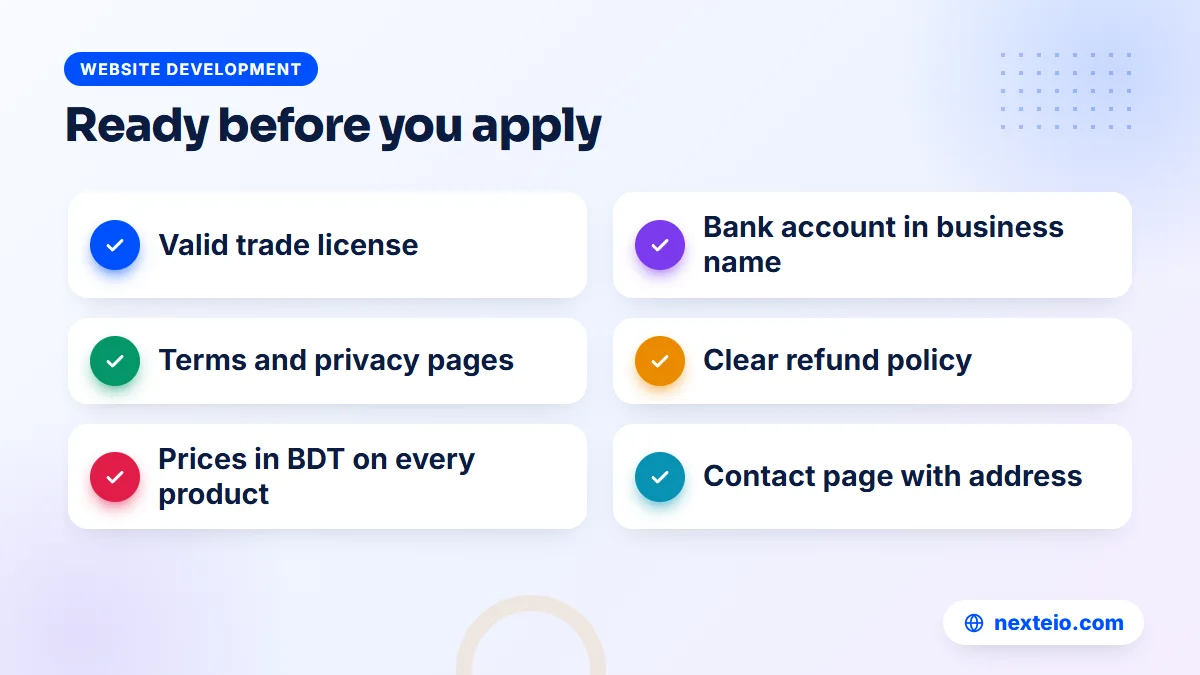
Gateway providers review both your business and your website before they approve a merchant account. Having everything ready can save weeks of back and forth. The exact list varies by provider, but these items come up again and again.
Business documents
- A valid trade license, or registration papers for a school, NGO or other institution.
- A business bank account in the same name as the trade license.
- National ID of the owner or authorized signatory.
- TIN certificate, and other tax papers if the provider asks for them.
- For companies, documents such as incorporation papers and a board resolution may be requested.
Website requirements
Providers usually want to see a working site that looks like a real business, not a half-finished demo. Before applying, make sure your site has:
- Clear product or service pages with prices in BDT.
- A terms and conditions page.
- A privacy policy explaining what customer data you keep.
- A refund, return and cancellation policy written in plain words.
- Delivery information, including areas covered and expected times.
- A contact page with a phone number, email and business address.
- HTTPS across the whole site, shown by the padlock in the browser.
Write these pages for your customers, not just to pass review. A clear refund policy reduces disputes later, because people know what to expect before they pay. If your current site is missing several of these pages, our article on planning and budgeting an e-commerce website lists the pages a store should have from day one. If you would rather have the whole store and its policy pages prepared together, tell us what you sell on our project form.
How to Add a Payment Gateway to Your Website
How you connect the gateway depends on how the site is built. The two common routes are a ready plugin on WordPress and a custom integration on a framework such as Laravel.
On WordPress and WooCommerce
Most major Bangladeshi providers offer a WooCommerce plugin. After approval, you install the plugin, enter the store ID and password from your merchant dashboard, choose sandbox or live mode, and set which payment methods appear at checkout. A developer should then test the full flow, including failed and cancelled payments, and check that order statuses update correctly in WooCommerce's order management screen.
A plugin is quick to set up, but it still needs care. Keep it updated, avoid installing two payment plugins that fight over the same checkout, and test again after every WooCommerce update. If you are choosing someone to set this up, our guide to hiring a WordPress developer covers the questions to ask. A well-built WordPress website keeps payment settings in one place and easy for your team to check.
On a custom or Laravel website
Custom sites use the provider's API. The usual pattern, which SSLCOMMERZ's developer documentation describes in detail, has three parts:
- Create a session: your server sends the amount, order ID and customer details, and receives a payment link or checkout token.
- Receive a notification: the gateway calls an address on your server (often called IPN) to report the result, even if the customer closes the browser.
- Validate the order: your server asks the gateway to confirm the transaction and checks that the amount and order ID match before marking it paid.
You will also need success, fail and cancel pages that show the customer a clear message and next step. Store each transaction ID against the order so your accounts team can match it with the settlement report later.
This is the standard approach for custom stores and portals built as Laravel web applications, where payments often connect to stock, invoices, student records or appointment slots. If you are hiring for this kind of work, our article on choosing a Laravel developer explains what experience to look for.
Related guides for anyone planning an online store:
- WordPress or a custom website for your business
- How to build a landing page that turns ad clicks into orders
- Why a site gets visitors but no customers
Security: Protecting Your Store and Your Customers
The safest card data is data you never touch. With a hosted payment page or the provider's own pop-up checkout, card numbers and wallet PINs go straight to the gateway. Your server only sees the result. That keeps most of the heavy security duties for card data with the provider, which is exactly where they belong for a small or medium business.
Your own website still has jobs to do:
- Run the whole site on HTTPS, not just the checkout page.
- Keep your store ID, API passwords and keys on the server, never in front-end code or a public file.
- Always validate payments from your server and check that the paid amount equals the order amount.
- Stop the same transaction ID from being used to mark two different orders as paid.
- Keep WordPress, plugins, themes and server software updated.
- Limit admin access and use strong passwords with two-step login for staff accounts.
Watch for warning signs too. A sudden run of small card payments from new accounts, orders with a different name on every payment, or customers who pay and then request refunds to another number can all signal fraud. Some gateways flag risky payments in their response, and your team should hold those orders for a manual check before shipping.
Security is also ongoing work, because every plugin, theme or server update can affect the checkout. In Nexteio's maintenance plans, stores with payment integrations usually fit the advanced level, roughly BDT 12,000 to 30,000 or more a month, depending on the site and the work agreed. Whoever looks after your store, make sure a test payment is part of the routine after each update.
Cash on Delivery, Advance Payments and Hybrid Checkout
Adding a payment gateway does not mean dropping cash on delivery. Many shoppers in Bangladesh still prefer to pay when the parcel arrives, especially from a shop they have not used before. The smart move is to offer both and make online payment the easier, more attractive option.
A few common approaches work well:
- Delivery charge in advance: the customer pays the delivery fee online and the product price on delivery. This usually cuts fake orders, because the buyer has something at stake.
- Partial advance for high-value items: furniture, electronics or custom orders take a percentage upfront through the gateway.
- Small online-only benefit: free delivery or a small discount for paying online, shown clearly at checkout.
- Online only for digital products: courses, e-books, event tickets and software licenses should always be paid before access.
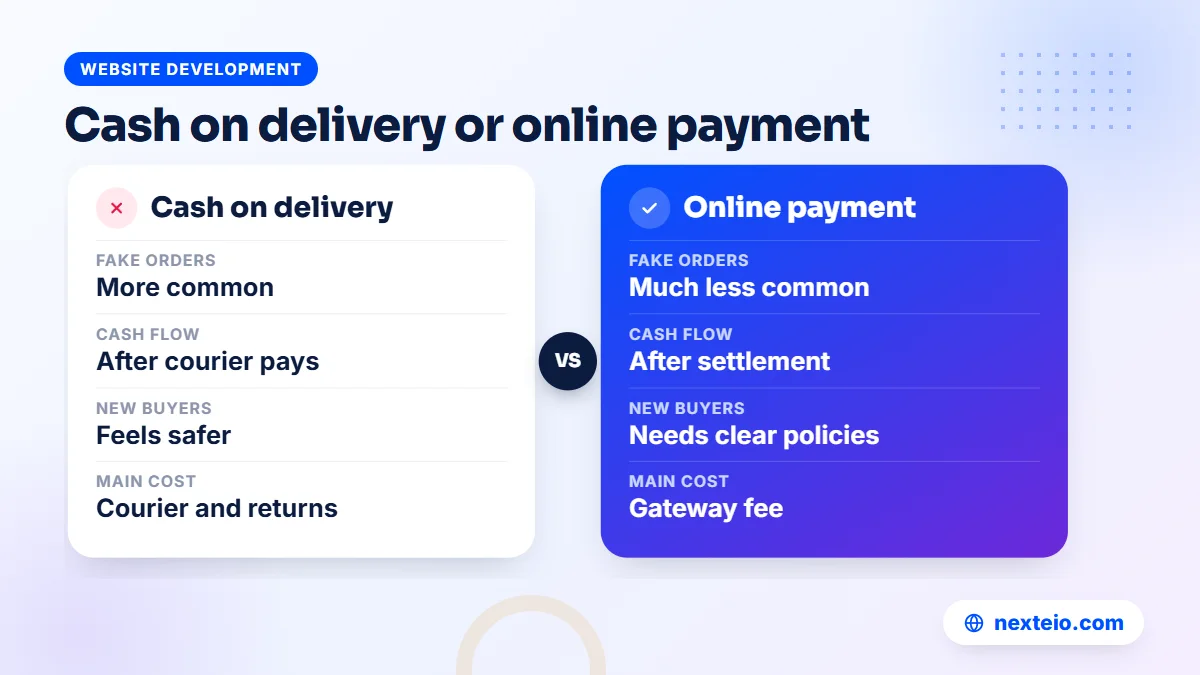
Whatever you choose, keep the checkout short. Each extra field or screen costs orders, especially on a phone with a weak signal. Which mix of COD and online payment suits your products and buyers is one of the first questions to settle when you plan a store through our e-commerce website development service.
Fee Collection for Schools, Clinics and Organizations
Not every website with a payment button is a shop. Schools, colleges, coaching centers, hospitals and NGOs collect fees, deposits and donations, and their needs are a little different.
For an education institution, the key is matching each payment to the right student. A good fee system lets a guardian enter a student ID, see the exact amount due for the month or term, pay through the gateway, and download a receipt. The accounts office then sees a list of paid and unpaid students instead of a pile of SMS screenshots.
For a clinic or diagnostic center, payments are often tied to appointments or test bookings. The system should hold the slot while the patient pays, release it if payment fails, and send a confirmation by SMS or email. For an NGO, donation pages need clear receipts, the purpose of the donation and, where relevant, a way to give monthly.
These are payment portals rather than shops, and they work best as custom systems connected to your own records. A ready-made online payment platform with simple payment links can be a useful first step, but it rarely fits an institution's approval chain and reporting needs for long. Many organizations start with a custom website and add a fee portal as a second phase.
International Payments and Selling Abroad
Businesses that sell services to clients abroad often ask about international payment processing platforms such as Stripe or PayPal. At the time of writing, Bangladesh is not on Stripe's list of supported countries, so a business registered in Bangladesh cannot open its own Stripe account in the usual way.
The practical route for most is to ask your local gateway and bank whether international cards can be accepted on your merchant account. Some local providers can enable this after extra checks. Receiving foreign currency also falls under Bangladesh Bank's foreign exchange rules, so talk to your bank about how the money will be settled and reported.
Garment buying houses, software firms and consultancies usually receive large international payments through bank transfers and letters of credit, not a website checkout. A payment gateway is more useful for smaller, repeat payments, such as course fees from students abroad or online orders from Bangladeshis living overseas.
Common Payment Gateway Mistakes to Avoid
These problems show up often when a business adds online payments in a hurry. Most are easy to avoid if you know about them in advance.
- Applying before the website is ready: missing refund or privacy pages, or placeholder text, often delay approval.
- Trusting the browser redirect: marking orders paid only from the success page, without server-side validation.
- Skipping failure testing: testing only successful payments, then finding that failed ones leave orders stuck.
- Forgetting reconciliation: nobody matches gateway settlement reports with orders and bank deposits each week.
- Using a personal account: taking payments to an owner's personal bKash number instead of a merchant account, which makes records and tax harder.
- Hiding payment methods: customers only discover at the last step that their wallet is not accepted.
- Ignoring mobile speed: a heavy checkout page that times out on mobile data before the gateway even loads.
Each of these is cheaper to prevent than to fix after launch.
Payment problems also affect your advertising. If you run campaigns through Facebook ads, every failed checkout is paid traffic wasted. Purchase events should only fire after a confirmed payment, as our guide to Meta Ads conversion tracking explains, otherwise your reports will count orders that never paid.
Once payments work smoothly, organic search can bring buyers without a cost per click. Our e-commerce SEO service helps product and category pages show up on Google, and our article on what e-commerce SEO includes explains the work in detail.
How Nexteio Can Help With Your Payment Gateway
We build online stores, fee portals and booking systems for businesses and organizations across Bangladesh, and payment integration is part of that work. Through our e-commerce website development service, we help you choose a sensible mix of payment methods and cash on delivery for your buyers, and we prepare the pages and settings that gateway providers check before approval.
On the technical side, we connect the payment gateway you choose to your WordPress or Laravel site, test successful, failed and cancelled payments in the provider's sandbox, and add server-side validation so orders are only marked paid after the gateway confirms them. For schools, clinics and other organizations, we can build fee or appointment payments that match your own records and reports.
The merchant account itself stays in your business's name, and the money settles straight to your bank account. If you are planning a new store or want to add online payments to an existing site, send us your project details. You can also browse our portfolio, read about Nexteio or reach us through the contact page.
Keep reading: what a Facebook ads service should include, or see all our website development guides.
Frequently asked questions
Which payment gateway is best for a small online shop in Bangladesh?
For most small shops, an aggregator that covers cards, bKash, Nagad and internet banking in one contract is the simplest choice. Compare at least two providers on fees, settlement time, plugin support and how fast they answer problems. The best one is the provider your customers find easy to pay with and your team finds easy to reconcile.
Can I get a payment gateway without a trade license?
Most providers ask for a valid trade license, or registration papers for an institution, along with a bank account in the same name. Some mobile wallets offer simpler merchant options for very small sellers, but the rules change, so check with the provider directly. Taking payments to a personal number may work at first but makes records, refunds and tax much harder.
How long does it take to get a merchant account approved?
It depends on the provider and how ready you are. If your documents are complete and your website already has prices, policy pages and contact details, approval can move quickly. Missing pages, a demo website or a mismatch between the trade license and the bank account name are the usual causes of delay.
Do I need a payment gateway if most of my customers pay cash on delivery?
Yes, in most cases it is still worth adding. Online payment reduces fake orders and returned parcels, helps you collect delivery charges in advance and suits customers who prefer not to handle cash. Keep cash on delivery as an option and make paying online the easier path.
Is it safe to take card payments on my own website?
It is safe when the card details are entered on the gateway's own page or secure pop-up, not on a form your server stores. Your site should run fully on HTTPS, keep API keys on the server and confirm every payment with the gateway before marking an order paid. Keep the website and plugins updated as well.
Can a school or college collect fees online through its website?
Yes. A fee portal lets guardians enter a student ID, see the amount due, pay by mobile wallet or card and download a receipt. The accounts office then sees paid and unpaid students in one list. Public institutions may be required to use a specific route, such as the Sonali Payment Gateway, so check your institution's rules first.
Can a Bangladeshi business use Stripe or PayPal to receive payments?
Bangladesh is not currently on Stripe's list of supported countries, so a business registered here cannot open a standard Stripe account. For card payments from abroad, ask your local gateway and bank whether international cards can be enabled on your merchant account. Larger overseas payments usually go through normal bank channels.