Reels Maker Guide: How to Make Business Reels People Watch
In this article 15 sections
- 1.What a Reels Maker Needs to Get Right
- 2.Pick Reel Ideas That Fit Your Business
- 3.Plan One Reel in Five Minutes
- 4.Hooks: The First Two Seconds
- 5.Filming Reels on a Phone
- 6.Editing in a Reels Maker App, Step by Step
- 7.Captions, Text and Bangla
- 8.Music and Sound Rights
- 9.Using a Clip Maker to Turn Long Videos Into Reels
- 10.Posting: Covers, Captions, Timing and Cross-Posting
- 11.A Weekly Reels Routine for a Small Team
- 12.How to Measure Whether Your Reels Work
- 13.Turning Your Best Reels Into Ads
- 14.How Nexteio Can Help With Reels and Video Ads
- 15.Frequently asked questions
A good reels maker does not start with the app. It starts with one clear idea that a stranger scrolling past will understand in two seconds, with the sound off, on a small phone screen. The app, the music and the effects come after that, and they matter much less than most business owners think.
Reels now sit at the center of Facebook, Instagram, TikTok and YouTube. For a clothing page, a clinic, a coaching center or a factory, they are often the cheapest way to reach new people without paying for every view. They are also easy to get wrong: a slow start, small text and a song the business has no right to use.
Most weak reels fail for the same few reasons, and none of them needs expensive equipment to fix.
This guide walks through the whole process: choosing ideas that fit your business, planning and filming on a phone, editing in a reels maker app, music rules, turning long videos into short clips, posting, measuring and finally turning your best reels into ads. It is written for businesses and organizations in Bangladesh that want reels people actually finish watching.
What a Reels Maker Needs to Get Right
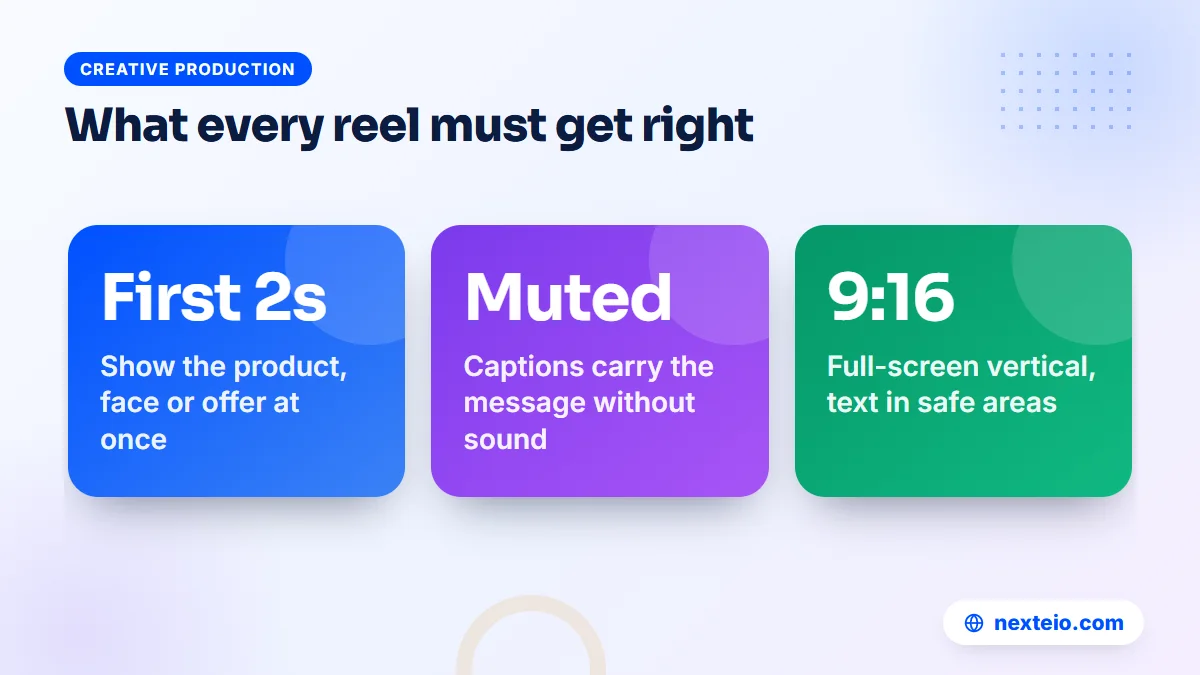
People watch reels in a very particular way. They swipe quickly, often with the sound off, and decide in a moment whether to stay. Every choice a reels maker makes should serve three things.
- The opening: the product, the face or the offer must be on screen from the first frame.
- Silent clarity: captions and on-screen text must carry the message without audio.
- The vertical frame: 9:16, filling the screen, with text kept clear of buttons and captions.
Get these right and even a simple phone video works. Get them wrong and polished footage still gets skipped.
One more point shapes everything else: a reel should do one job. Show one product, answer one question or tell one short story. When a reel tries to cover the full price list, the location and three offers, viewers remember none of them.
Who should be your reels maker?
In a small business, the reels maker is often the owner, filming between other jobs. That works for a while, but reels drop off as soon as the owner gets busy. A better setup gives the job to one person who understands the customers, is comfortable on camera or behind it, and has a few protected hours each week.
That person does not need to be a professional editor. They need to know what customers ask, notice good moments in daily work and finish what they start. Many organizations pair an in-house reels maker who plans and films with an outside editor who handles the harder edits and ad versions.
Pick Reel Ideas That Fit Your Business
The hardest part of regular reels is not editing. It is knowing what to film next week. Formats that suit your business remove that problem, because you can repeat them with new content each time.
| Business | Reel ideas that usually work |
|---|---|
| Clothing or online shop | Try-ons, fabric close-ups, packing an order, new arrivals |
| Clinic or hospital | A doctor answers one common question, a tour of a ward |
| School or coaching center | Campus walk, a teacher's 30-second tip, results day |
| Factory or exporter | A process step, quality checks, a finished shipment |
| Restaurant or food business | Cooking one dish, the day's special, a busy kitchen |
| NGO or office | A field visit moment, a staff spotlight, an event recap |
Pick two or three formats and rotate them. Repetition helps people recognize your reels.
Ideas that come from your customers
The best ideas often come from questions your staff answer every day. A front-desk officer at a clinic hears "Do I need an appointment?" many times a week. A shop's page inbox fills with "Is this available in XL?" Each repeated question is a reel. Ask staff to note them down for a week, and you will have a month of ideas.
Ideas to avoid
Skip trends that have nothing to do with what you sell. A dance trend can earn views, but views from people who will never buy do little for a business. Avoid reels that only show your logo or building with music; they give viewers no reason to stay.
Plan One Reel in Five Minutes
Planning does not need a long script. A five-line brief, written before you film, is enough for most reels:
- Who is it for? For example, parents choosing a coaching center for class nine.
- What is the one message? Classes are small, so each student gets attention.
- What is the hook? "We keep every batch under 20 students. Here's why."
- What is the proof? A real classroom, a teacher checking a student's work.
- What should viewers do? Message the page for the admission schedule.
The brief keeps filming short, because you know exactly which shots you need.
Here is how that brief turns into a 30-second reel. The first two seconds show the teacher at a small class with the text "Under 20 students per batch". The next ten seconds show the teacher explaining why in one or two sentences. Then comes a cut of a student solving a problem on the board, followed by a closing shot of the front desk with "Message us for the admission schedule".
Notice what is missing: no long introduction, no logo animation at the start and no list of every subject taught. Those can go in the caption or on the page.
Hooks: The First Two Seconds
The opening decides whether anyone sees the rest. A hook is the first image and first line together, and it should make the right viewer want the next second. These hook types work well for business reels:
- The result first: show the finished outfit, the clean room or the packed order, then show how.
- A direct question: "Is your child's handwriting hard to read?"
- A clear number: "Three things to check before buying a used laptop."
- A surprising detail: a close-up of a stitch, a machine or a process most people never see.
- A common mistake: "Most people store rice like this. Here is the problem."
Film two or three different openings for the same reel. It costs a minute on the day and lets you test which hook holds viewers better.
Avoid hooks that promise something the reel does not deliver. A dramatic opening followed by a slow product shot teaches viewers to scroll past your next reel too. The hook should be an honest, fast summary of what follows.
Filming Reels on a Phone
A recent phone is enough for business reels. The quality difference between a good reel and a poor one usually comes from light, sound and steadiness, not from the camera.
Set up the shot
- Hold the phone vertically and fill the frame with the subject.
- Face a window or use a simple light; avoid strong light behind the person.
- Rest the phone on a stand or against something solid for talking shots.
- Wipe the lens. A greasy lens makes every shot look hazy.
- Leave space at the top and bottom of the frame for text and captions.
Check the background too. A messy counter or a cluttered office wall pulls attention away from the person speaking.
Get clean sound
Viewers forgive slightly soft video, but they leave quickly when the voice is hard to hear. A small clip-on microphone that plugs into the phone costs little and improves talking reels more than any camera upgrade. Film away from traffic, generators and ceiling fans, or switch the fan off for the minute you are recording.
Shoot extra footage
Record a few seconds before and after each line so you can cut cleanly. Then film short extra shots, often called B-roll, of hands at work, the product from different angles and the space around you. Those shots cover cuts and keep the reel moving.
Help nervous speakers
Doctors, teachers and managers often know their subject well but freeze in front of a phone. Do not hand them a long script to memorize. Give them one question to answer, let them talk naturally for a minute, and cut the best 20 seconds. Filming a conversation, with someone asking the question just beside the camera, usually feels easier than speaking straight into the lens.
Record several takes and keep the mood relaxed. The second or third take is almost always better, and small pauses can be removed in the edit.
Editing in a Reels Maker App, Step by Step
Most businesses edit reels on a phone with a reels maker app such as CapCut, Edits by Instagram, VN or InShot. The CapCut editor is common because its auto captions and templates save time, but the steps below work in any app.
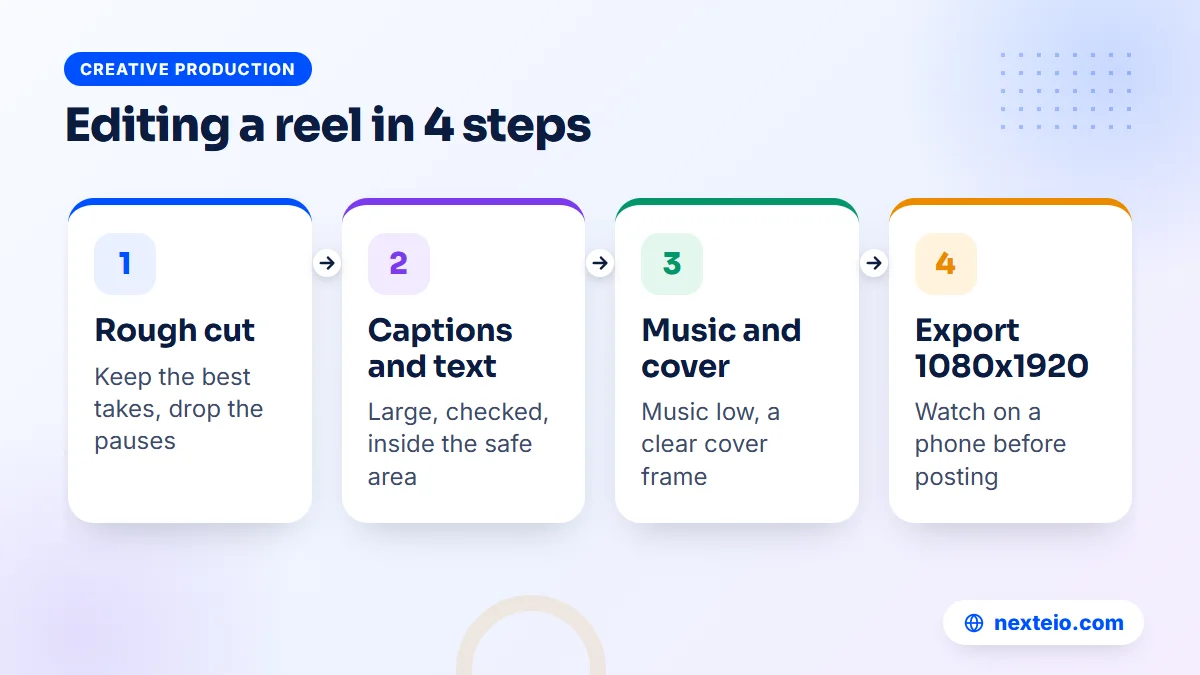
- Start a 9:16 project and import your clips in order.
- Make a rough cut: keep the best takes and remove pauses, coughs and false starts.
- Tighten the cut until there is no dead air; most business reels land between 15 and 45 seconds.
- Add captions, check every word, and fix names, prices and Bangla spellings by hand.
- Place titles and key text inside the safe area, away from the bottom and right edges.
Then finish the edit with sound, the cover and the export:
- Add music at a low level under the voice, or no music for talking reels.
- Choose a clear cover frame with a short title so the reel looks good on your profile grid.
- Export at 1080 x 1920 and watch it on a phone with the sound off before posting.
The rough cut is where most improvement happens. A reel that feels slow is almost always too long. Cut any line that repeats something already said, and cut the opening if it starts with "Hello everyone, today I will show you."
Templates help with speed, but adapt them. Change fonts and colors to match your brand, and use the same caption style on every reel so people recognize your page as they scroll.
Choosing a reels maker app
The best reels maker app is the one your team will open every week without frustration. Before you settle on one, test it on the phone that will actually do the editing, with your own footage. Check these points:
- Auto captions that are easy to correct, line by line.
- Bangla fonts that show joined letters properly.
- Export at 1080 x 1920 without a watermark you did not choose.
- Smooth playback with several clips and text layers on your phone.
- Saved text styles, so every reel uses the same look.
Paid plans add effects and assets, but most business reels need only clean cuts, captions and a steady pace.
Captions, Text and Bangla
Captions are not optional for business reels. Many people watch in public places, at work or late at night with the sound off. Burned-in captions, added in your reels maker, also help people who find spoken words hard to follow.
Decide on language by audience. A local shop speaking to customers in Bangladesh will usually do best with Bangla speech and Bangla captions, perhaps with English for product names. A garment exporter speaking to overseas buyers needs English. Mixed Bangla and English speech is common and fine, but captions should be consistent in one script per line.
Auto captions in Bangla make more mistakes than English ones, especially with names and technical terms. Read every line before export. Also check that the font displays joined Bangla letters correctly; some fonts break them or show empty boxes.
Keep on-screen text short and large. A headline of four to six words is easy to read in a second. Longer explanations belong in spoken words with captions, or in the post caption below the reel.
Music and Sound Rights
Music is where business reels most often run into trouble. A popular song can be licensed for personal use on a platform and still not be cleared for a business account or a paid ad.
TikTok business accounts can use songs from TikTok's Commercial Music Library, which is cleared for commercial use. Instagram and Facebook business profiles often see a smaller music library than personal accounts, because many popular songs are not licensed for commercial use. If a reel is muted or blocked after posting, the music is usually the cause.
Safer options for a business are simple:
- Use the platform's commercial or business music library.
- Use royalty-free tracks with a license that allows business use, and keep the proof.
- Use original sound: a voice, the noise of a kitchen or a workshop, or a simple tune made for you.
- Skip music on talking reels and let the voice carry the reel.
Never take music from someone else's reel and reuse it in an ad. Ads face stricter checks than organic posts, and a music claim can stop a campaign in the middle of a sale.
Related guides for planning reels that sell:
- What a good video ad edit includes and costs
- How to find your TikTok target audience
- Meta ads targeting for audiences in Bangladesh
Using a Clip Maker to Turn Long Videos Into Reels
Many organizations already have long videos: a Facebook Live, a webinar, a seminar, a teacher's recorded lesson or a factory walkthrough. A clip maker, whether a feature inside your editing app or a separate tool, lets you cut those into several short reels.
Long recordings are a rich source because the content already exists. The skill is choosing the right moments. Good clips usually have these qualities:
- A complete thought in under a minute, which makes sense without the rest of the video.
- A strong first sentence that can work as a hook.
- A speaker who is clearly visible and audible.
- A useful tip, a clear answer or a surprising fact.
Some apps suggest clips automatically. They are a starting point, not a final choice; check every suggestion.
Horizontal recordings need reframing for vertical reels. Crop around the speaker, keep the face in the upper third, and add captions below. If the speaker moves across a wide stage, you may need to adjust the crop through the clip. Where reframing cuts off important slides or demonstrations, place the horizontal video in the middle of the vertical frame with a title above and captions below.
A single one-hour seminar can supply a month of reels when clipped well. For coaching centers and schools, recorded lessons work the same way: one short explanation per reel, with the full lesson linked for those who want more. If you have hours of recordings and no time to sort them, tell us what you have and we will suggest which parts could become reels.
Posting: Covers, Captions, Timing and Cross-Posting
How you post a reel affects how many people see it and what they do next.
Cover and caption
Choose a cover frame with a clear face or product and a short title. The cover is what visitors see on your profile grid, and a tidy grid makes a page look trustworthy. Write a caption that adds something: the price, the branch hours or one more tip, followed by a clear action such as "Message us for sizes".
Hashtags and timing
A few relevant hashtags are enough. Long blocks of unrelated tags add nothing and look like spam. Post when your audience is free to watch, which you can see in your page insights after a few weeks. For many local audiences, evenings and weekends work well, but your own data is the better guide.
Posting on several platforms
Posting the same reel on Facebook, Instagram, TikTok and YouTube is efficient, but export a clean version without another app's watermark for each upload. A TikTok logo on an Instagram reel looks recycled, and platforms prefer original uploads. YouTube explains its own format in its guide to creating YouTube Shorts.
Before you upload, watch the final export from your reels maker once more on a phone, with the sound off. Then reply to comments and messages quickly, especially in the first hours. A reel that brings questions but gets no answers wastes its reach.
Consent and privacy
Get permission before featuring customers, patients, students or staff. Schools should have guardian consent before showing children, and hospitals and clinics should never show patients or their records without clear written agreement. In factories, check that no buyer's unreleased designs or confidential labels appear in the background. A reel that has to be taken down after complaints does more harm than the views it earned.
A Weekly Reels Routine for a Small Team
Reels work best when they are regular. Two or three good reels every week usually do more than ten in one burst and nothing for a month. A simple routine makes that possible without a full-time video person.
Batch the work, so the reels maker on your team is not starting from zero every day. Plan several reels on one day, film them all in one session, and edit them together. Filming four reels in one setup takes little more time than filming one, because the light, microphone and space are already arranged.
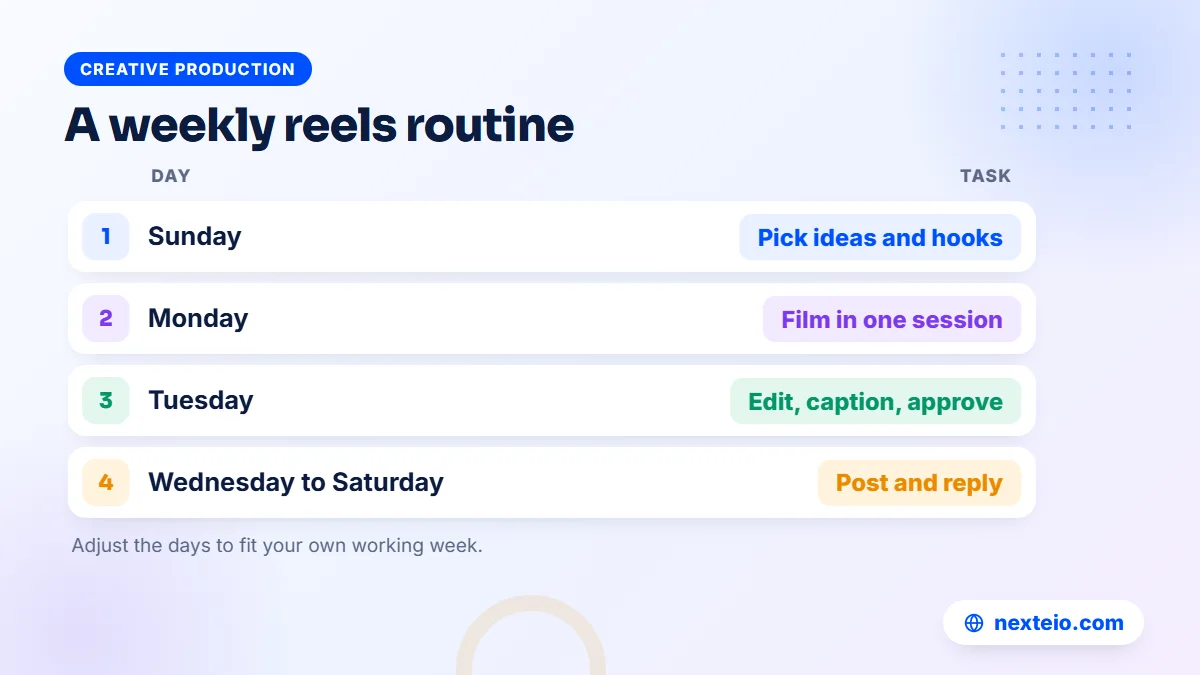
Give one person ownership of the routine, even if several people appear on camera. That person keeps the idea list, books filming time with the doctor, teacher or manager, and gets approval before posting.
In organizations with approval chains, such as schools, hospitals and corporate groups, agree on approval rules early. A reel about admission dates may need the principal's sign-off; a reel about a canteen lunch probably does not. Clear rules stop reels from waiting a week for approval and going out of date.
How to Measure Whether Your Reels Work
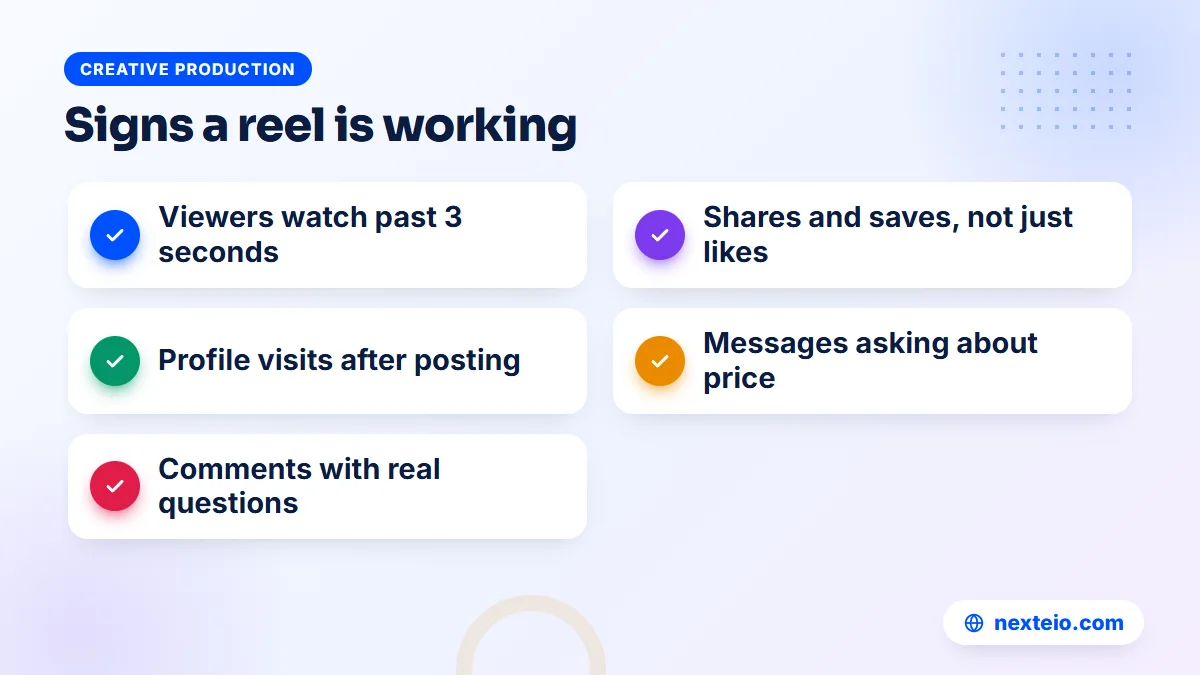
Views alone can mislead. A reel can reach thousands of people who never think about your business again. Look at signals that show interest and intent:
- Watch time and retention: where viewers drop off tells you which part of the reel is weak.
- Shares and saves: people share and save content they find useful.
- Profile visits and follows: the reel made someone curious about you.
- Messages and comments: questions about price, sizes or admission are the strongest sign.
- Website clicks and orders: the final step, where you can track it.
Review the numbers every two weeks rather than every hour.
When a reel loses most viewers in the first two seconds, test a new hook. When people watch to the end but do not act, make the action clearer. When one format keeps doing well, make more of it. Our guide on Meta ads conversion tracking explains how to see which visits from reels turn into orders on your website.
Common mistakes that hold reels back
When the numbers stay low week after week, the cause is usually one of a few habits that any reels maker can fix:
- A slow start with a greeting, a logo or an empty shot.
- Text too small, or covered by the platform's buttons.
- Music louder than the voice.
- Several messages squeezed into one reel.
- No clear next step for interested viewers.
- Long gaps between posts, then a sudden burst.
Fix one habit at a time and compare the next few reels with the last few. Changing everything at once makes it impossible to see what helped.
Turning Your Best Reels Into Ads
Organic reels show you what your audience likes for free. Once a reel performs well, it becomes a strong candidate for paid promotion, because you already know it holds attention.
On TikTok, you can promote your own posts or creators' posts as ads, and TikTok's creative best practices describe what tends to work in paid placements. On Facebook and Instagram, a reel can run as an ad through Ads Manager with proper targeting rather than a quick boost. YouTube Shorts can carry ads through Google's video campaigns.
Ads usually need more than one version of a winning reel. Make two or three variations with different hooks, captions and lengths, so the platform can test them. A video ads editing service can produce those versions from the same footage, in the right shapes for each platform.
Plan the page the ad sends people to as well. A strong reel that leads to a slow or confusing page loses most of its value, which is why our guide to a high-converting landing page pairs well with this one. If campaigns stop delivering, our checklist on why Meta ads stop performing covers the usual causes, and our guide to TikTok advertising costs helps you set a budget.
For campaign setup and management, we run Facebook and Instagram ads, TikTok ads and YouTube ads, and we can prepare the reel versions for testing before the budget goes live.
How Nexteio Can Help With Reels and Video Ads
If your team films but struggles to turn footage into reels that hold attention, our video ads editing team can take over the editing. You send us phone or camera footage, and we cut it into short reels and ads with a clear opening, captions for muted viewing and the offer shown early, in versions ready to test.
We can also help with the planning side: choosing formats that suit your business, writing hooks and preparing a filming list so a single session produces several reels. For long recordings such as seminars, lessons or live sessions, we pick the strongest moments and reframe them for vertical viewing. For longer videos, brand films and YouTube content, our video editing service covers the full edit.
When you are ready to talk about your reels, share your project details or reach us through the contact page. You can look at our work, learn more about Nexteio, or read about our reels and video ad editing before you decide.
Keep reading: a practical guide to video editing services in Bangladesh, TikTok business vs personal accounts, or browse all our creative production guides.
Frequently asked questions
Which reels maker app is best for a small business?
CapCut is the most common choice because its auto captions and templates save time, while Edits by Instagram suits pages that post mainly to Instagram and Facebook. VN and InShot are good alternatives for simple edits. Pick one, learn it well and test it on the phone your team actually uses.
How long should a business reel be?
Most business reels work well between 15 and 45 seconds. Platforms allow longer reels, but every extra second must earn its place. A quick product reel can be under 15 seconds, while a doctor or teacher explaining something useful may need closer to a minute.
How many reels should we post each week?
Two or three good reels a week is a realistic target for most small teams and is better than many rushed ones. Consistency matters more than volume, because regular posting helps people recognize your page. Increase the number once you have a routine that works.
Can we use popular songs in our business reels?
Only if the song is cleared for business use on that platform. Business accounts on TikTok are limited to its Commercial Music Library, and business profiles on Instagram and Facebook often see a smaller library. Using unlicensed music can get a reel muted or an ad rejected, so use cleared tracks, royalty-free music with a license or original sound.
Do we need a professional camera to make reels?
No. A recent phone, good light from a window and a small clip-on microphone are enough for most business reels. Spend on sound and light before spending on a new camera, because viewers notice poor audio first.
What is the difference between a reels maker and a clip maker?
A reels maker is any app or person that edits short vertical videos from raw footage. A clip maker focuses on cutting long recordings, such as webinars, lessons or live sessions, into short standalone clips. Many editing apps now do both, but choosing the right moments from a long video still needs human judgment.
Should we boost reels or run them as proper ads?
A boost is quick but offers limited targeting and tracking. Running a reel through Ads Manager or TikTok Ads Manager gives you better audience control, conversion tracking and the ability to test several versions. Start by promoting reels that already performed well organically.
Should we hire a reels maker or train our own staff?
Training one staff member to plan and film is usually the best start, because they know your customers and can capture daily moments. An outside editor or agency is worth adding when reels must be produced regularly, when you run them as ads or when your team has footage but no time to edit. Many businesses use both, with staff filming and a professional handling edits and ad versions.