Best Video Editor for Android and iPhone: Picks by Job and Phone
In this article 15 sections
- 1.How to Choose the Best Video Editor for Android
- 2.The Short List at a Glance
- 3.Best Picks by Job
- 4.Best Video Editor for Android on a Budget Phone
- 5.Best Video Editor for iPhone: What Changes on Apple Phones
- 6.Free or Paid: What a Subscription Really Buys
- 7.A 20-Minute Test to Find Your Own Mobile Video Editor
- 8.Set Up Your Editor Once: Brand Kit and Templates
- 9.Shoot So the Edit Is Easier
- 10.Export Settings and File Size on Mobile Data
- 11.Keep Your Projects and Footage Safe
- 12.Mistakes People Make With Phone Editing
- 13.When a Phone Editor Is Not Enough
- 14.How Nexteio Can Help With Video Editing
- 15.Frequently asked questions
The best video editor for Android is not the one with the longest feature list. It is the one that runs smoothly on your phone, exports clean video without a watermark you did not choose, and lets you finish a product clip or a notice video in the time you actually have. For most business owners in Bangladesh, that time is ten minutes between customers, not a free afternoon.
The same is true on an iPhone. Apple's phones come with good free tools, but the right choice still depends on the job: a quick reel for a clothing page, a talking video from a doctor, or a school's annual sports day recap.
App store rankings do not help much here. They mix popularity, paid placement and reviews from people making very different videos from yours.
This guide sorts the main mobile editors by job and by phone, explains what a paid plan really buys, and gives you a short test you can run on your own handset before you commit. Prices, features and availability change often, so treat app details as a snapshot and check the store listing before you pay.
How to Choose the Best Video Editor for Android
Before you compare apps, decide what you need the editor to do. Four questions settle most choices.
What kind of video do you make most?
Short vertical clips with text and music need a different tool from a ten-minute YouTube tutorial. A clothing seller posting five reels a week wants templates and speed. A coaching center recording lessons wants clean cuts, good audio tools and stable performance on long clips. Write down the two or three video types you make most often, and judge every app against those.
What phone will do the editing?
Editing is one of the heaviest jobs a phone does. A budget Android with 4 GB of RAM can handle simple cuts, but it may stutter with several layers of video, text and effects. If the phone that will do the editing is not your newest one, test on that phone, not on a friend's flagship.
How will you pay, if at all?
Many editors are free to install and charge for exports without a watermark, extra effects or higher resolution. Others charge a one-time price. Decide whether a monthly subscription is acceptable for your business, and remember that app store payments need a card or payment method that works for international charges.
Where will the video be posted?
Facebook, Instagram, TikTok, YouTube and WhatsApp all prefer slightly different shapes and lengths. The editor must make it easy to set the shape before you start and to export in the size each platform expects.
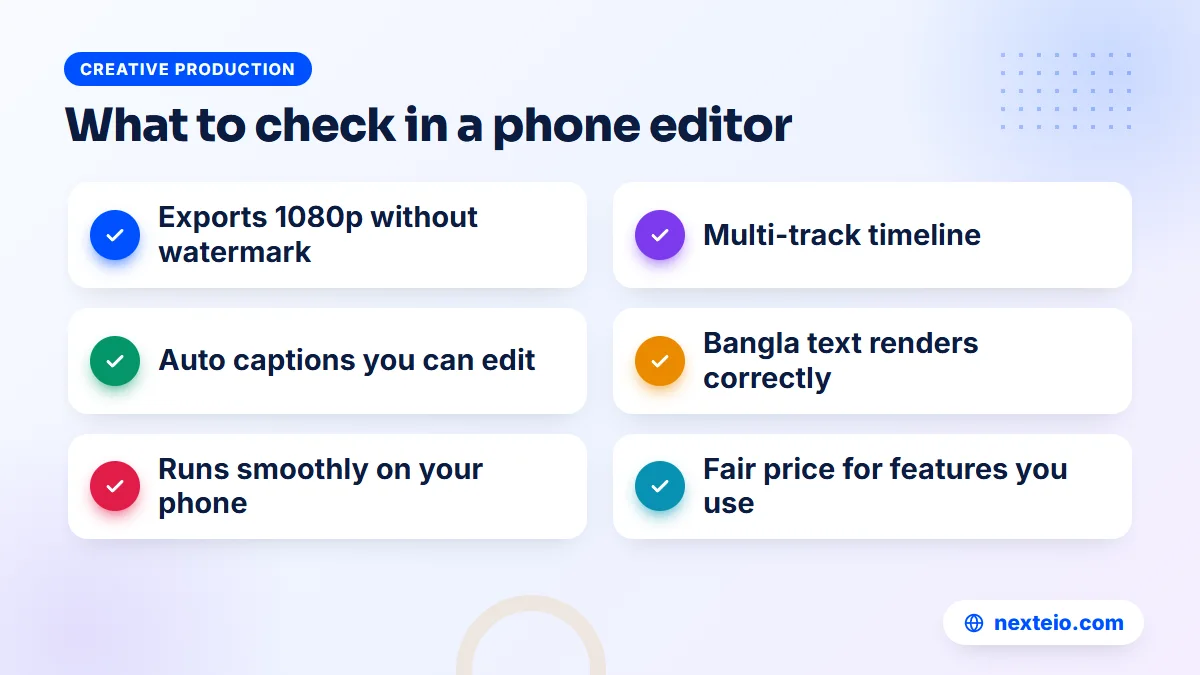
Once you have these answers, the short list below becomes much easier to read, because you can ignore the strengths that do not matter to you.
The Short List at a Glance
If you are still looking for the best video editor for Android or iPhone, these are the apps most business users in Bangladesh end up choosing between. The table is a quick map; the sections after it explain which app suits which job.
| App | Phones | Price model | Strongest at |
|---|---|---|---|
| CapCut | Android, iPhone | Free, with paid Pro | Reels, templates, auto captions |
| VN | Android, iPhone | Mostly free | Clean multi-track editing |
| Edits (Instagram) | Android, iPhone | Free | Vertical videos for Reels |
| InShot | Android, iPhone | Free, paid removes watermark | Quick, simple edits |
The second group adds more control, or comes built into the phone:
| App | Phones | Price model | Strongest at |
|---|---|---|---|
| KineMaster | Android, iPhone | Free with watermark, subscription | Layers, chroma key |
| PowerDirector | Android, iPhone | Free with watermark, subscription | Stabilizing, effects |
| LumaFusion | Android, iPhone | Paid | Pro-style timeline, audio |
| iMovie | iPhone only | Free | Simple, polished edits |
Google Photos on Android and the Photos app on iPhone also handle trimming, cropping and basic color fixes.
Price models shift. An app that is free today may move a feature behind a subscription next year, so check the export screen and the store listing before you plan your workflow around it.
Best Picks by Job
Instead of crowning one winner, match the editor to the work. Here is how the main options fit common business jobs.
Quick product clips and reels
For a shop posting new arrivals or offers several times a week, speed matters more than control. CapCut is the usual choice because its templates, beat sync and auto captions save time, and the official CapCut site lists the same tools on desktop if you later move to a computer. Edits, made by Instagram, is a strong free option if most of your videos go to Instagram and Facebook Reels.
Keep templates in check, though. When every shop uses the same trending template, your video looks like everyone else's. Use them for structure, then change fonts, colors and text to match your brand.
Talking videos with captions
A doctor explaining a treatment, a principal giving an admission message or a founder answering a common question needs clean cuts and readable captions. CapCut and VN both handle this well. Auto captions save time, but always read them through, because names, prices and technical terms are often transcribed wrongly, and Bangla speech recognition is less reliable than English.
Promos with layers and logos
When a video needs a logo, a lower-third name tag, picture-in-picture and a product shot over a background, you need proper layers. VN, KineMaster and PowerDirector give you a multi-track timeline. KineMaster and PowerDirector also offer chroma key for green-screen shots, which suits explainer videos filmed against a plain backdrop.
Longer YouTube videos and lessons
A twenty-minute lesson or product review is hard work on a small screen. LumaFusion is the most complete choice on a phone, with detailed audio controls and a full timeline. VN is a capable free alternative. For regular long videos, though, a computer editor or a professional editor working from your footage is usually faster, and our guide to video editing services in Bangladesh explains when outsourcing makes more sense.
Event recaps for schools and organizations
Sports days, prize-giving ceremonies, factory audits and NGO field visits produce lots of short clips from different phones. You need an editor that handles mixed footage and lets you add music and titles quickly. iMovie works well on iPhone, while CapCut or VN suit Android. Ask staff to film horizontally or vertically by agreement beforehand, so the clips match.
Short videos for your website
A product demo or a welcome video on your website needs different handling from a social post. Large video files uploaded straight to a website slow the page down, especially for visitors on mobile data. A better approach is to export a clean horizontal version, upload it to YouTube and embed it on the page, or keep any self-hosted clip short and well compressed. Our guide on website speed and SEO explains why heavy pages lose visitors before they see anything.
Best Video Editor for Android on a Budget Phone
Android phones in Bangladesh range from entry-level models to expensive flagships, and the same app can feel very different across them. Choosing the best video editor for Android on a mid-range or budget handset means looking at performance first and features second.
Memory, storage and heat
Video editing needs free storage for the original clips, the app's cache and the exported file. Keep at least 10 GB free before a bigger project. Close other apps before editing, and let the phone cool if it gets hot, because many phones slow down to protect themselves when warm.
Battery matters too. A long export can drain a phone quickly, so plug in before exporting, especially if load-shedding has kept the phone from a full charge.
Settings that keep a cheaper phone responsive
- Film in 1080p rather than 4K unless you truly need the extra detail.
- Use a lower preview quality inside the editor if the app offers it.
- Limit stacked effects; add them last, after the cuts are final.
- Clear the app cache after finishing a project.
- Split long projects into shorter parts and join them at the end.
On lower-end phones, VN and InShot often feel lighter than heavier editors, while CapCut runs well on most mid-range handsets.
Whichever Android video editor you pick, test it with your own footage before relying on it for a deadline.
Footage format surprises
Some newer phones record in HEVC (H.265) to save space. Most modern editors open it, but older or cheaper phones may struggle to play it smoothly in the timeline. If editing stutters, try recording in the more common H.264 format. On many Android phones, that means switching off a "high efficiency" video option in the camera settings; on iPhone, the matching setting is called "Most Compatible".
Best Video Editor for iPhone: What Changes on Apple Phones
Picking the best video editor for iPhone is simpler in one way: the hardware is consistent, so an app that runs well on one recent model usually runs well on the others. The trade-off is price, since several advanced iPhone apps cost more than their Android equivalents or work on subscription.
Start with the free Apple tools
The Photos app trims clips, crops, straightens and adjusts color, which covers many quick jobs. iMovie adds a timeline, titles, music and simple transitions, and Apple's iMovie user guide for iPhone explains each tool clearly. iMovie has long been built around horizontal projects, so many people use CapCut, VN or Edits for vertical reels instead.
HDR footage that looks wrong after upload
Recent iPhones record HDR video by default. That footage can look washed out or overly bright when it is edited in some apps, shared to Android phones or uploaded to certain platforms. If colors keep looking strange, you can turn off HDR Video in the iPhone camera settings for business clips, or make sure your editor exports in standard dynamic range.
When to pay for an iPhone video editor
LumaFusion is the usual step up for people who outgrow iMovie, with more tracks, detailed audio and finer color controls. Pay for it when you are editing regularly and keep hitting iMovie's limits, not before. Most iPhone owners making short business clips do well with iMovie, CapCut or Edits.
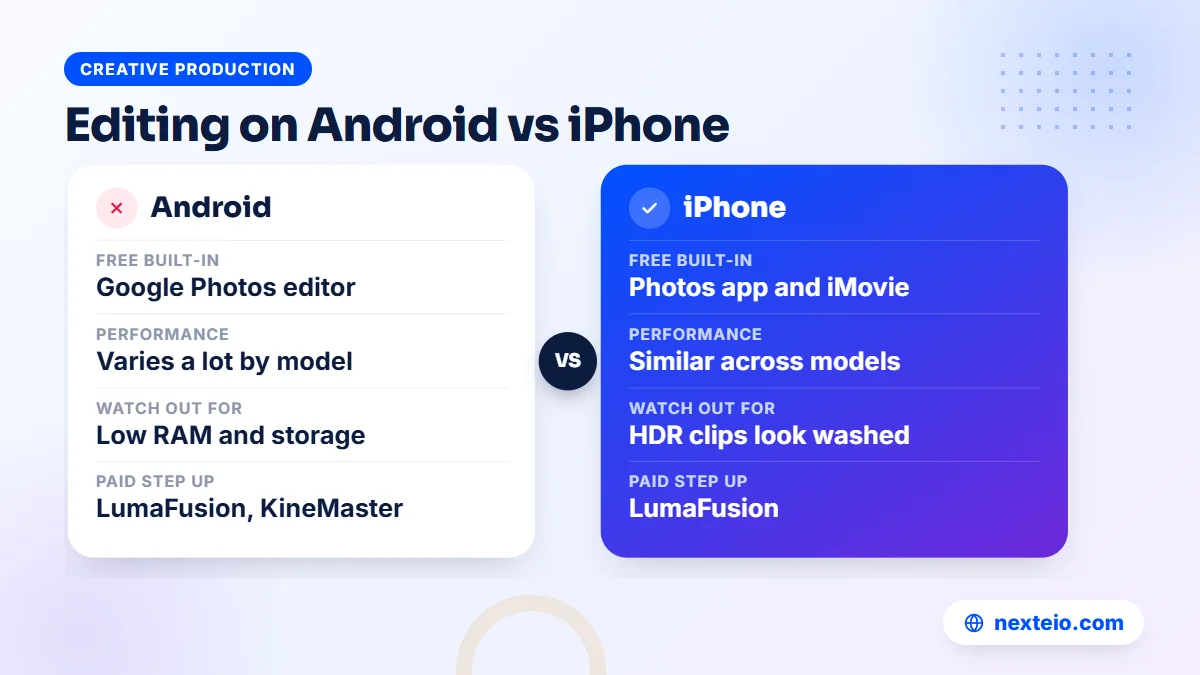
On both platforms, the editor matters less than the footage you feed it. A steady, well-lit clip with clear sound looks professional in any app.
Free or Paid: What a Subscription Really Buys
Most mobile editors use a "freemium" model. The free version lets you try nearly everything, then limits what you can export or use commercially. Before paying, look at exactly what changes:
- Watermark: many free versions stamp the app's logo on exports, which looks unprofessional on a business page.
- Export quality: some free tiers cap resolution or frame rate.
- Assets: premium effects, fonts, stickers, music and templates are often paid.
- Cloud storage: some plans add space to sync projects between devices.
- Ads: free versions may show ads inside the app.
For a business, the watermark and export quality matter most. Effects and stickers rarely make a business video better.
Check music rights too. Music inside an editing app may be licensed only for personal use or for certain platforms. Using a track in a paid ad is a different matter from using it in a personal clip, and an ad can be rejected or muted because of it. Our TikTok advertising policy guide covers what ad reviews look for.
A simple rule: if you post business videos every week and the free version's limits cost you time, pay for one app and learn it well. Paying for three apps you half-use is the more common waste.
A 20-Minute Test to Find Your Own Mobile Video Editor
Reviews tell you how an app behaved on someone else's phone with someone else's footage. A short test on your own handset tells you far more. Pick two candidate apps and run the same test in each.
- Load three real clips: one talking clip, one product or place shot, and one filmed in poor light.
- Set the project to the shape you post most, such as 9:16 for reels.
- Cut the clips down to 30 seconds, with at least two cuts inside the talking clip.
- Add a title in English and a line of Bangla text, then check that Bangla letters and joined characters display correctly.
- Turn on auto captions for the talking clip and count how many fixes you need.
Then finish the test with the parts that reveal hidden limits:
- Add your logo and a music track, and lower the music under the speech.
- Export at 1080p and note the time, the file size and whether a watermark appears.
- Send the file to another phone and watch it with sound on and off.
Score each app on speed, ease and result. The one that felt easiest is often the best video editor for Android or iPhone in your hands, even if the other has more features.
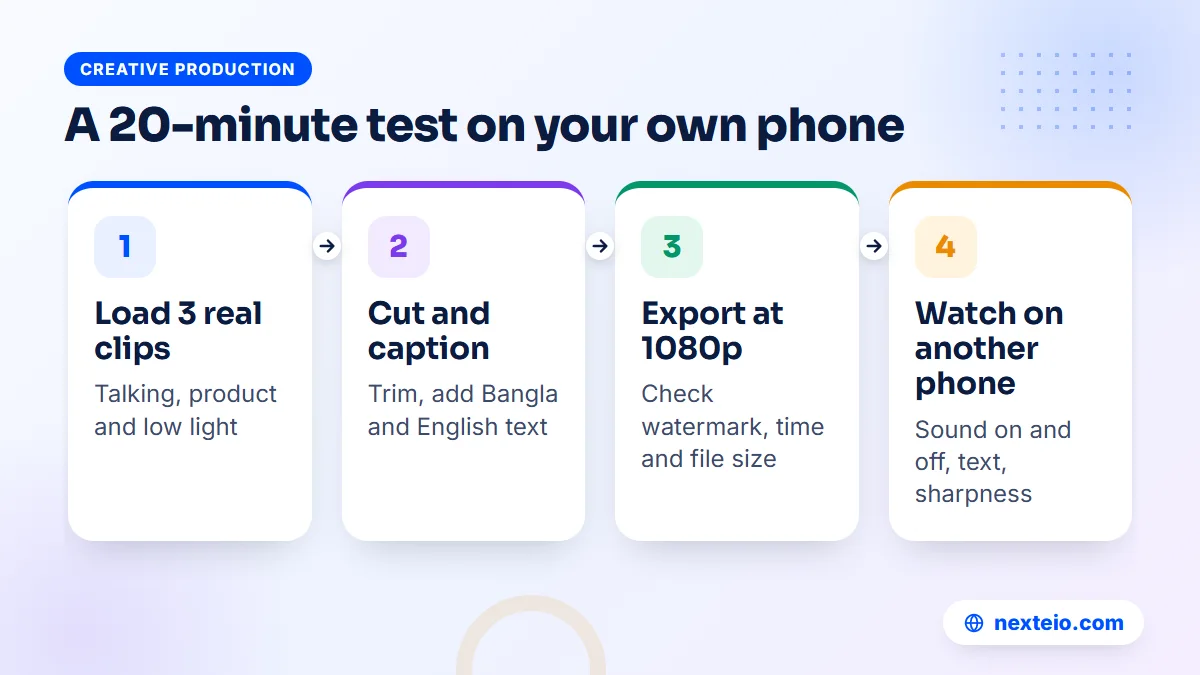
Bangla text deserves special attention. Some apps break joined letters or show boxes instead of characters, depending on the font. If that happens, try a different font inside the app, or add the text as a ready-made image made in another tool.
Related guides for getting more from your videos:
- What a good video ad edit includes and costs
- Tips for better Meta ads results in Bangladesh
- TikTok business account vs personal account
Set Up Your Editor Once: Brand Kit and Templates
Most of the time lost in phone editing goes into repeating the same small decisions: which font, which color, where the logo sits, how big the captions are. Settle those once, and every later video gets faster and looks more consistent.
Build a small brand kit
Collect the pieces every video uses and keep them in one folder on the phone and in a shared cloud folder:
- Your logo as a PNG with a transparent background, in light and dark versions.
- One or two fonts for English and one tested Bangla font that renders correctly.
- Your brand colors written down as hex codes, such as #0050FF.
- A short intro or end card with your phone number, page name or website.
- Two or three music tracks you have the right to use in business videos.
Some editors let you save fonts, colors and logos inside the app. Where that is not possible, keep the folder tidy so anyone on the team can find the same files.
Save a project template
Make one finished video in the shape you post most, with the logo placed, caption style set and end card added. Duplicate that project each time instead of starting from a blank screen. In apps that support it, save the caption and text styles as presets.
Keep text away from the bottom and right edges of vertical videos, where platforms place captions, buttons and profile names. A template with text already in safe positions stops that mistake from happening again.
Templates also make it easier to hand work between people. When a sales officer, a teacher or a store manager all start from the same project, the page looks like one brand rather than five different people. Whichever app you settle on as the best video editor for Android in your team, the template will matter more than the app's extra features.
Shoot So the Edit Is Easier
An hour of editing often fixes problems that ten seconds of care during filming would have avoided. These habits make any mobile video editor faster to use.
- Decide the shape first. Hold the phone vertically for reels and horizontally for YouTube.
- Keep all clips at the same frame rate, usually 30 frames per second.
- Tap and hold to lock focus and exposure, so brightness does not jump mid-shot.
- Record a few seconds before and after each line, giving room for clean cuts.
- Use a small clip-on microphone for talking videos; viewers forgive soft images faster than bad sound.
- Film near a window or with a simple light, not under a single ceiling bulb.
For more control, free camera apps can lock settings that the default camera changes automatically.
Blackmagic Design's free Blackmagic Camera app, available for iPhone and some Android phones, lets you fix frame rate, shutter and white balance. That keeps clips consistent when you cut them together, especially for interviews filmed over several days.
Export Settings and File Size on Mobile Data
A good edit can still look poor if it is exported wrongly. Each platform recompresses your upload, so start from a clean, correctly shaped file.
| Where it goes | Shape | Usual export |
|---|---|---|
| Reels, TikTok, Shorts | 9:16 vertical | 1080 x 1920 |
| YouTube video | 16:9 horizontal | 1920 x 1080 |
| Facebook or Instagram feed | 4:5 or 1:1 | 1080 wide |
| WhatsApp Status | 9:16 vertical | 1080 x 1920, short |
YouTube publishes its own recommended upload encoding settings, which are useful if you also export from a computer.
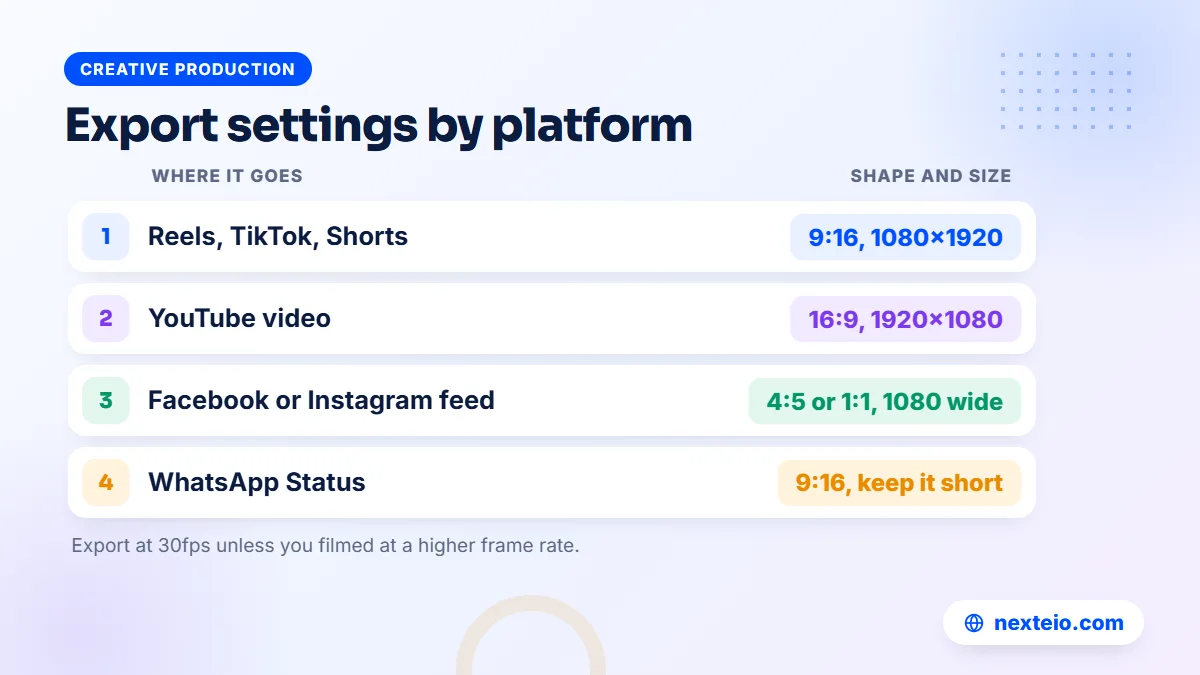
For ads, check the platform's specifications as well. TikTok lists accepted sizes, lengths and file limits on its video ad specifications page, and your ad manager will reject files outside them.
File size matters in Bangladesh, where many people upload on mobile data. A 60-second clip at 1080p usually lands at a manageable size, while 4K exports can be several times larger with little visible gain on a phone screen. Upload over Wi-Fi when you can, and keep the original export saved until the post is live and looks right.
Keep Your Projects and Footage Safe
Mobile editors store projects inside the app. If you delete the app, reset the phone or lose it, the projects usually go with it, even if the exported videos survive in your gallery.
- Back up raw footage to Google Drive, iCloud or a computer after each shoot.
- Keep the final export in a shared folder the whole team can reach.
- Name files clearly, such as "eid-offer-reel-v2-bangla", not "VID_2026".
- If staff edit on personal phones, agree that business footage is copied to a company folder.
That last point matters when a staff member leaves. Without it, a year of product footage can leave with them.
If you plan to move editing to a computer later, choose an app that exports clean files and keeps originals untouched, so a professional editor can pick up the raw clips without starting over.
Mistakes People Make With Phone Editing
The same problems turn up again and again in business videos edited on phones. Avoiding them improves results more than switching apps.
- A slow start. The first two seconds must show the product, the person or the offer.
- Text too small or placed where buttons and captions cover it.
- Music louder than the voice, or a track that is not cleared for business use.
- Too many transitions and effects, which make a video feel cheap.
- No captions, although many people watch with the sound off.
- The app's watermark left on a video used as a paid ad.
- One version for every platform, instead of shapes that fit each one.
Fixing these takes discipline rather than skill. Make a short checklist and run each video through it before posting.
When a Phone Editor Is Not Enough
Phone editing is the right tool for daily posts, quick offers and behind-the-scenes clips. It starts to struggle when the stakes rise.
Paid ads are the clearest example. An ad usually needs several versions with different openings, captions and lengths so the platform can test them, and the creative often decides whether the budget is wasted. A professional video ads editing service prepares those versions together, in the right specifications, before the campaign starts on Facebook and Instagram, TikTok or YouTube.
The same goes for brand films, factory profile videos for overseas buyers, school promotional videos and anything shown on a big screen. These need color correction, clean audio mixing and careful pacing that are hard to do with a fingertip. A professional video editing team can take your phone footage and produce the long version, the trailer and the short cut-downs from one shoot.
A sensible split for many businesses: staff edit daily clips on their phones, and important videos go to an editor. That keeps everyday content fast and the important pieces polished. If you are unsure which videos belong in which group, send us a short brief and we will suggest a split. If your videos feed a website or a landing page, our guide to building a high-converting landing page shows how the page and the video should work together.
How Nexteio Can Help With Video Editing
If phone editing is taking more of your team's time than it should, our video editing service can take it over. You send us footage from your phone or camera, and we cut it into reels, YouTube videos, product promos or brand films with captions, sound and color sorted, ready to upload.
For campaigns, we prepare short ad versions with a clear opening, captions for muted viewing and the offer shown early, in the shapes each platform needs. We can also advise on how to film so your own clips edit cleanly, which helps if your staff keep making daily posts themselves.
Many clients mix both: their team handles quick clips on a mobile editor, and we handle the videos that need more care. To see what else we do, look at all our services or browse our recent work. When you are ready, tell us about your video project, or ask a question through our contact page. You can also compare options in our editing packages before you decide.
Keep reading: what to expect from a TikTok ads service, what a Facebook ads service should include, or browse all our creative production guides.
Frequently asked questions
Which free video editor is best for Android?
For most business clips, CapCut and VN are the strongest free choices, with Edits a good option if your videos go mainly to Instagram and Facebook Reels. CapCut is faster for templates and captions, while VN gives a cleaner multi-track timeline. Try both with your own footage, because performance differs between phones.
Can I edit professional-looking videos on a phone?
Yes, for short social videos, product clips and simple talking videos. Good results depend more on steady footage, clear sound and tight cuts than on the app. Longer brand films, color-critical work and ads that need many versions are usually faster and better on a computer or with a professional editor.
Is iMovie good enough for business videos on iPhone?
For simple horizontal videos with titles, music and clean cuts, iMovie is free and reliable. It is less suited to vertical reels and heavy text work, where many people prefer CapCut, VN or Edits. If you outgrow it, LumaFusion is the common paid step up.
How do I remove the watermark from a mobile video editor?
Usually by paying for the app's premium version, which removes the logo from exports. Some apps, such as VN, Edits and iMovie, export without a watermark at no cost, at the time of writing. Do not use cropping or blurring to hide a watermark on paid ads, as it looks poor and may break the app's terms.
Why does my video look blurry after uploading to Facebook?
Platforms recompress every upload, and a small or low-bitrate file loses more detail. Export at 1080p in the right shape, upload over a stable connection, and check whether the app or page settings are uploading in reduced quality to save data. Starting from a sharp, well-lit clip helps most.
How much phone storage do I need for video editing?
Keep at least 10 GB free for a typical project, because the editor stores original clips, a cache and the exported file at the same time. 4K footage needs much more space. Clear the app cache and back up raw footage after each project to keep the phone responsive.
Should our staff edit on their personal phones?
It works for daily posts, but agree on some rules first. Business footage and final exports should be copied to a shared company folder, and brand fonts, logos and colors should be the same for everyone. Otherwise footage is lost when someone changes phones or leaves the job.
Which mobile editor handles Bangla captions best?
Results depend on the font as much as the app, so test with your own text. Type a sentence with joined letters and check that every character displays correctly in the preview and in the exported file. If an app breaks the letters, switch to a different Bangla font or add the text as an image made in a design tool. Always proofread auto captions in Bangla by hand.