What Does Boost Post Mean on Facebook? Boosting vs Ads Manager
In this article 15 sections
- 1.What Does Boost Post Mean on Facebook, in Plain Words
- 2.What Happens After You Press the Boost Button
- 3.The Settings Inside the Boost Screen
- 4.Boosting vs Ads Manager: The Real Differences
- 5.When Boosting a Post Is the Right Choice
- 6.When Ads Manager Is the Better Tool
- 7.What Does Boost Post Mean on Facebook for Your Budget in Bangladesh
- 8.Choosing the Right Goal for Your Business
- 9.How to Read the Results of Boosted Posts
- 10.Common Mistakes That Waste Boost Money
- 11.Ad Review, Rejections and Restricted Topics
- 12.Better Creative Makes Every Boost Work Harder
- 13.From Boosting to a Proper Campaign: A Simple Path
- 14.How Nexteio Can Help With Boosting and Facebook Ads
- 15.Frequently asked questions
What does boost post mean on Facebook? It means paying Meta to show one of your existing Page posts to more people than would see it for free. You pick the post, choose who should see it, set a budget and a number of days, and Facebook turns that post into an ad. The post keeps its likes, comments and shares, and it gets a small "Sponsored" label while the boost runs.
That blue button sits under almost every post a business Page publishes, and it is often the first paid advertising a Bangladeshi business ever tries. A clothing page owner boosts a new Eid collection. A coaching center boosts its admission notice. A clinic boosts a post about a new specialist joining on Thursdays.
Sometimes the money brings orders and calls. Often it brings a pile of likes from people who will never buy, and the owner decides that "Facebook ads do not work." The problem is rarely Facebook itself. It is usually the wrong goal, the wrong audience or the wrong tool for the job.
This guide explains exactly what happens when you boost, what each setting does, how boosting differs from Ads Manager, what budget makes sense, and how to tell whether your boosted posts are earning their cost. By the end you should know when the Boost button is enough and when you need a proper campaign.
What Does Boost Post Mean on Facebook, in Plain Words
A normal Page post is organic. Facebook shows it to some of your followers, and a few of their friends may see it if they react or share. Most of your followers never see a given post, because their feeds are full of posts from friends, groups and other Pages.
Boosting removes that limit for a price. You tell Meta, "Show this post to these people, for this many days, and I will pay up to this much." Meta then places the post in feeds, stories and other spots across Facebook and, if you allow it, Instagram and Messenger. People who see it can react, comment, message you or tap a button, just like a normal post.
People search for this in many forms: "what does boost a post mean on Facebook", "what does it mean to boost a post on Facebook", "what does it mean to boost post on Facebook" or simply "Facebook what does boost post mean". The answer to all of them is the same. A boost is a simple ad built from a post you have already published.
Three things make a boost different from a post that simply does well on its own:
- It is paid. You are charged for the reach you buy, up to the budget you set.
- It is targeted. You choose the location, age range and, within limits, the interests of the people who see it.
- It is labeled. Viewers see "Sponsored", and Meta reviews the post against its advertising rules before it runs.
Everything else about the post stays the same. The text, image or video, the comments and the reactions all carry over, which is one reason boosting appeals to small Pages.
What Happens After You Press the Boost Button
Many owners imagine that boosting pushes a post to the top of every feed at once. The real process is quieter and takes a little time. Understanding it helps you avoid panicking on day one or switching off a boost that was about to start working.
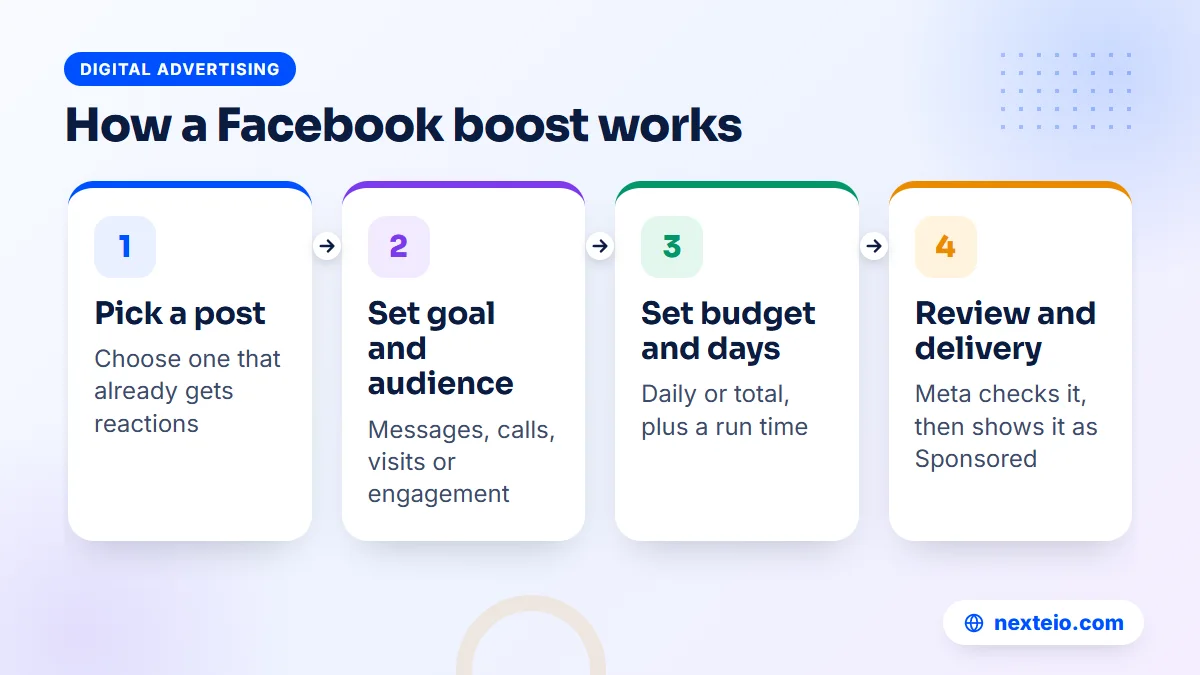
- Review. Meta checks the post, the image or video and any link against its Advertising Standards. Many posts are approved within a day, though some take longer.
- Delivery starts. Facebook begins showing the post to people inside your chosen audience, testing different times and placements.
- Learning. For the first few days, the system is still working out which people respond to your goal. Results can be uneven during this period.
- Steady delivery. Once the system has enough data, spending and results usually settle into a more even pattern.
- End and report. When the days or the budget run out, the boost stops. The post stays on your Page with all the reactions it gathered.
For most boosts, the whole cycle plays out over a few days.
Two details catch people out. First, Facebook may spend a little more on some days and less on others, as long as it stays within your overall budget. Second, a boost does not change the post itself. If the text has a spelling mistake or a missing price, editing it during the boost may send it back for review.
The Settings Inside the Boost Screen
The boost screen looks simple, but each choice decides who sees your post and what you pay for. The exact labels change from time to time and can differ between Pages, so treat the names below as a guide to what each part does.
Goal
The goal tells Meta what result you want. Typical options include more engagement, more messages, more website visitors and more calls, and there is often an automatic option that lets Meta choose. This is the most important setting on the screen. Facebook will find people likely to do what you ask for, so if you ask for engagement, you get people who like and comment, not necessarily people who buy.
Button
Depending on the goal, you can add a button such as Send Message, Learn More, Call Now or Book Now. Match it to the next step you want. A shop that takes orders in Messenger should use Send Message, while a clinic with an online booking page might use Book Now and a link.
Audience
You can usually let Meta find an audience automatically, choose people who already like your Page, or build your own by location, age, gender and detailed interests. For most local businesses in Bangladesh, location is the setting that matters most. A coaching center serving one district gains nothing from reaching students in another division, however cheap that reach looks.
Interest targeting is broader than many people expect. Choosing "fashion" or "education" includes huge numbers of people, so treat interests as a loose hint rather than a precise filter. Our guide to Meta ads targeting in Bangladesh explains how to build audiences that match real buyers.
Duration and budget
You set how many days the boost runs and either a daily budget or a total budget. Facebook shows an estimate of reach or results, which is a rough guide, not a promise. Very short boosts with tiny budgets rarely leave the learning period, so the results tend to look random.
Placements and payment
You can choose whether the post also appears on Instagram and Messenger. Leaving more placements on gives Meta more room to find cheaper results, but check how your creative looks in each one. Finally, you choose a payment method. Many advertisers in Bangladesh use a bank card enabled for international online payments, so confirm your card's limits with your bank before you plan a large boost.
Boosting vs Ads Manager: The Real Differences
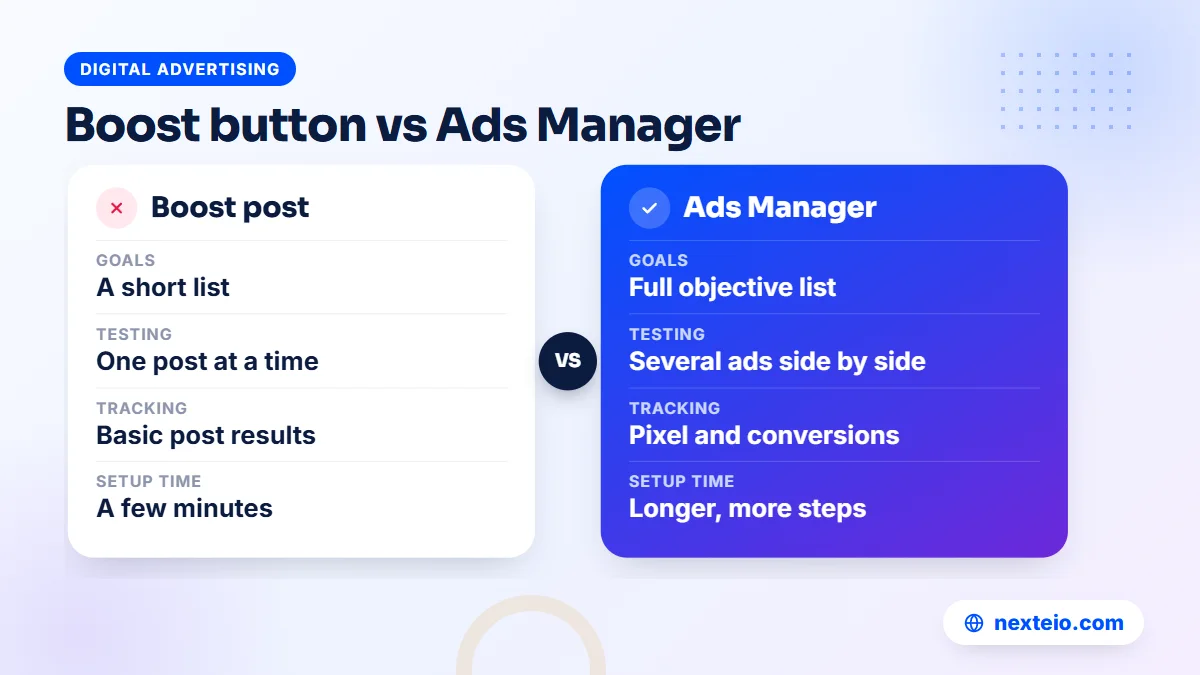
So what does boost post mean on Facebook once you compare it with Ads Manager? Both run on the same Meta ad system, use the same auction and charge from the same ad account. A boost is a shortcut with fewer controls. Ads Manager is the full workshop. The table below shows the gaps that matter most to a business.
| Feature | Boost post | Ads Manager |
|---|---|---|
| Where it starts | An existing Page post | A new ad or an existing post |
| Goals | A short list | The full list of campaign objectives |
| Versions | One post at a time | Several ads and audiences side by side |
| Audience control | Basic and saved audiences | Custom, lookalike and excluded audiences |
| Tracking | Basic results on the post | Pixel, conversions and detailed reports |
| Setup time | A few minutes | Longer, with more steps |
Boosts also appear inside Ads Manager after you create them, so you can view their numbers there.
The biggest practical difference is testing. In Ads Manager you can run two or three versions of an ad, with different images, headlines or audiences, and let the results show which one works. A boost gives you one post and one audience at a time, so you learn slowly and spend more to learn it.
The second difference is measurement. Ads Manager can optimize for actions on your website, such as a purchase or a submitted form, once the Meta Pixel or the Conversions API is set up. Our beginner's guide to Meta Pixel and CAPI tracking shows how that works. A boost aimed at website visitors usually counts link clicks, which is not the same as customers.
When Boosting a Post Is the Right Choice
Boosting is not a lesser option for beginners only. It fits a few situations very well, and in those cases the extra controls of Ads Manager add little.
- A post that is already working. If a post gets strong comments and shares without any money behind it, boosting puts more of the same in front of similar people.
- Local announcements. A new branch, a change in clinic hours, admission dates or a holiday closing notice. The aim is simply to inform people nearby.
Three more situations suit the Boost button well:
- Building early trust. A new Page with few followers can use a small engagement boost on its best posts so that later ads do not look like they come from an empty Page.
- Message-led selling. Many Bangladeshi Facebook shops sell through the inbox. A boost with the messages goal can work well if someone replies quickly.
- Very small budgets. When you can spend only a little, one well-chosen boost may teach you more than a complex campaign split into tiny pieces.
In each case the post itself is the ad, so its quality decides most of the result. A clear photo, a price or offer in the first line and an easy next step do more than any setting.
When Ads Manager Is the Better Tool
Move to Ads Manager once your goal goes beyond reach and simple messages. These are the common signs:
- You sell on a website and want Meta to find buyers, not just clickers.
- You want to test several images, videos or offers against each other.
- You need to show ads to past website visitors or to people who messaged you before.
- You want to exclude existing customers or students from a new-customer offer.
- You plan to use lead forms, catalogs or sales campaigns.
- Your monthly ad spend is large enough that small improvements save real money.
Ads Manager also lets you structure spending. One campaign can hold several ad sets, each with its own audience and budget, and each ad set can hold several ads. That structure is how you find out which audience or message brings the cheapest customers.
The downside is complexity. Ads Manager has many settings that are easy to get wrong, from the campaign objective to the conversion event. If that sounds like more than you want to manage, a Facebook ads management service can set up the structure and tracking while you focus on the product and the replies.
What Does Boost Post Mean on Facebook for Your Budget in Bangladesh
Meta does not publish one fixed price for a boost. You set the budget, and the cost of each result depends on your audience, the season, your goal and how people react to the post. A boost aimed at a narrow, high-demand audience during Eid shopping costs more per result than the same boost in a quiet month.
Instead of asking "how much does a boost cost", ask "how much can I spend to learn whether this works". A simple way to plan it:
- Decide the result you are paying for. Messages, calls, website visits or engagement.
- Work out what one customer is worth. For a shop, this is the profit on an average order. For a coaching center, it is the fee from one enrolled student.
- Set a test budget. Run the boost for at least five to seven days with a daily amount you can afford to lose while you learn.
- Compare. Divide the spend by the number of real customers, not by likes or clicks.
If one customer brings BDT 800 of profit and the test spent BDT 3,000 to bring two customers, the boost lost money even if it reached thousands of people. If it brought eight customers, it is worth repeating and improving.
Payment is the other practical point in Bangladesh. Meta charges your ad account in the currency you chose when it was created, and your bank converts card charges at its own rate. Some card issuers also limit international online spending, so a boost can stop because a payment failed. Keep an eye on your billing page during any large campaign. If you would rather have someone plan the budget and watch the spending each week, our Facebook ads team can take that on.
Related guides for planning paid social:
- What you should get from a Facebook ads service
- Google Ads vs Meta Ads: which brings more profit
- Ten Meta ads tips for better results in Bangladesh
Each of these goes further into budgets and results than a single boost needs.
Choosing the Right Goal for Your Business
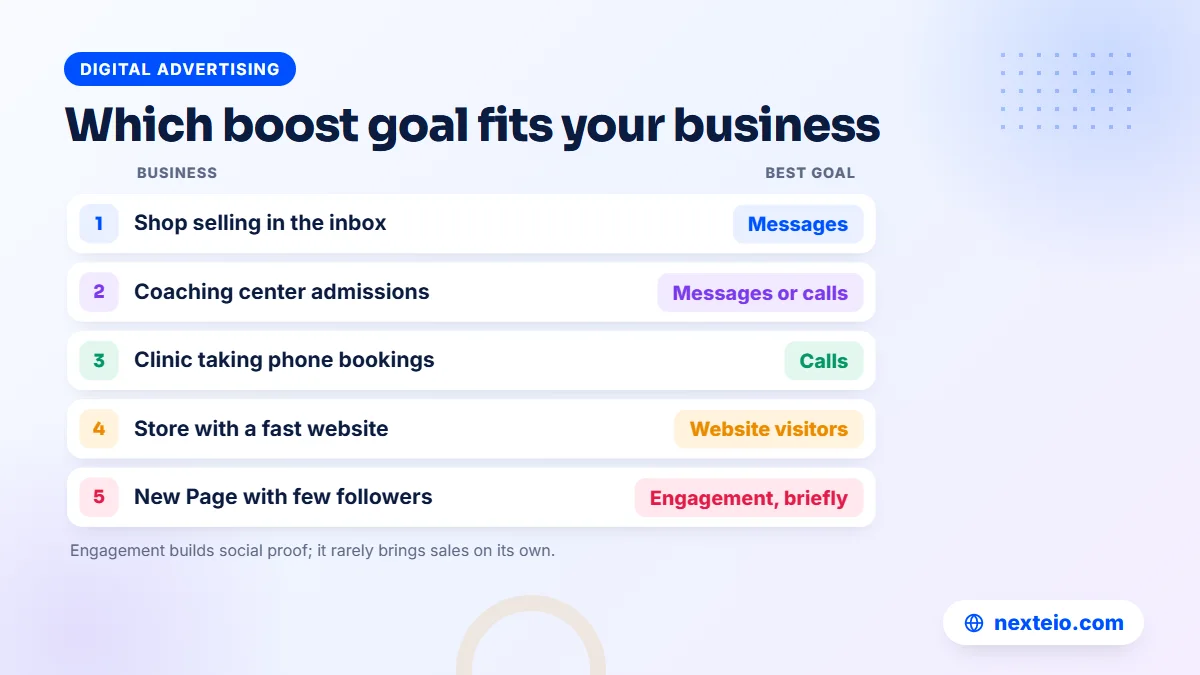
The goal setting decides who Facebook looks for. Pick it based on what a real customer does next, not on what looks best in the report. Here is how that plays out for a few common businesses.
A clothing or gadget page that sells in the inbox
Use the messages goal and a Send Message button. Put the price, sizes and delivery charge in the post, because people who must ask "price?" before anything else often drop off. Make sure someone can answer within minutes during the evening, when many people browse. A slow reply wastes the money spent to start the conversation.
A coaching center or school with admission dates
Messages or calls usually work better than engagement here. Parents and students want to ask about fees, batch times and seats. Target the areas your students actually travel from, and run the boost during the weeks when families are deciding, not after the batch has filled.
A clinic or diagnostic center
If appointments are taken by phone, use the calls goal with a Call Now button and make sure the number is answered. If you have an online booking page, the website visitors goal with a Book Now button can work, but check that the page loads quickly on mobile data. A slow page loses many of the people you paid to send.
A new Page building its first audience
A small engagement boost on two or three of your best posts is reasonable. It gives the Page some reactions and comments so that later ads look credible. Do not keep running engagement boosts for months and expect sales to follow.
How to Read the Results of Boosted Posts
The results panel shows many numbers, and some of them look impressive without meaning much. Focus on the few that connect to money.
| Metric | What it tells you | Watch out for |
|---|---|---|
| Reach | How many people saw the post at least once | Reach alone does not pay bills |
| Frequency | Average times each person saw it | Above 3 or 4, people tire of it |
| Cost per result | Spend divided by your chosen result | Only useful if the result is right |
| Messages started | New conversations from the boost | Count the ones that became orders |
| Link clicks | Taps on your link | Many never wait for the page to load |
Keep a simple record beside these numbers: orders, bookings or admissions that came from each boost.
For website traffic, add campaign tags to the link so that your analytics tool shows visits from each boost separately. Google's guide to campaign URL builders explains how to create these tagged links. If you use Google Analytics, you can also mark form submissions or purchases as key events, so you can see which boost brought customers rather than visitors.
The most reliable record for many small businesses is still a notebook or a spreadsheet. Ask every new customer how they found you, and note the date. After a few boosts, the pattern is usually clear.
Common Mistakes That Waste Boost Money
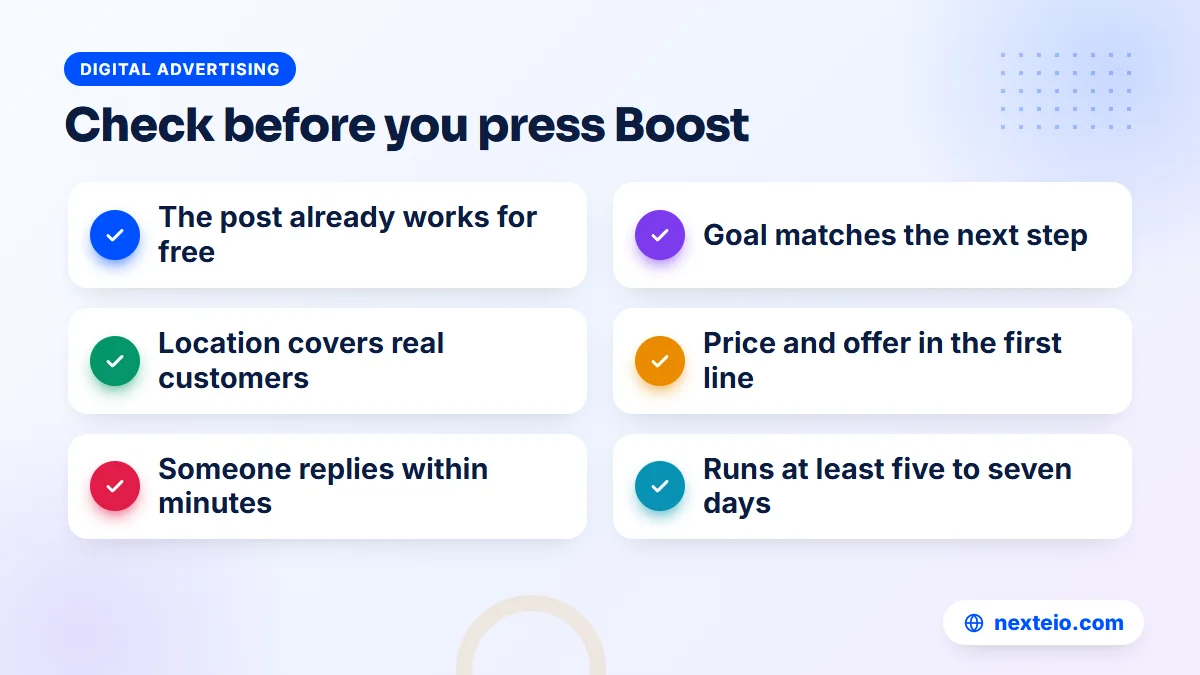
Most wasted boost money in Bangladesh goes on the same handful of errors. Check this list before you spend anything:
- Boosting for engagement when you want sales. You pay for likes from people chosen because they like things, not because they buy.
- Leaving the location too wide. A delivery-only shop that serves part of the country should not pay to reach the whole country.
- Boosting a weak post. If nobody reacted to it for free, money rarely fixes it. Boost your best posts.
- No price or no next step. Hidden prices and vague captions create questions instead of orders.
The other four mistakes happen after the boost goes live:
- Slow replies. Messages that wait hours for an answer often go to a competitor.
- Stopping too early. Turning a boost off after one day judges it before delivery has settled.
- Running the same boost for months. The same people see the same post until they ignore it.
- Sending traffic to a slow page. Website visitors on mobile data leave before the page appears.
The last point needs more attention than it usually gets. Google's guide to Largest Contentful Paint explains how page loading speed is measured, and it applies just as much to visitors from Facebook as to visitors from search.
If your boosts get clicks but no orders, the page may be the problem rather than the ad. Our guide on how to build a high converting landing page covers what that page needs, and a properly built store through our e-commerce website development service handles mobile speed, cash on delivery and bKash checkout. If your ads have stopped working for no obvious reason, our checklist on why Meta ads stop performing walks through the usual causes.
Ad Review, Rejections and Restricted Topics
Every boost is an ad, so it goes through the same review as any Meta ad. A post that is fine as a normal update can still be rejected when you try to boost it. Common reasons include:
- Claims that sound like guaranteed results, such as weight loss or exam success in a set time.
- Health, medicine or supplement claims that Meta treats as sensitive.
- Images or text that point out personal traits, such as "Are you overweight?"
- Links to pages that do not work, load very slowly or do not match the post.
- Products Meta restricts or bans, such as certain drugs, weapons or adult items.
If a boost is rejected, read the reason in the notification before editing anything. You can usually fix the post and try again, or request another review if you think the decision was wrong.
Some topics also need extra steps. Ads about social issues, elections or politics require identity checks and a disclaimer showing who paid for them. Ads about jobs, credit or housing fall under special categories with limited targeting. A school recruiting teachers or a company advertising vacancies should expect these rules to apply.
Clinics and hospitals deserve a specific warning. Keep claims factual: the doctor's name, specialty, chamber days and how to book. Avoid promises of cures, before-and-after images and anything that sounds like medical advice. These posts get approved more easily and also earn more trust.
Better Creative Makes Every Boost Work Harder
Because a boost uses your post as the ad, the post's content does most of the work. The same budget can bring very different results for two posts from the same Page.
For images, use real photos of your product, team or premises, taken in good light. Stock photos are easy to scroll past. Keep text on the image short, and put the important details in the first line of the caption, because Facebook cuts long captions after a few lines.
For video, the first two or three seconds decide whether anyone keeps watching. Show the product or the result right away, and add captions, since many people watch with the sound off. Short vertical videos also suit Instagram and Reels placements. If you need help turning phone footage into clean, short ads, our video ads editing service prepares versions ready for boosting or for Ads Manager, and our article on what a good video ad edit includes shows what to ask for.
Write captions in the language your customers use. Many Pages in Bangladesh do well with a Bangla caption and English product names, or the other way round for corporate buyers. Test both if you are unsure, one boost at a time.
From Boosting to a Proper Campaign: A Simple Path
If you first searched "what does boost post mean on Facebook" because you are just starting out, here is the good news. You do not need to choose between boosting forever and building a complex campaign on day one. Most businesses move through four stages, and each one builds on the last.
- Post regularly and watch. Publish useful posts for a few weeks and note which ones get real questions, shares and saves.
- Boost the winners. Put a small budget behind your best posts with a clear goal and a tight location.
- Set up tracking. Install the Meta Pixel on your website, or keep a careful record of orders from messages.
- Move to Ads Manager. Build campaigns that test audiences and creative, and retarget people who already showed interest.
You can move faster or slower through these stages, depending on your budget and how quickly you learn.
Facebook is also not the only channel worth testing. Search ads catch people who are already looking for what you sell, and short-video platforms reach younger audiences. Our ads campaign service plans the split between platforms, and our guide on ads campaign services in Bangladesh explains how small businesses usually divide a budget. For product categories with a young audience, TikTok ads can sit beside Facebook, while Google Ads can capture people searching for your service.
Each stage teaches you something about your customers. By the time you reach Ads Manager, you already know which posts, offers and audiences work, so your first proper campaign starts from evidence rather than guesswork.
For organizations with an approval chain, such as a school board or a company's marketing head, put this plan in writing. Agree on the goal and the test budget before the first boost, and report results in customers or enquiries, not likes. That keeps the decision about the next budget simple.
How Nexteio Can Help With Boosting and Facebook Ads
We help businesses and organizations across Bangladesh decide when a simple boost is enough and when it is time for a full campaign. Through our Facebook ads service, we start by looking at your Page, your recent posts, your website if you have one, and how customers currently reach you, by message, phone or online order.
From there, the work depends on what you need. For some clients that means choosing the right posts to boost and setting the goal, audience and budget correctly. For others it means building Ads Manager campaigns with proper audiences, several versions of each ad, and Pixel tracking so that spending connects to real orders, bookings or admissions. We explain what we set up and why, so your team understands where the money goes.
If your website or landing page is slowing results down, we can fix that as well, and our video team can prepare short ad edits from your own footage. To see whether our Facebook and Instagram ad management suits your goals, tell us about your business and budget through our project form, browse our portfolio, read more about Nexteio or reach us through the contact page. When you are ready to stop guessing with the Boost button, start a project brief and we will reply with a clear plan.
Keep reading: why a website gets traffic but no customers, what to expect from a TikTok ads service, or browse all our digital advertising guides.
Frequently asked questions
Is boosting a post the same as running a Facebook ad?
Yes, a boosted post is a type of Facebook ad. It is built from a post already on your Page and has fewer settings than a campaign made in Ads Manager. It is charged to the same ad account and reviewed under the same advertising rules.
Do I need a Facebook Page to boost a post?
For business use, yes. The Boost button appears on posts published by a Page or a professional profile, not on ordinary personal posts. You also need an ad account with a working payment method before the boost can start.
How long should I run a boosted post?
Most small businesses get clearer results from five to seven days than from one or two. Short boosts often end before Meta has learned who responds to your goal. For time-bound news, such as an admission deadline, start early enough to give the boost several days before the date.
Why was my boost rejected when the post itself is fine?
A normal post is not checked against ad rules, but a boost is. Rejections often come from health or result claims, text that points at personal traits, restricted products, or a link to a broken or slow page. Read the reason Meta gives, fix that part and submit again or request a review.
Can I edit a post while it is being boosted?
You can edit some parts, but changes to the text, image or link may send the boost back for review and pause delivery for a while. If a large change is needed, it is often cleaner to stop the boost, fix the post and boost it again.
Should a business stop boosting once it uses Ads Manager?
Not necessarily. Many businesses keep boosting a few strong posts for local reach or messages while running their main sales campaigns in Ads Manager. The key is to give each one a clear job and to measure both by customers, not by likes.
Do boosted posts help the Page grow followers?
They can bring some new followers, especially with an engagement goal, because people who react may also follow the Page. Followers gained this way are not always buyers, so treat follower growth as a side effect rather than the reason to boost.