Table Reservation Website for Restaurants: How It Works
In this article 15 sections
- 1.How a Table Reservation Website Works, Step by Step
- 2.Phone, Page Messages or Online Booking: What Changes
- 3.Features a Table Reservation Website Needs
- 4.Tables, Time Slots and Capacity: The Logic Behind Booking
- 5.Deposits, Cancellations and No-Shows
- 6.Confirmations and Reminders by SMS, Email and Messaging Apps
- 7.The Staff Side: Running the Host Stand From a Dashboard
- 8.Iftar, Eid, Events and Other Special Cases
- 9.Getting Found: Google, Ads and Structured Data
- 10.Build Options: Booking App, WordPress Plugin or Custom System
- 11.What a Table Reservation Website Costs and How Long It Takes
- 12.Guest Data, Privacy and Security
- 13.Launch Checklist and How to Measure Results
- 14.How Nexteio Can Help With Your Table Reservation Website
- 15.Frequently asked questions
A table reservation website lets guests pick a date, a time and a party size, see what is free, and book a table without calling the restaurant. For the restaurant, it replaces a notebook at the counter, a busy phone line and a stream of Facebook messages with one clear list of who is coming, when and how many. Done well, it fills tables on slow evenings and keeps busy nights under control.
Many restaurants in Bangladesh still take bookings by phone and page messages. That works until a Friday evening during Ramadan, when the phone rings during iftar service, two staff members write the same table into different notebooks, and a family of eight arrives to find their table already taken.
This guide explains how an online reservation system works behind the screen: the guest steps, the table and time-slot logic, deposits, reminders, the staff dashboard and the special cases restaurants here deal with every year. It also compares the ways to build one, what each costs, and what to measure once it is live.
It is written for restaurant owners, managers of hotel dining rooms and caterers with private halls. You do not need technical knowledge to follow it, but you will finish with a clear brief you can hand to a developer.
How a Table Reservation Website Works, Step by Step
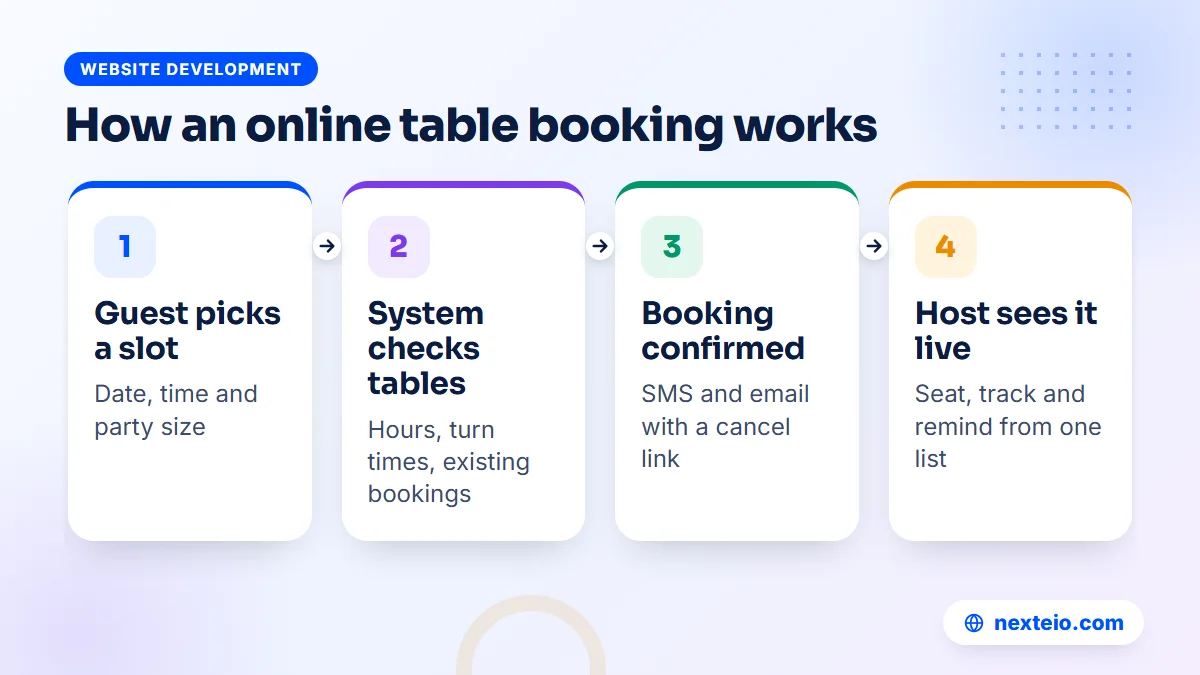
From the guest's side, a good booking flow takes less than a minute. Each step answers one question, and nothing asks for information the restaurant does not need.
- Choose the details: the guest picks a date, a party size and a preferred time.
- See what is free: the system shows available time slots, based on tables, opening hours and existing bookings.
- Add contact details: name, mobile number and, if needed, a note such as a birthday or a high chair.
- Pay a deposit if required: only for large groups, special nights or set menus.
- Get a confirmation: an SMS or email with the booking reference, time and address.
Behind each of these steps sits a set of rules that the restaurant controls.
On the restaurant's side, every booking lands on a dashboard. The host sees the day's reservations by time, can assign or change tables, mark guests as arrived or seated, and add walk-ins to the same list. A reminder goes out automatically before the booking, and the guest can cancel through a link, which frees the table for someone else.
The important point is that the website and the host stand look at the same live data. When the last table for 8 pm is booked online, the host sees it, and the website stops offering it. That shared view is what removes double bookings.
Phone, Page Messages or Online Booking: What Changes
Phone and messenger bookings are personal, and some guests will always prefer them. The problem is not the channel. It is that each booking lives in someone's head, notebook or message inbox, and the information is never in one place.
| Point | Phone and messages | Online booking |
|---|---|---|
| Hours | Only when staff answer | Any time, including late night |
| Accuracy | Names and numbers misheard | Guest types own details |
| Double booking | Common at busy times | Blocked by the system |
| Reminders | Manual calls, often skipped | Sent on schedule |
| Records | Scattered notebooks | Searchable guest history |
Most restaurants run both, with every booking ending up in one list.
Online booking does not mean turning away phone guests. The host simply enters phone and walk-in bookings into the same dashboard. The result is a single source of truth, and the phone is answered by someone who can see every table at a glance.
There is also a timing benefit. Many people decide where to eat late at night or during a commute, when nobody is answering the restaurant's phone. A table reservation website takes those bookings while the staff are asleep, and they are confirmed by the time the manager arrives.
Features a Table Reservation Website Needs
Feature lists from booking software can run to dozens of items. For most restaurants, the useful core is shorter. Start with what every booking needs:
- Live availability by date, time and party size.
- Opening hours and closed days, including holiday hours.
- Booking confirmations by SMS and email, with a cancel link.
- Automatic reminders a set time before the booking.
- A staff dashboard that works on a tablet at the host stand.
Then add the features that protect your evenings and your data:
- Deposits through a payment gateway for large groups or special nights.
- Walk-ins and a waitlist in the same list as online bookings.
- Guest notes and history, such as allergies or repeat visits.
- Staff roles, so a waiter cannot change settings or export guest data.
- Simple reports on bookings, no-shows and busy hours.
Everything beyond this is optional and should earn its place.
Bilingual pages help too. Many guests are comfortable booking in English, while others prefer Bangla, especially for family bookings. The booking form is short, so offering both languages costs little and removes a reason to call instead.
Tables, Time Slots and Capacity: The Logic Behind Booking
The part that makes or breaks a reservation system is the availability logic. It is also the part that off-the-shelf tools handle in very different ways, so it is worth understanding before you choose one.
Tables or covers
Some systems count covers, meaning the number of seats per time slot. Others track each physical table. Counting covers is simpler and suits buffets and food courts. Tracking tables is more accurate for a sit-down restaurant, because six free seats spread across three tables of two cannot seat a family of six.
Turn times
A turn time is how long a party usually keeps a table. A couple at lunch may take an hour, a family of eight at dinner nearer two. The system uses these times to decide when a table becomes free again. Set them by party size and by meal, and adjust them after a few weeks of real data.
Combining tables
Large groups often need two or three tables pushed together. A good system lets you define which tables can be joined, so it can offer a slot for ten people only when those tables are free together.
Holding some tables back
Many restaurants keep a share of tables for walk-ins or regular guests. The system should let you mark tables as "not bookable online" for certain times, rather than forcing you to accept every slot through the website.
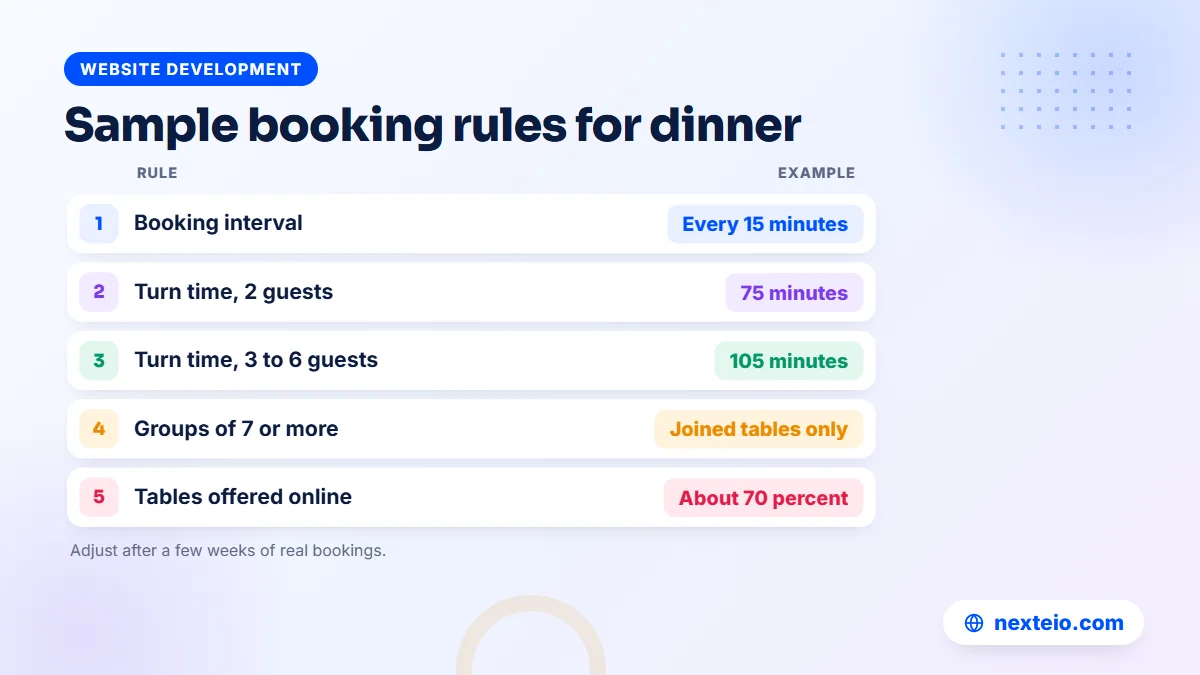
Here is a simple set of rules for a 60-seat restaurant serving dinner:
| Rule | Example setting |
|---|---|
| Booking interval | Every 15 minutes from 6:30 pm |
| Turn time, 2 guests | 75 minutes |
| Turn time, 3 to 6 guests | 105 minutes |
| Turn time, 7 or more | 2 hours, joined tables only |
| Online share | About 70 percent of tables |
| Last booking | 90 minutes before kitchen closes |
These are starting values for illustration, not a standard. Your own kitchen speed sets the real numbers.
Deposits, Cancellations and No-Shows
A no-show on a quiet Tuesday is annoying. A no-show for twelve people on Eid night, after you turned other families away, is real lost income. Deposits and clear cancellation rules reduce the problem without scaring off ordinary guests.
Most restaurants do not need a deposit for every booking. Asking a couple to pay in advance for a weekday dinner adds friction for little benefit. Deposits make sense in a few cases:
- Groups above a set size, such as eight or more guests.
- Special nights: iftar buffets, Eid, New Year's Eve, Valentine's Day.
- Set menus or pre-ordered food that the kitchen prepares in advance.
- Private rooms and outdoor areas with limited space.
For everything else, a reminder and an easy cancel link do most of the work.
In Bangladesh, guests expect to pay with bKash, Nagad or a card. A payment gateway such as SSLCommerz can accept these methods on one checkout page, and the money settles to the restaurant's account. The booking should only be confirmed once the gateway reports a successful payment, otherwise you get tables held for unpaid bookings.
Write the deposit rules in plain words and show them before payment, not after. Say whether the deposit is adjusted against the bill, how late a guest can cancel for a refund, and what happens if the restaurant has to cancel. Clear rules prevent arguments at the counter and complaints on your page.
Reminders matter just as much. A short SMS a day before and a few hours before the booking, with a one-tap cancel link, recovers many tables that would otherwise sit empty. Guests who cannot come usually do cancel when it is easy to do so.
Confirmations and Reminders by SMS, Email and Messaging Apps
A booking does not feel real to a guest until they receive a confirmation. On a table reservation website for a restaurant in Bangladesh, SMS is usually the most reliable channel, because almost every guest has a mobile number and not everyone checks email.
Bulk SMS providers offer an API that the booking system calls after each booking. Ask the provider about sender names, delivery reports and the cost per message, and keep each message short enough to fit in one SMS. A Bangla message uses more of the character limit than an English one, so test the length before launch.
A good confirmation contains:
- The restaurant name and booking reference.
- Date, time and party size.
- The address with a map link, and a phone number.
- Deposit status, if one was paid.
- A link to view, change or cancel the booking.
Keep it short; the guest reads it on a phone screen.
Email is still worth sending, because it gives a permanent record and works well for corporate bookings, where an office assistant books for a manager. Messaging apps are popular, but sending automated messages through them usually needs a business account and an approved setup. Start with SMS and email, then add other channels once the basics run smoothly.
The Staff Side: Running the Host Stand From a Dashboard
Guests see the booking form of your table reservation website. Your staff live in the dashboard, and that is where the system saves or wastes time every evening. Design it for a busy host holding a tablet in one hand.
The day view
The main screen should show today's bookings by time, with party size, table, notes and status. Statuses such as booked, confirmed, arrived, seated, finished, cancelled and no-show let the team see the evening at a glance. A floor plan view, where tables change color as they fill, helps larger restaurants.
Walk-ins and the waitlist
When a family walks in at a busy time, the host should be able to add them in a few taps, see the next free table and send an SMS when it is ready. Walk-ins entered this way also appear in reports, which shows you how much business arrives without a booking.
Roles and permissions
Not everyone needs the same access. A host manages bookings, a manager changes opening hours and table rules, and only the owner exports guest data. Role-based access is a standard feature in frameworks like Laravel, as its documentation on authorization shows, and it should be part of any custom build.
Power cuts and weak internet
The website itself should be hosted on a proper server, so it keeps taking bookings during load-shedding at the restaurant. The host stand is a different story. Keep the tablet charged, have a mobile data backup for the router, and print the evening's list before service on busy nights. Planning for that scenario is part of a sensible setup, not an extra.
Related guides you may find useful:
- How to build a professional business website that gets results
- How to create a landing page that converts ad visitors
- Why a website gets traffic but no customers
Each one helps turn visitors into bookings.
Iftar, Eid, Events and Other Special Cases
Restaurants in Bangladesh have booking peaks that generic software from abroad does not always handle well. Plan for them before launch rather than discovering the gaps during Ramadan.
Iftar bookings. During Ramadan, everyone wants to arrive at the same moment, just before sunset. Normal 15-minute slots do not fit. The system needs a single seating per evening, with the time set daily from the iftar schedule, a fixed buffet or set-menu price, and usually a deposit. Seating capacity, not table turns, is the real limit.
Eid and public holidays. Hours change, staff are on leave and demand jumps. You need to set special opening hours for specific dates in advance, and possibly a different menu or minimum spend.
Group and corporate bookings. Office parties, family gatherings and school reunions often want a set menu, a private area and an invoice. A simple enquiry form that collects date, group size, budget and menu preference often works better than forcing these into the normal booking flow.
Private rooms and halls. Treat each room as a bookable space with its own capacity, minimum spend and deposit rules. Some restaurants also rent halls for small events, which is closer to venue booking than table booking.
Buffet restaurants. Many buffets sell fixed seatings with a per-person price. Here the system sells seats in a seating, and the payment step matters more than table assignment.
A ready-made booking app may cover some of these cases and not others. This is often where restaurants decide that a custom booking system makes more sense.
Getting Found: Google, Ads and Structured Data
A table reservation website only works if people reach it. Most guests find a restaurant through Google Maps, search results, Facebook or Instagram, so the booking link must be easy to find in each of those places.
On your Google Business Profile, add the booking page as your reservation link where the profile allows it. In some countries, Google can show a booking button through supported scheduling providers, as explained in its help page on setting up bookings through a provider. Availability depends on your country and provider, so check before you plan around it.
On the website itself, put a clear "Book a table" button in the header of every page, not only on the homepage. Keep the booking page fast on mobile data, with the form near the top. Search engines also read structured data, and schema.org includes a type for restaurant reservations and properties that show a restaurant accepts bookings. Your developer can add this markup so the page is easier for search engines to understand.
Paid ads can fill quiet nights. A Facebook campaign aimed at people near the restaurant, promoting a weekday set menu with a direct booking link, is easy to measure because every booking comes through the website. Our Facebook ads and Google Ads services set up this kind of campaign, and the guide on Meta ads targeting in Bangladesh explains how to reach nearby diners. Track each booking as a conversion, as described in our guide to Google Ads conversion tracking, so you know which campaign actually filled tables.
For steady free traffic, a well-built menu page and location page help you appear for searches such as a cuisine and your area. Our SEO service handles that work, and many of the basics are things you can start on yourself.
Build Options: Booking App, WordPress Plugin or Custom System
There are three common ways to get online bookings. Each suits a different kind of restaurant.
A ready-made booking service
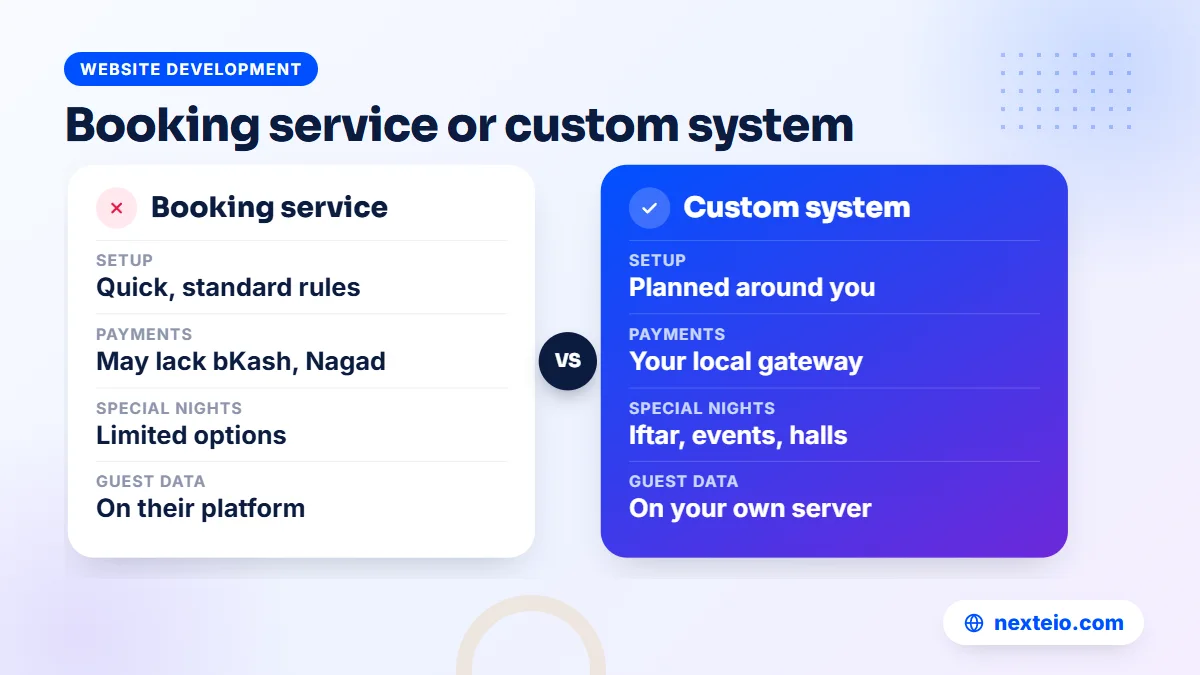
Subscription booking platforms give you a widget to place on your website and a dashboard for staff. Setup is quick. The downsides are a monthly fee, sometimes in foreign currency, limited control over the booking rules, and payment and SMS options that may not support bKash, Nagad or local SMS providers. Guest data also sits on someone else's platform.
A WordPress site with a booking plugin
A WordPress website with a reservation plugin is a sensible middle path for a single restaurant with simple rules. You own the site and the data, and the cost is moderate. The limits show when you need table combining, iftar seatings, deposits through local gateways or several branches, because plugins are built for the common case.
A custom system built on Laravel
A custom table reservation website, built as a web application, follows your rules exactly: your tables, your turn times, your special nights, your payment gateway and your SMS provider. It can grow into a multi-branch system with a central dashboard, guest history and reports. This is the kind of project our Laravel web application service handles, and it suits restaurant groups, hotels and busy single restaurants with complex booking patterns.
| Option | Best for | Main limit |
|---|---|---|
| Booking service | Quick start, standard rules | Monthly fee, less control |
| WordPress plugin | One restaurant, simple tables | Hard to change complex rules |
| Custom Laravel system | Groups, hotels, special seatings | Higher upfront cost |
Pick the simplest option that handles your busiest night.
Our comparison of WordPress and custom websites goes deeper into this choice. If you lean towards a custom build, our guide on hiring a Laravel developer in Bangladesh explains what to check before you sign.
What a Table Reservation Website Costs and How Long It Takes
Costs depend on which option you choose and how much logic the booking system needs. The figures below are typical market ranges in Bangladesh, not fixed quotes, and they exclude SMS credit, payment gateway fees and ad budgets.
| What you build | Typical market range |
|---|---|
| Restaurant website on a ready theme, with a plugin or booking widget | BDT 25,000 to 60,000 |
| Custom-designed restaurant website with booking | BDT 60,000 to 150,000 |
| Large site with integrations, several branches or a hotel | BDT 150,000 to 400,000 or more |
| Custom reservation system or portal | Quoted after a requirements review |
Running costs are separate. A .com domain usually costs about BDT 1,500 to 2,500 a year, and shared hosting about BDT 2,000 to 8,000 a year.
When a range is needed for a full custom system, such as multi-branch booking with deposits, waitlists, guest history and reports, it can fall anywhere from about BDT 150,000 to 1,200,000 or more, depending on modules and users. That is why a requirements review comes first. A one-branch system with clear rules sits at the low end; a hotel group with banquet halls sits much higher.
Timelines follow the same pattern. A website with a booking plugin can go live in a few weeks once content and photos are ready. A custom system goes through planning, design, development, testing with staff and a soft launch, which takes longer and depends on how quickly decisions are made on the restaurant's side.
Guest Data, Privacy and Security
A table reservation website collects names, phone numbers, email addresses, visit history and sometimes notes about allergies or celebrations. Guests trust you with that information. Losing it or misusing it damages the trust that brings them back.
A few basics protect both you and your guests:
- Collect only what you need for the booking.
- Use HTTPS on every page, especially the booking and payment pages.
- Give each staff member their own login, never a shared one.
- Limit who can export or download guest lists.
- Remove access as soon as a staff member leaves.
- Keep backups of the booking database off the main server.
Ask your developer how each point is handled.
For custom systems, ask the developer how they protect against the common weaknesses listed in the OWASP Top Ten, such as broken access control and injection attacks. The booking form is public, so it also needs protection against spam bookings, for example rate limits and a check on phone number format.
Never store card details yourself. A payment gateway handles card and mobile wallet data on its own secure pages and only tells your system whether the payment succeeded.
Launch Checklist and How to Measure Results
Before you announce your table reservation website, test it the way guests and staff will use it. Book from a phone on mobile data, cancel through the SMS link, pay a test deposit, and add a walk-in during a busy hour. Ask the staff who will use it every night to try it too. They will find problems that the owner and the developer miss.
Then run through this list:
- Opening hours, closed days and the next holiday dates are set.
- Turn times and table combinations match how the floor really works.
- Confirmation and reminder messages arrive on all the main mobile operators.
- Deposits confirm only after a successful payment.
- The "Book a table" button appears on every page and on your social profiles.
- Staff have their own logins and know how to handle walk-ins.
Fix anything that fails before the first busy weekend.
After launch, a few numbers tell you whether the system is working. Watch the share of bookings that come online, the no-show rate before and after reminders, the busiest booking hours, and which source each booking came from. A table reservation website that takes most of its bookings outside opening hours is doing exactly its job, because those are guests nobody could have answered.
Review these numbers monthly for the first three months, then adjust turn times, deposit rules and the share of tables offered online. The first settings are always a guess. Real data makes them right.
How Nexteio Can Help With Your Table Reservation Website
We build restaurant websites and booking systems for businesses across Bangladesh. For a single restaurant with straightforward rules, a custom-designed website with a well-chosen booking tool may be all you need. When your booking rules are more involved, we build a custom system through our Laravel development service.
We start by sitting with you and your floor staff to map how bookings really work: your tables, turn times, busy nights, deposit rules and special seatings such as iftar. From that, we write a short requirements document so you can review scope and price before any development starts. We then build the booking flow, the staff dashboard, the payment gateway connection and SMS confirmations, and test everything with your team before launch.
You can browse our portfolio, see all our services, or ask a question through the contact page. If you are ready to plan, share your restaurant's details on our project form and we will suggest the right booking system setup for your size. A short brief is enough to start the conversation.
Keep reading: how faster pages help you rank and sell, simple SEO tips for small businesses, or browse all our website development guides.
Frequently asked questions
Do small restaurants really need online booking?
Not always. If most guests walk in and the restaurant rarely fills up, a phone number and a simple list may be enough. Online booking pays off when you regularly turn people away, take group bookings, run special nights or lose bookings because nobody answers the phone at busy times.
Can guests pay a booking deposit with bKash or Nagad?
Yes, if the system connects to a payment gateway that supports them. The guest pays on the gateway's checkout page, and the booking is confirmed only after the gateway reports a successful payment. Most restaurants ask for deposits only for large groups, set menus or special nights.
How do we handle walk-in guests with an online system?
The host adds walk-ins to the same dashboard in a few taps. The system then shows which tables are free now and which are about to free up, and it can send an SMS when a table is ready. Keeping walk-ins in the same list is what prevents double seating.
What happens to bookings if the internet goes down at the restaurant?
The website runs on a hosting server, so guests can keep booking during a power cut or internet outage at the restaurant. The host stand needs a charged tablet and a mobile data backup to see new bookings. On busy nights, printing the list before service is a sensible precaution.
Can one system handle several restaurant branches?
A custom system can. Each branch gets its own tables, hours and staff logins, while the owner sees all branches in one dashboard with combined reports. Ready-made services often charge per location, and WordPress plugins are usually built for one restaurant.
How do we reduce no-shows without annoying regular guests?
Send reminders with an easy cancel link, ask for deposits only where a no-show really hurts, and keep a record of guests who repeatedly fail to arrive. Regular guests who always come can be exempted from deposits by staff. Clear, polite rules shown before booking work better than strict penalties.
Who owns the guest data in a booking system?
With a custom system or your own WordPress site, the data sits on your hosting account and belongs to you. With a subscription booking service, it sits on their platform, so read their terms on data export and what happens if you cancel. Either way, limit who on your staff can download guest lists.