Retargeting Ads: How to Bring Back Visitors Who Did Not Buy
In this article 15 sections
- 1.What Retargeting Ads Are and How They Work
- 2.Where You Can Run Retargeting Ads
- 3.Set Up Tracking Before Anything Else
- 4.Building Audiences by Intent
- 5.How Long to Keep People in Each List
- 6.Retargeting Ads Creative: What to Show Each Group
- 7.Frequency, Exclusions and Not Annoying People
- 8.Google Ads Remarketing: A Step-by-Step Setup
- 9.Retargeting on Facebook, Instagram and TikTok
- 10.How Much to Spend on Retargeting Ads
- 11.Measuring Whether Retargeting Ads Really Work
- 12.Privacy, Consent and Sensitive Businesses
- 13.Common Retargeting Mistakes to Avoid
- 14.How Nexteio Can Help With Retargeting Ads
- 15.Frequently asked questions
Retargeting ads are ads shown to people who have already visited your website, watched your video or opened your app, but left without buying. Someone looks at a pair of shoes on your store, closes the tab to answer a call, and later sees those shoes again on Facebook or YouTube. That second look is often what turns a browser into a buyer.
Most visitors do not buy on the first visit. They compare prices, wait for payday, ask a family member, or simply get distracted. A shop in Bangladesh selling on mobile data loses even more people to dropped connections and slow checkout pages. Without a way to reach those visitors again, every taka spent bringing them in the first time is partly wasted.
Done well, retargeting ads feel like a helpful reminder. Done badly, they follow people around the internet with the same banner for weeks and make the brand look desperate.
This guide explains how retargeting works, where you can run it, how to set up tracking and audiences, what to show each group, how often to show it, how to budget, and how to tell whether it is really bringing extra sales or just taking credit for sales you would have made anyway.
What Retargeting Ads Are and How They Work
The mechanism is simple. A small piece of tracking code sits on your website: the Meta Pixel, the Google tag, the TikTok Pixel or similar. When someone visits, the code records the visit and the pages or actions involved, such as viewing a product or adding it to the cart. The ad platform then adds that person to an audience list, and you can show ads to that list later.
The visitor's identity is not shared with you. You never see names or phone numbers from these lists. You only see the size of the audience and how ads perform with it. The platform matches the visit to its own logged-in users and handles the targeting on its side.
Lists can also come from outside your website:
- Video viewers: people who watched a set share of your Facebook, TikTok or YouTube video.
- Page and profile engagers: people who messaged, liked, commented or saved a post.
- Customer lists: phone numbers or emails you upload, which the platform matches to its users after hashing.
- App users: people who installed or used your app, tracked through an app events setup.
Each source catches a different level of interest. Someone who watched 75% of a product video is warmer than someone who scrolled past one second of it, and a customer list of past buyers is warmer still.
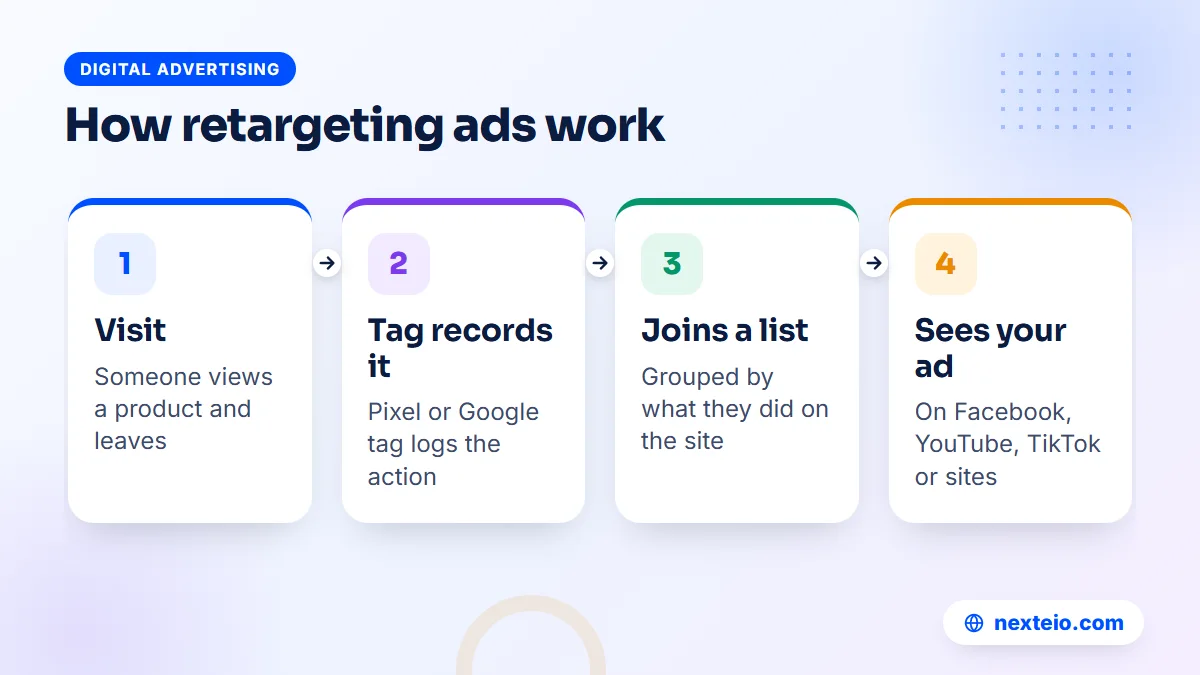
Retargeting or remarketing: is there a difference?
In everyday use, the two words mean the same thing. Google has long used "remarketing" in its products, while many marketers and Meta users say "retargeting". Some people use remarketing more narrowly for email follow-ups to past customers, and retargeting for paid ads to website visitors. The distinction rarely matters in practice. What matters is that you reach people based on what they already did.
Where You Can Run Retargeting Ads
Every major ad platform offers some form of retargeting advertising, and most businesses in Bangladesh use two or three of them. The table below shows how each platform builds its lists and where the ads appear.
| Platform | How the list is built | Where ads appear |
|---|---|---|
| Google Ads | Google tag, Google Analytics, YouTube activity, customer lists | Display Network sites and apps, YouTube, Gmail, Search, Performance Max |
| Meta (Facebook and Instagram) | Meta Pixel and Conversions API, page and video engagement, customer lists | Facebook and Instagram feeds, Stories, Reels, Messenger, Audience Network |
| TikTok | Its own pixel, video and profile engagement, customer files | TikTok feed and partner apps |
The best platform is usually the one where your buyers already spend time.
Google retargeting ads are strong when people research before buying, because they can follow up across millions of websites and on YouTube, and can even change how your search ads bid when a past visitor searches again. Meta is usually the main channel for online shops in Bangladesh, because most buyers spend hours on Facebook and Instagram and are comfortable ordering through Messenger. TikTok works well when your first contact was a TikTok video and your buyers are younger.
You do not need all three on day one. Start where your existing traffic comes from. If most visitors arrive from Facebook ads, retarget them on Facebook first. Once you use two or more platforms, a managed multi-platform ad plan keeps the lists, exclusions and budgets in one place. Our comparison of Google Ads and Meta Ads helps if you are unsure which platform suits your business.
Set Up Tracking Before Anything Else
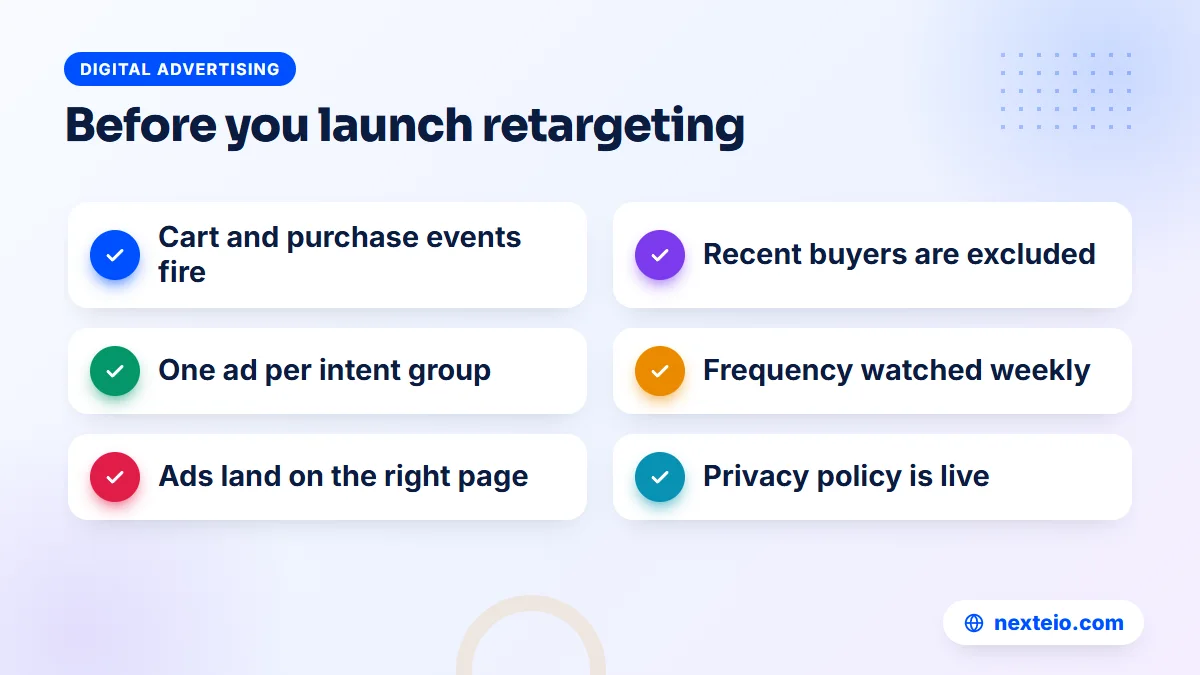
Retargeting ads are only as good as the tracking behind them. If the pixel fires on the homepage but not on product pages, you cannot separate a casual visitor from someone who nearly bought. If the purchase event does not fire, you cannot exclude buyers, and they will keep seeing ads for something they already own.
At minimum, track these actions on an online store:
- Page view: any visit to the site.
- View content: a product or service page viewed, with the product ID.
- Add to cart: an item added to the cart.
- Initiate checkout: the visitor started the checkout form.
- Purchase or lead: the order placed, or the form submitted.
For a service business, such as a coaching center or a clinic, the equivalent events are viewing a course or department page, opening the booking form, and submitting it.
Cash on delivery adds a wrinkle. On many Bangladeshi stores, an order is placed online but confirmed by phone later, and some orders are canceled. Fire the purchase event when the order is placed, so you can exclude that person from cart ads, but judge real results from confirmed and delivered orders in your own records.
Browser restrictions and ad blockers mean the pixel misses some visits. Meta's Conversions API and Google's enhanced conversions send event data from your server or from hashed form data, which fills part of that gap. Our guides on Meta Pixel and Conversions API setup and Google Ads conversion tracking walk through both. If your site was built without clean event tracking, a developer may need to fix the store itself; our e-commerce website development work includes these events from the start.
Building Audiences by Intent
The single biggest improvement most advertisers can make with retargeting ads is to stop treating all visitors as one group. Someone who read a blog post six weeks ago and someone who abandoned a cart this morning need different messages, different budgets and different time windows. Split your visitors by how close they came to buying.
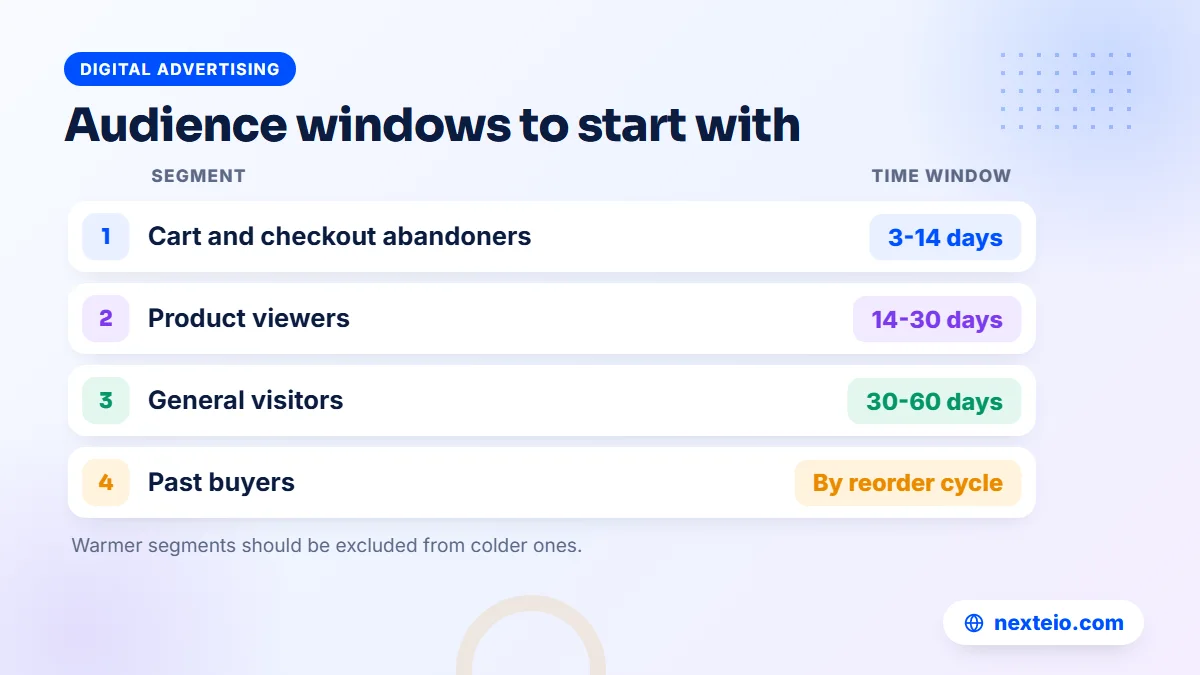
A practical set of audience segments for an online store looks like this:
| Segment | Who is in it | Starting time window |
|---|---|---|
| Cart and checkout abandoners | Added to cart or started checkout, did not buy | 3 to 14 days |
| Product viewers | Viewed one or more product pages, no cart | 14 to 30 days |
| General visitors | Visited home, category or blog pages only | 30 to 60 days |
| Engaged video viewers | Watched a large share of a product video | 30 to 60 days |
| Past buyers | Purchased before | Depends on how often people reorder |
These windows are starting points, not rules. Test and adjust them for your own sales cycle.
Each segment should exclude the warmer ones. Product viewers should exclude cart abandoners, and every prospecting audience should exclude recent buyers. Without exclusions, the same person lands in several ad sets, sees several different ads in one day, and your reports count the same sale more than once.
Small stores will find some segments too small to run on their own. Google requires a minimum number of active users in a list before it will show ads, and the minimum is higher for Search than for Display. If a segment is too small, merge it with the next warmest one rather than dropping it.
How Long to Keep People in Each List
The right time window for retargeting ads depends on how long your buyers take to decide. A t-shirt bought on impulse is decided in hours or days. A sofa, a laptop or a course admission can take weeks. A garment buyer sourcing from a factory may take months. Match your windows to that rhythm.
Some examples by business type:
- Fashion, cosmetics and small gadgets: keep cart abandoners for about a week and product viewers for two to four weeks. Interest fades quickly.
- Furniture, electronics and home appliances: extend product viewers to 30 to 60 days, because people compare and wait for salary or festival offers.
- Schools, colleges and coaching centers: line up windows with the admission season, and keep visitors from the previous intake for the next round.
- B2B services and exporters: keep website visitors for 90 to 180 days, since decisions pass through several people and meetings.
Platforms set upper limits. Meta allows website audiences of up to 180 days, while Google allows longer membership durations for its data segments. Longer is not automatically better, though. A list full of people who visited half a year ago mostly wastes impressions on those who have already bought elsewhere.
Festival timing matters in Bangladesh. Visitors who browsed before Eid but did not buy may be ready again before the next major shopping season. A separate list of last season's visitors, used for a short campaign just before the next one, can be worth testing.
Retargeting Ads Creative: What to Show Each Group
The worst version of retargeting shows everyone the same "Shop now" banner. Each segment has a different reason for not buying, and the ad should answer that reason. Think about what stopped them, then make the ad remove that obstacle.
- Cart abandoners: show the exact product, with delivery charge, delivery time, cash on delivery and return terms. Most cart drops come from doubt about cost or trust, not from losing interest.
- Product viewers: show reviews, a customer video, or a comparison of similar items. They liked the idea but were not convinced.
- General visitors: show your best sellers or the main reason to buy from you, such as fast delivery or a clear warranty.
- Video viewers: continue the story with a second video that shows the product in use or answers common questions.
- Past buyers: show items that go with what they bought, a refill reminder, or a new arrival, never the same product they already own.
Good retargeting ads answer an objection. They do not simply repeat the pitch the visitor already ignored once.
Dynamic product ads make the first two groups easier. With a product catalog connected to Meta or Google Merchant Center, the platform automatically shows each person the items they viewed. That needs a clean product feed with correct prices and stock, which is another reason to keep your store's data in order.
Customer-style videos, such as unboxings and short reviews, often work well in retargeting because they answer trust doubts. Our video ads editing team can cut existing footage into short versions for each segment.
Use discounts carefully
A discount for cart abandoners is tempting, and it does bring back some buyers. Used every time, though, it teaches regular customers to add items to the cart, leave, and wait for the coupon. Your margins shrink and your reports look better than reality.
Try other answers first: free delivery above a certain order value, a clear return promise, or a reminder that stock is limited if that is true. Save discounts for festival campaigns or for segments that have shown they do not respond to anything else.
Frequency, Exclusions and Not Annoying People
Because the lists are small, the same people see your retargeting ads again and again. A few views over a week act as a reminder. Twenty views in three days feel like stalking, and some people will hide your ads or complain. Watch frequency closely, especially on Facebook and Instagram.
Google lets you set a frequency cap on Display and video campaigns, limiting how many times one person sees your ads per day, week or month. Meta does not offer the same simple cap on most sales campaigns, so you control frequency through budget size, audience size and the number of ad sets aimed at the same people. In Meta Ads Manager, add the frequency column to your reports and watch it weekly.
Exclusions protect both your budget and your reputation:
- Exclude people who bought in the last few days or weeks from every sales ad.
- Exclude existing students from admission ads and existing patients from new-patient offers.
- Exclude job seekers who only visited your careers page, since they are not buyers.
- Exclude your own staff where possible, using a customer list of staff emails or office IP addresses in Google Ads.
Rotate creative too. Prepare three or four versions for each important segment and swap them every couple of weeks, so returning visitors do not see the same image every time.
For more on audience choice, our guide to Meta ads targeting in Bangladesh covers how retargeting lists fit alongside interest and lookalike audiences. Related guides: why traffic does not turn into customers and how an ads campaign service works for small businesses.
Google Ads Remarketing: A Step-by-Step Setup
Running retargeting ads on Google takes a few more steps than on Meta, because the lists can be used in several campaign types. Google now calls remarketing lists "your data segments", and the official help page on data segments explains the options in detail. The basic setup looks like this.
1. Install the Google tag and link Analytics
Add the Google tag to every page of your site, or connect it through Google Tag Manager. If you use Google Analytics 4, link it to Google Ads. You can then build audiences in Analytics, such as people who viewed a product category twice, and they become available in Google Ads. Google's guide to creating audiences in Analytics covers the conditions you can use.
2. Create your segments
In Google Ads, go to the audience manager and create segments based on website visitors, YouTube users or customer lists. Use the same intent groups you would use anywhere: cart abandoners, product viewers, general visitors and past buyers. Set the membership duration for each.
3. Use the segments in campaigns
Google Ads remarketing can be used in several places:
- Display campaigns: image and responsive ads shown to your segments across websites and apps in the Display Network.
- Video campaigns: YouTube ads shown to past visitors or past viewers of your channel.
- Search campaigns: add segments in "observation" mode to see how past visitors behave and bid higher for them, or in "targeting" mode to show certain ads only to them.
- Performance Max: segments added as audience signals, which guide the campaign but do not limit it to those people.
Search is the most overlooked option. Someone who visited your site last week and now searches a general term is usually more likely to buy than a stranger, so raising bids for them often pays.
Display and YouTube placements need checking. Review where your ads appeared after the first week, and exclude apps and sites that bring accidental clicks. Children's games and some mobile apps are common sources of wasted spend.
If this feels like a lot to manage alongside running your business, our Google Ads management service handles the setup and the weekly placement checks.
Retargeting on Facebook, Instagram and TikTok
On Meta, the lists behind retargeting ads are called custom audiences. In Ads Manager, open Audiences, create a custom audience from your website, catalog, video views, Instagram account or Facebook page, and choose the event and time window. Then pick that audience in the ad set and add exclusions for warmer and converted groups.
Messenger is a strong destination for retargeting in Bangladesh. Many buyers prefer to ask a question before ordering, and a "Send message" button on a cart reminder ad can rescue sales that a checkout page would lose. Prepare quick replies for price, size and delivery questions, so answers arrive fast.
TikTok offers the same idea through custom audiences in TikTok Ads Manager, built from pixel events, video engagement, profile visits or customer files. TikTok retargeting works best with fresh, native-looking videos; static banners usually perform poorly there. If your TikTok account is not set up yet, our guide to TikTok Ads Manager setup covers the first steps, and our TikTok ads service can run the campaigns for you.
For stores running Meta as the main channel, our Facebook ads management includes catalog setup, dynamic product ads and segment-by-segment retargeting.
How Much to Spend on Retargeting Ads
Retargeting budgets are limited by audience size, not ambition. If only 2,000 people visited your site last month, no amount of money will make that list bigger. Spending too much on a small list simply pushes frequency up and returns down.
A practical way to set the budget is to work backwards from how often you want each person to see the ad:
- Note the size of each segment in Ads Manager or Google Ads.
- Decide on a target number of views per person per week, for example two to four for cart abandoners.
- Multiply audience size by views per person, then divide by 1,000 to get thousands of impressions.
- Multiply that by the cost per thousand impressions (CPM) you see in your own account for similar audiences.
The result is a weekly budget that matches the audience. Recheck it every few weeks, because CPM changes during busy seasons such as Eid and year-end sales.
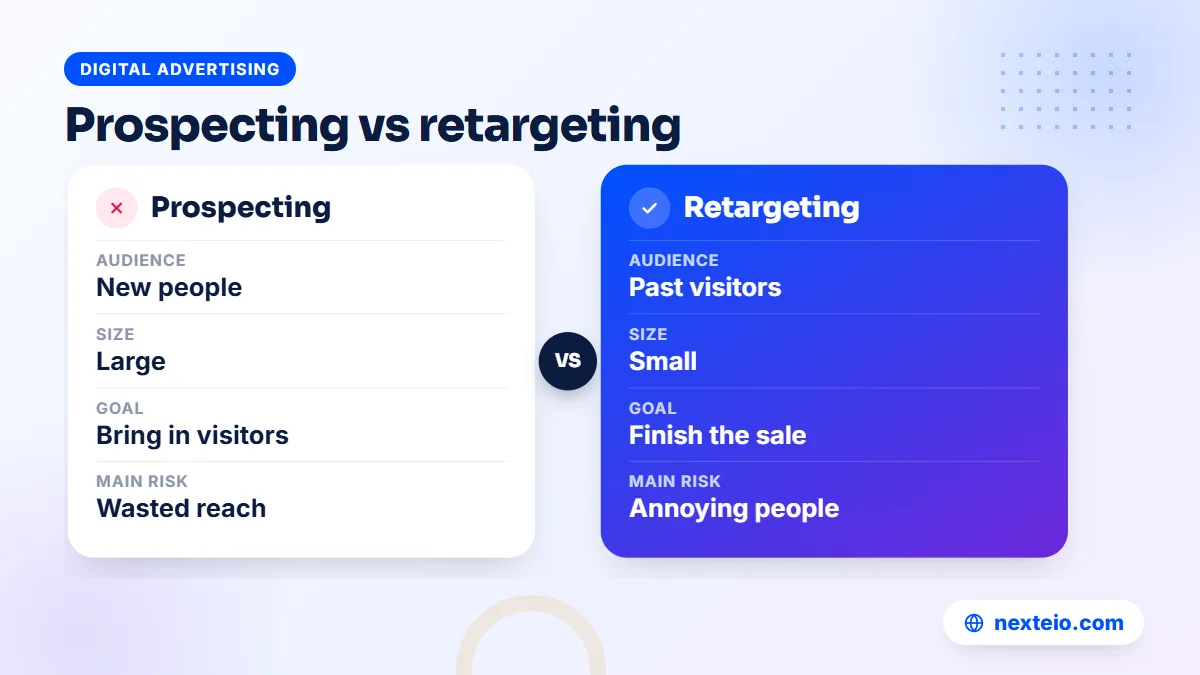
Retargeting also depends on prospecting. If you stop bringing new visitors to the site, your lists shrink within weeks and retargeting results fall with them. Most of the budget should usually go to reaching new people, with retargeting as the smaller, high-intent layer. Our ads campaign service plans that split across platforms so the two layers support each other.
Measuring Whether Retargeting Ads Really Work
Reports for retargeting ads often look excellent, and that is exactly why they need careful reading. These audiences were already interested. Some of them would have come back and bought anyway, and the platform will still count those sales as conversions. The real question is how many extra sales the ads created.
Check these points before you trust the numbers:
- Click versus view conversions: a sale counted because someone saw an ad, without clicking, is weaker evidence. Look at click-based results separately.
- Double counting: Meta, Google and TikTok may each claim the same order. Compare the total they report with the orders in your own system.
- Confirmed orders: on cash-on-delivery stores, measure delivered orders, not placed orders.
- Time to purchase: if most retargeted buyers purchase within a day, they may have been coming back anyway.
For a cleaner answer, run a holdout test. Meta offers conversion lift studies for eligible advertisers, and a simpler version works for anyone: pause retargeting for one product category for two weeks while keeping everything else the same, and compare orders from that category against the previous period and against similar categories. If sales barely change, your retargeting was mostly taking credit.
Look at retargeting results as part of the whole account rather than in isolation. A healthy setup shows prospecting bringing new visitors at a reasonable cost and retargeting turning a share of them into orders. If you would like an outside view of your numbers, our team can review the account through the campaign management process before suggesting changes.
Privacy, Consent and Sensitive Businesses
Retargeting ads use data about what people did on your site, so they come with rules. Every major platform requires a clear privacy policy on your website that explains the use of cookies and ad tracking. Make sure yours exists, is linked in the footer, and mentions the platforms you use.
Some industries face extra limits. Google's personalized advertising policy restricts targeting based on sensitive topics such as health, financial hardship and personal struggles. For a hospital or clinic, that means building lists from general pages, such as the appointment page or the doctors list, not from pages about specific diseases or treatments. Meta applies its own restrictions on health-related data, so keep sensitive page URLs out of your events.
Schools and coaching centers should be careful with audiences that may include children, and aim their ads at parents and guardians. If you sell to buyers in Europe, Google and other platforms require consent before ad cookies are set, which is usually handled through a consent banner and Google's consent mode.
Respect is also good business. People who feel watched rarely buy. Short windows, reasonable frequency and helpful ads keep retargeting on the right side of that line.
Common Retargeting Mistakes to Avoid
Most accounts where retargeting ads underperform share a handful of problems:
- One audience for everyone: all visitors in a single 180-day list, shown the same ad.
- No buyer exclusion: customers keep seeing ads for products they already ordered.
- Broken events: the add-to-cart or purchase event does not fire on mobile, so segments are wrong.
- The same creative for months: returning visitors stop noticing it.
- Constant discounts: buyers learn to wait for the coupon.
- Judging by platform reports alone: view-through and double-counted sales make results look better than they are.
- Sending people to the homepage: a cart abandoner should land on the product or the cart, not start over.
A slow or confusing checkout is often the real problem behind abandoned carts. If many people reach checkout and leave, fix the page first. Our guide to building a high-converting landing page covers the page-side fixes.
How Nexteio Can Help With Retargeting Ads
We set up retargeting as part of a complete ad plan, not as a separate trick. We start by checking your tracking: whether the pixel and tag fire on every key page, whether purchase and lead events are recorded correctly, and whether cash-on-delivery orders are handled sensibly. Where tracking is missing or broken, we fix it or work with your developer to fix it.
Then we build segments by intent across the platforms your buyers use, set time windows that match your sales cycle, add exclusions, and write or edit ads that answer each group's reason for not buying. Through our ads campaign service, prospecting and retargeting are planned together, with budgets set by audience size, and we compare platform results against your own order records so you see what the ads really add.
You can browse our portfolio, see all our services, or tell us about your store or organization through the project brief form. If you would rather ask a quick question first, use our contact page.
Keep reading: getting more leads from Google Ads and the full list of digital advertising guides. When you are ready to bring back the visitors you are losing, send us your project details.
Frequently asked questions
Do retargeting ads work for small businesses?
Yes, as long as the website gets enough visitors to build a usable list. A small store with a few hundred visitors a month can still retarget on Facebook and Instagram, while Google needs a minimum list size before it serves ads. The key is to keep budgets in line with audience size so the same people are not shown the ad too often.
Is retargeting the same as remarketing?
For most purposes, yes. Google calls it remarketing in Google Ads, while many marketers and Meta advertisers say retargeting. Some people use remarketing for email follow-ups and retargeting for paid ads, but the idea is the same: reaching people based on what they did before.
Can I retarget people who visited my Facebook page but not my website?
Yes. Meta lets you build custom audiences from people who engaged with your Facebook page or Instagram account, watched your videos, opened lead forms or messaged you. These lists are useful for businesses that sell mainly through Messenger and have little website traffic.
How often should someone see a retargeting ad?
There is no fixed number, but a few views a week is usually enough for a reminder. If frequency climbs well above that while results fall, the audience is too small for the budget or the creative is stale. Lower the budget, widen the time window, or add new ad versions.
Do I need a developer to set up retargeting?
Not always. Platforms such as WordPress with WooCommerce and Shopify have plugins and integrations that install the pixel and standard events. Custom-built sites, cash-on-delivery order flows and server-side tracking usually need a developer to make sure events fire correctly on every step.
Why are my retargeting ads not delivering?
The most common reasons are a list that is too small, a pixel that is not firing, overlapping exclusions that remove almost everyone, or a very short time window. Check the audience size in Ads Manager or Google Ads first, then test the pixel with the platform's own diagnostic tools.
Can hospitals and clinics use retargeting?
Yes, with care. Google and Meta restrict targeting based on health conditions, so lists should be built from general pages such as appointments, doctors or contact pages, not pages about specific diseases. Ads should promote services and booking, never suggest that the viewer has a particular condition.