SEO Web Design: What to Build Into Your Website From Day One
In this article 16 sections
- 1.What SEO Web Design Means, and What It Does Not
- 2.Start With Keyword and Page Planning, Not Mockups
- 3.Site Structure and URLs That Search Engines Understand
- 4.Page Templates With a Clear Heading Structure
- 5.Designing Navigation Google Can Crawl
- 6.Speed and Core Web Vitals Are Design Decisions
- 7.Mobile-First Layouts for Visitors on Phones
- 8.Content Areas, Meta Fields and Schema Built Into the CMS
- 9.Accessibility and SEO Point the Same Way
- 10.Bangla and English: Planning a Bilingual Site for Search
- 11.Redesigning Without Losing Rankings
- 12.An SEO Web Design Checklist for Launch Day
- 13.Budget and Timeline for SEO Website Design
- 14.How to Choose an SEO Web Design Company
- 15.How Nexteio Can Help With SEO Web Design
- 16.Frequently asked questions
SEO web design means building a website so that search engines can find, understand and rank it from the day it goes live, instead of trying to fix that later. Most of the choices that decide whether a site can rank are made during design and development: which pages exist, how they are named, how headings are set, how fast the templates load and how menus link everything together. Once those decisions are built into hundreds of pages, changing them is slow and expensive.
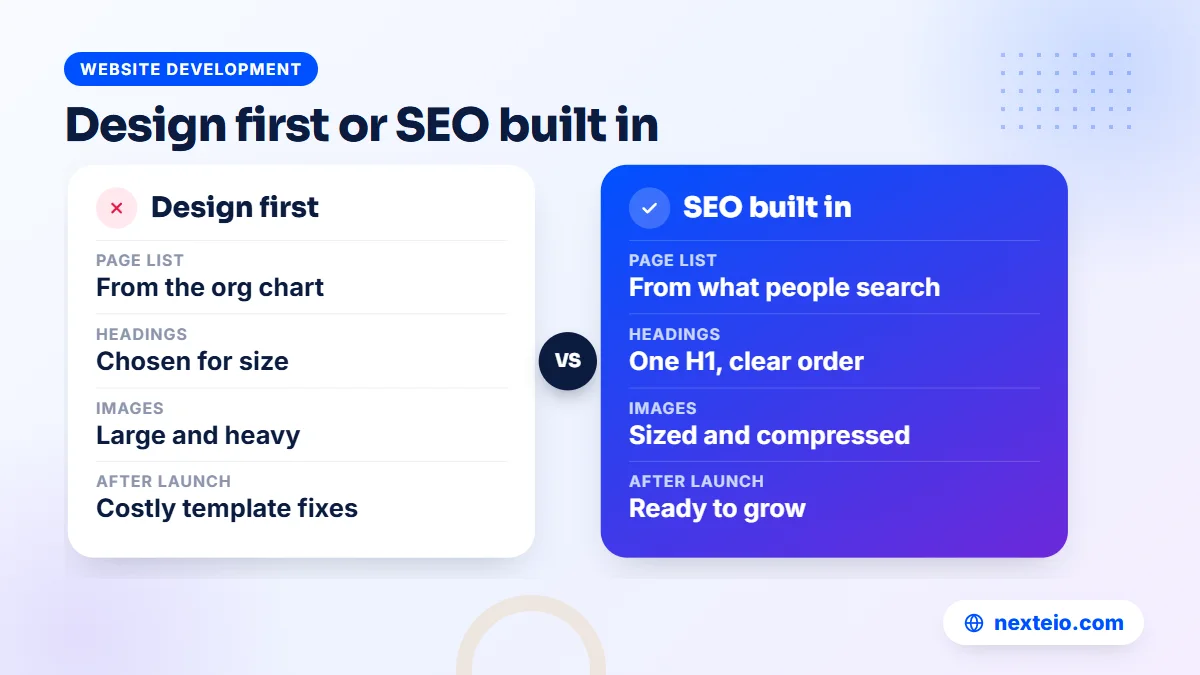
Many businesses in Bangladesh discover this after launch. A company spends months on a new site, the design is approved by the board, and then the first SEO audit says the services sit on one long page, every heading is an H1, the images weigh several megabytes each and the menu is built in a way Google cannot follow. The fix often means redesigning templates that were signed off only weeks before.
SEO website design avoids that by putting search questions on the table before the first mockup. It does not mean filling pages with keywords or giving up good looks. It means the designer, the developer and whoever writes the content plan the site around what customers actually search for, and build the technical basics into every template.
The sections below go through those decisions in the order a project meets them, from keyword and page planning to launch checks, with notes on bilingual sites, redesigns, costs and how to choose a team.
What SEO Web Design Means, and What It Does Not
Web design and SEO are often sold as two separate jobs. A design agency builds the site, then a different person is hired months later to "do SEO". The trouble is that SEO depends heavily on things the design team already decided: the structure of the site, the speed of the code, the way text and images are placed, and whether content can be edited easily.
SEO web design joins the two. In practice it covers four areas:
- Planning: deciding which pages the site needs based on what people search, not only on the company's internal structure.
- Structure: clear URLs, a logical menu, sensible internal links and one topic per page.
- Templates: correct headings, fast loading, mobile layouts and fields for titles, descriptions and image alt text.
- Launch: a sitemap, Search Console setup, redirects from any old site and checks that nothing blocks indexing.
What it does not cover is the ongoing work: publishing new content, earning links from other sites and improving pages month by month. That is the job of an SEO service after launch. A well-built site makes that work faster and cheaper, but it does not replace it.
It also does not mean any trick to fool Google. Google's own SEO starter guide describes the basics plainly: help search engines understand your content, and make pages useful for the people who visit them. Good design and good SEO point in the same direction far more often than they conflict.
Start With Keyword and Page Planning, Not Mockups
The first design question is usually "what should the homepage look like?" For search, the better first question is "what are people typing into Google when they need what we offer?" The answer decides which pages you need, and the pages decide the design.
Take a company that makes packaging for exporters. Internally it may think in terms of departments. Buyers, though, search for corrugated cartons, printed boxes, shipping labels and export packaging. If the site has one "Products" page listing everything, it has one chance to rank. If it has a clear page for each main product line, each one can match a different search.
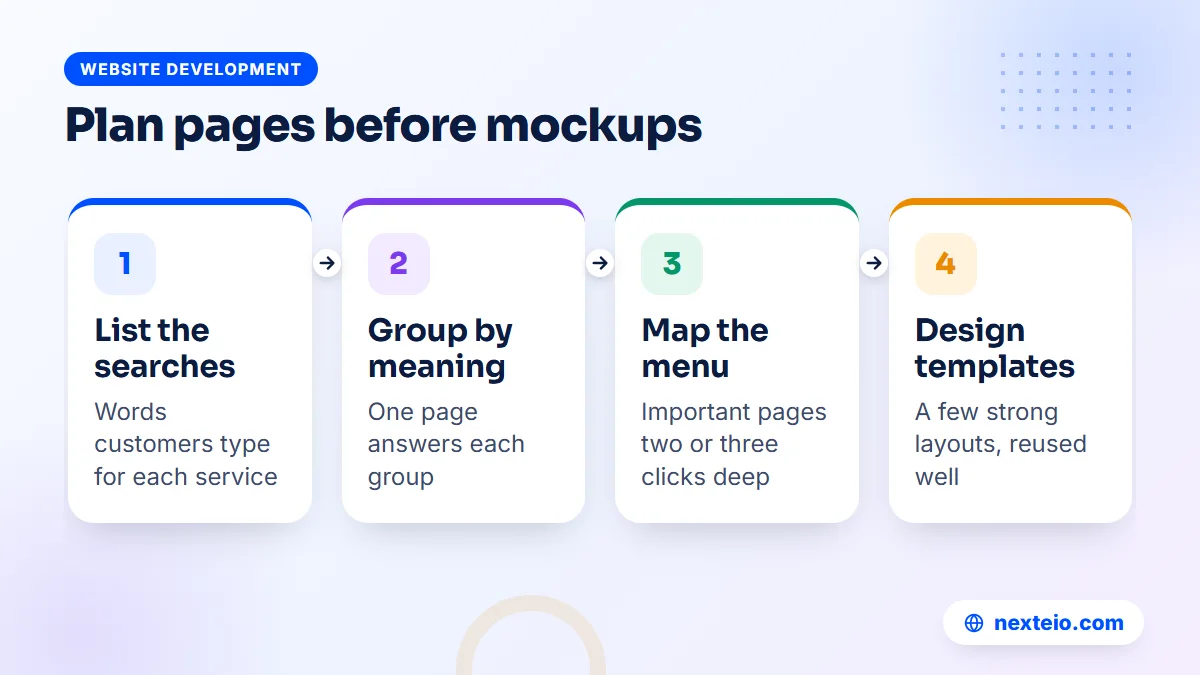
A simple planning process works for most business sites:
- List the services or products you most want to sell, in the words customers use.
- For each one, note the searches people make, including questions and comparisons.
- Group searches that mean the same thing, so one page answers each group.
- Give each group a page, then arrange the pages into a menu.
- Only then sketch the templates those pages need.
This also helps the design budget. A site with twenty service pages usually needs only one or two well-designed service templates, not twenty unique layouts. Our guide to writing SEO-friendly website content explains how to write the text that will fill those templates.
Avoid pages that compete with each other
When two pages target the same search, Google has to pick one, and it may pick the weaker page. This often happens with a "Services" page and a separate page for each service that say almost the same thing. Decide during planning which page owns each topic, and let the other pages link to it instead of repeating it.
Site Structure and URLs That Search Engines Understand
Site structure is how your pages are grouped and linked. A clear structure helps visitors find things and helps search engines understand which pages matter most. For most business sites, a shallow structure works best: any important page should be reachable within two or three clicks from the homepage.
URLs should be short, readable and stable. Compare these pairs of addresses:
| Weak URL | Clear URL | Why it matters |
|---|---|---|
| /page.php?id=482 | /services/export-packaging | Visitors and search engines can see what the page is about |
| /2026/03/14/new-product-launch-final-v2 | /products/printed-cartons | No dates or drafts to go out of date |
| /Services/Export_Packaging | /services/export-packaging | Lowercase and hyphens avoid duplicate versions |
Decide the URL pattern before development, because changing it after launch means redirects for every page. Keep words in English or simple transliterated Bangla in the URL, even on Bangla pages, since Bangla characters in addresses become long encoded strings when shared.
Breadcrumbs, the small trail of links such as Home, Services, Export Packaging, are worth designing in from the start. They show visitors where they are, give search engines a clear picture of the hierarchy, and add useful internal links on every page without cluttering the layout.
Page Templates With a Clear Heading Structure
Headings are one of the places where design habits and SEO clash most often. Designers sometimes choose heading tags for their size: an H1 for a big banner line, an H4 for a small label, an H2 for a footer title. Search engines read headings as an outline of the page, so a template built that way sends a confusing signal on every page that uses it.
The fix is to separate looks from structure. The developer sets the heading levels by meaning, and the designer styles each level however the brand needs. A sound template follows a few rules:
- One H1 per page, describing the page's main topic, usually the page title.
- H2s for the main sections, and H3s for points inside a section.
- No heading tags used only for styling, such as small labels above titles.
- Repeated elements in the header and footer kept as normal text or list items, not headings.
- Room in the layout for real text under each heading, not just a line and an icon.
That last point matters more than it seems. Very minimal designs with a few words per section look clean, but they give search engines little to understand. A service page that explains what you do, for whom, how it works and what it costs has far more chance of ranking than a page with three icons and a button. Our on-page SEO guide for beginners shows how to structure a page step by step.
Designing Navigation Google Can Crawl
Google finds pages mainly by following links. If the menu is built in a way that does not produce normal links, some pages may never be found. This can happen with menus that load only after a script runs, buttons that change pages with JavaScript instead of real links, or mega menus that exist only on hover.
Google's guidance on making links crawlable is simple: use standard anchor elements with an href attribute pointing to a real address. A designer does not need to know the code, but the developer should build every menu, card and button that leads to another page as a real link.
Internal links inside the content matter as well. A service page that links to related services, a case study and a contact page helps visitors move on and tells search engines how pages relate. Good templates include places for these links, such as a related services block or a "next step" section, so content editors do not have to add them by hand each time. Our article on internal linking for SEO covers the method in more detail.
Footer and sidebar links
Footers often become a dumping ground for dozens of links. A few useful ones, such as main services, contact details and key policies, help visitors. A long list of keyword-stuffed links helps nobody and can look spammy. Keep the footer short and useful.
Speed and Core Web Vitals Are Design Decisions
Page speed is often treated as a developer's problem to solve at the end. In reality, many speed problems are designed in: a full-screen video on the homepage, a slider with six large photos, four web fonts in several weights, and animations on every section. By the time a developer is asked to "make it fast", the heavy parts are already approved.
Google's Core Web Vitals measure three things visitors notice: how quickly the main content appears, how fast the page responds to a tap or click, and how much the layout jumps around while loading. Each one can be helped or hurt by design choices:
| What is measured | Design choices that hurt | Design choices that help |
|---|---|---|
| Main content appearing (LCP) | Huge hero images, background videos, sliders | One well-compressed hero image or a text-led hero |
| Response to taps (INP) | Heavy scripts, many animations, chat widgets on load | Fewer scripts, effects only where they add value |
| Layout stability (CLS) | Images without set sizes, late banners, font swaps | Fixed image dimensions, reserved space for banners |
Set a simple "performance budget" during design. Agree, for example, that the homepage uses one hero image, two font families at most, and no autoplay video. Small limits like these keep the site fast without making it plain. Our article on website speed and SEO explains how faster pages help both rankings and enquiries.
Mobile-First Layouts for Visitors on Phones
Google mainly uses the mobile version of a page for indexing and ranking. In Bangladesh, a large share of visitors also arrive on phones, often on mobile data that slows down in crowded areas or during load-shedding hours. Both facts point the same way: the phone layout is the main layout, not a squeezed version of the desktop design.
Designing mobile first changes several decisions:
- Same content on both versions: text removed from the mobile layout to save space may not count for ranking, so keep the important content on every screen size, using tabs or accordions if space is tight.
- Readable text: body text large enough to read without zooming, with enough line spacing for Bangla script.
- Tap targets: buttons and links with enough space between them for a thumb.
- Short forms: fewer fields and the right keyboard type for phone numbers and email.
- Light pages: images sized for phone screens, not desktop images shrunk by the browser.
Ask to review mobile designs first in the approval process. Decision makers often review designs on a large monitor in a meeting room, while most customers will see the site on a mid-range Android phone. Reviewing on the device customers use avoids many late surprises.
Related guides that go deeper into these topics:
- Technical SEO basics every website owner should know
- Common SEO mistakes that hurt business websites
- How long SEO takes to show results on a new site
Content Areas, Meta Fields and Schema Built Into the CMS
A site is only as good for search as its editors can keep it. If changing a page title needs a developer, titles will never be improved. The content management system should give editors simple fields for everything search depends on:
- An SEO title and meta description for every page, with a preview of how it will look in search.
- An editable URL slug, with automatic redirects if a slug changes.
- Alt text fields on every image upload.
- Controls to keep a page out of search results when needed, such as thank-you pages.
- An automatic XML sitemap that updates when pages are added.
On WordPress, much of this comes from a good SEO plugin, which is one reason our WordPress website builds suit many company sites. On a custom system, the fields have to be built in, so list them in the project brief.
Structured data in the templates
Structured data is code that describes the page in a format search engines read directly: your organization's name and logo, your address and opening hours, products with prices, articles with authors and dates. Google's introduction to structured data explains how it works and which types can appear as rich results.
The efficient approach is to build structured data into templates rather than adding it page by page. The organization details go into the site-wide template, product details come from product fields, and breadcrumb data comes from the breadcrumb trail. Once set up, every new page gets correct markup without extra work. Structured data does not guarantee rich results, but it helps search engines understand the page.
Accessibility and SEO Point the Same Way
Many of the things that make a site usable for people with disabilities also make it easier for search engines to read. Screen readers and search crawlers both rely on the code, not on how the page looks. A page that works well for one usually works well for the other.
- Alt text: describes images for screen reader users and tells search engines what the image shows.
- Heading order: lets screen reader users jump between sections and gives search engines the page outline.
- Descriptive link text: "see our export packaging range" tells everyone where a link goes, while "click here" tells nobody.
- Real text, not text in images: words baked into a banner image cannot be read aloud, translated or indexed properly.
- Enough color contrast: light gray text on white is hard to read on a phone in sunlight, and visitors who cannot read a page leave it.
Each of these costs almost nothing when it is part of the design from the start.
One habit deserves special mention. Offers, notices and even full service lists are often placed inside banner images made in a design tool, because it is quick. It looks fine, but it hides that text from search engines and from many visitors. Keep important words as real text on the page, and let images support them.
Bangla and English: Planning a Bilingual Site for Search
Many organizations in Bangladesh need both languages: English for buyers, partners and international visitors, and Bangla for local customers, parents, patients or job seekers. People search in both languages, sometimes in transliterated Bangla written in English letters too. A bilingual site can reach both groups, but only if it is planned for search.
The main decisions are structural:
- Give each language version its own URL, such as /en/services and /bn/services, instead of switching text on the same address.
- Link each page to its other-language version with hreflang annotations, so Google shows the right version to the right searcher.
- Do not redirect visitors automatically based on their browser language. Let them choose, and keep a visible language switch.
- Translate titles, descriptions, headings and image alt text, not just body text.
- Write the Bangla version for Bangla searchers, using the words they type, rather than translating English word for word.
Google's guide to telling Google about localized versions of a page covers hreflang in detail. The design work matters too: Bangla text needs its own font choice, line height and spacing, and buttons must have room for labels that are longer or shorter than their English versions.
Redesigning Without Losing Rankings
A redesign is the most dangerous moment for a site's search traffic. Pages that ranked for years can disappear overnight if their addresses change without redirects, if content is cut to fit a new design, or if the new site is accidentally blocked from indexing.
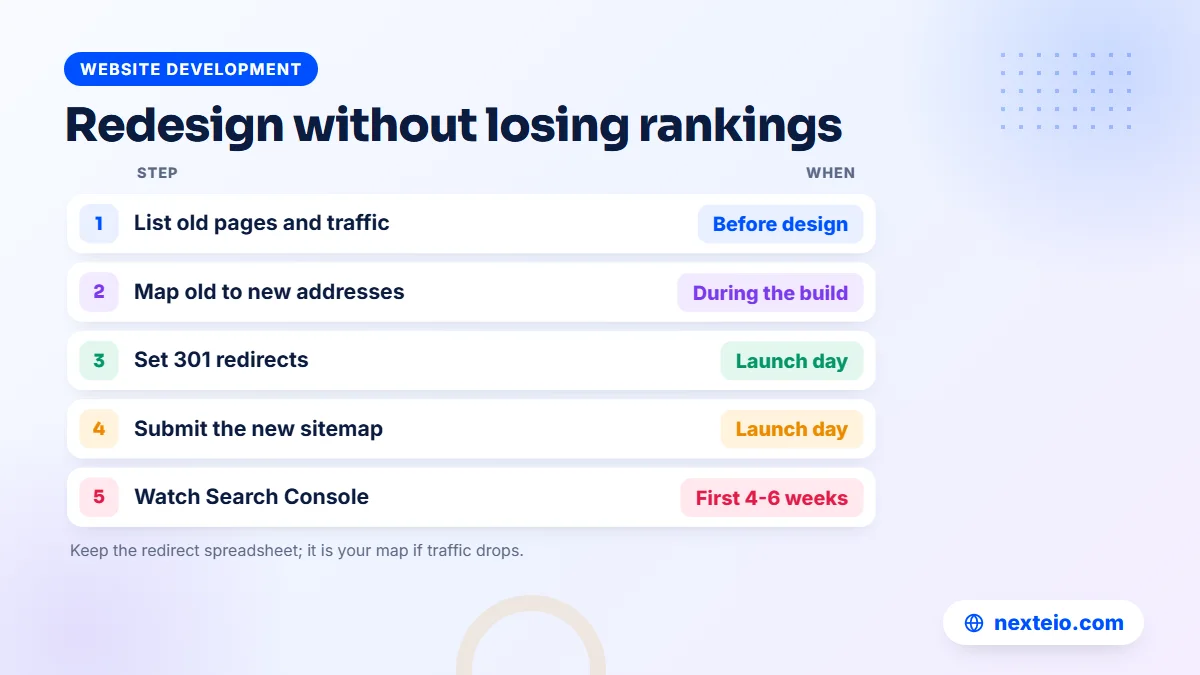
A safe redesign follows a clear order:
- Before design starts, export a full list of the old site's pages and note which ones bring traffic in Search Console and analytics.
- Decide what happens to each old page: kept, merged into another page, or retired.
- Map every old address to its new address in a spreadsheet.
- Keep the useful content from pages that rank, even if the design changes around it.
- On launch day, set up permanent (301) redirects for every mapped address and submit the new sitemap.
- For the next few weeks, watch Search Console for errors and pages that dropped out.
Skipping any of these steps is how good rankings get lost.
Google's guide to site moves with URL changes covers the technical side. Some ranking movement in the first weeks is normal. A sharp, lasting drop usually means missing redirects or lost content, and both can be traced with the spreadsheet you made before launch. If the old site sits on a theme or system that makes these fixes hard, a custom-designed replacement is often simpler than patching it.
An SEO Web Design Checklist for Launch Day
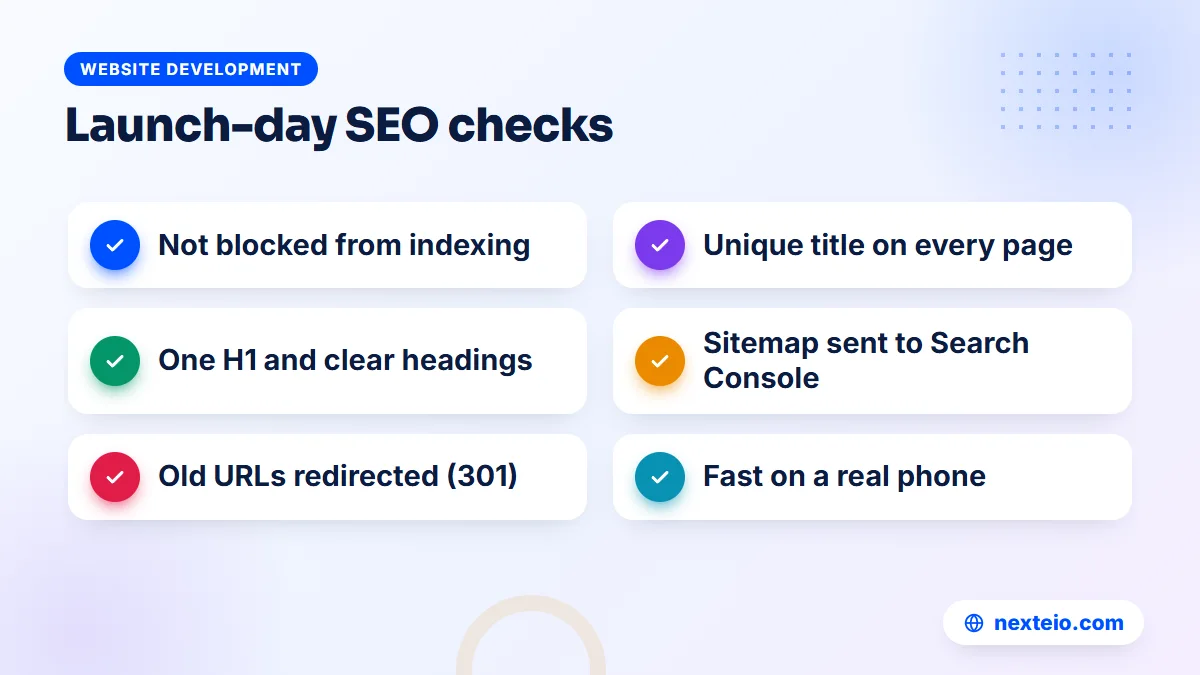
Launch day is when small mistakes cause the biggest problems. A staging site is usually blocked from search engines, and that block is sometimes carried over to the live site. Run through these checks before announcing the new site:
- The live site is not blocked by robots.txt or a "noindex" setting.
- Every page has a unique title and meta description.
- Each page has one H1 and a logical heading order.
- HTTPS works everywhere, and all versions of the domain lead to one address.
- The XML sitemap is live and submitted in Google Search Console.
- Redirects from the old site work, with no redirect chains.
- Images are compressed and have alt text.
- Main pages pass a mobile speed test on a real phone.
- Analytics and conversion tracking record form submissions and calls.
- Structured data validates without errors.
Conversion tracking deserves a mention because it is often forgotten. If the site will later support paid campaigns through Google Ads, setting up form and call tracking at launch means you can measure results from day one, from search and from ads alike.
Budget and Timeline for SEO Website Design
Building SEO in from the start adds some planning time, mostly keyword research and page planning before design. In return, it avoids redesigning templates after launch. In Bangladesh, a small business site with the SEO basics built in often costs somewhere around BDT 30,000 to 70,000. A corporate site with custom design, keyword-based page planning and full technical setup often falls around BDT 70,000 to 180,000. Larger bilingual or multi-section sites, and online shops with many categories, cost more.
These are market ranges, not fixed prices. Timelines follow a similar pattern:
| Stage | What happens | Typical time |
|---|---|---|
| Research and planning | Keywords, page list, sitemap, URL pattern | 1 to 2 weeks |
| Design | Mobile and desktop templates, approval rounds | 2 to 3 weeks |
| Development | Templates, CMS fields, structured data, speed work | 2 to 5 weeks |
| Content and launch | Pages filled, redirects, checks, sitemap submitted | 1 to 2 weeks |
Content is usually the slowest part, as it is in most web projects. Ranking takes longer still. A new site can take months to build steady search traffic, even when everything is built correctly.
For an online shop, the same principles apply at a larger scale, with category pages, filters and product data to plan. Our e-commerce SEO service focuses on that kind of site. To get a realistic estimate for your own project, send us your brief through our project form.
How to Choose an SEO Web Design Company
Agencies describe this work in different ways: SEO web design services, website design and SEO services, or simply a website with "SEO included". The label matters less than what actually happens. Some providers mean only that they install an SEO plugin. Others plan the whole site around search. Ask questions that reveal the difference:
- Do you research keywords before designing, and will the page list come from that research?
- How do you set heading levels in templates, and can we see an example page outline?
- What page speed targets do you design and build to, and how will you test them?
- Which SEO fields will our editors have for titles, descriptions, slugs and alt text?
- What structured data will the templates include?
- If we are replacing a site, how will you map and redirect the old pages?
- Will you set up Google Search Console, the sitemap and analytics at launch?
- What is included after launch, and what counts as ongoing SEO work?
When you compare SEO web design companies, put their answers side by side.
An SEO website design company that plans pages from research will usually show you a sitemap with search terms next to each page before any design appears. A provider that sells web design and SEO services as separate packages may still do good work, but ask how the two teams will share decisions and who has the final say on page structure.
Look at sites the team has built and check them yourself. Open them on a phone, view a few page titles in search results, and see whether service pages have real content. A good SEO web design company will happily explain its choices in plain words.
Be wary of anyone who promises first-page rankings by a date. No honest web design and SEO company can guarantee rankings, because Google decides them. What a team can promise is a site built correctly, fast and easy to grow.
Finally, there is a practical reason to buy SEO and web design services from the same team. When the people who design the site also plan its search structure, nobody has to rebuild templates later to fix decisions made without SEO in mind. If you do use two providers, involve the SEO specialist before the design is approved, not after launch.
How Nexteio Can Help With SEO Web Design
Our custom website design service plans and builds sites from a blank page, so search decisions can be made before the design is fixed. The page list and menu can follow what your customers search for, and the templates can be designed to load quickly on mobile data and stay easy for your team to update.
Because we also run an SEO service, the same thinking carries on after launch if you want it to. For companies that prefer WordPress, we build on that platform, and for complex processes such as portals or booking systems, we build with Laravel. Either way, you can use the questions in this guide to check our plan, just as you would with any other team.
To see the kind of sites we build, visit our portfolio, or read about a website designed around your customers' searches. When you are ready, share your project details, browse all our services, or contact us with questions about a new site or a redesign of your existing company website.
Keep reading: a buyer's checklist for choosing a web design company, SEO or Google Ads: which to use, or browse all our website development guides.
Frequently asked questions
What is the difference between SEO web design and ordinary web design?
Ordinary web design focuses on how the site looks and works. SEO web design adds search planning to that work: which pages exist, how they are structured, how fast they load and whether search engines can read them. The site can look just as good, but it is ready to rank instead of needing fixes after launch.
Can SEO be added to a website after it is built?
Some of it, yes. Titles, descriptions and content can be improved at any time. Problems built into the templates, such as a confusing structure, slow code, menus search engines cannot follow or missing pages, are much harder to fix later and sometimes need a partial redesign.
Does a beautiful design hurt SEO?
Not by itself. Problems come from specific choices, such as huge background videos, very little text, headings used for styling, or menus built without real links. A skilled team can keep a strong visual style while avoiding those choices.
Will an SEO-friendly website rank on Google straight away?
No. A well-built site gives search engines what they need, but rankings also depend on the content, the competition and links from other sites. New sites usually take several months to build steady search traffic. Treat good structure as the foundation, not the finished result.
Is WordPress good for SEO web design?
Yes, when it is set up carefully. WordPress with a fast theme and a good SEO plugin gives editors fields for titles, descriptions, sitemaps and redirects. The risks are heavy themes, page builders that add a lot of code, and too many plugins, all of which can slow pages down.
Should a website in Bangladesh be in Bangla, English or both?
It depends on who you need to reach. Exporters and companies with foreign partners usually need English first, while schools, clinics and local consumer businesses often need Bangla. If you serve both groups, a bilingual site with separate addresses for each language lets you appear in searches in both languages.
How much does SEO add to the cost of a new website?
Mostly it adds planning time at the start, for keyword research, page planning and setting up templates correctly. That usually costs less than redesigning templates after launch. Ongoing SEO work, such as new content and link building, is a separate monthly service.