How to Create a Google Ads Campaign Step by Step
In this article 17 sections
- 1.What a Google Ads Campaign Is and How It Is Organized
- 2.Step 1: Decide What the Campaign Must Achieve
- 3.Step 2: Choose the Right Campaign Type
- 4.Step 3: Prepare Tracking and the Landing Page First
- 5.Step 4: Plan Keywords and Ad Groups
- 6.Step 5: Build the Google Ads Campaign in the Interface
- 7.Step 6: Write Responsive Search Ads That Match the Search
- 8.Step 7: Add Assets That Give the Ad More Room
- 9.Step 8: Set the Budget and Bidding Strategy
- 10.Settings That Quietly Waste Money
- 11.Final Checks Before You Launch the Google Ads Campaign
- 12.The First 30 Days of a New PPC Campaign
- 13.Reading the Numbers Without Fooling Yourself
- 14.A Worked Example: A Coaching Centre Admission Campaign
- 15.Common Google Ads Campaign Mistakes
- 16.How Nexteio Can Help With Your Google Ads Campaign
- 17.Frequently asked questions
A Google Ads campaign is where your budget, keywords, ads and targeting live together, and the way you build it decides whether your money brings enquiries or disappears into random clicks. Many businesses in Bangladesh open an account, accept every default setting and switch the campaign on the same afternoon. A week later the budget is spent, the phone has not rung, and nobody can say which searches triggered the ads.
The answer is rarely a bigger budget. It is a careful setup: one clear goal, tight groups of keywords, ads that repeat what people typed, a landing page that answers them, and tracking that shows what each click produced.
This guide follows the creation of a Search campaign from the first decision to the end of the first month. It covers which campaign type to pick, how to group keywords, the settings on each creation screen, how to write responsive search ads, how to plan a budget in taka and what to check every week once the ads are running.
The examples use the advertisers that are common in Bangladesh: coaching centres taking admissions, suppliers selling to offices, service companies that live on phone calls and online shops that deliver across the country.
What a Google Ads Campaign Is and How It Is Organized
Google Ads uses a simple ladder. The account holds your billing and access. Inside it, each campaign holds the decisions that apply to everything below it. Inside each campaign, ad groups hold a set of closely related keywords and the ads written for them.
- Account: payment method, users, time zone and currency.
- Campaign: goal, budget, bidding, locations, languages, networks and schedule.
- Ad group: one theme, such as "office chairs" or "medical admission coaching".
- Keywords and ads: the searches you want to appear for and the text people see.
- Assets: extra lines such as sitelinks, phone numbers and callouts, added at account, campaign or ad group level.
If you ran a Google AdWords campaign years ago, the logic is the same. Google renamed AdWords to Google Ads in 2018, and the ladder of account, campaign and ad group stayed.
Search campaigns are pay-per-click advertising. You pay when someone clicks the ad, not when it is shown, which is why people call this kind of work a PPC campaign. The price of each click is set in an auction every time someone searches, and it depends on your bid, the quality of your ad and landing page, and what competitors are willing to pay.
Step 1: Decide What the Campaign Must Achieve
Every good campaign starts with one sentence: "This campaign exists to get ___." Fill the blank with a single action a real person takes, such as a quotation request, a phone call, a seminar booking, a WhatsApp message or a completed order. If you try to get calls, brand awareness and online sales from the same campaign, you will not be able to judge any of them.
Next, put a rough value on that action. Suppose a coaching course costs BDT 30,000 and about one in five serious enquiries turns into an admission. Each enquiry is then worth around BDT 6,000 in fees. You would not pay that much for a lead, but you now know that paying BDT 300 or 600 for one can make sense, while paying BDT 5,000 cannot.
Finally, decide who handles the leads. A form that nobody reads until Sunday, or a phone that rings during prayer time with nobody to answer, wastes the click you already paid for. Write down the office hours, the person responsible for calling back and how fast that should happen. These details later shape your ad schedule and the wording of your ads.
Step 2: Choose the Right Campaign Type
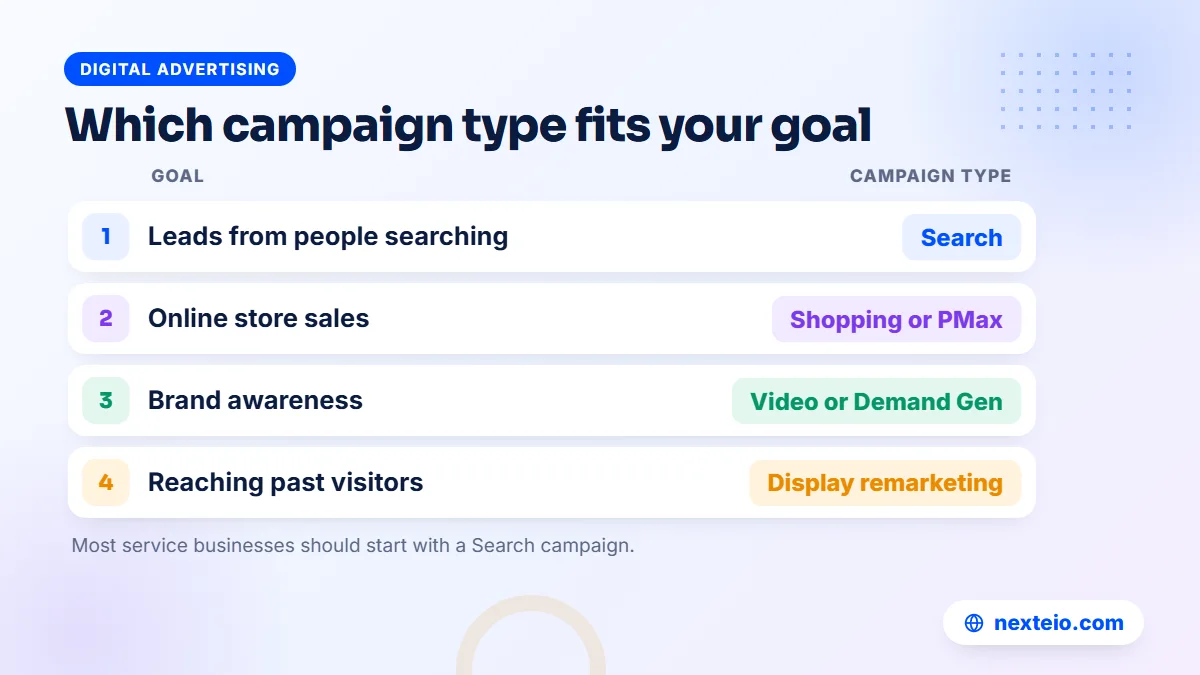
When you create a campaign, Google offers several types. Each one shows ads in different places and suits a different goal. Google's own page on how to choose the right campaign type lists the current options. Here is how they usually fit businesses and organizations in Bangladesh:
| Campaign type | Where ads show | Usually suits |
|---|---|---|
| Search | Google search results | Services, B2B suppliers, admissions, clinics, repairs |
| Performance Max | Search, YouTube, Display, Gmail, Maps | Online stores and advertisers with solid conversion data |
| Shopping | Product listings with image and price | E-commerce stores with a product feed |
| Display | Banners on websites and apps | Remarketing and awareness, rarely first leads |
| Video | YouTube | Brand awareness, launches, explaining a product |
| Demand Gen | YouTube, Discover and Gmail feeds | Visual products and audiences who are not searching yet |
For a first campaign, Search is the safest choice for most service businesses.
Search shows your ad at the moment someone types what they need, so intent is already there. You control the keywords, you can read the exact search terms, and you can stop waste quickly. Performance Max and Demand Gen rely more on Google's automation, which works better once the account has conversion history. If video is part of your plan, our YouTube ads service covers that separately.
Step 3: Prepare Tracking and the Landing Page First
Building the campaign before tracking is ready is the most expensive shortcut in Google Ads. Without conversion tracking, Google cannot tell a click that became a lead from a click that bounced, and neither can you. Smart bidding strategies also need these signals to learn who to show ads to.
Decide which actions count as conversions and set each one up before launch. For most organizations the list is short: a form submission (measured on a thank-you page), a click on the phone number, a click on a WhatsApp button and calls made from the ad itself. Our beginner's guide to Google Ads conversion tracking explains each method in plain steps. Setting up and testing this tracking is part of the work in our Google Ads management service, because every later decision depends on it.
The landing page matters just as much. People who search "conference table price" should land on a page about conference tables with prices or a clear way to get them, not on your homepage. A good landing page usually has:
- A headline that repeats the search intent in plain words.
- Prices, packages or at least a price range where possible.
- A short form and a tap-to-call phone number visible on a phone screen.
- Proof such as project photos, client logos you are allowed to show, or certifications.
- Fast loading on mobile data, with light images and no heavy sliders.
If your current site cannot do this, fix the page before you buy traffic.
Our guide to building a high-converting landing page covers layout and copy in detail. A focused page built as part of a WordPress website is often enough, and it lets your team change prices or offers without a developer.
Step 4: Plan Keywords and Ad Groups
Keywords tell Google which searches your ad may appear for. Start with the words customers actually use, not the words in your brochure. A factory owner may call a product "ergonomic task seating", while buyers search "office chair price". Keyword Planner, which sits inside the Tools menu of your account, shows search volume estimates and suggested bids, and our guide to Google Ads keyword research shows how to find the high-intent terms.
Group keywords by theme
Each ad group should hold one tight theme, usually 5 to 20 keywords that a single ad and a single landing page can answer well. Here is how a corporate furniture supplier might split its first Search campaign:
| Ad group | Example keywords | Landing page |
|---|---|---|
| Office chairs | office chair price, executive chair, ergonomic chair for office | Chairs category with prices |
| Workstations | office workstation, cubicle desk, open office desk | Workstation page with layouts |
| Conference tables | conference table, meeting table for 10 people | Conference table page |
| Brand | your company name, company name showroom | Homepage or contact page |
Notice that each group has its own page. This one decision does more for results than any bid change.
Choose match types
Match types control how closely a search must match your keyword. Broad match allows the widest set of related searches, phrase match requires the meaning of your phrase, and exact match keeps to searches with the same meaning as the keyword. Google's guide to keyword matching options shows examples of each.
On a small budget, start with phrase and exact match so you can see and control where the money goes. Broad match works better later, paired with smart bidding and enough conversion data to guide it.
Add negative keywords from day one
Negative keywords stop your ads from showing for searches you never want to pay for. Common examples in Bangladesh include "job", "salary", "free", "pdf", "second hand", "repair" (if you only sell new items) and "wholesale" (if you only sell retail). Build a starter list of 20 to 40 negatives before launch, then grow it each week from real search terms.
Step 5: Build the Google Ads Campaign in the Interface
With the goal, tracking, landing pages and keyword plan ready, building the Google Ads campaign itself takes less than an hour. The screens change from time to time, but the order of decisions stays much the same.
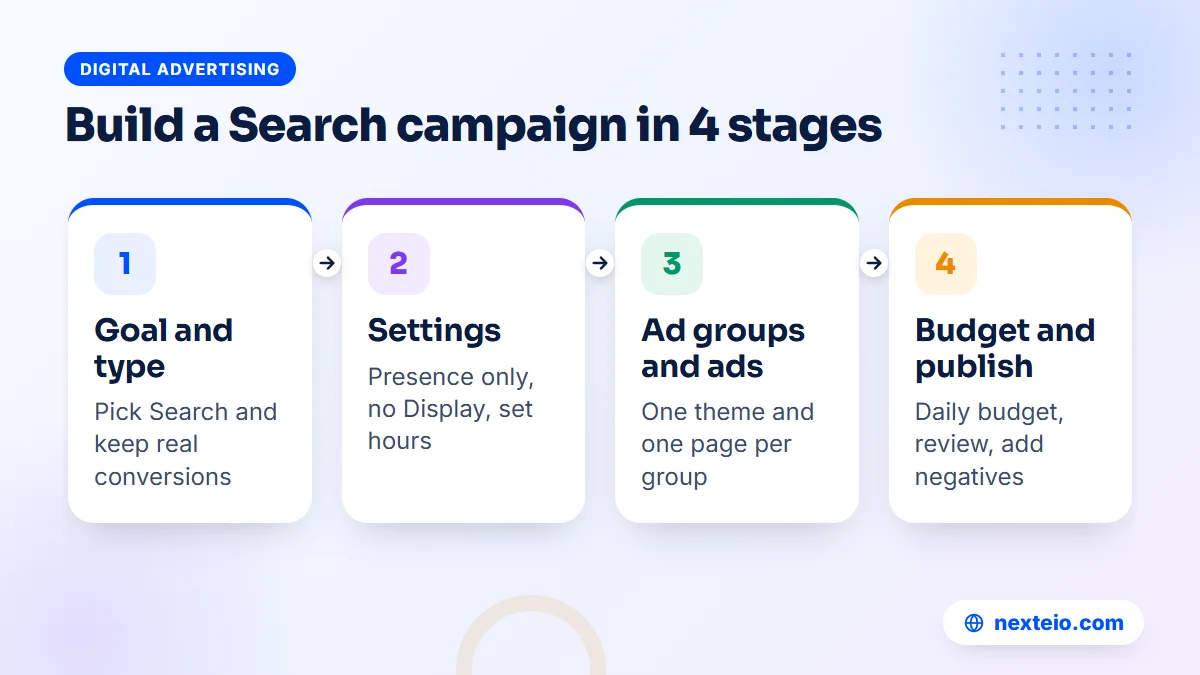
Goal, type and name
- Open your account, go to Campaigns and click the plus button to start a new campaign.
- Choose an objective, such as Leads or Sales, or choose to create a campaign without a goal's guidance if you want full control.
- Select Search as the campaign type.
- Check the conversion goals Google shows and keep only the actions that matter, such as form submissions and calls.
- Give the campaign a clear name, for example "Search | Office Chairs | Bangladesh".
Clear names save time later, when you run five campaigns and need to read reports quickly.
Bidding
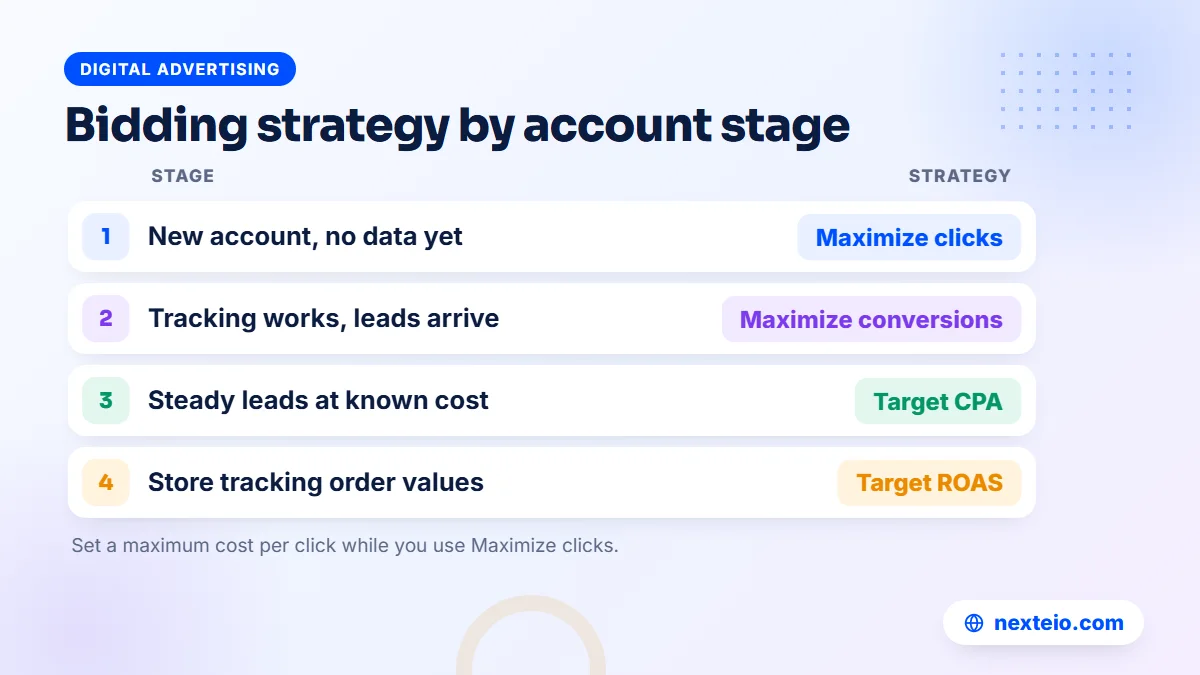
Next, Google asks what to focus on. A new account with no conversion history often starts with Maximize clicks and a maximum cost-per-click limit, or with Maximize conversions if tracking already works. The budget and bidding section below explains how to choose.
Campaign settings
- Networks: untick the Google Display Network for a Search campaign. Decide about search partners later, once you have data.
- Locations: choose Bangladesh, a set of districts or a radius around your branch.
- Location options: open this and choose people who are in, or regularly in, your locations.
- Languages: add English and Bengali so people who use either language are covered.
- Audience segments: add relevant ones in Observation mode only, so they report without limiting reach.
- Start date, end date and ad schedule: set the hours when someone can answer leads.
Read every setting rather than accepting the defaults. Most money lost in a new account is lost here.
Keywords, ads and budget
- Create the first ad group, paste its keywords and set the match types.
- Write a responsive search ad with the final URL of that group's landing page.
- Repeat for each ad group in your plan.
- Enter the average daily budget.
- Review the summary, fix any warnings and publish.
After publishing, add your negative keyword list and the campaign assets before the ads collect much traffic.
Step 6: Write Responsive Search Ads That Match the Search
Text ads on Google today are responsive search ads. You write up to 15 headlines of up to 30 characters each and up to 4 descriptions of up to 90 characters, and Google tests combinations to find what works for each search. Google's page about responsive search ads covers the full rules.
Because Google can show any headline next to any other, each one must make sense on its own. Aim for a mix of headline jobs:
- Keyword headlines: repeat the theme, such as "Office Chairs for Teams".
- Offer headlines: "Delivery and Setup Included" or "Bulk Order Rates".
- Proof headlines: "Showroom Open Six Days" or "Warranty on Every Chair", only if true.
- Practical headlines: "Delivery Across Bangladesh" or "Cash on Delivery".
- Action headlines: "Request a Quote Today" or "See Models and Prices".
Write descriptions that add detail rather than repeating the headlines.
A description such as "Ergonomic and executive chairs in stock. Send your list and get a quote within a day." gives a reason to click and sets an expectation, but only promise a response time your team can keep. Google shows an Ad Strength rating while you write. Treat it as a hint about variety, not as a forecast of sales. What really moves your cost per click is how relevant the ad and landing page are to the search.
Pin headlines only when you must, for example a legal line or the brand name in position one. Heavy pinning reduces the combinations Google can test. On language, match the search. Many people in Bangladesh search in English or in Bangla typed with English letters, so test English ads first for most commercial terms, and add Bangla ads for audiences such as guardians or local customers who search in Bangla.
Step 7: Add Assets That Give the Ad More Room
Assets, once called extensions, add extra lines and links to your ad. They make the ad larger on a phone screen and give people more reasons and ways to act. They cost nothing extra to add; you still pay per click. The most useful ones for a first campaign are:
- Sitelinks: links to pages such as Price List, Projects, Showroom Location and Contact.
- Callouts: short points such as "Same-Week Delivery" or "Corporate Billing Available".
- Structured snippets: a header with a list, such as Types: Chairs, Desks, Workstations.
- Call asset: a phone number people can tap, with a schedule matching office hours.
- Location asset: your address and map, which needs a linked Google Business Profile.
- Image assets: product or project photos that can show beside the ad.
Add at least four sitelinks and four callouts. Google picks which ones to show for each search.
The location asset is especially useful for showrooms, clinics and coaching centres, because people want to know how far away you are before they call. If your organization does not have a Google Business Profile yet, set one up and link it to the ads account before launch.
Step 8: Set the Budget and Bidding Strategy
Google Ads uses an average daily budget. On busy days Google can spend up to twice that amount, but over a month it should not charge more than about 30.4 times your daily budget. Plan your monthly spend first, then divide it by 30.4 to get the daily figure.
To estimate a sensible budget, work backwards from the leads you need. The numbers below are an illustration, not a market rate. If Keyword Planner suggests clicks of around BDT 25 and your landing page turns 5 percent of visitors into enquiries, each enquiry costs about BDT 500. Thirty enquiries a month would then need about BDT 15,000 in ad spend, or roughly BDT 500 a day. Our guide on Google Ads costs for small businesses explains what drives these numbers up or down.
The bidding strategy decides how Google sets your bid in each auction. Here are the common choices for Search:
| Bidding strategy | What it does | Good time to use it |
|---|---|---|
| Maximize clicks | Gets as many clicks as the budget allows | First weeks of a new account, with a max CPC limit |
| Manual CPC | You set each keyword's bid yourself | Small, tightly managed accounts |
| Maximize conversions | Aims for the most conversions within budget | Once tracking works and leads are coming in |
| Target CPA | Aims for an average cost per conversion | After steady conversion volume at a known cost |
| Target ROAS | Aims for a return on ad spend | Online stores tracking order values |
Move from one strategy to the next as data builds up, not all at once.
Payment needs attention in Bangladesh. Ad spend is charged to the payment method on the account, and many advertisers use a dual-currency or internationally enabled card. Check the card's international limit before launch, because a declined payment pauses every campaign in the account.
Settings That Quietly Waste Money
Some settings look harmless but can spend a large part of a small budget on the wrong people. Check each of these before and after launch.
Location option. By default, a campaign may reach people who are interested in your location, not only people who are in it. A clinic or a furniture showroom rarely wants clicks from abroad. Google's help page on targeting geographic locations explains the presence option, which limits ads to people in or regularly in your chosen areas.
Display Network inside Search. A Search campaign can also show ads on websites if this box stays ticked. Those clicks behave very differently and blur your results, so keep Search and Display in separate campaigns.
Ad schedule. If nobody answers the phone after 8 pm or on Friday, consider reducing or pausing ads in those hours. Leave form-based campaigns running longer if someone replies first thing the next morning.
Auto-apply recommendations. Google can apply some recommendations automatically, such as adding keywords or changing bids. Review this list in the Recommendations section and turn off anything you have not approved. Read each suggestion; some are useful, others mainly raise spend.
Related guides for this stage:
- Google Ads tips for better results on a small budget
- How to get more leads from Google Ads
- Google Ads Quality Score and how to improve it
Each one goes deeper into a decision this guide only touches.
Final Checks Before You Launch the Google Ads Campaign
Before you switch the Google Ads campaign on, run through a short launch checklist. It takes about twenty minutes and catches the mistakes that are most expensive to discover later.
- Submit a test form and confirm the conversion appears in the account.
- Click every final URL and sitelink on a phone to check that each page loads.
- Confirm the location option is set to presence.
- Confirm the Display Network is off for Search campaigns.
- Check that negative keywords are added at campaign level.
- Read every headline aloud for spelling, prices and promises.
- Make sure the phone number in the call asset is answered during the schedule.
- Confirm the billing card works and the daily budget is correct.
After you publish, every ad is reviewed against Google's rules before it runs.
Most reviews finish within a business day. Ads for areas such as health, finance, alcohol or gambling can face restrictions or need certification, so read the Google Ads policies before you write ads in those fields. A "Limited" or "Disapproved" status always comes with a reason you can fix and appeal.
The First 30 Days of a New PPC Campaign
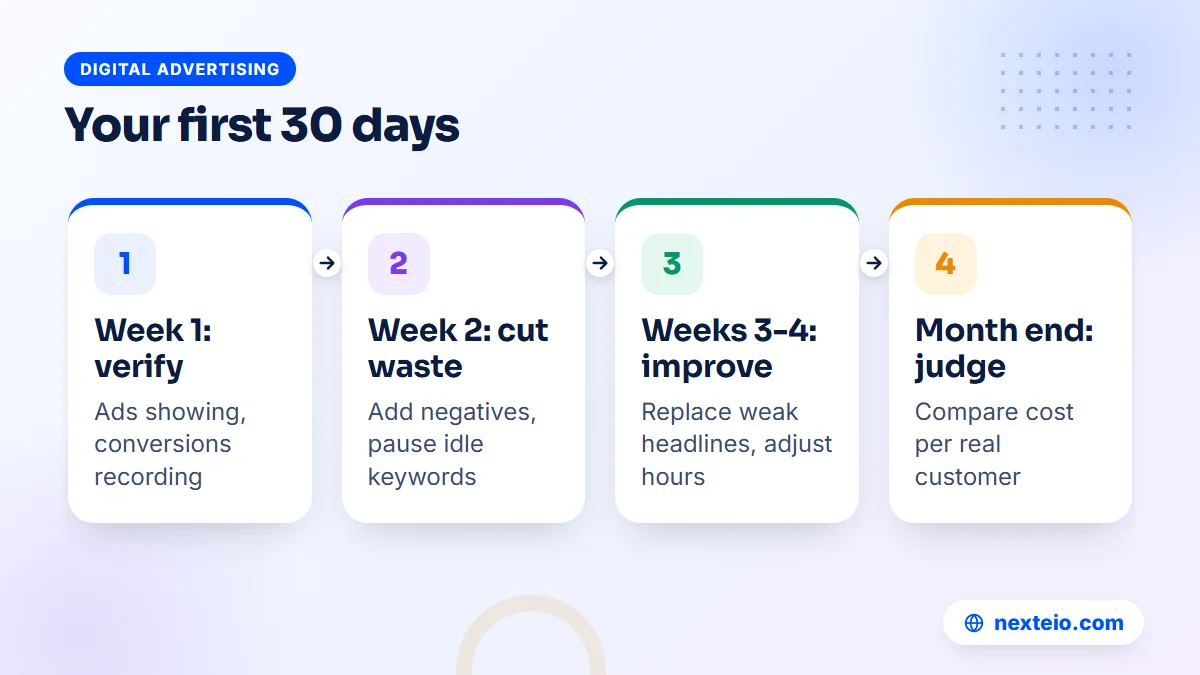
A new PPC campaign is never finished at launch. The first month is when you learn what people really search for and remove the waste. Make changes in small, steady steps so you can tell what each one did.
Week 1: confirm delivery and tracking
Check that ads are showing, that clicks are arriving and that conversions are recorded. Open the search terms report after two or three days. It lists the exact searches that triggered your ads, and it is the most useful report in the whole account.
Week 2: cut the waste
Add every irrelevant search term as a negative keyword. Pause keywords that spend money with no sign of interest, and move strong search terms into their own ad groups if they deserve their own ad and page.
Weeks 3 and 4: improve ads and settings
Review which headlines Google shows most and replace the weakest ones. Compare results by device, hour and location, and adjust bids or schedules where the difference is clear. If you switched to a smart bidding strategy, give it time to learn before judging it, because large changes in the first weeks reset what it has learned.
Also call a few of the leads yourself. A form full of wrong numbers or students asking about jobs tells you more about your keywords than any chart. If you would rather hand this weekly routine to someone else, our Google Ads team can run it for you.
Reading the Numbers Without Fooling Yourself
A busy dashboard can hide a poor campaign, and a quiet one can hide a good campaign. Focus on a few numbers and what each one means for your next step.
| Metric | What it tells you | If it looks poor |
|---|---|---|
| Click-through rate (CTR) | How well the ad matches the search | Tighten keywords, rewrite headlines |
| Average CPC | What each click costs in the auction | Improve ad relevance and the landing page |
| Conversion rate | How well the page turns visitors into leads | Fix the page, the offer or the form |
| Cost per conversion | What each lead or sale costs | Cut wasted terms, test bids and schedules |
| Search impression share | How often you appear when eligible | Raise budget or bids on the best terms |
Cost per lead is only half the picture; the other half is what those leads become.
Keep a simple sheet that records each lead, where it came from and whether it turned into a sale or admission. After a month, you can compare the cost per real customer between campaigns, not just the cost per form. A campaign with cheap leads that never buy is worse than one with costlier leads that do.
If you also run Facebook and Instagram ads, compare like with like. Our Facebook ads service and Google campaigns often work best together, but the two platforms count conversions differently, so judge them by the same final sales sheet.
A Worked Example: A Coaching Centre Admission Campaign
Picture a coaching centre that prepares HSC students for university and medical admission tests. Admissions open twice a year, the course fee is fixed, and the centre runs a free orientation seminar each week. The goal is clear: seminar bookings through a short form, plus phone calls during office hours.
Structure. One Search campaign with three ad groups: medical admission coaching, engineering admission coaching and university admission coaching. Each group links to its own course page with fees, schedule, teacher profiles and the seminar form. A fourth ad group covers searches for the centre's own name.
Targeting. A radius of about 10 km around the centre, presence only, with English and Bengali languages. Ads run from 9 am to 9 pm, when the front desk answers calls. Negative keywords include "pdf", "question bank download", "job circular", "free course" and the names of unrelated exams.
Ads. Headlines repeat each course name, the seminar offer and practical facts parents care about, such as batch timings and the branch location. A Bangla version runs alongside the English one, since many guardians search in Bangla.
Judging results. After four weeks, the centre compares seminar bookings and final admissions per ad group. If medical admission searches bring most enrolments at a fair cost, the budget moves there. Campaigns of this kind usually pause or scale down between admission seasons, which saves money for the weeks that matter.
Common Google Ads Campaign Mistakes
Most failed Google Ads campaign attempts share the same handful of causes. None of them needs a large budget to fix.
- Sending every click to the homepage instead of a matching page.
- Launching with no conversion tracking, then guessing what worked.
- Putting dozens of unrelated keywords in one ad group.
- Using broad match on a small budget with no negative keywords.
- Leaving the Display Network and "presence or interest" settings on.
- Changing bids, ads and budgets every day, so nothing can be measured.
- Judging success by clicks instead of leads and sales.
- Letting the payment card fail during an admission season or a sale.
Fixing even three of these usually improves results more than a bigger budget would.
There is also a wider mistake: treating ads as the whole marketing plan. Google PPC campaigns buy attention while you pay, and they stop the day the budget stops. Many organizations pair them with search visibility that keeps working, through an SEO service that targets the keywords the paid campaign has proven bring customers.
If you run several channels at once, an ads campaign service that plans Google, Facebook and video budgets together can stop each platform from claiming the same customer.
How Nexteio Can Help With Your Google Ads Campaign
We build and run Google Ads campaigns for businesses and organizations across Bangladesh through our Google Ads service. The work follows the order in this guide. We start by agreeing on the one action that matters, such as calls, form leads or orders, and we set up and test conversion tracking before any ad spends money.
Then we plan keywords and ad groups around how your customers really search, write responsive search ads in English, Bangla or both, add the assets, and set the budget and bidding to match your goal. Once the campaign is live, we work through the search terms, add negative keywords and adjust ads and bids based on leads rather than clicks.
If your landing pages are holding results back, we can also build focused pages through our custom website design team. You can read more about Nexteio, look at our portfolio, or share your goals and budget on our project form so we can suggest a campaign plan. For a quick question, reach us through the contact page or ask for a Google Ads campaign review before you launch. When you are ready to begin, start a project with us.
Keep reading: what to expect from a Google Ads service in Bangladesh, how SEO and Google Ads differ, or browse all our digital advertising guides.
Frequently asked questions
How much money do I need to start a Google Ads campaign in Bangladesh?
Google does not set a fixed minimum, so the budget should come from the number of leads you need and what a click costs in your field. Check suggested bids in Keyword Planner, estimate how many visitors your page turns into enquiries, and work backwards. A small, focused campaign with a few tight ad groups is better than a large budget spread across hundreds of keywords.
How soon will a new campaign show results?
Ads can start showing within hours once they pass review, which usually takes up to one business day. Useful data takes longer: most campaigns need two to four weeks of clicks and search terms before you can judge keywords and ads fairly. Smart bidding strategies also need a learning period, so avoid big changes in the first weeks.
Is a Google AdWords campaign different from a Google Ads campaign?
No. Google renamed AdWords to Google Ads in 2018, and campaigns still follow the same structure of account, campaign, ad group, keywords and ads. Older guides may show screens and ad formats that no longer exist, such as expanded text ads, so follow current Google Ads help pages when they differ.
Should I start with Search or Performance Max?
Most service businesses and organizations should start with Search, because you control the keywords and can see exact search terms. Performance Max spreads ads across Search, YouTube, Display, Gmail and Maps and depends heavily on conversion data, so it tends to work better once tracking is reliable and the account has history. Online stores with a product feed are the main exception.
Can I write my ads in Bangla?
Yes. Google Ads supports Bengali as a target language and accepts ad text written in Bangla. Many commercial searches in Bangladesh are typed in English or in Bangla written with English letters, so test both versions and compare results. Keep headlines short, since Bangla text can run close to the character limit.
Why is my ad approved but getting no impressions?
The usual causes are bids too low for the auction, keywords with very little search volume, a narrow location or schedule, or negative keywords that block your own terms. Check the keyword status column and the bid suggestions first. If keywords show low search volume, add closely related phrases that people search more often.
Can I manage a PPC advertising campaign myself?
Yes, if you can spend time every week on search terms, negatives, ads and lead quality. Small accounts with one or two campaigns are manageable for a careful owner or marketing officer. Many organizations hand it over once spend grows, several campaigns run at once, or nobody has time to check the account each week.