Website Redesign: When a Company Should Rebuild Its Site, and How
In this article 16 sections
- 1.Redesign, Refresh or Rebuild: Decide What You Actually Need
- 2.Nine Signs Your Company Needs a Website Redesign
- 3.When a Website Redesign Is the Wrong Answer
- 4.Audit the Current Site Before You Change Anything
- 5.Set Goals That Management Can Approve and Measure
- 6.Content Decisions: Keep, Merge, Rewrite or Remove
- 7.Protecting Search Rankings During a Website Redesign
- 8.Choosing the Platform: Stay, Upgrade or Move
- 9.The Website Redesign Process, Step by Step
- 10.Realistic Timelines and Who Does What Inside the Company
- 11.What a Website Redesign Costs in Bangladesh
- 12.Launch Day and the First 60 Days After
- 13.How to Choose Website Redesign Services
- 14.Measuring Whether the Redesign Worked
- 15.How Nexteio Can Help With Your Website Redesign
- 16.Frequently asked questions
A website redesign is the moment a company stops patching its old site and plans a better one on purpose. Most companies in Bangladesh reach that point slowly. The site was built five or six years ago, the menu no longer matches the business, the phone number on the contact page belongs to someone who left, and the sales team quietly sends buyers a PDF profile instead of the website link.
The trouble is that a redesign can go wrong in two directions. Some companies change too little: new colors on the same confusing structure. Others change everything at once, throw away pages that Google already trusted, and watch enquiries fall for months after launch.
This guide is for the person inside a company who has to make the case, run the project and answer to management when it is done. It covers how to tell whether you need a full rebuild or a lighter refresh, how to audit what you have, how to protect search traffic, what a realistic timeline and budget look like, and how to check that the new site is actually doing better than the old one.
Redesign, Refresh or Rebuild: Decide What You Actually Need
People use "redesign" for three very different jobs. Getting the label right at the start saves money, because each one has a different scope, cost and risk.
A refresh keeps the structure, the platform and most of the pages. You update the colors, fonts, photos, homepage sections and some text. A redesign changes how the site is organized and how it looks: new page structure, new templates, rewritten content and often new URLs. A rebuild replaces the technology underneath as well, for example moving from an abandoned theme or an old hand-coded site to a modern WordPress or Laravel build.
| Option | What changes | Good fit when | Main risk |
|---|---|---|---|
| Refresh | Look, photos, some copy | The structure and platform still work well | Old problems hide under a new coat of paint |
| Redesign | Structure, templates, content, design | Visitors cannot find what they need, or the business has changed | Lost rankings if URLs change without redirects |
| Rebuild | Everything, including platform and code | The software is outdated, insecure or impossible to edit | Longer timeline and more testing |
Most companies that ask for a full rebuild actually need a redesign on a sound platform. The reverse also happens.
A company with a sensible WordPress site may only need a refresh and better content. A company whose site runs on a theme that stopped receiving updates years ago needs a rebuild, even if the design still looks acceptable, and a custom-designed rebuild lets you fix the structure at the same time. If you are unsure which side of that line you are on, our comparison of WordPress and custom-built websites explains how each option ages.
Nine Signs Your Company Needs a Website Redesign
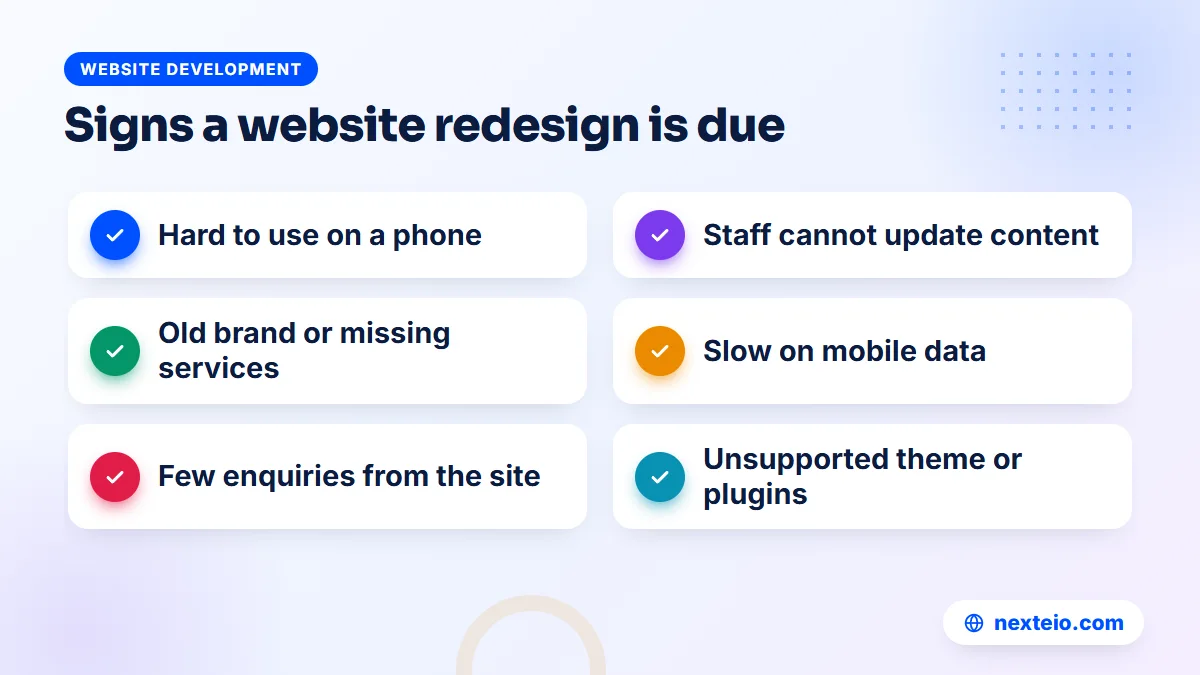
A website redesign is worth the effort when the site is getting in the way of the business, not simply because it looks old. These are the signs we see most often in company, group and factory websites. The first group is about how the site works and looks:
- It is hard to use on a phone. Text needs zooming, buttons sit too close together, or tables spill off the screen.
- Nobody on staff can update it. Every small change needs the original developer, who may no longer answer.
- The business has moved on. New divisions, products, certifications or markets do not appear anywhere.
- The brand has changed. A new logo or name sits awkwardly on an old layout.
- Pages load slowly on mobile data. Visitors wait for large sliders and uncompressed photos.
The second group is about what the site delivers, or fails to deliver:
- The site brings in few enquiries. Forms are buried, phone numbers are images, or there is no clear next step.
- The software is out of date. The theme, plugins or PHP version no longer receive security updates.
- The sales team avoids it. Staff send PDFs and WhatsApp photos because the site does not show the company well.
- Search visibility is weak. The company does not appear for its own services, even in Bangladesh.
One sign on its own may only need a fix. Three or more usually point to a structural problem, and that is when a planned redesign pays off.
A quick way to test the last point: search for your main service plus "Bangladesh" on a phone and see whether your company appears on the first page. If competitors with weaker businesses show up and you do not, the site is likely hurting you. Our guide to why a site gets traffic but no customers covers the opposite problem, when visitors arrive but do not contact you.
When a Website Redesign Is the Wrong Answer
Not every problem is a design problem. Before you approve a budget, rule out the cheaper fixes, because a new site will not solve these on its own.
- No one follows up on enquiries. If form emails go to an inbox nobody checks, a new design changes nothing.
- The content is the problem. Vague text like "we provide quality services" will be just as weak on a new template.
Some causes sit outside the pages themselves:
- The site is slow because of the hosting. A cheap, overloaded server can make any design feel slow. Moving hosting may be enough.
- Nobody promotes the site. A website that is never shared, advertised or optimized will stay quiet, however good it looks.
- Management keeps changing the brief. If the company cannot agree on what it sells and to whom, settle that first.
It is also worth asking how long ago the last redesign happened. If the current site is under two years old and built on a supported platform, fixing the specific weak pages is usually smarter than starting again. A full redesign every few years because a new manager prefers a different style wastes money and resets your search history each time.
Audit the Current Site Before You Change Anything
The audit is the part of a website redesign that most companies skip, and it is the part that protects you. You cannot decide what to keep until you know what the current site is doing well.
Gather the numbers
If the site has Google Analytics, export the last twelve months of data: the most visited pages, where visitors come from and which pages lead to enquiries. If it has Google Search Console, export the pages and search terms that bring clicks. Those pages are your most valuable assets. They should survive the redesign, or move to a new address with a redirect.
If neither tool was ever set up, add Search Console now. Even a few weeks of data before the redesign is better than none, and it will be essential after launch.
Build a content inventory
Make a simple spreadsheet with one row for every page on the site. Record the URL, the page title, what the page is for, when it was last updated and its traffic. A five-page company profile takes an hour. A corporate group site with news, tenders and product pages can take a few days, but it is still worth doing.
Ask the people who use it
Talk to the sales team, the receptionist who answers the phone and the HR officer who posts jobs. Ask what buyers and candidates ask most often, and what they cannot find on the site. Those answers shape the new structure better than any design trend. If possible, also ask two or three loyal clients what they look for when they open your site before a meeting.
Set Goals That Management Can Approve and Measure
"Make it modern" is not a goal. It cannot be measured, and it guarantees endless rounds of design feedback. Good goals describe what the business wants the site to do, and they give the board or managing director something concrete to approve.
Useful goals for a company site sound like this:
- Increase enquiry form submissions and calls from the website.
- Let the HR team post jobs and the admin team post notices without calling a developer.
- Show each division or sister concern clearly, with its own contact person.
- Load the main pages quickly on an average mobile connection.
- Appear in Google for the company's main services in Bangladesh.
- Give international buyers the certifications and capacity details they ask for before a visit.
Pick three to five goals, write down how each one is measured today, and agree on who signs off the project. In many companies the real approval chain runs through the managing director, a marketing head and sometimes the chairman. Name those people at the start. A website redesign that surprises the chairman at the final presentation often goes back to the beginning.
If the goals involve leads, it helps to understand how content supports each stage of a buyer's decision. Our guide to content for every stage of the customer journey is a good companion to this step.
Content Decisions: Keep, Merge, Rewrite or Remove
Once the inventory is done, give every page one of four decisions. This is where a redesign either becomes clearer than the old site or simply larger.
| Decision | Use it for | What happens to the URL |
|---|---|---|
| Keep | Pages with traffic, rankings or enquiries that are still accurate | Keep the same URL if you can |
| Rewrite | Important topics with weak or outdated text | Keep the URL, replace the content |
| Merge | Several thin pages on the same subject | Redirect the old URLs to the merged page |
| Remove | Outdated news, expired offers, duplicate pages with no traffic | Redirect to the closest useful page, or let it return a 404 if nothing fits |
Be careful with "remove". A page that looks outdated may still rank for a useful search term.
Content is also the most common cause of delay. Designers can build templates in weeks, but a company's text, photos and approvals often take months. Assign each page to a named person in the company with a due date. Ask for real factory, office or team photos early, since stock photos of people in suits rarely convince buyers in Bangladesh or abroad.
Decide on languages at this stage as well. Many companies need English for buyers and partners and Bangla for local customers, job seekers and government contacts. Two languages roughly double the content work, so plan for it rather than adding Bangla pages as an afterthought. For writing pages that both people and search engines understand, our guide on SEO-friendly website content gives practical rules.
Protecting Search Rankings During a Website Redesign
This is the section that saves companies from the most painful mistake. When page addresses change and nobody redirects the old ones, every link from Google, other websites and old emails leads to an error page. Rankings that took years to build can drop within weeks.
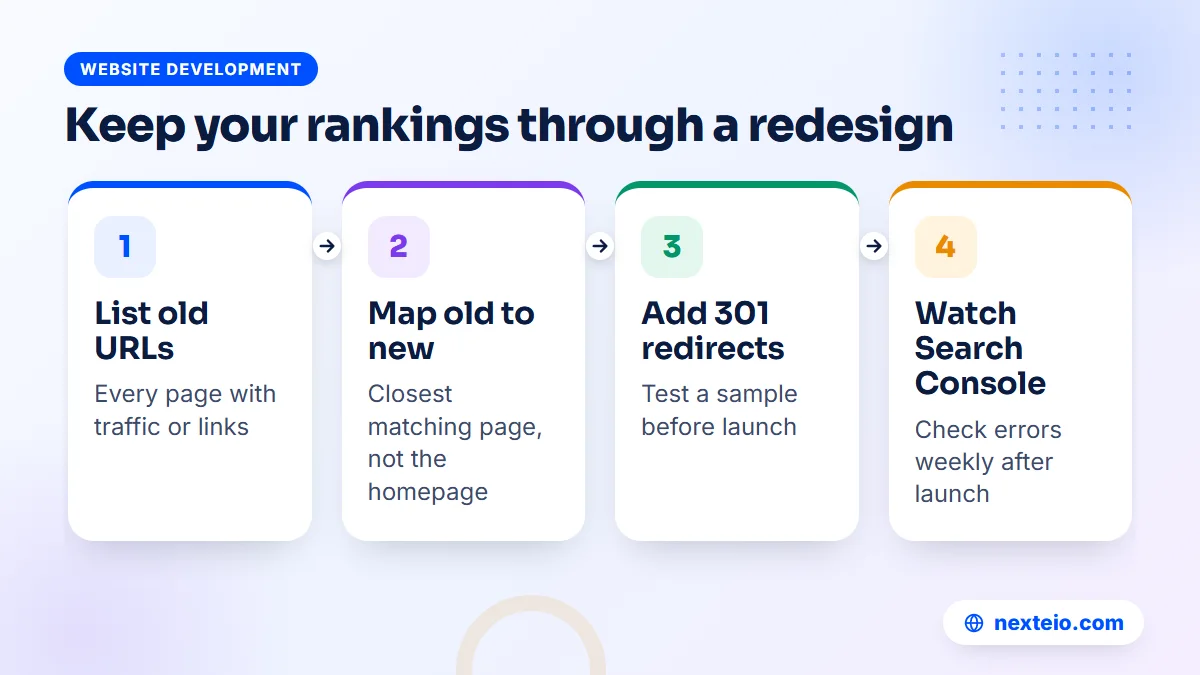
Map every old URL to a new one
Use the content inventory to create a redirect map: one column for the old URL, one for the new URL. Every old page with traffic, rankings or links from other sites needs a destination. Point each one to the closest matching new page, not to the homepage. A product page should redirect to the new product page, not to a general "Products" list.
Use permanent redirects
The redirects should be permanent, known as 301 redirects. Google's own guide to redirects and Google Search explains the types and when to use each one. On WordPress, a redirect plugin or server rules can handle this. On a custom or Laravel site, the developer sets them in the application or server configuration.
Carry over the on-page basics
Page titles, meta descriptions, headings and image alt text often get lost when content is copied into new templates. Check that each important page keeps a clear title and description, that the new site has an XML sitemap, and that no page is accidentally set to "noindex". That last error is common when a staging site's settings are copied to the live site. Our article on technical SEO basics explains each of these checks in plain words.
If the domain itself is changing, for example from an old .com to a new name after rebranding, the job is larger. Google's guide to site moves with URL changes sets out the full process, including the Change of Address tool in Search Console.
Internal links matter too. Menus, footer links and links inside text should point straight to the new URLs, not through redirects. Our guide to internal linking for SEO shows how to connect pages so both visitors and Google find the important ones.
Choosing the Platform: Stay, Upgrade or Move
A redesign is the natural time to ask whether the current platform still fits. The answer depends on what the site needs to do over the next five years, not on what is popular this year.
Stay on WordPress if the site is mainly pages, news, jobs and enquiry forms, and your staff are comfortable with it. A well-built WordPress website with a lean theme and few plugins is easy to update and inexpensive to maintain. Many redesigns simply move an overloaded WordPress site to a cleaner build on the same platform.
Move to a custom design if a ready-made theme is limiting how you present the company, or if the old theme is abandoned. A custom website design can still run on WordPress for easy editing. The difference is that the layout is planned around your content instead of a demo.
Move to Laravel or another framework when the website is part of a process: dealer logins, quotation requests that go into a system, stock or order tracking, or a portal for staff. In that case, a Laravel web application gives you control over the workflow that a plugin-based site cannot. If the redesign includes selling online, a proper e-commerce website build with bKash, Nagad and cash on delivery deserves its own planning.
Whatever you choose, confirm that the platform, theme and main plugins are actively maintained, and that the developer will hand over full admin access and, for custom code, the source files.
The Website Redesign Process, Step by Step
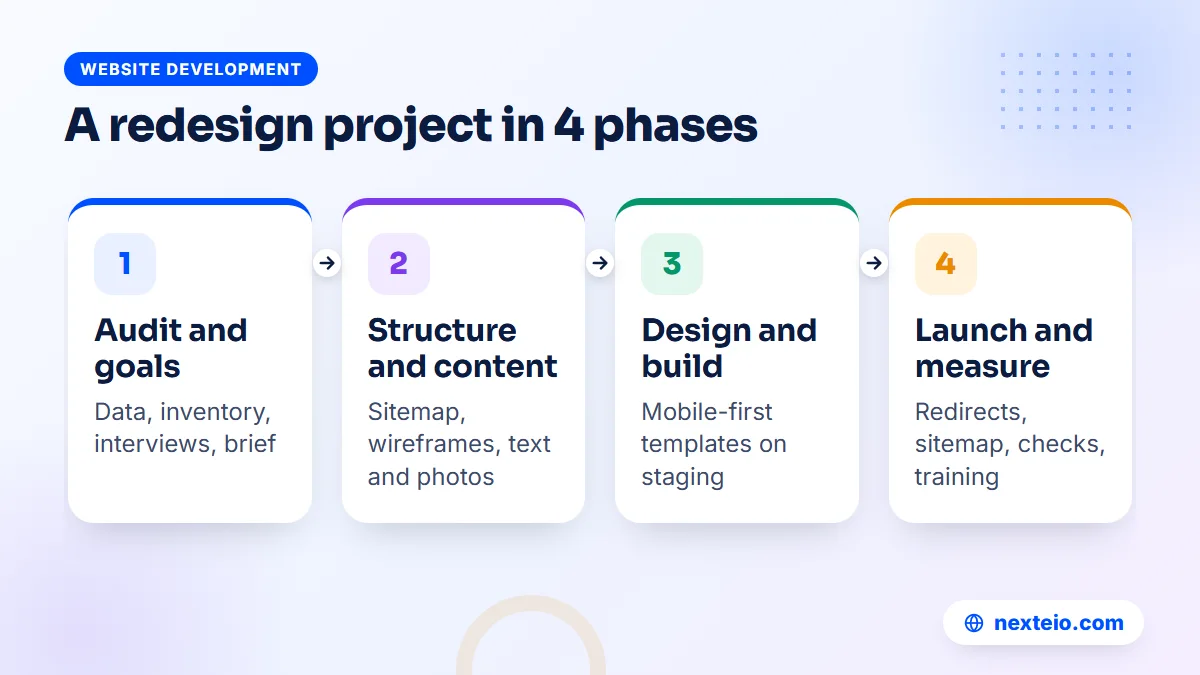
Every agency names its stages differently, but a well-run website redesign usually follows the same order. Skipping or rushing a step tends to cost more time later than it saved. The first five stages are about planning:
- Discovery and audit. Review the current site, analytics, Search Console data and the content inventory. Interview the people who use the site.
- Goals and brief. Agree on goals, audience, languages, features and the approval chain. Put it in writing.
- Sitemap and structure. Plan the menu and the list of pages. Mark which old pages map to which new ones.
- Wireframes. Simple layouts that show what goes on each key page, before any colors or photos.
- Visual design. Homepage and main templates in your brand style, reviewed on mobile first.
The next five stages turn the plan into a live site:
- Content production. Writing, translation, photos and approvals, running alongside design.
- Development. Building the templates, forms, integrations and admin panel on a staging site.
- Testing. Phones, browsers, forms, speed, redirects, broken links and accessibility basics.
- Launch. Switch the live site, apply redirects, submit the sitemap and check everything again.
- Training and handover. Show staff how to update content, and hand over all access details.
The steps overlap in practice. Content work should start during the sitemap stage, not after design is approved.
Ask to see the work on a staging site, a private copy of the new website, throughout the build. Reviewing real pages on your own phone catches problems that a static design image hides, such as long Bangla headings that wrap badly or tables that do not fit a small screen.
Realistic Timelines and Who Does What Inside the Company
Timelines depend more on the company than on the developer. The design and build work is fairly predictable. Content, feedback and approvals are not. The table below is a rough guide for a typical company website with 15 to 40 pages.
| Phase | Typical length | Who on your side |
|---|---|---|
| Audit and brief | 1 to 2 weeks | Project owner, marketing, sales head |
| Sitemap and wireframes | 1 to 2 weeks | Project owner, managing director for sign-off |
| Visual design | 2 to 3 weeks | Marketing, management |
| Content and photos | 3 to 6 weeks, alongside design and build | Department heads, HR, a translator if needed |
| Development and testing | 3 to 6 weeks | Project owner for testing and feedback |
| Launch and handover | About 1 week | Project owner, IT or admin officer |
Larger corporate groups, sites with integrations and two-language sites usually sit at the longer end.
The single most useful thing a company can do is name one project owner with the authority to collect feedback and make decisions. When five managers send separate comments on the same design, the developer either waits or guesses. Neither helps. Collect feedback in one document, agree on it internally, then send it.
Plan around the calendar too. Launching during the week before Eid, at the end of a financial year or during a major trade fair leaves no one available to test or fix issues. A quieter month makes the switch much safer.
What a Website Redesign Costs in Bangladesh
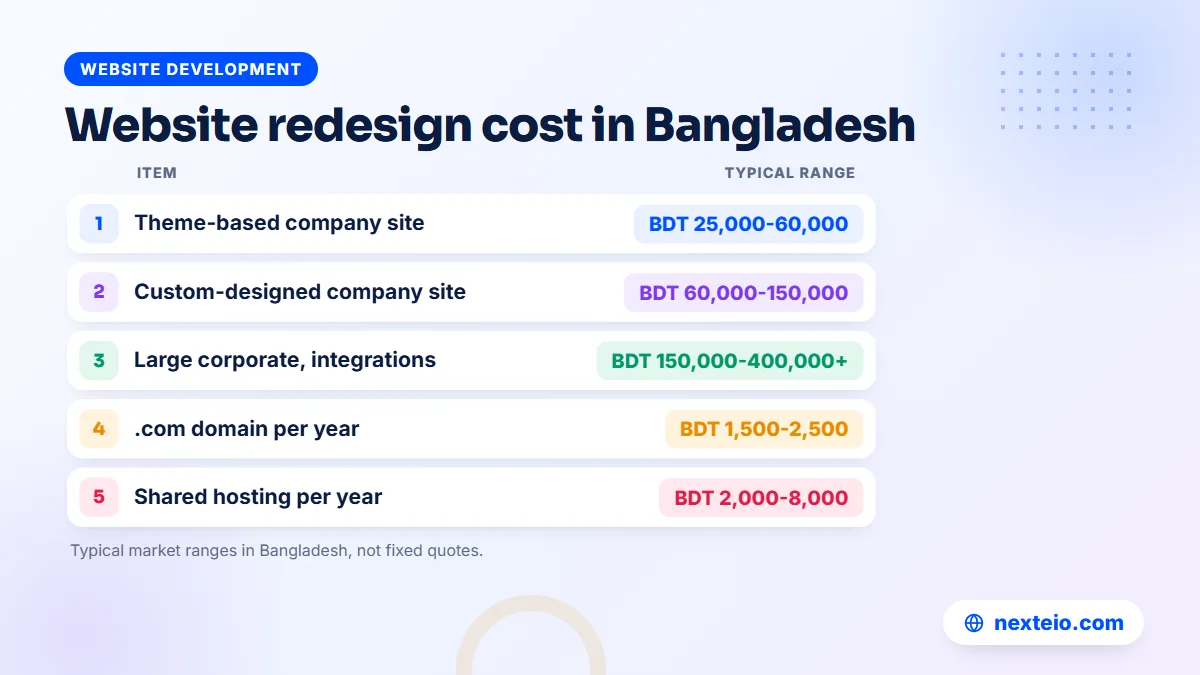
The cost of a redesign follows the same logic as a new build, since most of the work is the same: planning, design, content setup, development and testing. Typical market ranges in Bangladesh look like this. They are general ranges, not quotes, and the final figure depends on the number of pages, languages, features and integrations.
| Type of company website | Typical market range | Usually includes |
|---|---|---|
| Theme-based company site | BDT 25,000 to 60,000 | A good ready-made theme set up with your content, forms and basic SEO |
| Custom-designed company site | BDT 60,000 to 150,000 | Design planned around your brand and content, built for easy editing |
| Large corporate site with integrations | BDT 150,000 to 400,000 or more | Several divisions, two languages, portals, ERP or CRM links, heavy content |
Running costs sit apart from the build.
A .com domain usually costs about BDT 1,500 to 2,500 a year, and shared hosting about BDT 2,000 to 8,000 a year, depending on the plan. Larger sites may need a VPS or cloud server, which costs more. If the redesign adds a dealer portal, a quotation system or other custom features, that part is usually quoted after a requirements review.
A few things push a redesign above the cost of a simple new site:
- Migrating a large amount of old content, such as years of news or hundreds of product pages.
- Writing a detailed redirect map for a site with many indexed pages.
- Cleaning up a hacked or badly broken old site before moving its content.
- Rewriting or translating content that the company cannot supply itself.
Ask any provider to price these items separately so you can compare quotes fairly.
Be wary of a quote that is far below these ranges for a full redesign. It usually means the audit, redirects and testing are not included. Those are exactly the parts that protect your search traffic and your reputation on launch day. For a figure based on your own site, you can send us your current URL and goals and we will review the scope with you.
Related guides for companies planning a new site:
- How to build a professional business website that gets results
- How faster pages help you rank and sell
- Common SEO mistakes that hurt business websites
Launch Day and the First 60 Days After
Launch is not the finish line. The weeks after it decide whether the website redesign keeps the trust and traffic the old site had. Before switching, take a full backup of the old site and keep it somewhere safe. If something goes badly wrong, you need a way back.
On launch day
- Point the domain to the new site and confirm HTTPS works on every page.
- Apply the full redirect map and test a sample of old URLs, especially the ones with the most traffic.
- Submit every main form and confirm the emails reach the right inboxes.
- Remove any "noindex" setting left over from the staging site.
- Submit the new XML sitemap in Search Console.
- Check the main pages on at least two phones and two browsers.
Keep the old developer's access open for a few days in case you need files or settings, then remove it.
In the following weeks
Check Search Console every week for crawl errors, pages that cannot be found and drops in clicks. A short dip right after launch is common while Google processes the changes. A steady fall over several weeks usually means missing redirects or lost content, and should be fixed quickly.
Compare the goals you set earlier with the first two months of data: enquiries, calls, page speed and the pages visitors use most. Share a short summary with management. It shows the project worked, and it builds support for the next round of improvements. Many companies also put the new site on a regular maintenance plan at this point, so updates, backups and security checks do not slide again.
How to Choose Website Redesign Services
Website redesign services vary more than most buyers expect. Some providers mainly sell a new look. Others plan the structure, content and search side as well. The right questions will show you which kind you are talking to.
- How will you audit our current site, and what will you need from us?
- Who prepares the redirect map, and how do you test it before launch?
- Which pages and how much content migration are included in the price?
- Will we review the work on a staging site, on our own phones?
- Who on your team writes or edits content, and is Bangla included?
- What platform do you recommend for us, and why?
- Will the domain, hosting and admin accounts be in our company's name?
- What support do you give in the first month after launch?
- Can we see redesigns you have done, with the before and after?
A provider who answers these clearly and in writing is usually one who has done the work before.
Look at real projects too. Ask for sites they have rebuilt, open them on your phone and check how they load. You can see the kind of work we do in our portfolio, and our buyer's checklist for choosing a web design company lists more checks that apply equally to a redesign.
Warning signs
- No mention of redirects, Search Console or the old site's traffic.
- A fixed design shown before anyone has asked about your business.
- Pressure to register the domain or hosting in the provider's name.
- A price that includes "unlimited pages" with no content plan.
- No written scope, only a total figure and a delivery date.
Any one of these is a reason to ask more questions before you sign.
Measuring Whether the Redesign Worked
Three to six months after launch, compare the new site with the old one against the goals you set. This step is often forgotten, and it is the one that tells management whether the money was well spent.
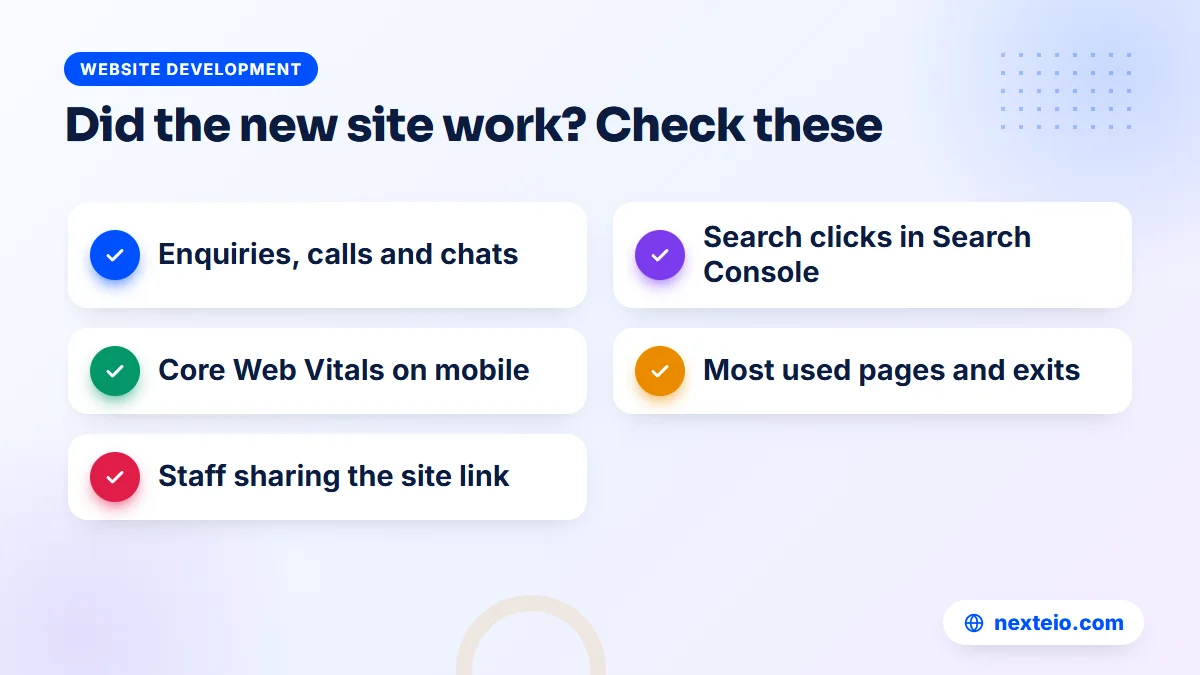
The useful measures for most company sites are simple. Count enquiry form submissions, calls and WhatsApp clicks from the website, if tracking is set up. Check search clicks and impressions in Search Console for the same months before and after. Test the main pages with Google's Core Web Vitals measures for loading, response and visual stability. Then ask the sales and HR teams whether they now share the website link instead of PDFs.
If a goal was missed, look for the specific cause before blaming the design. A form may be too long, a key service page may be thin, or the site may not be promoted at all. Search visibility usually improves gradually rather than in a single jump, and our SEO service exists for companies that want to build on the redesign rather than wait.
Accessibility is worth a check at the same time. Clear contrast, readable font sizes, labeled form fields and alt text on images help every visitor, including people with poor eyesight reading on a small phone in bright light. The WCAG guidelines from the W3C are the standard reference if you want to go further.
How Nexteio Can Help With Your Website Redesign
We plan and build company websites through our custom website design service, and many of those projects start as a redesign of an existing site. We begin by looking at what you already have: the current pages, what still brings visitors and enquiries, and what your sales, HR and admin teams need from the site.
From there we agree on the goals, the page structure and the platform with you, whether that is a cleaner WordPress build, a fully custom design or a Laravel application for portals and workflows. You review the new site on a staging copy on your own phone before anything goes live. We plan the redirects from old pages to new ones, set up the basic on-page SEO and check the forms, speed and mobile layout before launch.
Your company keeps ownership of the domain, hosting and admin accounts, and your team learns how to update content themselves. You can read more about Nexteio, tell us about your current site on our project form, or reach us through the contact page if you would rather talk first. If your redesign is mostly about appearance and structure, a fresh custom design on a sound platform is usually where we start.
Keep reading: what to check before hiring a WordPress developer, or browse all our website development guides.
Frequently asked questions
How often should a company redesign its website?
There is no fixed cycle. Many company sites need a proper redesign every four to six years, when the business, brand or technology has moved on. In between, regular content updates, maintenance and small improvements usually do more good than a full redesign every two years.
Will a website redesign hurt our Google rankings?
It can if page addresses change without redirects or if ranking content is removed. With a redirect map, permanent 301 redirects, preserved titles and content, and close monitoring in Search Console, most companies keep their rankings and often improve them once the new site is faster and clearer.
Can we keep our current domain name?
Yes, and in most cases you should. Keeping the same domain makes the move much simpler for search engines and for everyone who has your email addresses. Change the domain only when there is a real business reason, such as a new company name, and plan that move carefully.
Should we redesign the website and change hosting at the same time?
It is often sensible, since the new site has to be set up on a server anyway and launch is a natural time to move. Make sure the new hosting account is in your company's name, check email settings separately so mail is not disrupted, and keep a full backup of the old site until the new one is stable.
How long does a website redesign take?
A typical company site with 15 to 40 pages often takes two to four months from audit to launch. The design and build are fairly predictable, while content, translation and internal approvals usually decide the real timeline. Larger corporate groups and sites with integrations take longer.
Do we need new content for a redesigned site?
Usually some, yes. Pages that rank well can keep their core text with light edits, but outdated, vague or duplicate pages should be rewritten, merged or removed. Fresh photos of your real team, office or factory also help the new site feel trustworthy.
Can we redesign only part of the website?
Yes. If the platform is sound, you can redesign the homepage, service pages or contact flow first and leave the rest for a second phase. This spreads the cost and lets you test what works, as long as the new and old sections still look consistent to visitors.