Owner Domain Check: Who Really Controls Your Website Address
In this article 15 sections
- 1.Why the Owner Domain Question Matters for Organizations
- 2.Registrant, Registrar, Reseller and Admin: Who Is Who
- 3.How to Run an Owner Domain Check
- 4.Reading the Results: What Each Field Tells You
- 5.Generic Domains and .bd Domains Follow Different Rules
- 6.Common Ways Organizations Lose Control of Their Domain
- 7.How to Move the Domain Into Your Organization's Name
- 8.DNS, Email and Hosting: Control Beyond the Name
- 9.Renewals, Expiry and What Happens When a Domain Lapses
- 10.Recovering a Domain When the Owner Domain Records Are Wrong
- 11.A Domain Ownership Policy Your Office Can Actually Follow
- 12.Questions to Ask Your Web Developer or Agency
- 13.Planning a New Website With Ownership Built In
- 14.How Nexteio Can Help With Domain Ownership
- 15.Frequently asked questions
An owner domain check answers a simple question that many organizations cannot answer: whose name is your website address actually registered in? For a company, school, hospital or NGO in Bangladesh, the domain is the base of the website and of every official email address. If the registered owner is a former employee, a freelancer or a web agency, your organization does not fully control either one.
The problem usually stays hidden for years. The site loads, emails arrive, and nobody asks who holds the account. Then a renewal is missed, a developer stops answering the phone, or the board wants to move to a new web team, and suddenly nobody can log in.
The good news is that most of these situations can be fixed calmly, and almost all of them can be prevented. You do not need to be technical. You need to know where to look, what the records mean and which papers to keep.
This guide walks through how domain ownership works, how to see who holds yours, how .com and .bd names differ, and the steps to move the domain into your organization's name and keep it there.
Why the Owner Domain Question Matters for Organizations
A domain name feels like a small yearly bill. In practice it is the key to three things at once: the website, the email system and your identity in Google. Whoever controls the domain can point it anywhere, switch off the email, or let it expire.
Think of a garment exporter whose buyers write to the merchandising team at an address on the company domain. If that domain lapses for even two days, purchase orders bounce and buyers start asking questions. A college that publishes admission results on its website faces the same risk in its busiest week of the year.
The owner domain record also matters legally. When there is a dispute, registrars listen to the registered holder, not to the person who paid the invoice or the organization whose logo is on the site. If a freelancer registered the name under his personal details, he is the one with the legal claim, even if your accounts department paid every renewal.
That is why ownership should be settled before a website project starts, not after something goes wrong. If you are planning a custom website for your organization, put the domain and hosting accounts at the top of the first meeting's agenda, because everything else depends on them.
Registrant, Registrar, Reseller and Admin: Who Is Who
Domain ownership confuses people because four different parties can be involved, and their names sound alike. Once you separate them, most problems become easy to understand.
- Registrant: the legal holder of the domain. This is the name that should be your organization's.
- Registrar: the company accredited to register domains, such as the firm that runs the control panel where you renew.
- Reseller: a local hosting company or agency that sells domains through a registrar's system. Many Bangladeshi organizations buy this way.
- Account holder: the person who has the username and password for the panel. This may be a staff member, a developer or the reseller.
Trouble starts when these do not line up. A common setup looks like this: the reseller's account holds the domain, the registrant field shows the developer's personal name, and your organization only has a receipt. On paper you are a customer of a customer, which is a weak position.
The ideal setup is simple. Your organization is the registrant, the account is opened with an official email address that more than one senior person can reach, and any developer or agency gets limited access as a helper, not as the owner.
What about the technical and admin contacts?
Older registration records also list an administrative contact and a technical contact. Many registrars have reduced or merged these fields, but where they still exist, the admin contact often receives transfer approvals and renewal notices. If that email belongs to someone who left three years ago, important messages go nowhere. Treat every contact field as something your organization should control.
How to Run an Owner Domain Check
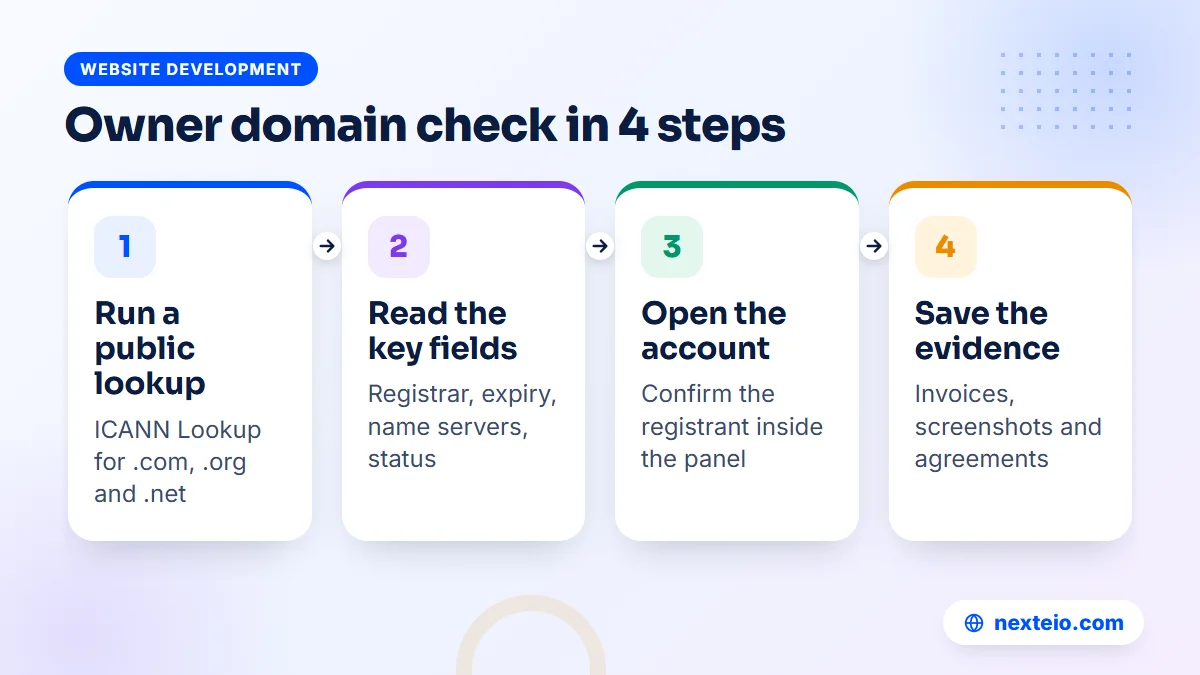
You can see much of the public information about a generic domain (.com, .org, .net and similar) in a few minutes. Here is a practical order to follow.
- Open the ICANN Lookup tool and enter your domain without "www".
- Note the registrar name, the creation date, the expiry date and the name servers.
- Look at the registrant fields. If they show "Redacted for privacy", that is normal and does not tell you who the owner is.
- Check the domain status codes, such as a transfer lock or a hold.
- Log in to the registrar or reseller account you believe holds the domain and confirm the registrant details shown inside the panel.
- Collect the original invoice, the email used for the account and any agreement with your developer.
The public lookup now runs on RDAP, the newer replacement for the old WHOIS system.
Because of privacy rules, a public owner domain lookup often shows only the registrar and the dates. The full registrant record sits inside the registrar's system, so step five matters most.
If nobody in your office can log in to any account that shows the domain, that alone is your answer: someone outside your organization controls it. Write down what you found, including screenshots and dates, before you contact anyone. You will need this record later.
Reading the Results: What Each Field Tells You
A lookup result looks technical, but only a few fields matter in an owner domain review. The table below explains the ones an office manager should understand.
| Field in the lookup | What it tells you | What to do with it |
|---|---|---|
| Registrar | Which company manages the registration | Ask that company, or your reseller, who the account belongs to |
| Creation date | When the domain was first registered | Match it with your old invoices or emails to find who bought it |
| Expiry date | When the current paid period ends | Put it in the office calendar with reminders 60 and 30 days before |
| Name servers | Where DNS is managed, which controls website and email routing | Find out who has the login for that DNS service |
| Status codes | Locks, holds or pending deletion | A transfer lock is good; a hold or pending delete needs action today |
| Registrant details | The legal holder, if not hidden | Must show your organization's name, not a person's |
Two of these fields need a little more explanation.
Status codes deserve a closer look. A code such as "clientTransferProhibited" means the domain is locked against unauthorized transfer, which is what you want in normal times. Codes that mention "hold", "redemption" or "pendingDelete" mean the domain has stopped working or is close to being released. ICANN keeps a plain explanation of every domain status code if you see one you do not recognize.
Name servers also tell a story. If they point to a hosting company you have never paid, your DNS is managed through someone else's account. Even with the domain in your name, that person could change where your website and email go. Control has two layers, and both need to be yours.
Generic Domains and .bd Domains Follow Different Rules
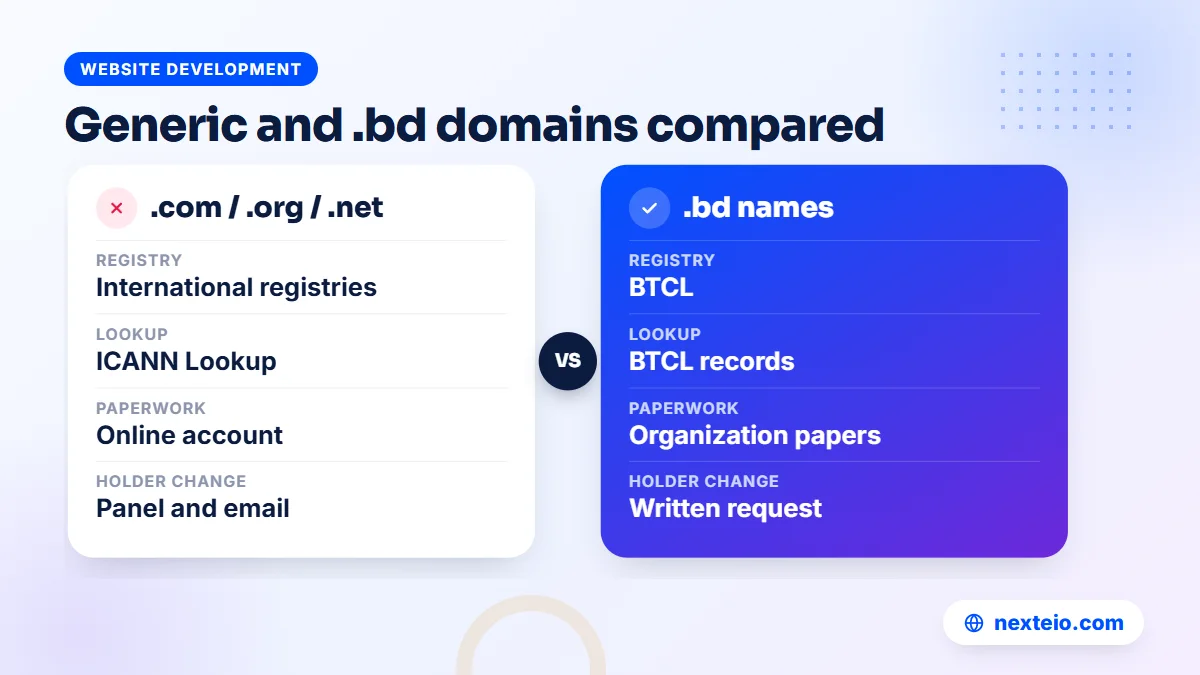
Many Bangladeshi organizations use a .com address, while others prefer .com.bd, .org.bd, .edu.bd or .gov.bd because it signals a local, registered body. Ownership works differently for each group, and the right steps depend on which one you have.
| Point | Generic (.com, .org, .net) | Bangladesh (.bd and its second levels) |
|---|---|---|
| Who runs the registry | International registries under ICANN rules | BTCL, under national rules |
| Where you buy | Any accredited registrar or its reseller | BTCL directly, or a local agent who applies for you |
| Public lookup | ICANN Lookup and the registrar's own tools | BTCL's own records, not the ICANN tool |
| Typical paperwork | An account and payment, usually online | An application with organization documents |
| Changing the holder | Done in the registrar panel with email approval | Usually a written request to BTCL with supporting papers |
With a .bd name, the paperwork is your friend. The original application should carry your organization's name and documents, such as a trade license, an institution's registration papers or an official letter. If an agent applied in their own name to save time, the fix is again a written process with BTCL rather than a click in a panel.
Keep a scanned copy of the application, the approval and every payment receipt in your office records. When staff change, these papers are often the only proof that the owner domain details belong to your institution. Schools and colleges in particular should file them with other official documents, not in a teacher's personal email.
Common Ways Organizations Lose Control of Their Domain
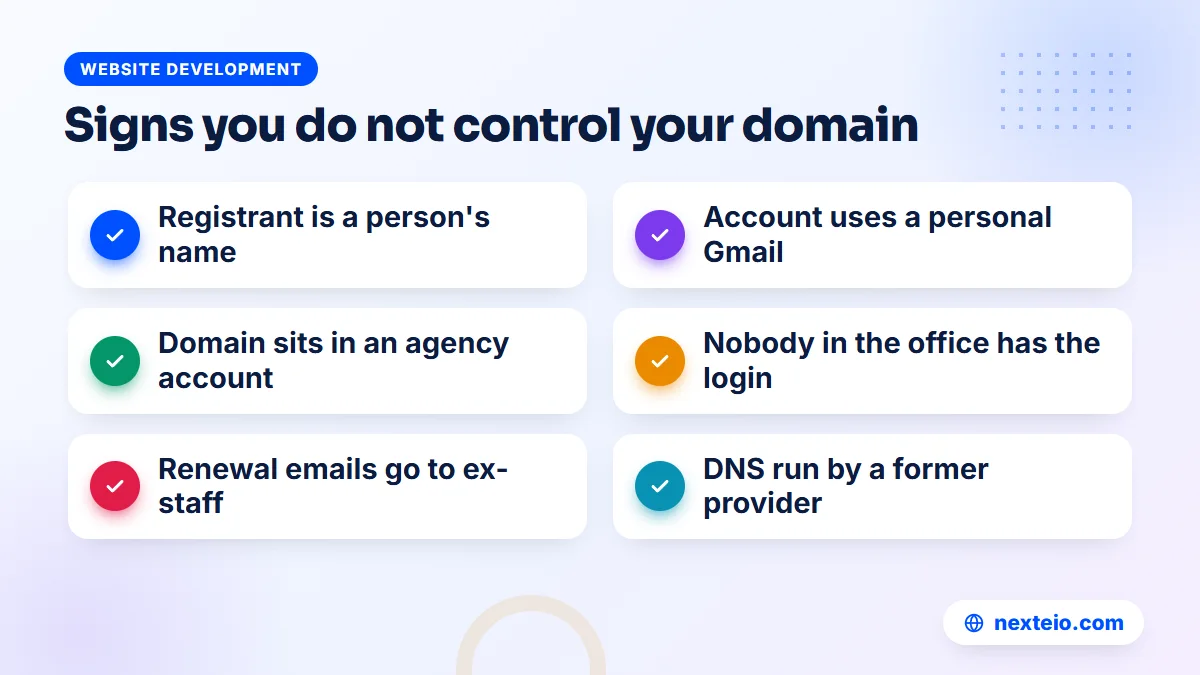
Very few domains are stolen in a dramatic way. Most are lost slowly through ordinary office habits. These patterns come up again and again in owner domain reviews.
The helpful developer. A freelancer registers the domain on his own account because it is faster. Years later he moves abroad or changes careers, and his phone number no longer works. The domain keeps renewing automatically on his card, or it does not.
The personal email. An IT officer opens the registrar account with his personal Gmail. When he resigns, the password reset emails go to him. Nobody else can log in, and he may not even remember the account exists.
The agency bundle. A web company sells a yearly package of domain, hosting and maintenance. The domain sits in the agency's reseller account. When you want to leave, the agency asks for a release fee, or simply stops replying.
The forgotten renewal. Renewal reminders go to an address nobody reads. The domain expires during Eid holidays, the website and email stop, and by the time anyone notices, the restore fee is far higher than the normal renewal.
The split control. The domain is in your name, but DNS is managed in a former agency's account. You own the name, yet someone else decides where it points.
Each of these starts with a reasonable shortcut. The fix is not to blame anyone but to bring every account under organization control, with records that survive staff changes. If you are also comparing who should build your next site, our buyer's checklist for web design companies includes questions about who registers the domain.
Related guides for organizations reviewing their website setup:
- How to build a professional business website that gets results
- WordPress or a custom website: which suits your organization
- Technical SEO basics every website owner should know
How to Move the Domain Into Your Organization's Name
Once your owner domain check shows the wrong holder, the goal is to make your organization the registrant and to hold the account yourself. There are two separate actions, and it helps to know which one you need.
Change of registrant
A change of registrant updates the legal holder while the domain stays with the same registrar. For generic domains this is done inside the registrar panel, and the current holder usually has to approve it by email. Under ICANN's Transfer Policy, a registrar may apply a transfer lock of up to 60 days after a change of registrant unless the holder opted out beforehand. That lock is a safety feature, so plan around it.
Transfer to a new registrar or account
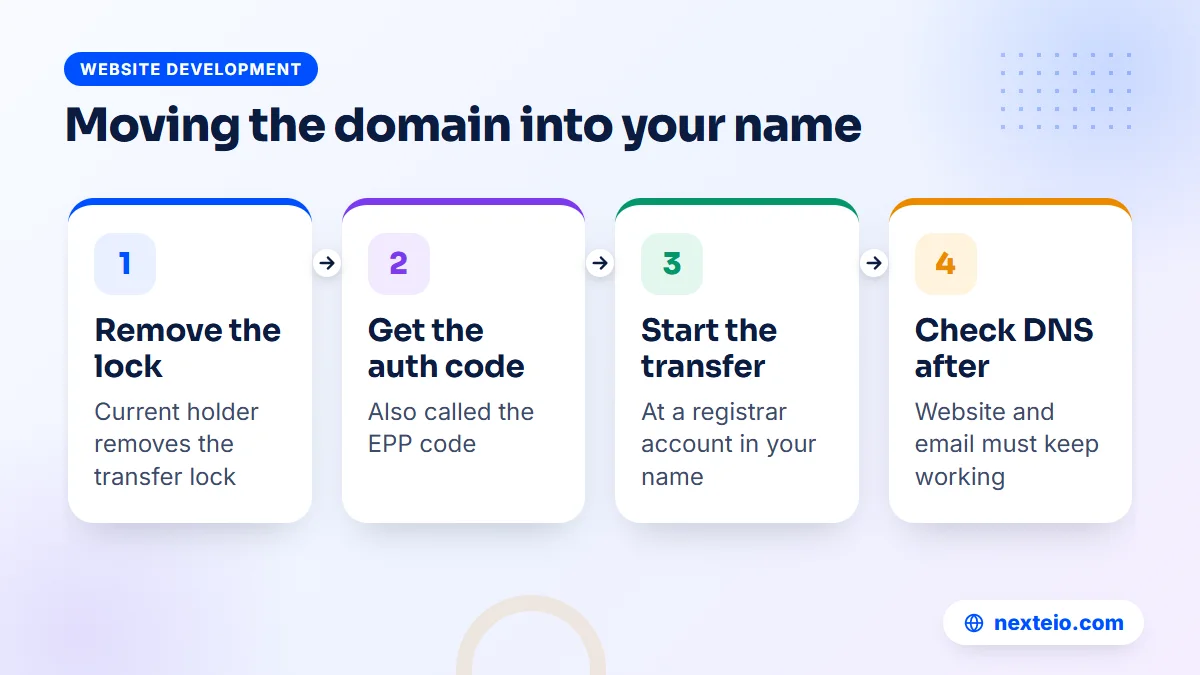
A transfer moves the domain to a different registrar, or from someone else's reseller account into your own. The usual steps are:
- Confirm the domain is more than 60 days past its registration or last transfer.
- Ask the current account holder to remove the transfer lock and send the authorization code, sometimes called the EPP code.
- Start the transfer at the new registrar using an account opened in your organization's name.
- Approve the confirmation email, which goes to the registrant or admin contact.
- Check that the name servers and DNS records stayed the same, so the website and email keep working.
Most transfers of generic domains also add a year to the expiry date, because the transfer fee includes a renewal. Do the transfer well before expiry, not in the final week, since a delay in approval could leave you exposed.
For .bd names, start with a formal letter to BTCL explaining the change, with your organization's documents and, if possible, a signed consent from the current holder. Expect it to take longer than a generic domain and keep copies of everything you submit.
DNS, Email and Hosting: Control Beyond the Name
Owning the domain is the first layer, and an owner domain check that stops at the registration misses half the picture. The second layer is DNS, the set of records that tells the internet where your website and email live. If DNS is managed in someone else's account, they can still break your site or redirect your email without touching the registration.
Make a simple map of the current setup. Write down where DNS is hosted (at the registrar, at the hosting company or at a separate service), who has that login, and which records exist. The most important ones are the address record for the website, usually an A record or a CNAME, and the MX records for email.
Email is where split control hurts most. If your organization uses Google Workspace or another mail provider, the domain is verified with that provider through a DNS record, as Google explains in its guide to verifying a domain for Google Workspace. Whoever controls DNS can remove that record or change the MX records, and every official mailbox stops receiving mail.
Hosting follows the same rule. The hosting account should be in your organization's name, with the main login on your side and a separate user for your developer. This should be standard practice for any WordPress website project, and it matters even more for custom systems built as Laravel web applications, where the server also holds your data.
Giving access is different from giving ownership. When Nexteio starts maintaining a website, for example, the client gives us access to the hosting server and the website, and both sides sign an agreement that sets out the work. The accounts themselves should still sit in the client's name.
Google Search Console deserves a mention too. If your site was verified there by a former agency, they still see your search data and can request changes. Add your organization's own Google account as an owner and remove users who no longer work with you. The Search Console settings page lists every owner and user, so the cleanup takes a few minutes.
Renewals, Expiry and What Happens When a Domain Lapses
An expired domain is the most common way control slips away, and the easiest to prevent. It can also undo every other owner domain fix you have made. The process after expiry varies by registrar and by domain type, but generic domains usually pass through a few stages.
- Just after expiry: the website and email may stop, but the registrant can usually still renew at the normal or a slightly higher price.
- Grace period: for a limited time, often a few weeks, renewal is still possible through the same registrar.
- Redemption period: many generic domains enter a period of about 30 days where restoring is possible only with a much higher fee.
- Release: after that, the domain can be deleted and registered by anyone, including someone who wants to resell it to you.
ICANN's page about renewing an expired domain describes the rules registrars must follow for generic names. For .bd domains, follow BTCL's notices and keep the renewal date in your own calendar.
Practical protection is simple. Renew for several years at a time if your budget allows, turn on auto-renewal with a card or account your organization controls, and send reminders to a shared office address. In organizations where payment needs approval from accounts or the head of the institution, start the request at least a month early.
The renewal date also belongs in your website maintenance routine. A provider that looks after your site should track domain and SSL expiry dates and warn you well ahead, even if the payment itself stays with your accounts team.
Recovering a Domain When the Owner Domain Records Are Wrong
Sometimes the person who holds the domain cannot be reached, or will not cooperate. Recovery is possible in many cases, but it is slower and needs evidence. Start with the friendliest route and escalate only when you have to.
- Ask politely, in writing. Many former developers simply forgot. A clear email asking them to change the registrant or release the domain often works.
- Go to the registrar or reseller. Explain the situation and provide proof: invoices, payment records, trade license, letterhead requests and the history of the website.
- Use the agreement. If you signed a contract with an agency, check what it says about ownership and handover. A written clause is strong support.
- Consider formal dispute routes. For generic domains, the Uniform Domain-Name Dispute-Resolution Policy covers cases involving trademarks and bad faith. This usually needs legal help and is a last resort.
In many cases, step one or two is enough.
While you work on recovery, avoid changing anything technical that could make things worse. Do not create a new domain and move everything in a hurry unless the old one is truly lost. A new address means new email accounts, lost search rankings and confused customers, and a guide on common SEO mistakes will tell you how costly a rushed domain change can be.
If recovery fails and a new domain is the only option, plan it properly. Register the new name in your organization's name from day one, set up redirects from any old address you can still reach, and update your Google Business Profile, letterheads and social pages together. Our SEO service can help keep as much search visibility as possible through a forced move.
A Domain Ownership Policy Your Office Can Actually Follow
Fixing the owner domain record once is not enough. Staff change, agencies change, and within a few years the same problem can return. A short written policy prevents that. It does not need to be long, and a single page approved by management is enough for most organizations.
A practical policy covers these points:
- All domains are registered in the organization's legal name, never a person's.
- Registrar, DNS and hosting accounts use an official role address, such as an IT or admin mailbox, not a personal one.
- At least two senior people can reach the login details, which are kept in a secure password manager or sealed record.
- Developers and agencies get their own limited logins, which are removed when the work ends.
- Renewal dates sit in the office calendar with reminders, and renewal payments have a standing budget line.
- Every year, someone runs a fresh owner domain check and confirms the records still match.
For larger groups with several companies, keep a single register that lists every domain, its owner company, the registrar and the renewal date. Corporate groups often find forgotten domains for old product lines or events, some of which still point to live pages that nobody updates.
Schools, madrasas and hospitals benefit from adding the website to their handover list when a principal, superintendent or IT officer changes. A short handover note with the domain, hosting and admin details avoids months of confusion. If a redesign is due anyway, a new website built from a blank page is a natural moment to reset every account and start the policy fresh.
Questions to Ask Your Web Developer or Agency
Before you sign with anyone to build or manage your website, ask about the owner domain details directly. A good provider will answer clearly and will not be offended. Vague answers are a warning.
- In whose name will the domain be registered, and can we see the record after purchase?
- Which email address will be used for the registrar and hosting accounts?
- Will we receive the main logins, or only a limited user?
- Who manages DNS, and can we have access to it?
- What happens to the domain, hosting and files if we stop working together?
- Is there any fee to release or transfer the domain?
- Will the agreement state that the organization owns the domain, content and design?
Put the answers in the contract. A clause that says the domain, hosting account and content belong to the client, and that the provider will hand over access within a set number of days on request, protects both sides. Our guides on hiring a WordPress developer and hiring a Laravel developer cover other questions worth asking.
If you sell online, ask these questions twice. An e-commerce website ties the domain to payment gateways, courier integrations and customer accounts, so losing control of it affects far more than a company profile would.
Planning a New Website With Ownership Built In
If you are about to build or rebuild your site, this is the cheapest moment to get ownership right. Before design work starts, settle who buys the domain, who holds hosting and which official email address opens the accounts. It takes an hour of planning and saves years of trouble.
A clean project checklist is short. The organization buys or keeps the domain in its own name and opens the hosting account, or approves one opened in its name. It shares a limited login with the developer and receives full admin access to the finished website. At handover, the developer should provide the access sheet, the latest backup and, for custom systems, the source code.
This approach fits both a simple company profile and a larger system. A custom-built company website is easier to move, maintain and improve when every account sits with the client. When you are ready to plan one, share your requirements on our project form and mention who currently holds your domain. If you want to see the kind of sites this applies to, our portfolio shows recent work, and you can read more about how Nexteio works with organizations.
Speed and search visibility also depend on a stable domain. A site that keeps the same address for years builds trust with search engines, which is one reason our article on website speed and SEO treats a steady technical base as the starting point for growth.
How Nexteio Can Help With Domain Ownership
We build websites for companies, schools, hospitals, NGOs and other organizations across Bangladesh. When you start a custom website design project with us, we talk through who should hold the domain, DNS and hosting before any design work begins, and we can set up new accounts in your organization's name with an official email address.
If your current site was built by someone else, we can help you run an owner domain check, read the records, and work out whether you need a change of registrant, a transfer or a written request to BTCL. We then help you bring DNS and hosting under your control in a planned order, so the website and email keep working, and we write the final setup into a simple access sheet your office keeps.
Our advice is always that the organization should own its domain, hosting and content, and that the agreement with any provider, including us, should say so in writing. If you are planning a new site or want to tidy up an old one, tell us about your project through our brief form or reach us on the contact page.
Keep reading: why a website gets traffic but no customers, or browse all our website development guides.
Frequently asked questions
How can I find out who owns a domain name?
For .com, .org, .net and other generic names, enter the domain in ICANN Lookup to see the registrar, dates and status. Personal details are often hidden for privacy, so the next step is to ask the registrar or reseller, or to log in to the account that holds it. For .bd names, the records sit with BTCL rather than the ICANN tool.
Our developer registered the domain in his own name. Is it still ours?
Legally, the registrar treats the registered holder as the owner, even if your organization paid for it. Ask the developer in writing to change the registrant to your organization or to transfer the domain to an account you control. Keep invoices and payment records in case you need to prove your claim to the registrar.
Does an owner domain change stop my website or email from working?
A change of registrant or a registrar transfer should not affect the website or email if the name servers and DNS records stay the same. Problems happen when DNS is moved at the same time without copying every record. Make a list of all current records before you start and check the site and mailboxes right after.
How long does it take to transfer a domain to a new registrar?
A generic domain transfer often completes within about a week once the transfer lock is removed and the authorization code is correct. It cannot usually happen within 60 days of registration or a previous transfer. Changes to .bd domains go through BTCL and depend on its paperwork process, so allow more time.
What happens if our domain expires?
The website and email linked to it can stop working soon after expiry. For a while you can usually still renew, then many generic domains enter a redemption period where restoring costs much more. If nobody acts, the name can be released and registered by someone else, so treat an expiry notice as urgent.
Should an organization choose .com or .com.bd?
Both work well. A .com is easy to buy and manage online and suits organizations with buyers or partners abroad. A .com.bd, .edu.bd or .org.bd name signals a registered Bangladeshi body but needs documents to register. Many organizations hold both and redirect one to the other.
How often should we run an owner domain check?
Once a year is a sensible routine for most organizations, and also whenever a key staff member leaves or you change web provider. The check takes less than an hour: confirm the registrant name, the account email, the expiry date and who manages DNS. Record the results with your other official documents.