Instagram Ads How To: Boosting Posts and Running Sponsored Ads
In this article 16 sections
- 1.Boosted Posts, Sponsored Ads and Paid Partnerships Explained
- 2.What You Need Before Your First Instagram Ad
- 3.Instagram Ads How To: Boost a Post From the App in 8 Steps
- 4.Choosing Which Post to Boost
- 5.Running Instagram Sponsored Ads in Ads Manager
- 6.Placements and Formats: Feed, Stories, Reels and Explore
- 7.Creative That Works in the Instagram Feed
- 8.Audience Settings for Businesses in Bangladesh
- 9.Instagram Ads How To Budget: A Test Plan in BDT
- 10.Working With Creators Through Paid Partnerships
- 11.Measuring Results Beyond Likes
- 12.Policy, Ad Review and Account Safety
- 13.Common Mistakes With IG Sponsored Ads
- 14.Instagram, Facebook or TikTok: Where to Put Your Money
- 15.How Nexteio Can Help With Instagram Ads
- 16.Frequently asked questions
Most people who search for an Instagram ads how to guide want a simple answer: which button do I press, how much do I spend, and will it bring customers? The buttons are the easy part. The harder part is choosing between a quick boost and a proper ad, picking the right post, and knowing which numbers show real sales rather than likes.
Instagram works differently from Facebook, even though both run on the same Meta ad system. People scroll faster, judge by the picture first and read captions only when the visual has already caught them. A boutique selling shalwar kameez, a cafe launching a new menu or a skincare page that sells through direct messages can all do well here, but only when the ad looks like it belongs in the feed.
This Instagram ads how to guide covers the full path for a business in Bangladesh: the difference between boosted posts, sponsored ads and paid partnerships, the setup you need first, step-by-step boosting from the app, building ads in Ads Manager, sizes and formats, audiences, budgets in BDT, working with creators and reading the results.
The steps reflect how the Instagram app and Meta Ads Manager worked at the time of writing. Meta moves buttons and renames options often, so if a label looks slightly different on your phone, look for the closest match.
Boosted Posts, Sponsored Ads and Paid Partnerships Explained
Three different things all get called "Instagram ads", and mixing them up leads to wasted money. Each one starts in a different place, offers different controls and suits a different job.
Boosting a post on Instagram
Boosting a post on Instagram means taking something already on your profile, such as a photo, carousel or Reel, and paying to show it to more people. You do it from the Instagram app in a few taps. Likes and comments from the boost stay on the original post, which helps the post look active to new visitors.
Instagram sponsored ads from Ads Manager
Instagram sponsored ads are built in Meta Ads Manager, the full ad tool. You get more goals, detailed placement choices, A/B tests, website conversion tracking and the option to create ads that never appear on your profile grid. This is where serious campaigns usually end up once a business is spending regularly.
Paid partnerships with creators
A paid partnership is content made with or by a creator who is paid or gifted something by your brand. Instagram shows a "Paid partnership with" label on these posts. With permission from the creator, you can also turn their post into an ad that shows both handles, which Meta calls a partnership ad.
When people see an Instagram post sponsored by a brand, they see a small "Sponsored" label under the account name. That label appears on boosted posts and Ads Manager ads alike, so the audience cannot tell which tool you used. The difference is in control and measurement, not in how the ad looks.
| Option | Where you create it | Best for | Main limit |
|---|---|---|---|
| Boosted post | Instagram app | Quick reach, profile visits, messages | Few settings, weak sales tracking |
| Ads Manager ad | Meta Ads Manager | Website sales, leads, testing | Takes longer to learn |
| Partnership ad | Ads Manager, with creator approval | Trust from a known face | Needs a creator deal first |
Most small businesses start with boosts and move to Ads Manager later.
What You Need Before Your First Instagram Ad
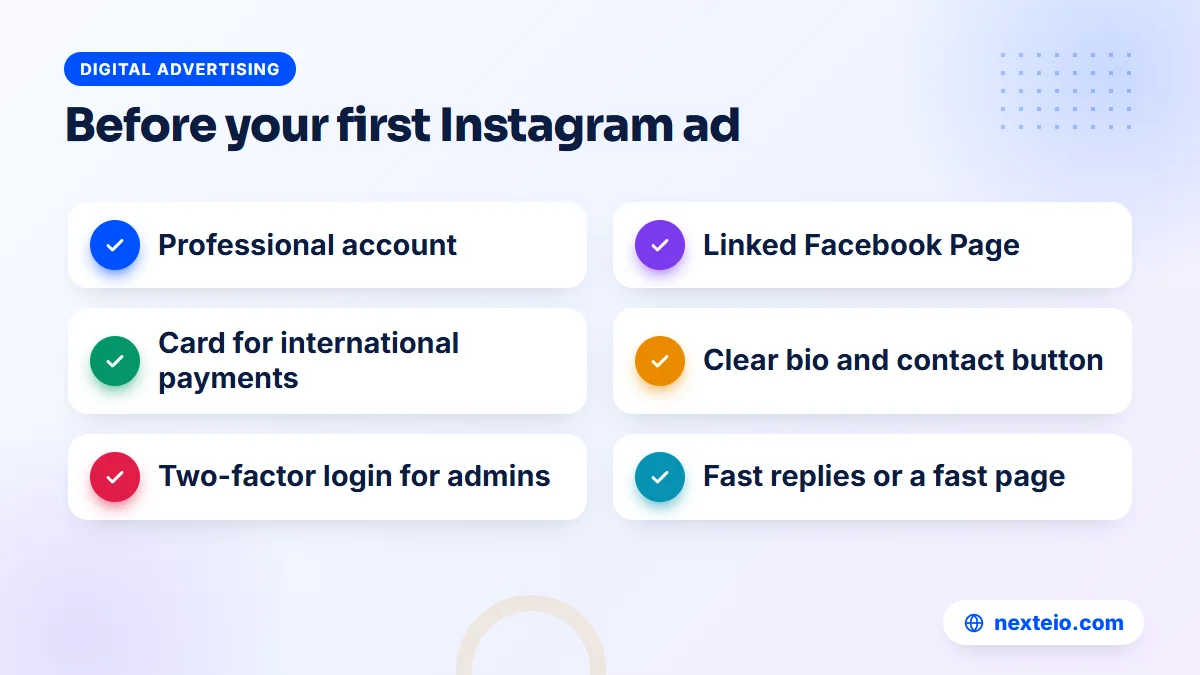
A boost can go live in five minutes, but a badly prepared account wastes the first week of spending. That is why every sensible Instagram ads how to checklist starts with the account, not the ad. Before you pay for anything, check that the basics are in place.
- A professional account. In Instagram settings, switch to a professional account and choose Business or Creator. Personal accounts cannot run ads.
- A linked Facebook Page. Link the account to your business Page through Accounts Center, so boosts and Ads Manager use one ad account and one payment method.
- A payment method that works. An international or dual-currency card from your bank, with enough limit for a month of ads.
- A complete profile. A clear profile photo, a bio that says what you sell and where you deliver, a contact button and a working link.
- Two-factor login. Turn it on for every admin, because hacked ad accounts are a common and painful problem.
Most of these take minutes to fix now and save hours later.
Then think about where buyers will land. If you sell through direct messages, someone must reply within minutes during the hours the ad runs. If you sell on a website, the product page must load fast on mobile data and accept the payment methods people use here, such as cash on delivery, bKash or Nagad. A shop built through our e-commerce website development work is set up for exactly that kind of buyer.
Instagram Ads How To: Boost a Post From the App in 8 Steps
This is the fastest way to get a post in front of new people. You need the Instagram app on your phone and a professional account. The flow below matches what most business accounts see.
- Open the post or Reel you want to promote and tap Boost under it.
- Choose a goal: more profile visits, more website visits or more messages.
- If you chose website visits, enter the page address and pick a button label such as Shop Now or Learn More.
- Choose an audience: Automatic, which finds people similar to your followers, or create your own.
- For your own audience, set locations, an age range and a few interests that match real buyers.
- Set a daily budget and the number of days. Instagram shows an estimated reach for your choice.
- Check the preview on Feed, Stories and Reels, and fix any text that gets cut off.
- Add or confirm the payment method and tap Boost post.
The boost then goes into Meta's ad review. It usually starts within a day, and often sooner.
That is the whole Instagram ads how to sequence for a boost. The settings you choose in steps 2, 4 and 6 matter far more than the order of the taps, so the next sections cover each of them in detail.
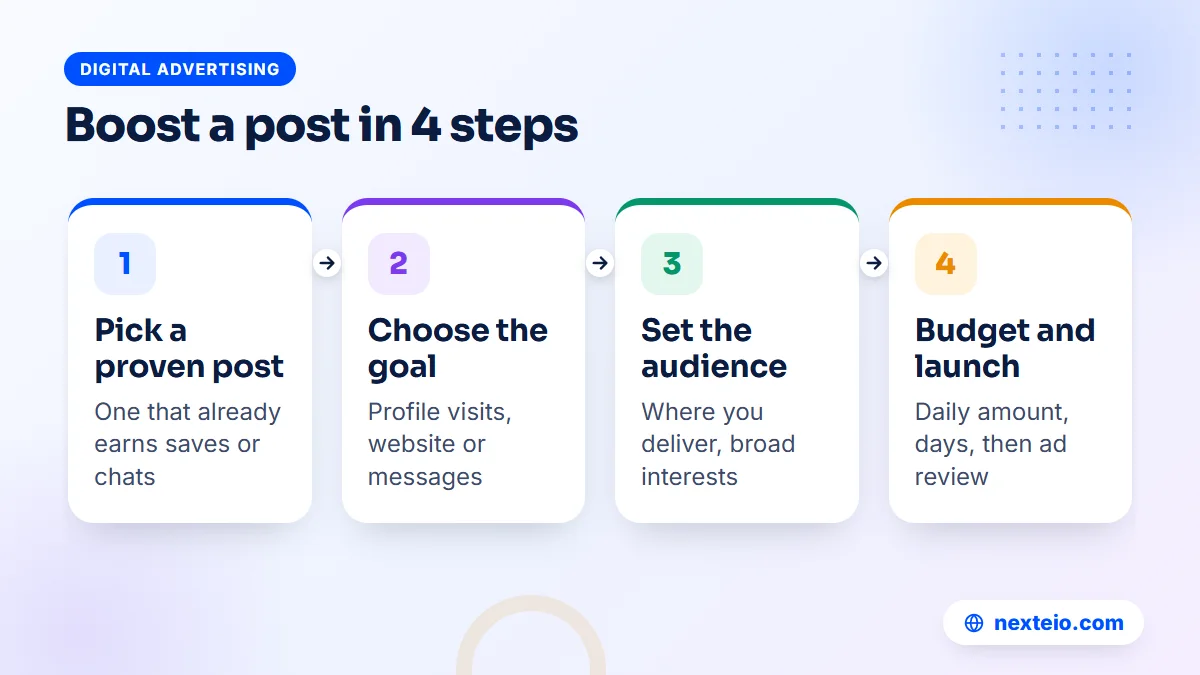
One tip for boosting posts on Instagram: decide your goal before you open the app. If the answer to "what should a buyer do next?" is "send us a message", choose messages. If it is "order from the product page", choose website visits. Profile visits suit new pages that need followers before they can sell.
Choosing Which Post to Boost
Paying to push a weak post only shows a weak post to more people. Look at your last twenty or thirty posts and find the ones that already earned saves, shares, comments or messages without any money behind them. Those posts have proven they can stop a scroll.
Posts that tend to work as ads
- A Reel showing the product in use, such as a fabric moving in light or a dish being plated.
- A carousel that answers buyer questions: sizes, colors, price and delivery time.
- A clear offer with a deadline, such as an Eid collection or an admission date.
- A short customer video, recorded with the customer's permission.
- A before-and-after of a service, where policy allows it and the result is honest.
Posts that usually waste money include greeting cards for special days, blurry group photos, memes that have nothing to do with the product and anything with long paragraphs of text on the image.
The music problem with Reels
Business accounts see a smaller music library than personal accounts, limited to tracks cleared for commercial use. A Reel that uses certain licensed songs may show no Boost button at all. The simple fix is to use original sound, a voice-over or audio from Meta's royalty-free collection when you plan to promote a Reel later.
Also check any tagged products, links in the caption and stickers. Some features that work on an organic Story or post cannot carry over into an ad, so a boost may be grayed out until you remove them.
Running Instagram Sponsored Ads in Ads Manager
Boosting is fine for reach and messages. When you need to know which ad produced which sale, test two images against each other or show different ads to people who already visited your website, you need Ads Manager, which is the second half of any Instagram ads how to plan. You can open it on a computer through Meta Business Suite or directly in a browser.
Ads Manager has three levels. The campaign holds the objective. The ad set holds the audience, budget, schedule and placements. The ad holds the image or video, the caption and the link. You can read how we plan and manage Meta ad campaigns for clients, and the steps below show the basic route.
- Create a campaign and choose an objective such as Traffic, Engagement, Leads or Sales.
- In the ad set, choose where conversions happen: website, messages, calls or an instant form.
- Set the location, age and any audience suggestions.
- Under placements, choose manual placements if you want Instagram only, then tick Feed, Stories, Reels and Explore.
- In the ad, pick your Instagram account as the identity.
- Either use an existing post or upload new media, write the caption and add the link and button.
- Check every placement preview, then publish.
An ad created with new media in Ads Manager does not appear on your profile grid. This is useful for testing many versions without filling your profile with near-identical posts.
Many people searching for ways to put sponsored ads in Instagram feeds only ever use the Boost button. That works until you need tracking. If sales happen on a website, set up the Meta Pixel and, ideally, the Conversions API before you spend on a Sales objective. Our beginner's guide to Meta Pixel and conversion tracking walks through both.
Placements and Formats: Feed, Stories, Reels and Explore
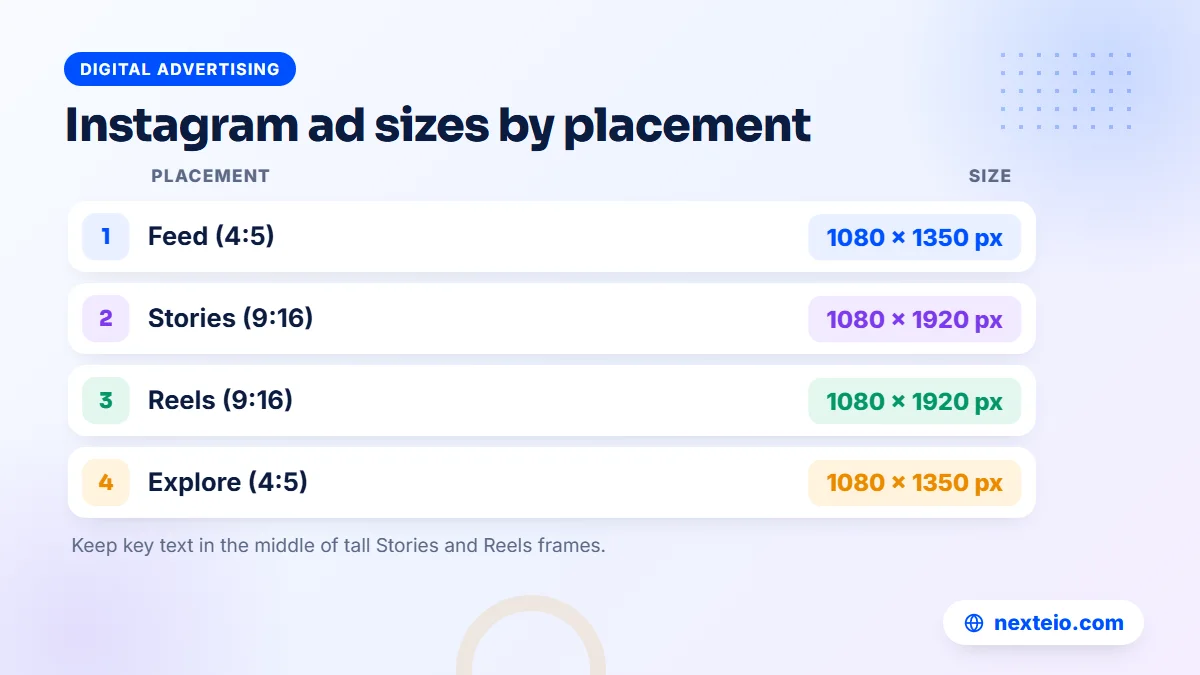
Instagram is several different screens, and an ad designed for one can look broken in another. A square image with small text works in the feed but leaves big empty bars in Stories. A tall video works in Reels but gets cropped in the feed. Plan your sizes before anyone shoots or designs anything.
| Placement | Shape that fits best | Suggested size | What works there |
|---|---|---|---|
| Feed | Vertical 4:5 or square 1:1 | 1080 x 1350 px | Clear product photos, carousels, short videos |
| Stories | Full-screen 9:16 | 1080 x 1920 px | Quick offers with a clear tap-through button |
| Reels | Full-screen 9:16 | 1080 x 1920 px | Short videos that feel native, with sound |
| Explore | Same as feed | 1080 x 1350 px | Strong visuals that interest new people |
Meta updates its recommended specs from time to time, so treat this as a working guide.
For Stories and Reels, keep important text and logos away from the top and bottom of the frame. The profile name sits at the top, and the caption, buttons and icons cover the bottom. A safe habit is to keep all key text inside the middle two-thirds of the screen.
Carousels deserve special attention for shops. You can show up to ten cards, each with its own image or video. A clothing seller can show one dress in four colors, or one card each for the front, back, fabric close-up and size chart. Carousels often hold attention longer because people swipe to see the next card.
Creative That Works in the Instagram Feed
On Instagram, the image or video is the ad. The caption only matters once the visual has stopped someone, and no Instagram ads how to setting can rescue a dull picture. That changes how you should brief a designer or a video editor.
The first second decides
Show the product or the result in the opening frame. Do not start with a logo animation, a slow pan across your shop or a greeting. If a skincare brand sells a serum, the first frame can be the serum on skin in daylight. If a restaurant launches a platter, the first frame is the platter, not the restaurant sign.
Design for the sound off
Many people scroll with the sound off, especially in offices, classrooms and on public transport. Add burned-in captions to any video with speech, and make sure the message still works with no audio at all. Our video ads editing service delivers cuts with captions and versions sized for Feed, Stories and Reels, which saves a lot of resizing later.
Write captions for a fast reader
Instagram shows only the first line or two of a feed caption before the "more" link. Put the most useful words there: the product, the price or offer, and the next step. Then add details below for people who tap. A mix of Bangla and English is normal for many audiences here, but stick to one language per line so it reads cleanly.
- Show the price, or at least "from BDT ...", if price is a common question in your inbox.
- Mention delivery coverage and cash on delivery if you offer it.
- Use your own photos and videos, not stock images.
- Keep text on images short; a headline and a price is usually enough.
- Make two or three versions so you can see which one works.
Real product shots and short phone videos often beat polished studio work on Instagram, because they look like normal posts. That said, they still need good light, a steady hand and a clean edit.
Related guides for planning your Instagram ads:
- Ten Meta ads tips for better results in Bangladesh
- How to create a landing page that turns ad clicks into enquiries
- What a good video ad edit includes and costs
Audience Settings for Businesses in Bangladesh
Audience settings decide who sees the ad, and the most common mistake is making the audience too narrow. Meta's delivery system needs room to find buyers. A home bakery that targets women aged 25 to 30 who like three specific pages has very little room to work with.
Location first
Start with where you can actually deliver or serve. A cafe or salon should target a radius around the shop. An online store with courier delivery across the country can target all of Bangladesh, but may want to exclude areas where its courier partner does not deliver or where cash on delivery has caused many returns. A coaching center should target the areas its students travel from, not the whole country.
Age, gender and interests
Only set age or gender when they are real limits. A brand of men's panjabis may still sell to women buying gifts. Interests can help at the start, but keep them broad, and test the Automatic or Advantage+ audience option against your own audience. For a deeper look at choosing and testing audiences, see our guide to Meta ads targeting in Bangladesh.
People who already know you
Your warmest audience is people who have already engaged with your Instagram account. In Ads Manager you can build custom audiences from people who visited your profile, saved a post, sent a message or watched a Reel. Ads shown to these people, such as a reminder of an offer or a review from a customer, usually cost less per result than ads shown to strangers.
If you have a website with the Pixel installed, you can also reach people who viewed a product but did not order. Keep these audiences fresh by using recent time windows, such as the last 14 or 30 days.
Instagram Ads How To Budget: A Test Plan in BDT
The Instagram ads how to question we hear most from shop owners is about money: how much is enough? There is no fixed number, because cost depends on your product, audience, season and creative. What you can control is how you test, so that a small budget gives you a clear answer.
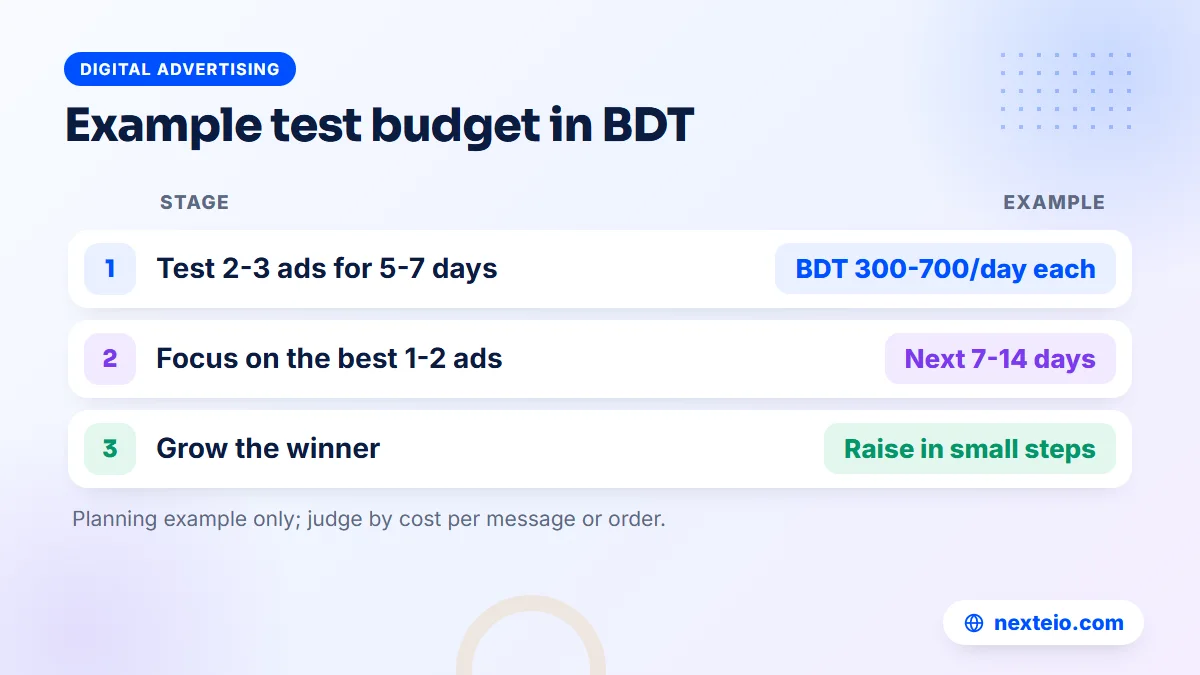
A practical approach is to treat the first two weeks as a test. Pick two or three ads, give each enough budget to collect real results, and judge them on cost per message, cost per website visit or cost per order rather than likes.
| Stage | Example daily budget | Length | What you learn |
|---|---|---|---|
| Test | BDT 300 to 700 per ad | 5 to 7 days | Which creative and audience bring results |
| Focus | Shift money to the best one or two ads | 7 to 14 days | Whether the cost per result holds steady |
| Grow | Raise the budget in small steps | Ongoing | How far you can scale before costs rise |
These are planning examples, not a promise of results.
Here is a worked example. A skincare page sells a product at BDT 1,200 and earns about BDT 400 after product cost and delivery. If it pays BDT 80 per message and one in four conversations becomes an order, each order costs about BDT 320 in ads. That leaves a thin profit. Improving the reply speed so one in three chats converts brings the ad cost per order down to about BDT 240, which changes the picture without touching the ad at all.
Do the same sum for your own business before you scale. Knowing the most you can pay for one order is more useful than any general rule about budgets, and it is the first figure we work out when a client asks us to run their Instagram ads.
Paying for ads from Bangladesh
Meta is a foreign merchant, so paying for ads from Bangladesh usually needs a card enabled for international payments, such as a dual-currency card. Banks issue these under the foreign exchange rules set by Bangladesh Bank, and each bank sets its own limits, fees and conversion rate. Check your bank's annual limit for online international payments before you plan a big season, such as Eid.
Some businesses pay through an agency or reseller. If you do, make sure the ad account and the Instagram account stay in your business's name and that you have admin access. Losing access to an ad account with your history and audiences is a costly setback.
Working With Creators Through Paid Partnerships
Instagram paid posts by creators can reach people who scroll past normal Instagram sponsored posts from brands. A food reviewer trying your menu or a fashion creator styling your saree carries more trust than a product photo alone. But it only works when the creator's followers match your buyers.
Before you agree on a fee, ask the creator for screenshots of their audience insights: the share of followers in Bangladesh, the age range and the typical reach of recent posts. A creator with a large following mostly outside the country may not help a shop that only delivers locally.
Meta requires creators to disclose paid or gifted content with the branded content tools, which add the "Paid partnership with" label. You should expect the same, and put it in your written agreement along with:
- What the creator will post, how many times and on which dates.
- Who approves the content before it goes live.
- Whether you can run the post as a partnership ad, and for how long.
- The fee, any free products and when payment is made.
- What happens if the post is deleted early.
Partnership ads let you put money behind the creator's post through Ads Manager. Both the creator's handle and yours appear on the ad. This often works better than boosting the creator's post on their account, because you keep control of the budget, the audience and the tracking.
Measuring Results Beyond Likes
Reach and likes are easy to buy and tell you little about sales. Choose one main number for each goal and judge every ad by it.
| Goal | Main number | Also watch |
|---|---|---|
| Messages | Cost per conversation started | How many chats become orders |
| Website visits | Cost per landing page view | Time on page, add to cart |
| Website sales | Cost per purchase | Return on ad spend |
| Profile visits | Cost per profile visit | New followers, later messages |
Pick one row and stay with it for the whole test.
For businesses that sell through direct messages, Instagram cannot see what happens inside the chat. Keep a simple sheet where whoever replies to messages notes the date, the ad or post the customer mentioned, and whether the chat became an order. After two weeks, this sheet tells you more than any dashboard.
If you send people to a website, add campaign tags to each ad's link so you can see the visits and sales in Google Analytics too. Google's guide to collecting campaign data with custom URLs explains the tags, and its guide to setting up Analytics covers the first install. Also check how fast the landing page loads; Google's explanation of Largest Contentful Paint shows what slows the main image and text on a phone.
A good provider of Facebook and Instagram ad management should report these numbers in plain words: what you spent, what came back and what will change next week.
Policy, Ad Review and Account Safety
Every ad, including a simple boost, goes through Meta's review. Most are approved quickly. When an ad is rejected, the notice usually names the policy, and you can edit the ad or request another review.
Common reasons for rejection on Instagram include:
- Text that points at personal traits, such as asking viewers whether they are overweight or in debt.
- Exaggerated health, weight-loss or skin-whitening claims.
- Products that are banned or restricted, such as some supplements and medicines.
- Landing pages that do not match the ad, or that do not load.
- Using a brand name or logo you do not own.
Clinics, education providers and finance businesses need extra care with wording.
Account safety matters as much as ad approval. Use two-factor login for every admin, never share the main password with a freelancer, and add helpers as partners or with limited roles in Meta Business Suite instead. If an ad account is disabled, appeal through the official Business Support options only. People who message you offering to "recover" a disabled account for a fee are almost always scammers.
Common Mistakes With IG Sponsored Ads
Most failed IG sponsored ads fail for ordinary reasons that are easy to fix once you can see them. You do not need an advanced Instagram ads how to course to spot them. These are the ones we see most often when a business asks us to look at its account.
Boosting for the wrong goal. A shop that sells through messages chooses profile visits because it sounds useful. It gets cheap visits and almost no chats. Match the goal to the next step you want.
Changing everything every day. Ads need a few days to settle. Editing the budget, audience and creative every morning resets that process and makes the results impossible to read.
One ad, one shot. Running a single version tells you nothing about why it worked or failed. Two or three versions with a different first frame or headline give you something to compare.
Slow replies. An ad that brings fifty messages is wasted if they wait six hours for an answer. Plan staff time for the hours the ad runs, and set saved replies for common questions such as price, size and delivery charge.
Ignoring the profile. People tap through to your profile before they buy. Old posts, no highlights for reviews or delivery information, and a bio with no clear offer all cost sales.
Copying Facebook creative directly. A horizontal Facebook video with small text rarely works in Reels. Resize and re-cut for Instagram's tall screens. If your Facebook ads are also struggling, our checklist on why Meta ads stop performing covers both platforms.
Instagram, Facebook or TikTok: Where to Put Your Money
Because Instagram and Facebook share one ad system, you rarely have to choose only one. In Ads Manager, you can let Meta place ads on both and see results for each placement in the breakdown. Many businesses find that Facebook brings more messages at a lower cost, while Instagram brings younger buyers and works better for visual products such as fashion, food, beauty and home decor.
Run Instagram-only campaigns when your product is highly visual, your buyers are younger and more brand-aware, or your Instagram account already has a strong following. Run combined placements when you want the lowest cost per result and do not mind where it comes from.
TikTok is a separate platform with its own ad tools. If your best content is short entertaining video, our TikTok ads service may suit you alongside Instagram, and our guide on what to expect from TikTok ads in Bangladesh explains the differences. For a wider view across search and social, see how our ads campaign service splits one budget across several platforms, or read the full set of digital advertising guides.
How Nexteio Can Help With Instagram Ads
If you would rather not work through every Instagram ads how to step yourself, we set up and run Instagram ads as part of our Facebook and Instagram ads service for businesses across Bangladesh. We start by understanding what you sell, how orders reach you and how fast your team can reply. Then we check your Instagram profile, Facebook Page link, ad account, payment method and admin access, and fix the gaps before any money is spent.
From there, we plan the campaign structure, choose between boosts and Ads Manager, write captions, and brief or edit the photos and videos into sizes for Feed, Stories and Reels. For website sales, we set up the Pixel and conversion events and test them. During the campaign, we watch cost per message or cost per order, move budget to the ads that work, and explain the results in plain language.
The ad account, the Instagram account and the data stay in your business's name. You can see examples of our work in our portfolio, learn more about Nexteio, or tell us about your product and budget and we will suggest a starting plan. If you prefer to talk first, our contact page has the details, or send a project brief whenever you are ready.
Keep reading: what a Facebook ads service should include for your money and whether Google Ads or Meta ads suit your business better.
Frequently asked questions
Can I run Instagram ads without a Facebook Page?
Instagram may let a professional account boost posts without a linked Page, but linking one is still the better setup. With the Instagram account and the Facebook Page connected through Accounts Center, both use one ad account, one payment method and one set of audiences, and you can open the same ads in Meta Ads Manager when you need more control.
Why is the Boost button missing or grayed out on my post?
The usual causes are a personal account instead of a professional one, licensed music in a Reel, product tags or stickers that ads cannot carry, or a problem with the ad account or payment method. Switch to a professional account, replace the audio with original or royalty-free sound, and check Meta Business Suite for account warnings.
What is the minimum budget for Instagram ads in Bangladesh?
The app shows a minimum daily amount that depends on your account currency and goal, and it is low enough for a small test. A more useful question is how much you need to learn something. Giving two or three ads a few hundred taka a day each for about a week usually shows which one is worth more money.
Do boosted posts on Instagram also show on Facebook?
A boost started from the Instagram app normally runs on Instagram placements. Ads built in Ads Manager can run on Instagram only, Facebook only or both, depending on the placements you choose. Check the placement breakdown in the results to see where your messages or orders actually came from.
Is it better to boost a Reel or a photo post?
Neither wins every time. Reels often reach more new people because short video fits how Instagram is used, while a carousel can work better for products where buyers want to see colors, sizes and prices. Boost whichever post already performed best without money, and try the other format as a second test.
How long does Instagram take to approve an ad?
Most ads go through review within a day, and many are approved much faster. Review can take longer for new ad accounts, sensitive categories such as health or finance, or ads that were edited many times. If an ad is rejected, the notice names the policy, and you can edit the ad or request another review.
Should I pay an influencer or run ads myself?
They do different jobs, and many brands use both. Your own ads give you full control of budget, audience and tracking, while a creator brings trust with an audience you may not reach otherwise. A partnership ad combines the two by running the creator's post through your ad account, with both names shown.