Google AdSense for Blogs: What You Need Before You Apply

In this article 18 sections
- 1.How Google AdSense for Blogs Works
- 2.Basic Eligibility: Age, Ownership and Site Access
- 3.Content Google Expects Before It Approves a Blog
- 4.Pages Every Blog Needs Before Applying
- 5.Privacy Policy, Cookies and User Consent
- 6.Policy Mistakes That Get Blogs Rejected or Banned
- 7.Do You Need Traffic Before Applying
- 8.Technical Setup: Domain, HTTPS, Speed and Mobile
- 9.Google AdSense for Blogs on Blogger vs WordPress
- 10.A 12-Point Checklist for Google AdSense for Blogs
- 11.What Happens After You Apply
- 12.After Approval: Placing Ads Without Hurting the Blog
- 13.Getting Paid in Bangladesh: PIN, Tax Form and Bank Transfer
- 14.What a Blog Can Realistically Earn
- 15.Should a Business or School Blog Run AdSense
- 16.A 30-Day Plan to Get a Blog Ready
- 17.How Nexteio Can Help With AdSense for Your Blog
- 18.Frequently asked questions
Google AdSense for blogs lets a blog owner show Google ads on their posts and earn a share of what advertisers pay. You do not sell ad space yourself or chase sponsors. Google finds the advertisers, picks an ad for each visitor and pays you once your balance reaches the payment threshold.
The hard part is getting approved. New bloggers in Bangladesh often apply with a handful of posts, a borrowed theme and no privacy policy, and they receive a short rejection email. Many apply again a few days later with almost nothing changed and get the same answer.
Approval is not a lottery, and nobody can buy it for you. Google's reviewers and automated systems look for a real site with original content, clear ownership and nothing that breaks its policies. When those pieces are in place, the review usually goes well.
This guide covers what Google AdSense for blogs requires before you apply: the eligibility basics, content depth, required pages, policy traps, setup on Blogger and WordPress, what each rejection message usually means, and how to place ads and get paid after approval.
How Google AdSense for Blogs Works
AdSense is an ad network run by Google. Advertisers create campaigns in Google Ads and bid to appear on websites that match their audience. When you join AdSense, your blog becomes one of those websites. A small piece of code on your pages lets Google choose an ad for each visitor and show it in the spaces you allow.
You earn mostly when visitors click ads, and on some ads when they are viewed. Google keeps a share and passes the rest to you. The amount per click varies widely by topic and by where your readers live, so two blogs with similar traffic can earn very different sums.
Three groups have to stay satisfied for this system to work:
- Advertisers want their ads next to real content read by real people, not on empty pages or bot traffic.
- Readers want to find what they came for without ads covering the text.
- Google wants both groups to keep trusting the network, so it reviews every site and keeps checking after approval.
Every rule in the review follows from those three interests. Once you see that, most of the rules stop feeling random.
The review looks at your site as a whole rather than at one post. A single excellent article on an otherwise thin blog will not carry the application, and a single copied post can hold back an otherwise good blog.
Basic Eligibility: Age, Ownership and Site Access
Before you think about content, check the basics on Google's AdSense eligibility page. They sound obvious, but a surprising number of failed applications start here.
- Age: the account holder must be at least 18. A younger blogger needs an adult, usually a parent, to hold the account and receive the payments.
- One account per person: Google allows one AdSense account per payee. If you opened one years ago for a YouTube channel, add the blog to that account instead of creating another.
- Ownership: you must own the site or have the right to place ads on it. You cannot monetize a client's blog in your own name without their agreement.
- Code access: you need to add Google's code to the head section of your pages, or use a platform with a built-in AdSense link such as Blogger.
Each of these takes only minutes to check.
The last point catches people who use free hosted builders. If the platform does not let you edit the HTML or install a plugin, you cannot add the AdSense code, and the site cannot be reviewed.
A self-hosted WordPress site, a Blogger blog or a custom-built site on your own domain avoids that problem. All three give you the access Google needs.
Personal blog or organization blog
Decide early whose name the account will carry. A personal blog is simple: the account is in your name and payments go to your own bank account. If the blog belongs to a company, school or NGO, choose a business account in the organization's name so the income lands in the organization's bank account.
Changing the payee name later is difficult, so settle this before you apply. An office manager who opens AdSense in a personal name for the company blog creates a real problem on the day they resign. If you are unsure which setup fits, our AdSense support team can talk it through with you before anything is submitted.
Content Google Expects Before It Approves a Blog
Content is where most applications for Google AdSense for blogs succeed or fail. Google's guidance on helpful, people-first content was written for search, but it describes the same qualities AdSense reviewers look for: original information, real experience and pages written for readers rather than for ads.
The table below shows the difference in practice. Both posts could carry exactly the same title.
| Area | Weak post (often rejected) | Strong post (helps approval) |
|---|---|---|
| Source | Rewritten from other blogs or news portals | Your own knowledge, tests, photos or local experience |
| Depth | 300 words that repeat the title | Answers the question fully, with steps or examples |
| Usefulness | Could appear on any site | Includes details only someone who did it would know |
| Format | One long block of text | Headings, short paragraphs, lists and images you own |
| Accuracy | Old prices, wrong facts, no dates | Checked facts, updated when things change |
Think of two recipe blogs. One copies recipes from cookbooks and other websites. The other shows the writer's own photos, explains which spices are easy to find in a local bazaar and notes what went wrong the first time. Only the second gives a reviewer a reason to approve it.
How many posts is enough
Google does not publish a minimum number of posts. In our experience, a blog with roughly 20 to 30 solid posts, each answering a clear question, gives reviewers enough to judge. Ten long, original guides still beat fifty short ones, so treat any number as a rough guide rather than a target.
Keep the posts within a few connected topics instead of writing one post each on twenty unrelated subjects. A blog about rooftop gardening, with posts on soil, pots, summer watering and common pests, reads as a real site with a purpose.
Bangla, English or both
Write in the language your readers search in. AdSense only serves ads on pages written mainly in a supported language, so check the supported languages list in the AdSense Help Center before you build a Bangla blog around ad income. If you publish in both languages, keep each post in one language and avoid machine-translated copies of the same article.
Writing style matters as much as language. Short paragraphs, clear headings and plain words keep readers on the page longer. Our guide to writing SEO-friendly content people actually read explains how to structure a post so it works for both readers and search engines.
Pages Every Blog Needs Before Applying
Reviewers look for signs that a real person or organization stands behind the blog. A few standard pages provide those signs, and writing them takes an afternoon.
- About page: who writes the blog, why, and what experience they bring. A real name and photo help.
- Contact page: an email address or a form that works. Send a test message yourself.
- Privacy policy: what data the site collects, and the fact that third parties, including Google, use cookies to serve ads.
- Disclaimer: useful for health, finance or legal topics, so readers know the content is general information.
- Clear menu: categories that hold posts, a working search box and no links to empty pages.
Before you apply, finish or delete every "coming soon" page, empty category and sample post that came with the theme.
Structure matters as much as the pages themselves. Each post should link to a few related posts, and each category should hold more than one article. Our guide to internal linking for SEO explains how to connect posts so readers and Google can move through the blog easily.
Design counts too, in a simple way. A reviewer who lands on a cluttered theme full of widgets, broken sliders and demo text will assume the blog is unfinished. If the theme is the problem, a clean Blogger website setup with a light mobile theme and your own domain often fixes more than new posts would.
Privacy Policy, Cookies and User Consent
AdSense requires every site that shows its ads to publish a privacy policy. The AdSense Program policies describe what it must cover, and the core points fit in a few plain sentences:
- Third-party vendors, including Google, use cookies to serve ads based on a visitor's earlier visits to your site or other sites.
- Google's advertising cookies let it and its partners serve ads based on those visits.
- Visitors can opt out of personalized advertising through Google's Ads Settings.
- Any other data the blog collects, such as comment names or newsletter emails, and how you use it.
Write the policy for your own blog instead of copying another site's page word for word. A generator tool can give you a first draft, but read it and remove anything that does not apply.
If your blog gets visitors from the European Economic Area, the UK or Switzerland, Google also requires a consent message from a Google-certified consent management platform before personalized ads are shown to them. AdSense includes a free option for this under Privacy and messaging. A blog with mostly local readers will see few such visitors, but turning it on early avoids trouble later.
Policy Mistakes That Get Blogs Rejected or Banned
Some problems lead to a rejection you can fix. Others lead to a disabled account, which is far harder to recover. These are the mistakes most common on new blogs in Bangladesh:
- Copied content: job circulars and news lifted from newspapers, song lyrics, book chapters or other bloggers' posts.
- Pirated downloads: movie links, cracked software, modded APK files and paid courses shared for free.
- Restricted topics: adult content, gambling, drugs, weapons, hacking guides and shocking images.
- Misleading content: fake result lists, fake giveaways or "earn money fast" schemes.
- Bought traffic: traffic exchanges, auto-surf sites or paid bot visits.
- Invalid clicks: clicking your own ads, or asking friends and Facebook groups to click them.
Invalid clicks deserve a warning of their own. Google's systems look for patterns such as repeated clicks from the same people, and the usual result is deducted earnings or a closed account. Never click your own ads, even to check that they work.
Old content counts too. A blog that once shared download links in 2021 posts still carries that risk today, even if the newer posts are clean. Go through the archive, the comments and any pages that third-party plugins created. Read Google's Search spam policies as well, because a blog built on scraped pages or hidden keywords will struggle in search as much as in AdSense.
If you are not sure whether a topic is allowed, ask before you publish rather than after a rejection. Reviewing these risks is a regular part of our AdSense approval help for bloggers.
Do You Need Traffic Before Applying
Google does not publish a minimum traffic figure for AdSense, and new blogs with modest traffic do get approved. Traffic still matters for two reasons. A blog with steady visitors from search looks like a living site, and without visitors the ads earn nothing even after approval.
The traffic that counts is real readers who arrive on their own: from Google search, from a Facebook page you run, or from people who bookmark the blog. Search traffic is the most valuable for most blogs because it keeps coming long after a post is published. Our article on how long SEO takes gives a realistic timeline for a new site.
Set up Google Search Console before you apply. It shows whether Google has indexed your posts, which searches bring visitors and any errors that keep pages out of results. If most posts are not indexed, fix that first, because the cause is often the same thin or duplicate content that leads to an AdSense rejection.
For a blog that wants faster search growth, our SEO service fixes the technical and structure problems that keep posts from ranking.
Related guides for blog owners preparing to apply:
- Common SEO mistakes that hurt websites and how to fix them
- Simple SEO tips for small websites in Bangladesh
- How faster pages help you rank and keep readers
Each one covers a part of blog quality that reviewers notice.
Technical Setup: Domain, HTTPS, Speed and Mobile
Reviewers and readers both judge the blog by how it behaves on a phone. Most visitors in Bangladesh read on mobile data, so a heavy theme that takes ten seconds to load loses people before the first ad ever appears.
- Domain: a custom domain looks more permanent than a free subdomain. A blogspot.com blog can still be approved, but your own .com, usually about BDT 1,500-2,500 a year, is easier to brand and keep.
- HTTPS: the padlock should show on every page. Blogger provides it free, and most WordPress hosts offer a free certificate.
- Speed: compress images, remove unused widgets and avoid heavy sliders and pop-ups.
- Mobile layout: text readable without zooming, buttons easy to tap and no sideways scrolling.
- Uptime: cheap hosting that goes down often can lead to a "site down or unavailable" rejection.
Speed deserves extra effort because ads add weight to every page.
Check the exact address you submit, too. If your blog redirects from the bare domain to the www version, or from HTTP to HTTPS, make sure the redirect works without loops. A reviewer who hits an error page will simply mark the site as unavailable.
Google AdSense for Blogs on Blogger vs WordPress
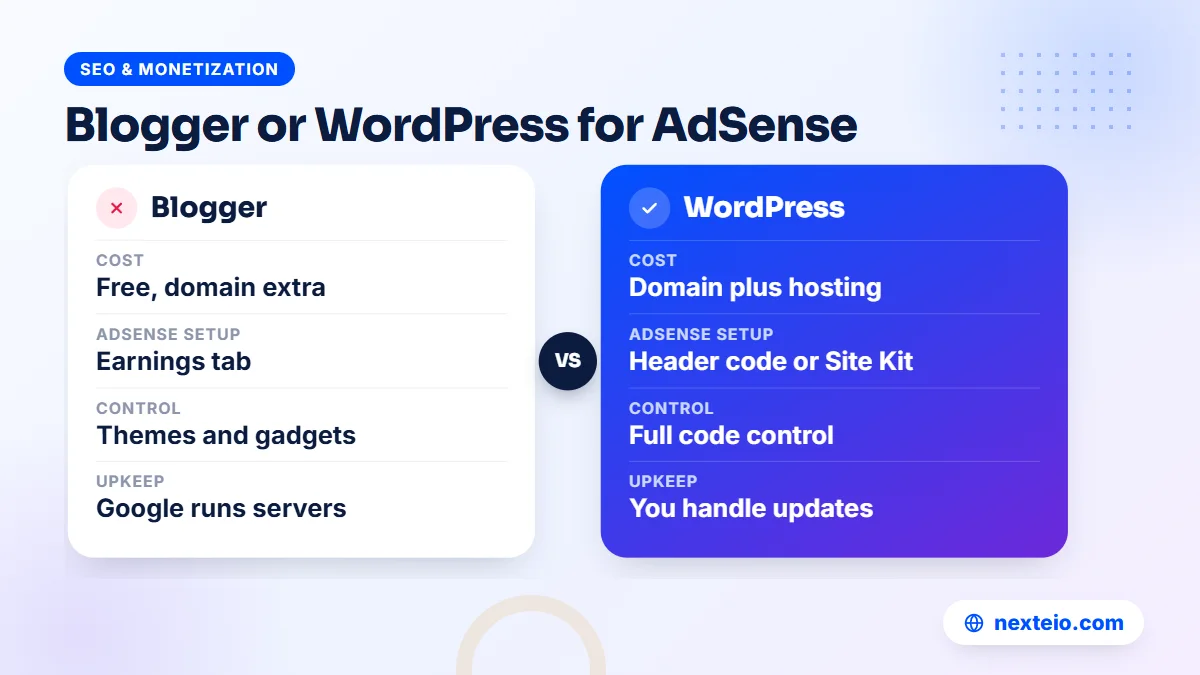
Most bloggers in Bangladesh start on one of two platforms. Both work well with AdSense, and the right choice depends on how much control you want and how much setup you can handle.
| Point | Blogger | Self-hosted WordPress |
|---|---|---|
| Cost | Free platform and hosting; you pay only for a custom domain | Shared hosting plus a domain; hosting is usually about BDT 2,000-8,000 a year |
| AdSense setup | Built-in Earnings section in the dashboard | Code in the theme header, or Google's Site Kit plugin |
| Control | Limited to Blogger themes and gadgets | Full control over themes, plugins and code |
| Upkeep | Google runs the servers and security | You or your developer handle updates, backups and security |
| Best for | Personal blogs and small publishers starting out | Blogs that plan to grow or add shops and courses |
Neither platform gets an easier review. Google judges the content and the site, not the software behind it.
Applying from Blogger
- Open the Blogger dashboard and select the blog.
- Go to Earnings and follow the prompt to sign up for AdSense with the same Google account.
- Enter the account type, payee name and address exactly as they appear on your bank and ID documents.
- Wait for the review. Blogger places the AdSense code on the blog for you.
Most Blogger applications need nothing more than that.
Applying from WordPress
- Sign in to AdSense and add your site's address.
- Copy the AdSense code and add it to the head section through the theme settings, a header plugin or Site Kit.
- Return to AdSense, confirm the code is in place and request the review.
- Leave the code on the site until the review finishes, even if it takes a few weeks.
If you are not comfortable editing theme files, ask a developer, because a mistake in the header can break the whole site. Our WordPress website team can add the code safely or build a light blog theme with clean ad spaces.
A 12-Point Checklist for Google AdSense for Blogs
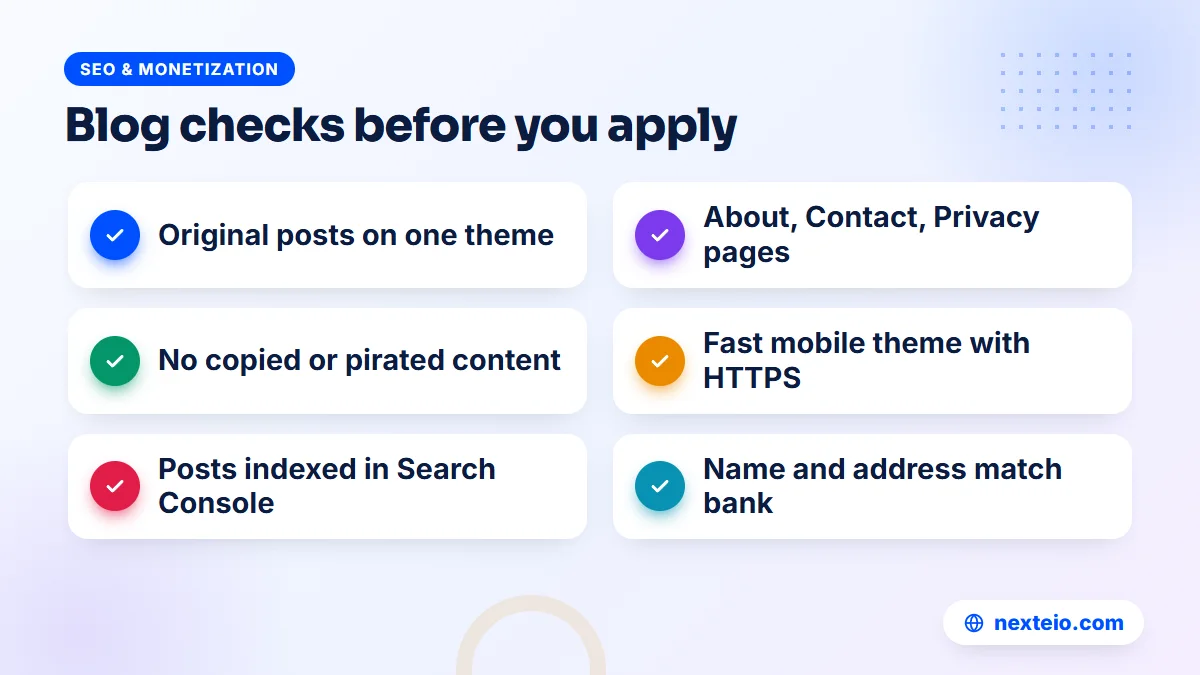
Run through this list the day before you apply. Each item is a common reason for rejection, and every one of them is within your control.
- Every post is original and written for readers.
- The blog has around 20 or more solid posts on connected topics.
- About, Contact and Privacy Policy pages are live and linked in the menu or footer.
- No empty categories, sample posts or "coming soon" pages remain.
- Images are your own or properly licensed, not copied from search results.
- Every menu item and internal link opens a real page.
- Pages load quickly on a phone using mobile data.
- HTTPS works on every page without warnings.
- Search Console is set up and most posts are indexed.
- No restricted content or pirated links exist anywhere, including old posts and comments.
- The account name and address match your bank and ID details.
- You can add code to the head section, or you are applying through Blogger.
If any answer is no, fix it first. A careful first application usually saves weeks of waiting.
Some owners prefer a second pair of eyes before they submit. You can send us the blog's address through our project form and ask for a pre-application review.
What Happens After You Apply
After you submit, AdSense shows the site as "Getting ready" while it checks the blog. Google says the review usually takes a few days, though some take two to four weeks. Keep publishing during this time, and do not remove the AdSense code or change the theme heavily.
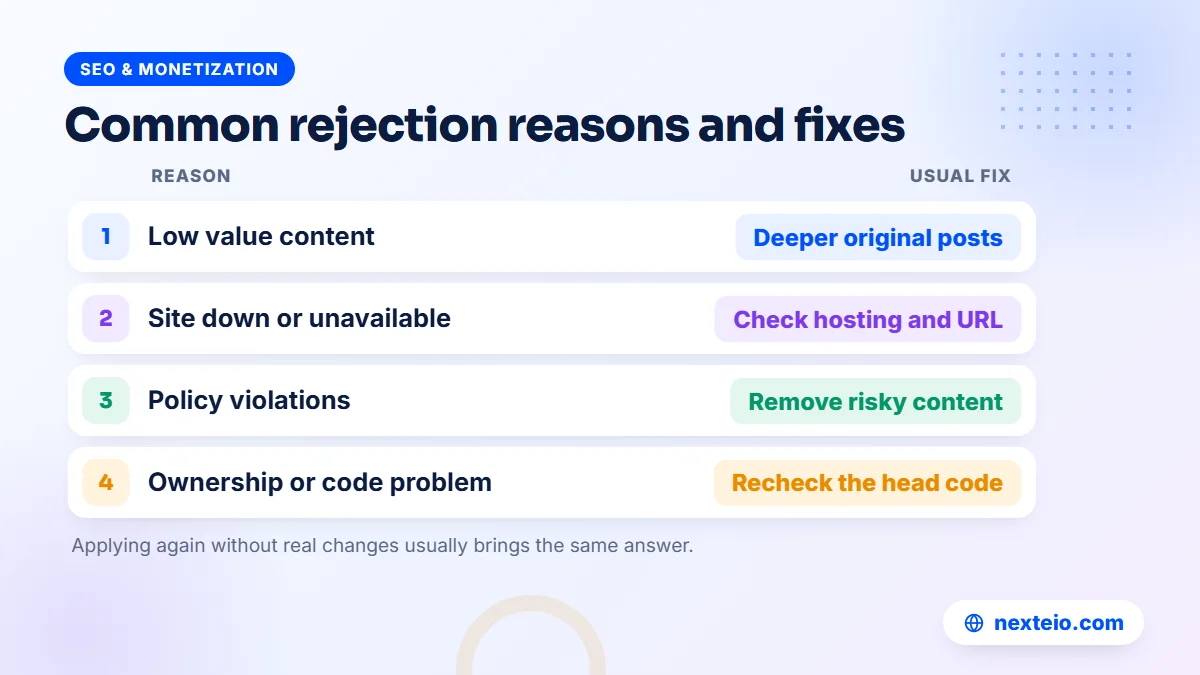
When the review ends, you get an email and the site status changes. If the blog is approved, you can start showing ads. If not, the Sites page in AdSense shows the reason in a short line. The table below explains what the common reasons usually point to.
| Rejection reason | What it usually means | What to do |
|---|---|---|
| Low value content | Thin, copied or unoriginal posts, or too little content overall | Rewrite or remove weak posts and add original, detailed ones |
| Site down or unavailable | The reviewer could not load the site | Check hosting uptime, the exact address and redirects |
| Policy violations | Restricted or copyrighted material somewhere on the site | Remove it, including old posts and comment spam |
| Ownership or code problem | AdSense could not find its code or confirm you own the site | Recheck the code in the head section, then resubmit |
Once the cause is fixed, request a review again from the same Sites page.
Reapplying is allowed, but applying again without real changes usually brings the same answer. Keep a short note of what you changed each time. If a blog has been rejected two or three times for low value content, the issue is rarely one post; it is usually the overall depth of the site. That is the point where many owners ask our Google AdSense service to audit the blog.
After Approval: Placing Ads Without Hurting the Blog
Getting approved for Google AdSense for blogs is the beginning. How you place ads decides whether readers stay, whether the blog keeps ranking and whether earnings hold up over time.
Auto ads or manual ad units
Auto ads let Google decide where ads appear on each page. You can lower the ad load, turn off certain formats and exclude specific pages. Manual ad units give you exact control: you create a unit in AdSense and paste its code where you want it, such as after the second paragraph of each post.
Many blogs use both. They start with Auto ads at a moderate setting, check how pages look on a phone, then add or remove placements by hand.
Keep ads from crowding the content
- Do not place ads where they push the article below the first screen on a phone.
- Keep ads clearly apart from menus, download buttons and links so nobody clicks by mistake.
- Never label ads with text like "click here" or "support us by clicking".
- Avoid ads on thin pages such as tag archives, search results or error pages.
Encouraging clicks and placing ads where accidental clicks happen are both against policy.
Add the ads.txt file
The ads.txt file is a small text file at the root of your domain that lists who may sell ads on your site. After approval, AdSense shows a ready-made line to put in it. On WordPress, upload the file to the main folder or add it with a plugin. On Blogger with a custom domain, turn on custom ads.txt in Settings and paste the line there.
Getting Paid in Bangladesh: PIN, Tax Form and Bank Transfer
Publishers in Bangladesh receive AdSense payments by wire transfer to a bank account. Three steps come before the first payment, and each depends on the details you entered at sign-up being correct.
- Address verification: when earnings reach the verification threshold, Google posts a PIN to your address. Post can be slow, so give a complete address with the postal code.
- Tax information: AdSense asks every publisher for US tax information. Individuals outside the US usually complete a W-8BEN form inside AdSense.
- Payment method: add a bank account in the payee's exact name, with the bank's SWIFT code. Ask your bank which details it needs for inward foreign remittance.
Google may also ask you to verify your identity with a government ID.
Payments are issued once your balance passes the payment threshold, which is $100 for accounts paid in US dollars. Smaller balances roll over to the next month. Our guide to AdSense services in Bangladesh covers the PIN and payment steps in more detail.
What a Blog Can Realistically Earn
No honest person can tell you what Google AdSense for blogs will pay you before your ads run. Earnings depend on a few things you can partly control and several you cannot:
- Topic: advertisers usually pay more to reach people researching finance, education, software or travel than people reading jokes or gossip.
- Reader location: visitors from countries where advertisers spend more tend to earn more per click than local visitors.
- Pages per visit: readers who open two or three posts see more ads.
- Placement: well-placed ads get seen, while ads buried at the bottom rarely do.
AdSense reports a figure called page RPM, the estimated earnings per thousand page views.
Watch your own RPM month by month rather than comparing it with screenshots shared online, since those come from different topics and audiences. For most new blogs, the first months bring small amounts, and that is normal. Blogs that eventually earn steady income usually treat AdSense as one source among several, alongside affiliate links, clearly marked sponsored posts or their own products.
Should a Business or School Blog Run AdSense
Google AdSense for blogs suits sites whose main product is the content itself: tutorials, news, recipes, study notes or reviews. It suits a company or institution website far less. A clinic's blog exists to bring patients to the clinic, and an ad for another clinic beside its doctor's article works against that goal.
There are sensible middle paths. A coaching centre can run a separate study-notes blog with ads while keeping its admission pages free of them. A media page or a community group can use ad income to cover hosting and writing costs. AdSense also lets you block ads from specific advertiser websites and some sensitive categories, which helps keep competitors and unsuitable ads off your pages.
If the website's real job is enquiries, orders or admissions, put the effort there first. A custom-built website with clear enquiry paths usually brings a business more than ad clicks would, and its blog can then focus on building trust instead of earning per click.
A 30-Day Plan to Get a Blog Ready
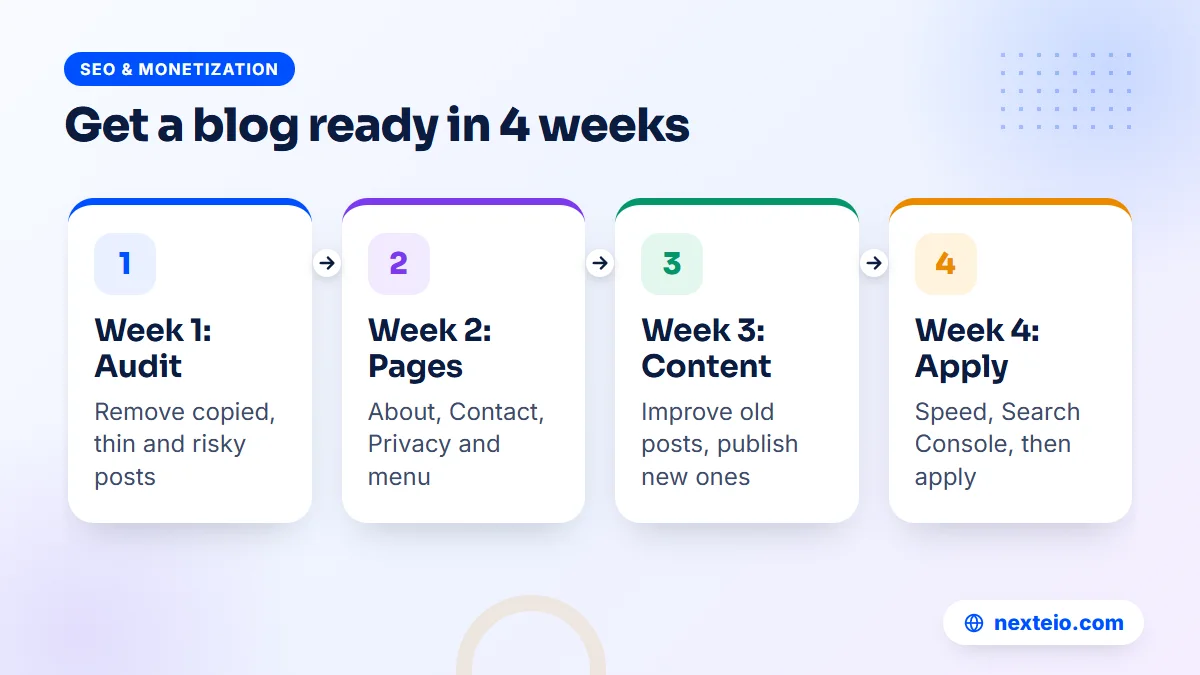
Most blogs that were rejected once can be ready within a month of steady work. Here is a simple weekly plan that keeps the job manageable alongside a day job or studies.
Week 1, audit. List every post in a spreadsheet. Mark each one to keep, improve or delete. Remove copied posts, download links and anything on a restricted topic, and check the comments for spam links.
Week 2, pages and structure. Write the About, Contact and Privacy Policy pages. Clean up the menu, merge thin categories and add links between related posts. Replace demo widgets and anything left over from the theme.
Week 3, content. Improve the posts marked for improvement and publish four to six new ones that use your own knowledge, photos or examples. Update old facts, dates and prices.
Week 4, technical checks and applying. Test speed on a phone, confirm HTTPS, submit the sitemap in Search Console and check that your name and address match your documents. Then apply for Google AdSense for blogs through Blogger or the AdSense website, and keep publishing while you wait.
This plan also sets up good habits for after approval. A blog that keeps growing with useful posts tends to keep its approval and earn more over time, while one that stops after approval often slides back.
How Nexteio Can Help With AdSense for Your Blog
Nobody can promise AdSense approval, because Google makes that decision. What our Google AdSense service does is find and fix the problems that usually lead to rejection, either before your first application or after a rejection email.
We start by looking at the blog the way a reviewer would: content quality, copied or thin posts, missing pages, policy risks, speed on mobile and the technical setup. You get a clear list of what to fix, in order of importance. We can make the fixes ourselves, from writing the privacy policy and cleaning up the theme to setting up Search Console and ads.txt, or guide your own writer through them.
After approval, we help with ad placement that keeps posts readable, and with the PIN, tax form and payment setup. If you want ongoing help, our AdSense support can continue alongside your publishing. You can see the kind of sites we build in our portfolio, read about Nexteio, share your blog's details on our project form, or ask a quick question through the contact page.
Keep reading: technical SEO basics every site owner should know, on-page SEO for beginners, or browse all our SEO and monetization guides.
Frequently asked questions
Can a blogspot.com blog get AdSense without a custom domain?
Yes. Blogger blogs can apply through the Earnings section of the Blogger dashboard, including blogs on a blogspot.com address. A custom domain is still worth considering because it is easier to brand and you keep it if you ever move the blog to another platform.
How long does AdSense take to review a blog?
Google says most reviews finish within a few days, but some take two to four weeks. Keep the AdSense code on the site and keep publishing during the wait. If the status has not changed for over a month, check that the site loads correctly and that the code is still in place.
Can I apply with a blog written in Bangla?
AdSense only serves ads on pages written mainly in a supported language, so check the current supported languages list in the AdSense Help Center first. Whatever language you choose, write original posts and keep each post in one language rather than mixing or machine-translating them.
How many visitors does a blog need before applying?
Google has no published minimum. New blogs with modest traffic do get approved when the content is original and the site is complete. Real visitors from search still help, because they show the blog is active and they are what turns approval into actual earnings.
Can I use affiliate links or other ad networks alongside AdSense?
Generally yes, as long as the other ads and links follow AdSense policies and do not imitate Google ads or crowd the content. Mark sponsored posts and affiliate links clearly so readers know what they are clicking. Too many ad units from different networks can slow the page and hurt the reader experience.
Will rewriting other people's posts with a paraphrasing tool pass review?
It is a poor bet. Reworded copies add nothing new, and that is exactly the kind of low value content the review is designed to catch. Posts based on your own experience, photos, tests or local knowledge are far more likely to be approved and to rank in search.
What happens if my AdSense account is disabled for invalid clicks?
Google usually withholds the unpaid earnings, and you can submit an appeal through the AdSense Help Center if you believe it was a mistake. Appeals are not always successful, so prevention matters more: never click your own ads, never ask others to click them and avoid any form of paid or exchanged traffic.
Should our company blog's AdSense account be in an employee's name?
No. Open a business account in the organization's name and link it to the organization's bank account. An account in a staff member's personal name causes problems with payments and access when that person changes jobs, and changing the payee later is difficult.