How to Create a Facebook Ad Campaign That Brings Sales
In this article 16 sections
- 1.What a Facebook Ad Campaign Is Made Of
- 2.Start With the Numbers: What You Can Afford per Sale
- 3.Choose the Facebook Ad Campaign Objective That Matches How You Sell
- 4.Set Up Tracking Before You Spend
- 5.Build the Facebook Ad Campaign in Ads Manager, Step by Step
- 6.Audiences That Give the System Room to Work
- 7.Creative and Copy: Plan Several Angles, Not One Ad
- 8.Budget and Bidding for a First Facebook Ad Campaign
- 9.Pre-Launch Checklist
- 10.The First 14 Days: What to Watch and When to Act
- 11.Scaling a Facebook Campaign That Works
- 12.A Worked Example: An Online Clothing Shop
- 13.Common FB Campaign Mistakes
- 14.When to Run Facebook Business Ads Yourself and When to Get Help
- 15.How Nexteio Can Help With Your Facebook Ad Campaign
- 16.Frequently asked questions
A Facebook ad campaign that brings sales is planned on paper before anyone opens Ads Manager. Most campaigns that fail were not set up badly in the tool. They were aimed at the wrong goal, measured with the wrong number or given a budget that could never produce enough results to learn from.
Businesses in Bangladesh feel this sharply. Many sell through Messenger and WhatsApp, collect cash on delivery and lose part of every month to refused parcels. A training center, a furniture showroom and a skin clinic all count a "sale" differently, so the same campaign settings cannot suit all of them.
This guide follows the order we use when we plan campaigns for clients. It starts with the numbers that decide what you can afford to pay for a customer, then covers the objective, tracking, the build in Ads Manager, audiences, creative, budget, launch checks, the first two weeks and how to grow a campaign once it works. A worked example for an online clothing shop pulls it all together near the end.
What a Facebook Ad Campaign Is Made Of
Every Facebook ad campaign in Meta Ads Manager has three levels, and each level holds different decisions. Knowing which setting lives where saves a lot of confusion when you start editing.
| Level | What you decide here | Typical mistake |
|---|---|---|
| Campaign | The objective, and the budget if you use Advantage+ campaign budget | Picking Engagement when you want sales |
| Ad set | Conversion location, audience, placements, schedule and budget | Too many tiny ad sets splitting a small budget |
| Ad | Image or video, text, headline, button and link | Only one ad, so nothing can be compared |
One campaign usually has one goal.
The same structure also runs ads on Instagram, Messenger and Meta's partner apps, so the word "Facebook" here covers all of Meta's ad placements. A simple account for a small business often needs only two or three campaigns: one to find new customers, one to bring back people who already showed interest, and sometimes one for a seasonal offer.
Boosting a post from your Page is a shortcut that creates a simple campaign behind the scenes. It is fine for reach, but it hides most of the settings described here. If you have only boosted so far, a full Facebook advertising campaign in Ads Manager is the step up.
Start With the Numbers: What You Can Afford per Sale
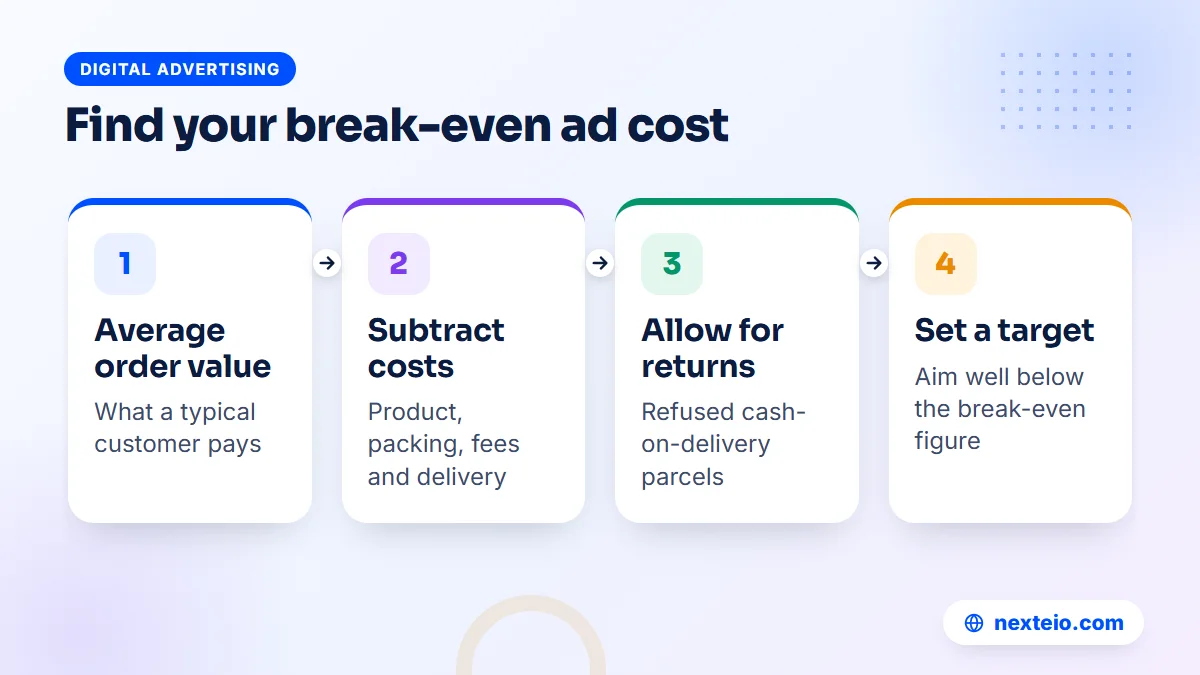
Before you choose a single setting for a Facebook ad campaign, work out the most you can pay in ads for one sale and still make money. Without this figure, you cannot tell whether a cost of BDT 250 per order is excellent or a slow loss.
The sum is simple. Take the average order value, subtract the product cost, packaging, payment fees and any delivery cost you absorb. What remains is your margin per order. That margin is your break-even ad cost per sale. Anything below it is profit; anything above it loses money on the first order.
Allow for cash-on-delivery returns
If you sell with cash on delivery, some parcels will be refused at the door. You still pay the courier for those trips, and the ad money that produced them is gone. So the real break-even figure is lower than the simple margin. Track your own refusal rate for a month before you plan, because it varies a lot by product, price and how well orders are confirmed by phone.
Decide what counts as a result
For a shop, the result is a delivered order. For a coaching center, it is an admission. For a clinic, it is a booked and attended appointment. For a factory selling to other businesses, it may be a qualified quotation request. Write down the result you care about, then the earlier step the ads can measure, such as a purchase on the website, a message, a call or a lead form.
Choose the Facebook Ad Campaign Objective That Matches How You Sell
Meta offers six campaign objectives: Awareness, Traffic, Engagement, Leads, App promotion and Sales. The objective tells the system which people to look for. Choose Traffic and it finds people who click. Choose Sales and it looks for people who buy. Those are often different people.
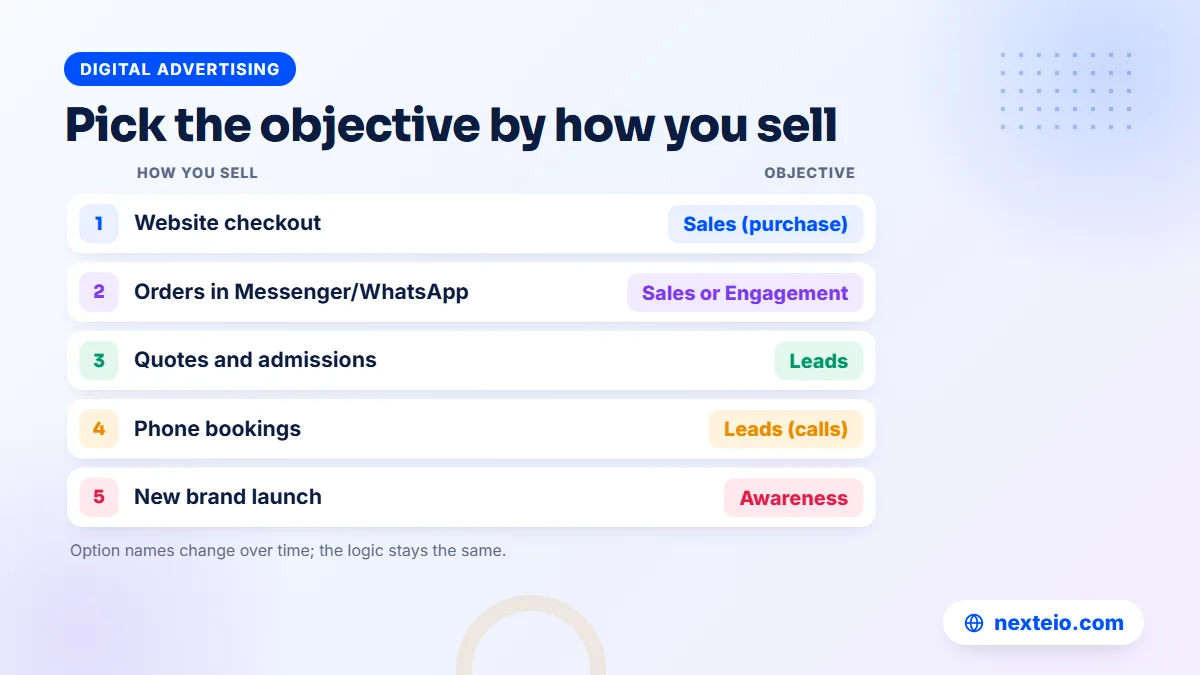
The objective you need depends on where the sale happens. This table matches the common sales models in Bangladesh to a starting setup.
| How you sell | Objective | Conversion location | Event to optimize for |
|---|---|---|---|
| Website checkout | Sales | Website | Purchase |
| Orders in Messenger or WhatsApp | Sales or Engagement | Message destinations | Conversations or purchases in chat |
| Quotation or admission enquiry | Leads | Instant form or website | Lead |
| Phone bookings | Leads | Phone calls | Call clicks |
| New brand or launch | Awareness | Not applicable | Reach or ad recall |
Exact names shift as Meta updates the tool, but the logic stays the same.
Message campaigns suit most social sellers here, because buyers want to ask about size, color and delivery before ordering. Lead campaigns with instant forms suit schools, training providers and service businesses. If you choose instant forms, the "Higher intent" form type adds a review step that tends to filter out people who tap without reading.
Awareness and Traffic are rarely the right start for a business that needs sales this month. They can support a later stage, but they should not carry the whole budget.
Special ad categories
If your ads are about credit or other financial products, jobs, housing, or social issues, elections and politics, you must declare a special ad category. Targeting options are then limited. A bank recruiting staff, a property developer or a microfinance provider should plan for broader audiences from the start.
Set Up Tracking Before You Spend
A Facebook ad campaign built for sales or leads is only as good as the signal it receives. If the system never learns who bought, it keeps finding people who look busy but never order. Tracking is not a later improvement; it is part of the setup.
For a website, this means installing the Meta Pixel and connecting the Conversions API, then setting up standard events: ViewContent, AddToCart, InitiateCheckout, Purchase and Lead. The Conversions API sends events from your server, which helps when browsers block tracking. Our beginner's guide to Meta Pixel and Conversions API tracking covers both in more detail.
Test before launch. Events Manager has a test tool that shows events as you place a test order. Check that the purchase value and currency are correct, that each order fires one purchase rather than three, and that the thank-you page is not counted on every refresh.
Use campaign tags on your links, too, so Google Analytics can show which Facebook ads sent visitors and sales. Google explains how to build these in its guide to campaign URLs, and you can mark orders or form submissions as key events to compare channels side by side.
If orders happen in chat, keep a simple sheet: date, the ad the customer mentioned or the ad that started the chat, and whether it became a delivered order. Two weeks of honest notes often tell you more than the dashboard. A proper store built through our e-commerce development work removes most of this manual work, because the website records every order and its source.
Build the Facebook Ad Campaign in Ads Manager, Step by Step
With the numbers, objective and tracking ready, the build itself is quick. Here is the order to follow on a computer, where Ads Manager is easier to use than on a phone.
- Click Create and choose the objective you decided on.
- Name the campaign clearly, for example "Sales | Eid Collection | Website | Oct".
- Decide whether to use Advantage+ campaign budget, which shares one budget across ad sets.
- In the ad set, choose the conversion location, the Pixel or Page, and the event to optimize for.
- Set the schedule and budget, then the location, age range and audience.
- Leave Advantage+ placements on unless you have a reason to restrict them.
- In each ad, choose the Facebook Page and Instagram account, then the format: image, video or carousel.
- Add the text, headline, button, website link with campaign tags, and check tracking settings.
- Preview every placement on mobile, then publish.
The ads go through review, which usually takes less than a day.
A clear naming pattern pays off quickly. After three months, an account full of campaigns named "New campaign copy 2" is impossible to read. Use the same order every time: objective, offer or product, destination and month.
If you search for Facebook ads how to guides, you will often see advice to create many ad sets with narrow interests. With today's delivery system and a small budget, fewer ad sets with more ads in each usually learn faster. One or two ad sets with three to five ads is a sensible start for most small businesses. This lean structure is also how we set up a new managed Facebook advertising campaign for clients.
Audiences That Give the System Room to Work
Audience settings were once the heart of Facebook business advertising. They still matter, but the ads themselves now do more of the targeting work, because the system learns from who responds to each creative. The main job is to set real limits and avoid strangling delivery.
- Location: only where you deliver or serve. A courier-based shop may target all of Bangladesh; a dental clinic targets the areas its patients travel from.
- Age: set a range only when it is a real limit, such as parents for school admissions.
- Interests: optional suggestions. Advantage+ audience may go beyond them when it finds better buyers.
- Custom audiences: website visitors, people who messaged your Page, video viewers and customer lists.
- Exclusions: remove recent buyers from offers they have already taken.
Retargeting is the cheapest win for most accounts.
Run a small ad set or campaign for people who visited a product page, added to cart or messaged you in the last 7 to 30 days. Show them reviews, delivery details or a reminder of the offer, not the same ad they already ignored. Our guide to Meta ads targeting in Bangladesh goes deeper into custom and lookalike audiences.
Lookalike audiences, built from a list of real customers, can help once you have a few hundred buyers. Upload only data you collected properly and have a right to use, and never upload lists bought from someone else.
Creative and Copy: Plan Several Angles, Not One Ad
The creative decides who stops scrolling, so it now does much of the work audience settings used to do. The fastest way to improve a campaign is usually to test better ads, not to change the audience.
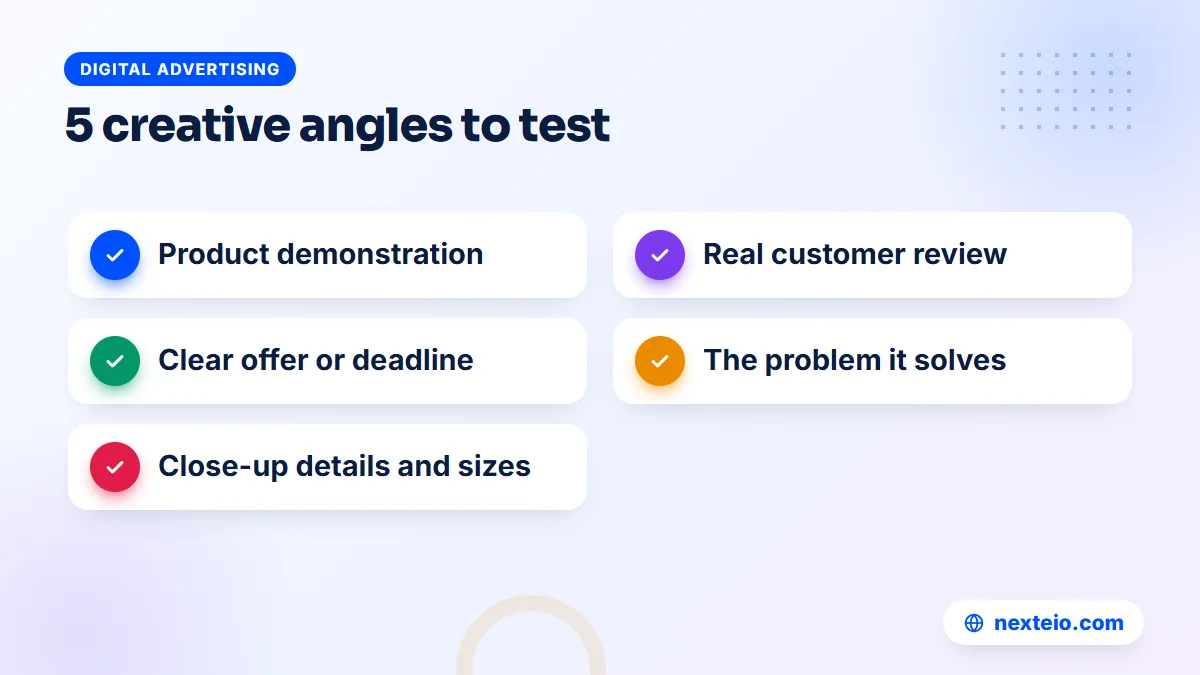
Plan three to five ads, each with a different angle rather than a different color. Useful angles include:
- The demonstration: the product in use, such as a blender making a lassi or a fabric moving in sunlight.
- The proof: a real customer review or a short video from a happy client, used with permission.
- The offer: a clear price, bundle or deadline, stated in the first line.
- The problem: a common frustration your product solves, said plainly and without shaming anyone.
- The detail: fabric close-ups, a size chart or what is inside the box.
Short vertical video tends to work well across placements.
Put the main point in the first two seconds and add captions, since many people watch with the sound off. Write the primary text in the language your buyers use, which for many audiences here means Bangla, with product names and sizes in English where that is normal. Keep claims honest: exaggerated health, beauty or income promises get ads rejected and accounts restricted.
If you do not have a designer or editor, our video ad editing service turns raw phone footage into short ads with captions in the sizes Meta uses.
Testing ads fairly
Ads Manager has an A/B test tool that splits the audience so each version reaches different people. It is useful for bigger questions, such as video against carousel or one offer against another. For everyday creative tests, running three to five ads in one ad set and letting delivery favor the stronger ones is usually enough.
Change one main thing between versions, such as the opening scene or the offer. If every element differs, you will know which ad won but not why, and the next round of ads starts from a guess.
Related guides for planning your campaign:
- Ten Meta ads tips for better results in Bangladesh
- How to build a landing page that turns ad clicks into buyers
- How an ads campaign service plans budgets for small businesses
Budget and Bidding for a First Facebook Ad Campaign
Meta's delivery system goes through a learning phase for each ad set. According to Meta, an ad set usually needs around 50 optimization events within a week after its last significant edit to leave this phase. Until then, results swing up and down and costs are less stable.
This gives you a practical way to size a budget. Multiply your expected cost per result by 50, then divide by seven to get a daily figure for one ad set. If you expect to pay BDT 300 per purchase, that is about BDT 15,000 a week, or a little over BDT 2,100 a day.
If that is more than you can spend, you have three honest options:
- Optimize for an earlier, more frequent event, such as add to cart or a conversation, and judge sales separately.
- Run fewer ad sets so the budget is not split.
- Accept that the campaign will learn slowly and avoid editing it during that time.
Splitting a small budget across many ad sets is the worst choice.
Budget sizing is one of the first things we work through when a business asks us to manage its Facebook ads, because it decides how many ad sets the account can support.
For bidding, start with the default highest volume strategy. Cost cap and bid cap strategies can protect profit later, but they need enough data to set sensible limits. Advantage+ campaign budget suits accounts with several ad sets because it moves money to the ones that perform. With a single ad set, it makes little difference.
Paying for ads from Bangladesh usually needs a card enabled for international payments. Check your bank's limits before a big season such as Eid or the winter wedding period, so the account is not paused halfway through.
Pre-Launch Checklist
Run through this list before you publish any Facebook ad campaign. Each item comes from a problem that has cost real businesses money.
- The objective and optimization event match how you sell.
- The Pixel, Conversions API and events were tested with a real or test order.
- The landing page loads quickly on mobile data and works on small screens.
- Prices, delivery charges and stock match between the ad and the page.
- Someone is assigned to reply to messages during the hours the ads run.
- Recent buyers are excluded from first-purchase offers.
- Every ad has campaign tags on its link and a clear name.
- Payment method and spending limits are in place.
Page speed deserves a second look. Google's guide to Core Web Vitals explains the three measures that show how a page feels to visitors, and a slow product page wastes clicks you have already paid for.
The First 14 Days: What to Watch and When to Act
The most common way to ruin a new FB ad campaign is to change it every morning. Each significant edit can restart learning. Set a review rhythm and stick to it.
Days 1 to 3: check delivery, not results
Confirm the ads are spending, the events are firing and messages are being answered. Fix broken links or rejected ads straight away. Do not judge cost per sale yet, as the numbers are too small.
Days 4 to 7: read the early signals
Look at click-through rate, cost per click and cost per result for each ad. Pause an ad only if it is clearly far behind the others on the result that matters. Keep at least two or three ads running.
Days 8 to 14: make one change at a time
By now you can compare ads on cost per purchase, lead or conversation. Add new creatives that build on the best angle, adjust the budget in modest steps, and leave the rest alone.
| Number | What it tells you | If it looks bad |
|---|---|---|
| CPM (cost per 1,000 views) | How competitive the audience is | Broaden the audience or wait out busy seasons |
| Click-through rate | Whether the ad stops people | Test a new opening or image |
| Cost per result | Whether the campaign pays | Check the page, offer and follow-up |
| Frequency | How often the same person sees the ad | Add fresh creatives |
Read these together, never one at a time.
If clicks are cheap but nobody buys, the problem is usually the landing page, the price or the follow-up, not the ad. Our checklist on why traffic does not turn into customers covers the usual causes, and our guide to why Meta ads stop performing covers the ad side.
Scaling a Facebook Campaign That Works
Once a Facebook campaign has held a profitable cost per result for a week or two, you can grow it. Growth has limits, and pushing too hard usually raises costs.
In our experience, raising the budget in modest steps every few days is safer than doubling it overnight. Watch the cost per result after each increase. If it holds, increase again. If it jumps and stays high for several days, step back.
Fresh creative is the other half of scaling. The same ad shown to the same people gets tired, and frequency climbs. Add new ads that use the winning angle in a new way: a new customer review, a different product or a new opening scene.
At this stage, a layered setup helps. One campaign finds new customers with broad audiences. A smaller one retargets people who visited or messaged. A third, when relevant, brings past buyers back with new arrivals or refills. You can see how this fits with search ads in our comparison of Google Ads and Meta ads, and many businesses later add a Google Ads campaign to catch people who search for the product directly.
A Worked Example: An Online Clothing Shop
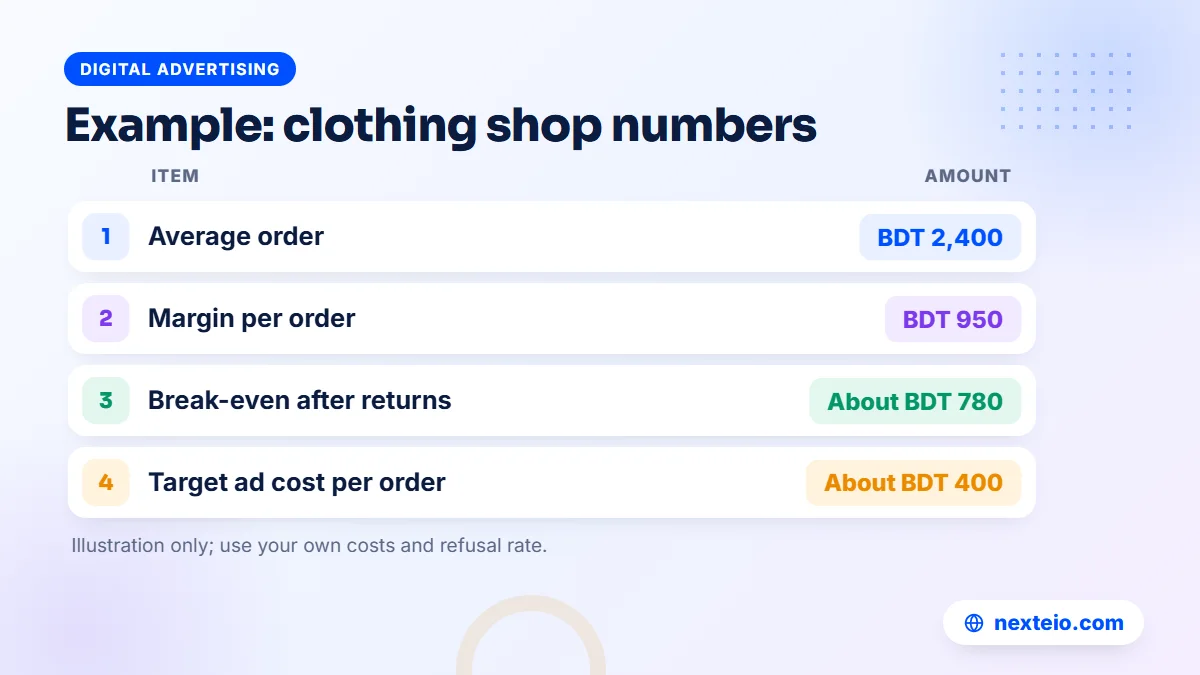
Here is how the steps come together in a Facebook ad campaign for a fictional shop selling women's three-piece sets through a website, with cash on delivery and bKash. The numbers are assumptions for illustration, not results.
- Average order: BDT 2,400. Margin after product, packing and fees: BDT 950.
- Assumed refusal rate for cash-on-delivery orders: about 15 percent, with a courier cost on each refused parcel.
- Break-even ad cost per placed order after returns: roughly BDT 780.
- Target ad cost per order, leaving profit: about BDT 400.
With those numbers settled, the plan follows.
The shop builds one Sales campaign optimized for purchases, with one broad ad set covering the delivery area and women aged 20 and above. It runs four ads: a try-on video, a carousel of five colors, a customer review video and an offer image for free delivery above a set amount. A second small ad set retargets people who viewed products or added to cart in the last 14 days.
At about BDT 400 per order, 50 purchases a week needs roughly BDT 20,000 a week. The owner can spend about BDT 1,500 a day, so the campaign will learn more slowly. The shop accepts that, avoids edits for the first week and calls every cash-on-delivery order to confirm it before shipping, which cuts refusals.
After two weeks, the try-on video and the review video bring orders under the target, while the offer image costs twice as much. The owner pauses the offer image, asks for two new try-on videos and raises the budget in small steps. That is a normal, healthy first month.
Common FB Campaign Mistakes
These mistakes show up again and again when we review accounts. Most of them cost money quietly for months before anyone notices.
- Optimizing for the wrong event. An Engagement campaign brings likes and comments, not buyers.
- Broken or duplicate tracking. Purchases counted twice make a weak campaign look strong.
- Too many ad sets. A BDT 1,000 daily budget split ten ways means no ad set ever learns.
- Judging too early. Pausing an ad after one day and a handful of clicks.
- Slow replies. Messages answered the next day lose most of their buyers.
- No fresh creative. One winning ad left running until frequency is high and costs climb.
- Ignoring the page. A slow, confusing product page after a good ad.
Most of these are fixed with planning, not more money.
Another common problem is access. Make sure the business owns its Business Manager (now Business Portfolio), ad account, Page and Pixel, and that freelancers or agencies are added as partners with limited roles. If a provider holds everything in their own account, you lose your data and audiences when you part ways. Our guide to what a Facebook ads service should include lists the questions to ask before you hand over access.
When to Run Facebook Business Ads Yourself and When to Get Help
Running Facebook business ads yourself makes sense when the budget is small, the product is simple and someone on the team has time to learn and check the account a few times a week. Many shop owners do this well after a few months of practice.
Outside help makes sense when the budget is large enough that a few percent of waste costs more than a management fee, when tracking involves a website, server events and chat sales together, or when you need fresh creatives every week. It also helps when ads run across several platforms and someone needs to compare them fairly. Our ads campaign service covers that wider planning, and you can browse all our digital advertising guides or see every service we offer.
Whoever runs the account, insist on access in your business's name, a written plan and regular reports in plain words.
How Nexteio Can Help With Your Facebook Ad Campaign
We plan, build and manage campaigns through our Facebook ads service for businesses and organizations across Bangladesh. Every Facebook ad campaign we take on starts with your numbers: what a sale is worth, what you can afford to pay for one and how orders reach you, whether through a website, Messenger, WhatsApp or the phone.
Then we check and fix the setup: Business Portfolio access, the Page and Instagram links, payment, Pixel, Conversions API and events. We choose the objective and structure, write the copy, brief or edit the creatives, and set up retargeting. Once the ads run, we watch cost per result, add new creatives, move budget to what works and explain each change in plain language. The accounts and data stay in your name.
If you also need a faster product page or a proper online store, our web team can help, and you can see examples in our portfolio. To start, tell us what you sell and your monthly budget, read more about our Facebook and Instagram advertising work, or reach us through the contact page. When you are ready for a plan, send a short project brief.
Keep reading: how TikTok ads compare for businesses that sell online and what to plan and budget for an e-commerce website.
Frequently asked questions
How much should I spend on my first Facebook ad campaign?
Base it on your expected cost per result rather than a round number. An ad set learns best when it gets around 50 results in a week, so multiply your expected cost per result by 50 and divide by seven for a daily figure. If that is too high, optimize for an earlier step such as conversations or add to cart, and keep the number of ad sets low.
Which objective should I choose if customers order through Messenger?
Start with a campaign that sends people to message destinations, such as Messenger or WhatsApp, and optimize for conversations. Some accounts can also optimize for purchases made in chat when that tracking is available. Either way, record which chats turn into delivered orders, because the ad dashboard cannot see what happens after the conversation starts.
How long before I know if a Facebook campaign is working?
Give it at least a week before judging cost per sale, and two weeks for a clearer picture. In the first few days, check only that ads are spending, events are firing and messages get answered. Changing settings every day restarts learning and makes the results harder to read.
Is boosting a post the same as running a campaign?
A boost creates a simple campaign in the background, but it gives you far fewer choices. You cannot pick every objective, set detailed placements, run proper A/B tests or use all tracking options. Boosting suits quick reach and messages, while Ads Manager suits campaigns where you need to measure sales.
Do I need a website to run Facebook ads for sales?
No. Many businesses in Bangladesh sell through Messenger, WhatsApp or phone calls, and campaigns can send people straight to a chat or a call. A website helps when you want automatic sales tracking, checkout with bKash or cards, and retargeting of people who viewed products. Many shops start with chat sales and add a website as they grow.
Why did my ad get rejected?
Common reasons include exaggerated claims, text that refers to personal traits, restricted products, a landing page that does not match the ad, or a page that does not load. The rejection notice names the policy involved. Edit the ad to fix the problem and request a review, and keep claims honest in future ads.
Should an agency run my ads from its own ad account?
It is safer for the ad account, Page, Pixel and business portfolio to belong to your business, with the agency added as a partner. That way, your data, audiences and history stay with you if you change providers. Ask about this before you hand over access, and get it in writing.