Ecommerce Website Maker or a Developer: Which Should You Choose?
In this article 15 sections
- 1.What an Ecommerce Website Maker Actually Is
- 2.What Hiring a Developer Means
- 3.8 Key Differences Between an Ecommerce Website Maker and a Developer
- 4.Payments and Delivery: The Bangladesh Test for Any Online Store Platform
- 5.The Real Cost Over Three Years
- 6.When an Ecommerce Website Maker Is the Right Choice
- 7.When Hiring a Developer Is the Better Choice
- 8.Four Example Shops and the Choice That Fits Each
- 9.The Middle Path: A Developer on a Ready Platform
- 10.Ownership, Data and Leaving a Platform
- 11.Speed, SEO and Mobile Performance
- 12.How to Test an Online Shop Platform Before You Commit
- 13.Questions to Ask Before Hiring a Developer
- 14.How Nexteio Can Help You Choose and Build
- 15.Frequently asked questions
An ecommerce website maker promises a working online shop in an afternoon: pick a template, add products, connect a payment method and start selling. Hiring a developer promises something different: a store built around your products, your payment options and your way of working, but with a higher upfront bill and a longer wait. For a business in Bangladesh, the right choice depends less on which option is "better" and more on which one fits how your customers pay, how your orders reach them and how big you plan to grow.
Both routes can work well. Plenty of small brands run happily on a builder for years. Plenty of others outgrow one in six months and pay twice, first for the subscription and then for a rebuild.
This guide compares the two options honestly, using the questions that matter to sellers here: cash on delivery, bKash and Nagad, courier booking, billing in dollars, ownership of your data, speed on mobile data and the real cost over three years. By the end you should know which route suits your shop, and what to check before you commit to either one.
What an Ecommerce Website Maker Actually Is
An ecommerce website maker is a hosted service that gives you a ready store in exchange for a monthly fee. The company runs the servers, handles security patches and updates the software. You choose a theme, fill in your products and settings through a dashboard, and connect your own domain if you want one.
Well-known international examples include Shopify, Wix and Squarespace. Shopify's pricing page and Wix's ecommerce page show how these plans are structured: a monthly or yearly subscription, with higher tiers adding features such as more staff accounts, better reports or lower transaction fees. Extra features usually come from an app store, and many apps have their own monthly charge.
A few local companies also offer store builders aimed at Bangladeshi sellers, often billed in taka and set up for cash on delivery and local couriers. They are worth comparing, but apply the same checks to them as to any other online store platform, especially around data export and what happens if the company changes its prices or closes.
What you get with a maker
- Hosting, security updates and backups handled by the provider.
- Ready-made themes that look reasonable on phones.
- A dashboard for products, orders, discounts and basic reports.
- An app store for extra features, from reviews to email marketing.
- Support from the provider, usually by chat or email in English.
What you do not get is control over the code, the server or the rules of the platform. You are renting a well-equipped shop in someone else's building.
What Hiring a Developer Means
Hiring a developer means someone builds the store for you, usually on an open-source system like WooCommerce or as a custom application, and installs it on hosting that you own. You pay for the build once, then pay for hosting and ongoing care.
Many developer-built stores in Bangladesh use WooCommerce, the free store plugin for WordPress. It is flexible, widely supported by local payment gateways and couriers, and easy for staff to manage after a short training. A WordPress and WooCommerce developer can shape the theme, the checkout and the order emails around your business instead of the other way round.
For larger or unusual shops, such as those with dealer pricing, subscriptions, multiple warehouses or integration with an ERP, a custom build on a framework like Laravel is the other option. Our Laravel web application service covers this kind of store, and our guide on WordPress versus custom websites explains when each one makes sense.
You can hire a freelancer or an agency. A freelancer is often cheaper, while an agency usually brings design, development, SEO and support under one roof, with someone to cover when a person is away. Our checklist for hiring a WordPress developer covers what to ask in either case.
8 Key Differences Between an Ecommerce Website Maker and a Developer
Here are the eight differences that decide most cases for a shop selling in Bangladesh. Read them against your own situation rather than looking for a general winner.
| Difference | Ecommerce website maker | Developer-built store |
|---|---|---|
| 1. Upfront cost | Low; you can start on a trial | A one-time build fee |
| 2. Ongoing cost | Monthly subscription, apps and sometimes transaction fees, often in USD | Hosting, domain and maintenance, usually in BDT |
| 3. Local payments | Depends on which gateways the platform supports | Local gateway, bKash and Nagad added as needed |
| 4. Courier integration | Often manual or through third-party apps | Plugins or custom connection to your courier |
| 5. Design freedom | Within the theme and platform limits | Anything you can describe and pay for |
| 6. Ownership | You rent the platform; data export varies | You own the code, database and hosting account |
| 7. Who fixes problems | Platform support, or you | Your developer or maintenance provider |
| 8. Room to grow | Limited by plan and platform rules | Limited by budget and good planning |
No single row decides it for everyone.
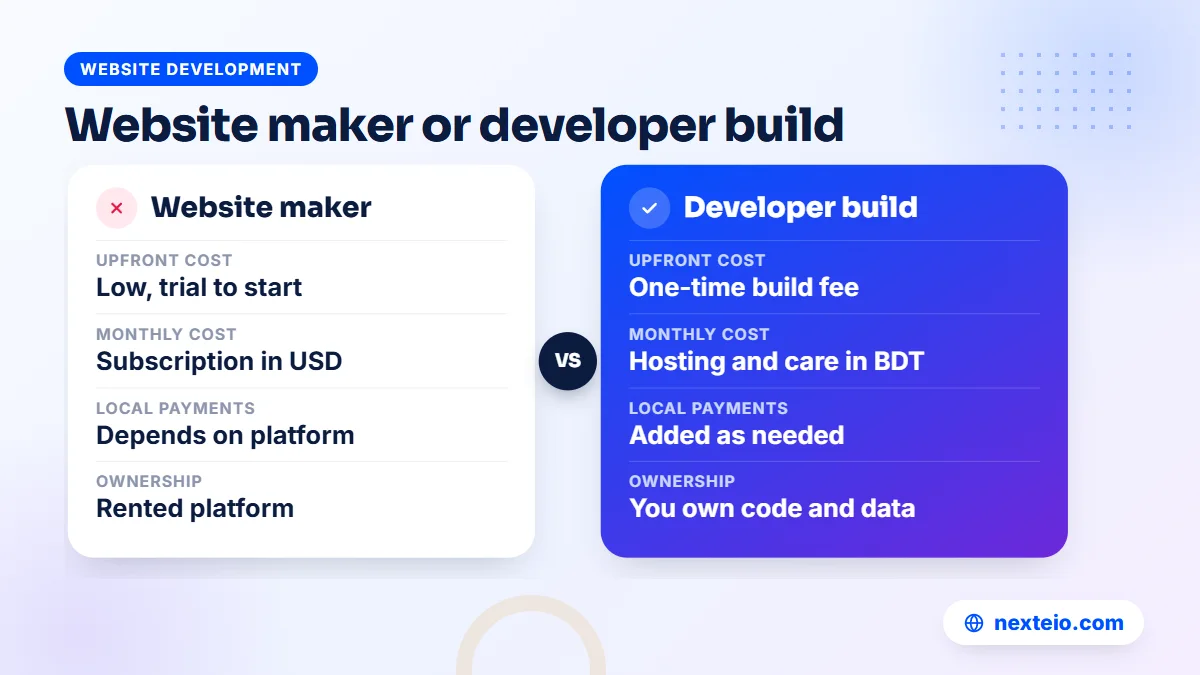
Look closely at rows 2, 3 and 6. They are where most Bangladeshi sellers feel the difference, and they are rarely mentioned in builder advertising. The next sections cover each one in more detail.
Payments and Delivery: The Bangladesh Test for Any Online Store Platform
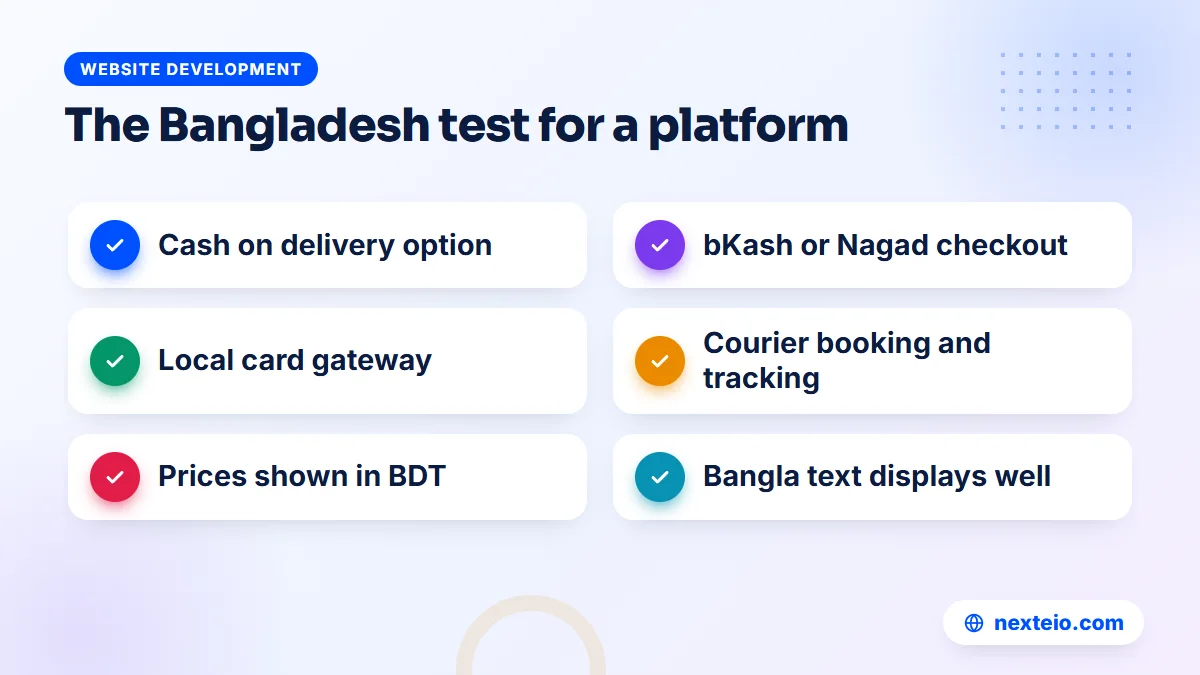
The single most important question is whether your customers can pay the way they want to. In Bangladesh, that usually means cash on delivery first, then bKash and Nagad, then cards through a local gateway. A platform that cannot offer these is a poor fit, however attractive its themes look.
International builders were designed for markets where card payment is normal. Their own payment services are generally not available to businesses based in Bangladesh, so you rely on manual methods such as cash on delivery, or on a third-party gateway the platform supports. Some platforms charge an extra transaction fee when you use a third-party gateway, so check that line on the pricing page carefully.
Questions to check before you sign up
- Can I offer cash on delivery, and can I add a delivery charge that differs by area?
- Is there a working integration for a local payment gateway that accepts bKash, Nagad and local cards?
- Can prices be shown in BDT with the taka symbol or "Tk" formatted correctly?
- Can I book parcels with my courier from the order screen, or will I copy addresses by hand?
- Do Bangla product names and descriptions display properly in the theme and order emails?
- Can I collect the phone number as a required field and format it for local numbers?
If the answer to the first two is no, stop there.
A developer-built store or a local builder will serve you better in that case. When we plan a store for Bangladeshi buyers, these six questions shape the checkout before any design work starts.
Paying for the platform itself
International builders bill in US dollars. To pay a monthly subscription, you need a card that works for international online payments, and your bank sets the rules and limits for that. Card limits, exchange rates and bank charges all affect what you really pay each month. A developer-built store, by contrast, is usually billed in taka by local hosting and service providers, which makes budgeting and office approvals simpler for many businesses.
Support is the other practical point. International builders offer help by chat or email, in English, on their own schedule. That works for simple questions, but a payment problem on a busy evening during an Eid sale needs someone who understands local gateways and couriers. Ask yourself who you will call when an order fails, and how quickly they will answer.
The Real Cost Over Three Years
Builders look cheap in month one, while developer quotes look expensive. Over three years, the gap often narrows or reverses. The example below compares rough totals for a small shop with around 100 products. The figures are illustrative ranges, not quotes, and dollar-based costs move with the exchange rate.
| Cost item | Ecommerce website maker | WooCommerce by a developer |
|---|---|---|
| Setup or build | Your own time, or a freelancer for theme setup | Often BDT 40,000 to 120,000 one time |
| Platform or hosting | Roughly USD 25 to 40 a month for an entry ecommerce plan | Often BDT 5,000 to 20,000 a year |
| Apps or plugins | Often USD 10 to 50 a month in total | Mostly free plugins, a few paid licenses yearly |
| Transaction fees | Gateway fee, plus a platform fee on some plans | Gateway fee only |
| Care and fixes | Mostly included; design changes cost extra | Often BDT 2,000 to 5,000 a month for basic maintenance |
The totals are closer than most people expect.
Add these up over 36 months and many small shops land in a similar range either way. The difference is what you have at the end. With a builder, you have paid rent. With a developer-built store, you own a site you can keep, move or extend. Neither is wrong, but the comparison is much closer than "free trial versus big quote" suggests.
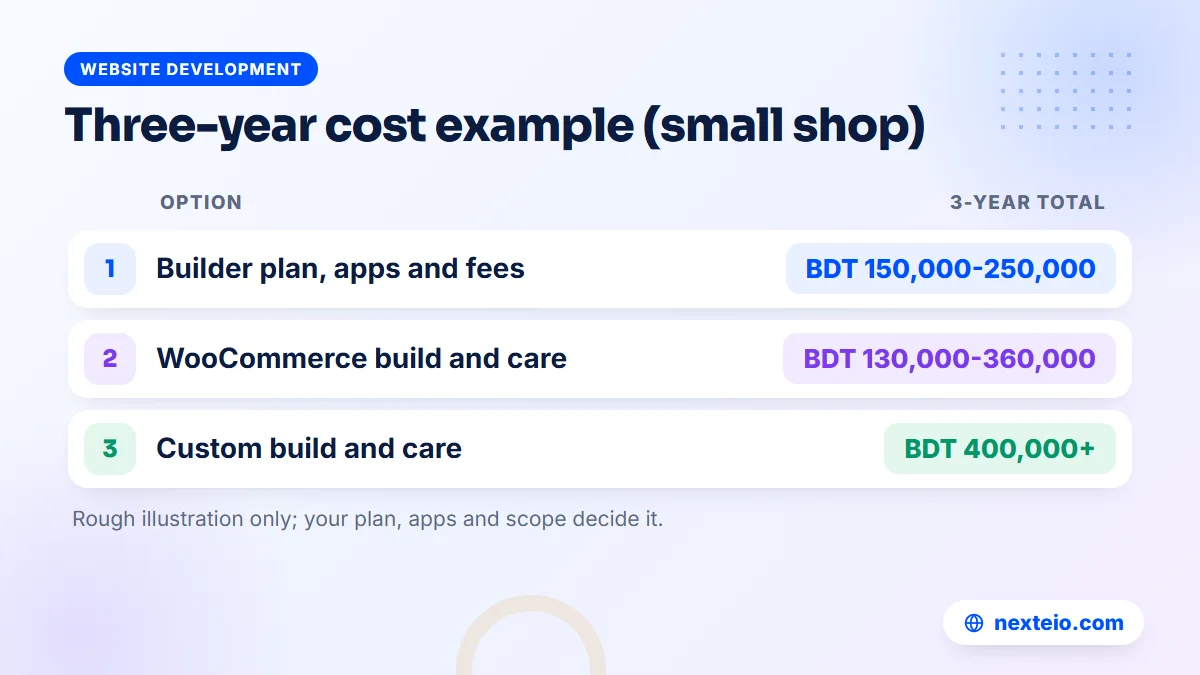
Watch for costs that only appear later. Builders may move a feature you need to a higher plan, or an app may raise its price. Developer-built stores can suffer from neglected updates that turn into an expensive repair. Ask both sides what the second and third years usually cost, not only the first. If you would like us at Nexteio to put real numbers on both options for your shop, send the details through our project form.
When an Ecommerce Website Maker Is the Right Choice
A builder is a sensible starting point in several situations. It lets you test an idea without a large upfront spend, and many sellers start this way before moving on.
- You sell mainly to card-paying customers abroad. International builders handle multiple currencies and international shipping settings well, provided you have a supported way to receive payments.
- You are testing a product idea. If you are not sure the business will last a year, a monthly plan you can cancel is lower risk.
- Your catalog is small and simple. Twenty products with no variants, sold to customers who pay by card, fit any good builder.
- Nobody on your side wants to manage updates. The provider handles the technical upkeep.
If you choose a builder, keep your options open. Use your own domain from day one rather than the free subdomain, keep a regular export of products and orders, and avoid custom code you cannot take with you.
When Hiring a Developer Is the Better Choice
A developer-built store usually wins once local payment, delivery and growth matter more than speed of setup. These are the most common signs.
- Most of your orders are cash on delivery or mobile wallet. You need a checkout designed for these, not one that treats them as an afterthought.
- You ship hundreds of parcels a month. Courier integration, bulk label printing and order confirmation tools save hours every day.
- You need features no app provides. Wholesale prices, custom product builders, pre-orders tied to production, or loyalty points paid out in a local way.
- You run ads at scale. Full control over tracking, landing pages and page speed helps every taka of ad spend work harder.
- Your organization needs local billing. Companies and institutions often find it easier to approve a local invoice in taka than a foreign card subscription.
If two or more of these describe your shop, a builder will start to feel tight.
In these cases, a well-planned e-commerce website development project tends to pay for itself through fewer manual tasks and fewer lost orders. If your design needs go beyond what a theme can do, a custom website design gives the store its own look and structure.
Related guides before you decide:
- What to plan and budget for an ecommerce website in Bangladesh
- A buyer's checklist for choosing a web design company
- How to hire the right Laravel developer
Four Example Shops and the Choice That Fits Each
General advice only goes so far. These four realistic shops show how the same questions lead to different answers. None of them is a real client; they are typical patterns we see when sellers ask which route to take.
A home baker taking local orders
She sells cakes and cookies to customers in her own area, takes about ten orders a week and collects payment by bKash or cash when the order is picked up. She does not need courier integration, a large catalog or complex checkout rules. A simple builder store, or even a well-organized Facebook page with an order form, is enough for now. Spending a large sum on a custom build would tie up money she needs for ingredients and packaging.
A clothing brand shipping across Bangladesh
This brand has 300 products in several sizes and colors, sends 40 to 80 parcels a day, and gets most orders from Facebook ads. Nearly all payments are cash on delivery, with some bKash. Every manual step, such as copying addresses into a courier panel, costs hours each day. A developer-built WooCommerce store with courier integration, order confirmation tools and proper ad tracking is the clear choice here, and it usually pays back the build cost through time saved.
A handicraft seller with buyers abroad
This seller makes nakshi kantha, jute bags and pottery, and most buyers are Bangladeshis living overseas or foreign customers who pay by card. International shipping rates, multiple currencies and an English storefront matter more than cash on delivery. A good international builder can work well, provided the seller has a legal, supported way to receive card payments and has checked how money reaches a Bangladeshi bank account. If that route is not available, a developer can connect a local gateway that accepts international cards.
A seller moving off a marketplace
A gadget shop already sells well on a large online shopping platform, but commissions keep rising and it cannot contact repeat buyers directly. It wants its own site for loyal customers while keeping the marketplace for reach. Here, the deciding factor is product data. The shop needs one master product list that feeds both channels, which points toward a developer-built store that can import and export product data cleanly.
Notice that the deciding factor was different every time: budget for the baker, order volume for the clothing brand, payment method for the handicraft seller, and data for the gadget shop. Find the deciding factor for your own shop and the choice usually becomes obvious.
The Middle Path: A Developer on a Ready Platform
The choice is not always one or the other. Many shops get the best of both by hiring a developer to set up and extend a ready platform. That might mean a developer customizing a Shopify theme and connecting the right apps, or building on WooCommerce with a premium theme instead of designing everything from scratch.
This route costs less than a fully custom build, and it avoids the trap of a beginner setting up a store alone and getting the basics wrong. The developer handles the checkout, shipping rules, tracking and speed, while you still benefit from the platform's ready features.
The key is to be clear about who owns what. The store account, the domain and the hosting should be in your name, with the developer added as a staff user or collaborator. When the work ends, you should be able to remove their access without losing anything. A good online store development team will set it up that way by default.
What to put in writing
- The platform and plan, and who pays each subscription or license.
- Every account that will be created, and whose name it is in.
- The features, integrations and number of products included.
- What support looks like after launch, and what it costs.
- How access is handed back if the work ends.
A one-page agreement covering these points prevents most of the disputes that sellers and developers end up in.
Ownership, Data and Leaving a Platform
Every shop eventually changes something: the platform, the developer, the hosting or the business model. How painful that change is depends on decisions made at the start. This is the difference people most often ignore when they pick an ecommerce website maker.
What you should be able to take with you
- Products, with variants, prices, descriptions and images.
- Customer records, with phone numbers and addresses.
- Order history, for accounts, tax records and repeat marketing.
- Your domain, so customers still find you after the move.
- Page content, such as policies, blog posts and the about page.
Most builders let you export products and customers as CSV files, but order history, reviews, page designs and app data are often harder to move. On a developer-built WooCommerce or custom store, the full database sits on hosting you control, so nothing is locked away. Before you commit to any platform, try an export during the trial and open the files. If you cannot read them, assume a future move will be slow.
Keep the domain separate from the platform where you can. If the domain is registered through the builder and you leave, transferring it adds another step. Registering it with an independent registrar, in your own name, keeps you free.
Plan for search rankings during any move as well. Product and category URLs often change between platforms, and without redirects from the old addresses to the new ones, pages that Google already ranks will return errors. A careful migration maps every important old URL to its new home before the switch, then checks Search Console for errors in the weeks after.
Speed, SEO and Mobile Performance
Most shoppers in Bangladesh browse on mid-range Android phones, often on mobile data. A store that loads slowly loses them before the first product appears. Both routes can produce a fast store, and both can produce a slow one.
With a builder, the hosting is usually solid, but speed suffers when you add many apps, each loading its own scripts, or a heavy theme with sliders and videos. With a developer-built store, speed depends on good hosting, a lean theme, image compression and caching. Google's Core Web Vitals give you a shared way to measure either one, and our guide on website speed and SEO explains why it affects both rankings and sales.
Stores with Bangla content have one extra point to check. Some themes load large web fonts for Bangla text, which can slow the first view on a weak connection. Test a Bangla product page on a phone over mobile data and make sure the text appears quickly and renders correctly, without broken characters.
SEO control
Builders handle basic SEO settings such as page titles, descriptions and sitemaps. Some limit URL structures or how much you can change in the page templates. A developer-built store gives full control over URLs, structured data, category page content and internal links, which matters if you want Google to bring a real share of your orders.
Whichever platform you use, the work that moves rankings is mostly the same: unique product descriptions, useful category pages and a clean technical setup. Our article on technical SEO basics covers the foundation, and our e-commerce SEO service handles the product and category page work for stores that want help.
How to Test an Online Shop Platform Before You Commit
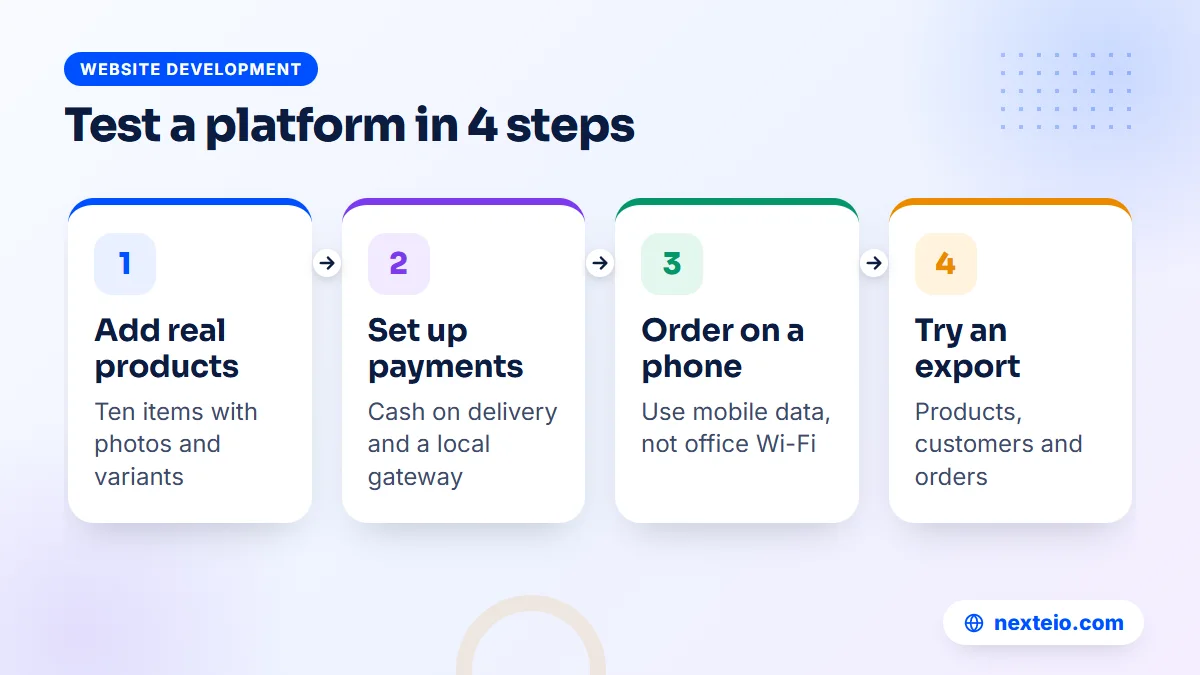
Do not decide from screenshots and sales pages. Spend a few hours testing the platform with your own products and your own phone. A free trial is enough for most of these steps.
- Add ten real products with photos, variants and Bangla or English descriptions.
- Set up cash on delivery and any local gateway the platform supports.
- Place an order on a mid-range phone using mobile data, not office Wi-Fi.
- Check the order email, the admin order screen and how you would book a courier.
- Export products, customers and the test order, then open the files.
- Add up the monthly cost with the plan, the apps you need and any transaction fees.
If you are comparing against a developer, ask them to show you a live store they built and to walk through the same order flow on their admin panel. Seeing a real order screen tells you more than any proposal. You can also ask how they would handle the parts the builder could not.
Questions to Ask Before Hiring a Developer
If the comparison points you toward a developer, choose one with care. A cheap build that nobody maintains can end up costing more than any ecommerce website maker. Ask these questions and expect clear answers.
- Which platform do you recommend for my shop, and why that one?
- Can you show me two or three stores you built that are still live and selling?
- Which payment gateways and couriers have you connected before?
- Will the domain, hosting and admin accounts be in my name from the start?
- How many products will you upload, and how will you train my staff?
- What happens after launch: updates, backups, fixes and their cost?
- How long will the build take, and what do you need from me to keep it on schedule?
Write down each answer as you go.
Also ask for a written scope listing pages, features, integrations and revision rounds. Vague promises like "complete ecommerce solution" are a warning sign. Compare their answers side by side, and look at our portfolio or anyone else's work with the same questions in mind. Our article on common SEO mistakes is also worth reading before launch, since many of them start during the build.
How Nexteio Can Help You Choose and Build
If you are weighing an ecommerce website maker against a developer, we are happy to look at your products, order volume and payment needs and tell you plainly which route we think fits. Sometimes that answer is a builder, and we will say so.
When a developer-built store is the better fit, our e-commerce website development service builds it around how people in Bangladesh buy: phone-first pages, cash on delivery, bKash and other local payment options through a gateway, and courier connections where an integration exists. For standard shops we generally suggest WooCommerce, and Laravel for stores with unusual workflows. The domain, hosting and admin accounts are set up in your name.
You can see all our services, share your shop details on our project form for a scoped estimate, or use the contact page if you would like to talk it through first.
Keep reading: how to build a professional business website that gets results, simple SEO tips for small business websites, or browse all our website development guides.
Frequently asked questions
Can I use Shopify or Wix to sell in Bangladesh?
You can build a store on them, but their own payment services generally do not support businesses based in Bangladesh. You would rely on cash on delivery, manual payment methods or a supported third-party gateway, and pay the subscription in US dollars by card. Test these points during the free trial before you commit.
Is a website builder cheaper than hiring a developer?
In the first month, almost always. Over three years, often not by much, because subscriptions, paid apps and extra transaction fees add up while a developer-built store mainly costs hosting and maintenance after launch. The bigger difference is that you own a developer-built store and only rent a builder store.
Can I move from a website builder to WooCommerce later?
Yes. Products and customers can usually be exported as CSV files and imported into WooCommerce, though order history, reviews and page designs often need extra work or a migration tool. Plan redirects from old product URLs to new ones so you keep your search rankings.
Do I need coding skills to run a developer-built store?
No. Once a WooCommerce store is built, adding products, changing prices, managing orders and editing pages is done through an admin panel, much like a builder. Technical work such as updates, backups and fixing plugin conflicts is usually handled by a maintenance provider.
Which option is better for SEO?
Both can rank well if the basics are done properly. Builders cover standard settings, while a developer-built store gives more control over URLs, structured data, page templates and speed. For most shops, unique product descriptions and strong category pages matter more than the platform.
Should I sell on a marketplace instead of building my own store?
A large online shopping platform such as a national marketplace brings ready traffic, but it controls fees, rules and the customer relationship. Your own store builds a brand and customer list you keep. Many sellers do both: marketplace for reach, their own site for repeat customers and higher margins.
How long does it take to launch with each option?
A builder store can go live within days if your products and photos are ready. A developer-built WooCommerce store usually takes three to eight weeks depending on design, integrations and product count. In both cases, preparing product data and getting payment approvals often takes longer than the technical setup.