What Is an Ecommerce Website? Types, Features and How It Works
In this article 15 sections
- 1.What Is an Ecommerce Website?
- 2.How an Ecommerce Website Works, From Click to Delivery
- 3.9 Types of Ecommerce Websites
- 4.Ecommerce Website vs Facebook Page vs Marketplace
- 5.Features Every Ecommerce Store Needs
- 6.Payments: Cash on Delivery, bKash, Nagad and Cards
- 7.Delivery, Couriers and Returns
- 8.Platforms: Shopify, WooCommerce or a Custom Build
- 9.Pages and Policies Your Store Must Have
- 10.Getting Traffic: SEO, Ads and Repeat Customers
- 11.What an Ecommerce Website Costs to Build and Run
- 12.Launching Your First Store: A Practical Order of Work
- 13.Common Mistakes That Sink New Online Stores
- 14.How Nexteio Can Help With Your Ecommerce Website
- 15.Frequently asked questions
An ecommerce website is a website where customers can browse products, place an order and pay or choose cash on delivery without calling or messaging anyone. It works as your shop counter, catalog, cash desk and order book at the same time, open every hour of the day. Behind the pages sits a system that tracks stock, records every order and tells your team what to pack.
In Bangladesh, a large share of online selling still happens through Facebook pages, where every order starts as a message and ends as a line in a notebook or spreadsheet. That is a fine way to test a product. It becomes painful when orders grow, staff miss messages, and customers ask for prices that are already in the post.
This guide explains what an ecommerce website is, how it works from the first click to delivery, the main types, the features that matter, how payments and couriers fit in, what it costs, and the mistakes that sink many new stores. It is written for owners and managers who want to understand the whole picture before they talk to a developer.
What Is an Ecommerce Website?
An ecommerce website sells directly online. The key word is directly: a visitor can pick a product, see the real price and availability, add it to a cart and complete an order alone. A company website that only shows products with a "call us" button is a catalog, not a store, even if it looks similar.
You will see the same idea described in many ways. People call it an online store, an ecommerce store, an ecommerce shop, an internet shop or an ecommerce web site. Search terms like "e commerce site", "ecom websites", "e comm website" and "web e commerce" all point to the same thing. The name matters less than the job: taking orders and payments without a person in the middle.
Every ecommerce website has two sides. The storefront is what customers see: the homepage, categories, product pages, cart and checkout. The back office, often called the admin panel, is what your team uses: products and prices, stock levels, orders, payments, customers, discounts and reports.
Most owners judge a store by its storefront. Staff live in the back office, and a clumsy admin panel can cost more time each day than any design flaw on the front. When you compare options, ask to see both sides. A good online store build gives equal attention to the screens your staff use every day.
How an Ecommerce Website Works, From Click to Delivery
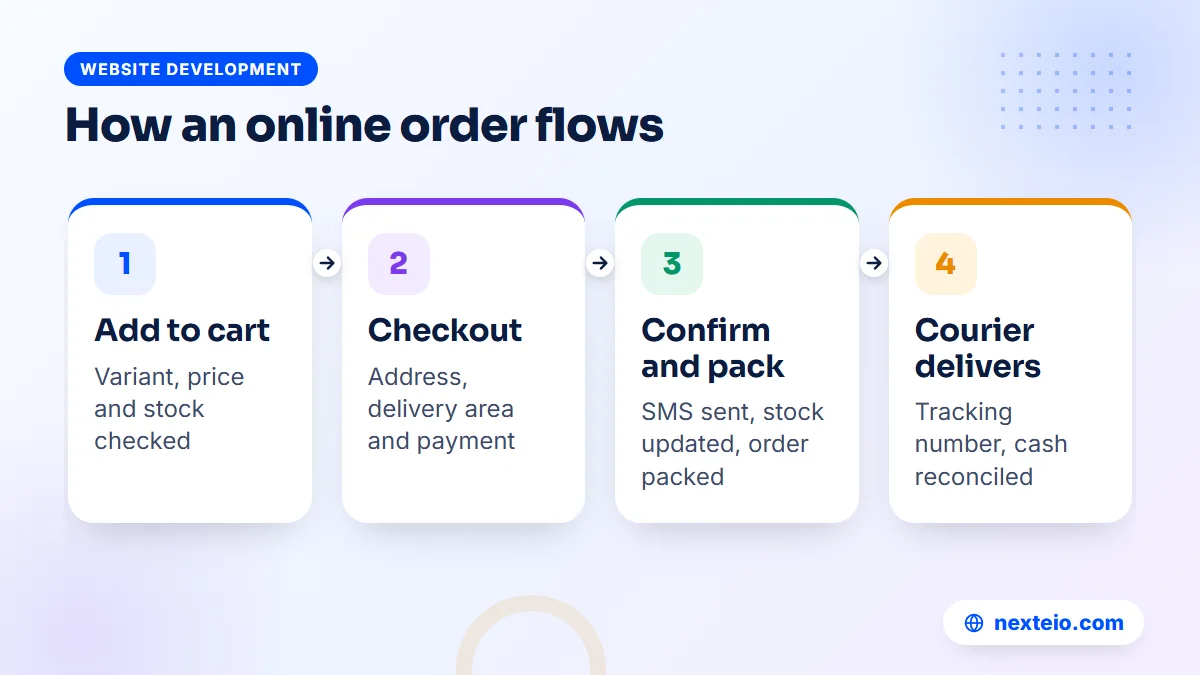
Following one order through the system shows what each part does. Imagine a customer in a district town who wants to buy a pair of shoes from your store.
- She finds the product through a Facebook ad, a Google search or a friend's link, and lands on the product page.
- She picks a size and color. The website checks the stock for that exact variant and shows the price.
- She adds the shoes to the cart. The cart remembers them even if she leaves and comes back later.
- At checkout, she enters her name, phone number and address, and picks a delivery area. The website adds the right delivery charge.
- She chooses cash on delivery, or pays through bKash, Nagad or a card via a payment gateway.
Then the work moves to your side of the store:
- The order is saved, the stock goes down by one, and she receives an SMS or email confirmation.
- Your team sees the order in the admin panel, calls to confirm if needed, then packs it.
- A courier picks it up. The tracking number is attached to the order, and the status changes to shipped.
- When the courier delivers and collects any cash, the order is marked delivered and the money is reconciled.
Each step involves a different part of the system: the product database, the cart, the checkout, the payment gateway, the order manager, the messaging service and the courier connection.
Behind the scenes, an ecommerce website runs on three layers. The front end is the pages people see. The back end is the code that applies your rules, such as prices, stock, discounts and delivery charges. The database stores everything: products, customers and orders. Hosting keeps all three online, and if the hosting is weak, the whole store slows down at exactly the moment a campaign brings traffic.
9 Types of Ecommerce Websites
Not every online store works the same way. The type you run shapes the features you need, the platform that fits and the budget you should set.
| Type | How it works | Example in Bangladesh |
|---|---|---|
| B2C retail store | A business sells many products to individual buyers | A fashion or electronics shop |
| D2C brand store | A brand sells its own products without middlemen | A skincare or food brand selling its own range |
| B2B wholesale store | Businesses buy in bulk at tiered prices | A distributor selling to retail shops and pharmacies |
| Multi-vendor marketplace | Many sellers list products; the site takes a commission | A platform hosting many small sellers |
| Single-product store | One product or a small set, sold through a focused page | A gadget sold through ads |
| Subscription store | Customers pay regularly for repeat deliveries | Monthly grocery boxes or baby care packs |
| Digital products | Files or access delivered instantly after payment | Online courses, e-books, software licenses |
| Service booking | Customers book and pay for a time slot or service | Salon or diagnostic test bookings |
| Catalog with order request | Products and prices shown; orders confirmed by phone | Furniture or building materials |
Some of these types overlap in practice.
A garment factory might run a B2B store for wholesale buyers and a separate D2C store for retail customers. A coaching center selling recorded courses is running a digital products store, even if it does not think of itself as ecommerce.
The type affects the build more than many owners expect. A B2B store needs customer-specific prices, minimum order quantities and invoice payments. A marketplace needs seller accounts, commission rules and payouts. A single-product store needs a strong landing page more than a large catalog. Our guide to high-converting landing pages covers that last case in detail.
Ecommerce Website vs Facebook Page vs Marketplace
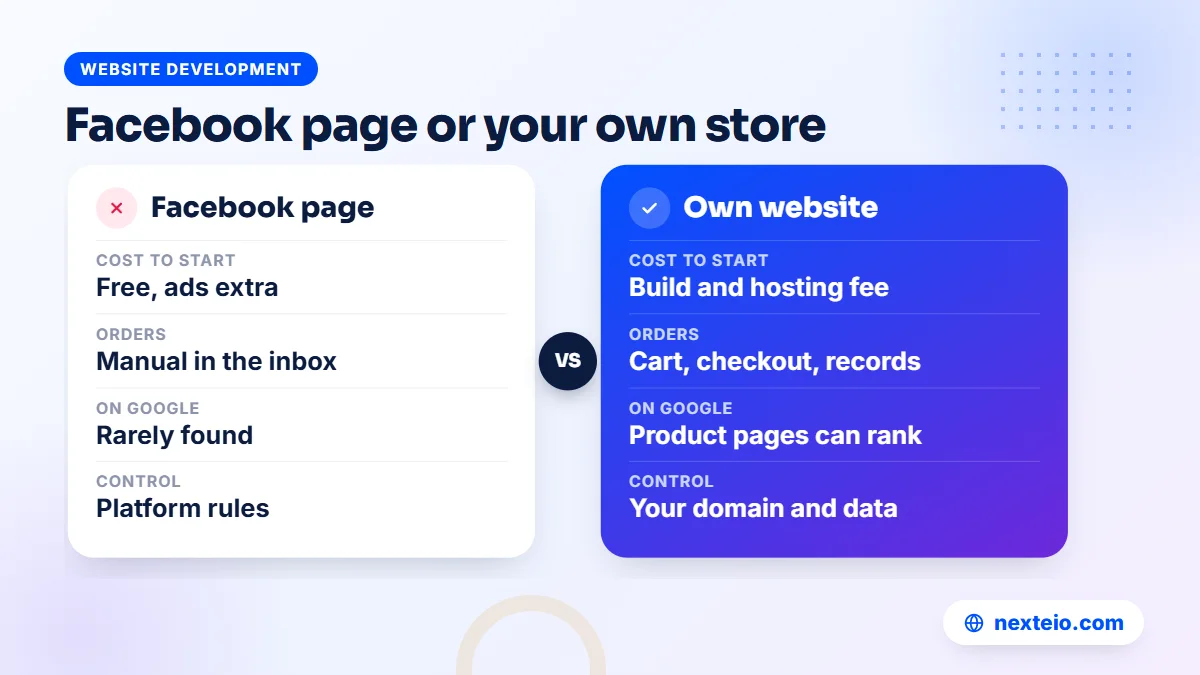
Many sellers in Bangladesh ask whether they need their own ecommerce website at all, when a Facebook page and a listing on a large marketplace already bring orders. The honest answer is that each channel does a different job, and most growing businesses end up using more than one.
| Point | Facebook page | Marketplace listing | Own ecommerce website |
|---|---|---|---|
| Cost to start | Free, though ads cost money | Free or low listing cost, commission per sale | Build cost plus hosting and domain |
| Order handling | Manual, through messages | Handled by the marketplace's system | Automatic cart, checkout and order records |
| Customer data | Scattered across chats | Owned mostly by the marketplace | Yours, in your own database |
| Google visibility | Limited | Strong for the marketplace, not your brand | Product and category pages can rank |
| Rules and control | Platform policies and reach changes | Marketplace pricing and policy rules | Your own prices, design and policies |
A Facebook page is excellent for reach and conversation. A marketplace brings ready buyers but takes a commission and keeps the customer relationship. Your own website is the only place where the brand, the data and the rules are fully yours.
A practical path is to keep using Facebook for discovery and send people to your website to order. That way, ads still bring traffic, but orders arrive cleanly with the right address, phone number and product variant. When you connect the Meta Pixel and Conversions API, you can also see which ads lead to real sales. Our guide to Meta ads conversion tracking explains how that works, and our Facebook ads service can manage the campaigns that feed the store.
Features Every Ecommerce Store Needs
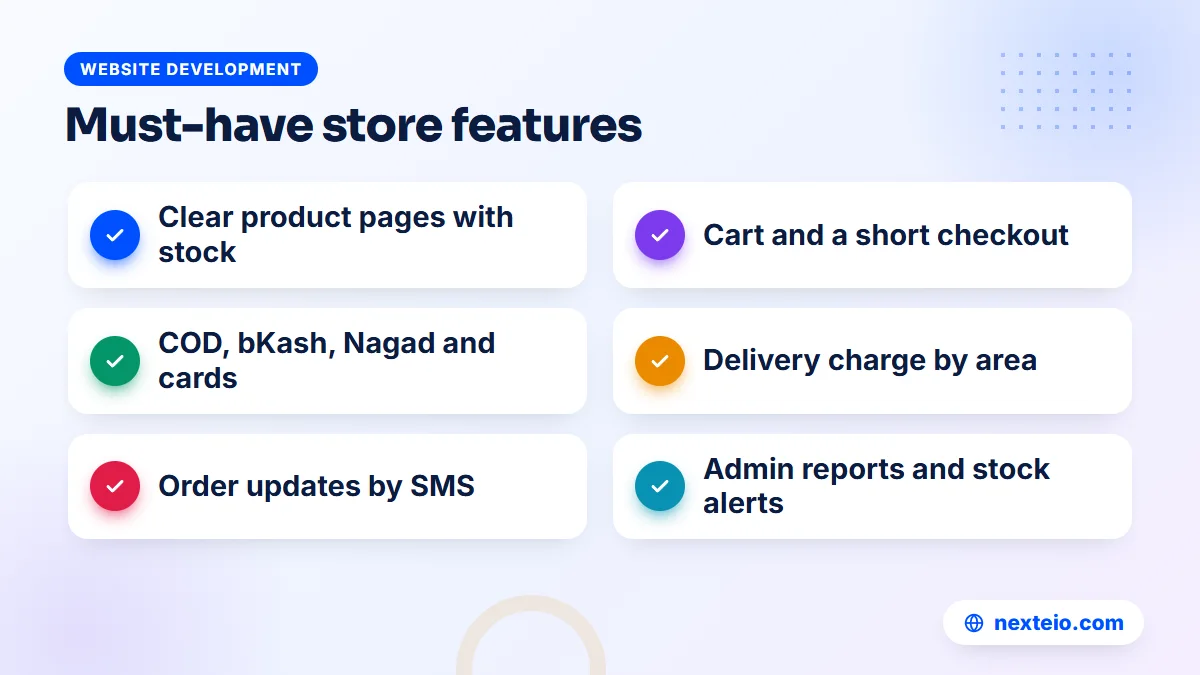
Feature lists from platforms are long, but a small set makes the difference between a store that sells and one that only looks good. Split them into what customers need and what your team needs.
For customers
- Clear product pages with real photos, size or variant options, stock status and the full price.
- Search and filters that work on a phone, so people find a product in a few taps.
- A cart that keeps items and shows the delivery charge before checkout.
- A short checkout: name, phone, address, delivery area and payment method, without forcing account creation.
- Order confirmation by SMS, with a way to track the parcel.
- Visible contact options, return rules and delivery times.
Those six points cover most of what a buyer judges in the first minute.
For your team
- Product management with variants, bulk price updates and stock alerts.
- An order screen with status steps: new, confirmed, packed, shipped, delivered, returned.
- Discount codes and simple offers that do not need a developer.
- Courier booking from the order screen, or at least easy export of shipping details.
- Staff accounts with limited rights, so a packer cannot change prices.
- Reports on sales, top products, returns and unpaid cash on delivery amounts.
Those points decide how many hours your staff spend on each order.
Leave the rest for later. Wishlists, loyalty points, product comparisons and live chat can all help, but only after the basics run smoothly. A store with fifty products and a slow checkout gains nothing from a loyalty program.
Payments: Cash on Delivery, bKash, Nagad and Cards
Cash on delivery is still the payment method many shoppers in Bangladesh trust most, especially for a first order from a store they do not know. An ecommerce website that does not offer it will lose sales. At the same time, cash on delivery brings returns, fake orders and slow cash flow, so most stores also push online payment.
Online payments usually run through a payment gateway, a service that sits between your website and the banks or mobile wallets. The customer pays on a secure page, the gateway confirms the payment to your website, and the money settles into your bank account after a few days, minus a fee. To use a gateway, your business normally needs a trade license, a bank account in the business name and a working website with clear policy pages.
Many stores use a mix of methods to balance trust and risk:
- Full cash on delivery for small orders and trusted delivery areas.
- Advance delivery charge paid by bKash or Nagad, with the product price collected on delivery. This cuts down fake orders.
- Full online payment with a small discount, for repeat customers and digital products.
- Partial advance for high-value or custom items such as furniture.
Whichever mix you choose, the website should record exactly what was paid, what is due on delivery and how each payment was made. That record is what lets accounts reconcile money from the courier with orders in the system, which is one of the most time-consuming jobs in a busy store.
Delivery, Couriers and Returns
Delivery is where many online shops win or lose customers. The website cannot control the courier, but it can set clear expectations and make the handover smooth.
Start with delivery charges. Most stores in Bangladesh charge one rate inside their home city and another for the rest of the country, sometimes with a third rate for remote areas. The website should calculate this automatically from the address or a delivery area dropdown, and show it in the cart, not as a surprise at the end.
Courier connections save hours each day. Several local courier companies offer APIs that let your website create a delivery request, print a label and receive status updates. Without that link, staff copy every address by hand into the courier's panel, which is slow and full of typing errors.
Returns need their own process. Decide which products can be returned, in what condition, within how many days, and who pays the return delivery. Show those rules on the product page and in a dedicated policy page. In the admin panel, a returned order should restore stock automatically and adjust the sales report.
Delivery times deserve honest wording. Saying "delivery in 2 to 5 days" and meeting it builds more trust than promising next-day delivery and missing it. If you use a separate courier for areas outside your city, say so.
Related guides for store owners:
- What to plan and budget for ecommerce development in Bangladesh
- Why a website gets traffic but no customers
- What you should get from a Facebook ads service
Platforms: Shopify, WooCommerce or a Custom Build
Every ecommerce website runs on some platform. The three common choices each suit a different stage of business.
Shopify: hosted and quick to start
Shopify is a hosted platform: you pay a monthly subscription, and Shopify handles hosting, security and updates. Setup is quick, and the Shopify Help Center documents nearly every feature. The trade-offs for Bangladesh are that the subscription and many apps are billed in US dollars, local payment and courier options depend on third-party apps, and deep changes to checkout are limited.
WooCommerce: flexible and self-hosted
WooCommerce is a free, open-source plugin that turns a WordPress site into a store. You host it yourself, so you control the data and can add local payment gateways and courier connections through plugins or custom code. It suits most small and mid-sized stores well. The cost is responsibility: someone must handle updates, backups, security and speed. A professionally built WordPress and WooCommerce site avoids the slow, plugin-heavy setups that give WooCommerce a bad name.
A custom build for unusual rules
A custom store is written for your exact business, often with a framework such as Laravel. It makes sense when your rules do not fit a standard platform: B2B pricing per customer, a multi-vendor marketplace, complex stock across warehouses, or tight links with your accounting or ERP system. It costs more and takes longer, but nothing is limited by a plugin. Our Laravel web application service handles this kind of build.
For a detailed comparison of the trade-offs, see our guide to WordPress versus a custom website. In most cases, the right platform is the simplest one that can handle your next two years of growth, not the one with the longest feature list. Our ecommerce development team can help you choose based on your products, order volume and budget.
Pages and Policies Your Store Must Have
An online shop is asking strangers to trust it with their money. Policy pages are part of how you earn that trust, and payment gateways usually check for them before approving a merchant account.
- About page: who runs the business, with a real address and trade license details.
- Contact page: phone, email, address and business hours.
- Delivery policy: areas, charges and expected delivery times.
- Return and refund policy: what can be returned, how and when refunds are paid.
- Terms and conditions: order rules, cancellations and pricing errors.
- Privacy policy: what customer data you collect and how you use it.
Write these pages in plain language. Customers read them when they are unsure, and a clear, short policy reassures more than a long legal one.
Bangladesh also has the Digital Commerce Operation Guidelines, issued by the Ministry of Commerce in 2021, which set rules for online sellers on matters such as advance payments, delivery times and refunds. Read the current version before you launch, and make sure your checkout and policies follow it. If you are unsure how it applies to your business, ask a lawyer or your trade body rather than guessing.
Each product page also needs honest information: the real photo, size charts where relevant, material or ingredients, and any warranty terms. Every e commerce web page that sells something should answer the questions a customer would ask in a physical shop.
Getting Traffic: SEO, Ads and Repeat Customers
A new ecommerce website starts with zero visitors. Launching the store is the start of the work, not the end. Traffic usually comes from three sources, and healthy stores use all of them.
Search engines
Category and product pages can rank on Google for searches like "cotton panjabi for men" or "baby stroller price in Bangladesh". That needs unique product descriptions, sensible category structure, fast pages and correct technical setup. Google's own guide to ecommerce sites in Search explains how it reads stores, and Product structured data helps search engines understand prices and availability. Our ecommerce SEO service and the guide to what ecommerce SEO includes go deeper on this.
Paid ads
Facebook, Instagram and TikTok ads drive most early sales for stores in Bangladesh. Google Shopping and search ads catch people who already know what they want. Short product videos work especially well, and a video ad editing service can turn simple phone footage into ads that show the product clearly in the first seconds. Searchers ready to buy can also be reached through Google Ads, which works best once conversion tracking is in place.
Repeat customers
Your cheapest sale is to someone who already bought. Collect phone numbers and, with permission, send SMS offers, restock alerts and festival discounts. Make reordering easy. A store with a strong repeat rate can spend less on ads for each order and still grow.
Speed connects all three channels. Slow pages lose visitors from ads you paid for and can hold back search rankings, and stores with many product images feel this more than most sites. Compress every photo, keep plugins lean and test the store on a phone using mobile data.
What an Ecommerce Website Costs to Build and Run
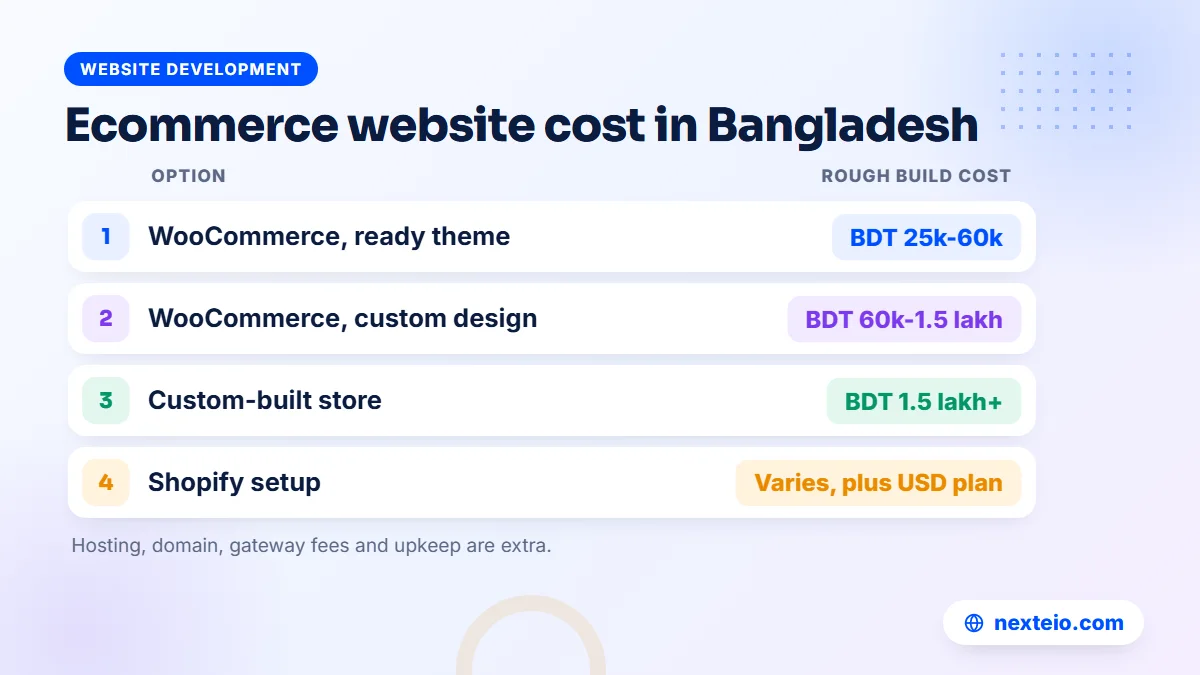
Cost depends on the platform, the number of products, the design work and the integrations. The ranges below are broad market figures in Bangladesh, meant for planning rather than as quotes.
| Option | Rough build cost | Usually suits |
|---|---|---|
| WooCommerce with a ready-made theme | BDT 25,000 to 60,000 | Small stores with a simple catalog and standard checkout |
| WooCommerce with custom design and integrations | BDT 60,000 to 1.5 lakh | Growing brands needing courier links, local payments and a strong design |
| Shopify setup and theme work | Varies by work, plus a monthly subscription in USD | Stores that prefer hosted software and sell partly abroad |
| Custom-built store | BDT 1.5 lakh or more | Marketplaces, B2B stores and businesses with complex rules |
Running costs come on top of the build. Plan for a domain renewal each year, hosting that can handle your traffic, payment gateway fees per transaction, SMS credits, paid plugins or apps, and maintenance. A small WooCommerce store might spend a few thousand taka a month on these. A busy store with heavy traffic spends much more, mostly on hosting and support.
Do not forget the hidden cost of time. Someone has to photograph products, write descriptions, answer customers and confirm orders. A store that launches with 500 products but no one to update stock will soon show items that are no longer available, and that damages trust faster than a missing feature.
The right budget also depends on who builds the store. Our ecommerce development service scopes the work from your product list and order process before giving a price. If you want an estimate for your own store, send us your product count and requirements on our project form, and we can suggest a sensible starting point.
Launching Your First Store: A Practical Order of Work
Before you commit to any web ecommerce project, put the work in the right order. Most delays come from content and decisions on the business side, not from code. A sensible sequence looks like this:
- List your products with prices, variants, stock and weights in one spreadsheet.
- Decide delivery areas, charges and the couriers you will use.
- Choose payment methods and apply for a payment gateway early, since approval takes time.
- Photograph the products in good light on a plain background, and write short, honest descriptions.
- Write the policy pages: delivery, returns, privacy and terms.
- Choose the platform and agree the scope and timeline in writing.
- Test every step on a phone: place real orders, pay small amounts, cancel one and return one.
- Launch quietly to existing customers before spending on ads.
The soft launch is worth the wait.
A week of real orders from people who already know you shows where checkout confuses buyers, which delivery areas cause trouble and whether stock numbers stay accurate. Fixing those problems before a big campaign costs far less than fixing them in front of thousands of new visitors.
Keep one person responsible for the store from day one. That person checks new orders, updates stock, answers questions and reports problems to whoever maintains the site. Without a clear owner, a new store drifts within weeks.
Common Mistakes That Sink New Online Stores
Most failed stores did not fail because of the platform. They failed because of decisions made before and just after launch. These patterns come up again and again:
- Launching with stock photos and copied descriptions, so the store looks like every other shop.
- Hiding the delivery charge until the last step of checkout.
- Forcing customers to create an account before they can order.
- Offering no cash on delivery option, or offering only cash on delivery with no fake-order control.
- Building on a cheap, overloaded host that slows down during every campaign.
- Letting a developer register the domain and hosting in their own name.
- Running ads without conversion tracking, so nobody knows which campaigns make money.
- Ignoring the admin side, so staff spend hours on work the system should do.
Each one is avoidable with a little planning. Notice that most of them have nothing to do with design.
One more mistake deserves its own line: treating the ecommerce website as finished on launch day. Stores need regular updates, new products, seasonal offers, security patches and speed checks. Plan for that work from the start, whether your own staff do it or an outside team does.
How Nexteio Can Help With Your Ecommerce Website
We build online stores through our ecommerce website development service, designed for the way people in Bangladesh buy: on a phone, often with cash on delivery or bKash, and with a quick confirmation before the parcel ships. We start by understanding your products, order volume, delivery areas and payment needs, then recommend the platform that fits, whether that is WooCommerce or a custom build.
The build covers the parts this guide describes: product pages, a short checkout, local payment gateways, delivery charges by area, courier connections where available, policy pages and an admin panel your staff can use. We also recommend that the domain, hosting and store data stay in your business's name. After launch, we can help bring traffic through ads and search, so the store has visitors as well as a design.
You can look at our portfolio, read more about Nexteio, or tell us about your store on the project form. If you have a quick question first, reach us through the contact page.
Keep reading: SEO vs Google Ads for bringing in buyers, how faster pages help you rank and sell, or browse all our website development guides.
Frequently asked questions
What is the difference between an ecommerce website and a normal business website?
A normal business website explains who you are and how to contact you. An ecommerce website lets visitors buy without contacting you: they see live prices and stock, add products to a cart, choose payment and place an order. It also needs a back office for orders, stock and payments.
Do I need a trade license to run an online store in Bangladesh?
To accept online payments through a payment gateway, you will normally need a trade license and a bank account in the business name. Even for cash on delivery only, a registered business builds trust with customers and couriers. Check the current requirements with the gateway and your local authority before you launch.
Can I run an ecommerce website with only cash on delivery?
Yes, and many small stores start that way. The risk is fake orders and returns, so many stores later ask for the delivery charge in advance through bKash or Nagad. Adding online payment also improves cash flow, because you do not wait for the courier to settle cash.
Which platform is best for a small online shop in Bangladesh?
For most small shops, WooCommerce on WordPress is a practical choice because it has no monthly platform fee and works well with local payment and courier plugins. Shopify suits owners who prefer hosted software and do not mind dollar billing. A custom build is worth it only when your business rules do not fit either.
How long does it take to build an online store?
A simple WooCommerce store with a ready-made theme can be ready in a few weeks once products and photos are prepared. A store with custom design, payment gateways and courier connections usually takes longer. Custom marketplaces and B2B stores can take several months.
How many products do I need before launching a store?
There is no minimum. A focused store with twenty well-photographed products and clear descriptions often sells better than one with hundreds of thin listings. Start with your best sellers, make sure stock is accurate, and add more as you learn what customers want.
Is my own store better than selling only on Facebook?
They do different jobs. Facebook is strong for reach and conversation, while your own store gives you clean orders, customer data and pages that can show up on Google. Most growing sellers use Facebook to attract buyers and send them to their website to order.