Domain and Email Hosting: Business Email Setup Options for Companies
In this article 15 sections
- 1.How Domain and Email Hosting Fit Together
- 2.Three Ways to Run Email on Your Own Domain
- 3.Choosing Domain and Email Hosting for Your Type of Organization
- 4.Registering the Domain the Right Way
- 5.The DNS Records Behind Domain and Email Hosting
- 6.Setting Up Domain and Email Hosting Step by Step
- 7.Keeping Company Mail Out of Spam
- 8.Planning Mailboxes, Aliases and Shared Addresses
- 9.Moving Email to a New Provider Without Losing Messages
- 10.Security for Company Email Accounts
- 11.What Domain and Email Hosting Cost in Bangladesh
- 12.Fixing Common Domain and Email Hosting Problems
- 13.Who Should Hold the Keys
- 14.How Nexteio Can Help With Domain and Email Setup
- 15.Frequently asked questions
Domain and email hosting decide how your company looks every time someone opens a message from you. A buyer who receives a quotation from sales@yourcompany.com reads it differently from one sent through a free Gmail address. A school that writes to guardians from its own domain is easier to trust than a teacher's personal account, and a hospital's appointment reminders look more official when they come from the hospital's name.
Yet many organizations in Bangladesh set this up in a hurry. Someone buys a domain, the web developer adds a few mailboxes on the same hosting account, and nobody writes down where anything lives. It works until a mailbox fills up, messages start landing in spam, or the one person who held the passwords leaves the company.
This guide covers the setup options for business email on your own domain, how to choose one for your kind of organization, and the DNS records that make mail arrive. It also explains how to move between providers without losing old messages, what each option usually costs, and how to fix the problems that come up most often.
It is written for owners, office managers and IT officers who need to make a sound decision, not for mail server engineers. You do not need to configure anything yourself to follow it, but you will know exactly what to ask for.
How Domain and Email Hosting Fit Together
People often talk about "the website" as if the domain, the site and the email were one product. They are separate services that happen to share a name. Once you see the parts clearly, most setup decisions become simple. There are four of them:
- Domain registration: the yearly right to use a name such as yourcompany.com, held through a registrar.
- DNS: the public address book for that name. It tells the internet where your website lives and which server accepts your mail.
- Website hosting: the server that stores and serves your web pages.
- Email hosting: the service that stores your mailboxes, receives incoming mail and sends outgoing mail.
All four can sit with one company, or each can sit somewhere different. The domain is the anchor, and DNS is the switchboard that connects it to everything else.
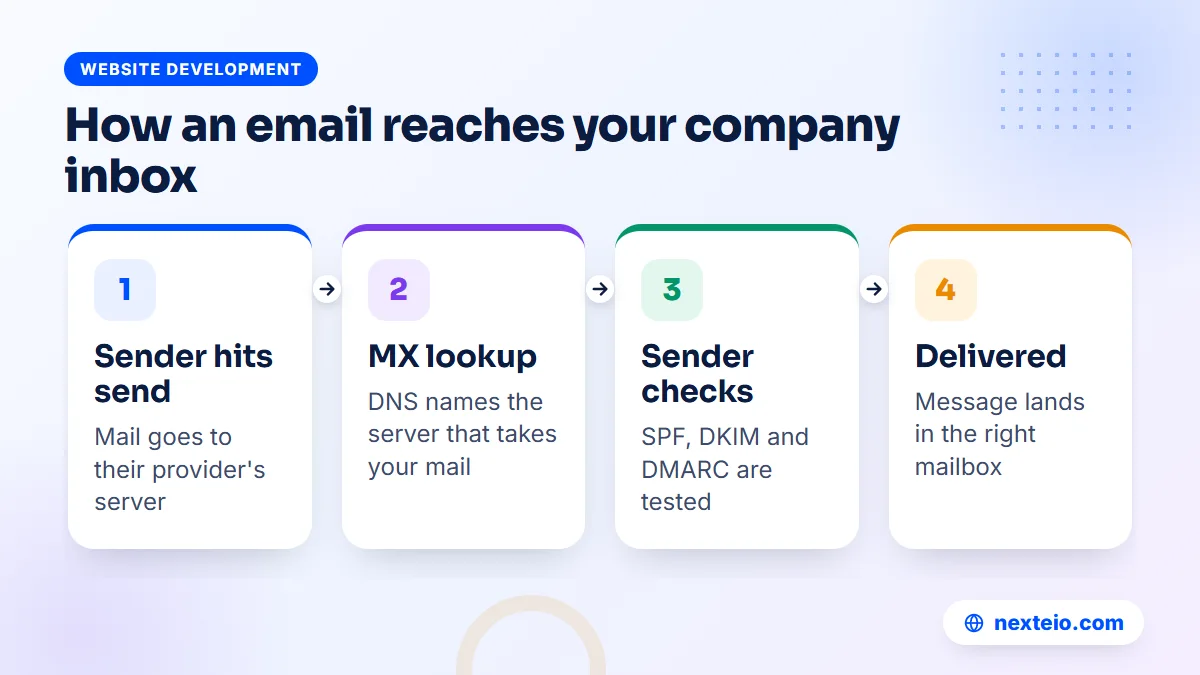
The record that matters most for mail is called the MX record. It names the server that should receive messages for your domain. Your website is pointed somewhere else with an A record. Because these are separate entries, you can keep your website on one host and your email with a different provider, and visitors will never notice.
That freedom is the main idea to hold on to. Choosing domain and email hosting is not one big purchase. It is a few smaller choices, and you can change any one of them later without rebuilding the others, as long as the DNS is managed with care.
Three Ways to Run Email on Your Own Domain
Option 1: Mailboxes included with your web hosting
Most shared hosting plans, especially those with a cPanel control panel, let you create email accounts on your domain at no extra cost. You open the panel, add info@ and a few staff addresses, and connect them to a phone or to Outlook. For a small office that sends ordinary letters and quotations, this is often enough.
The weak points show up as the organization grows. Mailboxes share disk space with the website, so a busy inbox can eat the space the site needs. The sending server is shared with many other customers, and if one of them sends spam, delivery can suffer for everyone on that server. Spam filtering, webmail and mobile apps are also usually more basic than on a dedicated service.
Option 2: A dedicated business email service
Services such as Google Workspace, Microsoft 365 and Zoho Mail host only email and related tools: calendars, shared drives and video meetings. You keep your domain where it is and point its MX records at the service. Each user is billed per month, and the price includes large mailboxes, strong spam filtering, good mobile apps and admin controls for adding or removing staff.
This is the usual choice for exporters, corporate offices, hospitals and any team where email is the main way business gets done. The trade-off is cost per person, since every mailbox is a paid seat, plus the need for an international card to pay in most cases.
Option 3: Running your own mail server
A few large organizations run their own mail server on a VPS or on hardware they control. It gives full control over data and storage, and it can make sense for a body with strict data rules and a skilled system administrator on staff.
For almost everyone else, it is a poor trade. A self-run mail server needs constant care: security patches, spam filtering, IP reputation, backups and monitoring. When something breaks on a holiday, there is no support line to call. If you do not already have a person whose job includes this, choose option 1 or 2.
| Setup | Best for | Main strengths | Main weaknesses |
|---|---|---|---|
| Mail with web hosting | Small offices, NGOs and shops with light email use | No extra fee, simple to set up | Shared sending reputation, small storage, basic tools |
| Dedicated email service | Exporters, corporate groups, hospitals, growing teams | Reliable delivery, large mailboxes, good apps and admin controls | Monthly fee per user, usually paid in US dollars |
| Own mail server | Large bodies with in-house server staff | Full control of data | High upkeep and delivery problems if neglected |
One warning applies to all three. Splitting mailboxes for the same domain across two providers, such as directors on one service and other staff on hosting mail, is possible but needs special routing. Unless an experienced person sets it up, pick one email host per domain.
Choosing Domain and Email Hosting for Your Type of Organization
The right answer depends less on company size than on how much your work depends on email. Here is how the choice usually plays out for the kinds of organizations we meet most often.
A small office or trading business
Five to ten people who mainly email suppliers and customers in Bangladesh can start with mailboxes on a good shared hosting plan. Make sure the plan gives enough storage per mailbox, supports proper SPF and DKIM settings, and offers webmail that works well on a phone. Move to a dedicated service when mail starts going missing or storage becomes a monthly headache.
A garment exporter or manufacturer
Here, email is the business. Buyers, buying houses and auditors send tech packs, approvals and large attachments, often from overseas mail systems with strict spam filters. A missed message can mean a missed shipment window. A dedicated service is nearly always worth the cost, along with careful sender authentication so your replies are not filtered out. The same domain should carry a clear, current website that buyers can check before a meeting, which is covered in our guide to a professional business website.
A school, college or madrasa
Education bodies need many accounts but use most of them lightly. Teachers send notices, the office handles admission queries, and the principal writes to the board or the governing body. Google and Microsoft both run education programs with free or discounted plans for institutions that meet their eligibility rules, so check those first. If you do not qualify, hosting mail for a few role addresses such as office@ and admission@ is a sensible start.
A hospital or clinic
Clinics handle appointment requests, reports and sometimes patient documents. Confidentiality matters more than features here. Use a service with two-step login, keep patient data out of personal inboxes, and route public enquiries through shared addresses that more than one staff member can see.
A corporate group with several companies
A group with five sister concerns often has five domains. A dedicated service lets you manage all of them from one admin account, with each company keeping its own addresses. This is far easier to control than five separate hosting accounts set up by different people over the years.
Groups in this position often review their websites at the same time, since each sister concern tends to have a different design and a different developer. A shared plan through one custom website design project can give every company its own site on a common base, with domain email hosting handled the same way for all of them.
Registering the Domain the Right Way
Everything else depends on the domain, so get this part right first. A .com domain is registered through any accredited registrar or one of its resellers. The .bd and .com.bd domains are handled by BTCL, the national registry for Bangladesh, and follow their own rules and paperwork. Either is fine for email. Pick the one your customers will remember and type correctly.
The details that matter most are not the name itself but who holds it. Follow these rules when you register:
- Register the domain in the organization's legal name, not in the name of a staff member or developer.
- Use an official role address, such as it@ or admin@, as the contact email, so renewal notices do not vanish when someone resigns.
- Keep the registrar account login with the organization, and give outside help their own access where possible.
- Turn on auto-renewal, or renew for several years at once, and put the expiry date in the accounts calendar.
- Avoid hyphens and odd spellings that people get wrong when they type an address over the phone.
ICANN, the body that coordinates generic domain names, publishes a plain page on registering domain names that covers the basics for registrants. It is worth ten minutes of reading before you pay anyone.
One more trap: some registrars offer free "email forwarding" with a domain. That sends mail on to another inbox, usually a personal Gmail, but it is not a mailbox, it cannot send properly as your domain, and it often fails spam checks. Treat it as a stopgap, not as business email.
The DNS Records Behind Domain and Email Hosting
You do not need to write DNS records yourself, but you should recognize them on a screen. When your developer or provider says "I have updated the records", these are the ones they mean:
| Record | What it does | Typical example |
|---|---|---|
| A | Points the domain to the website server's IP address | yourcompany.com to your web host |
| CNAME | Points one name to another name | www to yourcompany.com |
| MX | Names the server that receives your email | Your email provider's mail servers |
| TXT (SPF) | Lists the servers allowed to send mail for your domain | Your email service plus your website's mail sender |
| TXT or CNAME (DKIM) | Publishes a key that lets others check your mail was not changed | A key generated by your email service |
| TXT (DMARC) | Tells receivers what to do with mail that fails the checks | A policy starting at "none" with reports to you |
Your email provider will also ask for a TXT record to prove you own the domain before it activates mailboxes.
Two rules prevent most DNS mistakes. First, a domain should have only one SPF record. If two providers each tell you to "add SPF", the correct move is to merge them into one line, because two separate SPF records cause both to fail. Second, know where your DNS is managed. It can be at the registrar, at your web host or at a service such as Cloudflare, and only one of them is live. Editing records in the wrong panel changes nothing, which is how many teams lose an afternoon.
Setting Up Domain and Email Hosting Step by Step
Here is the order we recommend for a new company, or for an organization finally putting its email on a proper footing. Each step depends on the one before it, so resist the urge to skip ahead.
- Register the domain in the organization's name with an official contact email.
- Decide where DNS will be managed and make sure two people can log in there.
- Choose the email host and list every mailbox, alias and shared address you need.
- Verify the domain with the email provider by adding the TXT record it gives you.
- Create the mailboxes and aliases, and set strong temporary passwords.
- Replace the MX records with the provider's values and remove any old MX entries.
- Add a single SPF record, turn on DKIM, and publish a DMARC record set to "none".
- Send and receive test messages with Gmail and Outlook addresses outside your company.
- Set up staff phones and computers, then record every login in an access sheet.
Most of these steps take minutes. The waiting happens between steps 6 and 8, while the new records spread across the internet.
Microsoft's guide to adding a domain to Microsoft 365 shows the same flow in its own admin screens, and Google Workspace follows a very similar pattern. If you use hosting mail, the cPanel email section covers steps 5 to 7.
For a new business, it is easiest to do this together with the website, so the domain, hosting and mail are planned once. If you are starting a site from scratch, our custom website design service includes planning where each piece will live before anything is built.
Keeping Company Mail Out of Spam
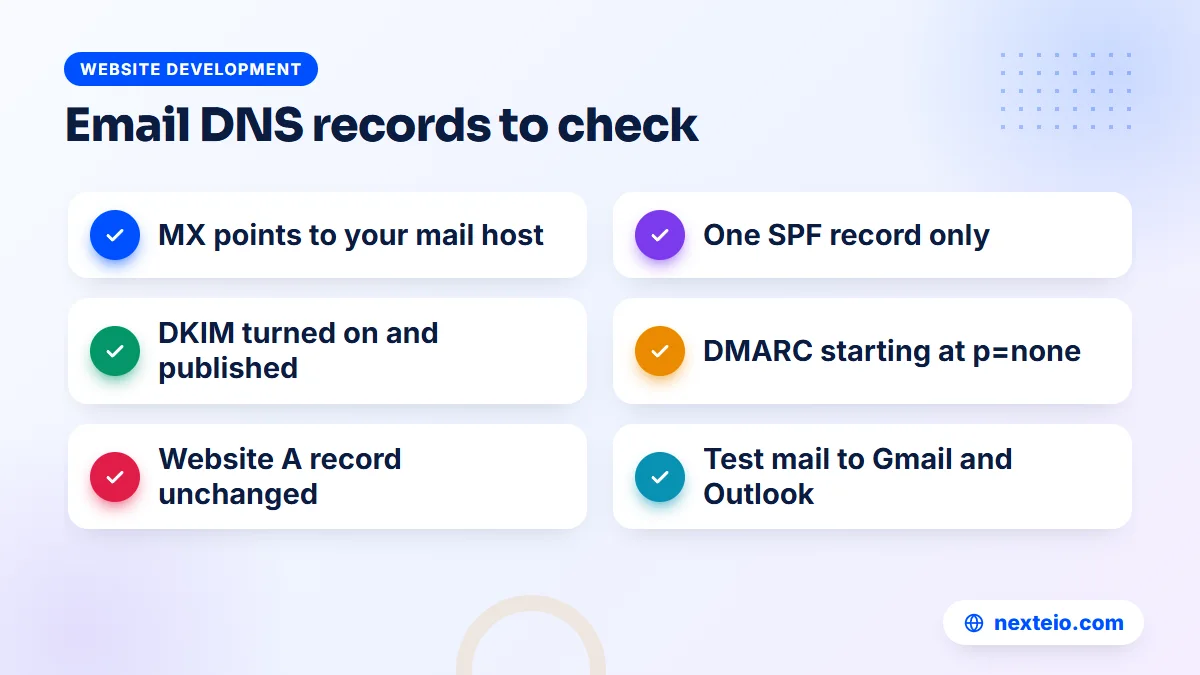
The most common complaint about business email is not that it stops working. It is that it works, but replies land in the other person's spam folder. Large mail providers now check whether a message really comes from the domain it claims, and they are stricter every year. Three records answer that question.
SPF is a list of servers allowed to send mail for your domain. Google's guide to setting up SPF shows how the record is written. DKIM adds a digital signature to every message, so the receiver can confirm it was not altered on the way. DMARC ties the two together and tells receiving servers what to do with mail that fails: deliver it, send it to spam, or reject it.
Start DMARC in monitoring mode, with the policy set to "none", and read the reports for a few weeks. They show every server sending mail with your name, including ones you forgot, such as an accounting system or a newsletter tool. Once all genuine senders pass, move to "quarantine" and later to "reject". Google's page on setting up DMARC explains this gradual approach.
Google's email sender guidelines ask everyone who sends to Gmail addresses to set up SPF or DKIM, and ask bulk senders to set up all three. Meeting the full set is simply good practice for any organization.
Other common causes of spam filtering
- Website forms sending "from" the visitor: a contact form that sends mail pretending to be from the visitor's Gmail address fails every check. The form should send from your own domain and put the visitor's address in "reply-to".
- Bulk mail from the main domain: newsletters and fee reminders sent to thousands of people from the same domain as daily business mail can harm its reputation. Use a proper sending service and authenticate it.
- A shared server with a bad neighbor: on cheap hosting, another customer's spam can get the shared IP address blocked.
- Messages that look like spam: a subject line in capitals, a single large image and no text, or link shorteners.
Forms deserve special attention, because a broken form costs enquiries without anyone noticing. Our article on why a website gets traffic but no customers covers this and other quiet leaks.
Related guides for the website side of the same domain:
- Technical SEO basics every website owner should know
- How faster pages help you rank and sell
- A buyer's checklist for choosing a web design company
Planning Mailboxes, Aliases and Shared Addresses
Before you create a single account, write down who needs what. A little planning here saves money on a dedicated service and keeps public addresses working when staff change.
There are three kinds of address. A mailbox belongs to one person and has its own password and storage. An alias is another name that delivers into an existing mailbox, so rahim@ and accounts@ might both reach Rahim. A group or shared mailbox delivers to several people at once, so admission@ can reach the office secretary and the vice principal together.
On dedicated services, mailboxes are paid seats but aliases and groups usually are not. On hosting mail, everything is usually free but shares limited storage. Either way, these habits keep things tidy:
- Pick one naming pattern, such as firstname.lastname@, and use it for everyone.
- Publish role addresses like info@, sales@ and hr@ on the website, never a person's own address.
- Point each role address at a group, so enquiries survive leave, holidays and resignations.
- Keep one separate admin account for managing the service, not used for daily mail.
- Agree a mailbox size limit and an archive routine before inboxes fill up.
Plan for people leaving, too. When a staff member resigns, do not delete the mailbox on day one. Reset the password, forward new mail to their manager, and keep or export the old messages for as long as your records policy requires. Deleting it too soon can lose years of correspondence with buyers or regulators.
Moving Email to a New Provider Without Losing Messages
Sooner or later, many organizations move mail from hosting to a dedicated service, or from one service to another. The move itself is not hard. Problems come from doing it in the wrong order or too quickly.
Start by taking stock. List every address, every alias and every device that reads mail. Ask whether anyone still uses POP3, which downloads messages to one computer and often removes them from the server. Those messages exist only on that computer, so they must be uploaded or exported before the move.
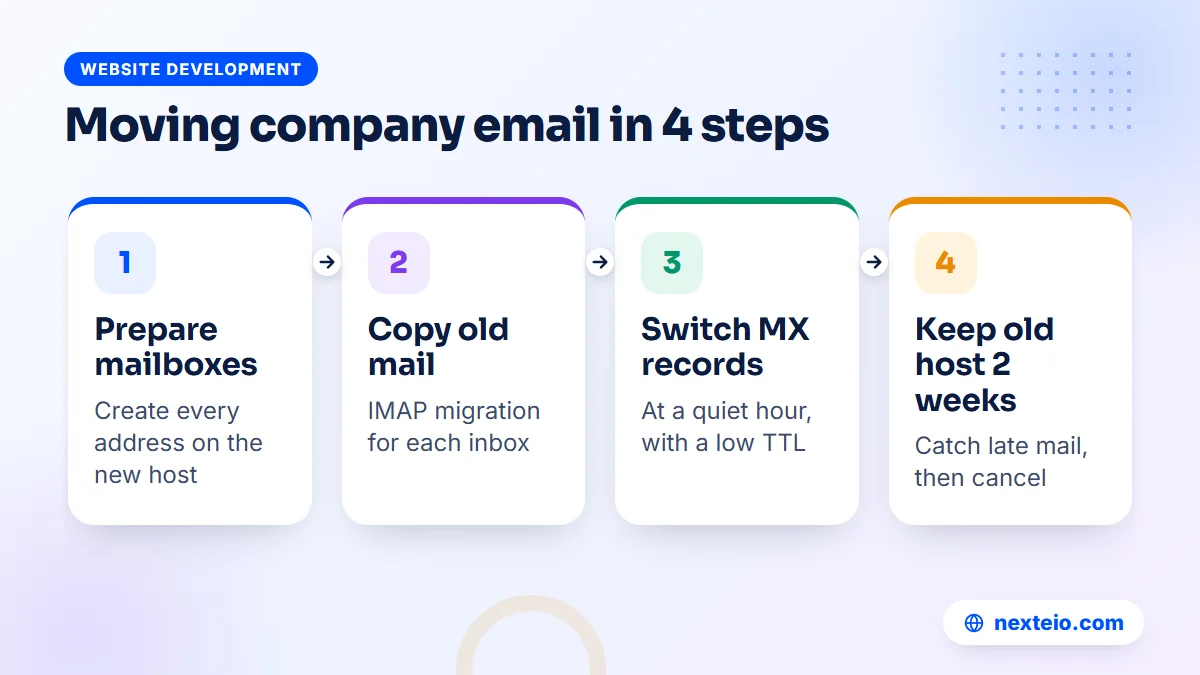
Next, create all the mailboxes on the new service and copy the old mail across. Google Workspace and Microsoft 365 both include tools that pull mail from an old server over IMAP. Copy the bulk of the mail a few days ahead, then run a final sync after the switch.
A day or two before the switch, ask whoever manages DNS to lower the TTL on the MX records, which controls how long other servers remember the old values. Then change the MX records at a quiet time. In Bangladesh, a Thursday evening before the weekend often works well. Update the SPF record to include the new service, and turn on DKIM there.
Finally, keep the old hosting mail running for at least two weeks. Some servers will keep delivering to the old address for a while, and you will want to collect those messages. The most expensive mistake in email migration is cancelling the old hosting the same day the records change.
Security for Company Email Accounts
Your email is the master key to almost every other account. Password resets for the domain registrar, the hosting panel, the bank's online portal and social media pages all go to an inbox. If an attacker gets into the right mailbox, they can take over much more than email.
A common fraud in trade is simple and costly. Someone gains access to a sales or accounts mailbox, reads ongoing conversations with a buyer, and then sends a convincing message saying the bank details have changed. Payment goes to the wrong account. The defense is a mix of settings and office habits:
- Turn on two-step login for every account, starting with directors, accounts and admin users.
- Never share one password among several staff. Use groups or delegated access instead.
- Confirm any change of bank details by phone, using a number you already had, not one from the email.
- Remove accounts and app passwords for staff who have left, on their last day.
- Train staff to check the real sender address before opening attachments or links.
- Make sure lost or stolen phones can be signed out from the admin panel.
Dedicated services make most of these easy to enforce from one admin screen. On hosting mail, you rely more on habits, so write the rules down and repeat them when new staff join.
What Domain and Email Hosting Cost in Bangladesh
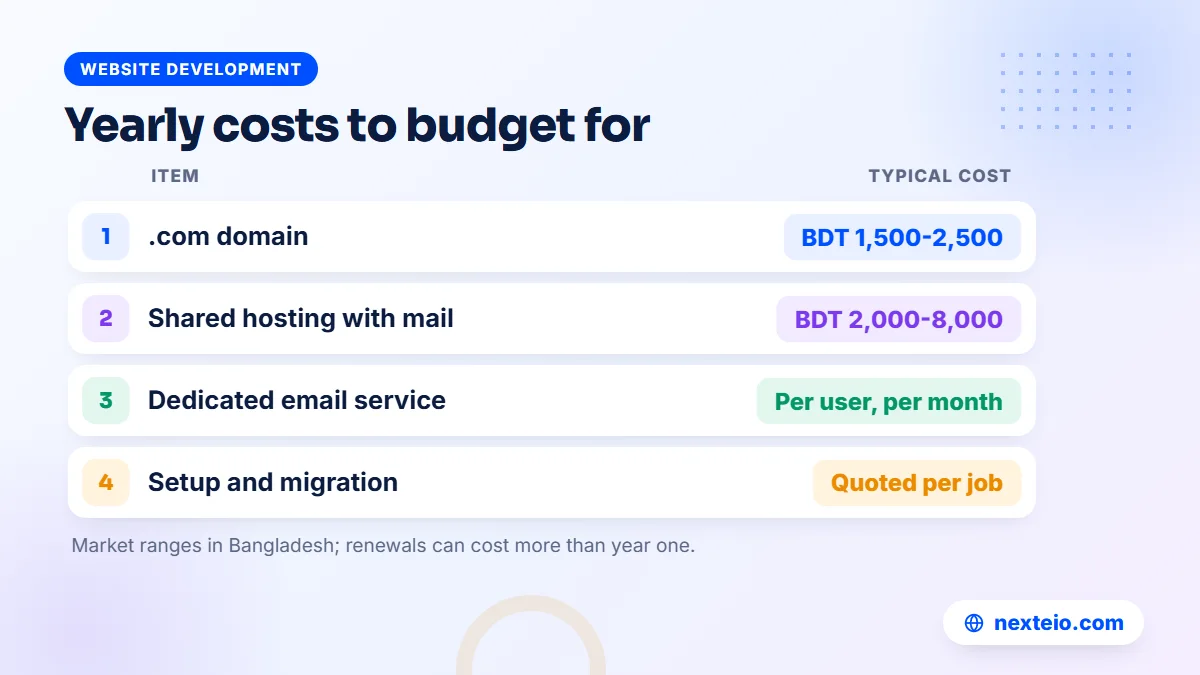
Domain name and email hosting costs are lower than most people expect, but they recur every year, so they belong in the annual budget rather than on someone's personal card. The table below shows typical market ranges in Bangladesh. They are not quotes, and prices vary by provider and plan.
| Item | Typical cost | Notes |
|---|---|---|
| .com domain | About BDT 1,500 to 2,500 a year | Renewal can cost more than the first year |
| .bd or .com.bd domain | Set by BTCL | Check current fees and paperwork with the registry |
| Shared hosting with email | About BDT 2,000 to 8,000 a year | Mailboxes usually included, storage shared with the website |
| Dedicated email service | Per user, per month | Usually priced in US dollars; check the official pricing page |
| Setup or migration help | Quoted per job | Depends on mailbox count and how much old mail moves |
A short worked example helps. A ten-person office on hosting mail pays only the domain and hosting fees above. The same office on a dedicated service pays those fees plus ten seats every month, which adds up quickly over a year. That is why careful mailbox planning matters: if four of those people only need to receive mail at a role address, an alias or group may cover them.
Payment is a practical hurdle. Dedicated services usually bill an international card, so the organization needs a dual-currency or international credit card, or a local reseller who bills in taka. Whichever route you choose, put the account in the organization's name so the service does not stop when one person's card expires.
Be careful with bundles, too. Some hosts sell a "domain name email hosting" package at a low first-year price, then charge much more at renewal or hold the domain in their own account. Read the renewal terms and confirm the domain will be registered in your name.
The cheapest setup is not always the cheapest year. One week of buyer emails going to spam, or one lost mailbox, can cost more than a full year of a better service. If you want help working out the right mix for your headcount, send us a short brief and we will suggest a setup.
Fixing Common Domain and Email Hosting Problems
Most email problems trace back to a handful of causes. Before calling anyone, check this table. It will at least help you describe the problem clearly.
| What you see | Likely cause | First thing to check |
|---|---|---|
| Website works, but incoming mail bounces | MX records point to the wrong server | MX values match the email provider's instructions |
| Sent mail lands in spam | Missing or broken SPF, DKIM or DMARC | One SPF record, DKIM turned on, DMARC published |
| Website went down after an email change | Nameservers moved without copying the A record | A record in the DNS panel that is actually live |
| Mail arrives on the phone but not on the PC | POP3 on one device removing mail | Switch every device to IMAP or the provider's app |
| Contact form emails never arrive | Form sends without authentication | Form sends from your domain through a proper mail service |
| Website and all email stopped on the same day | Domain expired | Expiry date at the registrar, then renew at once |
Each of these takes only minutes to confirm once you know which panel to open.
If you check these and the problem remains, collect one example: the time of a failed message, the sender, the receiver and any bounce text. That single example usually lets a provider find the fault in minutes.
Many of these issues appear right after a website rebuild, when a developer moves the domain to new hosting and forgets the mail records. If your site is being redone through a WordPress website project or a Laravel web application, ask for a written list of every DNS record before and after the move. It takes ten minutes and prevents most surprises.
Who Should Hold the Keys
Domain and email hosting involve four accounts: the registrar, the DNS panel, the email admin console and the web hosting panel. Every one of them should belong to the organization, with an official email as the login and at least two senior people able to get in. Outside developers and agencies should get their own logins wherever the service allows it, so access can be removed cleanly later.
Keep an access sheet listing each account, who can log in, where two-step codes go and when each service renews. Store it safely and review it once a year. If you are hiring a new web team, a good one will ask for this sheet early, and our guide to hiring a WordPress developer lists other things to settle before work starts.
The same applies to the search side of your domain. Google Search Console, Analytics and your business profile should also be owned by an organization account. They are part of the same domain story, and our SEO service starts by checking that ownership is in the right hands.
How Nexteio Can Help With Domain and Email Setup
We treat the domain, DNS, hosting and email as part of every website we plan, rather than as an afterthought at launch. When we build a site through our custom website design work, we help you register or check the domain in your organization's name, set up hosting, and configure the DNS records so the website and email run side by side.
For organizations that already have a site, we can review your current setup and list what needs fixing: missing SPF, DKIM or DMARC records, contact forms that send unauthenticated mail, or accounts held in a former employee's name. We then agree the work with you in writing before changing anything. If you need a new site as well, whether a company profile, an online store or a portal, we plan the move so mail keeps flowing during the switch.
You can see the kind of sites we build in our portfolio or read more about Nexteio. To get started, tell us about your domain, website and email needs through our project form, or contact us directly. If you would like a full rebuild, our website design team can plan it around the setup you choose here.
Keep reading: WordPress or a custom website for your business, simple SEO tips for small business websites, or browse all our website development guides.
Frequently asked questions
Can I keep my website with one company and my email with another?
Yes. Your domain's DNS can point the website to one server with an A record and your mail to a different provider with MX records. Many organizations keep their site on shared hosting and their email on Google Workspace or Microsoft 365. The only care needed is to change records in the DNS panel that is actually live.
Is the free email that comes with web hosting good enough?
For a small office with light email use, it often is, as long as the host supports SPF and DKIM and gives enough storage. It becomes a problem when mail is central to your work, such as export orders or patient communication, because shared servers have weaker spam filtering and a shared sending reputation.
How long does it take for new email settings to start working?
Mailboxes are ready within minutes, but DNS changes such as new MX records can take anywhere from a few minutes to a day or two to reach every server. Lowering the TTL a day before the change shortens that window. Keep the old mail service running during this period so nothing is lost.
Do I need a .com.bd domain for a company in Bangladesh?
No. A .com domain works just as well for email and is quicker to register through any accredited registrar. A .com.bd or .bd domain signals a local organization and is handled by BTCL with its own paperwork. Some organizations register both and point one to the other.
Why do my emails go to the receiver's spam folder?
The usual reasons are a missing or duplicated SPF record, DKIM not turned on, no DMARC record, or sending from a shared server with a poor reputation. Website forms that send mail pretending to come from the visitor are another frequent cause. Fix the records first, then test with Gmail and Outlook addresses.
What happens to a staff member's email when they leave?
Do not delete the account straight away. Reset the password, forward new messages to their manager or a role address, and export or keep the old mail for as long as your record policy requires. On paid services you can later remove the seat once the mail is safely kept.
Who should own the domain and email accounts?
The organization should, in its legal name, with an official role address as the contact and at least two senior people able to log in. Developers and agencies should have their own separate logins. This keeps the domain, website and email safe when staff or providers change.