DNS Hosting Explained: How Your Domain Points to Your Website
In this article 16 sections
- 1.What DNS Hosting Means in Plain Words
- 2.Registrar, DNS Hosting and Web Hosting: Three Different Jobs
- 3.How a Visitor Finds Your Website Through DNS
- 4.The DNS Records Your Organization Actually Uses
- 5.Where Your DNS Hosting Can Live: Four Common Options
- 6.How to Choose a DNS Hosting Provider
- 7.How to Find Out Who Hosts Your DNS Today
- 8.TTL and Propagation: Why DNS Changes Take Time
- 9.Moving DNS Hosting Without Downtime
- 10.DNS Hosting and Email: Keeping Mail Working
- 11.Securing Your DNS Hosting Account
- 12.Common DNS Problems and Their Fixes
- 13.A Worked Example: A Clinic Changes Its Web Host
- 14.DNS Hosting Costs and Who Should Manage It
- 15.How Nexteio Can Help With DNS Hosting
- 16.Frequently asked questions
DNS hosting is the service that answers one question for every visitor and every email: where does this domain live? When someone types your web address, their device asks the DNS servers for your domain, and those servers reply with the address of your website server. If that answer is wrong or missing, the site and the email stop working, even though nothing is wrong with the website itself.
Most organizations never think about it until something breaks. The website moves to new hosting and the email stops. A developer changes the nameservers and the office cannot receive mail for two days. A former IT officer leaves, and nobody knows which company holds the DNS settings.
Part of the confusion is that DNS often comes bundled with something else. Your domain registrar offers it, your hosting company offers it, and services such as Cloudflare offer it too. Only one of them is actually in charge at any time.
This guide explains what DNS does in plain words, how it differs from domain registration and web hosting, which records matter for a company, school or clinic in Bangladesh, how to choose where your DNS lives and how to change it without taking your website or email offline.
What DNS Hosting Means in Plain Words
DNS stands for Domain Name System. It works like a phone directory for the internet. Computers find each other using numeric IP addresses, but people remember names such as yourcompany.com. DNS connects the two. Mozilla's short explainer on what DNS is covers the basics well.
There are two kinds of DNS servers involved in every lookup. Resolvers belong to your internet provider, your mobile operator or a public service, and they do the searching on behalf of the visitor. Authoritative nameservers hold the official records for your domain and give the final answer.
DNS hosting means running those authoritative nameservers for your domain. That company stores your records, such as where the website is, where the email goes and which services are allowed to send mail for you. It answers questions about your domain from all over the world, every second of the day.
You do not buy this service the way you buy a domain. It usually comes free with a domain or hosting plan. What matters is knowing which provider is actually doing the job for your domain, and who in your organization can log in to change it.
Registrar, DNS Hosting and Web Hosting: Three Different Jobs
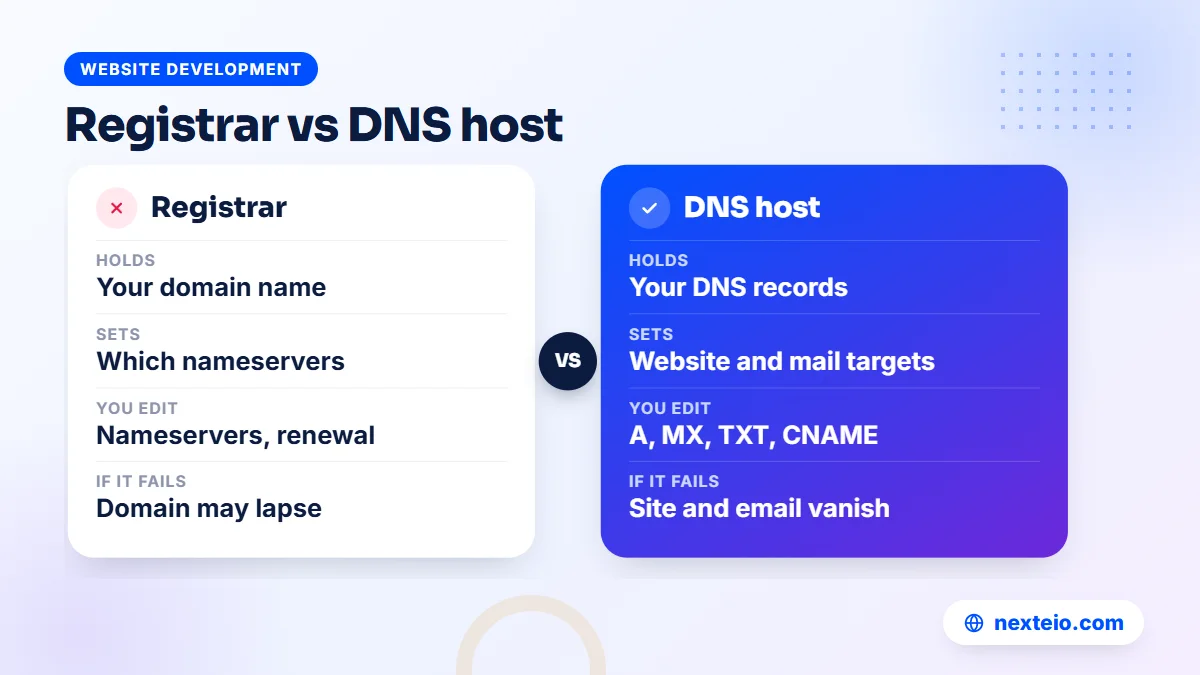
Many people use "domain", "DNS" and "hosting" as if they were the same thing. They are three separate jobs, and they can sit with three separate companies.
| Job | What it does | Who usually provides it | If it fails |
|---|---|---|---|
| Domain registration | Records that you hold the name and which nameservers it uses | A registrar or reseller | Domain lapses or cannot be changed |
| DNS hosting | Answers where the website, email and other services are | The registrar, the web host or a DNS provider | Site and email cannot be found |
| Web hosting | Stores and serves the website files and database | A hosting company or cloud server | Site shows errors or goes offline |
| Email hosting | Stores and delivers mail for your addresses | The web host, Google Workspace or Microsoft 365 | Mail bounces or goes missing |
Email is listed too because it depends entirely on the DNS records.
The registrar decides which nameservers are in charge. Whichever company runs those nameservers is your DNS hosting provider, and only changes made there take effect. This is why editing records at your registrar sometimes "does nothing": the nameservers point somewhere else, and that other place holds the live records.
Keeping the three jobs clear also helps when you change suppliers. You can move the website to a new host without touching the domain, or move DNS to a new provider without moving the website, as long as you know which job you are changing.
How a Visitor Finds Your Website Through DNS
Here is what happens in the second or so after a guardian types your school's address into a phone browser:
- The phone asks its resolver, usually run by the mobile operator, for the address of the domain.
- If the resolver has a fresh answer saved, it replies at once. If not, it asks the root servers which servers handle the domain's ending, such as .com or .bd.
- Those servers reply with the nameservers your registrar has on record for your domain.
- The resolver asks your nameservers, which your DNS provider runs, for the website's address.
- Your nameservers answer with the IP address of the web server, and the resolver passes it back to the phone.
- The phone connects to that server and the page starts loading.
Resolvers save answers for a set time, called the TTL, so most visits skip several of these steps.
That saving is why DNS changes do not reach everyone at once, which we cover later. It also explains why fast, reliable nameservers matter: a slow or unreachable DNS host delays or blocks every first visit, no matter how fast the website server is.
The DNS Records Your Organization Actually Uses
A DNS zone is the full list of records for your domain. Most company, school or clinic domains need only a handful of record types:
| Record | What it does | Typical example |
|---|---|---|
| A | Points a name to an IPv4 address | yourcompany.com to the web server |
| AAAA | Points a name to an IPv6 address | Same, for IPv6 if the host supports it |
| CNAME | Makes one name an alias of another | www pointing to the main domain |
| MX | Says which servers receive your email | Google Workspace or Microsoft 365 mail servers |
| TXT | Holds text such as SPF, DKIM, DMARC and site verification | Proof of ownership for Google Search Console |
| NS | Lists the authoritative nameservers | Your DNS provider's servers |
| CAA | Limits which authorities may issue SSL certificates | Allowing only Let's Encrypt |
Larger setups may also use SRV records for services such as calling systems.
Subdomains are simply more records in the same zone. A university might point portal.university.edu.bd to a student system, mail to an email provider and admission to a separate application server. Every one of those lines lives in that one zone.
Keep a written copy of your zone. Most control panels let you export it as a file, and cPanel's Zone Editor lists all records on one screen. A saved copy turns a lost login or a messy move from a disaster into a ten-minute fix.
Where Your DNS Hosting Can Live: Four Common Options
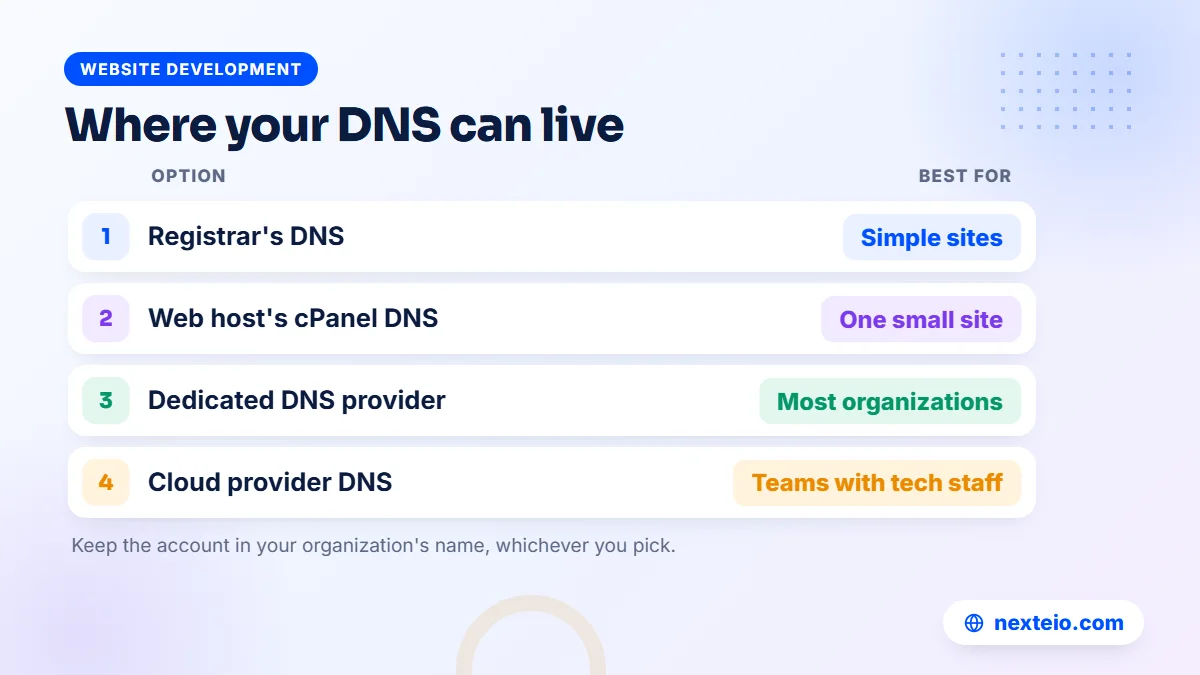
Organizations in Bangladesh usually end up with one of four setups. Each has trade-offs, and the right one depends more on who manages it than on technology.
1. The registrar's DNS
Most registrars include free DNS with the domain. It is simple, and the domain and records sit in one account. The weakness is that many registrar panels are basic, some resellers offer slow support, and if the registrar account is held by an old vendor, you lose control of both at once.
2. The web host's DNS
Shared hosting plans with cPanel usually include DNS. When you point the nameservers to the host, it creates the website and email records for you. That is convenient for small sites. The risk is that DNS is tied to the hosting account. If you leave the host, or the account is suspended for an unpaid bill, the DNS goes with it, and so does your email.
3. A dedicated DNS provider
Services such as Cloudflare run large networks of nameservers around the world. Cloudflare's free plan includes DNS hosting with a clean panel, quick updates and optional extras such as caching and basic protection. DNS stays separate from both the registrar and the web host, so you can change hosts by editing a record rather than moving nameservers again.
4. Cloud provider DNS
Organizations that already run servers on Amazon Web Services, Google Cloud or Microsoft Azure often use that provider's DNS service. It is reliable and easy to automate, and usually charged by usage. It suits companies with technical staff more than small offices.
For most companies, schools and NGOs, either the registrar's DNS or a dedicated provider works well. The deciding questions are who will manage it and whether the account sits in your organization's name. On a custom-built website project, settle this choice before launch rather than leaving it to whoever sets up the hosting.
Related guides for the people who manage your website:
- Common SEO mistakes that hurt business websites
- How to hire the right Laravel developer
- What to plan and budget for an e-commerce website
Each one touches on the accounts and access your web team will need.
How to Choose a DNS Hosting Provider
All mainstream providers can serve basic records. The differences show up in reliability, security and day-to-day control. Use this list when you compare any DNS hosting provider:
- Reliability: several nameservers in different locations, so one failure does not take your domain offline.
- Account security: two-step login, separate user accounts and a log of who changed what.
- DNSSEC support: the option to sign your records, explained further below.
- Record types: support for CAA, long TXT records for DKIM keys, and the other records your services need.
- Change speed: edits that go live within minutes rather than hours.
- Team access: the ability to give your developer access without sharing the main login.
- Export: a way to download the full zone file.
- Support: a clear way to get help when something goes wrong.
Price rarely decides this. Good DNS hosting for a normal organization domain is usually free or very cheap. Control and security matter far more than a small saving.
Ask one more question: whose name is on the account? The DNS account should belong to your organization, with an official email, just like the domain. Your developer or agency can have their own login, but the main account should stay on your side.
How to Find Out Who Hosts Your DNS Today
Before changing anything, find out where your DNS actually lives. This takes a few minutes.
- Look up your domain on ICANN's registration lookup. It shows the registrar and the nameservers listed for the domain.
- Read the nameserver names. Names containing the registrar's brand mean the registrar runs DNS. Names containing a hosting company's brand mean the host does. Names ending in cloudflare.com mean Cloudflare does.
- Log in to that provider and confirm you can see the records.
- Write down who holds the login and where the password is kept.
For .bd and .com.bd domains, the global lookup may not show full details. Check the documents from whoever registered the domain, or ask your web team which nameservers they set.
If nobody in the office can log in, start recovery now, not on the day the website breaks. Recovering a registrar or DNS account usually needs the domain holder's details and some paperwork, and it is much easier when nothing is urgent.
TTL and Propagation: Why DNS Changes Take Time
When you change a record, the new answer is live on your nameservers at once. But resolvers around the world may still hold the old answer in their saved copy until the record's TTL, or time to live, runs out. That delay is what people call DNS propagation.
TTL is set in seconds. A TTL of 3600 means resolvers may keep an answer for up to an hour. A TTL of 300 means five minutes. Lower values let changes spread faster, while higher values reduce the number of lookups.
Nameserver changes are slower, because the records at the domain ending's level often have a long TTL of their own. A change of nameservers can take up to a day or two to reach everyone. That is why moving to a new DNS provider needs more planning than editing one record.
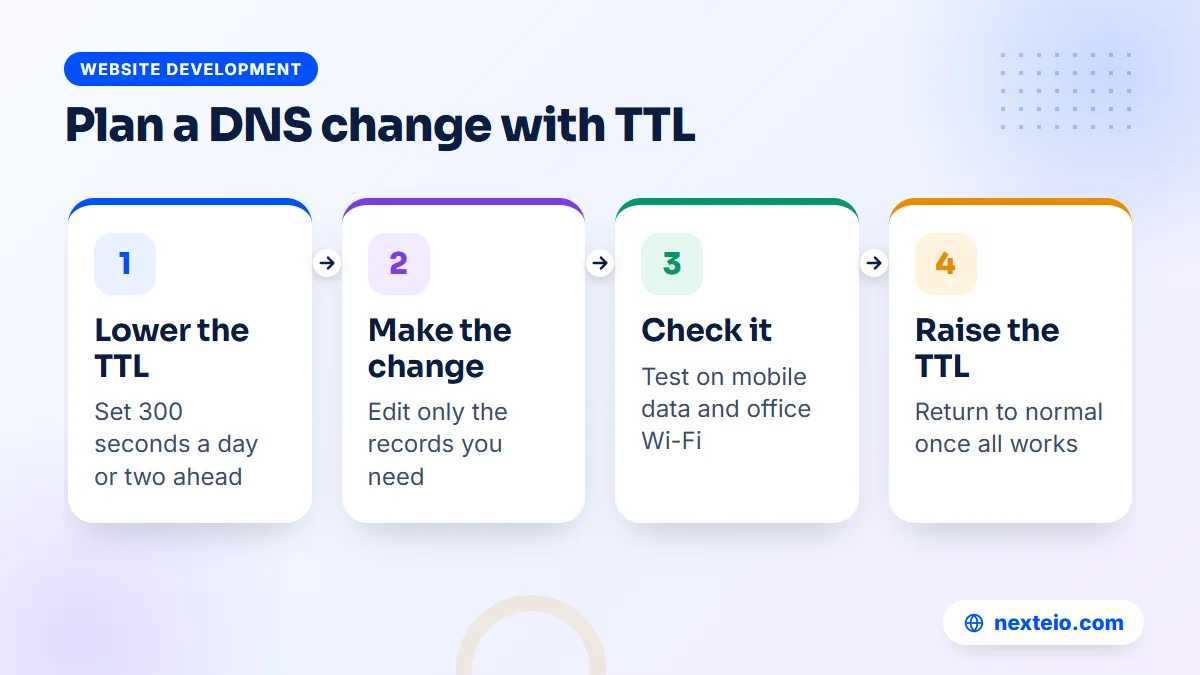
Here is a simple rule for planned changes. A day or two before you move a website to a new server, lower the TTL of the records you will change to 300 seconds. Make the change, check it, and raise the TTL again once everything works. Visitors will barely notice the switch.
Moving DNS Hosting Without Downtime
Moving DNS hosting from one provider to another is safe when you copy everything first and switch last. Most outages during a move come from one missing record, usually an email or verification record nobody knew about.
- Export the current zone. Download the zone file or take screenshots of every record, including TXT records for SPF, DKIM, DMARC and site verification.
- Check DNSSEC. If DNSSEC is turned on at the registrar, turn it off and wait for it to clear before you move. Otherwise resolvers may reject the new provider's answers.
- Create the zone at the new provider. Add every record exactly as before. Many providers can import records automatically, but check the list line by line.
- Compare the two. Query the new nameservers directly for the main records, or ask your developer to do it, before switching.
Only when the new zone matches the old one should you make the actual switch:
- Change the nameservers at the registrar. Replace the old nameservers with the new provider's.
- Keep the old zone for a week. Some resolvers will keep using the old nameservers for a while. Do not delete the old records yet.
- Test website and email. Open the site on mobile data and office Wi-Fi, and send and receive email from outside.
- Turn DNSSEC back on. Once everything is stable, enable it at the new provider and add the new DS record at the registrar.
Plan the switch for a quiet period. For a school, avoid admission or result weeks. For an online shop, avoid sale campaigns and Eid. Our guide to technical SEO basics explains what else to check when a site moves, so search visibility is not affected. If rankings did drop after an earlier move, our SEO service can trace the cause.
DNS Hosting and Email: Keeping Mail Working
Email is the part of DNS that breaks most often and causes the most damage. A website outage is visible at once. An email problem can go unnoticed for days while buyers, parents or patients get bounced messages.
Four kinds of records keep email working:
- MX records tell other servers where to deliver mail for your domain.
- SPF lists the servers allowed to send mail as your domain.
- DKIM adds a signature that proves messages were not altered.
- DMARC tells receiving servers what to do with mail that fails those checks.
All four sit in your DNS zone, not with the email provider.
The classic mistake happens during a website move. The new web host asks you to point the nameservers to them, and their system creates default MX records for their own mail server. Your company email, which actually runs on Google Workspace or Microsoft 365, suddenly stops arriving. The fix is simple once you know: copy the correct MX and TXT records into the new zone before switching.
If you send newsletters or automatic notices through a separate mailing service, that service usually needs its own SPF or DKIM entries too. Keep a list of every service that sends mail as your domain, and review it once a year.
Securing Your DNS Hosting Account
Whoever controls your DNS controls where your website and email go. An attacker who gets into the account can point your domain to a fake site or read incoming mail without touching your server. That makes DNS accounts worth protecting as carefully as bank logins.
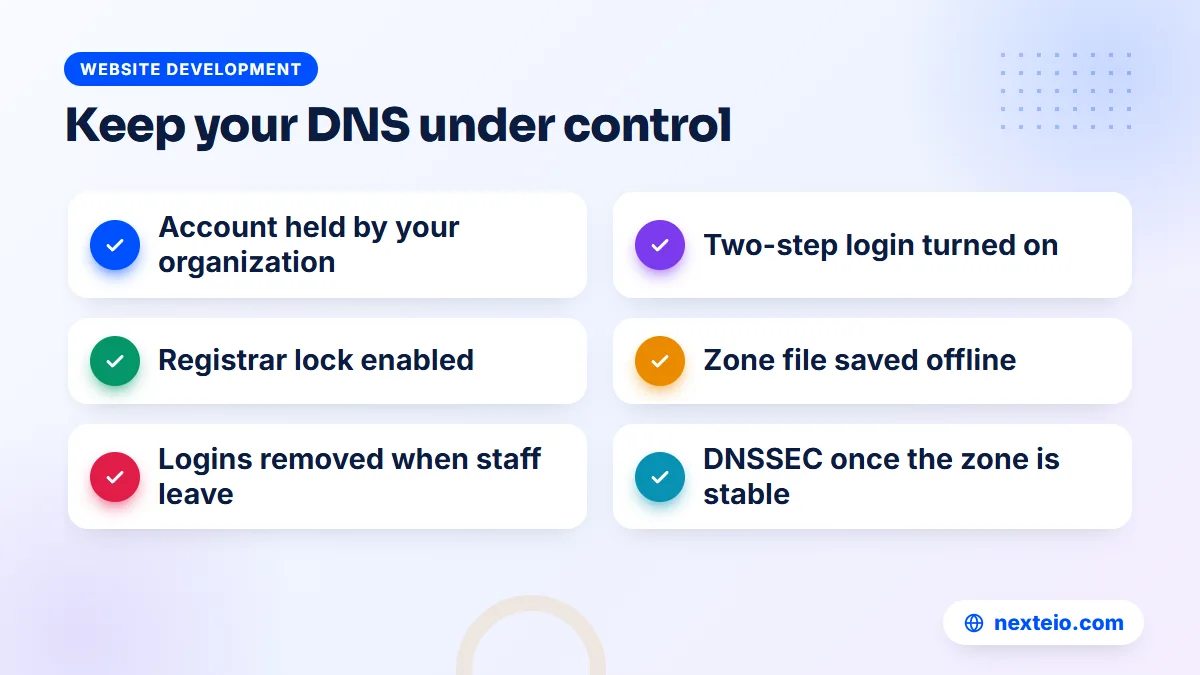
- Two-step login on the registrar and DNS accounts, using an authenticator app rather than SMS where possible.
- Registrar lock so the domain cannot be moved to another registrar without your approval.
- Official contact email on the domain, not a staff member's personal address.
- Separate logins for each person, removed when they leave.
- DNSSEC where your registrar and provider support it.
- CAA records so only your chosen certificate authority can issue SSL certificates for the domain.
DNSSEC deserves a short explanation. It adds digital signatures to your records, so resolvers can check that an answer really came from your DNS host. Cloudflare's guide to how DNSSEC works walks through the setup. Turn it on once the zone is stable, and remember to handle it carefully whenever you change providers.
Common DNS Problems and Their Fixes
Most DNS trouble falls into a few familiar patterns. This table can save hours of guessing:
| What you see | Likely cause | What to do |
|---|---|---|
| Site works on Wi-Fi but not on mobile data | Old answer still saved by one resolver | Wait for the TTL to run out, then test again |
| Changes at the registrar do nothing | Nameservers point to another provider | Edit the records at the provider that runs the nameservers |
| Email stopped after moving the website | New zone has the host's default MX records | Restore the correct MX, SPF and DKIM records |
| Domain does not load anywhere after a move | DNSSEC left on with old keys | Remove the old DS record at the registrar |
| Outgoing mail lands in spam | Missing or wrong SPF, DKIM or DMARC | Add or correct the TXT records |
| www works but the bare domain does not | Missing A record or CNAME for one name | Add the missing record for both versions |
When in doubt, check the live records before changing anything else.
Many website problems that look like hosting faults are really DNS issues, and the other way around. If your site is slow on first load, both may be involved. Our guide on website speed and SEO covers the server side of that question.
A Worked Example: A Clinic Changes Its Web Host
Here is how the pieces fit together in one realistic case. A clinic's website runs on a small shared hosting plan, and the hosting company also runs its DNS. Staff email runs on Google Workspace. The clinic wants to move the website to a faster server with a new hosting company.
The web team first logs in to the old host and exports the DNS zone. It shows an A record for the website, a CNAME for www, the MX records for Google Workspace, an SPF record, a DKIM key and a Search Console verification record. There is also an A record for an appointment subdomain that nobody in the office remembered.
Because the clinic does not want its DNS tied to any web host again, the team moves the zone to a dedicated DNS provider first, copying every record exactly and keeping the website on the old server. Two days later, with everything stable, they lower the TTL on the website records to 300 seconds.
The new server is then set up and tested using a temporary address. On a quiet Friday morning, the team changes the A records for the main site and the appointment subdomain to the new server. Within the hour, the site loads from the new host on both mobile data and office Wi-Fi. Email never stops, because the MX and TXT records were never touched. The old hosting plan is cancelled a week later, after a final backup.
DNS Hosting Costs and Who Should Manage It
For a normal organization domain, DNS hosting itself is usually free. It comes with the domain, the hosting plan or a free plan from a dedicated provider. The real costs are the other parts of the setup and the time needed to manage it properly.
As a rough guide to the related yearly costs in Bangladesh, a .com domain usually costs about BDT 1,500-2,500 a year, and shared hosting about BDT 2,000-8,000 a year. Business email through Google Workspace or Microsoft 365 is billed per user. Larger setups with cloud servers may pay small usage fees for DNS as well.
The bigger question is who looks after it. DNS needs very little work most months, but the few changes it does need are high-risk: a host move, a new email provider, a new subdomain for a portal or an SSL problem. For many organizations, the safest answer is to keep the accounts in the organization's name and have a web team handle changes as part of regular website maintenance.
Maintenance plans in Bangladesh usually run from about BDT 2,000-5,000 a month for a basic site to 5,000-12,000 for a standard one and 12,000-30,000 or more for stores, portals and custom applications. DNS checks, SSL renewals and domain expiry tracking fit naturally inside those plans rather than as separate jobs. Nexteio's own maintenance plans sit in these same ranges.
If you are planning a new website, settle these points at the start. Any custom website design project should end with the domain, DNS and hosting accounts in your name and a written record of every DNS entry. Our buyer's checklist for web design companies includes these ownership questions.
How Nexteio Can Help With DNS Hosting
We set up and look after DNS as part of the websites we build and maintain for organizations across Bangladesh. On a new project through our custom website design service, we register or connect your domain in your organization's name, choose a sensible DNS hosting setup, add the website, email and verification records, and hand you a written copy of the zone.
For existing sites, we can find out where your DNS lives today, recover access with you where possible, and move your website, email or DNS to a new provider using the steps in this guide. Email records get special care, because they are the ones that break most often. For ongoing work, our maintenance plans start once you give us access to the hosting and website and we both sign an agreement that sets out the work.
We work with WordPress websites, Laravel web applications and online stores, so DNS changes are tested against the real site, not in isolation. You can see what we build in our portfolio, read about Nexteio, share your project details or ask a quick question through the contact page. If you are planning a full rebuild, a new website built around your organization is the right moment to clean up DNS as well.
Keep reading: how to build a professional business website, WordPress versus a custom website, or browse all our website development guides.
Frequently asked questions
Is DNS hosting the same as web hosting?
No. Web hosting stores and serves your website files, while DNS hosting tells visitors' devices where those files are. They can come from the same company, but they are separate services, and you can change one without changing the other.
Do I need to pay for DNS hosting?
Usually not. Most registrars and hosting plans include it, and dedicated providers such as Cloudflare offer free plans. Paid DNS mostly makes sense for large organizations that need advanced traffic routing or detailed usage controls.
How long does a DNS change take to work?
A change to a normal record usually spreads within the record's TTL, often minutes to a few hours. A change of nameservers can take up to a day or two, because older answers are saved by resolvers around the world for longer.
Will changing DNS hosting affect my email?
Only if records are missed. Copy every MX, SPF, DKIM and DMARC record to the new provider before switching the nameservers, and email will keep working. Most email problems after a move come from a new zone that has the wrong MX records.
Can I use Cloudflare DNS with a .com.bd domain?
In many cases yes, as long as the domain's nameservers can be changed through the registrar or reseller you bought it from. Ask them how nameserver changes are handled for .bd domains, since the process and timing can differ from .com domains.
What happens if my DNS hosting provider goes down?
New visitors cannot find your website and incoming email may be delayed, even though your server is fine. Visitors with a saved answer may still reach the site for a while. Choosing a provider with several nameservers in different locations reduces this risk.
Who should hold the DNS login in an organization?
The account should belong to the organization, using an official email, with at least two senior people able to reach it. Your developer or agency can have a separate login with the access they need, removed when the work ends.