Dental Website Design: A Practical Guide for Clinics in Bangladesh
In this article 16 sections
- 1.What Patients Look For on a Clinic Website
- 2.Dental Website Design Starts With the Right Pages
- 3.Dentist Profiles and Credentials That Build Trust
- 4.Treatment Pages That Answer Real Questions
- 5.Appointment Booking: Phone, Messaging or Online
- 6.Before-and-After Photos, Reviews and Patient Consent
- 7.Dental Website Design Choices for a Calm, Readable Site
- 8.Bangla and English Content for Patients
- 9.Local SEO: Being Found by Nearby Patients
- 10.Health Content Rules: Accuracy, Claims and Privacy
- 11.Websites for Medical Practices and Diagnostic Centers
- 12.Common Mistakes on Clinic Websites
- 13.What Dental Website Design Costs in Bangladesh
- 14.Planning a Dental Website Design Project Step by Step
- 15.How Nexteio Can Help Your Clinic Website
- 16.Frequently asked questions
Good dental website design helps a worried patient decide, within a minute, that your clinic is the right place to call. Most people look for a dentist when something already hurts, or when a child needs braces and a parent wants to compare options. They open a search on their phone, check two or three clinics, and book with the one that answers their questions fastest.
Many dental chambers in Bangladesh still rely on a Facebook page, a signboard and word of mouth. Those all help, but a page feed is a poor place to find chamber hours, the dentist's qualifications or what a root canal involves. A clinic website puts that information in one stable place that Google can show and patients can trust.
The same thinking applies to small medical practices, eye clinics, physiotherapy centers and diagnostic labs. The details change, but the patient's questions are much the same: who will treat me, where are you, when are you open and how do I book?
This guide walks through dental website design step by step: the pages a clinic site needs, how to present dentists and treatments, booking options, photos and reviews, mobile design, language, local search, health content rules, costs and a practical project plan.
What Patients Look For on a Clinic Website
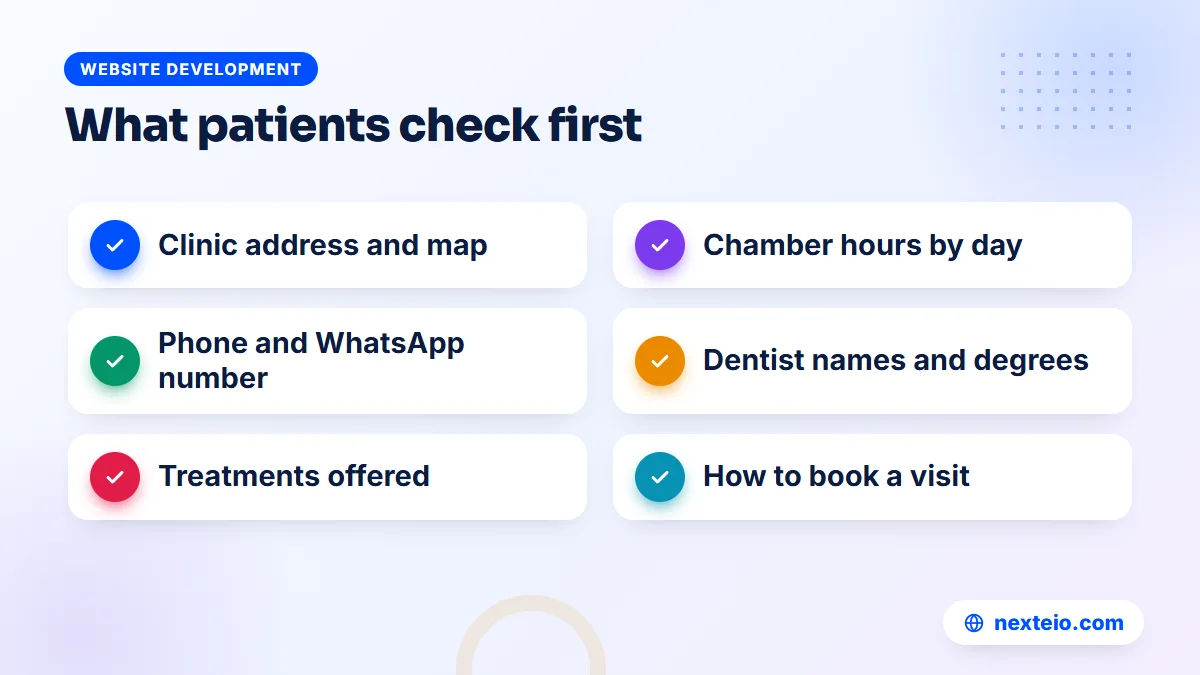
A patient visiting a dental clinic's site is not browsing for fun. They have a task. Watch a few people use a clinic site on their phones and the same questions come up again and again:
- Is this clinic near me, and how do I get there?
- Is it open today, and at what time is each dentist available?
- Who is the dentist, and what are their qualifications?
- Does the clinic offer the treatment I need?
- Roughly what will it cost, or at least how is the fee decided?
- How do I book, and can I do it right now?
If the site answers these within the first screen or two, the patient calls. If they have to dig, they go back to the search results.
Notice what is missing from that list: long welcome messages, stock photos of smiling models and paragraphs about "the latest equipment". Patients care about equipment only when it affects them, such as digital X-rays that mean less waiting or sterilization routines that make them feel safe. Write about those in plain terms, and keep the first screen for the practical facts.
Dental Website Design Starts With the Right Pages
Before choosing colors or fonts, decide which pages the site needs. The page list is the backbone of dental website design, and a clear structure does more for patients than any visual effect. For a typical single-location clinic, the core pages are:
- Home: clinic name, what you treat, phone number, hours, location and a booking button.
- Dentists: one profile per dentist with degrees, special interests and chamber schedule.
- Treatments: an overview page plus a page for each major treatment.
- Book an appointment: the booking method, with phone and messaging options.
- Visit us: address, map, landmarks, parking and floor details.
- Patient information: what to bring, payment methods and aftercare advice.
- Contact: phone, messaging, email and a simple form.
A multi-branch practice adds a page for each branch with its own hours, map and dentists.
Keep the menu short. Five or six items are enough, with "Book" set apart as a button. On a phone, the call and booking buttons should stay within easy reach of the thumb, not hidden at the bottom of a long page. A custom-designed clinic website lets you place these exactly where your patients need them, instead of where a general theme happens to put them.
Dentist Profiles and Credentials That Build Trust
For a healthcare site, trust is the whole job. A patient is about to let a stranger work inside their mouth, and they want to know that stranger is qualified. Dentist profiles are often the most visited pages after the homepage, so treat them seriously.
What each profile should include
- A clear, recent photo in a professional setting, not a heavily edited portrait.
- Full name, degrees such as BDS, and any postgraduate training or specialty.
- Registration with the Bangladesh Medical and Dental Council (BMDC), if the dentist is happy to show the number.
- Areas of interest, such as orthodontics, children's dentistry or implants.
- Chamber days and times, and the languages the dentist speaks.
Keep the profile in a calm, factual tone rather than a list of superlatives.
A short personal note helps too. Two or three sentences in the dentist's own words, such as how they handle nervous patients or why they enjoy working with children, make the profile feel human. Avoid copying a CV line by line. Patients want reassurance, not every conference attended since graduation.
If dentists visit your chamber on set days, make that schedule easy to read and easy to update. A table that shows each dentist against the days of the week works better than a block of text. Whoever manages the front desk should be able to change it from the admin panel when a dentist goes on leave.
Treatment Pages That Answer Real Questions
In dental website design, treatment pages do two jobs. They help patients understand what will happen, and they help Google match your clinic to searches like "root canal treatment" or "braces for children". One thin page that lists twenty treatments in bullet points does neither job well.
Start with the treatments that bring most of your patients, which for many clinics means scaling and polishing, fillings, root canal treatment, extractions, crowns and bridges, braces and implants. Give each of these its own page. Each page can follow a simple pattern:
- What the treatment is, in one or two plain sentences.
- Who usually needs it and the common signs.
- What happens at the visit, step by step.
- How many visits it usually takes and what recovery is like.
- How the fee is decided, or a starting price if the clinic chooses to show one.
- A booking button and a phone number.
Write these pages for patients, not for other dentists.
Avoid promises you cannot keep, such as "completely painless" or "results guaranteed". Health information must be accurate, and exaggerated claims damage trust the moment a patient's experience differs. Have a dentist from the clinic review every treatment page before it goes live, and note that review on the page.
Pricing is a real question for patients in Bangladesh, and many clinics avoid it. You do not have to publish a full price list. Even a sentence such as "the fee depends on the number of canals and is confirmed after an X-ray" tells the patient you are open about cost. Our guide on writing website content people actually read shows how to keep pages like these clear and useful.
Appointment Booking: Phone, Messaging or Online
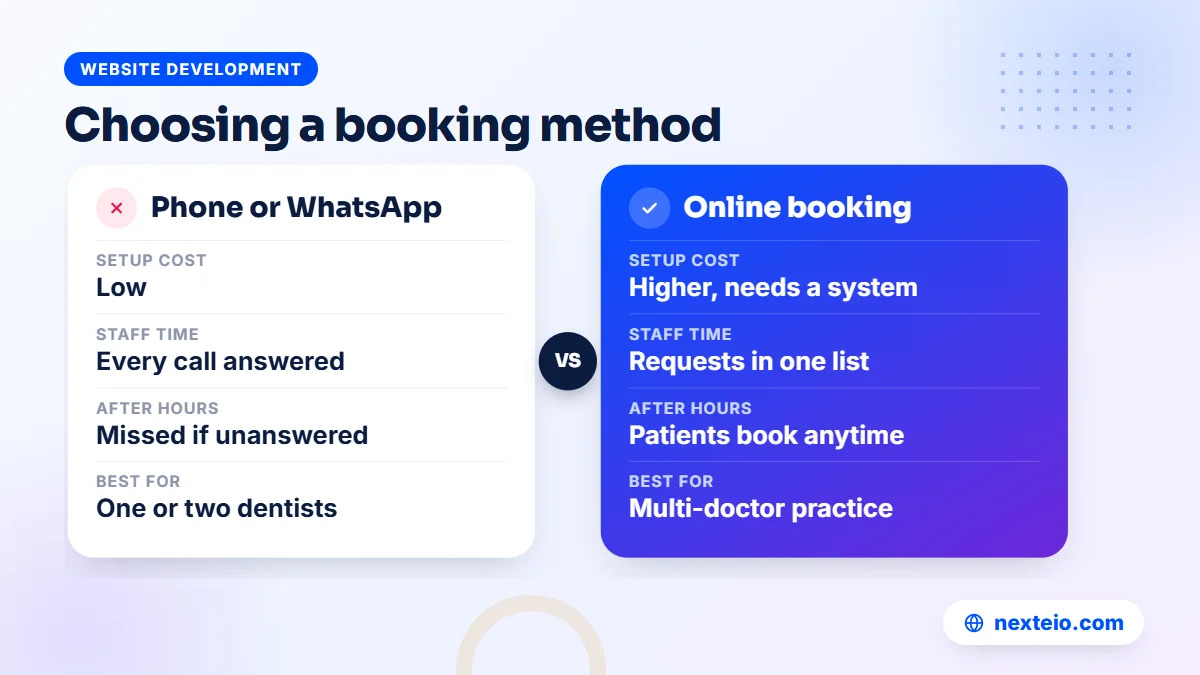
Booking is where the website turns a visitor into a patient, and no other part of dental website design has a more direct effect on the appointment book. There is no single right method. The best choice depends on how many dentists you have, who answers the phone and how busy the chamber gets.
| Method | Works well for | Watch out for |
|---|---|---|
| Tap-to-call button | Small clinics with a staffed front desk | Missed calls after hours |
| WhatsApp or Messenger | Patients who prefer to message | Messages left unanswered for hours |
| Simple request form | Clinics that confirm by phone later | Form emails landing in spam |
| Online booking system | Multi-doctor practices with set slots | Higher cost and staff training |
Most single-chair clinics start with the first three and add a booking system later.
Whatever you choose, test it every month. A request form that silently stops sending email is one of the most common and costly faults on clinic sites. The patient sees "thank you", waits for a call that never comes, and books elsewhere.
When a full booking system makes sense
A real booking system shows open slots per dentist, blocks double bookings and can send an SMS reminder before the visit. It suits practices with several dentists, several branches or long waiting lists. That kind of system is usually built as a web application, for example with a Laravel booking system, so it can match your own schedule rules rather than forcing your clinic into someone else's software. This is the kind of build we take on at Nexteio when a practice outgrows phone bookings.
If you are not sure you need it yet, start with a request form that collects the patient's name, phone, preferred dentist and preferred day. Review how many requests arrive in three months, then decide.
Before-and-After Photos, Reviews and Patient Consent
Photos of real results are persuasive, especially for braces, whitening, veneers and implants. They also carry responsibility. Never use a patient's photo without their written consent, and explain clearly where it will appear. Crop out or blur anything that identifies the patient unless they have agreed to be shown.
Keep the photos honest. Use the same lighting and angle before and after, avoid editing that changes the result, and add a short note that results vary between patients. A gallery of three honest cases is worth more than thirty polished ones that look too good to be real.
Reviews
Patient reviews carry weight, but they must be genuine. Encourage satisfied patients to leave a review on your Google Business Profile or Facebook page, and show a few on the website with the patient's permission. Do not write reviews yourself or pay for them. Fake reviews break the rules of the platforms that host them, and patients can usually tell.
When a review is negative, reply calmly and briefly, without sharing any treatment details. Protecting patient privacy matters more than winning the argument.
Photos of the clinic itself
Real photos of your reception, treatment rooms and sterilization area help nervous patients feel prepared. A short walk-through video can do the same. If you film one, our video editing service can turn phone footage into a clean clip for the website and social media.
Related guides that help a clinic site bring in patients:
- Simple SEO tips for small business websites in Bangladesh
- How to build a landing page that turns visitors into enquiries
- Why a website gets traffic but no customers
Dental Website Design Choices for a Calm, Readable Site
Dental anxiety is common, so the design should feel calm and clean. That does not mean bland. It means plenty of white space, a limited color palette, clear photos of real people and real rooms, and nothing flashing or sliding across the screen. Soft blues, greens and whites are common for a reason, but your clinic's own logo colors matter more than any trend. A website designed around your clinic's brand will look like your chamber, not like every other template.
Readability for every age
Your patients range from children's parents to grandparents. Use a body text size that is comfortable on a phone, strong contrast between text and background, and buttons large enough to tap without zooming. Write link and button labels that say what happens, such as "Call the clinic" or "Book a check-up", rather than "Click here".
Accessibility is part of good dental web design, not an extra. The MDN accessibility guide covers the basics, such as text alternatives for images, sensible heading order and forms that work with screen readers. Most of these cost nothing if they are planned from the start.
Speed on mobile data
Most patients will open your site on a phone, often on mobile data. Large, uncompressed photos, auto-playing videos and heavy sliders make a clinic site slow, and a slow site loses the patient who is in pain right now. Keep images compressed, load the gallery only when needed, and test the homepage on a mid-range phone, not just the office computer.
Google's PageSpeed Insights tool shows how a page performs on mobile and what to fix. Our guide on website speed and SEO explains why faster pages help with both rankings and bookings.
Bangla and English Content for Patients
Language is a practical choice, not a branding one. A clinic in a residential area may find most patients search and read in Bangla. A clinic near offices or serving expatriates may need English first. Many clinics need both.
Language also shapes dental web design choices such as font size and line spacing, because Bangla script needs a little more room to read comfortably on a small screen. If you offer two languages, decide early how the site will handle them. A proper two-language setup gives each page a Bangla and an English version, with a clear switch between them. A half-translated site, where the menu is English and the treatment pages are Bangla, confuses both groups of readers.
- Translate the pages patients use most first: home, treatments, booking and location.
- Have a native speaker review medical terms, so the Bangla reads naturally and correctly.
- Keep phone numbers, addresses and hours identical in both versions.
- Update both versions together whenever chamber hours change.
Two languages roughly double the content work, so plan the time and budget for it.
Local SEO: Being Found by Nearby Patients
Most dental searches are local. People search for a dentist near them, a clinic in their area, or a specific treatment plus their neighborhood. The clinics that show up first in Google's map results usually have three things in order: a complete Google Business Profile, a website with consistent details, and real patient reviews.
Google Business Profile
Claim and complete your profile with the correct name, address, phone number, hours, category and photos. Google explains how relevance, distance and prominence affect results in its guide to improving your local ranking. Link the profile to your website and keep hours updated, especially around Eid and other holidays.
On the website itself
- Show the clinic name, address and phone number in the same format on every page footer.
- Give each branch its own page with its own map and hours.
- Add structured data using the schema.org Dentist type so search engines can read your details.
- Write page titles that name the treatment and the area in natural language.
- Earn links from local directories and health associations you genuinely belong to.
These basics are part of sound dental website design and cost little when done at the build stage.
If you want to grow beyond the basics, our SEO service handles the technical and content work over time. Paid search can fill the gap while organic rankings grow. A small Google Ads campaign for treatments such as implants or braces can bring bookings from the first week, as long as the landing page is ready to convert the visit.
Health Content Rules: Accuracy, Claims and Privacy
Health websites are held to a higher standard, by patients and by search engines, and dental website design has to respect that from the first draft. Google's guidance on creating helpful, reliable content asks whether content shows clear expertise and who created it. For a clinic, that means naming the dentist who wrote or reviewed each page and keeping advice accurate and current.
Claims to avoid
- "Best dentist in the country" or any ranking you cannot prove.
- Guarantees about results, pain or recovery time.
- Prices that are not honored at the chamber.
- Advice that tells patients to skip an examination.
- Copied text from other clinics or medical sites.
Each of these can cost you trust faster than any design fault.
Patient privacy on the website
Booking forms collect personal details, and sometimes patients add symptoms in a message box. Treat all of it as confidential. Make sure the whole site runs on HTTPS, collect only what you need to book the visit, and limit who can read form submissions. Do not ask for medical history on a public form. That conversation belongs at the chamber.
Write a short privacy page in plain words: what the form collects, who sees it, how long you keep it and how a patient can ask you to delete it. It reassures patients and shows you take their information seriously.
Websites for Medical Practices and Diagnostic Centers
Everything above applies to other small healthcare providers, with a few differences. A multi-specialty practice has many doctors with changing chamber schedules, so the doctor directory and schedule become the heart of the site. A diagnostic center needs a clear list of tests, preparation instructions such as fasting, report collection times and sometimes online report download.
Online report download is a good example of where a simple website ends and a web application begins. Patients need a secure login, reports must reach only the right person, and staff need a simple way to upload them. That is custom work, usually built after a requirements review, and it needs careful attention to security.
Physiotherapy, eye care and skin clinics sit closer to dental clinics. They run on appointments, depend on trust in a few named practitioners and benefit from clear treatment pages. Most of the page structure in this guide carries over directly.
For practices that only need an informative site with a booking form, a well-built WordPress website is often enough, and staff can update schedules themselves. Our comparison of WordPress and custom websites helps you decide which route fits.
Common Mistakes on Clinic Websites
Most weak clinic sites fail in the same handful of ways. None of them needs an expensive fix, but each one quietly sends patients to another chamber:
- The phone number is an image, so patients cannot tap it to call.
- Chamber hours on the website differ from those on Google and Facebook.
- A dentist who left months ago is still listed, while a new one is missing.
- The homepage opens with a large slider that hides the booking button.
- Treatment pages are one line each, copied from a supplier brochure.
- The booking form has not been tested since launch.
- The site shows a security warning because the SSL certificate expired.
A ten-minute check on your own phone each month catches most of these.
The deeper mistake is treating the site as a one-time project. A clinic changes constantly: dentists join, hours shift, new treatments arrive. A site that is hard to update falls behind within months. When you plan a new clinic website, ask to see the admin panel and try changing a schedule yourself before you sign off.
What Dental Website Design Costs in Bangladesh
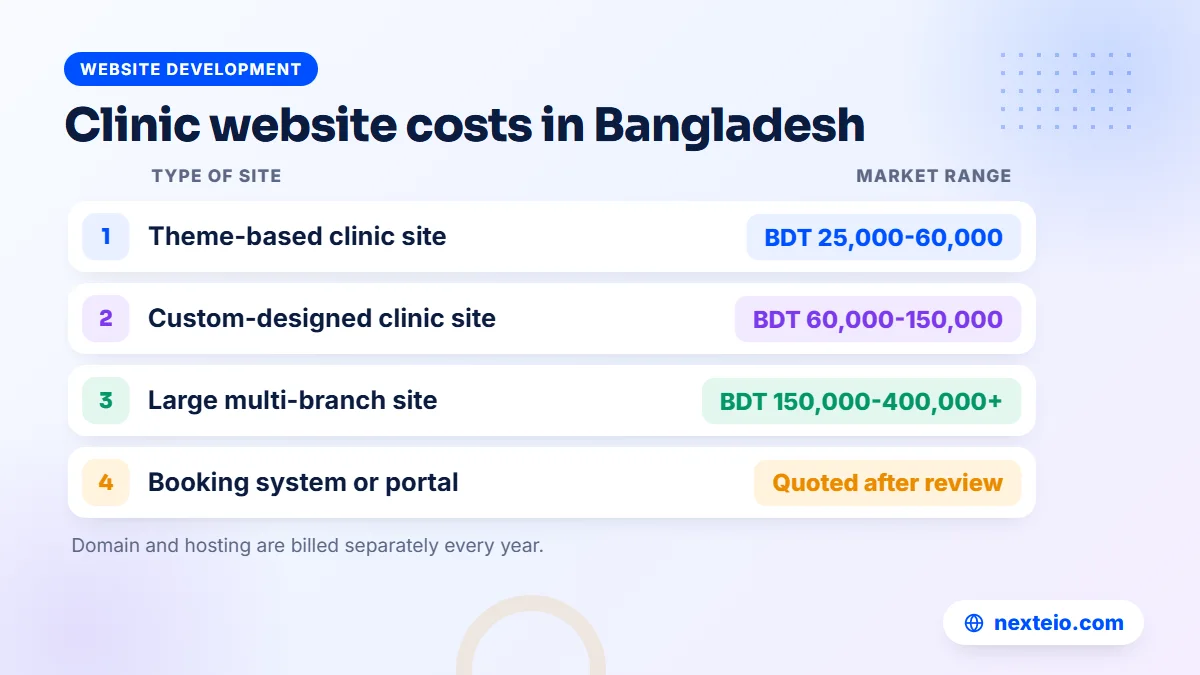
The cost of dental website design depends on how many pages and dentists you have, whether you need two languages and how bookings are handled. These are typical market ranges in Bangladesh for the build, not quotes from any single provider:
| Type of clinic site | Typical market range |
|---|---|
| Theme-based clinic website | BDT 25,000-60,000 |
| Custom-designed clinic website | BDT 60,000-150,000 |
| Large multi-branch practice site with integrations | BDT 150,000-400,000+ |
| Booking system or patient portal | Quoted after a requirements review |
A .com domain usually costs about BDT 1,500-2,500 a year and shared hosting about BDT 2,000-8,000 a year on top of the build.
A small clinic with one or two dentists and a request form usually fits the first or second row. A practice with several branches, a doctor directory and an online booking system sits higher. Custom systems such as a patient portal are priced on their modules and users, often from BDT 150,000 upward.
Plan for running costs too. Someone must update dentist schedules, renew the domain and hosting, keep the software patched and check the booking form. Many clinics do the content updates themselves and pay a provider for the technical care. If you want a figure for your clinic, share a few details through our project form.
Planning a Dental Website Design Project Step by Step
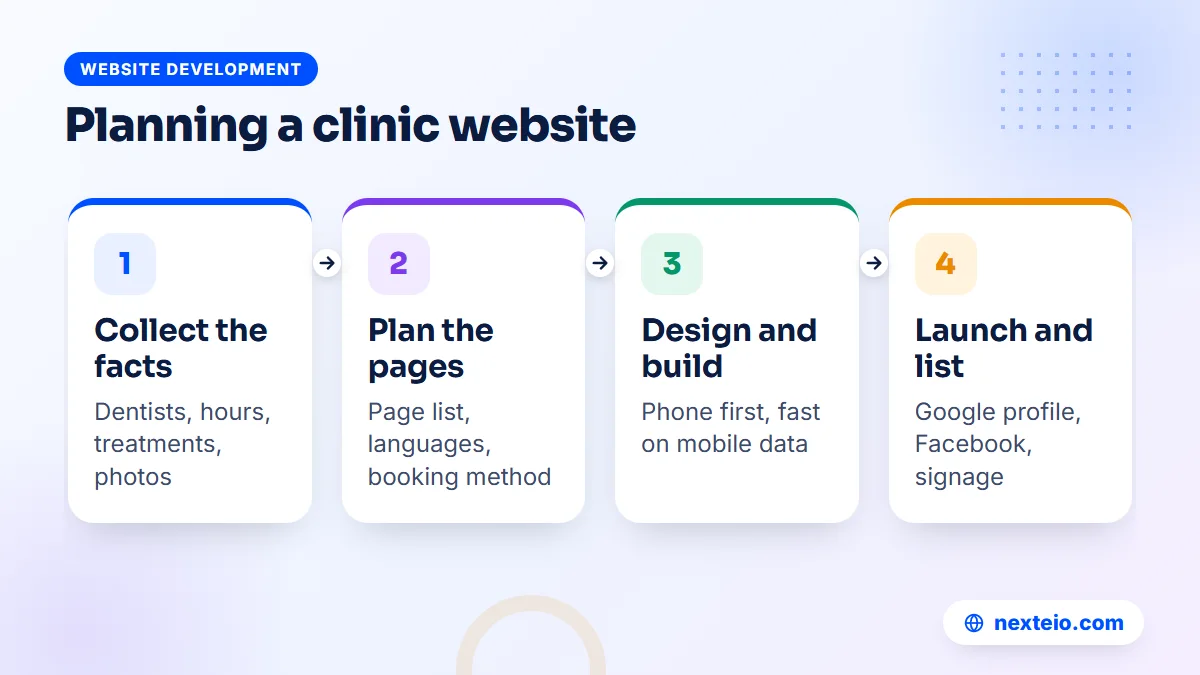
A clinic website project goes faster when the clinic prepares its part early. Most delays come from missing photos, unconfirmed schedules and treatment text waiting for a busy dentist to review it. This order works well:
- Collect the facts: dentist names, degrees, schedules, treatments, address, phone numbers and payment methods.
- Decide the booking method and who will answer calls, messages and form requests.
- Agree the page list and languages with the provider.
- Take real photos of the clinic and the team, with consent from everyone shown.
- Write or approve treatment pages, with a dentist reviewing each one.
- Review the design on a phone before the build is finished.
- Test every button, form and phone link, then launch.
- Update the Google Business Profile, Facebook page and printed materials with the website address.
The last step is easy to forget, and it brings more visitors than anything else in the first month.
After launch, watch which pages patients visit and how many booking requests arrive. If people visit the treatment pages but few book, the booking step may be too hard or too hidden. Small changes, such as a fixed call button on mobile, often make a bigger difference than a redesign. A well-planned clinic website design makes these small changes easy to test.
Promotion helps a new site get its first visitors. Many clinics in Bangladesh already reach patients through Facebook, and well-targeted Facebook ads that send people to a treatment page, rather than a busy page feed, usually bring better-qualified bookings.
How Nexteio Can Help Your Clinic Website
Nexteio builds websites for clinics, hospitals and other organizations across Bangladesh. Through our custom website design service, we plan the pages around what your patients need to know, design them to feel calm and trustworthy, and make sure they load quickly on mobile data.
For a dental clinic, that means dentist profiles your staff can update, treatment pages structured for patients and search, a booking method that suits your front desk, and the basic local SEO settings done properly. If your practice needs online booking with dentist slots or a patient login, we can build it as a Laravel web application after reviewing your requirements.
After launch, we can look after updates, backups and security through a maintenance plan, which starts with access to your hosting and website and a signed agreement that sets out the work. You can browse our portfolio, see all our services, tell us about your clinic or reach us through the contact page.
Keep reading: how to choose a web design company, technical SEO basics every site owner should know, or browse all our website development guides.
Frequently asked questions
How much does a dental clinic website cost in Bangladesh?
Typical market ranges are about BDT 25,000-60,000 for a theme-based clinic site and BDT 60,000-150,000 for a custom design. Large multi-branch sites with integrations often start around BDT 150,000, and online booking systems or patient portals are quoted after a requirements review. Domain and hosting are paid separately each year.
Is a Facebook page enough for a dental clinic?
A Facebook page is useful for updates and messages, but it is a poor place for chamber schedules, dentist qualifications and treatment details, and it depends on a platform you do not control. A website gives that information a stable home that Google can show in search results. Most clinics do best with both, linked to each other.
Should a clinic website show treatment prices?
It is not required, and many clinics prefer to confirm fees after an examination. Even so, patients appreciate some guidance, such as a starting price or a sentence explaining how the fee is decided. Whatever you publish must match what the chamber actually charges.
Do we need online booking on our dental website?
Not always. A clinic with one or two dentists and a staffed front desk can do well with a tap-to-call button, a messaging link and a simple request form. Online booking with live slots makes more sense for practices with several dentists or branches, where phone bookings are hard to manage.
Can we use before-and-after photos of patients?
Yes, but only with the patient's written consent, and ideally with identifying features cropped or blurred unless they agree to be shown. Keep the photos honest, with the same lighting and angle, and add a note that results vary between patients.
How long does a dental website design project take?
A theme-based site with a handful of pages can often be ready in a few weeks once the content is available. A custom design with two languages or a booking system takes longer. The biggest factor is usually how quickly the clinic supplies photos, schedules and reviewed treatment text.
Can clinic staff update dentist schedules themselves?
They should be able to. Ask for an admin panel where front desk staff can change chamber days, add leave notices and post updates without calling a developer. Give staff editor accounts rather than full administrator access, which keeps the site safer.