Affordable Website Design: Where Cheap Websites Cut Corners
In this article 16 sections
- 1.What Affordable Website Design Should Still Include
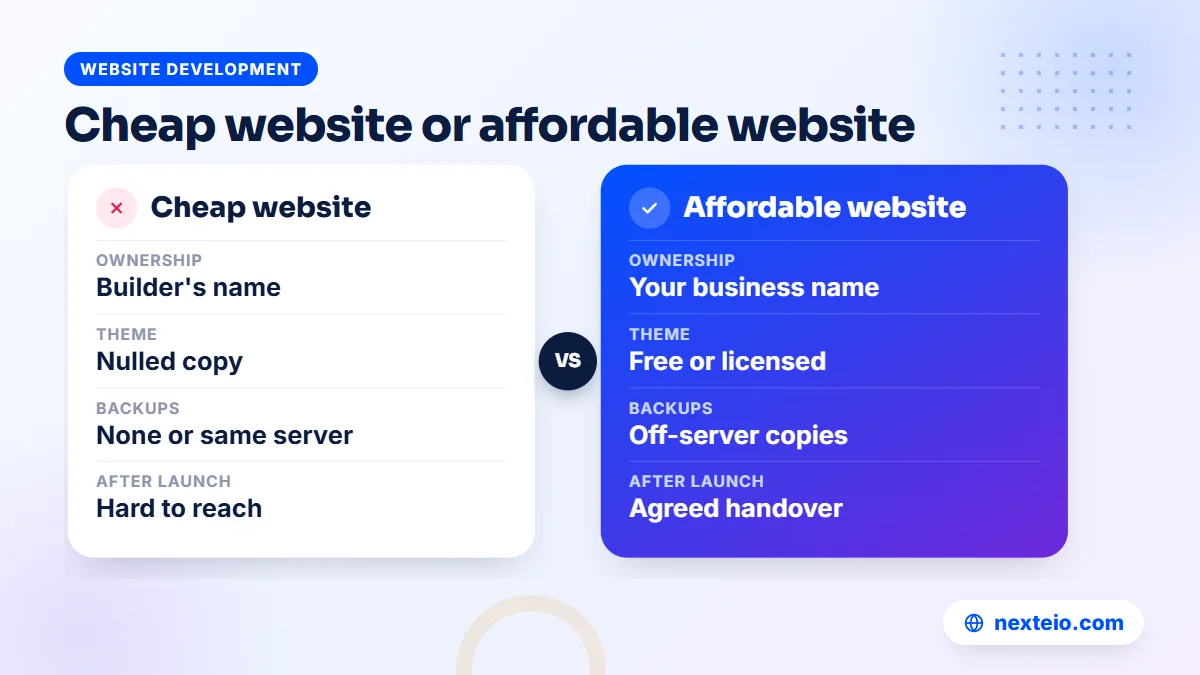
- 2.Cheap and Affordable Are Not the Same Thing
- 3.Corner 1: Ownership of the Domain, Hosting and Logins
- 4.Corner 2: Hosting That Is Too Cheap to Stay Online
- 5.Corner 3: Pirated Themes and Plugin Pile-Ups
- 6.Corner 4: Mobile Layout and Speed Nobody Tested
- 7.Corner 5: Content, Search Basics and the Old Website
- 8.Corner 6: Forms, Email and Basic Security
- 9.Corner 7: The Handover That Never Happens
- 10.Bangladesh-Specific Corners Worth Checking
- 11.Where Affordable Website Design Can Safely Save Money
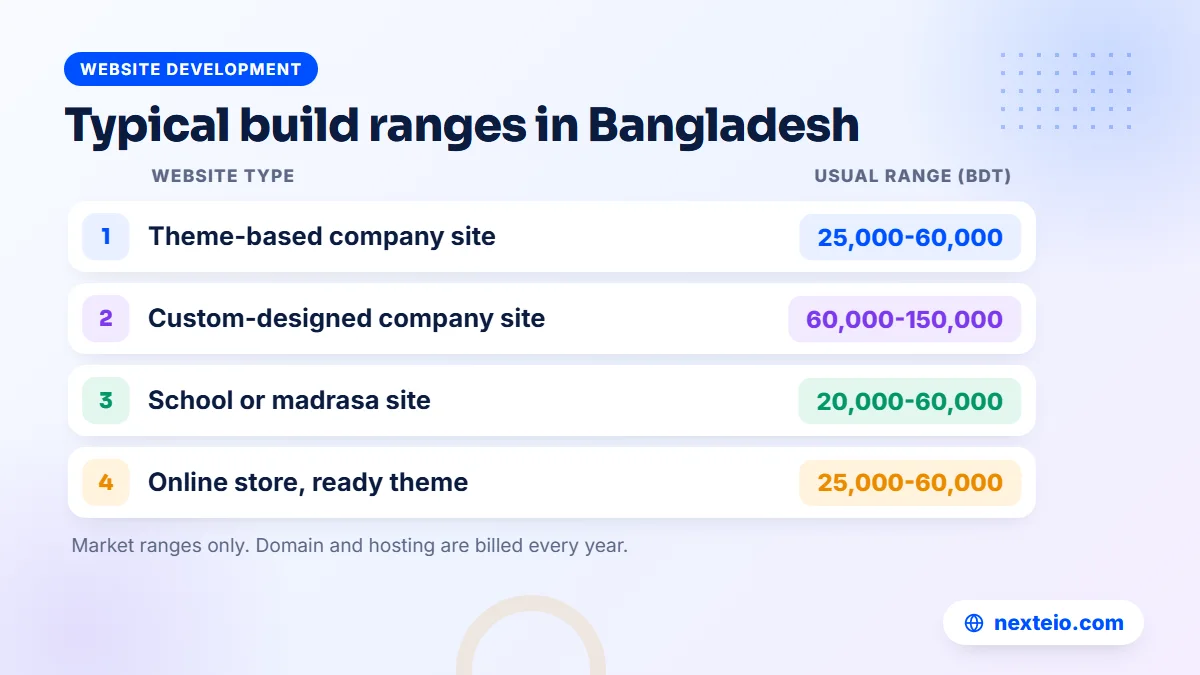
- 12.Typical Prices for Affordable Website Design in Bangladesh
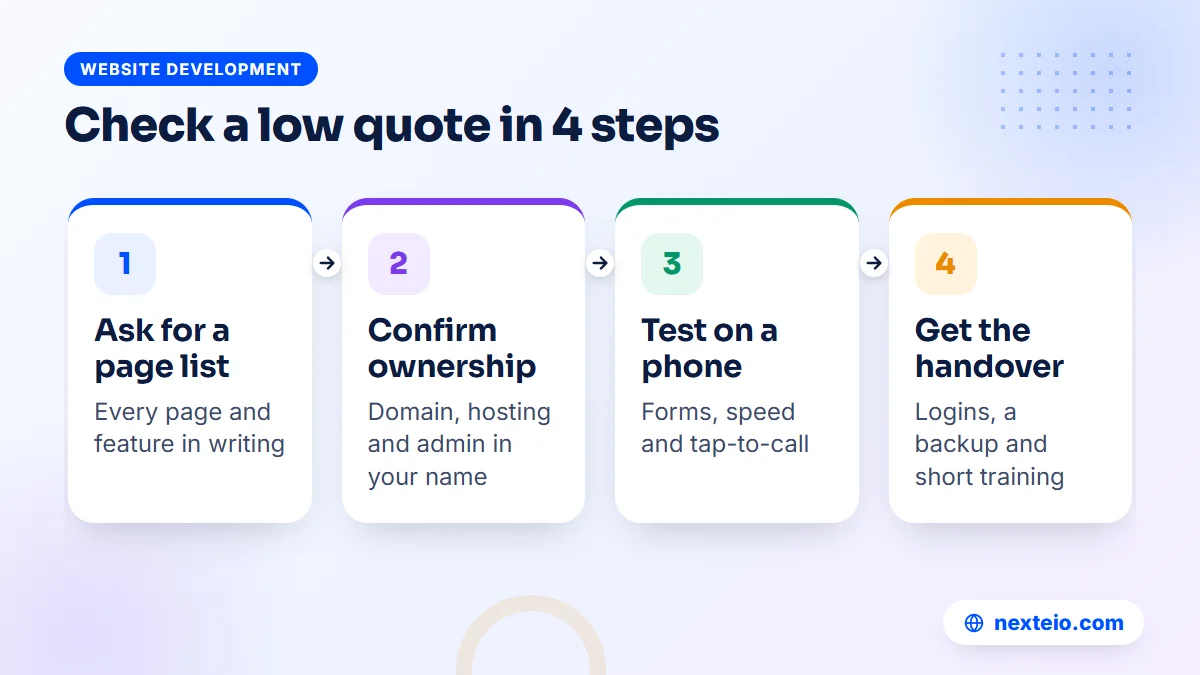
- 13.How to Check a Low Website Quote Before You Pay
- 14.Keeping a Low-Cost Site Cheap to Run After Launch
- 15.How Nexteio Can Help With Affordable Website Design
- 16.Frequently asked questions
Affordable website design means paying a fair, modest price for a site that still works properly: it loads on a phone, belongs to you, stays secure and brings in enquiries. Cheap website design is something else. It reaches a low number by quietly removing the parts you cannot see on launch day, and you pay for them later.
Many business owners in Bangladesh have seen both. Someone builds a site for a few thousand taka, it looks fine in the first week, and six months later nobody can log in, the domain has expired, or the homepage redirects to a gambling page. The owner then pays a second time to fix it, often more than a sensible first quote would have cost.
The problem is not a small budget. A small budget can buy a good website if the money goes to the right places. The problem is not knowing which corners were cut until something breaks.
This guide walks through the corners cheap websites usually cut, which savings are safe, what typical prices look like in Bangladesh, and how to test a low quote before you hand over the final payment.
What Affordable Website Design Should Still Include
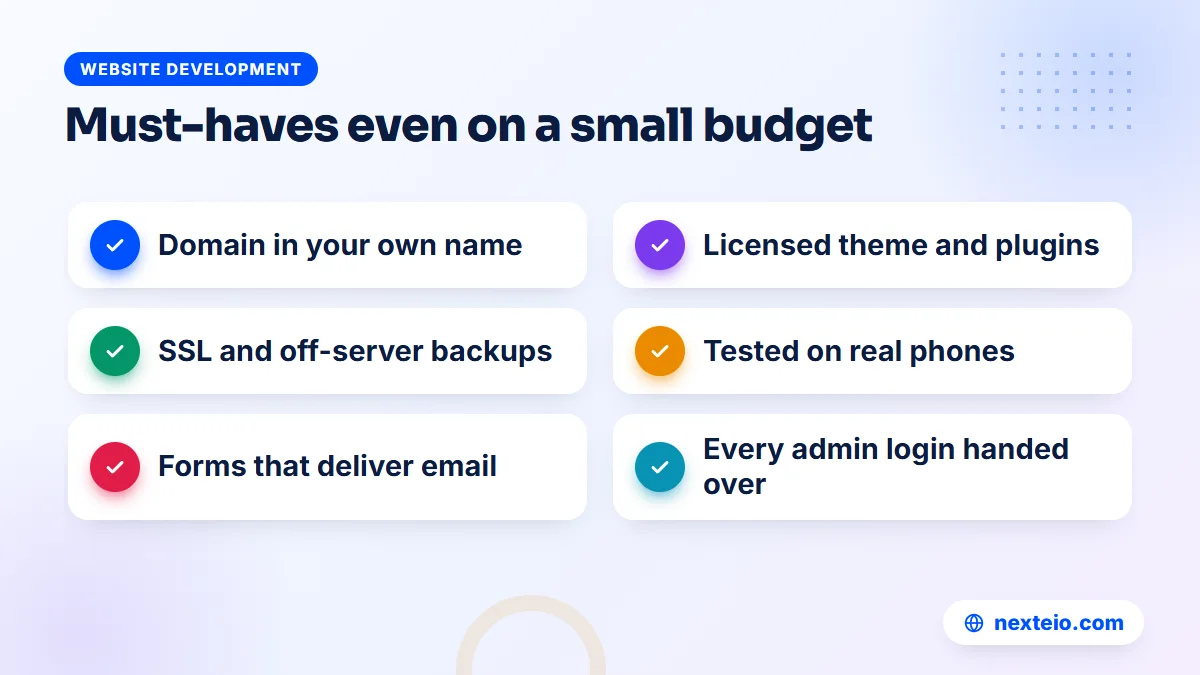
Before comparing prices, agree on a floor. Some things are not extras. They are the minimum that makes a website a business asset rather than a liability, and a low price should never remove them. The first four protect the business:
- Ownership: the domain, hosting account and main admin login are registered to your business, not to the person who built the site.
- Legitimate software: a free theme and plugins from the official directory, or paid ones with a real licence, never pirated copies.
- HTTPS: a working SSL certificate that renews automatically.
- Backups: regular copies of the files and database, stored away from the hosting server.
The other four make the site useful to visitors and to your own staff:
- Mobile layout: every page checked on real phones, not only in a desktop browser.
- Working contact routes: forms that deliver email, a tap-to-call number and a WhatsApp link where it makes sense.
- Basic search setup: page titles, descriptions, a sitemap and Google Search Console access in your name.
- Handover: every login, a short training session and a recent backup.
None of this is expensive on its own. A five-page company site with all eight items is still affordable website design. A site missing three of them is cheap, whatever it cost.
Cheap and Affordable Are Not the Same Thing
The difference shows up after launch, not before. On delivery day, a cheap site and a well-built budget site can look almost identical in a browser. Both have a banner, a services section and a contact page. The difference is in who owns the accounts, what the site is built on and what happens when something goes wrong.
Think about the price you pay over three years rather than in the first month. A site that costs BDT 10,000 and then needs a BDT 30,000 rescue was never cheaper than a BDT 35,000 site that simply kept working. It only looked cheaper on the first invoice.
Low quotes usually come from one of three places. Some are from beginners who are still learning and price low to win work, which is fair as long as you know it. Some come from providers who reuse one pirated template for every client. Others look low on paper but recover the money through high renewal fees, locked accounts or a charge for every small change. The first can work out well with clear terms. The other two rarely do.
A good website design service can explain its price line by line, including what is left out. If a provider cannot do that, the low number is hiding something.
Corner 1: Ownership of the Domain, Hosting and Logins
The most expensive corner to cut costs nothing to get right. When a low-cost builder registers your domain and hosting under their own name and email, the site in practice belongs to them. That is convenient for them and risky for you.
Here is how it usually plays out. The builder gets busy, changes phone number or moves on to other work. The domain renewal notice goes to their inbox. The website and every email address on the domain stop working on the same day, and you have no account to log in to. Recovering a domain held by someone else is possible, but it is slow and depends on their cooperation.
Insist on these points from day one:
- The domain is registered with your business name and an official email you control.
- The hosting account is opened in your name, and the builder gets a separate login or user access.
- You receive the main administrator login for the website, not just an editor account.
- Renewal dates for the domain, hosting and any paid licences are written down and shared with accounts.
For most generic domains such as .com, ICANN's registration data lookup shows the registrar and the expiry date, which is a quick way to see where your domain sits. A builder who refuses to put the accounts in your name is not offering affordable website design. They are renting you a website they control.
Corner 2: Hosting That Is Too Cheap to Stay Online
Hosting is where many budget sites save a few hundred taka a year and lose far more. Shared hosting itself is fine for a small business site. In Bangladesh, a decent shared plan usually costs about BDT 2,000 to 8,000 a year, and a .com domain about BDT 1,500 to 2,500. The trouble starts below that, or when a builder squeezes dozens of client sites onto one overloaded reseller account.
Signs that this corner was cut:
- The site is slow even with few visitors, especially on mobile data.
- It goes down for hours and nobody notices until a customer calls.
- The control panel login belongs to the builder, and you only get "your" folder.
- Backups exist only on the same server, or not at all.
- Email from your domain often lands in spam.
Ask where the site will be hosted, what the plan includes and who holds the account. Load-shedding at your office does not affect a properly hosted site, but a site on an overloaded server will feel broken no matter how good the design looks.
Corner 3: Pirated Themes and Plugin Pile-Ups
This is the corner most buyers never see. Premium WordPress themes and plugins cost money, and some low-cost builders use "nulled" copies: paid products with the licence check removed, shared on unofficial sites. They look identical to the real thing. They also often carry hidden code that adds spam links, creates secret admin users or opens a back door, and they never receive proper updates.
Plugin pile-ups are the other half of the problem. Instead of building a section properly, a rushed build adds a plugin for every small job: one for sliders, one for icons, one for a pop-up, one for a chat button, one for animations. Each one slows the site and adds another thing to update. Twenty-five plugins on a five-page site is a warning sign.
Ask which theme the builder will use and whether it comes free from the official WordPress theme directory or is bought with a licence in your name. A premium licence is a one-time cost that looks tiny next to the price of cleaning a hacked site. If you are still choosing a platform, our comparison of WordPress and custom-built websites sets out the trade-offs.
Corner 4: Mobile Layout and Speed Nobody Tested
Most visitors to a business website in Bangladesh arrive on a phone, often on mobile data rather than office Wi-Fi. A cheap build is usually checked on the builder's laptop by shrinking the browser window. It looks fine there. On a mid-range Android phone with a weak signal, the same page can take a long time to show anything useful.
The usual causes are simple and cheap to avoid:
- Uncompressed photos straight from a camera, several megabytes each.
- A large slider at the top that loads five images before any text appears.
- Menus that do not open properly on a touch screen.
- Phone numbers that cannot be tapped to call.
- Text so small that people have to zoom in to read it.
Google publishes Core Web Vitals, a set of measures for loading speed, responsiveness and layout stability. You do not need to understand every metric. Ask the builder to test the main pages in Google's PageSpeed Insights before handover and to fix anything marked poor on mobile. Our guide on website speed and SEO explains why this matters for rankings as well as for patience.
Corner 5: Content, Search Basics and the Old Website
Cheap builds often ship with placeholder text, paragraphs copied from a competitor or a theme demo, and stock photos of people who have never worked for you. Visitors notice. So does Google, which aims to reward original, helpful pages over copied ones.
Search basics are another quiet cut. A site can look finished while every page has the same title, there is no sitemap and nobody has added the site to Google Search Console. These jobs take an hour or two on a small site. Skipping them can leave the site almost invisible in search for months. Google's own SEO Starter Guide covers the basics in plain language and makes a good checklist to hold any builder to.
If you already have a website, ask what happens to the old pages. When page addresses change without redirects, links from other sites and existing Google rankings point to error pages. Setting up redirects is routine work, and a builder who has never heard of it is likely to cut other corners too. Our article on common SEO mistakes lists more of the problems that start at launch.
Related guides if you are planning a site on a budget: how to build a professional business website, how to write website content people actually read and why some websites get traffic but no customers.
Corner 6: Forms, Email and Basic Security
A contact form that does not send email is worse than no form, because visitors believe they have reached you. Cheap sites often rely on the server's default mail function, which many mail systems treat as suspicious. The form shows a thank-you message, the enquiry disappears, and leads quietly stop.
Ask the builder to send a test enquiry in front of you and show it arriving in your inbox, not in spam. If you use business email on your domain, correct SPF, DKIM and DMARC records help your messages reach the people you write to.
Basic security on a small site is cheap when it is done at the start:
- A strong admin password and a username other than "admin".
- Limited login attempts, and two-step login for administrators.
- No unused plugins or themes left installed.
- HTTPS on every page, with a free certificate from Let's Encrypt or the host, set to renew automatically.
- Automatic backups stored somewhere other than the hosting server.
None of these adds much to the price. Cleaning up a hacked site later often costs more than the whole original build.
Corner 7: The Handover That Never Happens
The last corner is cut after the final payment. The builder stops replying, or replies slowly, and you discover there was never a plan for what happens next. You have a website, but nobody on your team knows how to change a phone number or post a notice.
A proper handover is short and costs very little:
- A list of every login: domain, hosting, website admin, email and Search Console.
- A session of 30 to 60 minutes showing your staff how to edit text, add a post and replace an image.
- A fresh full backup that you store yourself.
- A note of every paid licence and its renewal date.
- An agreed period after launch when small bugs are fixed without extra charge.
Agree the handover in writing before the project starts. It is much harder to ask for once the money has changed hands. Any website design project worth its price ends with your team able to run the site without calling the builder for every small change.
Bangladesh-Specific Corners Worth Checking
Some shortcuts are specific to websites built for a Bangladeshi audience. They are easy to miss if you only look at the English version on a laptop.
Bangla text that is not real text
Bangla content is sometimes typed in older Bijoy-style fonts such as SutonnyMJ and pasted onto the site. On the builder's computer it looks right. On a visitor's phone it can turn into random English letters, and search engines cannot read it as Bangla at all. All Bangla text on a website should be Unicode, shown with a web font that supports it.
Heavy fonts and bilingual pages
Loading several Bangla and English font files can slow a page more than people expect. One well-chosen font family for each language is usually enough. If the site has Bangla and English versions, check that both are complete and that a visitor can switch between them from any page, not only from the homepage.
Contact details that match how people reach you
Phone numbers should be written in a format that works when tapped, including the +880 country code where needed. If customers prefer WhatsApp, the link should open a chat with the right number. The map on the contact page should point to your real location, not to the builder's office or a random pin.
Approval chains inside your organization
In schools, factories and corporate groups, content often needs approval from a principal, a director or the board. A cheap timeline ignores this and then blames the client for delays. A realistic plan builds the approval steps into the schedule from the start.
Where Affordable Website Design Can Safely Save Money
Cutting corners is not the same as trimming scope. Affordable website design is mostly about spending less on the parts that do not matter yet, and there are honest ways to do that without damaging the site. A good builder will suggest them before you ask.
Start smaller, then grow
A company that needs a site this month rarely needs thirty pages. Five to eight strong pages, such as home, about, services, a few key service or product pages and contact, cover what most visitors look for. A news section, a careers page or a Bangla version can follow in a second phase once the budget allows.
Use a good theme instead of a fully custom design
A well-chosen, licensed theme with your logo, colors and real photos can look professional for far less than a design built from a blank page. The trade-off is flexibility. If your brand, your process or your buyers need something a theme cannot do, custom website design may be worth the extra cost. If not, a theme is a sound choice, and a WordPress website built on one is easy for staff to update.
Prepare your own content
Writing and photography are where many quotes grow. If you can supply clear text for each page, your logo in good quality and recent photos of your office, products or team, the builder spends less time chasing material. Even rough notes in Bangla or English help, as long as someone on your side approves the final wording.
Choose the platform that fits the job
A personal blog or a small publishing project may not need WordPress at all. A free platform set up properly, such as a Blogger website on your own domain, can be enough. The opposite also holds. A business that takes bookings or runs a member portal will waste money forcing that into a simple brochure site, and should look at a Laravel web application instead.
What you should never trim are the floor items listed at the start: ownership, licensed software, HTTPS, backups, mobile testing, working forms, basic search setup and a proper handover.
Typical Prices for Affordable Website Design in Bangladesh
Prices in Bangladesh vary widely, so ranges are more honest than a single number. The table shows typical market ranges for the build itself. They are not Nexteio quotes, and your price depends on the pages, features, content work and deadline.
| Website type | Typical market range (BDT) | What usually drives the price |
|---|---|---|
| Company site, theme-based | 25,000 to 60,000 | Pages, content help, languages |
| Company site, custom design | 60,000 to 150,000 | Design from scratch, special sections |
| Large corporate site with integrations | 150,000 to 400,000+ | Several companies, ERP or HR links |
| School or madrasa site | 20,000 to 60,000 | Notices, results, gallery, admission form |
| Online store, ready theme | 25,000 to 60,000 | Products, payments and delivery setup |
Domain and hosting renewals come on top, every year.
Notice where a typical affordable website design project for a small company sits: in the theme-based band. A quote far below that range is not automatically bad, but it should make you ask which of the corners above was removed to reach it. Online stores need payment, stock and delivery work on top, which is why e-commerce website development has its own price bands.
If you want a realistic figure for your own site, send us your page list and deadline and compare our answer with the other quotes you have.
A worked example: two quotes for the same clinic website
Picture a small diagnostic clinic that wants a six-page site: home, about, services, doctors, contact and a page of test preparation instructions. Patients mostly call to book, so the main goal is a phone number they can tap and clear information about tests and timings.
The first quote is BDT 12,000, delivered in one week. On questioning, the builder plans to use a theme they "already have", register the domain in their own name to "save trouble", host the site on their reseller account and leave placeholder text for the clinic to replace later. There is no mention of backups, a sitemap or training.
The second quote is BDT 40,000, delivered in about three weeks. It lists a licensed theme, the domain and hosting in the clinic's name, page titles and a sitemap, a tested contact form, a tap-to-call button on every page, help turning the doctors' notes into readable text and a one-hour handover session.
Now think about the next two years. If the first site is hacked through an unpatched theme or loses its domain, the clinic pays for a rescue or a rebuild, plus the calls it misses while the site is down. The second site needs hosting, domain renewal and occasional updates. On paper the first quote is BDT 28,000 cheaper. In practice it is the riskier spend by a wide margin, and only the second is affordable website design in any useful sense.
The numbers here are an illustration, not a price list. The pattern is common, though: the gap between two quotes is usually explained by work that one of them left out.
How to Check a Low Website Quote Before You Pay
A low price can be genuine, and plenty of affordable website design work in Bangladesh is honest and well done. Some builders keep their costs low, follow good habits and are happy with smaller projects. The way to tell a sensible low quote from a corner-cutting one is to ask specific questions and listen for specific answers.
- Can you list every page and feature included, in writing?
- In whose name will the domain and hosting be registered?
- Which theme and plugins will you use, and are they licensed?
- Where will backups be stored, and how often will they run?
- Will you set up page titles, a sitemap and Google Search Console?
- How many rounds of changes are included?
- What happens if something breaks in the first month after launch?
- Can I see two or three live sites you built and speak to one of those clients?
Vague answers to clear questions are a warning in themselves.
Tie payments to things you can check
A common arrangement is an advance at the start, a second payment when the design is approved and the final payment at handover. Make the final payment depend on a short checklist: you have every login, the site works on your own phone, the forms deliver email and you hold a backup. This protects you without being unfair to the builder.
Look at their real work
A builder's own website and live client sites tell you more than any proposal. Open three of them on your phone. Check that they load quickly enough, that the contact details work and that the content looks current. Our buyer's checklist for choosing a web design company goes through more of these checks. If you are hiring an individual, our guide on what to check before hiring a WordPress developer covers the questions that matter for freelancers.
Red flags in a cheap website offer
Some warning signs appear before any work starts. Watch for these in the first conversation or the proposal:
- A price with no page list or feature list attached.
- "We will register the domain for you" with no mention of whose name it goes in.
- A finished demo shown within hours, still filled with another business's content.
- Unlimited revisions promised for a very low fixed price.
- No written agreement, only a chat thread.
- Pressure to pay the full amount upfront.
- A yearly "maintenance" fee with no list of what it covers.
One red flag deserves a question. Two or three are a reason to keep looking.
Keeping a Low-Cost Site Cheap to Run After Launch
The build is only the first bill. A small site still needs hosting, a domain, updates and occasional content changes. Plan for them and the site stays cheap to run. Ignore them and the savings from the build slowly disappear.
- Set reminders 60 days before domain and hosting renewals.
- Update the platform, theme and plugins regularly, with a backup taken first.
- Keep the plugin count low, and remove anything you stop using.
- Review the homepage and contact details every few months.
- Check Google Search Console for errors once a month.
Some businesses handle these jobs in-house. Others hand them to a provider for a modest monthly fee. Either way, one named person should be responsible.
Growth is a separate budget line. If you want the site to bring in more search traffic over time, an SEO service is worth considering once the basics above are in place. Until then, our guide to technical SEO basics explains what to keep an eye on.
How Nexteio Can Help With Affordable Website Design
We build websites for companies, schools, clinics, NGOs and other organizations across Bangladesh, and many projects start with a modest budget. The useful first step is to fix the floor described in this guide, then decide where the rest of the money should go.
For many small organizations, that means a WordPress build on a sound theme, with strong content and pages that are simple for your team to update. For others, it means launching the core pages now and adding more in a second phase. When your brand or process needs something a theme cannot do, our custom website design team plans, designs and builds the site from a blank page, so it fits your organization, loads quickly on mobile data and makes it easy for people to reach you.
Whoever you choose, ask for the pages, features and account ownership in writing, so quotes can be compared fairly. You can see the kind of sites we build in our portfolio, read more about Nexteio, or share a short brief with your pages, deadline and budget. If you would rather talk first, reach us through the contact page.
Keep reading: how to hire the right Laravel developer, or browse more website development guides.
Frequently asked questions
How much does affordable website design cost in Bangladesh?
For a small company or organization, a theme-based site typically falls between BDT 25,000 and 60,000 in the Bangladesh market, while a custom-designed site usually sits between BDT 60,000 and 150,000. School and madrasa sites often cost BDT 20,000 to 60,000. Domain and hosting are extra and renew every year.
Is a theme-based website bad for a business?
No. A licensed, well-supported theme with your own content, photos and colors can serve a small business very well. Problems come from pirated themes, piles of plugins and copied demo content, not from using a theme as such. Choose custom design when your brand or process needs something a theme cannot do.
What should I do if my old web designer registered the domain in their name?
Ask them politely, in writing, to move the domain into your business name and give you the registrar login. Do it before the next renewal date, because a lapsed domain is much harder to recover. If they cannot be reached, contact the registrar with proof that the business uses the domain, but expect the process to take time.
Can I build a business website myself to save money?
You can, especially with WordPress or a hosted builder, if you have time to learn and keep it updated. The risk is that the parts people skip, such as backups, security, speed and search setup, are exactly the parts that cause trouble later. Many owners build the content themselves and pay a professional only for setup and checks.
How long does a small business website usually take to build?
A small theme-based site of five to eight pages often takes two to four weeks when the text and photos are ready. Content collection and internal approvals are the usual causes of delay, not the build itself. Custom design, Bangla and English versions, or special features add more time.
How can I tell if my website uses a pirated theme?
Ask your builder for the licence key or the purchase invoice for the theme and any paid plugins. Signs of a problem include update notices that never go away, a theme that cannot be updated from the dashboard, unknown admin users and strange links appearing in your pages. A security scan can also flag modified files.
Do I need to keep paying after the website is built?
Yes, but the amounts can be small. You will renew the domain and hosting every year, and someone needs to update the software, take backups and change content from time to time. You can do this in-house or pay a provider a modest monthly fee. Leaving the site untouched for years is what makes it expensive later.
Is a cheaper quote always worse than an expensive one?
Not always. A lower price can come from a smaller scope, a good theme or a builder with low running costs. Compare quotes item by item, check ownership, software, backups and handover, and look at live sites the builder has made. If two quotes cover the same work, the lower one may simply be the better deal.