Domain Name Transfer: How to Move Your Domain Without Downtime

In this article 16 sections
- 1.What a Domain Name Transfer Is, and What It Is Not
- 2.Good Reasons to Move, and Times to Wait
- 3.Check Eligibility Before You Start
- 4.Map Every DNS Record First
- 5.Where Your DNS Lives Decides the Risk
- 6.Domain Name Transfer Step by Step
- 7.Keeping the Website and Email Online During the Move
- 8.DNSSEC, Privacy Settings and Other Traps
- 9.How Long a Domain Name Transfer Takes
- 10.A Worked Example: A College Moving Its .com Domain
- 11..bd and .com.bd Domains Follow a Different Process
- 12.When the Current Holder Will Not Release the Domain
- 13.What a Domain Transfer Costs
- 14.After the Transfer: Checks for the First Week
- 15.How Nexteio Can Help With Your Domain Transfer
- 16.Frequently asked questions
A domain name transfer moves your domain from one registrar to another, and when it is done in the right order, visitors never notice. The website keeps loading, email keeps arriving, and the only visible change is where you pay the renewal. When it is done in the wrong order, a company can lose its website and every official email address for a day or more.
Most of the risk has nothing to do with the transfer itself. It comes from DNS records that were never written down, nameservers that were switched at the same time, or a renewal reminder that went to someone who left the organization years ago. A school in the middle of admission week, or an exporter waiting for a buyer's confirmation email, cannot afford that kind of surprise.
This guide covers the whole job: how a transfer differs from other domain changes, how to check eligibility, how to protect your DNS and email, a step-by-step process, realistic timings, and what to do when the current holder will not cooperate. It also explains why .bd and .com.bd domains follow a different path.
What a Domain Name Transfer Is, and What It Is Not
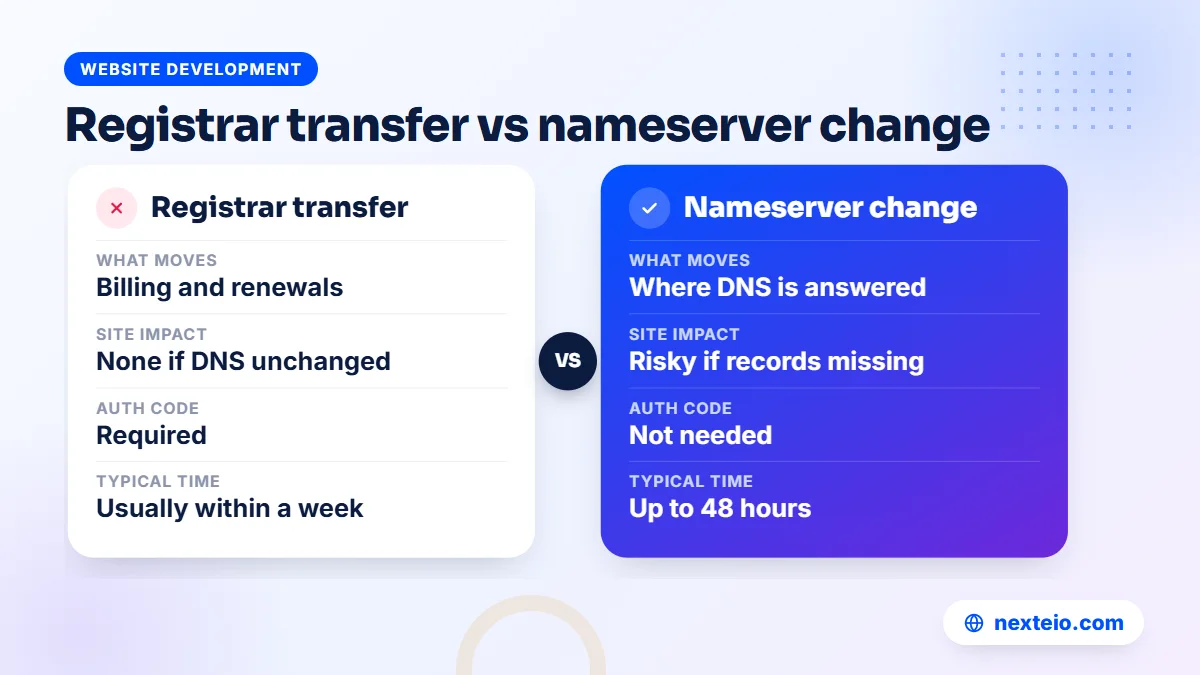
People use "transfer" for several different jobs, and mixing them up is the most common cause of downtime. A registrar transfer only changes which company manages the registration. It does not, by itself, move your website or your email anywhere.
| Change | What actually moves | Can it cause downtime? |
|---|---|---|
| Registrar transfer | Billing, renewals and the control panel for the domain | Not if DNS stays the same during the move |
| Nameserver change | Where the internet looks up your DNS records | Yes, if the new DNS host is missing records |
| Hosting move | The server that stores and serves your website files | Yes, for a short time, if not planned |
| Change of registrant | The legal holder of the domain | No, but it can trigger a 60-day transfer lock |
| Account move at the same registrar | Which customer account the domain sits in | No, DNS is usually untouched |
The first row is the subject of this guide. The others often happen alongside it, which is exactly why they need to be kept apart.
Ask yourself which of these you actually need. If you only want a new hosting company, you may not need a registrar transfer at all. If you want the domain out of a former developer's reseller account but the registrar itself is fine, an account move at the same registrar may be quicker. ICANN's own FAQ on transferring your domain name makes the same point: sometimes changing hosting or nameservers is all that is required.
Good Reasons to Move, and Times to Wait
Organizations in Bangladesh usually transfer a domain for one of a few reasons:
- The domain sits in a former developer's or agency's account, and the organization wants direct control.
- Renewal prices at the current registrar have risen well above the market.
- Support is slow, or the control panel is too limited to manage DNS properly.
- The organization wants all its domains in one place under one official account.
- A new web partner works better with a particular registrar.
If the move is part of a redesign, plan the domain work alongside the new website build, not in the same week as the launch.
Timing matters as much as the reason. Avoid starting a move in the last two weeks before expiry, because a delay could leave the domain expired in the middle of the process. Avoid your busiest period too. A school should not move its domain during admission season, a store should not move it during an Eid sale, and a company running paid campaigns through Google Ads should not risk the landing pages during a major promotion.
Also wait if the domain was registered or transferred within the last 60 days, or if anyone is disputing who owns it. Sort out ownership first, then move.
Check Eligibility Before You Start
A few minutes of checking prevents most failed transfers. Start by looking the domain up with ICANN Lookup, which shows the current registrar, the creation and expiry dates and the status codes for most generic domains such as .com, .net and .org.
Then work through these checks:
- Age: the registrar may refuse a transfer within 60 days of first registration or of a previous registrar transfer.
- Recent contact changes: changing the registrant's name, organization or email can start a 60-day lock on registrar transfers, unless the registrar lets you opt out.
- Expiry date: if the domain expires within a few weeks, renew it first or move it well before the date.
Next, look at the technical status and your own access:
- Status codes: "clientTransferProhibited" simply means the transfer lock is on, which you will remove later. Codes such as "serverHold", "redemptionPeriod" or "pendingDelete" mean there is a bigger problem to solve first. ICANN explains each one on its EPP status codes page.
- Account access: confirm someone in your organization can log in to the current registrar account and read the registrant email.
The contact change point catches many people. If you plan to move the domain and also update the registrant details to your organization, check with both registrars which order they recommend. Often the simpler path is to transfer first, then update the details at the new registrar, so the 60-day lock does not stall the move.
Map Every DNS Record First
DNS records are the instructions that tell browsers where your website is and tell mail servers where your email goes. If any of them is lost during a move, part of your service stops working. Before you touch anything, make a complete copy.
Log in to wherever your DNS is currently managed and export the zone file if that option exists. If it does not, take screenshots of every record and type them into a spreadsheet. Pay attention to these types:
| Record type | What it does | What breaks if it is missing |
|---|---|---|
| A, AAAA | Point the domain to your web server's IP address | The website stops loading |
| CNAME | Point names such as www to another name | www, portals or subdomains fail |
| MX | Route incoming email to your mail provider | Email stops arriving |
| TXT (SPF, DKIM, DMARC) | Prove your email is genuine | Your emails start landing in spam |
| TXT (verification) | Prove ownership to Google, Microsoft and other services | Search Console or email services lose verification |
| SRV and others | Support services such as calling or chat tools | Those specific services stop working |
If a record looks unfamiliar, copy it anyway. Someone added it for a reason.
Count the records and keep the list. After the move, you will compare the new setup against it line by line. This small spreadsheet is also worth keeping in your organization's access file, because the next person who manages the domain will need it too.

Where Your DNS Lives Decides the Risk
The single most important question in any domain name transfer is where your DNS is hosted today. There are three common situations, and each needs a different plan.
DNS hosted outside the registrar
If your nameservers point to your hosting company, a DNS service such as Cloudflare, or your web partner's server, the registrar transfer does not touch your records. The registrar only stores the nameserver names, and those move with the domain. This is the safest case. Keep the nameservers unchanged during the transfer and nobody will notice.
DNS hosted at the current registrar
Many registrars offer free DNS on their own nameservers. That service often stops once the domain leaves them, sometimes immediately and sometimes after a short grace period. In this case, recreate every record at the new DNS host first, switch the nameservers, wait at least 48 hours, confirm everything works, and only then start the transfer.
DNS controlled by a former developer
Sometimes the nameservers point to a server that belongs to a developer or agency you no longer work with. Treat this as two separate projects. First, bring DNS under your control by recreating the records with a provider your organization owns and switching the nameservers. Then transfer the registration. Doing both on the same day doubles the chance of something going wrong. If you are also changing web partners, ask the new team to plan the DNS step as part of the handover, as any well-run website build and handover should.
Domain Name Transfer Step by Step
With eligibility checked and DNS mapped, the move itself has nine steps in two stages. The preparation stage happens at the current registrar:
- Back up your DNS list and confirm it matches what is live.
- Renew the domain if it expires within the next few weeks.
- Turn off the transfer lock in the current registrar's control panel.
- Request the authorization code, also called the auth code, EPP code or transfer code. Your registrar must give it to you within five calendar days of your request.
Check that the registrant email address is one you can read, because approval messages will go there. Then move to the transfer stage at the new registrar:
- Open an account in your organization's name, using an official email address and two-step login.
- Start the transfer, enter the authorization code and pay the transfer fee.
- Approve any confirmation emails from the old or new registrar. Approving the old registrar's message can make the process faster.
- Wait for completion, checking the status in the new registrar's panel.
- Verify and relock: confirm the nameservers and DNS records are unchanged, turn the transfer lock back on and switch on auto-renew.
Keep the old registrar account open for a few weeks after the domain transfer completes. If you hold other domains or services there, you will need it. Even if you do not, it is useful for checking past invoices and settings.

Keeping the Website and Email Online During the Move
Downtime during a domain name transfer almost always comes from DNS, not from the registrar. These habits keep the website and email running:
- Change one thing at a time. Move DNS, hosting and the registration in separate steps, with a day or two between them.
- Lower the TTL in advance. TTL tells other servers how long to remember a record. Setting it to a few minutes a day before a planned DNS change means any fix spreads quickly.
Three more habits matter, especially when the hosting or DNS is changing as well:
- Keep the old hosting running. If the website is also moving servers, keep the old plan active until the new one has served traffic for a week.
- Test before and after. Open the site on mobile data, send email to and from the domain, and check any subdomains such as a student portal or webmail.
- Watch the SSL certificate. If DNS or hosting changes, the certificate may need to be issued again on the new server.
Nameserver changes for .com and similar domains can take up to 48 hours to reach everyone. During that time, some visitors see the old setup and some see the new one. That is normal, and it is harmless as long as both setups contain the same records.
For organizations whose site and email are closely linked, such as a hospital using its domain for appointment confirmations, plan the change for a quiet evening near the start of the week. Avoid Thursday evenings and holiday weekends, when fewer people are around to notice or fix a problem.
Related guides for keeping a site healthy through changes:
- Technical SEO basics every website owner should know
- How faster pages help you rank and sell
- Common SEO mistakes that hurt business websites
DNSSEC, Privacy Settings and Other Traps
DNSSEC settings
DNSSEC adds a digital signature to your DNS records so visitors' resolvers can trust them. It is useful, but it is also the setting most likely to break a move. If DNSSEC is on and your DNS provider is changing, the old signature record held at the registry will no longer match, and resolvers that check signatures will refuse to load your site.
The safe approach is to turn DNSSEC off at the registrar, wait for that change to spread, move DNS, and then turn it on again with the new provider. If your DNS host is staying the same, check after the transfer that the DNSSEC record is still correct. Cloudflare's DNSSEC documentation explains the setup for one widely used DNS provider.
Privacy protection and contact emails
Many domains use privacy protection, which hides the registrant's details in public records. Some registrars ask you to turn it off during a transfer so approval emails reach you. If yours does, turn it back on afterwards. Either way, make sure the registrant email is a working, official address, not a personal account or a former employee's inbox.
Locks, billing holds and add-ons
An unpaid invoice at the old registrar can block the move, so clear any balance first. Email forwarding, paid DNS features or website builders bundled with the domain may stop when the domain leaves, so list any add-ons and plan a replacement for each. Finally, check whether your registrar applies a separate account-level lock in addition to the domain lock.
How Long a Domain Name Transfer Takes
Most transfers between registrars for generic domains finish within about a week. Under ICANN's rules, if the current registrar does not respond to a transfer request within five calendar days, the registry approves it automatically. Many complete faster when you approve the confirmation email promptly.
| Stage | Typical timing | What you do |
|---|---|---|
| Preparation and DNS mapping | One or two days | Record inventory, renewal check, lock removed |
| Getting the authorization code | Minutes, or up to five calendar days | Generate it in the panel or ask the registrar |
| Transfer request to completion | Often a few days, usually within a week | Approve emails and watch the status |
| Post-transfer checks | The first week after completion | Test site, email, SSL, DNS and renewal settings |
Build the timing into your plan. If an important event is coming, such as a product launch or results day, finish the move at least two weeks before it.
A Worked Example: A College Moving Its .com Domain
Picture a private college whose .com domain was registered years ago by a former IT officer, through a reseller account he opened with his personal email. The website runs on a shared hosting plan, staff email runs on a cloud email service, and the DNS sits on the reseller's free nameservers. The college wants the domain in its own account with a registrar it chooses.
The office manager first recovers access to the reseller account and the personal email with the former officer's help, then exports the DNS list. It has eleven records, including MX records for staff email, DKIM and SPF records, a CNAME for the results portal and a verification record for Search Console.
Because the DNS lives on the reseller's nameservers, the college does not start the domain name transfer yet. It recreates all eleven records at a DNS host in its own name, compares them line by line, switches the nameservers on a Sunday evening outside exam season and waits two days. The website, the results portal and staff email keep working throughout.
Only then does the domain name transfer begin. The lock is removed, the auth code is requested and entered at the new registrar, and the confirmation email is approved the same day. Within a few days the domain shows at the new registrar with the same nameservers, so nothing visible changes. The office relocks it, switches on auto-renew, updates the registrant email to an official address and records everything in the college's access file.
The lesson is the order. Separating the DNS move from the domain name transfer turned one risky change into two quiet ones.
.bd and .com.bd Domains Follow a Different Process
Domains ending in .bd, such as .com.bd, .edu.bd and .org.bd, are run by BTCL as the national registry. They do not follow ICANN's registrar transfer process, and ICANN Lookup does not cover them. Many organizations bought their .bd domain through a local agent rather than directly from BTCL.
For a .bd domain, the jobs you are most likely to need are different:
- Moving hosting or DNS: update the nameservers through BTCL's domain service or through the agent who manages the domain for you.
- Changing the holder or the managing contact: usually a written request to BTCL with your organization's documents, such as a trade licence, an institution's registration papers or an official letter.
- Taking the domain away from an agent: ask the agent for the domain's records and payment history, and prepare a formal request on your letterhead.
The exact paperwork and timing can change, so check BTCL's current requirements before you start, and keep copies of everything you submit. Expect a .bd change to take longer than a .com transfer and plan around it.
When the Current Holder Will Not Release the Domain
The hardest cases are not technical. A former developer stops replying, an agency asks for an unexplained "release fee", or nobody remembers the registrar login. You still have options.
For generic domains, the rules are on your side if the domain is registered in your organization's name. The registrar must give the registrant the authorization code within five calendar days of a request and must offer a way to remove the transfer lock. A registrar may charge its own transfer fee, but under ICANN's rules it cannot deny the transfer because that fee is unpaid. If a registrar refuses without a valid reason, you can file a complaint with ICANN Contractual Compliance.
If the domain is registered in someone else's name, the problem is ownership, not transfer. Gather evidence that the domain belongs to your organization: invoices, emails about the original purchase, your trade licence and the website's history. Contact the registrar's support team with these documents and ask about their process for registrant disputes. It is slow, which is why the domain should be in the organization's name from the start. If you are stuck, send us the details and we can help you work out which route applies.
When you set up a new website, insist that the domain, hosting and admin accounts are in your name before anything else. Any custom website project should end with you holding those keys, and our checklist for choosing a web design company lists the ownership questions to ask before you sign.
What a Domain Transfer Costs
The fee itself is usually modest. For .com and most similar domains, the transfer price normally includes a one-year renewal that is added to the current expiry date, so you lose no paid time. A .com domain typically costs about BDT 1,500-2,500 a year in Bangladesh, and transfer prices tend to sit in a similar range.
The hidden costs are elsewhere:
- Staff or developer time to map DNS, test and fix anything missed.
- Overlap in hosting fees if the website is also moving, since both plans run for a while.
- Replacement add-ons such as email forwarding or a paid DNS service.
- Lost enquiries or orders if the site or email goes down, which usually costs more than everything else combined.
Shared hosting usually costs about BDT 2,000-8,000 a year, so moving both domain and hosting is rarely expensive in direct fees. The real saving comes from doing it once, in the right order, with no outage.
After the Transfer: Checks for the First Week
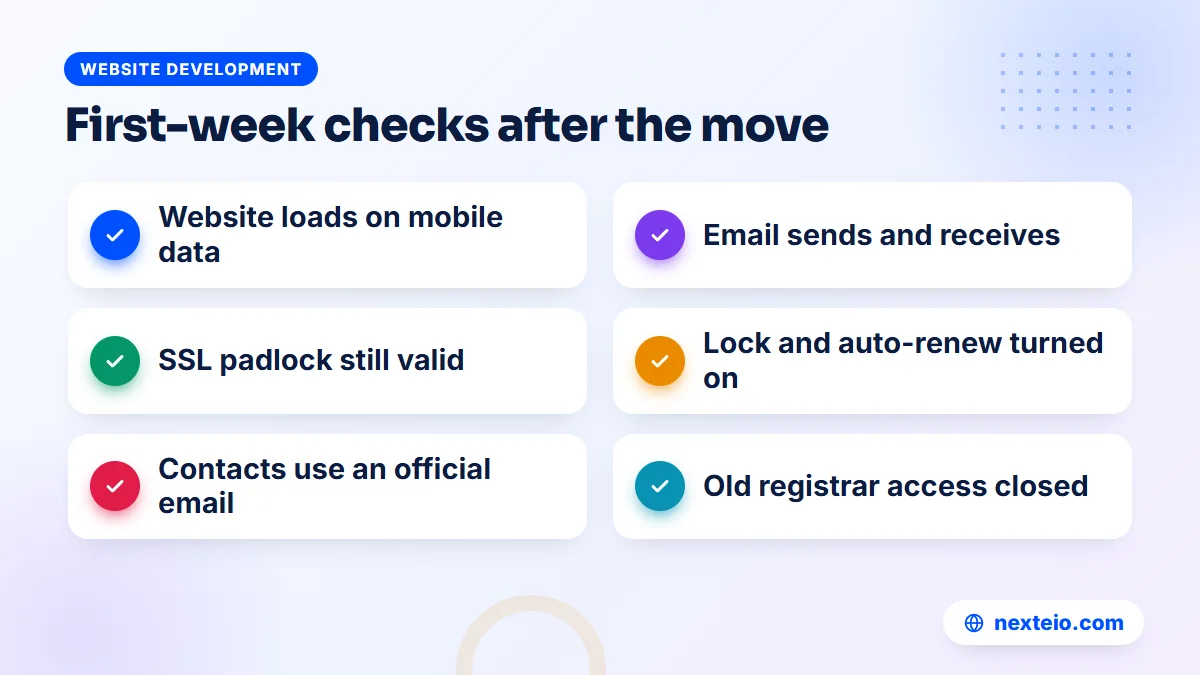
Once the new registrar shows the domain as active, run through these checks over the next few days:
- The website loads on a phone over mobile data, with the padlock showing.
- Email sends and arrives correctly, and messages do not land in spam.
- Subdomains such as a portal, webmail or online store all work.
Then check the settings that protect the domain from now on:
- The nameservers and every DNS record match the list you made earlier.
- Google Search Console still shows the property as verified, with no new errors.
- The transfer lock and auto-renew are switched on at the new registrar.
- The registrant and account contacts use an official organization email.
- Any old logins at the previous registrar are closed or handed to the right person.
Then update your access file with the new registrar, the login owner, the renewal date and who pays. If your site runs on WordPress, also confirm that contact forms and any plugins that send email still work, since these depend on the domain's email settings. Our guide on hiring a WordPress developer covers who should handle this kind of upkeep.
Search visibility should not change after a pure registrar transfer, because the website and its URLs stay the same. If you changed hosting or URLs at the same time, watch rankings and crawl errors for a month, or ask our SEO team to do it for you.
How Nexteio Can Help With Your Domain Transfer
Nexteio can plan and carry out domain, DNS and hosting moves as part of building or looking after websites for organizations across Bangladesh. When you ask us to handle a domain name transfer, our approach follows the order in this guide: find out where the domain is registered, who holds it and where DNS lives, and write down every record before anything changes.
From there, the work runs in separate steps with checks in between: DNS first if it needs to leave an old provider, then the registrar transfer, then any hosting move. We recommend opening the new registrar account in your organization's name, so the domain stays under your control whoever manages your website later.
Domain moves often come with a bigger change, such as a redesign or a move to a new platform. We handle that through our custom website design service, and we also build and look after WordPress websites, Laravel web applications and online stores, where a careful move matters most. To plan your move, share the details on our project form or reach us through the contact page. You can also see our portfolio or read more about Nexteio.
Keep reading: WordPress vs custom website, how to build a professional business website, or browse all our website development guides.
Frequently asked questions
Will my website go down during a domain name transfer?
Not if the nameservers and DNS records stay the same during the move. The registrar transfer only changes who manages the registration. Downtime usually happens when DNS was hosted at the old registrar and was not copied to a new provider before the transfer.
How long does it take to transfer a domain to another registrar?
For .com and most generic domains, usually a few days and normally within about a week. If the current registrar does not act on the request within five calendar days, the registry approves it automatically. Approving the confirmation email quickly often speeds things up.
What is an auth code or EPP code?
It is a password-like code linked to your domain that proves you are allowed to move it. You get it from the current registrar's control panel or by asking their support team, and you enter it at the new registrar when you start the transfer. Treat it like a password and share it only with the person handling the move.
Why can't I transfer a domain I registered recently?
Registrars may refuse a transfer within 60 days of first registration or of a previous transfer. Changing the registrant's name, organization or email can also start a 60-day lock unless your registrar lets you opt out. Wait for the period to pass, or plan the order of changes with your registrar.
Do I lose the time already paid on my domain when I transfer it?
Usually not. For .com and most similar domains, the transfer adds a one-year renewal to the existing expiry date, so the remaining time carries over. Check the new registrar's terms, especially if the domain is already registered for many years ahead.
Can I transfer a .com.bd domain to a registrar like the ones used for .com?
.bd domains are managed by BTCL and do not use the same registrar transfer process as .com. To move hosting, you change the nameservers through BTCL or your agent. To change the holder or managing contact, you normally submit a written request with your organization's documents.
Should we move the domain and the hosting at the same time?
It is safer to do them separately. Move or confirm DNS first, then transfer the registration, then move the hosting, with checks in between. Doing everything in one day makes it hard to tell which step caused a problem if something stops working.