How to Check Where Site Is Hosted and Take Back Control

In this article 16 sections
- 1.Domain, DNS, Hosting and Email: Four Different Answers
- 2.Method 1: Search Your Own Records Before Any Tool
- 3.Method 2: Run a WHOIS or RDAP Lookup to Find the Domain Registrar
- 4.Method 3: Check the Nameservers to Find Who Runs Your DNS
- 5.Method 4: Check Where Site Is Hosted Using the IP Address
- 6.Method 5: Read the Clues on the Website and Server
- 7.Method 6: Check the Email Records Separately
- 8.When Cloudflare or Another Proxy Hides the Real Host
- 9.Check Where Site Is Hosted: A Worked Example From a School
- 10.Regaining Access Once You Know the Host
- 11.Moving Accounts Into Your Organization's Name
- 12.What to Do If the Site or Its Files Are Lost
- 13.Build an Access Record So You Never Search Again
- 14.Mistakes That Make Hosting Hard to Trace
- 15.How Nexteio Can Help Trace and Take Back Your Website
- 16.Frequently asked questions
The search "check where site is hosted" usually comes from someone in a hurry. The developer who built the website has stopped answering, the site is down, a renewal notice arrived from a company nobody recognizes, or a new provider needs hosting access before they can start work. Somewhere a server is running your website, and nobody in the office knows whose it is.
The good news is that most of the answer is public. Every website leaves a trail: the domain record, the nameservers, the server's IP address, the email settings and a few clues in the site itself. With free tools and about half an hour, you can usually find out which company holds the domain, which one runs the DNS, which one hosts the files and which one handles email.
Finding the host is only half the job, though. The other half is getting your organization back in control of the accounts. This guide covers both: six practical ways to check where site is hosted and trace the domain, DNS and email behind it, a worked example, how to recover access once you know who to contact, and how to set things up so you never have to search again.
Domain, DNS, Hosting and Email: Four Different Answers
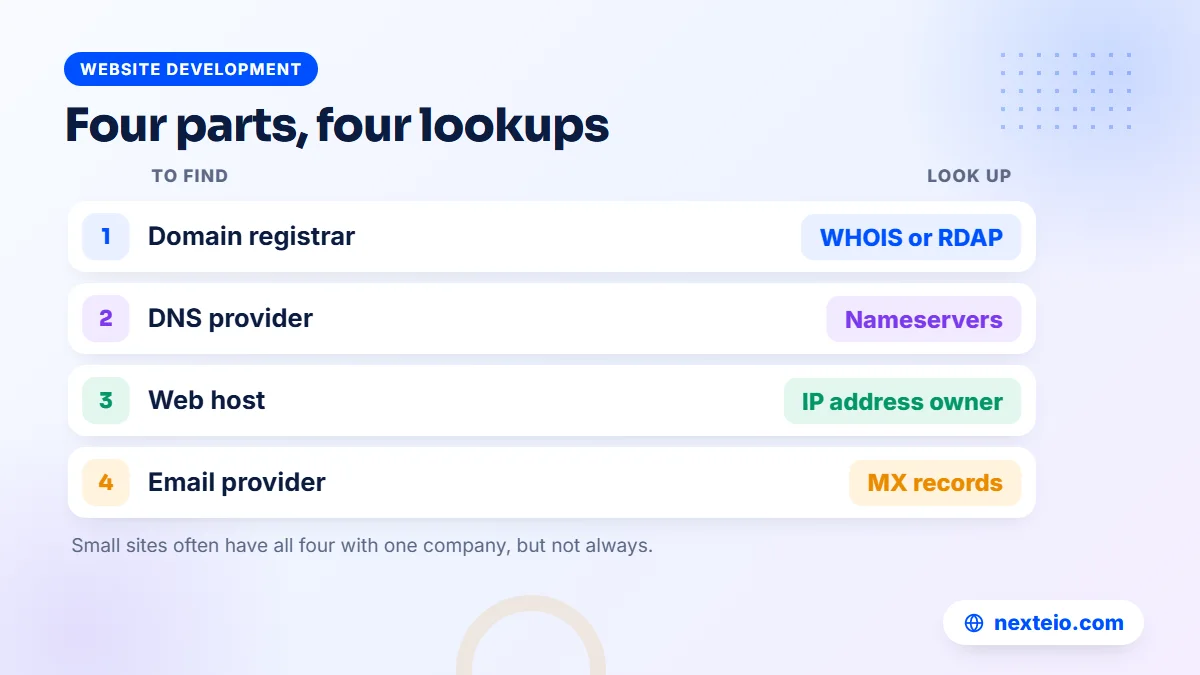
Before you start looking, it helps to know that "where is my website hosted" can have four different answers. Small sites often have all four with one company. Many organizations in Bangladesh, especially those whose site was built years ago by a freelancer, have them spread across two or three companies without knowing it.
| Part | What it does | How you find it |
|---|---|---|
| Domain registrar | Holds your domain name and its renewal | WHOIS or RDAP lookup |
| DNS provider | Tells the internet where your website and email live | Nameserver lookup |
| Web host | Stores the website files and database and serves the pages | IP address lookup plus clues from the site |
| Email provider | Runs your official mailboxes | MX record lookup |
Keep these four apart in your notes. Mixing them up is how people end up asking the wrong company for help.
The domain registrar is the company you pay for the name itself, such as yourcompany.com. The DNS provider works like the address book for that name. The web host is where the files actually sit. The email provider might be your web host, Google Workspace, Microsoft 365 or someone else entirely. If you want a short background on how names point to servers, MDN has a clear explanation of what DNS is.
Method 1: Search Your Own Records Before Any Tool
The fastest way to find web host details is often sitting in your organization's own records. Hosting and domains are paid for every year, so somebody received an invoice, a receipt or a renewal reminder. Start there, because the paperwork also tells you which account name was used, and that will matter when you ask for access.
Search these places:
- Office email inboxes: search for "hosting", "cPanel", "renewal", "invoice", "domain", "nameserver" and your domain name.
- The former developer's handover email: many freelancers send login details once, at launch, and never again.
- Accounts records: look for yearly payments with a hosting or domain company's name, including bank transfers, card statements and bKash or Nagad payments.
- Old project files: the website quotation or agreement often names the hosting company and plan.
- Staff who left: a polite call to the former IT officer or admin officer can save days.
Write down every company name you find, even if you are not sure what it was for.
If this turns up a clear invoice in your organization's name, you may not need the technical methods at all. Contact that company, prove who you are and ask for access. If it turns up nothing, or only a freelancer's personal name, move on to the public lookups below.
Method 2: Run a WHOIS or RDAP Lookup to Find the Domain Registrar
Every domain has a public registration record. The old system for reading it is called WHOIS, and the newer standard is RDAP. Both show you which registrar holds the domain, when it was registered, when it expires and which nameservers it uses. This is the quickest way to find domain host details for a .com, .net, .org and most other common extensions.
The official tool is ICANN Lookup, run by the organization that coordinates domain names worldwide. Type your domain, and look for these fields in the result:
- Registrar: the company that holds your domain registration.
- Registrar abuse contact: an email and phone number, useful if you cannot find another way to reach them.
- Expiry date: when the domain must be renewed. If it is close, deal with this first.
- Name servers: where the DNS is managed, covered in the next method.
- Domain status: codes such as "clientTransferProhibited" are normal; "redemptionPeriod" means the domain has already expired.
Note the registrar and the expiry date before you do anything else.
Do not be surprised if the owner's name and email are hidden. Since 2018, many registrars redact personal contact details from public records for privacy reasons. You will see the registrar, but not necessarily whose account holds the domain. Only the registrar can tell you that, and only after you prove you have the right to know.
.bd and .com.bd domains
Bangladesh's own domain extension works differently. IANA's delegation record for .bd lists the government's Posts and Telecommunications Division as the manager, with BTCL running registration services. Public lookup data for .bd domains is limited, so the usual route is to contact BTCL's domain section with your organization's documents. If your domain was registered through a reseller, they may hold the account details, so check your records for their name too.
Method 3: Check the Nameservers to Find Who Runs Your DNS
Nameservers are the servers that answer the question "where does this domain point?" They are listed in the WHOIS result, and you can also look them up directly. They often give the first strong hint about where the website lives.
On a Windows computer, open Command Prompt and type:
nslookup -type=ns yourdomain.com
On a Mac or Linux computer, open Terminal and type:
dig NS yourdomain.com
Replace "yourdomain.com" with your real domain. The answer will list two or more nameservers, usually something like ns1.companyname.com and ns2.companyname.com.
Read the company name in the nameservers. If they belong to a hosting company, there is a good chance the same company hosts the website too, since many hosts manage DNS for their customers by default. If they end in "cloudflare.com", the DNS is managed in a Cloudflare account, which also hides the real host, as explained later. If they belong to your registrar, the DNS is managed at the registrar, and the website could be hosted anywhere.
Whoever controls the DNS can redirect your website and your email in minutes. Treat that login as one of the most important accounts your organization owns, even though most staff have never heard of it.
Method 4: Check Where Site Is Hosted Using the IP Address
The most direct way to check web hosting is to find the IP address of the server that answers for your domain, then find out who owns that address. On Windows, type:
nslookup yourdomain.com
On Mac or Linux, use "dig yourdomain.com" or "ping yourdomain.com". The result shows one or more IP addresses, such as a set of four numbers separated by dots. That is the address of the server, or of a service sitting in front of it.
Next, look up who owns that IP address. IP addresses are assigned to organizations through regional internet registries, and the records are public. Searching the IP in an IP lookup or "IP WHOIS" tool shows the network owner, usually a hosting company, a data center or a cloud provider. Many of the free tools that promise to find host of website details are simply doing this step for you and showing the result in a friendlier way.
Read the answer carefully. The network owner is not always the company you pay. Many hosting resellers, including plenty of local providers serving Bangladesh, rent servers in large data centers in the United States, Europe or Singapore. The IP lookup will name the data center, not the reseller. If the result shows a big cloud or data center brand that nobody in your office has ever paid, the real host is probably a smaller company renting space there.
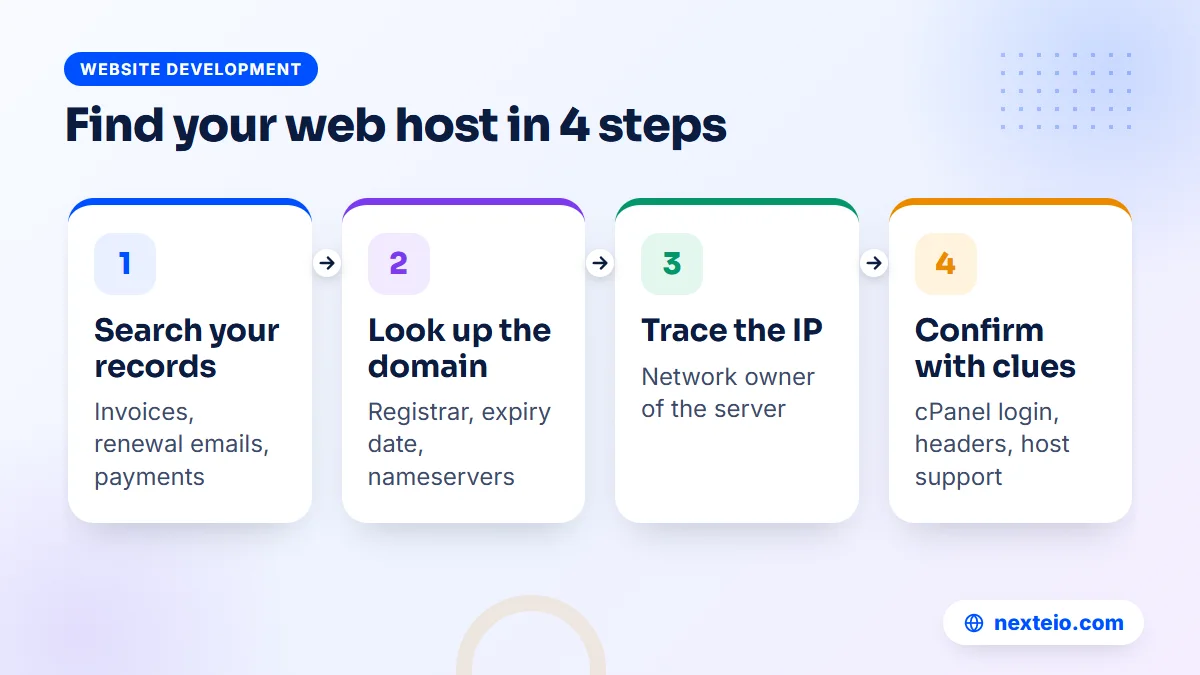
In that case, combine the IP result with what you found in your records and the clues in the next method. Together they usually point clearly to one company.
Method 5: Read the Clues on the Website and Server
When the lookups leave you with a data center name or a vague answer, the website itself often fills in the gap. Try these checks:
- The cPanel login: visit yourdomain.com/cpanel. On many shared hosting servers, this redirects to a login page whose address or branding shows the hosting company.
- Server headers: in Terminal on Mac or Linux, or in Command Prompt on recent Windows, run "curl -I https://yourdomain.com". Look for lines such as "server" or "x-powered-by", and any line that names a host or platform.
- Error and default pages: a suspended account page or a default server page often carries the host's name and support link.
- The site's own admin area: in WordPress, hosting-specific plugins, backup tools or cache tools often reveal which host installed them.
- The footer and page source: some developers leave a "hosted by" line or a comment in the code.
No single clue proves anything, but two or three pointing to the same company is a strong answer.
You can also ask the most likely company directly. Hosting support teams will not hand over access to a stranger, but many will confirm whether a domain is on their servers once you explain the situation and show that you represent the organization.
Method 6: Check the Email Records Separately
Email is often set up with a different provider from the website, and it breaks in different ways. If your official mailboxes stop working while the website is fine, or the other way round, this is usually why. To find the email provider, look up the MX records. On Windows:
nslookup -type=mx yourdomain.com
On Mac or Linux, use "dig MX yourdomain.com". The answer names the mail servers. Records mentioning google.com point to Google Workspace. Records ending in "mail.protection.outlook.com" point to Microsoft 365. Records using your own domain, such as mail.yourdomain.com, usually mean email runs on the web hosting server.
Email is the reason many organizations get nervous about moving hosting. If mail runs on the same server as the website, moving the site also means moving the mailboxes. If mail runs on Google or Microsoft, the website can move without touching email, as long as nobody changes the MX records by mistake.
When Cloudflare or Another Proxy Hides the Real Host
Some websites sit behind a content delivery network or security proxy, most commonly Cloudflare. Visitors connect to Cloudflare first, and Cloudflare fetches the page from the real server behind it. That is good for speed and protection, but it means the IP lookup shows Cloudflare rather than the actual host.
You can spot this setup in a few ways. The nameservers end in "ns.cloudflare.com", the IP lookup names Cloudflare as the network owner, and the response headers include lines such as "server: cloudflare" or "cf-ray". Cloudflare's own explanation of how Cloudflare works describes this reverse proxy setup.
To find the real host in this case, you need access to the Cloudflare account that manages the domain. Inside it, the DNS records show the IP address of the origin server, and that IP can then be looked up as in Method 4. If nobody knows who opened the Cloudflare account, search your inboxes for Cloudflare emails, and ask the former developer. Once you are inside, the DNS section lists every record for the domain in one place.
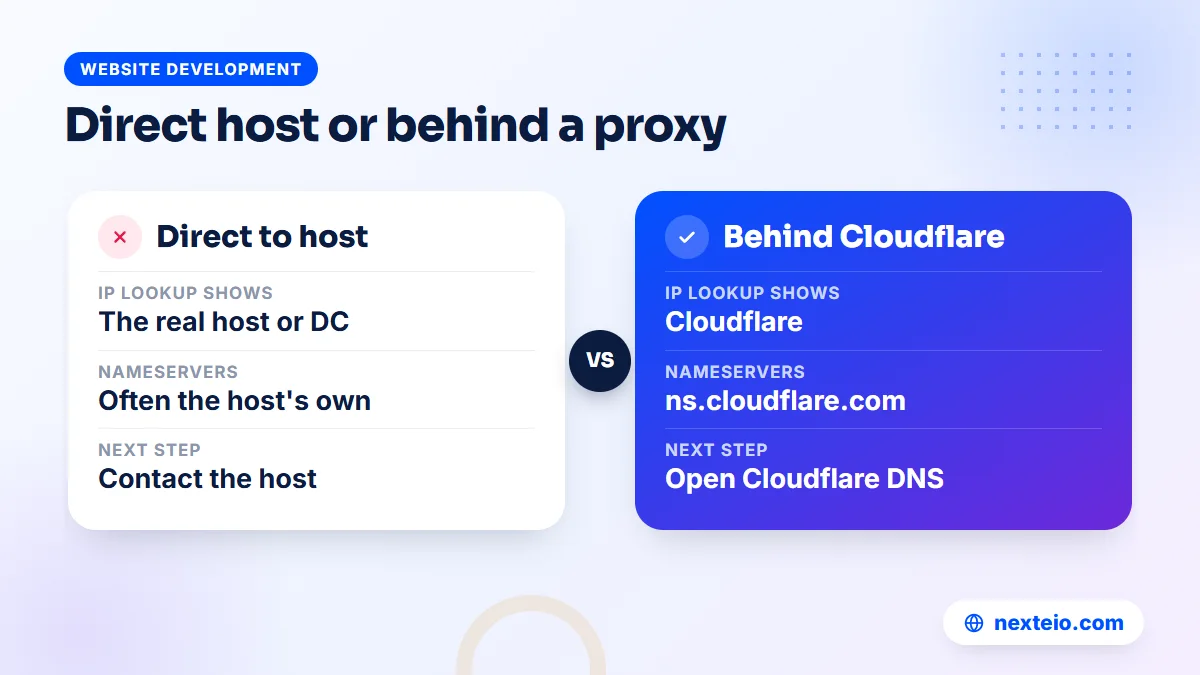
A proxy does not change who owns the site. It only adds one more account that your organization needs to control.
Check Where Site Is Hosted: A Worked Example From a School
Here is how the methods fit together in a typical case. A private school's website stops loading two weeks before admission season. The teacher who coordinated the site has moved to another school, and the freelancer who built it does not answer calls.
The admin officer first searches the school's email for "hosting" and "renewal" and finds a year-old invoice from a local hosting reseller, addressed to the freelancer's personal email. That is a lead, but not proof.
An ICANN Lookup on the school's .com domain shows that the domain is registered at a large international registrar and expires in five months. The nameservers belong to the same local reseller named on the invoice. Running nslookup gives an IP address that belongs to a data center abroad, which fits the pattern of a reseller renting server space. Visiting the /cpanel address shows a login page with the reseller's branding. Four clues now point to the same company.
The site is down because the hosting account expired. The renewal reminders went to the freelancer's email. The school contacts the reseller with a letter on school letterhead, the principal's signature, the trade or institution registration and proof of past payment. The reseller agrees to renew the account in the school's name and add the school's official email as the account contact.
The domain is a separate problem. It sits in the freelancer's registrar account, so the school asks the registrar about its recovery process and, in parallel, keeps trying to reach the freelancer. Once both accounts are in the school's name, the school writes everything into an access record and adds a renewal date to the accounts calendar.
Regaining Access Once You Know the Host
Finding the host is the easy part. Getting into the account can take longer, because a good hosting company will not hand over a website to anyone who asks. Prepare your case before you contact them. Most hosts and registrars will ask for some mix of:
- A request on official letterhead, signed by the head of the organization.
- Trade licence, institution registration or other proof that the organization exists.
- Proof of payment for the hosting or domain, such as an invoice or bank record.
- An email from an address on the same domain, if any mailbox still works.
- A national ID or passport copy of the person making the request.
Send only what the company asks for, through its official support channel. If you would rather not handle this alone, you can send us the domain and what you have found so far.
If the account was opened in a freelancer's or former employee's name, the host may need that person's consent. Try to get it in writing. A short email from them saying "please transfer this account to the organization" usually settles it.
If the former owner cannot be reached, ask the company for its documented dispute or recovery process, and expect it to take time. For domains, ICANN's information for registrants explains your rights and how registrar transfers and disputes work.
Google Search Console can help with one related problem. If you control the DNS, you can verify ownership of the site in Search Console through a DNS record, even without access to the hosting. Google's guide to verifying site ownership lists the options. It does not give you the files, but it shows how the site appears in search while you sort out the rest. If rankings have already dropped during the outage, our SEO service can help you recover them once the site is back.
Moving Accounts Into Your Organization's Name
Once you are in, do not stop at a password reset. The goal is to make sure this never depends on one person again. Work through these steps in order:
- Change the account contact to an official, shared address such as it@ or admin@ on your own domain.
- Update the account holder name to the organization's legal name.
- Set a new, strong password and turn on two-step login where the company offers it.
- Create separate logins for any developer or agency instead of sharing the main one.
- Check renewal dates and switch on auto-renewal or calendar reminders.
- Download a full backup of the website files and database and store it outside the hosting.
Keep a note of what you changed and when, in case the host or registrar asks later.
If the domain is stuck in an individual's registrar account, ask them to move it into an account in the organization's name, either at the same registrar or through a transfer to a new one. Do this calmly and in writing. A domain transfer between registrars is a standard process, but it needs the current account holder's cooperation or a formal dispute.
This is also a good moment to decide whether the current host is worth keeping. If the site was slow, frequently down or running on an outdated server, moving it during the cleanup can solve two problems at once, and an old site may be better replaced with a new custom-built website on hosting you control. Our guide on how site speed affects search and sales explains what a slow server costs you.
Related guides for organizations sorting out their website setup:
- Technical SEO basics every website owner should know
- Common SEO mistakes that hurt business websites
- What to check before hiring a WordPress developer
What to Do If the Site or Its Files Are Lost
Sometimes the search ends badly. The hosting account was deleted after non-payment, the freelancer kept no backup, and nobody can recover the files. It happens more often than people admit, especially with sites that were left unpaid for months.
Check three places before giving up. First, ask the host whether they keep any backup of closed accounts, since some do for a short time. Second, check whether the former developer or a staff member kept a copy on a laptop or drive. Third, look at public archive services that save copies of web pages, which can help you recover old text and images even if the code is gone.
If nothing usable survives, treat it as a fresh start rather than a rescue. Recover the domain first, because the domain carries your name, your email and your search history. Then plan a new site properly. A new build is a chance to choose a platform your staff can manage, whether a well-made WordPress website for a typical organization or a Laravel web application if the site runs portals, results or bookings. A custom-designed replacement site also lets you fix the structure that was probably holding the old site back.
When you rebuild, keep the same page addresses where you can, or redirect old ones to the new pages. Our article on choosing between WordPress and a custom site can help you decide which way to go.
Build an Access Record So You Never Search Again
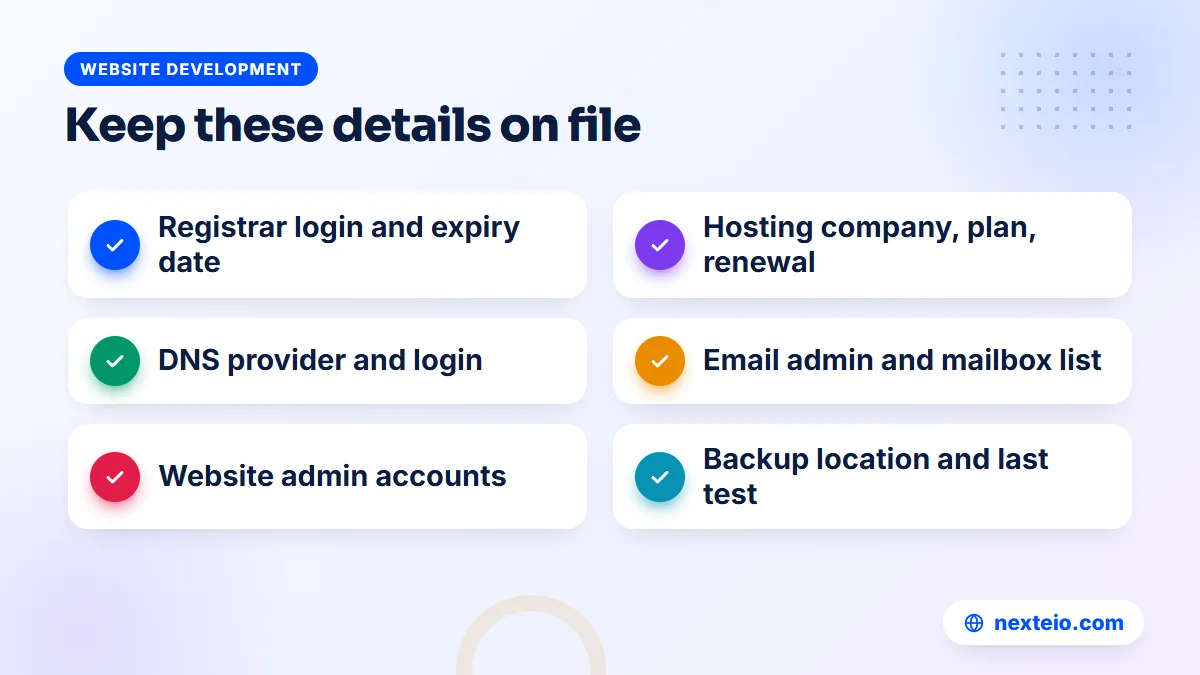
The best outcome of all this work is a single document that answers every question in this guide at a glance. Keep it in a secure shared place, such as a password manager or a locked file, and make sure at least two senior people can open it.
| Item | What to record | Review |
|---|---|---|
| Domain | Registrar, account email, expiry date, who pays | Every year, before renewal |
| DNS | Provider, login, where nameservers point | When anything moves |
| Hosting | Company, plan, account email, renewal date, server IP | Every year |
| Provider, admin login, list of mailboxes | When staff join or leave | |
| Website admin | Login URL, user list, developer contact | Every quarter |
| Backups | Where copies are kept, date of the last restore test | Every quarter |
Store logins in a password manager, not inside the table itself.
Add the renewal dates to the accounts department's calendar, with reminders at least a month ahead. In many organizations, payments need approval from more than one person, and a renewal can miss its date while it waits for a signature.
When anyone who holds access leaves, update the record and change the passwords the same week. When you hire a new developer or agency, give them their own logins and note them here. If you are choosing a new provider, our checklist for choosing a web design company includes the ownership questions to ask before you sign.
Mistakes That Make Hosting Hard to Trace
Most hosting mysteries start with a few small decisions made at launch. If you are setting up a new site, or cleaning up an old one, avoid these:
- Letting a developer register the domain or hosting in their own name "to save time".
- Using a staff member's personal Gmail as the account email.
- Paying renewals from a personal card or mobile wallet, so the receipts never reach the office.
- Keeping the only copy of the passwords in one person's head or phone.
- Adding Cloudflare or another service without recording who opened the account.
- Never testing whether the backups can actually be restored.
Each one is easy to avoid at the start and slow to fix later.
Think of it as a simple test. If someone in your office had to check where site is hosted today, could they answer in two minutes from your own records? If it would take a week of detective work, the problem is not technical. It is ownership, and it is worth fixing properly while the site is still working.
How Nexteio Can Help Trace and Take Back Your Website
We help organizations across Bangladesh that have lost track of where their website lives. We start with the same steps described in this guide: checking the domain record, the nameservers, the server IP, the email records and the clues on the site, then writing down clearly which company holds each part.
From there we help you prepare what the host or registrar will ask for, and once access is back we move the accounts into your organization's name, take a full backup and set up separate logins for anyone who works on the site. If the site is worth keeping, we can look after it under a maintenance agreement, which starts with you giving us access to the hosting and the website and both sides signing a contract that sets out the work.
If the old site is too outdated or broken to rescue, we can plan a replacement through our custom website design service, with the domain, hosting and admin accounts in your name from day one. You can read more about Nexteio, see examples in our portfolio, send us your domain name and the problem on our project form or reach us through the contact page. If you want a fresh site built around your content, our website design team can scope it with you.
Keep reading: how to build a professional business website, how to hire the right Laravel developer, or browse all our website development guides.
Frequently asked questions
What is the quickest way to check where site is hosted?
Look up the domain's IP address with nslookup or an online IP lookup, then check who owns that IP range. Pair that with the nameservers from a WHOIS or RDAP lookup and any hosting invoices in your records. Together these usually name the host within a few minutes.
Can I find out who owns a domain if the details are hidden?
Public records often hide the owner's name and email for privacy, but they still show the registrar. The registrar can confirm or change ownership only for someone who proves they have the right to it. If the domain belongs to your organization, contact the registrar with official documents and proof of payment.
Is the domain registrar the same as the web host?
Not always. The registrar holds the domain name, while the host stores the website files and serves the pages. Many small sites buy both from one company, but it is common to register a domain in one place, host the site in another and run email with a third provider.
Why does the IP lookup show a company we have never paid?
The IP usually belongs to the data center or cloud provider that owns the server. If you bought hosting from a reseller, which is common in Bangladesh, the reseller rents space from that larger company. Your invoices, nameservers and the cPanel login page normally reveal the reseller.
What if our former developer registered everything in their own name?
Ask them politely and in writing to transfer the domain and hosting accounts to the organization. Most people agree when asked clearly. If they cannot be reached or refuse, contact the registrar and host with your organization's documents and proof of payment, and ask about their dispute or recovery process.
Will moving our website to a new host affect our email?
It depends on where email runs. If mailboxes are on the same hosting server, they need to move too, and the MX records must be updated carefully. If email runs on Google Workspace or Microsoft 365, the website can move without touching mail, as long as the MX records stay the same.
How do I check where a .bd domain is registered?
Public lookup data for .bd and .com.bd domains is limited compared with .com. Registration services are run by BTCL, so the usual route is to contact its domain section with your organization's documents. If a reseller registered the domain for you, check your records for their name as well.